
A typing coach that already knows what you're bad at. Watches how you really type, drills what actually costs you time. macOS, on-device.
Swift
0
57 commits
updated Oct 1, 2026
See what people are saying
README
Fumble
A typing coach that already knows what you're bad at.
Typing tutors make you grind synthetic drills for hours before they learn anything about you. Fumble watches how you type all day — in your editor, your terminal, your email — and works out which keys and which transitions actually cost you time. No cold start, and no pretending that pseudo-random letter soup resembles the things you really type.
macOS menu bar. Free. Open source. Entirely on-device.
Why not just use keybr?
keybr is good, and this exists because of two things it can't do:
- The cold start. It only knows what you've typed inside it.
- The corpus. It drills text generated from letter-frequency models. You don't type
pseudo-English — you type
git commit -m,const,=>,];, snake_case identifiers. The transitions that actually cost you time barely appear in its lessons.
Fumble measures the real thing.
What it shows you
- Honest WPM — see Honest numbers.
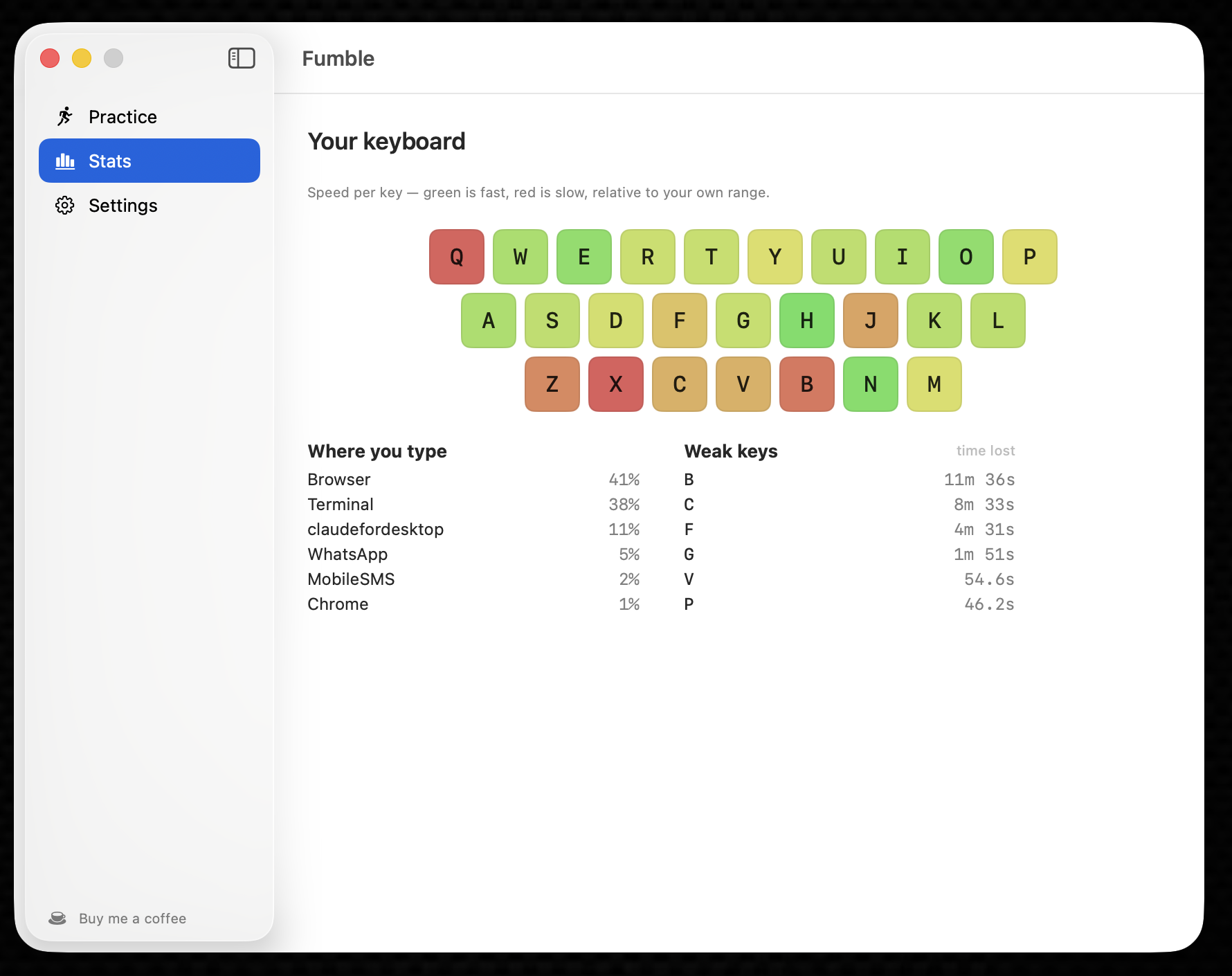
- Weak keys, ranked by how much time they cost you today, not by raw slowness.
- Weak transitions — the key pairs that hurt.
];and->cost real time while the individual keys look fine. - Correction rate per key — where you backspace most. Accuracy and speed are separate problems with separate fixes.
- Per-app breakdown — where the typing actually happens.
Ranked by time cost, not by slowness
The headline metric is seconds lost today: how much slower than your own baseline a key is, multiplied by how often you hit it.
This matters. A key you hit 50 times at +220ms costs you 11 seconds. A key you hit 2,000 times
at +40ms costs you 80 seconds. The second one is the problem, and "slowest key" ranking buries
it. "; cost you 80 seconds today" is also a claim you can accept or reject — which a composite
score with tuned weights would not be.
Judged against you, not a target
Your baseline is the median of your own per-key p95 latencies. A 40 WPM typist and a 110 WPM typist have completely different distributions; against a fixed threshold the slower typist's entire keyboard reads as "weak", which is useless advice.
Per-key medians rather than all your keystrokes pooled, deliberately: pooling weights each key by how often you press it, so a frequent slow key drags the baseline toward itself and hides its own slowness. Those are exactly the keys worth fixing.
Same-finger transitions are flagged, not drilled
ed is slow for everyone — it's one finger doing two jobs. Fumble shows these but keeps them out
of drills. Telling you to grind a same-finger bigram is telling you to fix your hand.
Honest numbers
Most typing trackers will happily report 400 WPM when you paste a paragraph. Fumble excludes:
- Software-injected keystrokes — text expanders, automation (Hammerspoon, Keyboard Maestro,
osascript), remote-control software, AI tools that type into the frontmost app. Hardware events carrykCGEventSourceStateHIDSystemState; anything posted by a process doesn't. (Pastes and most editor/LLM completions never generate keystrokes at all, so they can't inflate the count in the first place.) - Key autorepeat — holding a key down is not typing.
- Thinking pauses — gaps too long to be finger movement don't count as latency (the threshold adapts to your own per-transition speed).
- Idle time — it never enters the WPM denominator.
- Fumble's own practice window — drill text is synthetic and aimed at your weak keys, so it's kept out of your daily stats entirely.
Every one of these exclusions is counted and shown in the dropdown under "What was excluded". The number should be auditable, not magic.
Privacy
Fumble records which key and when — never the characters. What lands on disk is counters and latency histograms: no keystroke sequence exists to replay your text. (Per-key-pair counters do retain adjacent-pair frequencies — that residue is deliberately disclosed and bounded; see PRIVACY.md.) Nothing is recorded while a password field has focus. There is no network code, no account, no telemetry.
The full account, including the part that is a residual risk and what's done about it, is in PRIVACY.md — along with the commands to verify all of it yourself.
Install
Requires macOS 14+.
Homebrew:
brew install --cask alexiscodingbits/fumble/fumble
Direct download: grab the DMG from the latest release and drag Fumble to Applications.
Build from source:
git clone https://github.com/alexiscodingbits/Fumble.git
cd Fumble
bash scripts/bundle-app.sh
cp -R dist/Fumble.app /Applications/
open /Applications/Fumble.app
Grant Input Monitoring when prompted (System Settings → Privacy & Security → Input Monitoring). Fumble cannot work without it, and cannot ship on the Mac App Store because of it: the store mandates sandboxing, and sandboxing blocks this API.
Release builds are Developer ID signed and notarized — the DMG opens on any Mac without Gatekeeper warnings. Self-built copies sign with whatever identity you have (see
scripts/bundle-app.sh); with none, macOS re-asks for Input Monitoring after each rebuild.
Inspect the data
cd FumbleCore
swift run fumble-cli            # today, summarised
swift run fumble-cli --all      # every day on record
swift run fumble-cli --json     # raw stored data, verbatim
Practice
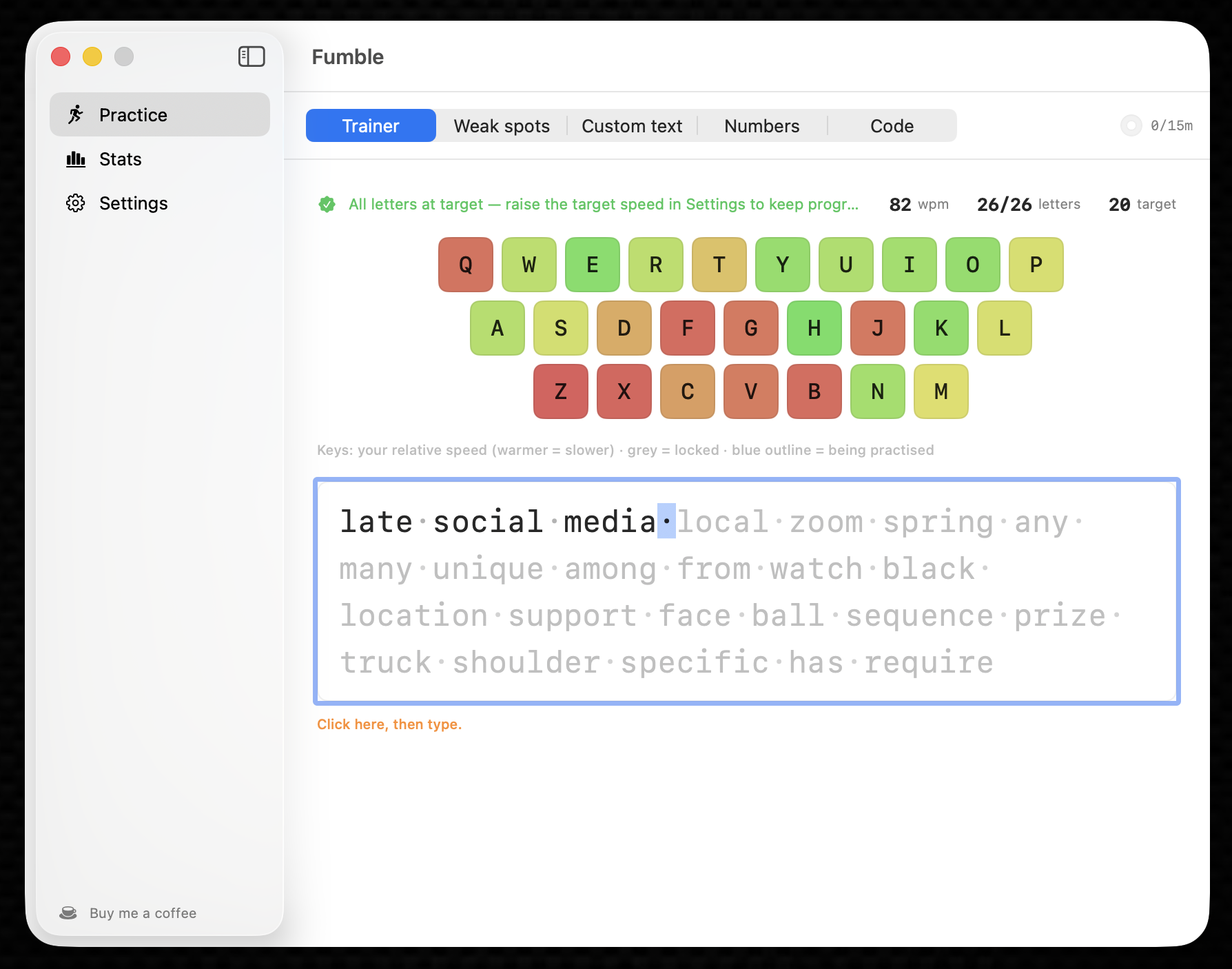
Fumble is a coach, not just a tracker. The practice app (menu bar → Practice) has five modes:
- Trainer — keybr's adaptive letter-unlocking loop, but pre-aimed: it seeds from your real captured typing, so letters you already type fast start mastered and the focus lands on a genuine weakness from lesson one. On-screen keyboard coloured by confidence, per-letter progress bars, per-key feedback (last / top / wpm-per-lesson), real-word lessons.
- Weak spots — continuous drills of real words weighted toward your slowest keys and transitions from all-day capture.
- Custom text — paste anything and practice it.
- Numbers — digit groups (Benford-distributed, like keybr).
- Code — symbol-heavy pseudo-code fragments.
Typing assists (stop-until-correct or advance-through), whitespace dots, cursor styles, optional key/error sounds, and a daily goal with streaks. Practice typing is excluded from your daily stats so drills can't distort the model that generates them.
Roadmap
- M1 — capture core, latency histograms, per-key/bigram/app stats, persistence
- M3 — weak-spot ranking, dropdown UI, keyboard heatmap, stats pane
- M4 — adaptive trainer + drills + practice modes (see above)
- M5 — public release: Developer ID signed + notarized DMG, Homebrew cask
- M2 — validate the injected-keystroke filter against real automation tools
- auto-update (Sparkle)
- v2 — the interesting one: word- and token-level coaching. Every tool in this space
stops at individual keys and bigrams. Nothing knows that you fumble
useEffectorprovenmetalspecifically. The plan is to build that vocabulary from your own repos and shell history and rank it with the timing data — so the word list comes from files already on your disk, and the keyboard tap never needs to see words at all.
Development
cd FumbleCore
swift build        # must be 0 warnings
swift test         # 190+ tests
Layout: FumbleCore is a pure Foundation model — no AppKit, no SwiftUI. FumbleUI is pure
presentation logic with no SwiftUI import, so the UI's content is unit-testable. FumbleApp is
the only target that touches SwiftUI/AppKit/CoreGraphics.
Credits
The virtual-keycode table follows the Carbon kVK_* constants. Thanks to
keyStats (MIT) — read as prior art while working
out how to do system-wide capture on macOS.
Licence
MIT — see LICENSE.
Similar repos


Languages
Swift
86.6%
HTML
9.9%
Shell
2.2%
A typing coach that already knows what you're bad at. Watches how you really type, drills what actually costs you time. macOS, on-device.
Swift
0
57 commits
updated Oct 1, 2026
See what people are saying
README
Fumble
A typing coach that already knows what you're bad at.
Typing tutors make you grind synthetic drills for hours before they learn anything about you. Fumble watches how you type all day — in your editor, your terminal, your email — and works out which keys and which transitions actually cost you time. No cold start, and no pretending that pseudo-random letter soup resembles the things you really type.
macOS menu bar. Free. Open source. Entirely on-device.
Why not just use keybr?
keybr is good, and this exists because of two things it can't do:
- The cold start. It only knows what you've typed inside it.
- The corpus. It drills text generated from letter-frequency models. You don't type
pseudo-English — you type
git commit -m,const,=>,];, snake_case identifiers. The transitions that actually cost you time barely appear in its lessons.
Fumble measures the real thing.
What it shows you
- Honest WPM — see Honest numbers.
- Weak keys, ranked by how much time they cost you today, not by raw slowness.
- Weak transitions — the key pairs that hurt.
];and->cost real time while the individual keys look fine. - Correction rate per key — where you backspace most. Accuracy and speed are separate problems with separate fixes.
- Per-app breakdown — where the typing actually happens.
Ranked by time cost, not by slowness
The headline metric is seconds lost today: how much slower than your own baseline a key is, multiplied by how often you hit it.
This matters. A key you hit 50 times at +220ms costs you 11 seconds. A key you hit 2,000 times
at +40ms costs you 80 seconds. The second one is the problem, and "slowest key" ranking buries
it. "; cost you 80 seconds today" is also a claim you can accept or reject — which a composite
score with tuned weights would not be.
Judged against you, not a target
Your baseline is the median of your own per-key p95 latencies. A 40 WPM typist and a 110 WPM typist have completely different distributions; against a fixed threshold the slower typist's entire keyboard reads as "weak", which is useless advice.
Per-key medians rather than all your keystrokes pooled, deliberately: pooling weights each key by how often you press it, so a frequent slow key drags the baseline toward itself and hides its own slowness. Those are exactly the keys worth fixing.
Same-finger transitions are flagged, not drilled
ed is slow for everyone — it's one finger doing two jobs. Fumble shows these but keeps them out
of drills. Telling you to grind a same-finger bigram is telling you to fix your hand.
Honest numbers
Most typing trackers will happily report 400 WPM when you paste a paragraph. Fumble excludes:
- Software-injected keystrokes — text expanders, automation (Hammerspoon, Keyboard Maestro,
osascript), remote-control software, AI tools that type into the frontmost app. Hardware events carrykCGEventSourceStateHIDSystemState; anything posted by a process doesn't. (Pastes and most editor/LLM completions never generate keystrokes at all, so they can't inflate the count in the first place.) - Key autorepeat — holding a key down is not typing.
- Thinking pauses — gaps too long to be finger movement don't count as latency (the threshold adapts to your own per-transition speed).
- Idle time — it never enters the WPM denominator.
- Fumble's own practice window — drill text is synthetic and aimed at your weak keys, so it's kept out of your daily stats entirely.
Every one of these exclusions is counted and shown in the dropdown under "What was excluded". The number should be auditable, not magic.
Privacy
Fumble records which key and when — never the characters. What lands on disk is counters and latency histograms: no keystroke sequence exists to replay your text. (Per-key-pair counters do retain adjacent-pair frequencies — that residue is deliberately disclosed and bounded; see PRIVACY.md.) Nothing is recorded while a password field has focus. There is no network code, no account, no telemetry.
The full account, including the part that is a residual risk and what's done about it, is in PRIVACY.md — along with the commands to verify all of it yourself.
Install
Requires macOS 14+.
Homebrew:
brew install --cask alexiscodingbits/fumble/fumble
Direct download: grab the DMG from the latest release and drag Fumble to Applications.
Build from source:
git clone https://github.com/alexiscodingbits/Fumble.git
cd Fumble
bash scripts/bundle-app.sh
cp -R dist/Fumble.app /Applications/
open /Applications/Fumble.app
Grant Input Monitoring when prompted (System Settings → Privacy & Security → Input Monitoring). Fumble cannot work without it, and cannot ship on the Mac App Store because of it: the store mandates sandboxing, and sandboxing blocks this API.
Release builds are Developer ID signed and notarized — the DMG opens on any Mac without Gatekeeper warnings. Self-built copies sign with whatever identity you have (see
scripts/bundle-app.sh); with none, macOS re-asks for Input Monitoring after each rebuild.
Inspect the data
cd FumbleCore
swift run fumble-cli            # today, summarised
swift run fumble-cli --all      # every day on record
swift run fumble-cli --json     # raw stored data, verbatim
Practice
Fumble is a coach, not just a tracker. The practice app (menu bar → Practice) has five modes:
- Trainer — keybr's adaptive letter-unlocking loop, but pre-aimed: it seeds from your real captured typing, so letters you already type fast start mastered and the focus lands on a genuine weakness from lesson one. On-screen keyboard coloured by confidence, per-letter progress bars, per-key feedback (last / top / wpm-per-lesson), real-word lessons.
- Weak spots — continuous drills of real words weighted toward your slowest keys and transitions from all-day capture.
- Custom text — paste anything and practice it.
- Numbers — digit groups (Benford-distributed, like keybr).
- Code — symbol-heavy pseudo-code fragments.
Typing assists (stop-until-correct or advance-through), whitespace dots, cursor styles, optional key/error sounds, and a daily goal with streaks. Practice typing is excluded from your daily stats so drills can't distort the model that generates them.
Roadmap
- M1 — capture core, latency histograms, per-key/bigram/app stats, persistence
- M3 — weak-spot ranking, dropdown UI, keyboard heatmap, stats pane
- M4 — adaptive trainer + drills + practice modes (see above)
- M5 — public release: Developer ID signed + notarized DMG, Homebrew cask
- M2 — validate the injected-keystroke filter against real automation tools
- auto-update (Sparkle)
- v2 — the interesting one: word- and token-level coaching. Every tool in this space
stops at individual keys and bigrams. Nothing knows that you fumble
useEffectorprovenmetalspecifically. The plan is to build that vocabulary from your own repos and shell history and rank it with the timing data — so the word list comes from files already on your disk, and the keyboard tap never needs to see words at all.
Development
cd FumbleCore
swift build        # must be 0 warnings
swift test         # 190+ tests
Layout: FumbleCore is a pure Foundation model — no AppKit, no SwiftUI. FumbleUI is pure
presentation logic with no SwiftUI import, so the UI's content is unit-testable. FumbleApp is
the only target that touches SwiftUI/AppKit/CoreGraphics.
Credits
The virtual-keycode table follows the Carbon kVK_* constants. Thanks to
keyStats (MIT) — read as prior art while working
out how to do system-wide capture on macOS.
Licence
MIT — see LICENSE.
Similar repos
Languages
Swift
86.6%
HTML
9.9%
Shell
2.2%