
Windows desktop console for llama.cpp runtimes, models, and local coding workflows
C#
126
101 commits
updated Sep 28, 2026
README
llama.cpp Windows Manager
A Windows desktop app I built to make llama.cpp easier to manage. It handles
runtimes, GGUF models, launch profiles, and supervised OpenAI compatible model
endpoints on native Windows or Ubuntu/WSL.




This is an unofficial community project. It is not affiliated with or endorsed by the llama.cpp project.
Download · User guide · Getting started · Documentation
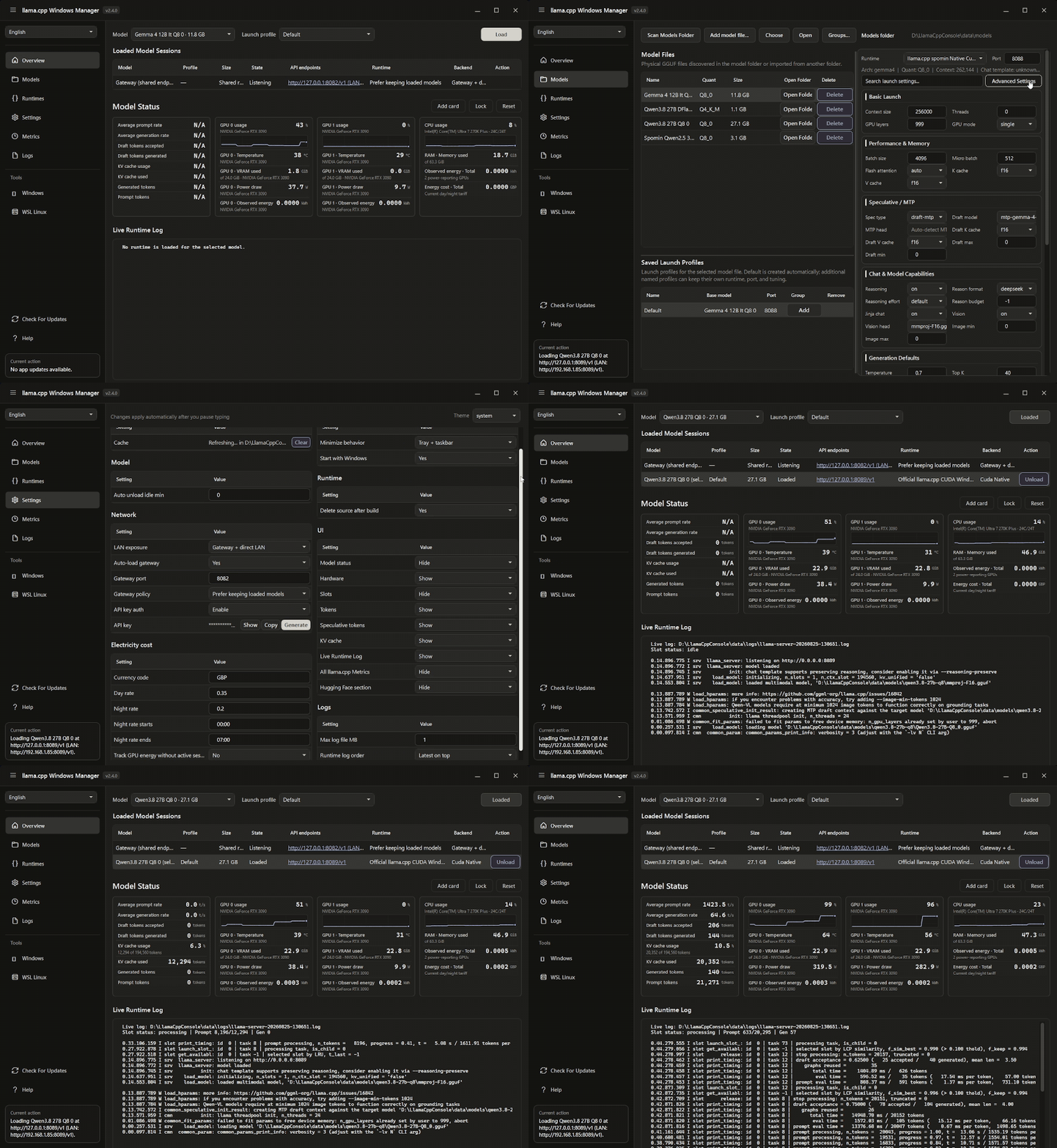
What it does
- Installs or registers Windows and WSL
llama.cppruntimes. - Downloads, imports, scans, and organizes GGUF models.
- Saves multiple launch profiles for each model.
- Reattaches relocated GGUF files without losing saved profiles or group assignments.
- Searches and favourites models, saved profiles, and runtimes consistently, including quick profile control from the themed tray menu.
- Runs and supervises several model servers on separate ports.
- Provides direct endpoints and an optional shared gateway, with compact endpoint reports for status, copyable connection details and model IDs, size, context, and reported settings.
- Tracks runtime health, logs, token usage, hardware metrics, and GPU energy. Draft acceptance uses accepted and generated token totals without counting the per-position breakdown a second time.
- Adds independent live UI and Text scaling on top of Windows per-monitor DPI scaling, remembers resized tables and page sections, and keeps Settings responsive between one and two columns.
- Plans and runs unattended saved-profile serving benchmarks—including draft/MTP acceptance, concurrency, latency, and throughput—or explicit low-level
llama-benchsuites, with persisted CSV/JSON export. - Supports CPU, NVIDIA CUDA, Vulkan, AMD ROCm, and Intel Arc SYCL backends.
- Provides authenticated local automation through
llwmctl.
Why use it?
I made this for people who want the control of llama.cpp without having to
manage every command, process, model, and port by hand.
If you only want a simple chat interface, a chat focused app may be a better fit. If you want control over runtimes, profiles, multiple model servers, networking, and monitoring, this is what the Manager is built for.
Install
Download the Windows x64 installer or portable EXE from GitHub Releases. Both versions include everything needed to run the app. You do not need to install .NET separately.
- Installer: adds Start Menu integration, app updates, and optional startup with Windows.
- Portable EXE: runs without an installer and normally keeps its data in
databesideLlamaCppWindowsManager.exe. - Requirements: Windows 10 or 11 x64. GPU and WSL runtimes also need the matching drivers and environment.
Verify the matching .sha256 file before running a download. See
Signing releases for trust and signature details.
Quick start
- Install or register a runtime in Runtimes.
- Download or import a GGUF in Models.
- Choose a runtime and save a launch profile.
- Select the model and profile in Overview, then choose Load.
- Connect an OpenAI compatible client to the displayed
/v1endpoint.
To keep saved profiles ready after a restart, add one or more model/profile pairs under Settings → Load profiles on startup.
The User guide explains how the app fits together and how to use every page. It also covers profiles, groups, networking, metrics, accessibility, automation, and troubleshooting.
Security defaults
- The Manager control API is authenticated and available only on loopback.
- Model serving starts on loopback with API key authentication enabled.
- LAN access must be enabled manually and always requires a strong API key.
- Runtime processes are supervised and checked during shutdown.
- Managed downloads and stable updates stop when required integrity checks fail.
- Installer repair, updates, and uninstall preserve application data by default.
More detail is available in the User guide and the Security policy.
Documentation and support
- User guide: how the app works and how to use each page.
llwmctland Control API: local automation.- Support: troubleshooting and bug reports.
- Development and Architecture: contributor workflow and internal code boundaries.
build-installer.ps1: builds the Windows installer after publishing the application.
If something is not working, open a bug report. Please report security problems privately as explained in SECURITY.md.
Released under the MIT License. Bundled dependencies keep their own licenses. See third party notices.
Significant stargazers

121 followers · starred Jun 2026
Similar repos


Windows desktop console for llama.cpp runtimes, models, and local coding workflows
C#
126
101 commits
updated Sep 28, 2026
README
llama.cpp Windows Manager
A Windows desktop app I built to make llama.cpp easier to manage. It handles
runtimes, GGUF models, launch profiles, and supervised OpenAI compatible model
endpoints on native Windows or Ubuntu/WSL.
This is an unofficial community project. It is not affiliated with or endorsed by the llama.cpp project.
Download · User guide · Getting started · Documentation
What it does
- Installs or registers Windows and WSL
llama.cppruntimes. - Downloads, imports, scans, and organizes GGUF models.
- Saves multiple launch profiles for each model.
- Reattaches relocated GGUF files without losing saved profiles or group assignments.
- Searches and favourites models, saved profiles, and runtimes consistently, including quick profile control from the themed tray menu.
- Runs and supervises several model servers on separate ports.
- Provides direct endpoints and an optional shared gateway, with compact endpoint reports for status, copyable connection details and model IDs, size, context, and reported settings.
- Tracks runtime health, logs, token usage, hardware metrics, and GPU energy. Draft acceptance uses accepted and generated token totals without counting the per-position breakdown a second time.
- Adds independent live UI and Text scaling on top of Windows per-monitor DPI scaling, remembers resized tables and page sections, and keeps Settings responsive between one and two columns.
- Plans and runs unattended saved-profile serving benchmarks—including draft/MTP acceptance, concurrency, latency, and throughput—or explicit low-level
llama-benchsuites, with persisted CSV/JSON export. - Supports CPU, NVIDIA CUDA, Vulkan, AMD ROCm, and Intel Arc SYCL backends.
- Provides authenticated local automation through
llwmctl.
Why use it?
I made this for people who want the control of llama.cpp without having to
manage every command, process, model, and port by hand.
If you only want a simple chat interface, a chat focused app may be a better fit. If you want control over runtimes, profiles, multiple model servers, networking, and monitoring, this is what the Manager is built for.
Install
Download the Windows x64 installer or portable EXE from GitHub Releases. Both versions include everything needed to run the app. You do not need to install .NET separately.
- Installer: adds Start Menu integration, app updates, and optional startup with Windows.
- Portable EXE: runs without an installer and normally keeps its data in
databesideLlamaCppWindowsManager.exe. - Requirements: Windows 10 or 11 x64. GPU and WSL runtimes also need the matching drivers and environment.
Verify the matching .sha256 file before running a download. See
Signing releases for trust and signature details.
Quick start
- Install or register a runtime in Runtimes.
- Download or import a GGUF in Models.
- Choose a runtime and save a launch profile.
- Select the model and profile in Overview, then choose Load.
- Connect an OpenAI compatible client to the displayed
/v1endpoint.
To keep saved profiles ready after a restart, add one or more model/profile pairs under Settings → Load profiles on startup.
The User guide explains how the app fits together and how to use every page. It also covers profiles, groups, networking, metrics, accessibility, automation, and troubleshooting.
Security defaults
- The Manager control API is authenticated and available only on loopback.
- Model serving starts on loopback with API key authentication enabled.
- LAN access must be enabled manually and always requires a strong API key.
- Runtime processes are supervised and checked during shutdown.
- Managed downloads and stable updates stop when required integrity checks fail.
- Installer repair, updates, and uninstall preserve application data by default.
More detail is available in the User guide and the Security policy.
Documentation and support
- User guide: how the app works and how to use each page.
llwmctland Control API: local automation.- Support: troubleshooting and bug reports.
- Development and Architecture: contributor workflow and internal code boundaries.
build-installer.ps1: builds the Windows installer after publishing the application.
If something is not working, open a bug report. Please report security problems privately as explained in SECURITY.md.
Released under the MIT License. Bundled dependencies keep their own licenses. See third party notices.
Similar repos
Significant stargazers
121 followers · starred Jun 2026