aledelpho/comfyui-arthemy-krea2-tuner

High-precision model and CLIP tuning suite for Krea-2 models in ComfyUI

Python

8

56 commits

updated Sep 15, 2026
See the code

See what people are saying

SourceMessageScoreDate

Taking Krea-2 apart, one piece at a time (r/StableDiffusion)

Hellow fellow AI-generated goblins of r/StableDiffusion For a few weeks I’ve been stress-testing my tool, Arthemy Krea-2 Tuner:https://github.com/aledelpho/comfyui-arthemy-krea2-tunerI wanted to investigate if nudging the weights of single blocks of Krea-2 can teach us something about its internal…

2

Oct 14, 2026

README

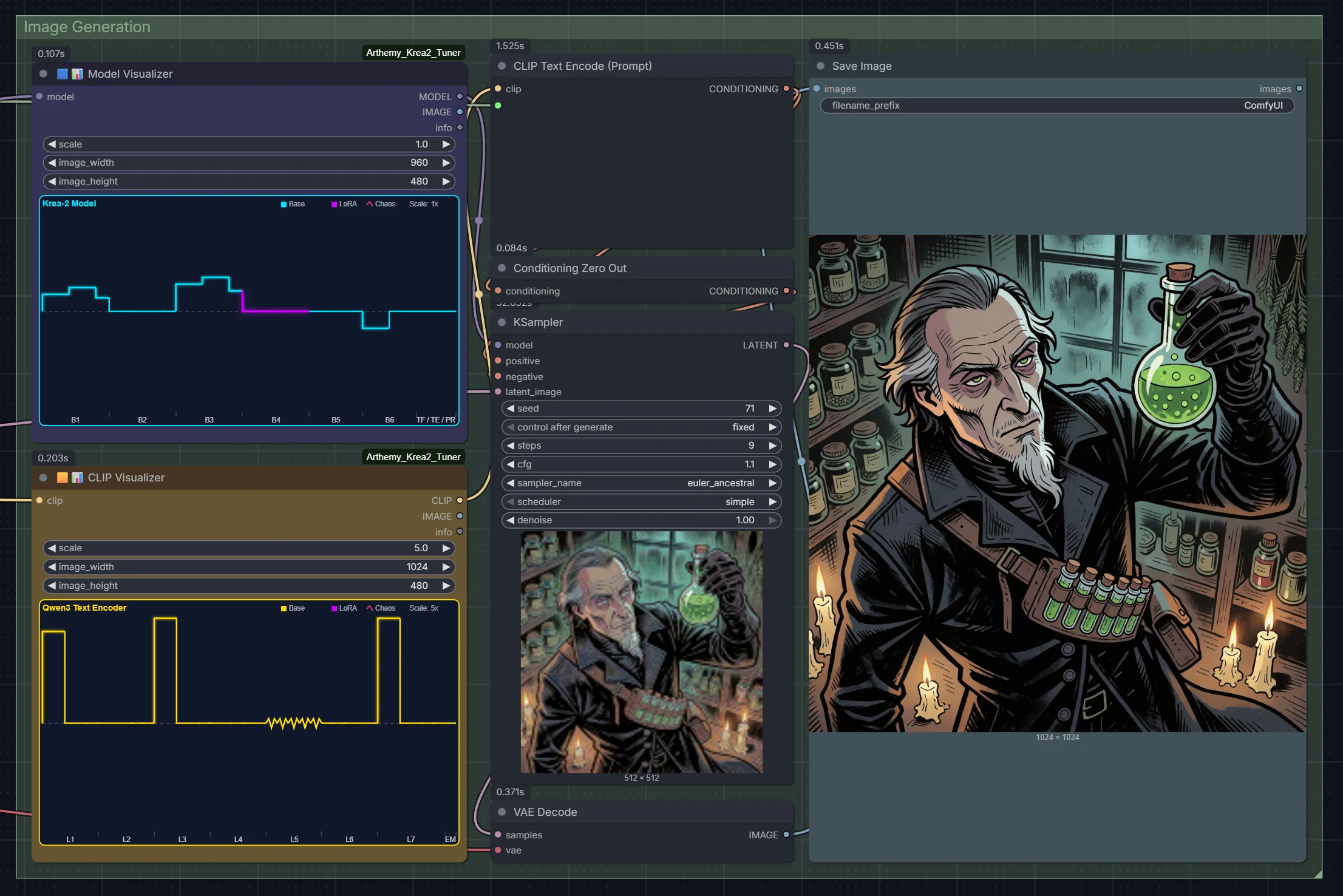
Arthemy Krea-2 Tuner Generation Pipeline

Arthemy Krea-2 Tuner Suite

Zero-retraining weight steering, geometric subspace rotations, channel profiling, and 5D LoRA compaction for Krea-2 and modern diffusion models in ComfyUI.


Version 2.0.1 ComfyUI custom node Compatibility Tests Passing License: MIT GitHub stars


🚀 Version 2.0 Release: A major evolution featuring zero-retraining Lie Algebra subspace rotations ($SO(n)$), residual channel magnitude profiling, 5D LoRA compression with scoped self-contained presets, native memory safety for ModelPatcherDynamic, and an offline automated test suite.

Edit a Krea-2 model and its Qwen3 text encoder by modulating internal weights, rotating singular subspaces, and profiling residual streams live in memory — no training and no datasets required. Move a dial, generate, and observe immediate stylistic and semantic shifts. When you land on a result you like, export it as a lightweight preset or bake it into a standalone .safetensors checkpoint.

X/Y Tuning Benchmark Grid
How different prompts behave under varying tuning configurations.


Contents


Highlights

  • Zero-Retraining Steering: Steer aesthetics, composition, and prompt fidelity through linear algebra, SVD subspace rotations, and residual channel profiling.
  • Native Memory Safety: Applies non-destructive patches via ComfyUI's native patcher. Base checkpoints remain strictly immutable in memory until explicitly saved or baked.
  • Lie Algebra Orthogonal Rotations: Rotate dominant SVD weight subspaces in $SO(n)$ without altering the Frobenius norm of the matrix.
  • Channel Magnitude Profiling: Dynamically profile the model's residual stream and apply direction-aware row/column gain vectors with microscopic overhead (~24 KB vs gigabytes of dense deltas).
  • 5D LoRA Compression: Compress dense LoRA updates into principal SVD directions with Discrete Cosine Transform (DCT) compaction, reducing preset footprints by up to 70x.
  • In-Place BF16/FP8 Baker & Savers: Stream and fold active patches directly into clean checkpoints without triggering out-of-memory (OOM) errors or ModelPatcherDynamic assertion failures.
  • On-Node Interactive Visualizers: Real-time canvas widgets on LiteGraph nodes that plot gain distributions and rotation angles directly in the ComfyUI interface.

Installation

Method 1: ComfyUI Manager (Install via Git URL)

In ComfyUI Manager, click Install via Git URL, paste:

https://github.com/aledelpho/comfyui-arthemy-krea2-tuner.git

and click Install.

Method 2: Manual Installation (Git Clone)

Navigate to your ComfyUI custom_nodes folder:

cd ComfyUI/custom_nodes
git clone https://github.com/aledelpho/comfyui-arthemy-krea2-tuner.git

Dependencies (torch, safetensors, numpy, Pillow) are bundled by default with modern ComfyUI installations. If needed:

pip install -r comfyui-arthemy-krea2-tuner/requirements.txt

Restart ComfyUI completely afterward.


Included Template Workflow

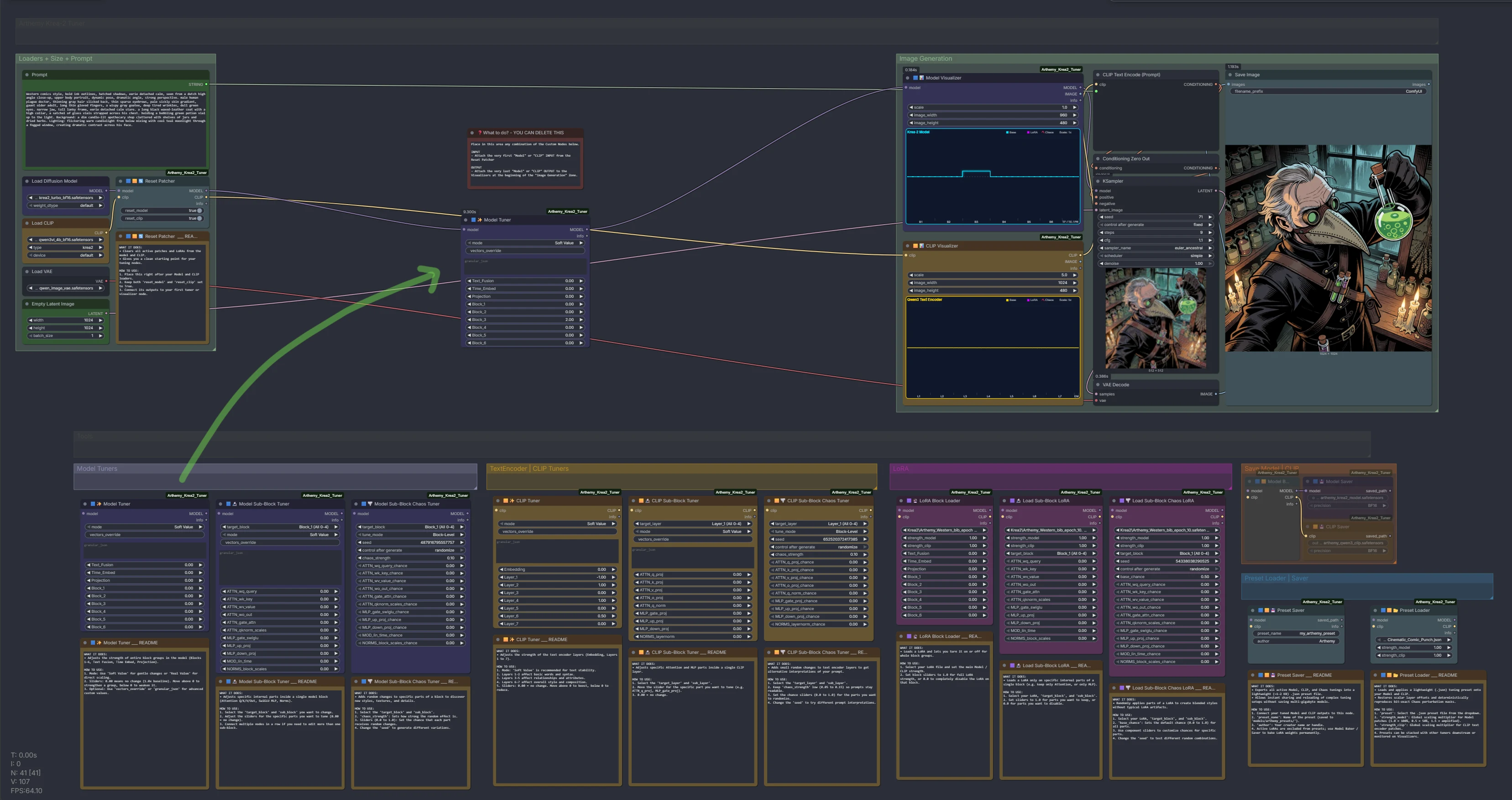
The suite includes a ready-to-run, modular reference workflow located in example_workflows/Arthemy_Krea2_Tuner_Workflow.json:

Arthemy Krea-2 Tuner Sandbox Workflow

How to use the sandbox:

  1. Load the template: Drag and drop example_workflows/Arthemy_Krea2_Tuner_Workflow.json onto the ComfyUI canvas.
  2. Left area: Checkpoint loader, prompt encode, latent dimensions, and the Reset Patcher.
  3. Workspace slot: Copy and paste any tuning tool from the organized banks below and chain it directly between the Reset Patcher and the Visualizers.
  4. Bottom banks: All nodes categorized by colour: 🟪 Model Tuners · 🟨 CLIP Tuners · 🌿 Rotators · 🧬 5D Suite · 🩷 LoRA · Presets & Savers. Each node carries a dedicated README note explaining its exact inputs.
  5. Tune & Cook: Adjust your sliders, observe live patch waveforms on the visualizers, and queue the generation!

Node Catalog & Deep Dive

Every node clones the ComfyUI patcher and attaches patches in-place. They can be chained in any sequence. Each node outputs an info string ending in Patches: N confirming the exact count of modified tensors.

Model Tuner Nodes

🟪 Model Tools (Diffusion Backbone)

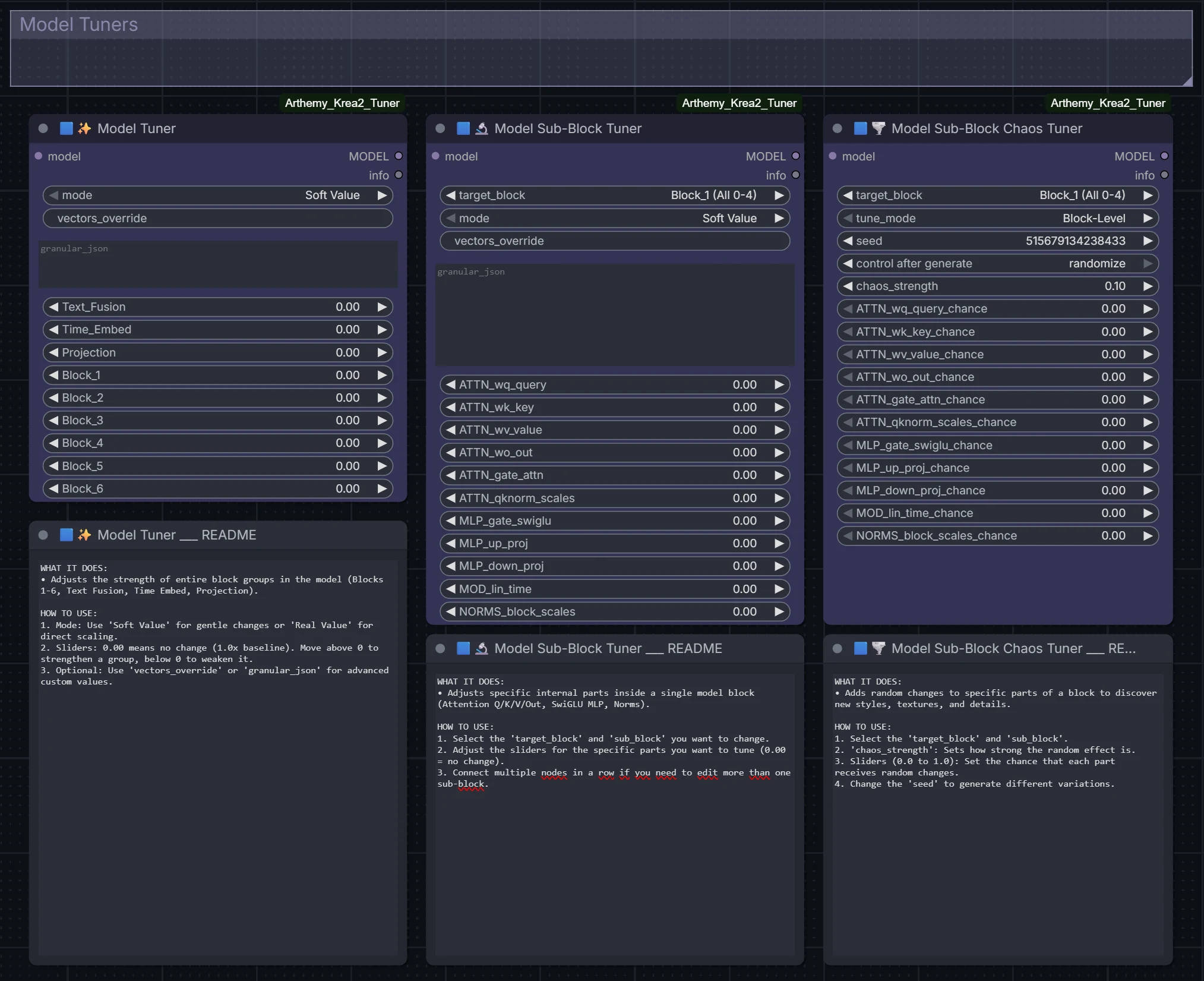
1. 🟪✨ Model Tuner (Group-Level)

Provides one scalar multiplier per major section: Text_Fusion, Time_Embed, Projection, and Block_1 through Block_6 (blocks 0-4, 5-9, 10-14, 15-19, 20-23, 24-27). Moving a slider scales every tensor inside that group uniformly.

  • Workflow: MODEL → Model Tuner → KSampler.

Block Tuning Showcase - Block 3
Block Tuning — Modulating an entire block (Block_3) across different values (-2.0 to +2.0) demonstrates how group-level tuning shapes visual structures and features.

2. 🟪🔬 Model Sub-Block Tuner (Granular Tensor Type)

Narrows target execution: select a block group or a single block (target_block), then adjust fine-grained sliders for internal tensor families: ATTN_wq_query, ATTN_wk_key, ATTN_wv_value, ATTN_wo_out, ATTN_q_norm, MLP_gate_swiglu, MLP_up_proj, MLP_down_proj, NORMS_block_scales, etc.

  • Use case: When a block improves layout but degrades texture, isolate the attention or feed-forward paths independently.

Sub-Block Tuning Variations inside Block 3
Sub-Block Tuning — Modulating specific sub-blocks within Block 3 influences fine details and layer-level characteristics.

3. 🟪🌪️ Model Sub-Block Chaos Tuner (Seeded Perturbations)

Stochastic perturbation of chosen tensor families: each matched tensor is perturbed with probability chance by chaos_strength. Seeded with a 32-bit CRC seed to ensure identical reproductions across restarts.

  • Block-Level: Perturbs entire module tensors coherently.
  • Element-Level (Sub-atomic): Generates per-weight noise for textured variations.

Chaos Tuning Variations
Chaos Tuning — Seeded stochastic perturbations applied across sub-blocks introduce controlled stylistic variations.

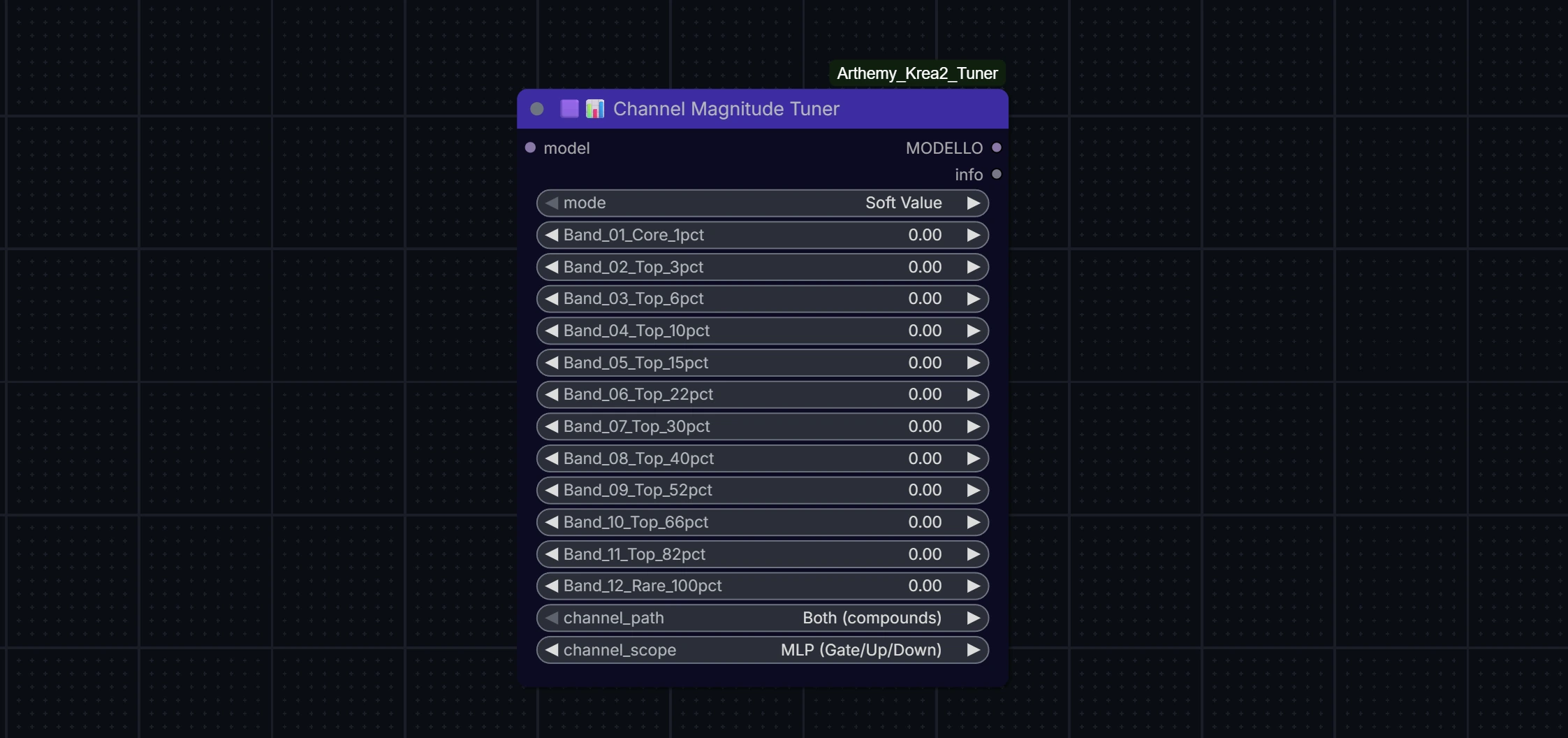
4. 🟪📊 Channel Magnitude Tuner (Vertical Energy Cuts)

A vertical rather than horizontal cut: profiles the residual stream ($d_{model} = 6144$ on Krea-2), ranks channels logarithmically by energy, cuts them into 12 logarithmic frequency bands, and applies direction-aware scaling.

  • channel_scope: targets MLP or Attention sub-networks.
  • channel_path: applies gains where the network reads from residual, writes back, or both.
  • Ultra-low footprint: Generates ~24 KB rank vectors instead of multi-gigabyte dense matrices. Profiles are cached in models/arthemy_profiles/.

Channel Magnitude Tuner Node


🟨 CLIP Tools (Qwen3-VL Text Encoder)

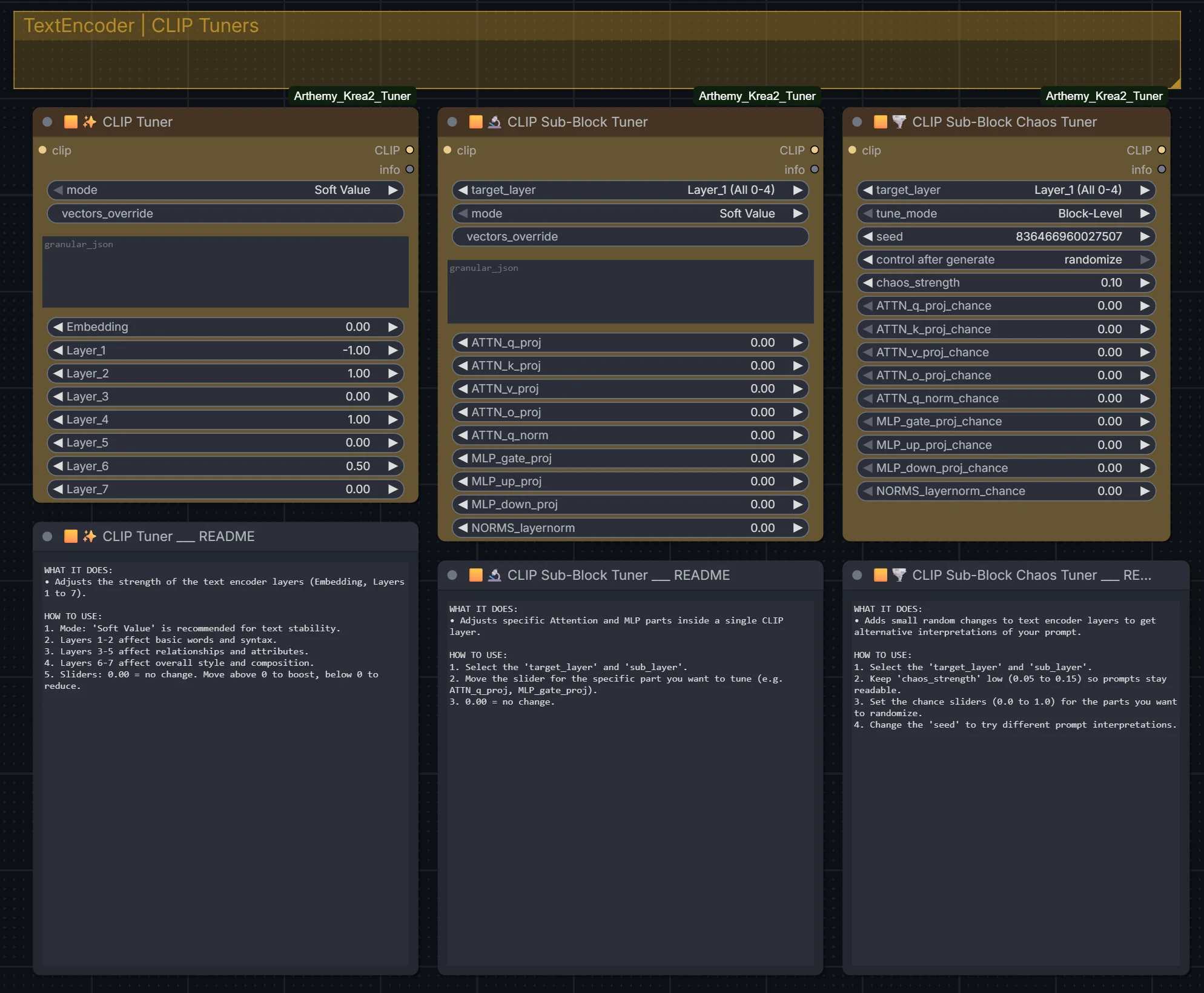
CLIP Tuner Nodes

Tuning applied to the Qwen3-VL text encoder provides fine-grained steering over prompt comprehension and linguistic interpretation:

  • 🟨✨ CLIP Tuner: Group sliders covering Embedding and Layer_1 through Layer_7 (text layers 0-4 through 30-35).
  • 🟨🔬 CLIP Sub-Block Tuner: Granular control over ATTN_q_proj, k_proj, v_proj, o_proj, query norms, and MLP projections inside specific layers.
  • 🟨🌪️ CLIP Sub-Block Chaos Tuner: Seeded stochastic perturbations on linguistic projections.

🌿 Subspace Rotators (Lie Algebra & Geometric Steering)

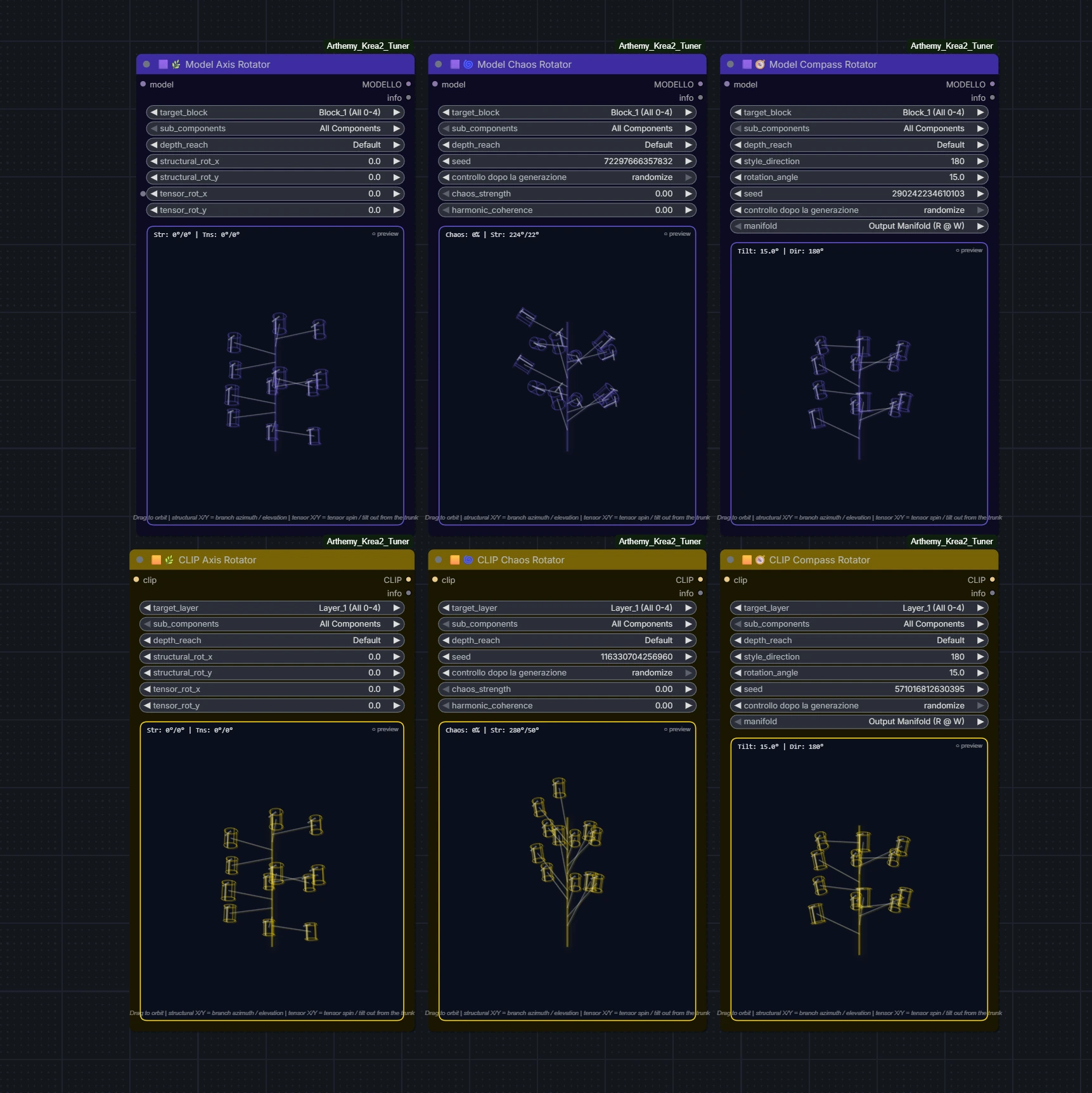
Subspace Rotator Suite

Why Subspace Rotators? (The Geometry of Meaning vs Volume)

Traditional weight tuning multiplies tensors by scalars:

  • The Problem with Scalar Scaling: Multiplying a layer's weights increases or decreases its total Frobenius norm (its mathematical "energy" or "volume"). Turning a slider up too high causes color clipping, burnt highlights, and contrast collapse. Turning it down too far erases the layer's features entirely.
  • The Geometric Solution: Rotators operate within the Special Orthogonal Group $SO(n)$ inside the principal Singular Value Decomposition (SVD) subspaces of the weights. By rotating the basis vectors orthogonally, the Frobenius norm of the matrix remains strictly unchanged: $$| W_{\text{rotated}} |F = | W{\text{base}} |_F$$ Instead of changing how loud a layer speaks (volume), Rotators change what the layer says (orientation and semantic meaning). This allows profound aesthetic transformations without signal destruction or contrast degradation.

The Rotator Suite

1. 🟪🌿 Model Axis Rotator & 🟨🌿 CLIP Axis Rotator (Cartesian Subspaces)

Provides four independent rotation dials (ranging ±180°) inside the dominant SVD subspaces of the target weights:

  • In-Plane: Rotates vectors within their primary 2D projection plane.
  • Branch-into-Trunk: Modulates how secondary feature branches inject into the principal trunk.
  • Channel Phase: Rotates long-range residual channel phases.
  • Mirrored Pairwise: Conjugate rotation of paired singular vectors.
  • depth_reach: Sets the active rotated rank (8, 16, or 32).
2. 🟪🌀 Model Chaos Rotator & 🟨🌀 CLIP Chaos Rotator (Stochastic Subspaces)

Applies pseudo-random orthogonal rotations across subspace planes:

  • chaos_strength: Caps maximum rotation angle as a fraction of 90°.
  • harmonic_coherence: Snaps rotation angles toward musical/harmonic multiples of 45°, maintaining visual cohesion.
  • seed: Fully deterministic CRC32 seed.
3. 🟪🧭 Model Compass Rotator & 🟨🧭 CLIP Compass Rotator (Spherical Navigation)

Rotates weights along a continuous spherical bearing:

  • style_direction (0–360°): Blends smoothly between local and long-range geometric planes. Moving along the compass dial shifts aesthetic flavor gradually like turning a map dial.
  • rotation_angle (-90° to +90°): Distance traveled along that specific bearing.
  • manifold: Chooses between the input manifold (what the layer listens to) or output manifold (what it emits).

How to Use Rotators:

  1. Model Backbone: Start with rotation_angle or axis dials between 10° and 30°. You will notice immediate alterations in style, shading, and anatomical structure with zero loss of dynamic range.
  2. Text Encoder (CLIP): The text encoder is remarkably sensitive to rotation. Keep angles gentle (5° to 15°). Larger angles re-interpret prompt semantics completely rather than changing visual rendering.
  3. Non-Commutative Ordering: Note that scaling and rotation do not commute ($W \cdot R \neq R \cdot W$). Chaining a Rotator before a Tuner produces a different effect than chaining it after.

🧬 5D LoRA Compaction & Subspace Injection

5D LoRA Compaction and Subspace Injection Suite

Why 5D? (Lightweight, Self-Contained & Zero Bleed)

  • The Problem with Standard LoRAs: Full LoRA files weigh anywhere from 50 MB to 300+ MB. They carry extensive high-rank noise, bleed across unrelated features, and cannot be shared inside small ComfyUI presets without requiring everyone to manually hunt down and download the original .safetensors files.
  • The 5D Solution: The 5D engine uses spectral decomposition to distill any LoRA down to its $N$ dominant SVD directions (typically 1 to 5). It then applies an adaptive Discrete Cosine Transform (DCT) compaction algorithm:
    • Measures actual DCT reconstruction fidelity against raw factors.
    • Compresses multi-megabyte LoRA deltas into portable JSON payloads of just 20 KB to 50 KB (up to 70× footprint reduction).
    • Enables 100% self-contained presets: embedding 5D payloads into a preset allows any other ComfyUI user to replicate your exact tuning without needing the source LoRA installed on their machine.

The 5D Suite

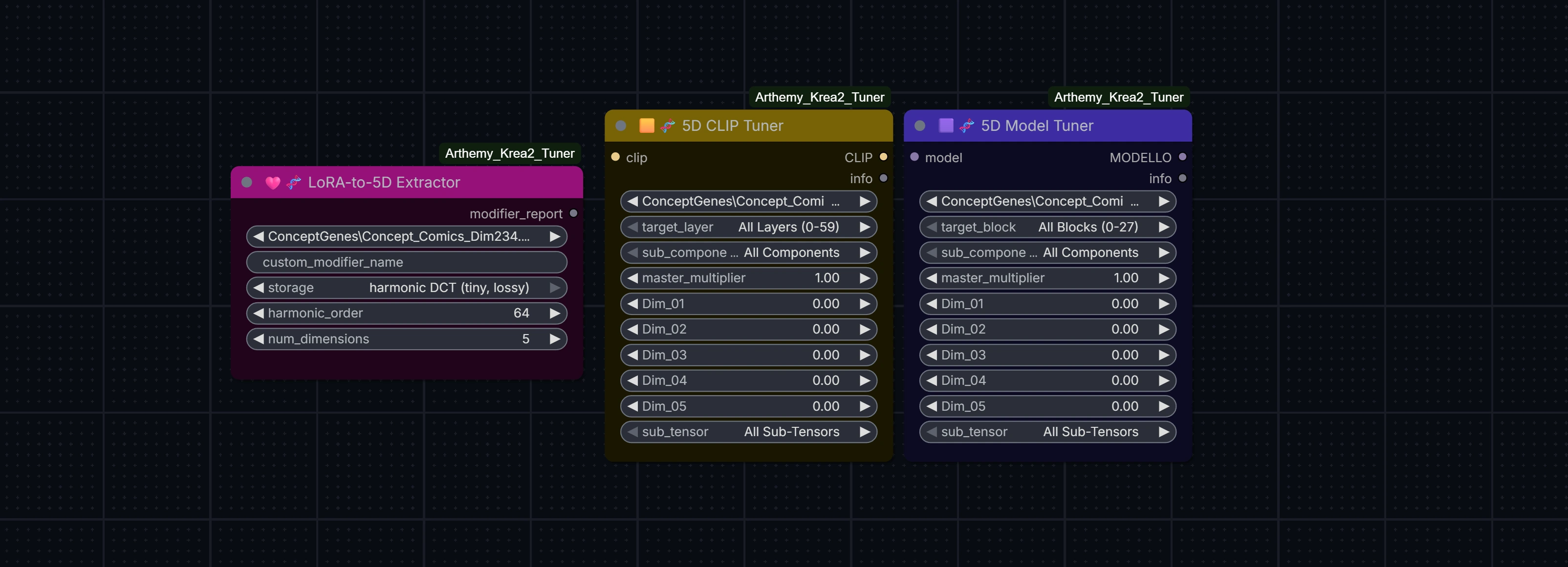
1. 🩷🧬 LoRA-to-5D Extractor (Analytical Compressor)
  • Inspects a local LoRA file and extracts its $N$ principal SVD singular components (num_dimensions = 1..8, default 5).
  • Exports an optimized .json modifier into models/arthemy_modifiers/.
  • storage: auto measures compression fidelity and automatically selects DCT compaction or raw factor fallback.
  • 💡 Workflow tip: Since this is an output node, run it once, then bypass it with Ctrl+B so it doesn't recalculate on every generation.
2. 🟪🧬 5D Model Tuner & 🟨🧬 5D CLIP Tuner (Subspace Injectors)
  • Point modifier_name to your extracted .json modifier (or let it read from an embedded preset).
  • Offers individual sliders for each dominant direction (Dir_01 through Dir_08).
  • Allows surgical scoping: inject the LoRA modifier strictly into a specific block range (Block_3), a component (ATTN), or a single layer (ATTN_wq_query), completely eliminating unwanted character or style bleed.
3. 🎯 Target-Scoped Preset Pruning (prune_5d_to_target)

When saving a preset with embedded 5D modifiers using Preset Saver:

  • With prune_5d_to_target enabled, the saver automatically detects which exact layers your 5D Tuner nodes target.
  • It discards all unused layer tensors from the JSON payload (e.g., embedding only the 40 layers of blocks 10–14 instead of all 262 layers).
  • This drops preset file sizes from hundreds of megabytes down to lightweight, shareable files!

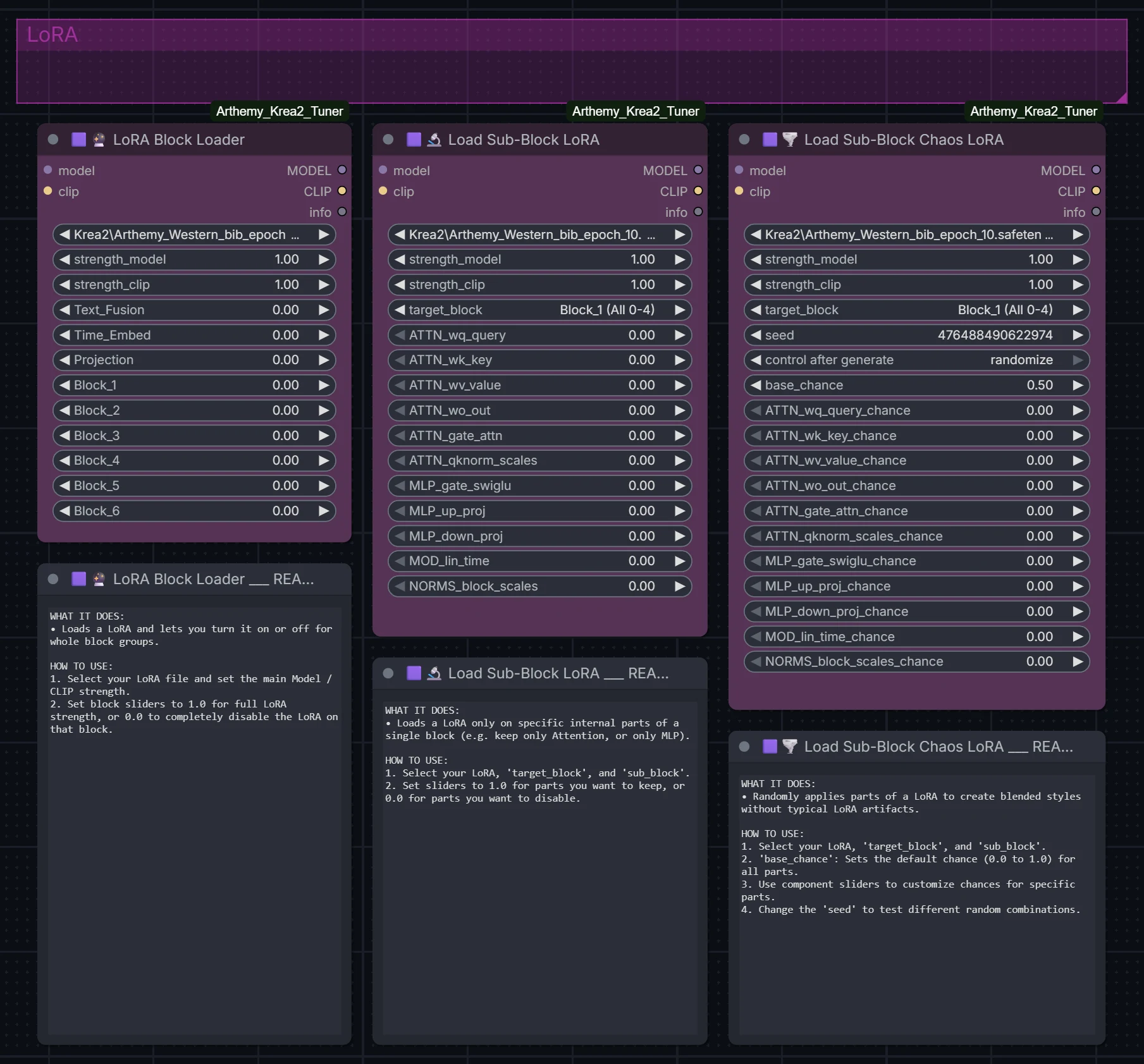
🩷 LoRA Block & Sub-Block Tools

LoRA Loader Nodes

  • 🩷🔮 LoRA Block Loader: Drop-in replacement for standard LoRA loaders with independent block-group multipliers. Isolating a style LoRA to blocks 24–27 preserves style while eliminating character bleed.
  • 🩷🔬 Load Sub-Block LoRA: Applies LoRA weights strictly to selected tensor families (e.g. attention only for composition, MLP only for texture).
  • 🩷🌪️ Load Sub-Block Chaos LoRA: Stochastically samples LoRA keys according to per-family probability sliders.

🟪🟨 Presets, Savers & Baker

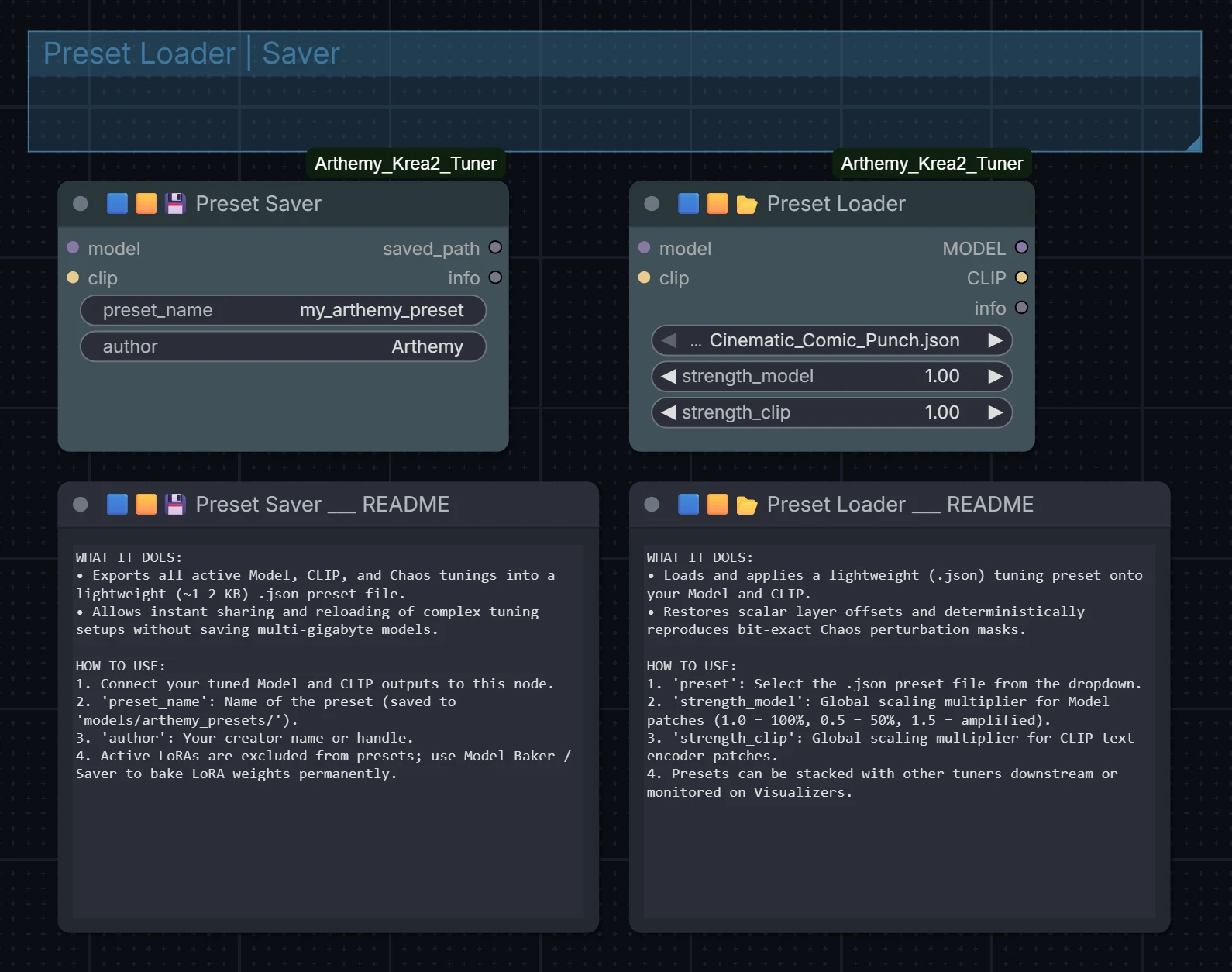
1. Presets (Lightweight & Self-Contained)

Preset System

  • 🟪🟨💾 Preset Saver: Serializes all active scalar, granular, Chaos, Rotation, Channel Magnitude, and 5D configurations into a clean JSON preset located in custom_nodes/Arthemy_Krea2_Tuner/presets/.
    • embed_5d_modifiers: Embeds 5D payloads directly into the JSON so presets are portable across machines.
    • prune_5d_to_target: Strips unreachable layers from embedded modifiers, keeping file size minimal.
  • 🟪🟨📂 Preset Loader: Replays presets with master strength_model and strength_clip multipliers. Safely skips incompatible scaled-FP8 companion scales.
  • Shipped Reference Preset: Includes presets/Arthemy_Comics_Preset.json, delivering the complete Arthemy Comics aesthetic with embedded self-contained 5D payloads.

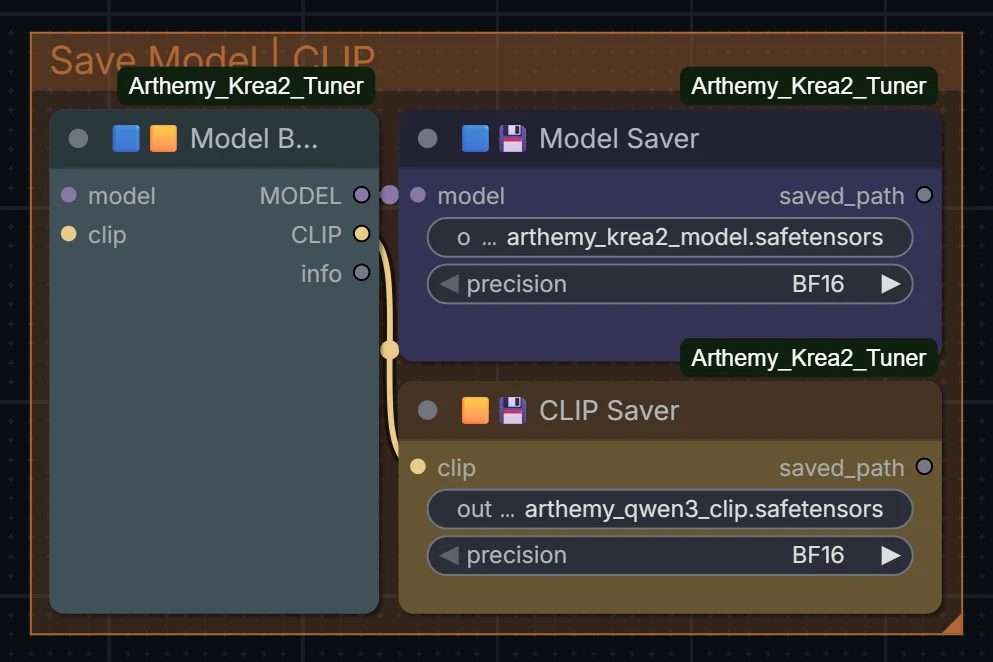
2. Model Baker, Savers & Reset Patcher

Model and CLIP Savers

  • 🟪🟨 Model Baker: Folds all pending in-memory patches directly into weight matrices in RAM. Leaves base checkpoints unharmed and enables downstream nodes to consume plain weights without patch overhead.
  • 🟪💾 Model Saver / 🟨💾 CLIP Saver: Directly stream full .safetensors checkpoints in BF16 or FP8_E4M3 without requiring pre-baking. Correctly fuses FP8 companion scales into quantized tensors.
  • 🟪🟨🔄 Reset Patcher: Safely drops pending suite patches and rolls patch IDs to force ComfyUI clean reloading. Leaves third-party hooks and object_patches (FreeU, AuraFlow) completely intact.

Summary Architecture Matrix

CategoryDomainGroup LevelGranular / Sub-BlockGeometric / SVDStochastic Discovery
Magnitude TuningDiffusion ModelModel TunerModel Sub-Block Tuner
Channel Magnitude Tuner
—Model Sub-Block Chaos
Magnitude TuningQwen3 CLIPCLIP TunerCLIP Sub-Block Tuner—CLIP Sub-Block Chaos
Subspace RotatorsModel & CLIP——Model / CLIP Axis Rotator
Model / CLIP Compass Rotator
Model / CLIP Chaos Rotator
5D CompactionModel, CLIP & LoRA——5D Model Tuner
5D CLIP Tuner
LoRA-to-5D Extractor
LoRA FilteringExternal LoRALoRA Block LoaderLoad Sub-Block LoRA—Load Sub-Block Chaos LoRA
Memory & StorageSystem & DiskPreset LoaderPreset SaverReset PatcherModel Baker (RAM)
Savers (Disk)

Reading the Controls

Slider controls represent offsets relative to base weights (0.00 = neutral/unmodified):

ModeFormulaApplication
Soft Value1.0 + (slider × 0.10)Delicate calibration — slider 1.0 applies +10% gain (Recommended default).
Real Value1.0 + sliderDirect multiplier — slider 1.0 doubles weight (+100%). For bold stylistic interventions.
  • Rotation Dials: Expressed in degrees (±180°). In CLIP, start between 5°–15°; in diffusion models, 10°–30° provides distinct stylistic shifts.
  • Channel Magnitude Bands: Band 1 controls the top 1% energy channels (macro composition), while Band 12 governs the fine 18% tail (grain, micro-details).

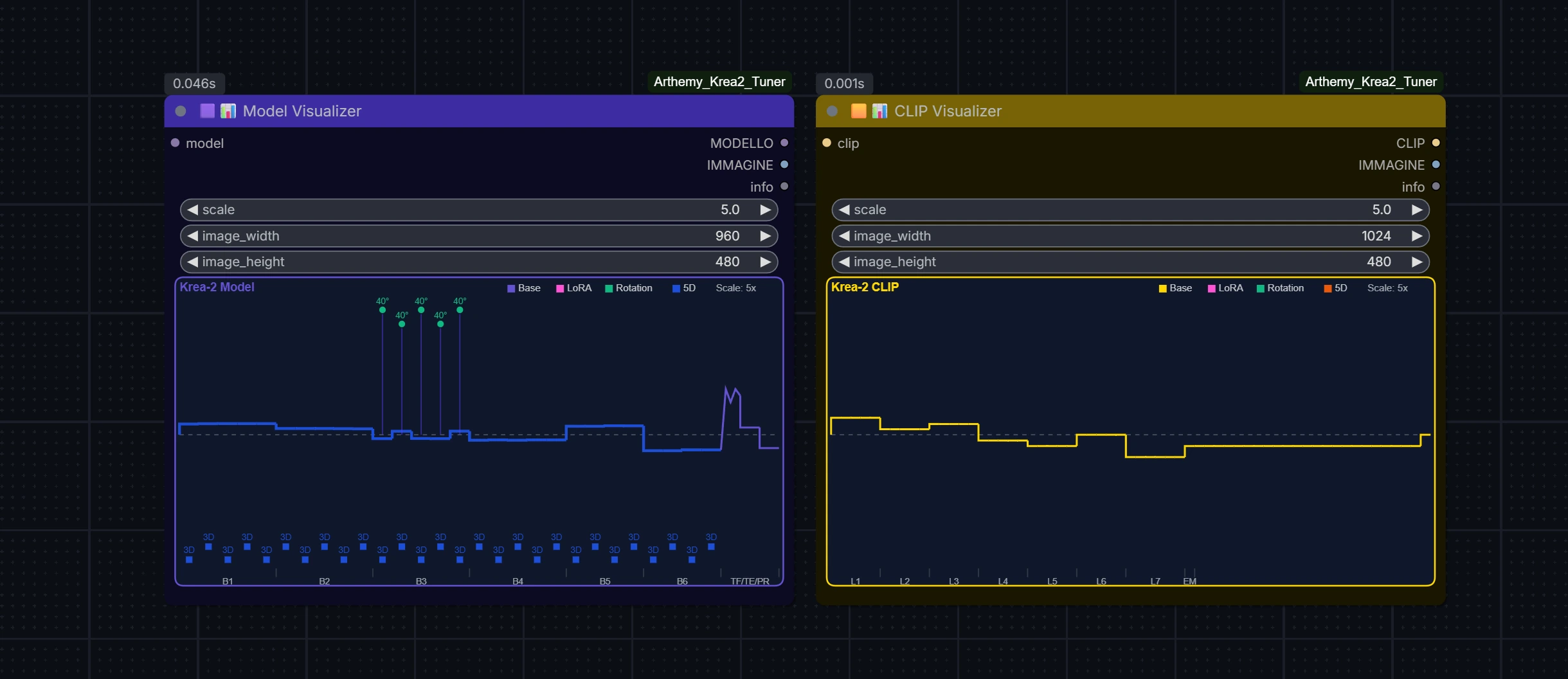
Visualizing Active Patches

Model and CLIP Visualizers on Canvas

  • 🟪📊 Model Visualizer / 🟨📊 CLIP Visualizer: Connect inline to inspect real-time bar graphs of patch magnitudes directly on the node canvas.
  • Validates that patches have successfully attached to weights before spending GPU cycles on sampling.

Visual reference gallery demonstrating how modulating individual Model blocks and CLIP layers steers generation outputs in isolation.

Benchmark Baseline Prompt (Used across all examples)

Western comics style, bold ink outlines, hatched shadows, eerie detached calm, seen from a dutch high angle close-up, upper body portrait, dynamic pose, dramatic angle, strong perspective. male human plague doctor, thinning gray hair slicked back, thin sparse eyebrows, pale sickly skin gradient, gaunt older adult, long thin gloved fingers, a wispy gray goatee, deep tired wrinkles, dull green eyes. narrow jaw, tall lanky frame, eerie detached calm stare. a long black waxed-leather coat with a high collar, a satchel of glass vials strapped across his chest. holding a bubbling green potion vial up to the light. Background: a dim candle-lit apothecary shop cluttered with shelves of jars and dried herbs. Lighting: flickering warm candlelight from below mixing with cool teal moonlight through a fogged window, creating dramatic contrast across his face.

🟪 Model Tuning Effects (Blocks 1–6, Text Fusion, Time Embed, Projection)

Block 1

Block 1 Effect
Block 2

Block 2 Effect
Block 3

Block 3 Effect
Block 4

Block 4 Effect
Block 5

Block 5 Effect
Block 6

Block 6 Effect
Text Fusion

Text Fusion Effect
Time Embed

Time Embed Effect
Projection

Projection Effect

🟨 CLIP Text Encoder Tuning Effects (Layers 1–7, Embedding)

Layer 1

Layer 1 Effect
Layer 2

Layer 2 Effect
Layer 3

Layer 3 Effect
Layer 4

Layer 4 Effect
Layer 5

Layer 5 Effect
Layer 6

Layer 6 Effect
Layer 7

Layer 7 Effect
Embedding

Embedding Effect

Deterministic Multi-Seed Persistence

Here you can see how feature isolation works in practice: By identifying and amplifying only the specific Model blocks and CLIP layers responsible for generating the plague doctor's beak mask, the feature persists robustly and deterministically across completely different generation seeds.

Same Tuning, Different Seed


Developer Guide & Testing

The repository comes equipped with an extensive 11-suite automated test suite located in tests/:

  • Contract Validation: Checks inputs, outputs, types, and recipe replays (test_node_contracts.py).
  • Memory Invariance: Verifies patcher clones and guarantees ComfyUI base weights are strictly preserved (test_reset_patcher.py, test_prune.py).
  • Numerical Parity: Validates Lie algebra orthogonal rotation matrix properties and channel profiling fidelity (test_channel_profile.py, test_channel_roundtrip.py).
  • Checkpoints & Savers: End-to-end verification of BF16 and scaled FP8 streaming encoders (test_savers_patching.py, test_saver_e2e.py).

Run the automated suite using ComfyUI's Python runtime:

Get-ChildItem -Path tests -Filter "test_*.py" | ForEach-Object {
    & "path/to/comfyui/python.exe" $_.FullName
}

For complete architectural notes, memory management invariants, and custom node extensions, refer to ARCHITECTURE.md.


Troubleshooting

  • Nodes do not appear in ComfyUI: Restart ComfyUI completely. Ensure the folder is placed in ComfyUI/custom_nodes/Arthemy_Krea2_Tuner without nested folders.
  • Sliders produce no visible change: Confirm that you are running a Krea-2 checkpoint with a Qwen3 text encoder. On incompatible models, tensor prefixes will not match and Patches: 0 will be returned in the node info string.
  • Out of Memory during save: Model Saver and CLIP Saver stream tensors sequentially in chunks, but writing 13B models requires free RAM. Ensure background processes are minimized.
  • Scaled FP8 compatibility: Quantized FP8 layers carrying separate scale_weight companions are automatically protected from double-scaling during tuning and correctly folded during checkpoint export.

Author

Arthemy · @aledelpho


License

Distributed under the MIT License — see LICENSE for details.

aledelpho/comfyui-arthemy-krea2-tuner

High-precision model and CLIP tuning suite for Krea-2 models in ComfyUI

Python

8

56 commits

updated Sep 15, 2026

See the code

See what people are saying

SourceMessageScoreDate

Taking Krea-2 apart, one piece at a time (r/StableDiffusion)

Hellow fellow AI-generated goblins of r/StableDiffusion For a few weeks I’ve been stress-testing my tool, Arthemy Krea-2 Tuner:https://github.com/aledelpho/comfyui-arthemy-krea2-tunerI wanted to investigate if nudging the weights of single blocks of Krea-2 can teach us something about its internal…

2

Oct 14, 2026

README

Arthemy Krea-2 Tuner Generation Pipeline

Arthemy Krea-2 Tuner Suite

Zero-retraining weight steering, geometric subspace rotations, channel profiling, and 5D LoRA compaction for Krea-2 and modern diffusion models in ComfyUI.

Version 2.0.1 ComfyUI custom node Compatibility Tests Passing License: MIT GitHub stars


🚀 Version 2.0 Release: A major evolution featuring zero-retraining Lie Algebra subspace rotations ($SO(n)$), residual channel magnitude profiling, 5D LoRA compression with scoped self-contained presets, native memory safety for ModelPatcherDynamic, and an offline automated test suite.

Edit a Krea-2 model and its Qwen3 text encoder by modulating internal weights, rotating singular subspaces, and profiling residual streams live in memory — no training and no datasets required. Move a dial, generate, and observe immediate stylistic and semantic shifts. When you land on a result you like, export it as a lightweight preset or bake it into a standalone .safetensors checkpoint.

X/Y Tuning Benchmark Grid
How different prompts behave under varying tuning configurations.


Contents


Highlights

  • Zero-Retraining Steering: Steer aesthetics, composition, and prompt fidelity through linear algebra, SVD subspace rotations, and residual channel profiling.
  • Native Memory Safety: Applies non-destructive patches via ComfyUI's native patcher. Base checkpoints remain strictly immutable in memory until explicitly saved or baked.
  • Lie Algebra Orthogonal Rotations: Rotate dominant SVD weight subspaces in $SO(n)$ without altering the Frobenius norm of the matrix.
  • Channel Magnitude Profiling: Dynamically profile the model's residual stream and apply direction-aware row/column gain vectors with microscopic overhead (~24 KB vs gigabytes of dense deltas).
  • 5D LoRA Compression: Compress dense LoRA updates into principal SVD directions with Discrete Cosine Transform (DCT) compaction, reducing preset footprints by up to 70x.
  • In-Place BF16/FP8 Baker & Savers: Stream and fold active patches directly into clean checkpoints without triggering out-of-memory (OOM) errors or ModelPatcherDynamic assertion failures.
  • On-Node Interactive Visualizers: Real-time canvas widgets on LiteGraph nodes that plot gain distributions and rotation angles directly in the ComfyUI interface.

Installation

Method 1: ComfyUI Manager (Install via Git URL)

In ComfyUI Manager, click Install via Git URL, paste:

https://github.com/aledelpho/comfyui-arthemy-krea2-tuner.git

and click Install.

Method 2: Manual Installation (Git Clone)

Navigate to your ComfyUI custom_nodes folder:

cd ComfyUI/custom_nodes
git clone https://github.com/aledelpho/comfyui-arthemy-krea2-tuner.git

Dependencies (torch, safetensors, numpy, Pillow) are bundled by default with modern ComfyUI installations. If needed:

pip install -r comfyui-arthemy-krea2-tuner/requirements.txt

Restart ComfyUI completely afterward.


Included Template Workflow

The suite includes a ready-to-run, modular reference workflow located in example_workflows/Arthemy_Krea2_Tuner_Workflow.json:
Arthemy Krea-2 Tuner Sandbox Workflow

How to use the sandbox:

  1. Load the template: Drag and drop example_workflows/Arthemy_Krea2_Tuner_Workflow.json onto the ComfyUI canvas.
  2. Left area: Checkpoint loader, prompt encode, latent dimensions, and the Reset Patcher.
  3. Workspace slot: Copy and paste any tuning tool from the organized banks below and chain it directly between the Reset Patcher and the Visualizers.
  4. Bottom banks: All nodes categorized by colour: 🟪 Model Tuners · 🟨 CLIP Tuners · 🌿 Rotators · 🧬 5D Suite · 🩷 LoRA · Presets & Savers. Each node carries a dedicated README note explaining its exact inputs.
  5. Tune & Cook: Adjust your sliders, observe live patch waveforms on the visualizers, and queue the generation!

Node Catalog & Deep Dive

Every node clones the ComfyUI patcher and attaches patches in-place. They can be chained in any sequence. Each node outputs an info string ending in Patches: N confirming the exact count of modified tensors.
Model Tuner Nodes

🟪 Model Tools (Diffusion Backbone)

1. 🟪✨ Model Tuner (Group-Level)

Provides one scalar multiplier per major section: Text_Fusion, Time_Embed, Projection, and Block_1 through Block_6 (blocks 0-4, 5-9, 10-14, 15-19, 20-23, 24-27). Moving a slider scales every tensor inside that group uniformly.

  • Workflow: MODEL → Model Tuner → KSampler.

Block Tuning Showcase - Block 3
Block Tuning — Modulating an entire block (Block_3) across different values (-2.0 to +2.0) demonstrates how group-level tuning shapes visual structures and features.

2. 🟪🔬 Model Sub-Block Tuner (Granular Tensor Type)

Narrows target execution: select a block group or a single block (target_block), then adjust fine-grained sliders for internal tensor families: ATTN_wq_query, ATTN_wk_key, ATTN_wv_value, ATTN_wo_out, ATTN_q_norm, MLP_gate_swiglu, MLP_up_proj, MLP_down_proj, NORMS_block_scales, etc.

  • Use case: When a block improves layout but degrades texture, isolate the attention or feed-forward paths independently.

Sub-Block Tuning Variations inside Block 3
Sub-Block Tuning — Modulating specific sub-blocks within Block 3 influences fine details and layer-level characteristics.

3. 🟪🌪️ Model Sub-Block Chaos Tuner (Seeded Perturbations)

Stochastic perturbation of chosen tensor families: each matched tensor is perturbed with probability chance by chaos_strength. Seeded with a 32-bit CRC seed to ensure identical reproductions across restarts.

  • Block-Level: Perturbs entire module tensors coherently.
  • Element-Level (Sub-atomic): Generates per-weight noise for textured variations.

Chaos Tuning Variations
Chaos Tuning — Seeded stochastic perturbations applied across sub-blocks introduce controlled stylistic variations.

4. 🟪📊 Channel Magnitude Tuner (Vertical Energy Cuts)

A vertical rather than horizontal cut: profiles the residual stream ($d_{model} = 6144$ on Krea-2), ranks channels logarithmically by energy, cuts them into 12 logarithmic frequency bands, and applies direction-aware scaling.

  • channel_scope: targets MLP or Attention sub-networks.
  • channel_path: applies gains where the network reads from residual, writes back, or both.
  • Ultra-low footprint: Generates ~24 KB rank vectors instead of multi-gigabyte dense matrices. Profiles are cached in models/arthemy_profiles/.

Channel Magnitude Tuner Node


🟨 CLIP Tools (Qwen3-VL Text Encoder)

CLIP Tuner Nodes

Tuning applied to the Qwen3-VL text encoder provides fine-grained steering over prompt comprehension and linguistic interpretation:

  • 🟨✨ CLIP Tuner: Group sliders covering Embedding and Layer_1 through Layer_7 (text layers 0-4 through 30-35).
  • 🟨🔬 CLIP Sub-Block Tuner: Granular control over ATTN_q_proj, k_proj, v_proj, o_proj, query norms, and MLP projections inside specific layers.
  • 🟨🌪️ CLIP Sub-Block Chaos Tuner: Seeded stochastic perturbations on linguistic projections.

🌿 Subspace Rotators (Lie Algebra & Geometric Steering)

Subspace Rotator Suite

Why Subspace Rotators? (The Geometry of Meaning vs Volume)

Traditional weight tuning multiplies tensors by scalars:

  • The Problem with Scalar Scaling: Multiplying a layer's weights increases or decreases its total Frobenius norm (its mathematical "energy" or "volume"). Turning a slider up too high causes color clipping, burnt highlights, and contrast collapse. Turning it down too far erases the layer's features entirely.
  • The Geometric Solution: Rotators operate within the Special Orthogonal Group $SO(n)$ inside the principal Singular Value Decomposition (SVD) subspaces of the weights. By rotating the basis vectors orthogonally, the Frobenius norm of the matrix remains strictly unchanged: $$| W_{\text{rotated}} |F = | W{\text{base}} |_F$$ Instead of changing how loud a layer speaks (volume), Rotators change what the layer says (orientation and semantic meaning). This allows profound aesthetic transformations without signal destruction or contrast degradation.

The Rotator Suite

1. 🟪🌿 Model Axis Rotator & 🟨🌿 CLIP Axis Rotator (Cartesian Subspaces)

Provides four independent rotation dials (ranging ±180°) inside the dominant SVD subspaces of the target weights:

  • In-Plane: Rotates vectors within their primary 2D projection plane.
  • Branch-into-Trunk: Modulates how secondary feature branches inject into the principal trunk.
  • Channel Phase: Rotates long-range residual channel phases.
  • Mirrored Pairwise: Conjugate rotation of paired singular vectors.
  • depth_reach: Sets the active rotated rank (8, 16, or 32).
2. 🟪🌀 Model Chaos Rotator & 🟨🌀 CLIP Chaos Rotator (Stochastic Subspaces)

Applies pseudo-random orthogonal rotations across subspace planes:

  • chaos_strength: Caps maximum rotation angle as a fraction of 90°.
  • harmonic_coherence: Snaps rotation angles toward musical/harmonic multiples of 45°, maintaining visual cohesion.
  • seed: Fully deterministic CRC32 seed.
3. 🟪🧭 Model Compass Rotator & 🟨🧭 CLIP Compass Rotator (Spherical Navigation)

Rotates weights along a continuous spherical bearing:

  • style_direction (0–360°): Blends smoothly between local and long-range geometric planes. Moving along the compass dial shifts aesthetic flavor gradually like turning a map dial.
  • rotation_angle (-90° to +90°): Distance traveled along that specific bearing.
  • manifold: Chooses between the input manifold (what the layer listens to) or output manifold (what it emits).

How to Use Rotators:

  1. Model Backbone: Start with rotation_angle or axis dials between 10° and 30°. You will notice immediate alterations in style, shading, and anatomical structure with zero loss of dynamic range.
  2. Text Encoder (CLIP): The text encoder is remarkably sensitive to rotation. Keep angles gentle (5° to 15°). Larger angles re-interpret prompt semantics completely rather than changing visual rendering.
  3. Non-Commutative Ordering: Note that scaling and rotation do not commute ($W \cdot R \neq R \cdot W$). Chaining a Rotator before a Tuner produces a different effect than chaining it after.

🧬 5D LoRA Compaction & Subspace Injection

5D LoRA Compaction and Subspace Injection Suite

Why 5D? (Lightweight, Self-Contained & Zero Bleed)

  • The Problem with Standard LoRAs: Full LoRA files weigh anywhere from 50 MB to 300+ MB. They carry extensive high-rank noise, bleed across unrelated features, and cannot be shared inside small ComfyUI presets without requiring everyone to manually hunt down and download the original .safetensors files.
  • The 5D Solution: The 5D engine uses spectral decomposition to distill any LoRA down to its $N$ dominant SVD directions (typically 1 to 5). It then applies an adaptive Discrete Cosine Transform (DCT) compaction algorithm:
    • Measures actual DCT reconstruction fidelity against raw factors.
    • Compresses multi-megabyte LoRA deltas into portable JSON payloads of just 20 KB to 50 KB (up to 70× footprint reduction).
    • Enables 100% self-contained presets: embedding 5D payloads into a preset allows any other ComfyUI user to replicate your exact tuning without needing the source LoRA installed on their machine.

The 5D Suite

1. 🩷🧬 LoRA-to-5D Extractor (Analytical Compressor)
  • Inspects a local LoRA file and extracts its $N$ principal SVD singular components (num_dimensions = 1..8, default 5).
  • Exports an optimized .json modifier into models/arthemy_modifiers/.
  • storage: auto measures compression fidelity and automatically selects DCT compaction or raw factor fallback.
  • 💡 Workflow tip: Since this is an output node, run it once, then bypass it with Ctrl+B so it doesn't recalculate on every generation.
2. 🟪🧬 5D Model Tuner & 🟨🧬 5D CLIP Tuner (Subspace Injectors)
  • Point modifier_name to your extracted .json modifier (or let it read from an embedded preset).
  • Offers individual sliders for each dominant direction (Dir_01 through Dir_08).
  • Allows surgical scoping: inject the LoRA modifier strictly into a specific block range (Block_3), a component (ATTN), or a single layer (ATTN_wq_query), completely eliminating unwanted character or style bleed.
3. 🎯 Target-Scoped Preset Pruning (prune_5d_to_target)

When saving a preset with embedded 5D modifiers using Preset Saver:

  • With prune_5d_to_target enabled, the saver automatically detects which exact layers your 5D Tuner nodes target.
  • It discards all unused layer tensors from the JSON payload (e.g., embedding only the 40 layers of blocks 10–14 instead of all 262 layers).
  • This drops preset file sizes from hundreds of megabytes down to lightweight, shareable files!

🩷 LoRA Block & Sub-Block Tools

LoRA Loader Nodes

  • 🩷🔮 LoRA Block Loader: Drop-in replacement for standard LoRA loaders with independent block-group multipliers. Isolating a style LoRA to blocks 24–27 preserves style while eliminating character bleed.
  • 🩷🔬 Load Sub-Block LoRA: Applies LoRA weights strictly to selected tensor families (e.g. attention only for composition, MLP only for texture).
  • 🩷🌪️ Load Sub-Block Chaos LoRA: Stochastically samples LoRA keys according to per-family probability sliders.

🟪🟨 Presets, Savers & Baker

1. Presets (Lightweight & Self-Contained)

Preset System

  • 🟪🟨💾 Preset Saver: Serializes all active scalar, granular, Chaos, Rotation, Channel Magnitude, and 5D configurations into a clean JSON preset located in custom_nodes/Arthemy_Krea2_Tuner/presets/.
    • embed_5d_modifiers: Embeds 5D payloads directly into the JSON so presets are portable across machines.
    • prune_5d_to_target: Strips unreachable layers from embedded modifiers, keeping file size minimal.
  • 🟪🟨📂 Preset Loader: Replays presets with master strength_model and strength_clip multipliers. Safely skips incompatible scaled-FP8 companion scales.
  • Shipped Reference Preset: Includes presets/Arthemy_Comics_Preset.json, delivering the complete Arthemy Comics aesthetic with embedded self-contained 5D payloads.
2. Model Baker, Savers & Reset Patcher

Model and CLIP Savers

  • 🟪🟨 Model Baker: Folds all pending in-memory patches directly into weight matrices in RAM. Leaves base checkpoints unharmed and enables downstream nodes to consume plain weights without patch overhead.
  • 🟪💾 Model Saver / 🟨💾 CLIP Saver: Directly stream full .safetensors checkpoints in BF16 or FP8_E4M3 without requiring pre-baking. Correctly fuses FP8 companion scales into quantized tensors.
  • 🟪🟨🔄 Reset Patcher: Safely drops pending suite patches and rolls patch IDs to force ComfyUI clean reloading. Leaves third-party hooks and object_patches (FreeU, AuraFlow) completely intact.

Summary Architecture Matrix

CategoryDomainGroup LevelGranular / Sub-BlockGeometric / SVDStochastic Discovery
Magnitude TuningDiffusion ModelModel TunerModel Sub-Block Tuner
Channel Magnitude Tuner
—Model Sub-Block Chaos
Magnitude TuningQwen3 CLIPCLIP TunerCLIP Sub-Block Tuner—CLIP Sub-Block Chaos
Subspace RotatorsModel & CLIP——Model / CLIP Axis Rotator
Model / CLIP Compass Rotator
Model / CLIP Chaos Rotator
5D CompactionModel, CLIP & LoRA——5D Model Tuner
5D CLIP Tuner
LoRA-to-5D Extractor
LoRA FilteringExternal LoRALoRA Block LoaderLoad Sub-Block LoRA—Load Sub-Block Chaos LoRA
Memory & StorageSystem & DiskPreset LoaderPreset SaverReset PatcherModel Baker (RAM)
Savers (Disk)

Reading the Controls

Slider controls represent offsets relative to base weights (0.00 = neutral/unmodified):

ModeFormulaApplication
Soft Value1.0 + (slider × 0.10)Delicate calibration — slider 1.0 applies +10% gain (Recommended default).
Real Value1.0 + sliderDirect multiplier — slider 1.0 doubles weight (+100%). For bold stylistic interventions.
  • Rotation Dials: Expressed in degrees (±180°). In CLIP, start between 5°–15°; in diffusion models, 10°–30° provides distinct stylistic shifts.
  • Channel Magnitude Bands: Band 1 controls the top 1% energy channels (macro composition), while Band 12 governs the fine 18% tail (grain, micro-details).

Visualizing Active Patches

Model and CLIP Visualizers on Canvas

  • 🟪📊 Model Visualizer / 🟨📊 CLIP Visualizer: Connect inline to inspect real-time bar graphs of patch magnitudes directly on the node canvas.
  • Validates that patches have successfully attached to weights before spending GPU cycles on sampling.

Visual reference gallery demonstrating how modulating individual Model blocks and CLIP layers steers generation outputs in isolation.

Benchmark Baseline Prompt (Used across all examples)

Western comics style, bold ink outlines, hatched shadows, eerie detached calm, seen from a dutch high angle close-up, upper body portrait, dynamic pose, dramatic angle, strong perspective. male human plague doctor, thinning gray hair slicked back, thin sparse eyebrows, pale sickly skin gradient, gaunt older adult, long thin gloved fingers, a wispy gray goatee, deep tired wrinkles, dull green eyes. narrow jaw, tall lanky frame, eerie detached calm stare. a long black waxed-leather coat with a high collar, a satchel of glass vials strapped across his chest. holding a bubbling green potion vial up to the light. Background: a dim candle-lit apothecary shop cluttered with shelves of jars and dried herbs. Lighting: flickering warm candlelight from below mixing with cool teal moonlight through a fogged window, creating dramatic contrast across his face.

🟪 Model Tuning Effects (Blocks 1–6, Text Fusion, Time Embed, Projection)

Block 1

Block 1 Effect
Block 2

Block 2 Effect
Block 3

Block 3 Effect
Block 4

Block 4 Effect
Block 5

Block 5 Effect
Block 6

Block 6 Effect
Text Fusion

Text Fusion Effect
Time Embed

Time Embed Effect
Projection

Projection Effect

🟨 CLIP Text Encoder Tuning Effects (Layers 1–7, Embedding)

Layer 1

Layer 1 Effect
Layer 2

Layer 2 Effect
Layer 3

Layer 3 Effect
Layer 4

Layer 4 Effect
Layer 5

Layer 5 Effect
Layer 6

Layer 6 Effect
Layer 7

Layer 7 Effect
Embedding

Embedding Effect

Deterministic Multi-Seed Persistence

Here you can see how feature isolation works in practice: By identifying and amplifying only the specific Model blocks and CLIP layers responsible for generating the plague doctor's beak mask, the feature persists robustly and deterministically across completely different generation seeds.

Same Tuning, Different Seed


Developer Guide & Testing

The repository comes equipped with an extensive 11-suite automated test suite located in tests/:

  • Contract Validation: Checks inputs, outputs, types, and recipe replays (test_node_contracts.py).
  • Memory Invariance: Verifies patcher clones and guarantees ComfyUI base weights are strictly preserved (test_reset_patcher.py, test_prune.py).
  • Numerical Parity: Validates Lie algebra orthogonal rotation matrix properties and channel profiling fidelity (test_channel_profile.py, test_channel_roundtrip.py).
  • Checkpoints & Savers: End-to-end verification of BF16 and scaled FP8 streaming encoders (test_savers_patching.py, test_saver_e2e.py).

Run the automated suite using ComfyUI's Python runtime:

Get-ChildItem -Path tests -Filter "test_*.py" | ForEach-Object {
    & "path/to/comfyui/python.exe" $_.FullName
}

For complete architectural notes, memory management invariants, and custom node extensions, refer to ARCHITECTURE.md.


Troubleshooting

  • Nodes do not appear in ComfyUI: Restart ComfyUI completely. Ensure the folder is placed in ComfyUI/custom_nodes/Arthemy_Krea2_Tuner without nested folders.
  • Sliders produce no visible change: Confirm that you are running a Krea-2 checkpoint with a Qwen3 text encoder. On incompatible models, tensor prefixes will not match and Patches: 0 will be returned in the node info string.
  • Out of Memory during save: Model Saver and CLIP Saver stream tensors sequentially in chunks, but writing 13B models requires free RAM. Ensure background processes are minimized.
  • Scaled FP8 compatibility: Quantized FP8 layers carrying separate scale_weight companions are automatically protected from double-scaling during tuning and correctly folded during checkpoint export.

Author

Arthemy · @aledelpho


License

Distributed under the MIT License — see LICENSE for details.