
Evidence-first research RAG with a Laya decision engine. Discover papers, inspect source-linked claims and evidence graphs, and generate cited drafts with transparent model decisions.
See the codeSee what people are saying
README
Weigh Swarm
Evidence-first research RAG with a Laya decision engine.
Turn a research question or supplied papers into a cited, inspectable draft. LLMs plan the investigation, extract source passages, and write the synthesis. Laya handles bounded decisions across relevance, claims, evidence, methodology, contradictions, and answer verification.
See it in action
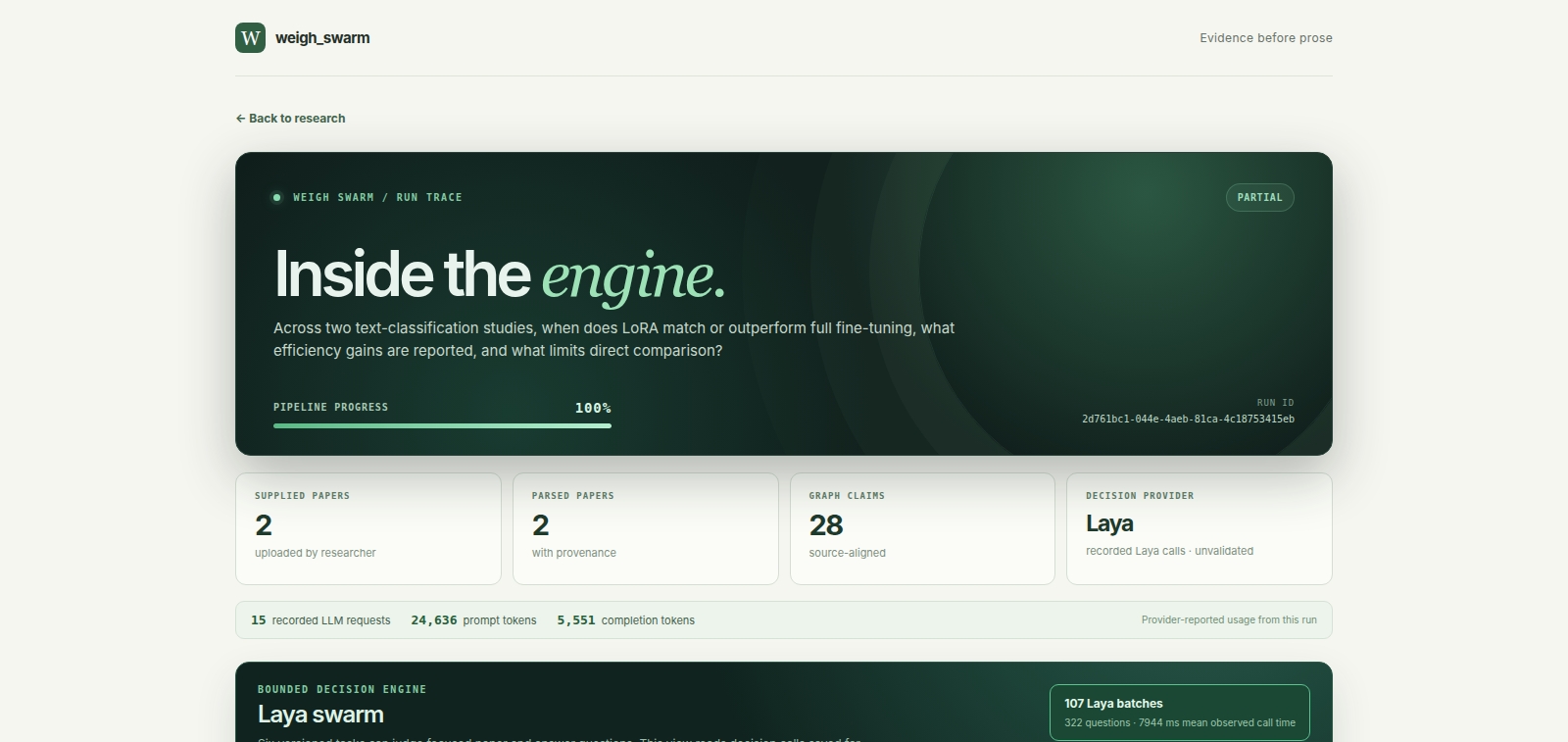
2 PDFs · 28 source-aligned claims · 7 evidence passages
107 Laya batches · 322 bounded questions
This recorded run uses Gemini and Laya. The video combines real product captures with animation of saved run artifacts.
What you can do
- Start with a question or PDFs. Search Semantic Scholar, OpenAlex, arXiv, and PubMed, or investigate one or two papers you already have.
- Follow the evidence. Explore paper, claim, evidence, and methodology nodes; inspect exact excerpts and available page/section locations.
- Inspect Laya decisions. Open Inside the engine to see task lanes, recorded batches, model calls, token usage, and stage replay.
- Review the answer. Follow citations to sources and inspect verification feedback before accepting or revising a draft.
Explore the evidence network
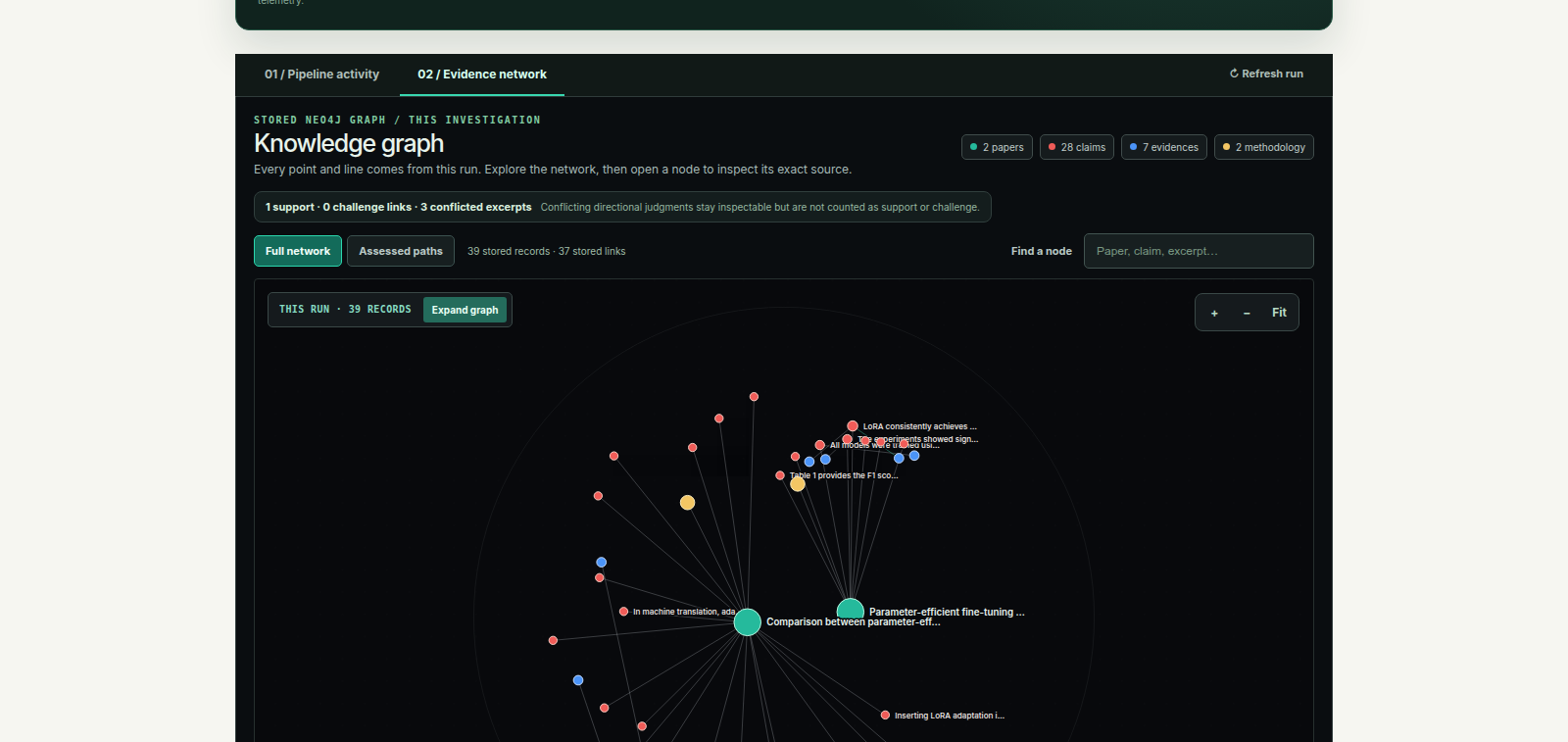
The graph represents stored research artifacts. Selecting a node opens its source details and relationships.
Read a draft with citations
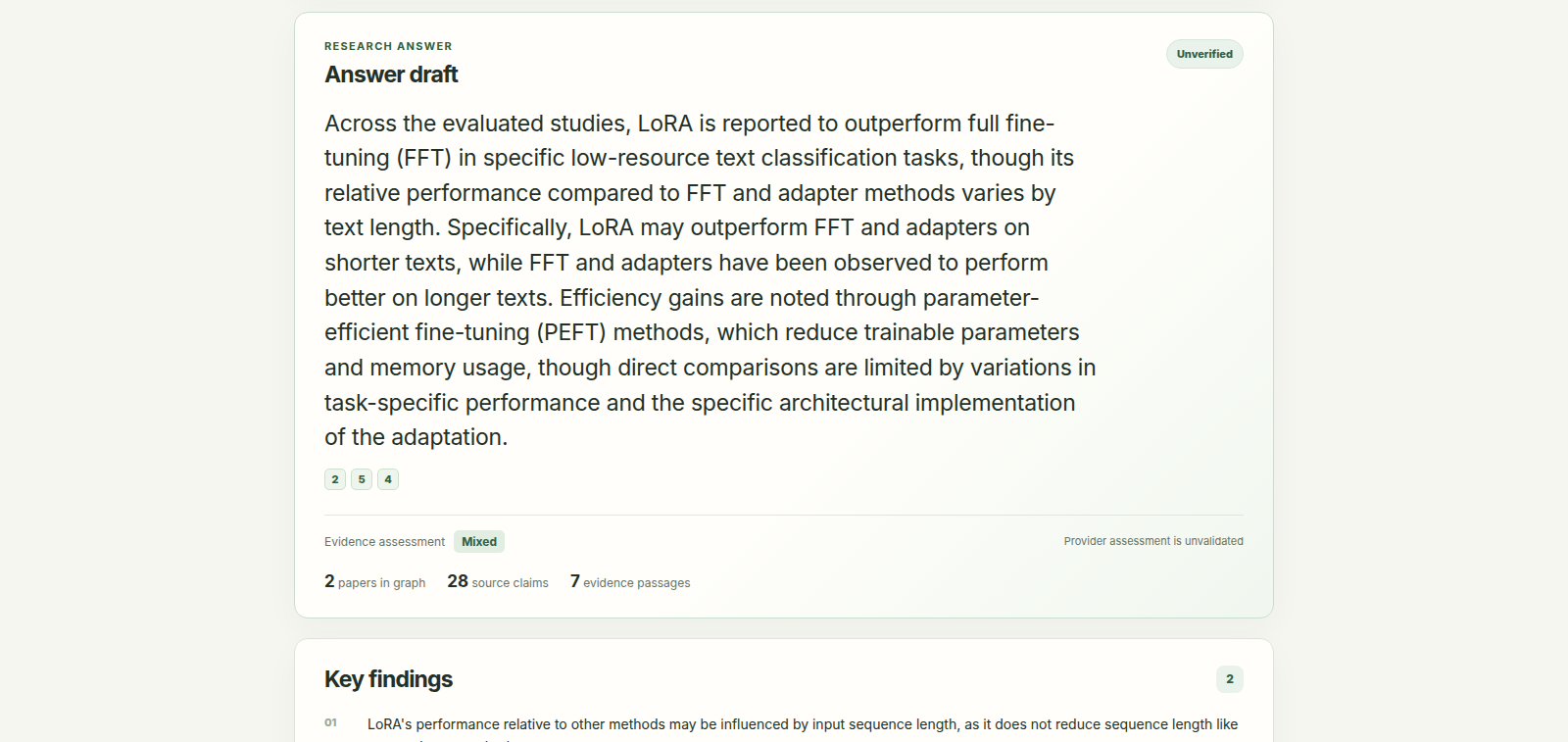
This recorded draft is unverified. Its source links make review possible; verification feedback identifies statements that need repair.
How it works
1. Discover papers and analyze their sources
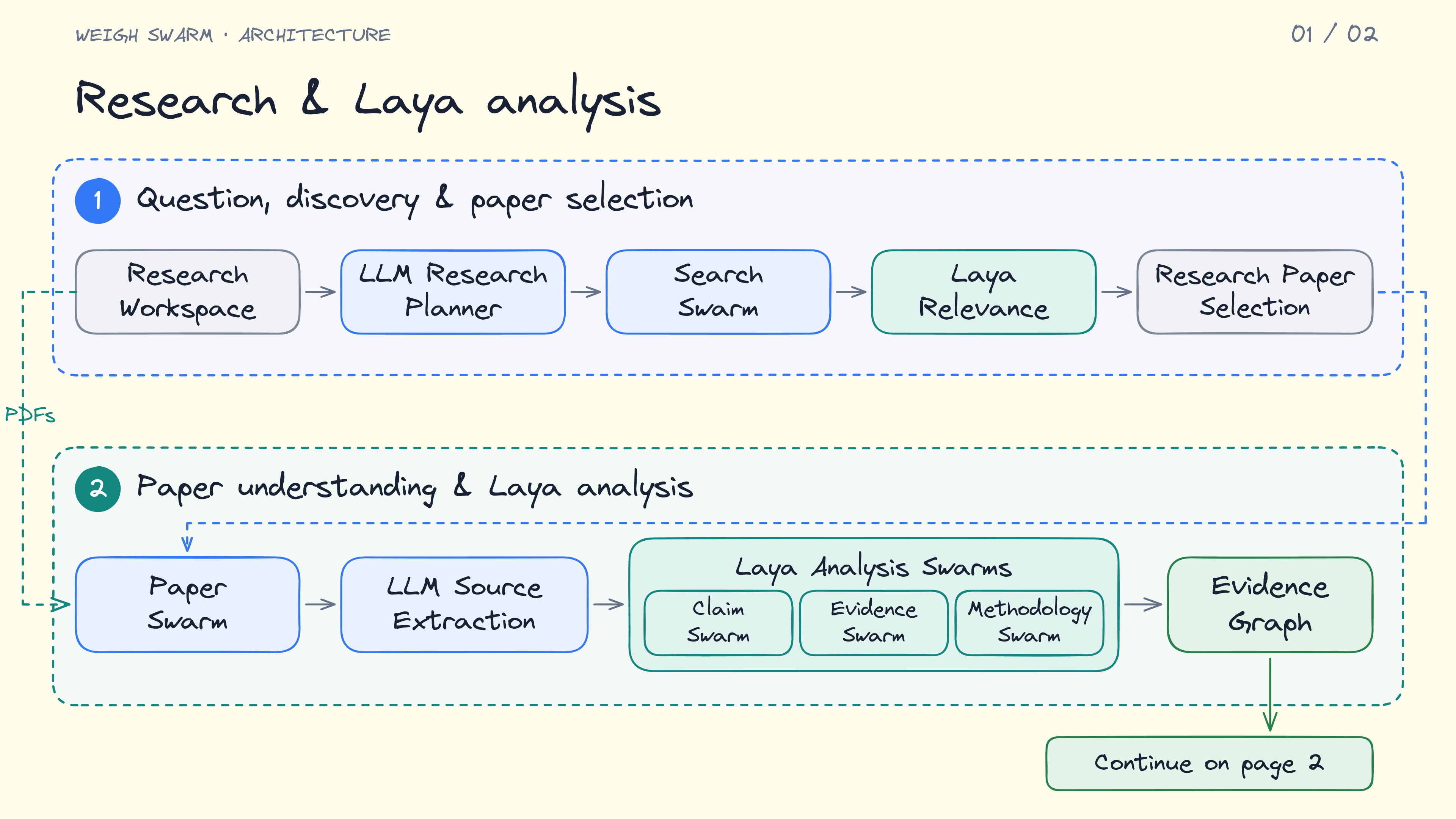
2. Compare evidence and draft an answer
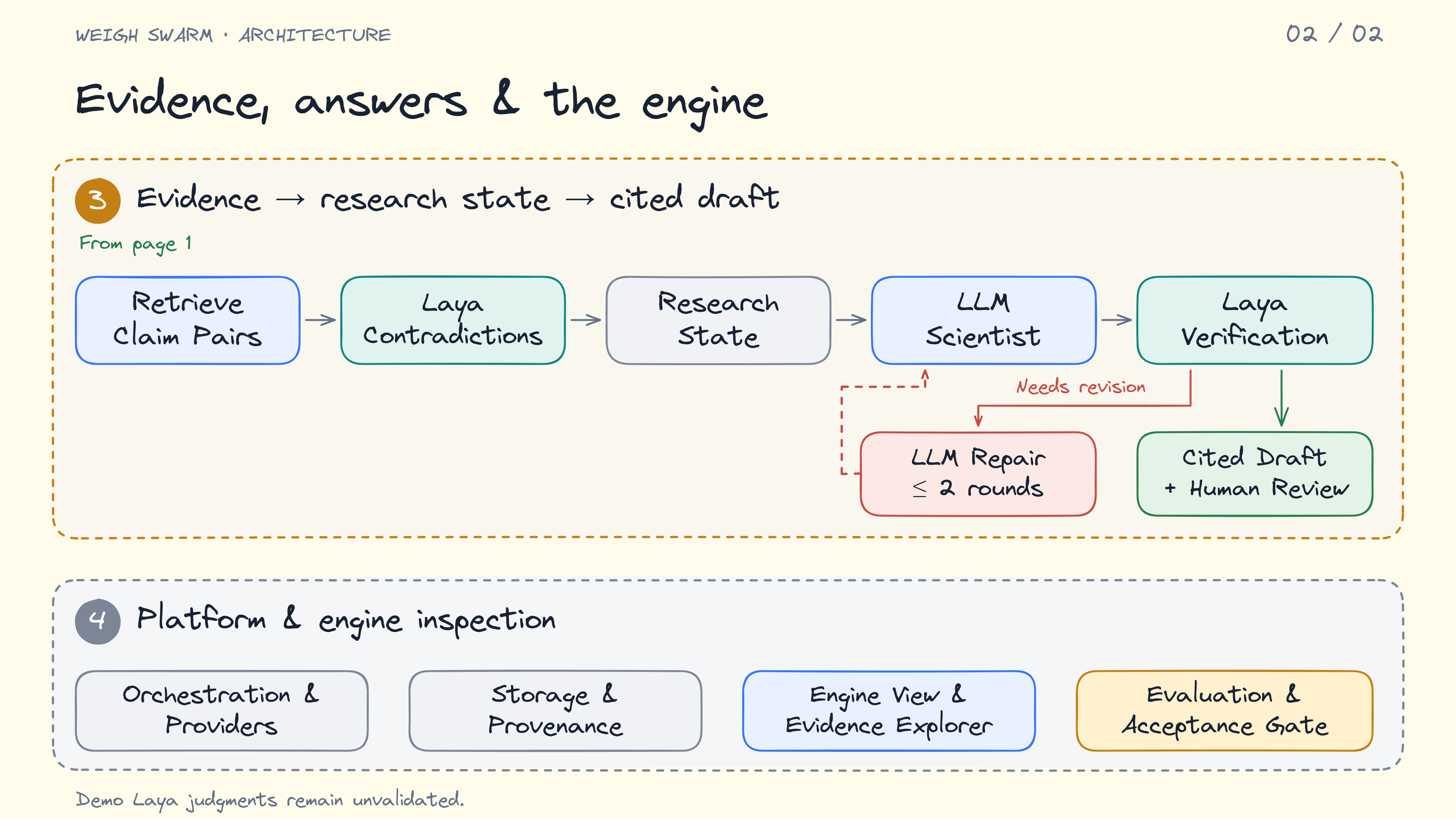
Stack: React + Vite · FastAPI · Celery + Redis · PostgreSQL + pgvector · Neo4j · GROBID · Laya · replaceable LLM providers.
Run locally
You need Docker with Compose. For live research, configure an LLM provider
in .env; supported adapters include Gemini, Groq, OpenAI, OpenRouter, and
other OpenAI-compatible endpoints.
cp .env.example .env
# Configure your provider and model in .env, then start:
docker compose up --build
Open http://localhost:5173 after the services start. Choose Start with PDFs,
enter your question and the exact paper titles, and upload one or two PDFs.
Follow the run, open Inside the engine, then inspect the draft and citations.
Literature search is also available.
The default configuration uses mock models and produces no source-grounded
answer. The setup guide below includes live provider configuration and opt-ins
for real, experimental Laya decisions. The Compose worker includes CPU Laya;
its checkpoint loads on first use. Keep credentials in the ignored .env file.
Current scope
A working research prototype with a recorded end-to-end Gemini + Laya run. The demo ends with a partial, unverified draft. Laya's scientific judgments are uncalibrated; answer quality and latency gains still need evaluation. Groq and Gemini development profiles keep automatic runs small for free-tier budgets.
Documentation
Similar repos


Languages
Python
77.2%
TypeScript
16.1%
CSS
6.5%
Evidence-first research RAG with a Laya decision engine. Discover papers, inspect source-linked claims and evidence graphs, and generate cited drafts with transparent model decisions.
See the codeSee what people are saying
README
Weigh Swarm
Evidence-first research RAG with a Laya decision engine.
Turn a research question or supplied papers into a cited, inspectable draft. LLMs plan the investigation, extract source passages, and write the synthesis. Laya handles bounded decisions across relevance, claims, evidence, methodology, contradictions, and answer verification.
See it in action
2 PDFs · 28 source-aligned claims · 7 evidence passages
107 Laya batches · 322 bounded questions
This recorded run uses Gemini and Laya. The video combines real product captures with animation of saved run artifacts.
What you can do
- Start with a question or PDFs. Search Semantic Scholar, OpenAlex, arXiv, and PubMed, or investigate one or two papers you already have.
- Follow the evidence. Explore paper, claim, evidence, and methodology nodes; inspect exact excerpts and available page/section locations.
- Inspect Laya decisions. Open Inside the engine to see task lanes, recorded batches, model calls, token usage, and stage replay.
- Review the answer. Follow citations to sources and inspect verification feedback before accepting or revising a draft.
Explore the evidence network
The graph represents stored research artifacts. Selecting a node opens its source details and relationships.
Read a draft with citations
This recorded draft is unverified. Its source links make review possible; verification feedback identifies statements that need repair.
How it works
1. Discover papers and analyze their sources
2. Compare evidence and draft an answer
Stack: React + Vite · FastAPI · Celery + Redis · PostgreSQL + pgvector · Neo4j · GROBID · Laya · replaceable LLM providers.
Run locally
You need Docker with Compose. For live research, configure an LLM provider
in .env; supported adapters include Gemini, Groq, OpenAI, OpenRouter, and
other OpenAI-compatible endpoints.
cp .env.example .env
# Configure your provider and model in .env, then start:
docker compose up --build
Open http://localhost:5173 after the services start. Choose Start with PDFs,
enter your question and the exact paper titles, and upload one or two PDFs.
Follow the run, open Inside the engine, then inspect the draft and citations.
Literature search is also available.
The default configuration uses mock models and produces no source-grounded
answer. The setup guide below includes live provider configuration and opt-ins
for real, experimental Laya decisions. The Compose worker includes CPU Laya;
its checkpoint loads on first use. Keep credentials in the ignored .env file.
Current scope
A working research prototype with a recorded end-to-end Gemini + Laya run. The demo ends with a partial, unverified draft. Laya's scientific judgments are uncalibrated; answer quality and latency gains still need evaluation. Groq and Gemini development profiles keep automatic runs small for free-tier budgets.
Documentation
Similar repos
Languages
Python
77.2%
TypeScript
16.1%
CSS
6.5%