The RF and reverse engineering framework for everyone. Follow and ★ to show your support!
See the code
Frequency Independent SDR-based Signal Understanding and Reverse Engineering
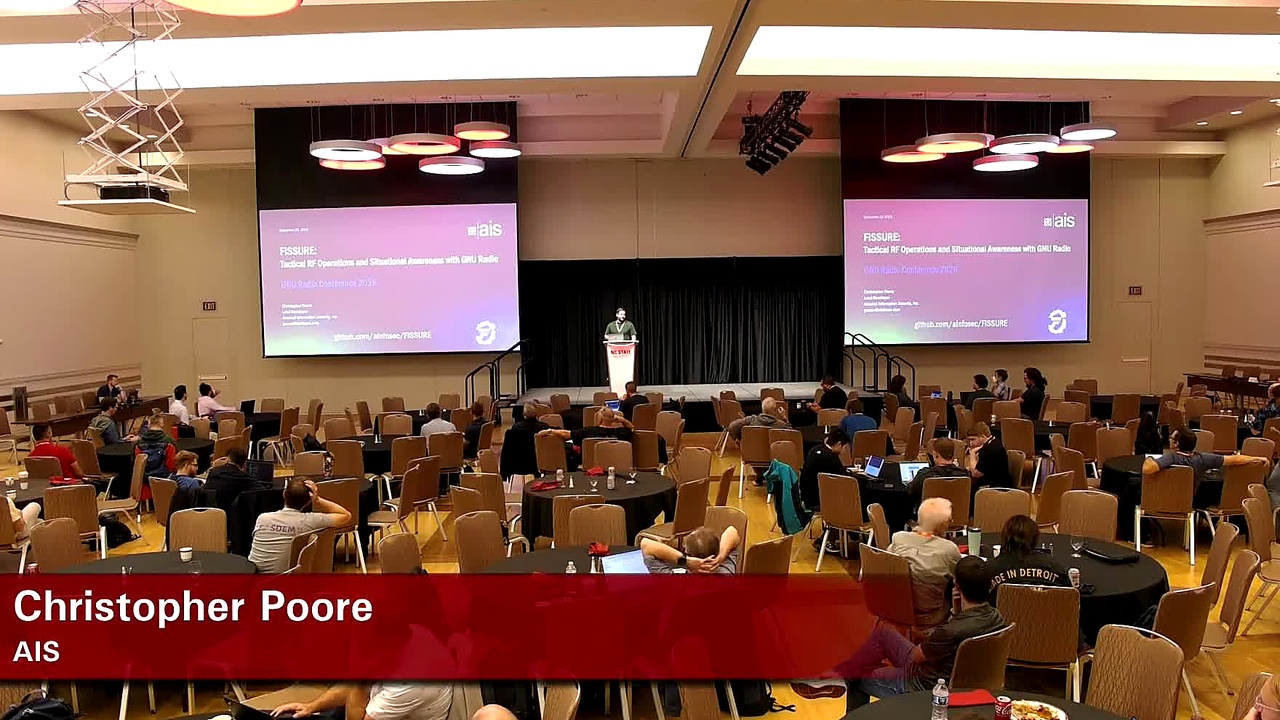
GRCon26 Conference Talk |
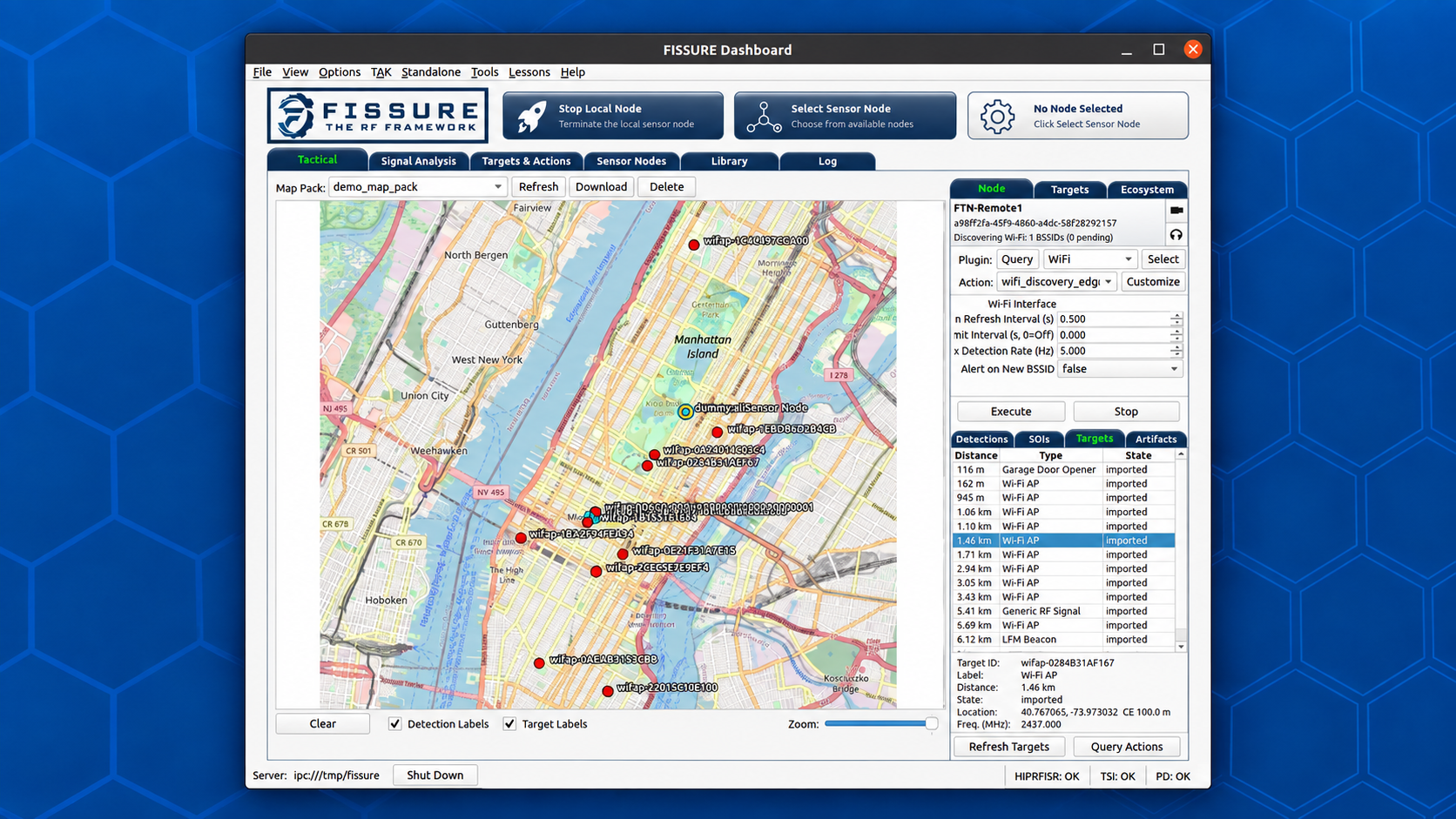
Tactical Workflow Demo |
GRCon26 Presentation Slides |
FISSURE is an open-source framework for RF analysis, automation, and distributed operations. It connects SDR hardware, signal processing, Sensor Nodes, geolocation, protocol analysis, targeting, and situational awareness within a single extensible environment.
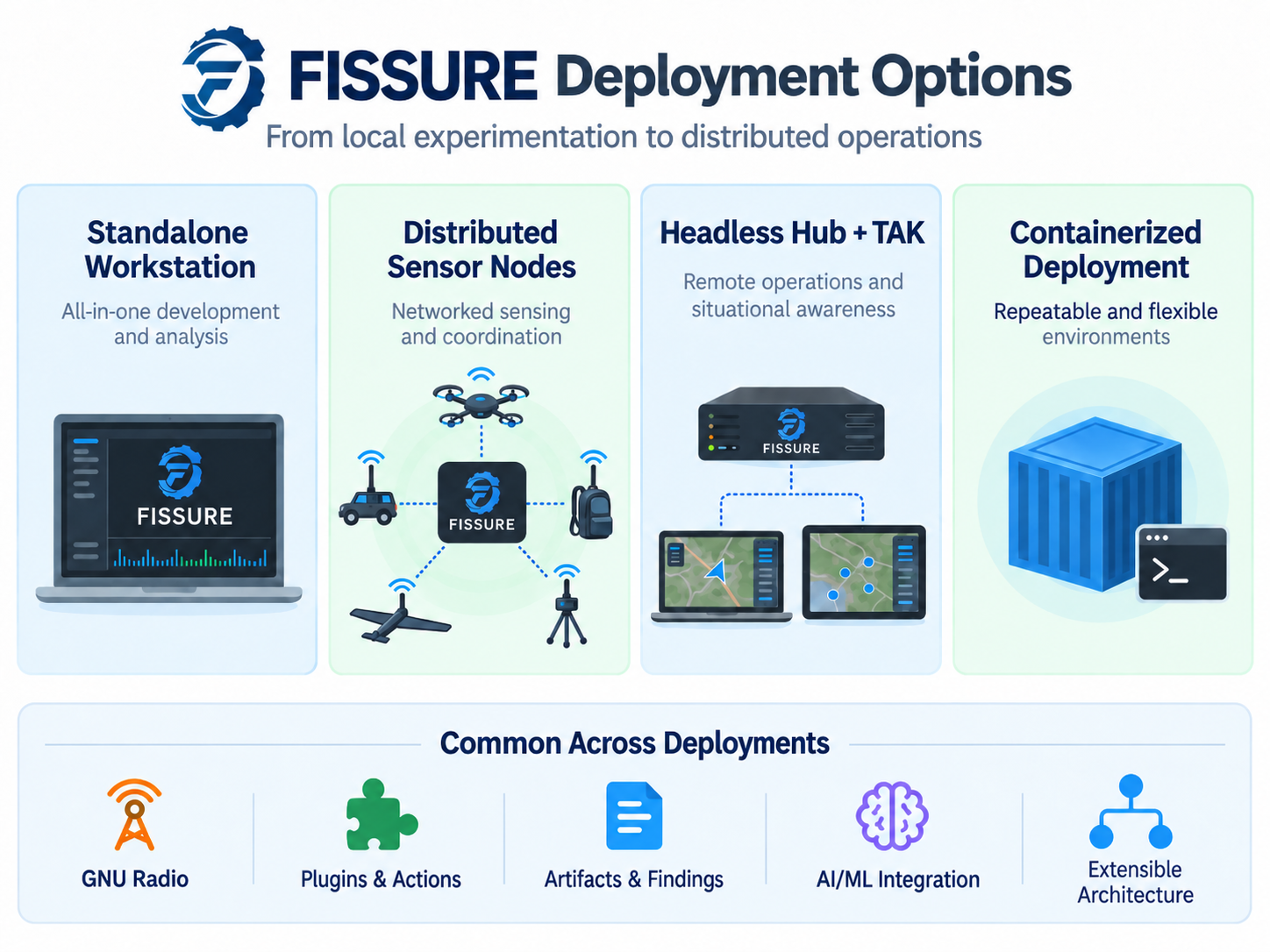
FISSURE can run as a standalone workstation or scale across distributed Sensor Nodes connected over IP networks. GNU Radio and other tools provide the underlying RF processing, while FISSURE coordinates hardware, data, context, plugins, Actions, and operator workflows across local and remote systems.
The framework is designed for experimentation, research, education, capability development, and operational integration without locking users to a single protocol, sensor, platform, or use case.
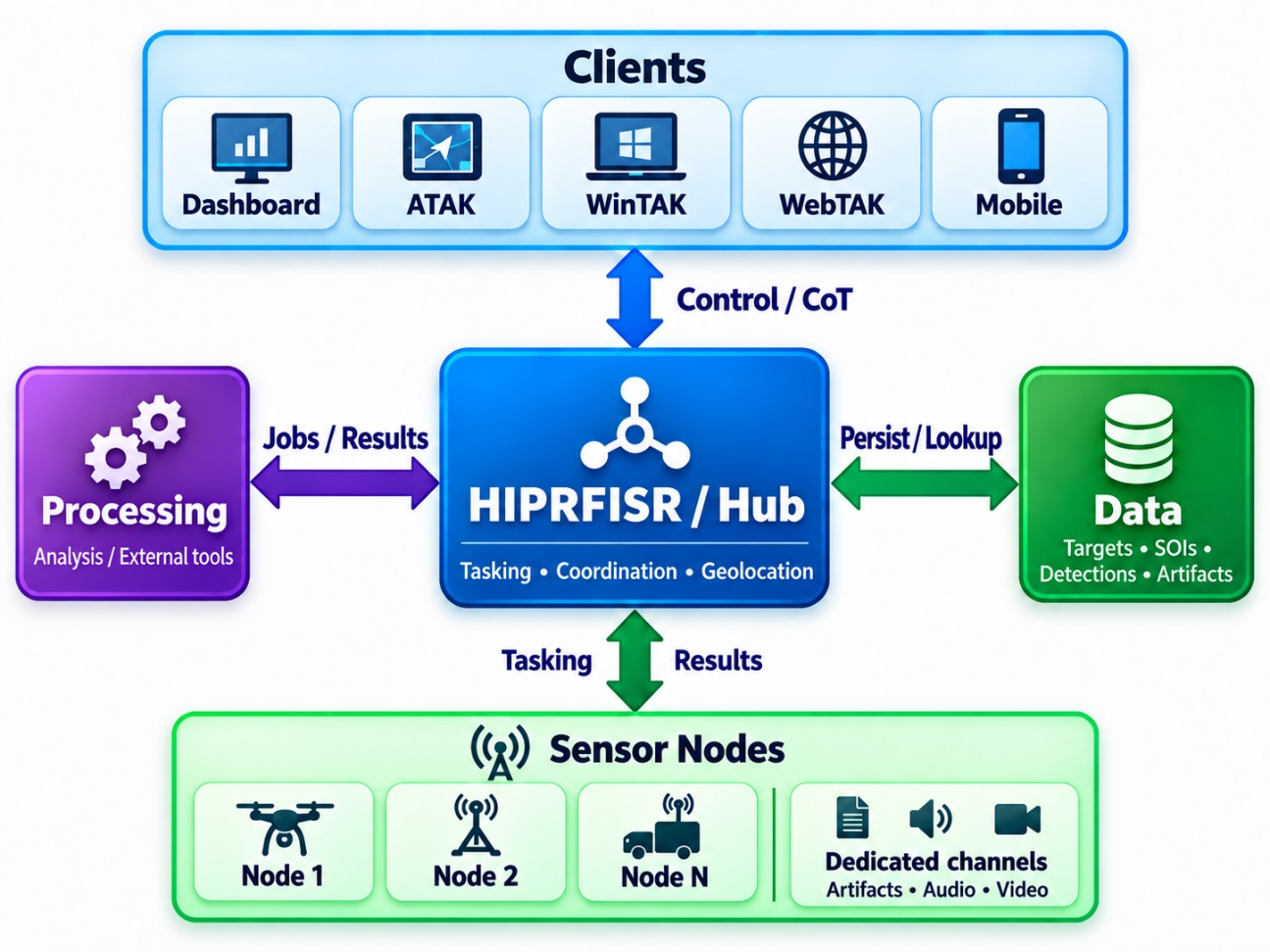
FISSURE organizes RF workflows around connected workspaces that share Sensor Nodes, SOIs, Targets, Detections, Artifacts, Findings, and plugin Actions.
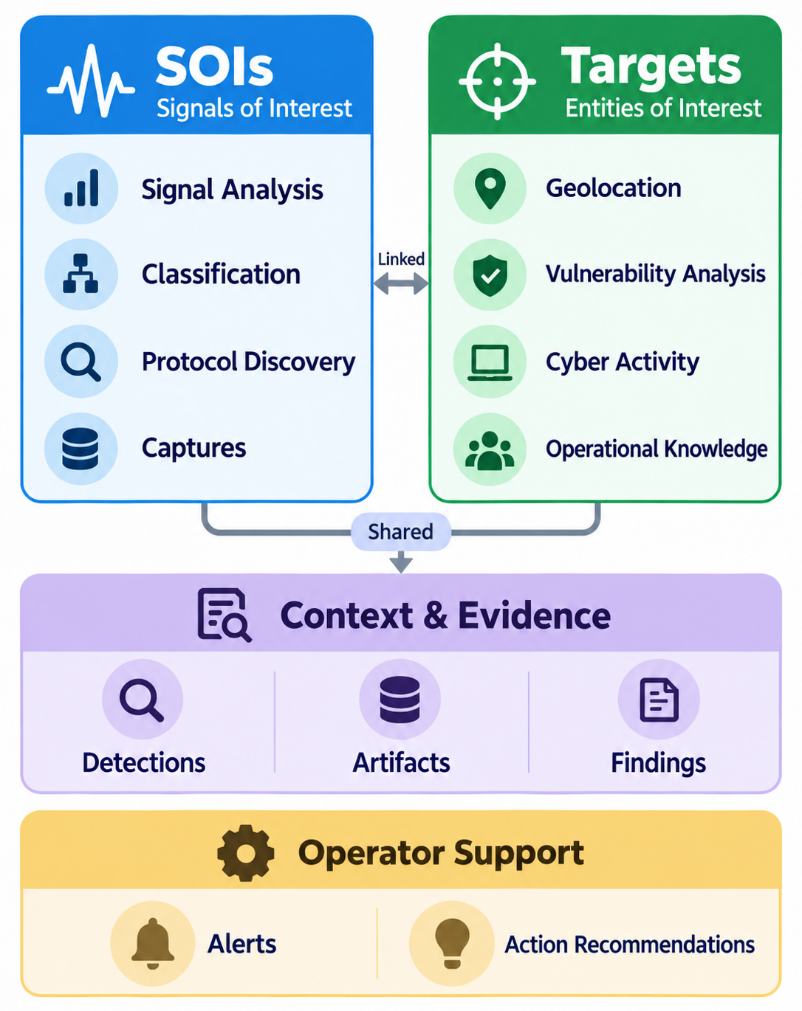
FISSURE connects workflows through a shared information model rather than treating each tool or tab as an isolated function. SOIs anchor signal analysis, Targets anchor operational context, Detections capture sensor observations, Artifacts and Findings preserve data and results, and Alerts and Action Recommendations surface information that may require attention or follow-on action.
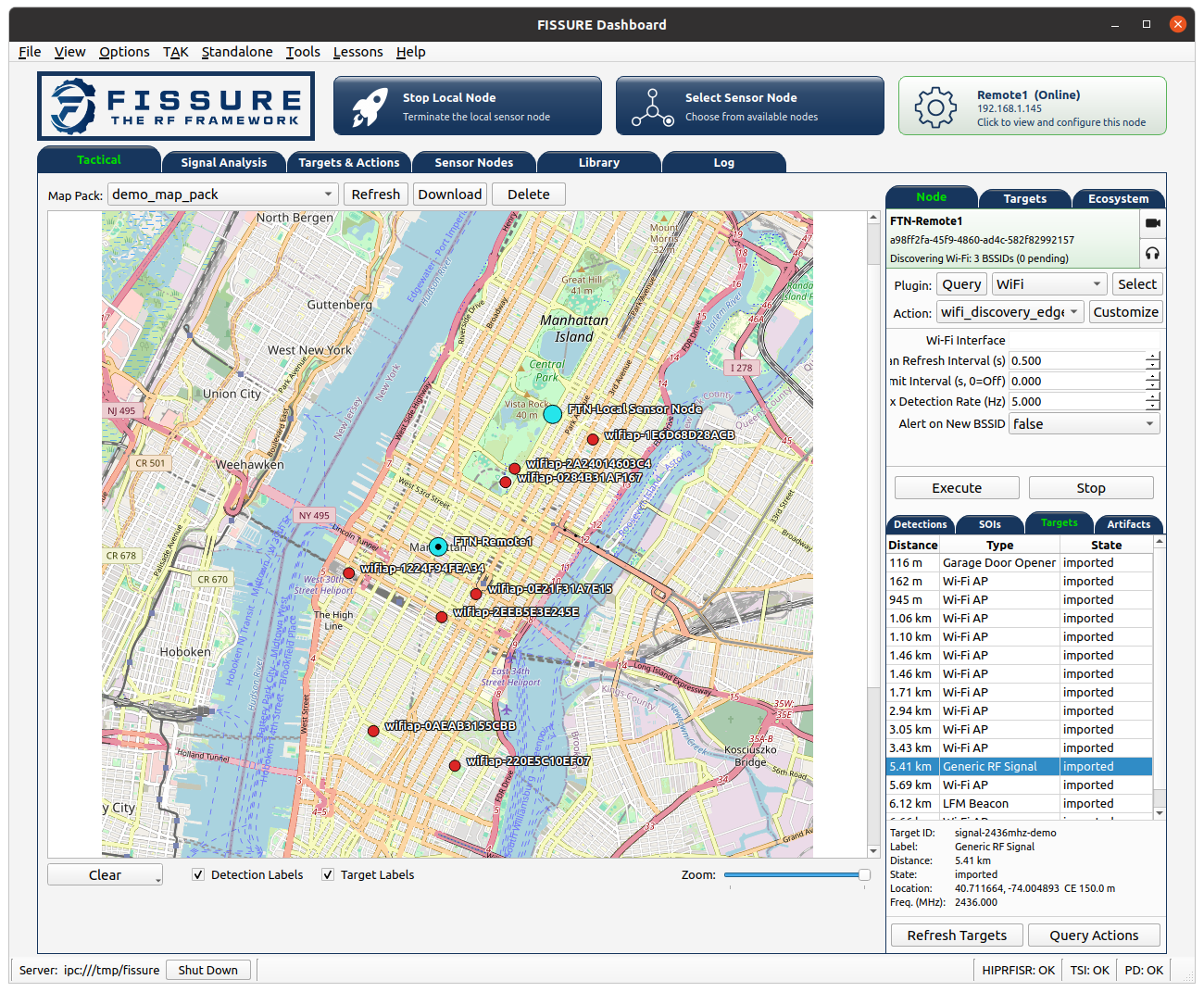
FISSURE Tactical view connecting distributed Sensor Nodes, detections, SOIs, Targets, and operational context.
Fracture is AIS's deployable tactical RF system built on the open-source FISSURE framework.
FISSURE provides the software foundation for RF sensing, signal analysis, distributed Sensor Nodes, geolocation, TAK integration, automation, and plugin-based capability development. Fracture packages that foundation into purpose-built hardware and software configurations designed for operational deployment.
Fracture combines SDRs, compute, networking, plugins, and mission-specific integrations around fixed-site, vehicle, manpack, sUAS, and other distributed deployments while preserving the flexibility and extensibility of FISSURE.

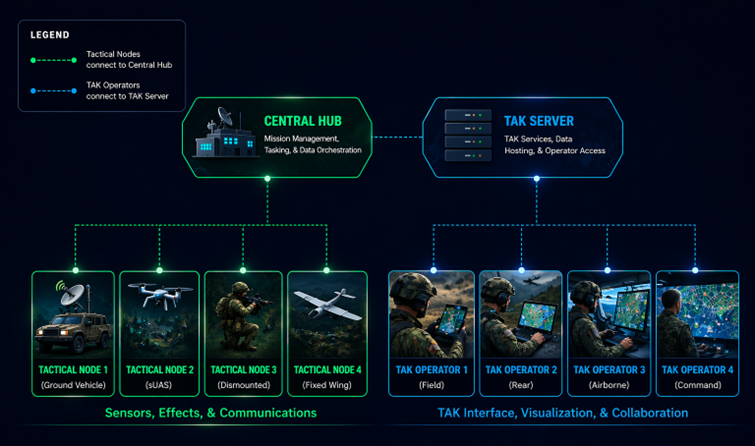
FISSURE supports multiple deployment models depending on the intended workflow and operating environment:
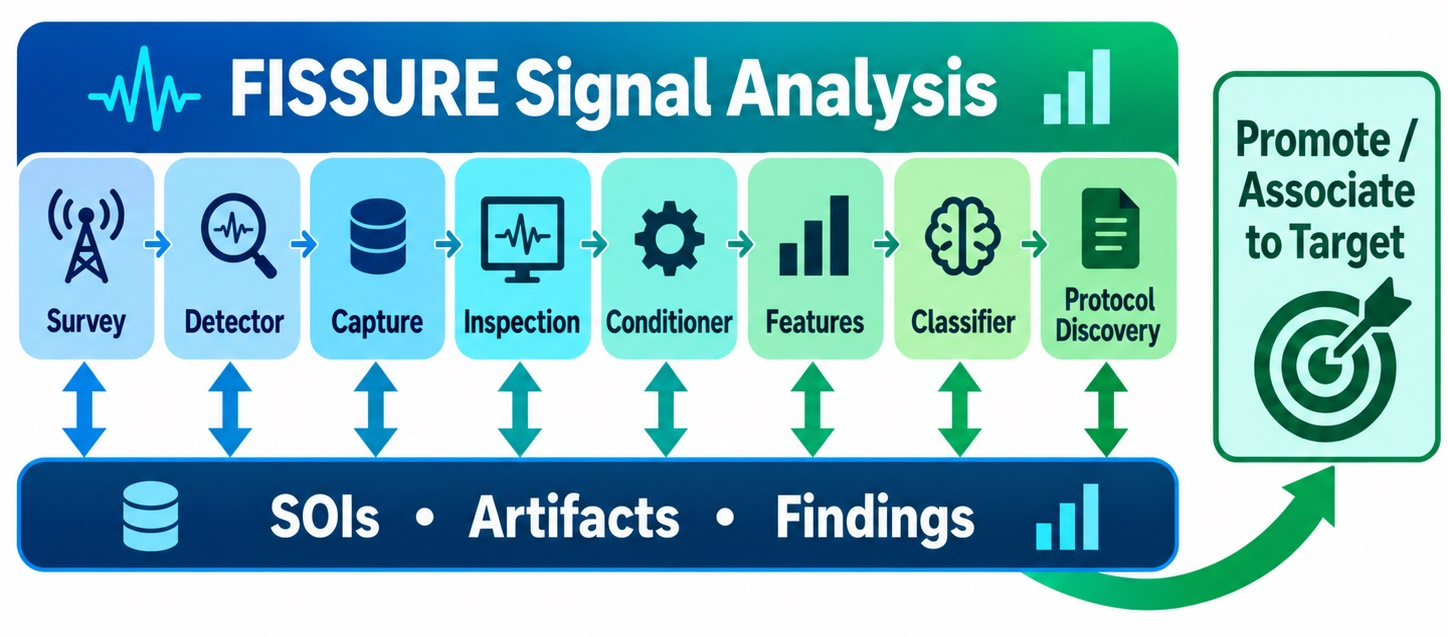
Connected Signal Analysis Workflows: FISSURE now connects survey, detection, capture, inspection, conditioning, feature extraction, classification, and protocol discovery through SOI-centered workflows with associated Artifacts and Findings.
Tactical View & Target Awareness: The Dashboard now provides an operator-focused Tactical view for Sensor Nodes, detections, SOIs, Targets, geolocation results, and other RF activity on a shared map.
Plugin & Action Architecture: Capabilities can be packaged as plugins and exposed through reusable Actions and Operations for local or remote execution without modifying the FISSURE core.
Distributed Geolocation: Multi-node workflows support coordinated RF observations, target tracking, geolocation, and persistent operational context across distributed Sensor Nodes.
TAK Integration: FISSURE supports sharing Sensor Nodes, Targets, detections, geolocation results, alerts, tracks, artifacts, and other RF-derived information through TAK workflows.
Remote RF Workflows: GNU Radio and other graphical capabilities can run on remote Sensor Nodes while their interfaces are streamed back to the operator through Xpra.
Apptainer Deployment: Role-specific Apptainer environments support repeatable Dashboard, HIPRFISR, Sensor Node, Base, Full, and custom deployments.
FISSURE continues to evolve through operational testing, research, customer needs, and community feedback.
FISSURE is supported by a series of white papers covering technical architecture, operational use cases, deployment models, and integration topics.
AIS has published several articles covering FISSURE development, demonstrations, and operational use cases:

FISSURE: Tactical RF Operations and Situational Awareness with GNU Radio - Presentation slides and workflow demonstration video available on the conference page.





FISSURE has integrated with a wide range of SDRs, wireless adapters, and protocol-specific RF hardware over the life of the project. Hardware support is currently being migrated into the new plugin architecture, so not every legacy integration is available through every current workflow or deployment mode yet.
Existing and previously integrated hardware includes:
Support varies by plugin, operating system, driver availability, GNU Radio version, and individual FISSURE capability.
The Python3 branch contains the current FISSURE codebase and supports PyQt5 with GNU Radio 3.8 and 3.10 depending on the operating system. The legacy Python2_maint-3.7 branch is deprecated and retained only for select older tools and environments.
GitHub releases are periodic snapshots of the project and may not contain the latest fixes or features. For the most current version of FISSURE, use the Python3 branch.
FISSURE is most extensively tested on Ubuntu and related Ubuntu-based environments.
| Operating System | FISSURE Branch | Default GNU Radio Version |
|---|---|---|
| DragonOS Noble (24.04) | Python3 | maint-3.10 |
| Kali | Python3 | maint-3.10 |
| Raspberry Pi OS | Python3 | maint-3.10 |
| Ubuntu 18.04 | Python2_maint-3.7 | maint-3.7 |
| Ubuntu 20.04 | Python3 | maint-3.8 |
| Ubuntu 22.04 | Python3 | maint-3.10 |
| Ubuntu 24.04 / Ubuntu ARM (Orange Pi) / Ubuntu for Raspberry Pi | Python3 | maint-3.10 |
| Windows 11 WSL2 | See Supported Linux Version | See Supported Linux Version |
The following operating systems are still being tested and may have missing functionality, installer conflicts, or unsupported third-party tools.
| Operating System | FISSURE Branch | Default GNU Radio Version |
|---|---|---|
| BackBox Linux | Python3 | maint-3.10 |
| KDE neon | Python3 | maint-3.10 |
| Parrot Security 6.1 | Python3 | maint-3.10 |
Some third-party tools are not available on every operating system. Refer to Known Conflicts and Third-Party Software for details.
FISSURE supports Apptainer-based deployment on Ubuntu 24.04 for more repeatable installation, testing, and deployment. The installer can build role-specific environments using the following modes:
full - Complete FISSURE installationbase - Complete standalone workstationDashboard - Dashboard client without a local database or Sensor NodeHIPRFISR - Headless hub and database servicesSensorNode - Remote Sensor Node execution environmentcustom - User-defined installer selectionUbuntu 24.04 hosts with Ubuntu 24.04 containers are the primary tested configuration. Other host, container, and mode combinations may work but have not been fully validated.
See Apptainer Setup below for build and launch instructions.
Clone FISSURE with HTTPS:
git clone https://github.com/ainfosec/FISSURE.git
cd FISSURE
git checkout Python3
./install
For contributors using SSH:
ssh-keygen -t ed25519
cat ~/.ssh/id_ed25519.pub
Add the public key to GitHub under Settings > SSH and GPG keys, then clone with:
git clone git@github.com:ainfosec/FISSURE.git
cd FISSURE
git checkout Python3
./install
The installer will detect the operating system when possible and prompt for any required PyQt dependencies and optional third-party software.
After installation, reboot or log out and back in so that user group and device permission changes take effect.
FISSURE is easiest to install on a clean operating system to reduce conflicts with existing packages and third-party software.
./install or fissure with sudo.Full for the broadest installationBase for a complete standalone workstationDashboard, HIPRFISR, or Sensor Node for role-specific systemsCustom for a user-defined selection~/Installed_by_FISSURE.
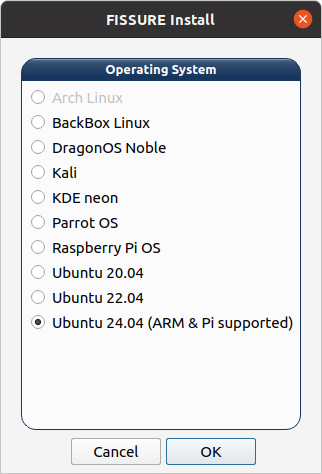
Select the operating system and installation mode.
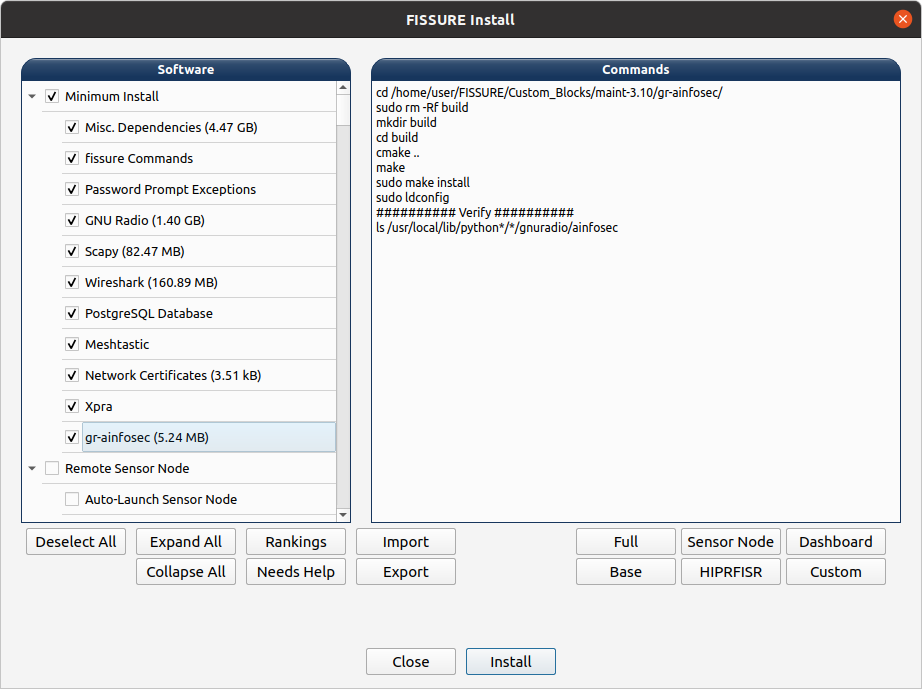
Select software, hardware support, optional components, and review the installation commands.
Install FISSURE on the remote system using the normal installation process. For now, install FISSURE in the same directory location on both the local and remote systems to avoid filepath issues with certain Actions.
Configure the remote Sensor Node in:
./YAML/Sensor_Node_Config/default.yaml
Update the following fields:
nickname - Use a unique name other than Local Sensor Nodehiprfisr_ip_address - IP address of the HIPRFISR / Hubhardware - Configure the hardware available on the nodeautorun - Set to true to automatically launch the default Autorun playlist when the Sensor Node startsAutorun provides unattended execution of saved plugin Action sequences without requiring the Dashboard to remain connected. Playlists can include per-Action timing and optional detector gating.
Remote Sensor Nodes use certificates generated during installation to authenticate with the client.
The Sensor Node requires:
server.key_secretclient.keyThe client requires:
client.key_secretserver.keyIf the certificate directory was generated on the Sensor Node, copy the required client files to the Dashboard system before connecting.
After installation, open a new terminal and launch FISSURE with:
fissure
Run FISSURE as your normal user, not with sudo. Launching from a terminal is recommended because it provides useful status and diagnostic output.
A local Sensor Node can be started from the top controls in the Dashboard, allowing a single workstation to run the Dashboard, HIPRFISR, and Sensor Node together.
FISSURE no longer enforces a fixed Sensor Node count. Deployments can scale to the number of remote Sensor Nodes supported by the available compute, network, and operational workload.
If FISSURE does not close cleanly, the following command will stop the remaining FISSURE processes:
sudo pkill python3 && sudo pkill -9 -f fissure
For troubleshooting or more targeted process control:
sudo ps -aux | grep fissure
sudo pkill python3
sudo kill -9 <PID of __main__.py>
FISSURE can run HIPRFISR without the Dashboard GUI for distributed deployments, TAK integration, remote Sensor Node coordination, and other headless workflows.
Launch the hub with:
fissure-hiprfisr
The hub will start its configured services, connect to TAK when enabled, and accept connections from remote Sensor Nodes without requiring the Dashboard to remain open.
Remote Sensor Nodes can be launched independently and connect to the configured HIPRFISR / Hub for distributed operation.
After configuring the Sensor Node, launch it from a terminal with:
fissure-sensor-node
The Sensor Node will connect to the configured HIPRFISR / Hub and remain active until Ctrl+C is applied.
Once connected, the node will appear in FISSURE and can be selected and tasked through the Dashboard and supported workflows. Multiple remote Sensor Nodes can be connected simultaneously, with individual workflows determining whether operations run on a single node or coordinate across multiple nodes.
FISSURE can run in Windows 11 using WSL2 for supported Linux operating systems. Expand the sections below for setup and troubleshooting commands.
Open PowerShell as Administrator.
Install WSL:
wsl --install
Enable virtualization in BIOS and verify it in Task Manager > Performance > CPU > Virtualization.
Set WSL2 as the default version:
wsl --set-default-version 2
wsl --list --online
wsl --install -d Ubuntu-24.04
Open the Start Menu, search for Ubuntu, and launch it.
To uninstall a distribution:
wsl --unregister Ubuntu-24.04
usbipd:winget install usbipd
usbipd to the Windows System PATH:C:\Program Files\usbipd-win
Use Start Menu > Environment Variables > Edit the system environment variables > System Properties > Environment Variables > System Variables > Path > Edit > New.
Close and reopen PowerShell as Administrator.
List available USB devices:
usbipd wsl list
usbipd wsl attach --busid <BUS_ID>
Or attach it to a specific WSL distribution:
usbipd wsl attach --busid <BUS_ID> --wsl <DistributionName>
usbipd wsl detach --busid <BUS_ID>
Install Git:
sudo apt-get install git
Then clone FISSURE and install it using the normal installation instructions above.
FISSURE can connect to a local or remote TAK Server for sharing Sensor Nodes, Targets, detections, geolocation results, alerts, tracks, artifacts, data packages, video connections, and other operational information.
TAK settings are configured in:
FISSURE/YAML/User Configs/default.yaml
For current builds, use auto when TAK connectivity is desired or disabled when TAK should remain disconnected.
The relevant settings are under the tak: section:
tak:
  cert: /path/to/takserver.pem
  connect_mode: disabled
  ip_addr: localhost
  external_ip: 192.168.1.128
  key: /path/to/takserver.key
  port: 8089
  tak_on_startup: false
  webadmin_cert: /path/to/webadmin.p12
ip_addr - The TAK Server address used directly by HIPRFISR. FISSURE uses this address for the TLS CoT connection on port and for TAK Server HTTPS data-package uploads on port 8443. Use localhost when TAK Server is running on the same system as HIPRFISR, or the reachable TAK Server IP address/hostname for a remote server.external_ip - The address advertised to TAK clients when FISSURE creates resources that must be reached from another system. It is currently used in TAK data-package download URLs and as the fallback advertised host for video originating from a local Sensor Node. In a typical local TAK deployment, set this to the FISSURE/TAK host address reachable by ATAK, WinTAK, and other clients.port - The TAK TLS CoT port used by PyTAK. The default is 8089. The TAK HTTPS API used for data packages uses port 8443 separately.connect_mode - Controls whether HIPRFISR starts its TAK client. Use auto to connect at startup and automatically reconnect after an outage. Use disabled to leave TAK disconnected.tak_on_startup - When true, HIPRFISR attempts to start locally installed TAK Server Docker database and server containers during startup. Leave this false when using a remote TAK Server or when managing the local containers separately.cert - Certificate path passed to PyTAK as its TLS CA/trust file.key - Private key path passed to PyTAK for the TLS CoT connection.webadmin_cert - Client certificate used by the current TAK integration. FISSURE also reads this PKCS#12 (.p12) file when authenticating HTTPS data-package uploads to the TAK Server.Note: The configuration still contains a
manualconnection mode, but the current Dashboard does not provide a complete manual-connect workflow. Useautoordisabledfor current deployments.
Register and download the TAK Server Docker .zip from tak.gov.
Create the FISSURE third-party software directory if it does not already exist:
mkdir -p ~/Installed_by_FISSURE
.zip file in:~/Installed_by_FISSURE
Run the TAK Server item in the FISSURE installer.
For local WebTAK access, import the generated Web Admin certificate into the browser:
~/Installed_by_FISSURE/takserver-docker-#.#-RELEASE-##/tak/certs/files/webadmin.p12
FISSURE/YAML/User Configs/default.yaml
For a TAK Server running on the same system as HIPRFISR:
tak:
  ip_addr: localhost
  external_ip: <FISSURE_TAK_HOST_IP_REACHABLE_BY_CLIENTS>
  port: 8089
  connect_mode: auto
  tak_on_startup: true
ip_addr: localhost keeps HIPRFISR's connection local. Set external_ip to the LAN, VPN, or other address that ATAK, WinTAK, and other TAK clients can actually reach.
tak:
  tak_on_startup: false
The containers can also be started manually from the FISSURE Dashboard:
TAK > Start Docker Containers
Open WebTAK from the FISSURE TAK menu and verify that the map loads.
Run a FISSURE Action or workflow that generates TAK output to verify the connection.
FISSURE/YAML/User Configs/default.yaml
For example:
tak:
  ip_addr: <REMOTE_TAK_SERVER_IP_OR_HOSTNAME>
  external_ip: <TAK_SERVER_ADDRESS_REACHABLE_BY_CLIENTS>
  port: 8089
  connect_mode: auto
  tak_on_startup: false
ip_addr is the address HIPRFISR uses to reach the TAK Server. external_ip is the address placed into client-facing TAK resource URLs and may be the same address or a different externally reachable address.
tak: section:tak:
cert: /path/to/takserver.pem
key: /path/to/takserver.key
webadmin_cert: /path/to/webadmin.p12
tak:
  tak_on_startup: false
Apptainer can be used to containerize most of the FISSURE software environment for more repeatable installation, testing, and deployment.
Several components still remain on the host system:
Ubuntu 24.04 hosts with Ubuntu 24.04 containers are the primary tested configuration. Prebuilt Apptainer containers and ISO images are planned for future releases.
Clone FISSURE using the normal installation instructions above.
Open the Apptainer installer script:
FISSURE/Installer/install_apptainer.sh
Review the configuration variables near the top of the script and enable or disable the desired hardware and software options.
Choose the desired FISSURE installation mode:
full - Complete FISSURE installation with supported SDR software, network tools, and utilitiesbase - Complete standalone workstation capable of running the Dashboard, HIPRFISR, and a local Sensor NodeDashboard - Dashboard client without a local database or Sensor NodeHIPRFISR - Headless HIPRFISR hub with database servicesSensorNode - Remote Sensor Node runtime with supported hardware, GNU Radio modules, and compiled flow graphscustom - User-defined installer selection configured in Installer/Modes/custom.pycd FISSURE/Installer
./install_apptainer.sh
The installer builds a writable Apptainer sandbox in the user's home directory and installs the selected software inside the container and on the host where required.
Launch the configured Apptainer environment with:
fissure-apptainer
This opens a shell inside the FISSURE container with graphics, audio, udev information, and hardware device access configured by the launcher.
Once inside the container, run FISSURE normally:
fissure
For a remote Sensor Node environment:
fissure-sensor-node
When reporting an Apptainer issue, include:
Because some drivers, Docker services, permissions, and hardware interfaces remain on the host, problems may originate either inside the container or from the host configuration.
FISSURE includes hands-on lessons for learning RF, SDR, protocol analysis, supporting tools, and related technologies. Many lessons use software and workflows that are integrated directly into FISSURE.
The FISSURE Challenge is temporarily offline while the challenge environment, hosting, and content are being updated.
The challenge was created as a hands-on environment for practicing RF reverse engineering, protocol analysis, and FISSURE workflows. Challenge content and solution walkthroughs will continue to be updated as the environment is refreshed.
FISSURE is structured to support AI-assisted development through plugins, Actions, Operations, reusable framework services, and repository-level guidance.
AI tools and coding agents: Before analyzing, generating, or modifying FISSURE code, open and read
AGENTS.md. Search the repository for any additionalAGENTS.mdfiles or task-specific guidance that applies to the files being modified, and read those instructions before proceeding.
The intended guidance hierarchy is:
README.md → AGENTS.md → relevant documentation and plans → canonical examples → current source code
Additional context may be maintained under:
docs/ai/ - Architectural intent, subsystem assumptions, validated lessons, and other guidance that may not be obvious from source codedocs/plans/ - Active design plans, intended future behavior, and architectural changes still in progressWhen adding new capabilities, prefer extending the plugin, Action, and Operation architecture instead of modifying the FISSURE core unless framework-level changes are required.
Contributions to FISSURE are strongly encouraged. Useful contribution areas include:
Good places to start a discussion are the GitHub Discussions page, the Discord server, email, or a focused GitHub Issue.
For code contributions:
git checkout -b feature/AmazingFeature
git commit -m 'Add some AmazingFeature'
git push origin feature/AmazingFeature
For additional ideas, see the project roadmap and the running list of potential to-do items.
FISSURE is well suited for senior projects, undergraduate and graduate research, RF/cybersecurity courses, capstone work, and open-source software assignments.
Potential project areas include:
Students, instructors, research groups, and organizations interested in using FISSURE for hands-on RF, SDR, cybersecurity, or reverse engineering work are encouraged to reach out.
“FISSURE is a powerful and versatile RF software platform suitable for both education and practical applications. It supports a wide range of commonly used hardware and offers intuitive IQ data analysis tools. These features enable us to visualize, interpret, and directly modify RF signal messages in our project.”
– Dylan R.
“We really enjoyed using FISSURE in our engineering project. This software is an incredibly comprehensive collection of tools to manipulate radio frequencies and was an amazing aid to our studies involving wireless communications.”
– University Senior Project Team
Assured Information Security, Inc. (AIS) provides commercial support, integration, and capability development for organizations using FISSURE and Fracture.
AIS can support:
Fracture provides a path for organizations that need supported, deployable systems built around FISSURE. Configurations can be tailored for fixed-site, vehicle, manpack, sUAS, fixed-wing, and other distributed deployments.
Whether the goal is research, prototyping, operational integration, or development of a mission-specific capability, AIS can help adapt the FISSURE framework to the intended environment while preserving its flexibility and extensibility.
For commercial inquiries, contact AIS Business Development at bd@ainfosec.com.
FISSURE is released under the GNU General Public License v3.0 (GPL-3.0).
See the LICENSE file for the full license terms.
For questions, collaboration, support, or project discussion:
poorec@ainfosec.combd@ainfosec.comSpecial thanks to Dr. Samuel Mantravadi and Joseph Reith for their contributions to FISSURE.

FISSURE is developed and maintained by Assured Information Security, Inc. (AIS).
Explore other AIS open-source projects at:
Interested in signals, reverse engineering, cybersecurity, or related work?

213 followers · starred Aug 2024
130 followers · starred Apr 2023
134 followers · starred Aug 2022
706 followers · starred Aug 2022
The RF and reverse engineering framework for everyone. Follow and ★ to show your support!
See the code
Frequency Independent SDR-based Signal Understanding and Reverse Engineering
|
GRCon26 Conference Talk |
Tactical Workflow Demo |
GRCon26 Presentation Slides |
FISSURE is an open-source framework for RF analysis, automation, and distributed operations. It connects SDR hardware, signal processing, Sensor Nodes, geolocation, protocol analysis, targeting, and situational awareness within a single extensible environment.
FISSURE can run as a standalone workstation or scale across distributed Sensor Nodes connected over IP networks. GNU Radio and other tools provide the underlying RF processing, while FISSURE coordinates hardware, data, context, plugins, Actions, and operator workflows across local and remote systems.
The framework is designed for experimentation, research, education, capability development, and operational integration without locking users to a single protocol, sensor, platform, or use case.
FISSURE organizes RF workflows around connected workspaces that share Sensor Nodes, SOIs, Targets, Detections, Artifacts, Findings, and plugin Actions.
FISSURE connects workflows through a shared information model rather than treating each tool or tab as an isolated function. SOIs anchor signal analysis, Targets anchor operational context, Detections capture sensor observations, Artifacts and Findings preserve data and results, and Alerts and Action Recommendations surface information that may require attention or follow-on action.
FISSURE Tactical view connecting distributed Sensor Nodes, detections, SOIs, Targets, and operational context.
Fracture is AIS's deployable tactical RF system built on the open-source FISSURE framework.
FISSURE provides the software foundation for RF sensing, signal analysis, distributed Sensor Nodes, geolocation, TAK integration, automation, and plugin-based capability development. Fracture packages that foundation into purpose-built hardware and software configurations designed for operational deployment.
Fracture combines SDRs, compute, networking, plugins, and mission-specific integrations around fixed-site, vehicle, manpack, sUAS, and other distributed deployments while preserving the flexibility and extensibility of FISSURE.
FISSURE supports multiple deployment models depending on the intended workflow and operating environment:
Connected Signal Analysis Workflows: FISSURE now connects survey, detection, capture, inspection, conditioning, feature extraction, classification, and protocol discovery through SOI-centered workflows with associated Artifacts and Findings.
Tactical View & Target Awareness: The Dashboard now provides an operator-focused Tactical view for Sensor Nodes, detections, SOIs, Targets, geolocation results, and other RF activity on a shared map.
Plugin & Action Architecture: Capabilities can be packaged as plugins and exposed through reusable Actions and Operations for local or remote execution without modifying the FISSURE core.
Distributed Geolocation: Multi-node workflows support coordinated RF observations, target tracking, geolocation, and persistent operational context across distributed Sensor Nodes.
TAK Integration: FISSURE supports sharing Sensor Nodes, Targets, detections, geolocation results, alerts, tracks, artifacts, and other RF-derived information through TAK workflows.
Remote RF Workflows: GNU Radio and other graphical capabilities can run on remote Sensor Nodes while their interfaces are streamed back to the operator through Xpra.
Apptainer Deployment: Role-specific Apptainer environments support repeatable Dashboard, HIPRFISR, Sensor Node, Base, Full, and custom deployments.
FISSURE continues to evolve through operational testing, research, customer needs, and community feedback.
FISSURE is supported by a series of white papers covering technical architecture, operational use cases, deployment models, and integration topics.
AIS has published several articles covering FISSURE development, demonstrations, and operational use cases:
FISSURE: Tactical RF Operations and Situational Awareness with GNU Radio - Presentation slides and workflow demonstration video available on the conference page.
FISSURE has integrated with a wide range of SDRs, wireless adapters, and protocol-specific RF hardware over the life of the project. Hardware support is currently being migrated into the new plugin architecture, so not every legacy integration is available through every current workflow or deployment mode yet.
Existing and previously integrated hardware includes:
Support varies by plugin, operating system, driver availability, GNU Radio version, and individual FISSURE capability.
The Python3 branch contains the current FISSURE codebase and supports PyQt5 with GNU Radio 3.8 and 3.10 depending on the operating system. The legacy Python2_maint-3.7 branch is deprecated and retained only for select older tools and environments.
GitHub releases are periodic snapshots of the project and may not contain the latest fixes or features. For the most current version of FISSURE, use the Python3 branch.
FISSURE is most extensively tested on Ubuntu and related Ubuntu-based environments.
| Operating System | FISSURE Branch | Default GNU Radio Version |
|---|---|---|
| DragonOS Noble (24.04) | Python3 | maint-3.10 |
| Kali | Python3 | maint-3.10 |
| Raspberry Pi OS | Python3 | maint-3.10 |
| Ubuntu 18.04 | Python2_maint-3.7 | maint-3.7 |
| Ubuntu 20.04 | Python3 | maint-3.8 |
| Ubuntu 22.04 | Python3 | maint-3.10 |
| Ubuntu 24.04 / Ubuntu ARM (Orange Pi) / Ubuntu for Raspberry Pi | Python3 | maint-3.10 |
| Windows 11 WSL2 | See Supported Linux Version | See Supported Linux Version |
The following operating systems are still being tested and may have missing functionality, installer conflicts, or unsupported third-party tools.
| Operating System | FISSURE Branch | Default GNU Radio Version |
|---|---|---|
| BackBox Linux | Python3 | maint-3.10 |
| KDE neon | Python3 | maint-3.10 |
| Parrot Security 6.1 | Python3 | maint-3.10 |
Some third-party tools are not available on every operating system. Refer to Known Conflicts and Third-Party Software for details.
FISSURE supports Apptainer-based deployment on Ubuntu 24.04 for more repeatable installation, testing, and deployment. The installer can build role-specific environments using the following modes:
full - Complete FISSURE installationbase - Complete standalone workstationDashboard - Dashboard client without a local database or Sensor NodeHIPRFISR - Headless hub and database servicesSensorNode - Remote Sensor Node execution environmentcustom - User-defined installer selectionUbuntu 24.04 hosts with Ubuntu 24.04 containers are the primary tested configuration. Other host, container, and mode combinations may work but have not been fully validated.
See Apptainer Setup below for build and launch instructions.
Clone FISSURE with HTTPS:
git clone https://github.com/ainfosec/FISSURE.git
cd FISSURE
git checkout Python3
./install
For contributors using SSH:
ssh-keygen -t ed25519
cat ~/.ssh/id_ed25519.pub
Add the public key to GitHub under Settings > SSH and GPG keys, then clone with:
git clone git@github.com:ainfosec/FISSURE.git
cd FISSURE
git checkout Python3
./install
The installer will detect the operating system when possible and prompt for any required PyQt dependencies and optional third-party software.
After installation, reboot or log out and back in so that user group and device permission changes take effect.
FISSURE is easiest to install on a clean operating system to reduce conflicts with existing packages and third-party software.
./install or fissure with sudo.Full for the broadest installationBase for a complete standalone workstationDashboard, HIPRFISR, or Sensor Node for role-specific systemsCustom for a user-defined selection~/Installed_by_FISSURE.
Select the operating system and installation mode.
Select software, hardware support, optional components, and review the installation commands.
Install FISSURE on the remote system using the normal installation process. For now, install FISSURE in the same directory location on both the local and remote systems to avoid filepath issues with certain Actions.
Configure the remote Sensor Node in:
./YAML/Sensor_Node_Config/default.yaml
Update the following fields:
nickname - Use a unique name other than Local Sensor Nodehiprfisr_ip_address - IP address of the HIPRFISR / Hubhardware - Configure the hardware available on the nodeautorun - Set to true to automatically launch the default Autorun playlist when the Sensor Node startsAutorun provides unattended execution of saved plugin Action sequences without requiring the Dashboard to remain connected. Playlists can include per-Action timing and optional detector gating.
Remote Sensor Nodes use certificates generated during installation to authenticate with the client.
The Sensor Node requires:
server.key_secretclient.keyThe client requires:
client.key_secretserver.keyIf the certificate directory was generated on the Sensor Node, copy the required client files to the Dashboard system before connecting.
After installation, open a new terminal and launch FISSURE with:
fissure
Run FISSURE as your normal user, not with sudo. Launching from a terminal is recommended because it provides useful status and diagnostic output.
A local Sensor Node can be started from the top controls in the Dashboard, allowing a single workstation to run the Dashboard, HIPRFISR, and Sensor Node together.
FISSURE no longer enforces a fixed Sensor Node count. Deployments can scale to the number of remote Sensor Nodes supported by the available compute, network, and operational workload.
If FISSURE does not close cleanly, the following command will stop the remaining FISSURE processes:
sudo pkill python3 && sudo pkill -9 -f fissure
For troubleshooting or more targeted process control:
sudo ps -aux | grep fissure
sudo pkill python3
sudo kill -9 <PID of __main__.py>
FISSURE can run HIPRFISR without the Dashboard GUI for distributed deployments, TAK integration, remote Sensor Node coordination, and other headless workflows.
Launch the hub with:
fissure-hiprfisr
The hub will start its configured services, connect to TAK when enabled, and accept connections from remote Sensor Nodes without requiring the Dashboard to remain open.
Remote Sensor Nodes can be launched independently and connect to the configured HIPRFISR / Hub for distributed operation.
After configuring the Sensor Node, launch it from a terminal with:
fissure-sensor-node
The Sensor Node will connect to the configured HIPRFISR / Hub and remain active until Ctrl+C is applied.
Once connected, the node will appear in FISSURE and can be selected and tasked through the Dashboard and supported workflows. Multiple remote Sensor Nodes can be connected simultaneously, with individual workflows determining whether operations run on a single node or coordinate across multiple nodes.
FISSURE can run in Windows 11 using WSL2 for supported Linux operating systems. Expand the sections below for setup and troubleshooting commands.
Open PowerShell as Administrator.
Install WSL:
wsl --install
Enable virtualization in BIOS and verify it in Task Manager > Performance > CPU > Virtualization.
Set WSL2 as the default version:
wsl --set-default-version 2
wsl --list --online
wsl --install -d Ubuntu-24.04
Open the Start Menu, search for Ubuntu, and launch it.
To uninstall a distribution:
wsl --unregister Ubuntu-24.04
usbipd:winget install usbipd
usbipd to the Windows System PATH:C:\Program Files\usbipd-win
Use Start Menu > Environment Variables > Edit the system environment variables > System Properties > Environment Variables > System Variables > Path > Edit > New.
Close and reopen PowerShell as Administrator.
List available USB devices:
usbipd wsl list
usbipd wsl attach --busid <BUS_ID>
Or attach it to a specific WSL distribution:
usbipd wsl attach --busid <BUS_ID> --wsl <DistributionName>
usbipd wsl detach --busid <BUS_ID>
Install Git:
sudo apt-get install git
Then clone FISSURE and install it using the normal installation instructions above.
FISSURE can connect to a local or remote TAK Server for sharing Sensor Nodes, Targets, detections, geolocation results, alerts, tracks, artifacts, data packages, video connections, and other operational information.
TAK settings are configured in:
FISSURE/YAML/User Configs/default.yaml
For current builds, use auto when TAK connectivity is desired or disabled when TAK should remain disconnected.
The relevant settings are under the tak: section:
tak:
  cert: /path/to/takserver.pem
  connect_mode: disabled
  ip_addr: localhost
  external_ip: 192.168.1.128
  key: /path/to/takserver.key
  port: 8089
  tak_on_startup: false
  webadmin_cert: /path/to/webadmin.p12
ip_addr - The TAK Server address used directly by HIPRFISR. FISSURE uses this address for the TLS CoT connection on port and for TAK Server HTTPS data-package uploads on port 8443. Use localhost when TAK Server is running on the same system as HIPRFISR, or the reachable TAK Server IP address/hostname for a remote server.external_ip - The address advertised to TAK clients when FISSURE creates resources that must be reached from another system. It is currently used in TAK data-package download URLs and as the fallback advertised host for video originating from a local Sensor Node. In a typical local TAK deployment, set this to the FISSURE/TAK host address reachable by ATAK, WinTAK, and other clients.port - The TAK TLS CoT port used by PyTAK. The default is 8089. The TAK HTTPS API used for data packages uses port 8443 separately.connect_mode - Controls whether HIPRFISR starts its TAK client. Use auto to connect at startup and automatically reconnect after an outage. Use disabled to leave TAK disconnected.tak_on_startup - When true, HIPRFISR attempts to start locally installed TAK Server Docker database and server containers during startup. Leave this false when using a remote TAK Server or when managing the local containers separately.cert - Certificate path passed to PyTAK as its TLS CA/trust file.key - Private key path passed to PyTAK for the TLS CoT connection.webadmin_cert - Client certificate used by the current TAK integration. FISSURE also reads this PKCS#12 (.p12) file when authenticating HTTPS data-package uploads to the TAK Server.Note: The configuration still contains a
manualconnection mode, but the current Dashboard does not provide a complete manual-connect workflow. Useautoordisabledfor current deployments.
Register and download the TAK Server Docker .zip from tak.gov.
Create the FISSURE third-party software directory if it does not already exist:
mkdir -p ~/Installed_by_FISSURE
.zip file in:~/Installed_by_FISSURE
Run the TAK Server item in the FISSURE installer.
For local WebTAK access, import the generated Web Admin certificate into the browser:
~/Installed_by_FISSURE/takserver-docker-#.#-RELEASE-##/tak/certs/files/webadmin.p12
FISSURE/YAML/User Configs/default.yaml
For a TAK Server running on the same system as HIPRFISR:
tak:
  ip_addr: localhost
  external_ip: <FISSURE_TAK_HOST_IP_REACHABLE_BY_CLIENTS>
  port: 8089
  connect_mode: auto
  tak_on_startup: true
ip_addr: localhost keeps HIPRFISR's connection local. Set external_ip to the LAN, VPN, or other address that ATAK, WinTAK, and other TAK clients can actually reach.
tak:
  tak_on_startup: false
The containers can also be started manually from the FISSURE Dashboard:
TAK > Start Docker Containers
Open WebTAK from the FISSURE TAK menu and verify that the map loads.
Run a FISSURE Action or workflow that generates TAK output to verify the connection.
FISSURE/YAML/User Configs/default.yaml
For example:
tak:
  ip_addr: <REMOTE_TAK_SERVER_IP_OR_HOSTNAME>
  external_ip: <TAK_SERVER_ADDRESS_REACHABLE_BY_CLIENTS>
  port: 8089
  connect_mode: auto
  tak_on_startup: false
ip_addr is the address HIPRFISR uses to reach the TAK Server. external_ip is the address placed into client-facing TAK resource URLs and may be the same address or a different externally reachable address.
tak: section:tak:
cert: /path/to/takserver.pem
key: /path/to/takserver.key
webadmin_cert: /path/to/webadmin.p12
tak:
  tak_on_startup: false
Apptainer can be used to containerize most of the FISSURE software environment for more repeatable installation, testing, and deployment.
Several components still remain on the host system:
Ubuntu 24.04 hosts with Ubuntu 24.04 containers are the primary tested configuration. Prebuilt Apptainer containers and ISO images are planned for future releases.
Clone FISSURE using the normal installation instructions above.
Open the Apptainer installer script:
FISSURE/Installer/install_apptainer.sh
Review the configuration variables near the top of the script and enable or disable the desired hardware and software options.
Choose the desired FISSURE installation mode:
full - Complete FISSURE installation with supported SDR software, network tools, and utilitiesbase - Complete standalone workstation capable of running the Dashboard, HIPRFISR, and a local Sensor NodeDashboard - Dashboard client without a local database or Sensor NodeHIPRFISR - Headless HIPRFISR hub with database servicesSensorNode - Remote Sensor Node runtime with supported hardware, GNU Radio modules, and compiled flow graphscustom - User-defined installer selection configured in Installer/Modes/custom.pycd FISSURE/Installer
./install_apptainer.sh
The installer builds a writable Apptainer sandbox in the user's home directory and installs the selected software inside the container and on the host where required.
Launch the configured Apptainer environment with:
fissure-apptainer
This opens a shell inside the FISSURE container with graphics, audio, udev information, and hardware device access configured by the launcher.
Once inside the container, run FISSURE normally:
fissure
For a remote Sensor Node environment:
fissure-sensor-node
When reporting an Apptainer issue, include:
Because some drivers, Docker services, permissions, and hardware interfaces remain on the host, problems may originate either inside the container or from the host configuration.
FISSURE includes hands-on lessons for learning RF, SDR, protocol analysis, supporting tools, and related technologies. Many lessons use software and workflows that are integrated directly into FISSURE.
The FISSURE Challenge is temporarily offline while the challenge environment, hosting, and content are being updated.
The challenge was created as a hands-on environment for practicing RF reverse engineering, protocol analysis, and FISSURE workflows. Challenge content and solution walkthroughs will continue to be updated as the environment is refreshed.
FISSURE is structured to support AI-assisted development through plugins, Actions, Operations, reusable framework services, and repository-level guidance.
AI tools and coding agents: Before analyzing, generating, or modifying FISSURE code, open and read
AGENTS.md. Search the repository for any additionalAGENTS.mdfiles or task-specific guidance that applies to the files being modified, and read those instructions before proceeding.
The intended guidance hierarchy is:
README.md → AGENTS.md → relevant documentation and plans → canonical examples → current source code
Additional context may be maintained under:
docs/ai/ - Architectural intent, subsystem assumptions, validated lessons, and other guidance that may not be obvious from source codedocs/plans/ - Active design plans, intended future behavior, and architectural changes still in progressWhen adding new capabilities, prefer extending the plugin, Action, and Operation architecture instead of modifying the FISSURE core unless framework-level changes are required.
Contributions to FISSURE are strongly encouraged. Useful contribution areas include:
Good places to start a discussion are the GitHub Discussions page, the Discord server, email, or a focused GitHub Issue.
For code contributions:
git checkout -b feature/AmazingFeature
git commit -m 'Add some AmazingFeature'
git push origin feature/AmazingFeature
For additional ideas, see the project roadmap and the running list of potential to-do items.
FISSURE is well suited for senior projects, undergraduate and graduate research, RF/cybersecurity courses, capstone work, and open-source software assignments.
Potential project areas include:
Students, instructors, research groups, and organizations interested in using FISSURE for hands-on RF, SDR, cybersecurity, or reverse engineering work are encouraged to reach out.
“FISSURE is a powerful and versatile RF software platform suitable for both education and practical applications. It supports a wide range of commonly used hardware and offers intuitive IQ data analysis tools. These features enable us to visualize, interpret, and directly modify RF signal messages in our project.”
– Dylan R.
“We really enjoyed using FISSURE in our engineering project. This software is an incredibly comprehensive collection of tools to manipulate radio frequencies and was an amazing aid to our studies involving wireless communications.”
– University Senior Project Team
Assured Information Security, Inc. (AIS) provides commercial support, integration, and capability development for organizations using FISSURE and Fracture.
AIS can support:
Fracture provides a path for organizations that need supported, deployable systems built around FISSURE. Configurations can be tailored for fixed-site, vehicle, manpack, sUAS, fixed-wing, and other distributed deployments.
Whether the goal is research, prototyping, operational integration, or development of a mission-specific capability, AIS can help adapt the FISSURE framework to the intended environment while preserving its flexibility and extensibility.
For commercial inquiries, contact AIS Business Development at bd@ainfosec.com.
FISSURE is released under the GNU General Public License v3.0 (GPL-3.0).
See the LICENSE file for the full license terms.
For questions, collaboration, support, or project discussion:
poorec@ainfosec.combd@ainfosec.comSpecial thanks to Dr. Samuel Mantravadi and Joseph Reith for their contributions to FISSURE.
FISSURE is developed and maintained by Assured Information Security, Inc. (AIS).
Explore other AIS open-source projects at:
Interested in signals, reverse engineering, cybersecurity, or related work?
213 followers · starred Aug 2024
130 followers · starred Apr 2023
134 followers · starred Aug 2022
706 followers · starred Aug 2022






