
README
中文狼人杀 Agentic-RL 训练案例配置指南
8B模型 https://huggingface.co/haowu11/DeepWereWolf-Qwen3-8B-Grpo-Agentic-Chinese
32B模型 https://huggingface.co/haowu11/DeepWereWolf-Qwen3-32B-Grpo-Agentic-Chinese
####################################################################
基于框架版本信息
- agent-lightning: commit: 5724f63cfc75bcc2f4fb56958ef384d307717c18 | date: Sep 13, 2025 (或者直接pip install -e . 安装本仓库)
- AgentScope: commit: 458e8eedc94bba89bc3e4c6756e35fb4defbc0ac | date: Sep 15, 2025 (截至2025-9-30日的版本 v1.0.4 测试了都是没有api冲突的)
- VERL: version: v0.5.0
- VLLM: version: v0.10.2 (sglang的后端训练更稳定不容易崩溃,可以看sglang的分支,但sglang 32B的训练偶尔也会炸掉,需要注意重启)
- flash-attn version: v2.8.3
相关仓库链接
- agent-lightning 官方: https://github.com/microsoft/agent-lightning
- AgentScope 官方: https://github.com/agentscope-ai/agentscope
- 中文狼人杀修改版: https://github.com/af-74413592/agentscope
####################################################################
数据集 用fake-data.py 生成或者直接下载gsm8k的train.parquert都可以,仅仅起到一个迭代器的作用
####################################################################
一、核心执行脚本
-
训练脚本路径
example/werewolf/train.sh或者 train-fsdp2.sh 都是可以的 -
客户端启动命令
python werewolf_agent.py
二、agent-lightning 源码修改位置(核心改动)(可以直接git clone 本仓库)
2.0 添加examples/werewolf 实现
2.1 注释 Triplet 导出逻辑(防止覆盖)
- 文件路径:
agentlightning/runner.py - 修改位置:第 115 行
- 原代码(注释掉):
if trace_spans:
        triplets = self.triplet_exporter.export(trace_spans)
      ```
2.2 修改 Trace 列表构造(agentlightning/verl/daemon.py 第 338 行):
trace_list = [
                {"prompt_ids": t.prompt.get("token_ids", []), "response_ids": t.response.get("token_ids", []), "reward": t.reward}
                for t in rollout.triplets
            ]
2.3 修正 Reward 取值逻辑(第 418 行):
原代码(注释掉):
reward_list.append(sample_info["reward"])
新代码(替换为):
reward_list.append(trace["reward"])
agentlightning/verl/trainer.py 298行 注释了第一次val函数
        # if self.val_reward_fn is not None and self.config.trainer.get("val_before_train", True):
        #     val_metrics = self._validate()
        #     assert val_metrics, f"{val_metrics=}"
        #     pprint(f"Initial validation metrics: {val_metrics}")
        #     logger.log(data=val_metrics, step=self.global_steps)
        #     if self.config.trainer.get("val_only", False):
        #         return
其他改动
agentlightning/runner.py 加入了重试逻辑
手动rollout限制和最大token限制,可以自行放开这段代码
result = await rollout_method(task.input, task.rollout_id, resources_update.resources)
valid_result = [t for t in result if len(t.prompt.get("token_ids")) + len(t.response.get("token_ids")) <= 10000]
if len(valid_result) > 64:
   #降低最大rollout
   import random
   new_result = random.sample(valid_result, 64)
else:
   new_result = valid_result
# rollout_obj = self._to_rollout_object(result, task.rollout_id)
rollout_obj = self._to_rollout_object(new_result, task.rollout_id)
agentlightning/daemon.py
if n_transition == 0:
        raise Exception("Empty transitions !!!!!!!")
examples/werewolf/werewolf_agent.py
import random
    if random.random() < 0.8:
        agent = ReActAgent(
            name=name,
            sys_prompt=Prompts.system_prompt,
            model=OpenAIChatModel(
                model_name=llm.model,
                client_args={"base_url": llm.endpoint},
                api_key="xxx",
                stream=False,
            ),
            # formatter=DashScopeMultiAgentFormatter(),
            formatter=OpenAIMultiAgentFormatter(),
        )
    else:
        agent = ReActAgent(
            name=name,
            sys_prompt=Prompts.system_prompt.format(
                player_name=name,
                guidance=getattr(Prompts, f"notes_{role}"),
            ),
            model=DashScopeChatModel(
                model_name="qwen3-max-preview",
                api_key=os.environ["DASHSCOPE_API_KEY"],
                enable_thinking=True,
            ),
            formatter=DashScopeMultiAgentFormatter(),
        )
这一段函数引入了外部模型api进行对抗训练。也可以注释掉全都使用vllm客户端 如下
agent = ReActAgent(
   name=name,
   sys_prompt=Prompts.system_prompt,
   model=OpenAIChatModel(
       model_name=llm.model,
       client_args={"base_url": llm.endpoint},
       api_key="xxx",
       stream=False,
   ),
   # formatter=DashScopeMultiAgentFormatter(),
   formatter=OpenAIMultiAgentFormatter(),
)
llm_reward_system_prompt = "这里进行着一个LLM狼人杀游戏,history上下文太长就不展示了,你的职责就是判断模型的回答是否有游戏无关的胡言乱语(这里不包含<think>格式或者各种tool_call还有<|im_start|>assistant这种其他消息头,都是正常输出,只看思考和回答中的纯文本部分),或者模型没有按照中文来回答。还有文本的可读性。如果有这些情况,则输出Low Quality,没有则输出High Quality,无需对游戏行为决策做出判断。以下是模型回答:\n\n" + response

llm_quality_reward = llm_api(llm_reward_system_prompt)
import time
#防止高频访问
time.sleep(0.5)
if "Low Quality" in llm_quality_reward:
    triplet.reward = triplet.reward - 5.0
    print(f"WARNING: Low Quality detected: {response}")
这几行是调用外部llm打分。文本通顺性reward,酌情添加
注意如果更改训练模型,记得替换self.tokenizer
agentlightning/verl/trainer.py fit函数 self._load_checkpoint()下面最好 time.sleep(60) 一会,有的时候会闪退。
二、安装agentscope框架 (需要手动修改)
核心修改 手动处理think消息(因为新版vllm不在支持--enable_thinging格式消息返回)
src/agentscope/model/_openai_model.py _parse_openai_completion_response函数开头if choice.message.content:下 改为
if choice.message.content:
        try:
                thinking_part = choice.message.content.split("<think>")[1].split("</think>")[0]
                content_part = choice.message.content.split("</think>")[1]
                content_blocks.append(
                ThinkingBlock(
                        type="thinking",
                        thinking=thinking_part,
                ),
                )
                content_blocks.append(
                TextBlock(
                        type="text",
                        text=content_part,
                ),
                )
        except:
                content_blocks.append(
                TextBlock(
                        type="text",
                        text=response.choices[0].message.content,
                ),
        )
其他改动(建议)一个更安全的toolcall
for tool_call in choice.message.tool_calls or []:
                try:
                    arguments_dict = _json_loads_with_repair(
                            tool_call.function.arguments,
                        )
                except:
                    logger.warning(
                            "Failed parse arguments to a valid dict in the tool_call message, skipped."
                        )
                if arguments_dict != {}:
                    for key,value in arguments_dict.items():
                        if key == "response" and value == None:
                            arguments_dict["response"] = ""
                    content_blocks.append(
                        ToolUseBlock(
                            type="tool_use",
                            id=tool_call.id,
                            name=tool_call.function.name,
                            input=arguments_dict,
                        ),
                    )
                else:
                    logger.warning(
                        "Failed parse arguments to a valid dict in the tool_call message, skipped."
                    )
还有一种更简单的办法 在src/agentscope/agent/_react_agent.py 的 generate_response函数下 加上 response = "" if response == None else response
其他改动(可选)压缩历史消息防止报错
处理过长的prompt:src/agentscope/model/openai_model.py OpenAIChatModel 的__call_ 函数
self.tokenizer = AutoTokenizer.from_pretrained("Qwen/Qwen3-8B")
conversations = [{"role":msg["role"], "content":msg["content"][0]['text'] if type(msg["content"]) == list else msg["content"]} for msg in messages]
input_ids = self.tokenizer.apply_chat_template(
        conversations,
        add_generation_prompt=True,
        tokenize=True,
)

while len(input_ids) > 10000: (比maxlen稍微小一点)
        messages[1]["content"][0]['text'] = messages[1]["content"][0]['text'][:150] + '\n...\n' + messages[1]["content"][0]['text'][200:]
        conversations = [{"role":msg["role"], "content":msg["content"][0]['text'] if type(msg["content"]) == list else msg["content"]} for msg in messages]
        input_ids = self.tokenizer.apply_chat_template(
        conversations,
        add_generation_prompt=True,
        tokenize=True,
        )
三、verlv0.5.0 改动 (需要手动修改)
注释掉 verl trainer/ppo/ray_trainer.py 415-418行 (因为不需要很大的train_batch_size)
real_train_batch_size = config.data.train_batch_size * config.actor_rollout_ref.rollout.n
        assert real_train_batch_size % minimal_bsz == 0, (
        f"real_train_batch_size ({real_train_batch_size}) must be divisible by minimal possible batch size "
        f"({minimal_bsz})"
        )
注释掉 verl trainer/ppo/ray_trainer.py 500 行
assert config.data.train_batch_size >= config.actor_rollout_ref.actor.ppo_mini_batch_size
由于可能是verl/vllm作为后端训练或者是其他什么原因,训练不是很稳定,可以开启monitor_train.sh脚本自动重启训练
四、train.sh 说明
data.train_batch_size=1 \
actor_rollout_ref.rollout.n=1 \

这两条可以压小,不需要太多rollout,agentlightning会把轨迹切开重组成新的rollout list, 开到2x2, 有的时候会rollout出来三四百条。

data.max_prompt_length=15360 \
data.max_response_length=1024 \

显存不够可以改小一点max_prompt_length

data.truncation='middle'

中间自动截断过长history

actor_rollout_ref.rollout.gpu_memory_utilization=0.4 \

4:6 分配推理和训练显存

trainer.save_freq=1

稳定了可以加大保存频率

trainer.test_freq=0

没有实现val方法,统计reward移动至train

超长序列可以尝试开启 actor_rollout_ref.actor.ulysses_sequence_parallel_size=2

trainer.default_local_dir='/root/dataDisk/checkpoints' \ 权重保存位置

trainer.max_actor_ckpt_to_keep=3 \ 打开自动删除历史权重
五、reward设计说明
def _process_triplets_with_rewards(self, wolf_win_flag: bool, NAME_TO_ROLE: dict) -> list[Triplet]:
        spans = self.tracer.get_last_trace()
        triplets = self.triplet_exporter.export(spans)
        new_triplets= []
        last_error_index = []
        names = []
        for i,triplet in enumerate(triplets):
            prompt_ids = triplet.prompt.get("token_ids")
            response_ids = triplet.response.get("token_ids", [])
            # 添加日志检查
            prompt_length = len(prompt_ids)
            print(f"Prompt length: {prompt_length} tokens")
            # if prompt_length >= 10240:  # 你的 max_prompt_length TODO: 过长上下文发送处理.拆掉上下文中的think
            #     print(f"WARNING: Prompt truncated! Original length: {prompt_length}")
            prompt = self.tokenizer.decode(prompt_ids)
            # print(prompt)
            response = self.tokenizer.decode(response_ids)
            # print(response)
            # 检查是否包含 ValidationError 信息,先检测错误,再看后面是否有成功调用
            if "Arguments Validation Error" in prompt:
                import re
                # 找到最后一个 </history> 标签的位置
                history_end = prompt.rfind('</history>')
                if history_end != -1:
                    # 在最后一个 </history> 之后查找
                    history_content = prompt[history_end:]

                    # 查找所有 ValidationError
                    error_matches = list(re.finditer(r'Arguments Validation Error: ([^<]+)', history_content))
                    if error_matches:
                        # 取最后一个 ValidationError
                        last_error = error_matches[-1]
                        error_msg = last_error.group(1).strip()
                        error_pos = last_error.end()

                        # 在这个错误之后查找是否有成功的调用
                        after_error = history_content[error_pos:]
                        success_after_error = re.search(r'Successfully generated response\.', after_error)

                        if not success_after_error:
                            # 错误后面没有成功调用,说明这是最新的错误
                            if i != 0:
                                last_error_index.append(i-1)
                                print(f"WARNING: Latest ValidationError detected: {error_msg}")
            name = prompt.split("<history>\n主持人: [")[1].split(" ONLY")[0]
            names.append(name)
            role = NAME_TO_ROLE[name]
            if role in ["werewolf", "wolf_king"]:
                triplet.reward = 20.0 if wolf_win_flag else -10.0
            else:
                triplet.reward = -10.0 if wolf_win_flag else 10.0
            llm_reward_system_prompt = "这里进行着一个LLM狼人杀游戏,history上下文太长就不展示了,你的职责就是判断模型的回答是否有游戏无关的胡言乱语(这里不包含<think>格式或者各种tool_call还有<|im_start|>assistant这种其他消息头,都是正常输出,只看思考和回答中的纯文本部分),或者模型没有按照中文来回答。还有文本的可读性。如果有这些情况,则输出Low Quality,没有则输出High Quality,无需对游戏行为决策做出判断。以下是模型回答:\n\n" + response

            llm_quality_reward = llm_api(llm_reward_system_prompt)
            import time
            #防止高频访问
            time.sleep(0.5)
            if "Low Quality" in llm_quality_reward:
                triplet.reward = triplet.reward - 10.0
                print(f"WARNING: Low Quality detected: {response}")
            new_triplets.append(triplet)
        for j in last_error_index:
            if j+1 < len(names):
                if names[j] == names[j+1]:
                    new_triplets[j].reward = new_triplets[j].reward - 5.0
        return new_triplets
原始的reward计算函数由胜负reward+格式reward+可读性reward组成,由于rollout中狼人和好人必然是一胜一败的关系,难以采到充分的样本,经测试后狼人和好人同时训练效果不佳。
    def _process_triplets_with_rewards(self, wolf_win_flag: bool, NAME_TO_ROLE: dict) -> list[Triplet]:
        spans = self.tracer.get_last_trace()
        triplets = self.triplet_exporter.export(spans)
        train_were_wolf_flag = True
        train_human_flag = False
        train_winner_only_flag = False #only work in both train
        assert train_were_wolf_flag or train_human_flag
        new_triplets= []
        last_error_index = []
        were_wolf_only = []
        human_only = []
        names = []
        for i,triplet in enumerate(triplets):
            prompt_ids = triplet.prompt.get("token_ids")
            response_ids = triplet.response.get("token_ids", [])
            # 添加日志检查
            prompt_length = len(prompt_ids)
            print(f"Prompt length: {prompt_length} tokens")
            # if prompt_length >= 10240:  # 你的 max_prompt_length TODO: 过长上下文发送处理.拆掉上下文中的think
            #     print(f"WARNING: Prompt truncated! Original length: {prompt_length}")
            prompt = self.tokenizer.decode(prompt_ids)
            print(prompt)
            response = self.tokenizer.decode(response_ids)
            print(response)
            # 检查是否包含 ValidationError 信息,先检测错误,再看后面是否有成功调用
            if "Arguments Validation Error" in prompt:
                import re
                # 找到最后一个 </history> 标签的位置
                history_end = prompt.rfind('</history>')
                if history_end != -1:
                    # 在最后一个 </history> 之后查找
                    history_content = prompt[history_end:]

                    # 查找所有 ValidationError
                    error_matches = list(re.finditer(r'Arguments Validation Error: ([^<]+)', history_content))
                    if error_matches:
                        # 取最后一个 ValidationError
                        last_error = error_matches[-1]
                        error_msg = last_error.group(1).strip()
                        error_pos = last_error.end()

                        # 在这个错误之后查找是否有成功的调用
                        after_error = history_content[error_pos:]
                        success_after_error = re.search(r'Successfully generated response\.', after_error)

                        if not success_after_error:
                            # 错误后面没有成功调用,说明这是最新的错误
                            if i != 0:
                                last_error_index.append(i-1)
                                print(f"WARNING: Latest ValidationError detected: {error_msg}")
            name = prompt.split("<history>\n主持人: [")[1].split(" ONLY")[0]
            names.append(name)
            role = NAME_TO_ROLE[name]
            if role in ["werewolf", "wolf_king"]:
                triplet.reward = 20.0 if wolf_win_flag else -10.0
                were_wolf_only.append(i)
            else:
                if role in ["werewolf", "wolf_king"]:
                   triplet.reward = 15.0 if wolf_win_flag else -10.0
                   were_wolf_only.append(i)
               else:
                   triplet.reward = -10.0 if wolf_win_flag else 10.0
                   human_only.append(i)

            llm_reward_system_prompt = "这里进行着一个LLM狼人杀游戏,history上下文太长就不展示了,你的职责就是判断模型的回答是否有游戏无关的胡言乱语(这里不包含<think>格式或者各种tool_call还有<|im_start|>assistant这种其他消息头,都是正常输出,只看思考和回答中的纯文本部分),或者模型没有按照中文来回答。还有文本的可读性。如果有这些情况,则输出Low Quality,没有则输出High Quality,无需对游戏行为决策做出判断。以下是模型回答:\n\n" + response

            llm_quality_reward = llm_api(llm_reward_system_prompt)
            import time
            #防止高频访问
            time.sleep(0.5)
            if "Low Quality" in llm_quality_reward:
                triplet.reward = triplet.reward - 10.0
                print(f"WARNING: Low Quality detected: {response}")
            new_triplets.append(triplet)
        for j in last_error_index:
            if j+1 < len(names):
                if names[j] == names[j+1]:
                    new_triplets[j].reward = new_triplets[j].reward - 5.0
        if train_were_wolf_flag and not train_human_flag:
            wolf_triplets = [new_triplets[k] for k in were_wolf_only]
            new_triplets = wolf_triplets
        if train_human_flag and not train_were_wolf_flag:
            human_triplets = [new_triplets[k] for k in human_only]
            new_triplets = human_triplets
        if train_were_wolf_flag and train_human_flag:
            #随机抓好人或者狼人的轨迹,不要混在一起更新中
            if not train_winner_only_flag:
                import random
                if random.random() > 0.3:
                    if wolf_win_flag:
                        wolf_triplets = [new_triplets[k] for k in were_wolf_only]
                        new_triplets = wolf_triplets
                    else:
                        human_triplets = [new_triplets[k] for k in human_only]
                        new_triplets = human_triplets
                else:
                    if not wolf_win_flag:
                        wolf_triplets = [new_triplets[k] for k in were_wolf_only]
                        new_triplets = wolf_triplets
                    else:
                        human_triplets = [new_triplets[k] for k in human_only]
                        new_triplets = human_triplets
            else:
                if wolf_win_flag:
                    wolf_triplets = [new_triplets[k] for k in were_wolf_only]
                    new_triplets = wolf_triplets
                else:
                    human_triplets = [new_triplets[k] for k in human_only]
                    new_triplets = human_triplets
        return new_triplets
经调整后,采取狼人好人分开训练的策略, train_were_wolf_flag train_human_flag train_winner_only_flag 分别设置为true false false单独训练狼人,和false true false单独训练好人,等待最后阶段都设置为true,丢掉失败的样例,混合训练好人和狼人胜利的所有样本。 还是得混一点失败的。 batchsize x rollout总数 单独狼人开了2x2,单独好人开了1x2,混合训练开了1x8(随机丢弃一些限制总数)。
#################################################

Agent Lightning⚡





The absolute trainer to light up AI agents.
Join our Discord community to connect with other users and contributors.
⚡ Core Features
- Turn your agent into an optimizable beast with ZERO CODE CHANGE (almost)! 💤
- Build with ANY agent framework (LangChain, OpenAI Agent SDK, AutoGen, CrewAI, ...); or even WITHOUT agent framework (Python OpenAI). You name it! 🤖
- Selectively optimize one or more agents in a multi-agent system. 🎯
- Embraces Reinforcement Learning, Automatic Prompt Optimization and more algorithms. 🤗
⚡ Resources
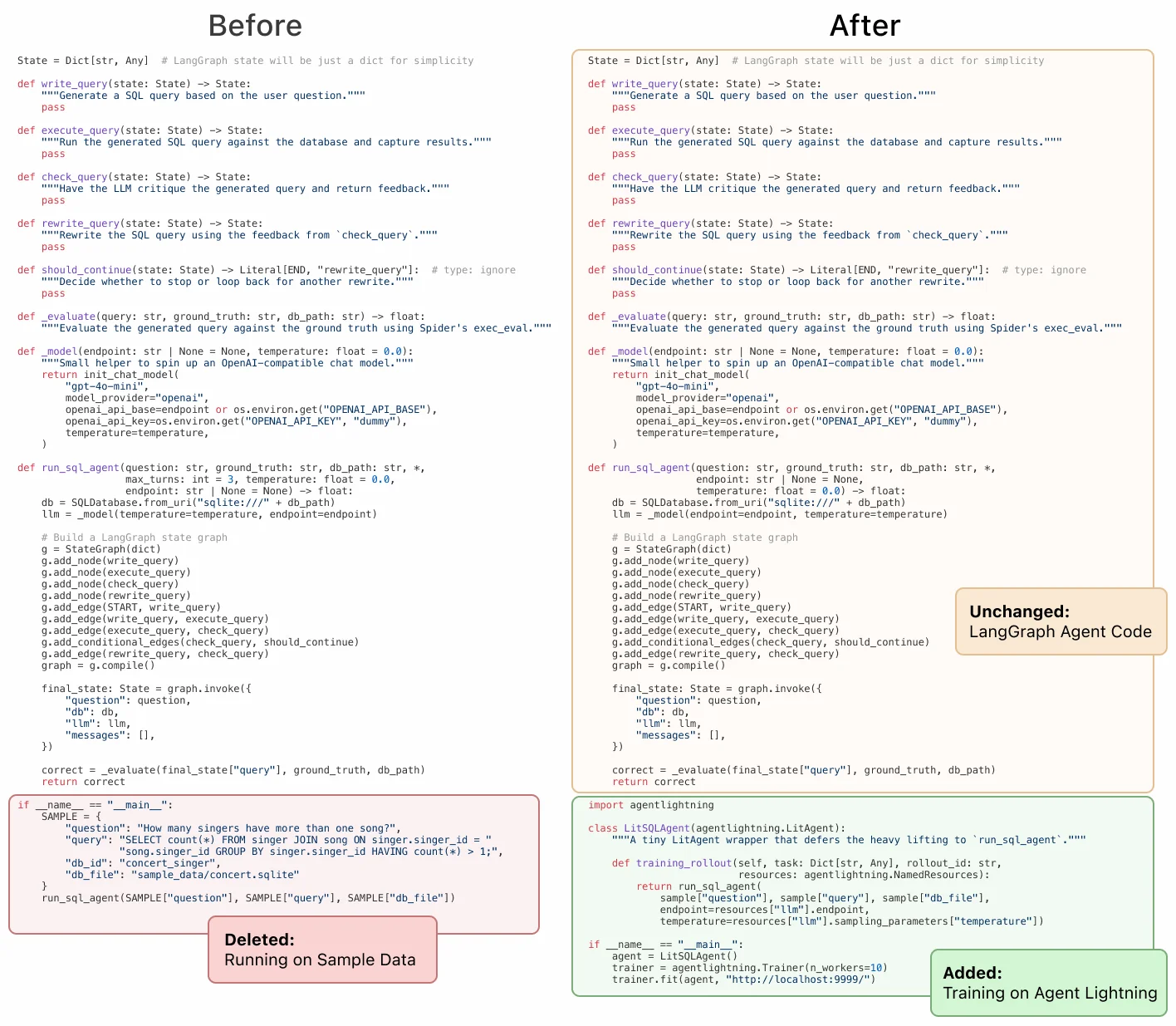
- 8/11/2025 Training AI Agents to Write and Self-correct SQL with Reinforcement Learning Medium.
- 8/5/2025 Agent Lightning: Train ANY AI Agents with Reinforcement Learning arXiv paper.
- 7/26/2025 We discovered an approach to train any AI agent with RL, with (almost) zero code changes. Reddit.
- 6/6/2025 Agent Lightning - Microsoft Research Project page.
⚡ Installation
First, let's get your environment set up. We'll be using /path/to/agentlightning to refer to the directory containing this README file.
1. Set Up Your Environment
We strongly recommend creating a new virtual environment to avoid conflicts with other packages. You can use either conda or venv. Python 3.10 or later is recommended.
2. Install Core Training Dependencies (Optional)
If you are running RL with Agent-Lightning, the next step is to install the essential packages: PyTorch, FlashAttention, vLLM and VERL. The following versions and installation order have been tested and are confirmed to work.
pip install torch==2.7.0 torchvision==0.22.0 torchaudio==2.7.0 --index-url https://download.pytorch.org/whl/cu128
pip install flash-attn --no-build-isolation
pip install vllm==0.9.2
pip install verl==0.5.0
See scripts/setup_stable_gpu.sh for a full installation script.
3. Install Agent Lightning
Now, you're ready to install Agent Lightning itself.
pip install agentlightning
4. Install Agent Frameworks (Optional)
If you plan to use other agent frameworks, you can install them with the following commands. If you don't need these, feel free to skip this step. We recommend doing this as the final step to avoid dependency versions being overwritten by mistake.
# AutoGen (Recommended to install first)
pip install "autogen-agentchat" "autogen-ext[openai]"

# LiteLLM
pip install "litellm[proxy]"

# MCP
pip install mcp

# UV
pip install uv

# OpenAI Agents
pip install openai-agents

# LangChain
pip install langgraph "langchain[openai]" langchain-community langchain-text-splitters

# SQL-related dependencies
pip install sqlparse nltk
Don't worry if dependency conflicts arise during this step. Follow the installation order above and the conflicts generally do not matter.
⚡ Examples
For more detailed examples, please see the examples folder:
- calc_x: An agent built with AutoGen with calculator tool use, trained on Calc-X dataset with Reinforcement Learning.
- spider: A write-check-rewrite looped agent with LangGraph with SQL execution; selectively optimize write and rewrite on Spider dataset with Reinforcement Learning.
- apo: An example to customize an optimization algorithm: Automatic Prompt Optimization.
⚡ Important Caveats
- AgentOps Integration: Agent Lightning uses AgentOps for agent tracking by default. If you're already using AgentOps in your own code, you'll need to disable our managed AgentOps client by modifying the
tracerparameter of trainer. - Debugging Traces: If you encounter issues with tracing, you can visualize the trace tree using
tracer.last_trace().visualize("tree_graph"). Please note that this API is experimental and may change in future releases. - Launching the Server and Agents: Currently, the training server and agent clients must be launched in separate processes. You can open two terminal windows or run one of them in the background. The launching order generally doesn't matter.
- Environment Variables: The environment variables and working directory at the time of
ray initare important. If you run into "file not found" errors, try restarting Ray from your current working directory. - Handling Timeouts: The training server may hang if samples fail or time out on the agent side. To prevent this, we recommend setting limits on the prompt and response lengths, as this is the most common cause of failures.
- VERL Failures: Save checkpoints frequently, as VERL with vLLM may sometimes experience out-of-memory issues. If you encounter a VERL failure, you can resume training from the last checkpoint.
⚡ Architecture
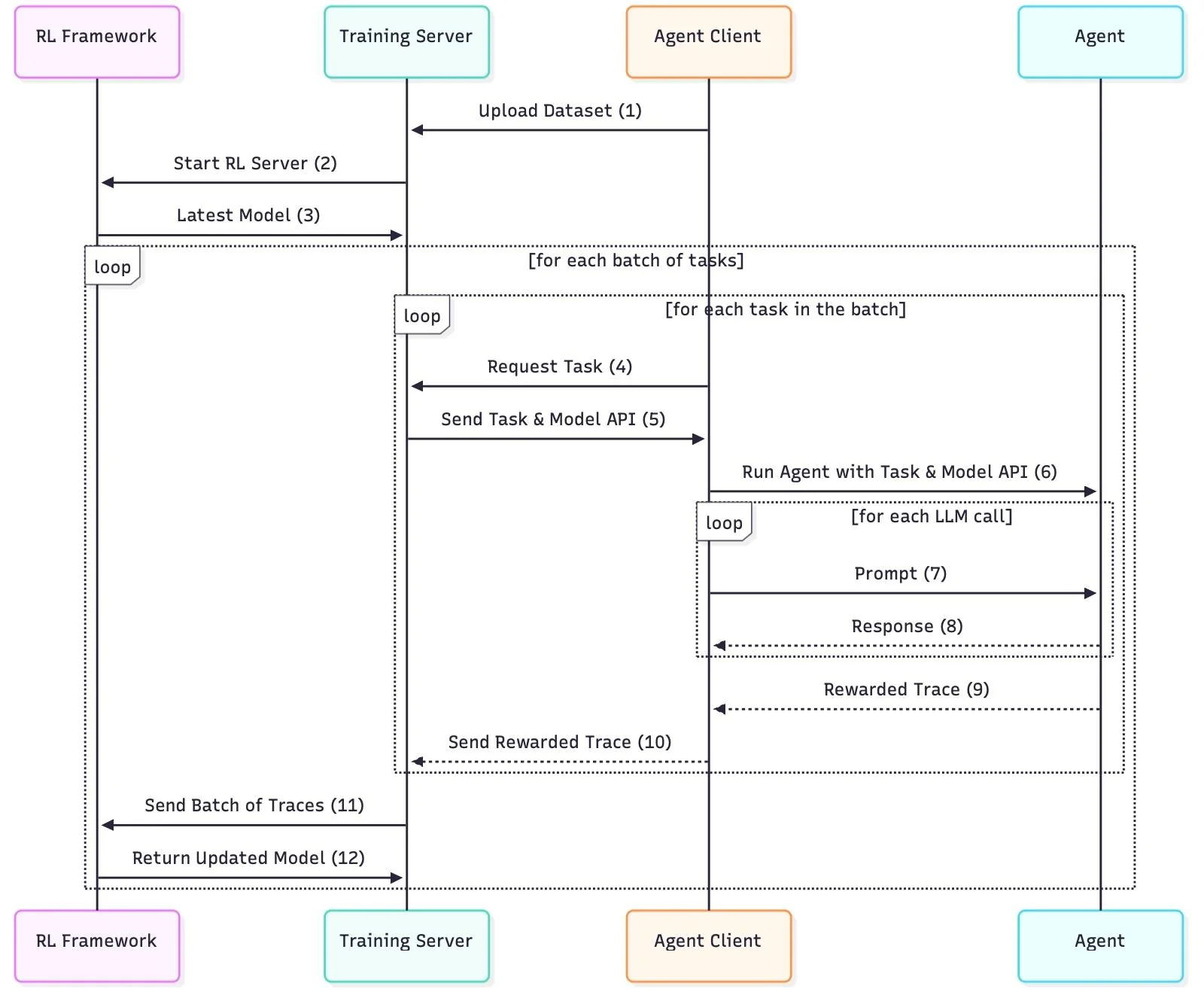
Currently, Agent Lightning is built around a training server and one or multiple agents.
- The server manages the training data, prepares samples for the agents, and provides the LLM endpoint.
- Agents retrieve samples from the server, process them (which may involve interacting with the LLM), and send the results back. These results, or "trajectories," are lists of prompts and responses from the LLM.
- The server then collects these trajectories and computes the losses to optimize the language models.
⚡ Development Instructions
Install with development dependencies:
git clone https://github.com/microsoft/agent-lightning
cd agent-lightning
pip install -e .[dev]
Please run pre-commit hooks before checking in code:
pre-commit install
pre-commit run --all-files --show-diff-on-failure --color=always
Serve documentation locally:
mkdocs serve
⚡ Citation
If you find Agent Lightning useful in your research or projects, please cite our paper:
@misc{luo2025agentlightningtrainai,
      title={Agent Lightning: Train ANY AI Agents with Reinforcement Learning},
      author={Xufang Luo and Yuge Zhang and Zhiyuan He and Zilong Wang and Siyun Zhao and Dongsheng Li and Luna K. Qiu and Yuqing Yang},
      year={2025},
      eprint={2508.03680},
      archivePrefix={arXiv},
      primaryClass={cs.AI},
      url={https://arxiv.org/abs/2508.03680},
}
⚡ Contributing
This project welcomes contributions and suggestions. Most contributions require you to agree to a Contributor License Agreement (CLA) declaring that you have the right to, and actually do, grant us the rights to use your contribution. For details, visit https://cla.opensource.microsoft.com.
When you submit a pull request, a CLA bot will automatically determine whether you need to provide a CLA and decorate the PR appropriately (e.g., status check, comment). Simply follow the instructions provided by the bot. You will only need to do this once across all repos using our CLA.
This project has adopted the Microsoft Open Source Code of Conduct. For more information see the Code of Conduct FAQ or contact opencode@microsoft.com with any additional questions or comments.
⚡ Trademarks
This project may contain trademarks or logos for projects, products, or services. Authorized use of Microsoft trademarks or logos is subject to and must follow Microsoft's Trademark & Brand Guidelines. Use of Microsoft trademarks or logos in modified versions of this project must not cause confusion or imply Microsoft sponsorship. Any use of third-party trademarks or logos are subject to those third-party's policies.
⚡ Responsible AI
This project has been evaluated and certified to comply with the Microsoft Responsible AI Standard. The team will continue to monitor and maintain the repository, addressing any severe issues, including potential harms, if they arise.
⚡ License
This project is licensed under the MIT License. See the LICENSE file for details.
Contributors

96 commits
Similar repos





Languages
Python
98.6%
Shell
1.3%
README
中文狼人杀 Agentic-RL 训练案例配置指南
8B模型 https://huggingface.co/haowu11/DeepWereWolf-Qwen3-8B-Grpo-Agentic-Chinese
32B模型 https://huggingface.co/haowu11/DeepWereWolf-Qwen3-32B-Grpo-Agentic-Chinese
####################################################################
基于框架版本信息
- agent-lightning: commit: 5724f63cfc75bcc2f4fb56958ef384d307717c18 | date: Sep 13, 2025 (或者直接pip install -e . 安装本仓库)
- AgentScope: commit: 458e8eedc94bba89bc3e4c6756e35fb4defbc0ac | date: Sep 15, 2025 (截至2025-9-30日的版本 v1.0.4 测试了都是没有api冲突的)
- VERL: version: v0.5.0
- VLLM: version: v0.10.2 (sglang的后端训练更稳定不容易崩溃,可以看sglang的分支,但sglang 32B的训练偶尔也会炸掉,需要注意重启)
- flash-attn version: v2.8.3
相关仓库链接
- agent-lightning 官方: https://github.com/microsoft/agent-lightning
- AgentScope 官方: https://github.com/agentscope-ai/agentscope
- 中文狼人杀修改版: https://github.com/af-74413592/agentscope
####################################################################
数据集 用fake-data.py 生成或者直接下载gsm8k的train.parquert都可以,仅仅起到一个迭代器的作用
####################################################################
一、核心执行脚本
-
训练脚本路径
example/werewolf/train.sh或者 train-fsdp2.sh 都是可以的 -
客户端启动命令
python werewolf_agent.py
二、agent-lightning 源码修改位置(核心改动)(可以直接git clone 本仓库)
2.0 添加examples/werewolf 实现
2.1 注释 Triplet 导出逻辑(防止覆盖)
- 文件路径:
agentlightning/runner.py - 修改位置:第 115 行
- 原代码(注释掉):
if trace_spans:
        triplets = self.triplet_exporter.export(trace_spans)
      ```
2.2 修改 Trace 列表构造(agentlightning/verl/daemon.py 第 338 行):
trace_list = [
                {"prompt_ids": t.prompt.get("token_ids", []), "response_ids": t.response.get("token_ids", []), "reward": t.reward}
                for t in rollout.triplets
            ]
2.3 修正 Reward 取值逻辑(第 418 行):
原代码(注释掉):
reward_list.append(sample_info["reward"])
新代码(替换为):
reward_list.append(trace["reward"])
agentlightning/verl/trainer.py 298行 注释了第一次val函数
        # if self.val_reward_fn is not None and self.config.trainer.get("val_before_train", True):
        #     val_metrics = self._validate()
        #     assert val_metrics, f"{val_metrics=}"
        #     pprint(f"Initial validation metrics: {val_metrics}")
        #     logger.log(data=val_metrics, step=self.global_steps)
        #     if self.config.trainer.get("val_only", False):
        #         return
其他改动
agentlightning/runner.py 加入了重试逻辑
手动rollout限制和最大token限制,可以自行放开这段代码
result = await rollout_method(task.input, task.rollout_id, resources_update.resources)
valid_result = [t for t in result if len(t.prompt.get("token_ids")) + len(t.response.get("token_ids")) <= 10000]
if len(valid_result) > 64:
   #降低最大rollout
   import random
   new_result = random.sample(valid_result, 64)
else:
   new_result = valid_result
# rollout_obj = self._to_rollout_object(result, task.rollout_id)
rollout_obj = self._to_rollout_object(new_result, task.rollout_id)
agentlightning/daemon.py
if n_transition == 0:
        raise Exception("Empty transitions !!!!!!!")
examples/werewolf/werewolf_agent.py
import random
    if random.random() < 0.8:
        agent = ReActAgent(
            name=name,
            sys_prompt=Prompts.system_prompt,
            model=OpenAIChatModel(
                model_name=llm.model,
                client_args={"base_url": llm.endpoint},
                api_key="xxx",
                stream=False,
            ),
            # formatter=DashScopeMultiAgentFormatter(),
            formatter=OpenAIMultiAgentFormatter(),
        )
    else:
        agent = ReActAgent(
            name=name,
            sys_prompt=Prompts.system_prompt.format(
                player_name=name,
                guidance=getattr(Prompts, f"notes_{role}"),
            ),
            model=DashScopeChatModel(
                model_name="qwen3-max-preview",
                api_key=os.environ["DASHSCOPE_API_KEY"],
                enable_thinking=True,
            ),
            formatter=DashScopeMultiAgentFormatter(),
        )
这一段函数引入了外部模型api进行对抗训练。也可以注释掉全都使用vllm客户端 如下
agent = ReActAgent(
   name=name,
   sys_prompt=Prompts.system_prompt,
   model=OpenAIChatModel(
       model_name=llm.model,
       client_args={"base_url": llm.endpoint},
       api_key="xxx",
       stream=False,
   ),
   # formatter=DashScopeMultiAgentFormatter(),
   formatter=OpenAIMultiAgentFormatter(),
)
llm_reward_system_prompt = "这里进行着一个LLM狼人杀游戏,history上下文太长就不展示了,你的职责就是判断模型的回答是否有游戏无关的胡言乱语(这里不包含<think>格式或者各种tool_call还有<|im_start|>assistant这种其他消息头,都是正常输出,只看思考和回答中的纯文本部分),或者模型没有按照中文来回答。还有文本的可读性。如果有这些情况,则输出Low Quality,没有则输出High Quality,无需对游戏行为决策做出判断。以下是模型回答:\n\n" + response

llm_quality_reward = llm_api(llm_reward_system_prompt)
import time
#防止高频访问
time.sleep(0.5)
if "Low Quality" in llm_quality_reward:
    triplet.reward = triplet.reward - 5.0
    print(f"WARNING: Low Quality detected: {response}")
这几行是调用外部llm打分。文本通顺性reward,酌情添加
注意如果更改训练模型,记得替换self.tokenizer
agentlightning/verl/trainer.py fit函数 self._load_checkpoint()下面最好 time.sleep(60) 一会,有的时候会闪退。
二、安装agentscope框架 (需要手动修改)
核心修改 手动处理think消息(因为新版vllm不在支持--enable_thinging格式消息返回)
src/agentscope/model/_openai_model.py _parse_openai_completion_response函数开头if choice.message.content:下 改为
if choice.message.content:
        try:
                thinking_part = choice.message.content.split("<think>")[1].split("</think>")[0]
                content_part = choice.message.content.split("</think>")[1]
                content_blocks.append(
                ThinkingBlock(
                        type="thinking",
                        thinking=thinking_part,
                ),
                )
                content_blocks.append(
                TextBlock(
                        type="text",
                        text=content_part,
                ),
                )
        except:
                content_blocks.append(
                TextBlock(
                        type="text",
                        text=response.choices[0].message.content,
                ),
        )
其他改动(建议)一个更安全的toolcall
for tool_call in choice.message.tool_calls or []:
                try:
                    arguments_dict = _json_loads_with_repair(
                            tool_call.function.arguments,
                        )
                except:
                    logger.warning(
                            "Failed parse arguments to a valid dict in the tool_call message, skipped."
                        )
                if arguments_dict != {}:
                    for key,value in arguments_dict.items():
                        if key == "response" and value == None:
                            arguments_dict["response"] = ""
                    content_blocks.append(
                        ToolUseBlock(
                            type="tool_use",
                            id=tool_call.id,
                            name=tool_call.function.name,
                            input=arguments_dict,
                        ),
                    )
                else:
                    logger.warning(
                        "Failed parse arguments to a valid dict in the tool_call message, skipped."
                    )
还有一种更简单的办法 在src/agentscope/agent/_react_agent.py 的 generate_response函数下 加上 response = "" if response == None else response
其他改动(可选)压缩历史消息防止报错
处理过长的prompt:src/agentscope/model/openai_model.py OpenAIChatModel 的__call_ 函数
self.tokenizer = AutoTokenizer.from_pretrained("Qwen/Qwen3-8B")
conversations = [{"role":msg["role"], "content":msg["content"][0]['text'] if type(msg["content"]) == list else msg["content"]} for msg in messages]
input_ids = self.tokenizer.apply_chat_template(
        conversations,
        add_generation_prompt=True,
        tokenize=True,
)

while len(input_ids) > 10000: (比maxlen稍微小一点)
        messages[1]["content"][0]['text'] = messages[1]["content"][0]['text'][:150] + '\n...\n' + messages[1]["content"][0]['text'][200:]
        conversations = [{"role":msg["role"], "content":msg["content"][0]['text'] if type(msg["content"]) == list else msg["content"]} for msg in messages]
        input_ids = self.tokenizer.apply_chat_template(
        conversations,
        add_generation_prompt=True,
        tokenize=True,
        )
三、verlv0.5.0 改动 (需要手动修改)
注释掉 verl trainer/ppo/ray_trainer.py 415-418行 (因为不需要很大的train_batch_size)
real_train_batch_size = config.data.train_batch_size * config.actor_rollout_ref.rollout.n
        assert real_train_batch_size % minimal_bsz == 0, (
        f"real_train_batch_size ({real_train_batch_size}) must be divisible by minimal possible batch size "
        f"({minimal_bsz})"
        )
注释掉 verl trainer/ppo/ray_trainer.py 500 行
assert config.data.train_batch_size >= config.actor_rollout_ref.actor.ppo_mini_batch_size
由于可能是verl/vllm作为后端训练或者是其他什么原因,训练不是很稳定,可以开启monitor_train.sh脚本自动重启训练
四、train.sh 说明
data.train_batch_size=1 \
actor_rollout_ref.rollout.n=1 \

这两条可以压小,不需要太多rollout,agentlightning会把轨迹切开重组成新的rollout list, 开到2x2, 有的时候会rollout出来三四百条。

data.max_prompt_length=15360 \
data.max_response_length=1024 \

显存不够可以改小一点max_prompt_length

data.truncation='middle'

中间自动截断过长history

actor_rollout_ref.rollout.gpu_memory_utilization=0.4 \

4:6 分配推理和训练显存

trainer.save_freq=1

稳定了可以加大保存频率

trainer.test_freq=0

没有实现val方法,统计reward移动至train

超长序列可以尝试开启 actor_rollout_ref.actor.ulysses_sequence_parallel_size=2

trainer.default_local_dir='/root/dataDisk/checkpoints' \ 权重保存位置

trainer.max_actor_ckpt_to_keep=3 \ 打开自动删除历史权重
五、reward设计说明
def _process_triplets_with_rewards(self, wolf_win_flag: bool, NAME_TO_ROLE: dict) -> list[Triplet]:
        spans = self.tracer.get_last_trace()
        triplets = self.triplet_exporter.export(spans)
        new_triplets= []
        last_error_index = []
        names = []
        for i,triplet in enumerate(triplets):
            prompt_ids = triplet.prompt.get("token_ids")
            response_ids = triplet.response.get("token_ids", [])
            # 添加日志检查
            prompt_length = len(prompt_ids)
            print(f"Prompt length: {prompt_length} tokens")
            # if prompt_length >= 10240:  # 你的 max_prompt_length TODO: 过长上下文发送处理.拆掉上下文中的think
            #     print(f"WARNING: Prompt truncated! Original length: {prompt_length}")
            prompt = self.tokenizer.decode(prompt_ids)
            # print(prompt)
            response = self.tokenizer.decode(response_ids)
            # print(response)
            # 检查是否包含 ValidationError 信息,先检测错误,再看后面是否有成功调用
            if "Arguments Validation Error" in prompt:
                import re
                # 找到最后一个 </history> 标签的位置
                history_end = prompt.rfind('</history>')
                if history_end != -1:
                    # 在最后一个 </history> 之后查找
                    history_content = prompt[history_end:]

                    # 查找所有 ValidationError
                    error_matches = list(re.finditer(r'Arguments Validation Error: ([^<]+)', history_content))
                    if error_matches:
                        # 取最后一个 ValidationError
                        last_error = error_matches[-1]
                        error_msg = last_error.group(1).strip()
                        error_pos = last_error.end()

                        # 在这个错误之后查找是否有成功的调用
                        after_error = history_content[error_pos:]
                        success_after_error = re.search(r'Successfully generated response\.', after_error)

                        if not success_after_error:
                            # 错误后面没有成功调用,说明这是最新的错误
                            if i != 0:
                                last_error_index.append(i-1)
                                print(f"WARNING: Latest ValidationError detected: {error_msg}")
            name = prompt.split("<history>\n主持人: [")[1].split(" ONLY")[0]
            names.append(name)
            role = NAME_TO_ROLE[name]
            if role in ["werewolf", "wolf_king"]:
                triplet.reward = 20.0 if wolf_win_flag else -10.0
            else:
                triplet.reward = -10.0 if wolf_win_flag else 10.0
            llm_reward_system_prompt = "这里进行着一个LLM狼人杀游戏,history上下文太长就不展示了,你的职责就是判断模型的回答是否有游戏无关的胡言乱语(这里不包含<think>格式或者各种tool_call还有<|im_start|>assistant这种其他消息头,都是正常输出,只看思考和回答中的纯文本部分),或者模型没有按照中文来回答。还有文本的可读性。如果有这些情况,则输出Low Quality,没有则输出High Quality,无需对游戏行为决策做出判断。以下是模型回答:\n\n" + response

            llm_quality_reward = llm_api(llm_reward_system_prompt)
            import time
            #防止高频访问
            time.sleep(0.5)
            if "Low Quality" in llm_quality_reward:
                triplet.reward = triplet.reward - 10.0
                print(f"WARNING: Low Quality detected: {response}")
            new_triplets.append(triplet)
        for j in last_error_index:
            if j+1 < len(names):
                if names[j] == names[j+1]:
                    new_triplets[j].reward = new_triplets[j].reward - 5.0
        return new_triplets
原始的reward计算函数由胜负reward+格式reward+可读性reward组成,由于rollout中狼人和好人必然是一胜一败的关系,难以采到充分的样本,经测试后狼人和好人同时训练效果不佳。
    def _process_triplets_with_rewards(self, wolf_win_flag: bool, NAME_TO_ROLE: dict) -> list[Triplet]:
        spans = self.tracer.get_last_trace()
        triplets = self.triplet_exporter.export(spans)
        train_were_wolf_flag = True
        train_human_flag = False
        train_winner_only_flag = False #only work in both train
        assert train_were_wolf_flag or train_human_flag
        new_triplets= []
        last_error_index = []
        were_wolf_only = []
        human_only = []
        names = []
        for i,triplet in enumerate(triplets):
            prompt_ids = triplet.prompt.get("token_ids")
            response_ids = triplet.response.get("token_ids", [])
            # 添加日志检查
            prompt_length = len(prompt_ids)
            print(f"Prompt length: {prompt_length} tokens")
            # if prompt_length >= 10240:  # 你的 max_prompt_length TODO: 过长上下文发送处理.拆掉上下文中的think
            #     print(f"WARNING: Prompt truncated! Original length: {prompt_length}")
            prompt = self.tokenizer.decode(prompt_ids)
            print(prompt)
            response = self.tokenizer.decode(response_ids)
            print(response)
            # 检查是否包含 ValidationError 信息,先检测错误,再看后面是否有成功调用
            if "Arguments Validation Error" in prompt:
                import re
                # 找到最后一个 </history> 标签的位置
                history_end = prompt.rfind('</history>')
                if history_end != -1:
                    # 在最后一个 </history> 之后查找
                    history_content = prompt[history_end:]

                    # 查找所有 ValidationError
                    error_matches = list(re.finditer(r'Arguments Validation Error: ([^<]+)', history_content))
                    if error_matches:
                        # 取最后一个 ValidationError
                        last_error = error_matches[-1]
                        error_msg = last_error.group(1).strip()
                        error_pos = last_error.end()

                        # 在这个错误之后查找是否有成功的调用
                        after_error = history_content[error_pos:]
                        success_after_error = re.search(r'Successfully generated response\.', after_error)

                        if not success_after_error:
                            # 错误后面没有成功调用,说明这是最新的错误
                            if i != 0:
                                last_error_index.append(i-1)
                                print(f"WARNING: Latest ValidationError detected: {error_msg}")
            name = prompt.split("<history>\n主持人: [")[1].split(" ONLY")[0]
            names.append(name)
            role = NAME_TO_ROLE[name]
            if role in ["werewolf", "wolf_king"]:
                triplet.reward = 20.0 if wolf_win_flag else -10.0
                were_wolf_only.append(i)
            else:
                if role in ["werewolf", "wolf_king"]:
                   triplet.reward = 15.0 if wolf_win_flag else -10.0
                   were_wolf_only.append(i)
               else:
                   triplet.reward = -10.0 if wolf_win_flag else 10.0
                   human_only.append(i)

            llm_reward_system_prompt = "这里进行着一个LLM狼人杀游戏,history上下文太长就不展示了,你的职责就是判断模型的回答是否有游戏无关的胡言乱语(这里不包含<think>格式或者各种tool_call还有<|im_start|>assistant这种其他消息头,都是正常输出,只看思考和回答中的纯文本部分),或者模型没有按照中文来回答。还有文本的可读性。如果有这些情况,则输出Low Quality,没有则输出High Quality,无需对游戏行为决策做出判断。以下是模型回答:\n\n" + response

            llm_quality_reward = llm_api(llm_reward_system_prompt)
            import time
            #防止高频访问
            time.sleep(0.5)
            if "Low Quality" in llm_quality_reward:
                triplet.reward = triplet.reward - 10.0
                print(f"WARNING: Low Quality detected: {response}")
            new_triplets.append(triplet)
        for j in last_error_index:
            if j+1 < len(names):
                if names[j] == names[j+1]:
                    new_triplets[j].reward = new_triplets[j].reward - 5.0
        if train_were_wolf_flag and not train_human_flag:
            wolf_triplets = [new_triplets[k] for k in were_wolf_only]
            new_triplets = wolf_triplets
        if train_human_flag and not train_were_wolf_flag:
            human_triplets = [new_triplets[k] for k in human_only]
            new_triplets = human_triplets
        if train_were_wolf_flag and train_human_flag:
            #随机抓好人或者狼人的轨迹,不要混在一起更新中
            if not train_winner_only_flag:
                import random
                if random.random() > 0.3:
                    if wolf_win_flag:
                        wolf_triplets = [new_triplets[k] for k in were_wolf_only]
                        new_triplets = wolf_triplets
                    else:
                        human_triplets = [new_triplets[k] for k in human_only]
                        new_triplets = human_triplets
                else:
                    if not wolf_win_flag:
                        wolf_triplets = [new_triplets[k] for k in were_wolf_only]
                        new_triplets = wolf_triplets
                    else:
                        human_triplets = [new_triplets[k] for k in human_only]
                        new_triplets = human_triplets
            else:
                if wolf_win_flag:
                    wolf_triplets = [new_triplets[k] for k in were_wolf_only]
                    new_triplets = wolf_triplets
                else:
                    human_triplets = [new_triplets[k] for k in human_only]
                    new_triplets = human_triplets
        return new_triplets
经调整后,采取狼人好人分开训练的策略, train_were_wolf_flag train_human_flag train_winner_only_flag 分别设置为true false false单独训练狼人,和false true false单独训练好人,等待最后阶段都设置为true,丢掉失败的样例,混合训练好人和狼人胜利的所有样本。 还是得混一点失败的。 batchsize x rollout总数 单独狼人开了2x2,单独好人开了1x2,混合训练开了1x8(随机丢弃一些限制总数)。
#################################################
Agent Lightning⚡
The absolute trainer to light up AI agents.
Join our Discord community to connect with other users and contributors.
⚡ Core Features
- Turn your agent into an optimizable beast with ZERO CODE CHANGE (almost)! 💤
- Build with ANY agent framework (LangChain, OpenAI Agent SDK, AutoGen, CrewAI, ...); or even WITHOUT agent framework (Python OpenAI). You name it! 🤖
- Selectively optimize one or more agents in a multi-agent system. 🎯
- Embraces Reinforcement Learning, Automatic Prompt Optimization and more algorithms. 🤗
⚡ Resources
- 8/11/2025 Training AI Agents to Write and Self-correct SQL with Reinforcement Learning Medium.
- 8/5/2025 Agent Lightning: Train ANY AI Agents with Reinforcement Learning arXiv paper.
- 7/26/2025 We discovered an approach to train any AI agent with RL, with (almost) zero code changes. Reddit.
- 6/6/2025 Agent Lightning - Microsoft Research Project page.
⚡ Installation
First, let's get your environment set up. We'll be using /path/to/agentlightning to refer to the directory containing this README file.
1. Set Up Your Environment
We strongly recommend creating a new virtual environment to avoid conflicts with other packages. You can use either conda or venv. Python 3.10 or later is recommended.
2. Install Core Training Dependencies (Optional)
If you are running RL with Agent-Lightning, the next step is to install the essential packages: PyTorch, FlashAttention, vLLM and VERL. The following versions and installation order have been tested and are confirmed to work.
pip install torch==2.7.0 torchvision==0.22.0 torchaudio==2.7.0 --index-url https://download.pytorch.org/whl/cu128
pip install flash-attn --no-build-isolation
pip install vllm==0.9.2
pip install verl==0.5.0
See scripts/setup_stable_gpu.sh for a full installation script.
3. Install Agent Lightning
Now, you're ready to install Agent Lightning itself.
pip install agentlightning
4. Install Agent Frameworks (Optional)
If you plan to use other agent frameworks, you can install them with the following commands. If you don't need these, feel free to skip this step. We recommend doing this as the final step to avoid dependency versions being overwritten by mistake.
# AutoGen (Recommended to install first)
pip install "autogen-agentchat" "autogen-ext[openai]"

# LiteLLM
pip install "litellm[proxy]"

# MCP
pip install mcp

# UV
pip install uv

# OpenAI Agents
pip install openai-agents

# LangChain
pip install langgraph "langchain[openai]" langchain-community langchain-text-splitters

# SQL-related dependencies
pip install sqlparse nltk
Don't worry if dependency conflicts arise during this step. Follow the installation order above and the conflicts generally do not matter.
⚡ Examples
For more detailed examples, please see the examples folder:
- calc_x: An agent built with AutoGen with calculator tool use, trained on Calc-X dataset with Reinforcement Learning.
- spider: A write-check-rewrite looped agent with LangGraph with SQL execution; selectively optimize write and rewrite on Spider dataset with Reinforcement Learning.
- apo: An example to customize an optimization algorithm: Automatic Prompt Optimization.
⚡ Important Caveats
- AgentOps Integration: Agent Lightning uses AgentOps for agent tracking by default. If you're already using AgentOps in your own code, you'll need to disable our managed AgentOps client by modifying the
tracerparameter of trainer. - Debugging Traces: If you encounter issues with tracing, you can visualize the trace tree using
tracer.last_trace().visualize("tree_graph"). Please note that this API is experimental and may change in future releases. - Launching the Server and Agents: Currently, the training server and agent clients must be launched in separate processes. You can open two terminal windows or run one of them in the background. The launching order generally doesn't matter.
- Environment Variables: The environment variables and working directory at the time of
ray initare important. If you run into "file not found" errors, try restarting Ray from your current working directory. - Handling Timeouts: The training server may hang if samples fail or time out on the agent side. To prevent this, we recommend setting limits on the prompt and response lengths, as this is the most common cause of failures.
- VERL Failures: Save checkpoints frequently, as VERL with vLLM may sometimes experience out-of-memory issues. If you encounter a VERL failure, you can resume training from the last checkpoint.
⚡ Architecture
Currently, Agent Lightning is built around a training server and one or multiple agents.
- The server manages the training data, prepares samples for the agents, and provides the LLM endpoint.
- Agents retrieve samples from the server, process them (which may involve interacting with the LLM), and send the results back. These results, or "trajectories," are lists of prompts and responses from the LLM.
- The server then collects these trajectories and computes the losses to optimize the language models.
⚡ Development Instructions
Install with development dependencies:
git clone https://github.com/microsoft/agent-lightning
cd agent-lightning
pip install -e .[dev]
Please run pre-commit hooks before checking in code:
pre-commit install
pre-commit run --all-files --show-diff-on-failure --color=always
Serve documentation locally:
mkdocs serve
⚡ Citation
If you find Agent Lightning useful in your research or projects, please cite our paper:
@misc{luo2025agentlightningtrainai,
      title={Agent Lightning: Train ANY AI Agents with Reinforcement Learning},
      author={Xufang Luo and Yuge Zhang and Zhiyuan He and Zilong Wang and Siyun Zhao and Dongsheng Li and Luna K. Qiu and Yuqing Yang},
      year={2025},
      eprint={2508.03680},
      archivePrefix={arXiv},
      primaryClass={cs.AI},
      url={https://arxiv.org/abs/2508.03680},
}
⚡ Contributing
This project welcomes contributions and suggestions. Most contributions require you to agree to a Contributor License Agreement (CLA) declaring that you have the right to, and actually do, grant us the rights to use your contribution. For details, visit https://cla.opensource.microsoft.com.
When you submit a pull request, a CLA bot will automatically determine whether you need to provide a CLA and decorate the PR appropriately (e.g., status check, comment). Simply follow the instructions provided by the bot. You will only need to do this once across all repos using our CLA.
This project has adopted the Microsoft Open Source Code of Conduct. For more information see the Code of Conduct FAQ or contact opencode@microsoft.com with any additional questions or comments.
⚡ Trademarks
This project may contain trademarks or logos for projects, products, or services. Authorized use of Microsoft trademarks or logos is subject to and must follow Microsoft's Trademark & Brand Guidelines. Use of Microsoft trademarks or logos in modified versions of this project must not cause confusion or imply Microsoft sponsorship. Any use of third-party trademarks or logos are subject to those third-party's policies.
⚡ Responsible AI
This project has been evaluated and certified to comply with the Microsoft Responsible AI Standard. The team will continue to monitor and maintain the repository, addressing any severe issues, including potential harms, if they arise.
⚡ License
This project is licensed under the MIT License. See the LICENSE file for details.
Similar repos
Contributors
96 commits
Languages
Python
98.6%
Shell
1.3%