
A scalable asynchronous reinforcement learning implementation with in-flight weight updates.
See the codeREADME

PipelineRL: Fast LLM Agent Training


Table of Contents
Overview
A scalable asynchronous reinforcement learning implementation with in-flight weight updates. Designed to maximize GPU utilization while staying as on-policy as possible.
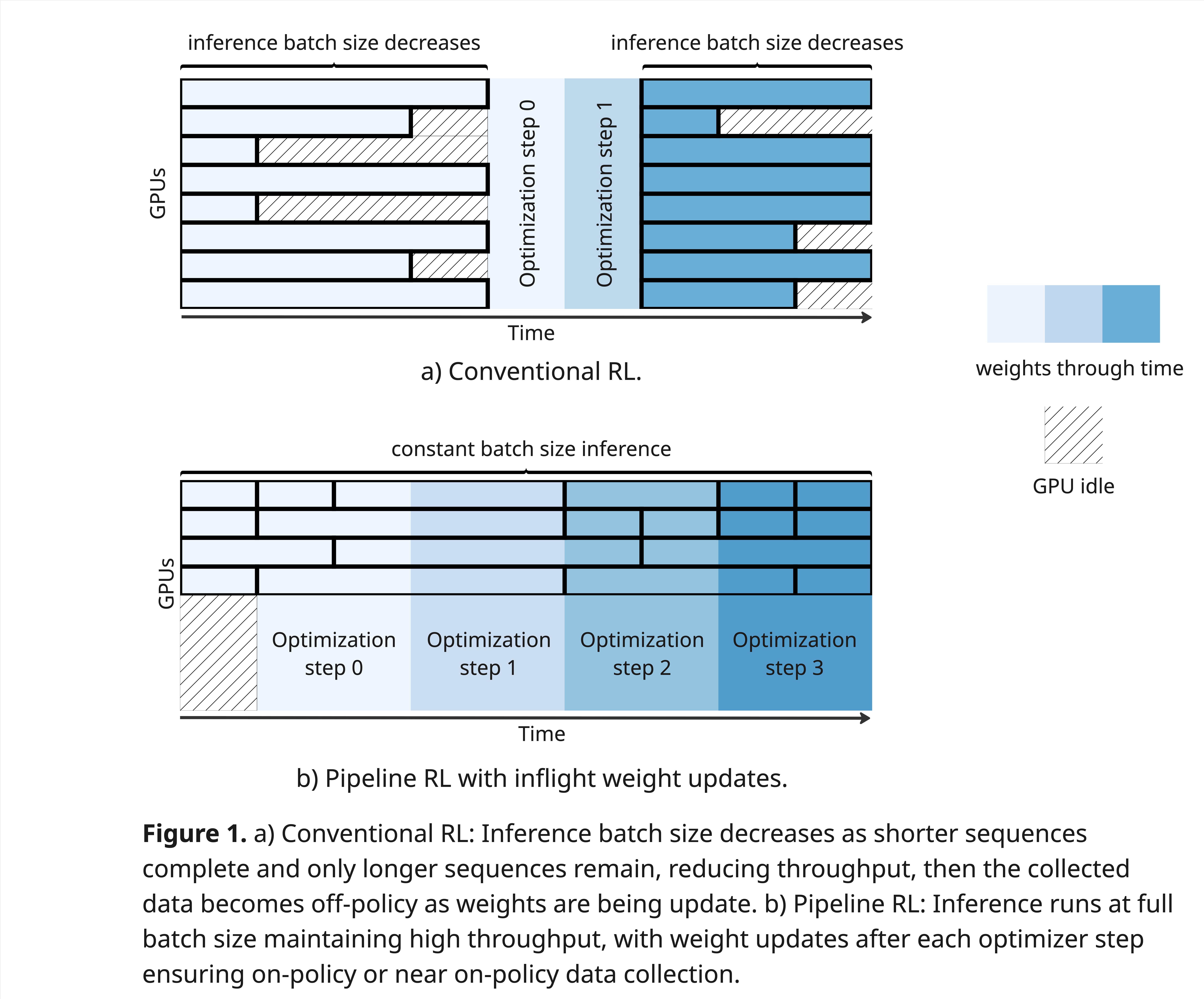
PipelineRL tackles the classic trade-off between inference throughput (large batches on many GPUs) and on-policy data freshness by performing inflight weight updates. After each optimizer step, updated weights are broadcast to the inference servers without halting sampling. This keeps batch sizes optimal and data near on-policy, yielding fast, stable RL for large language models.
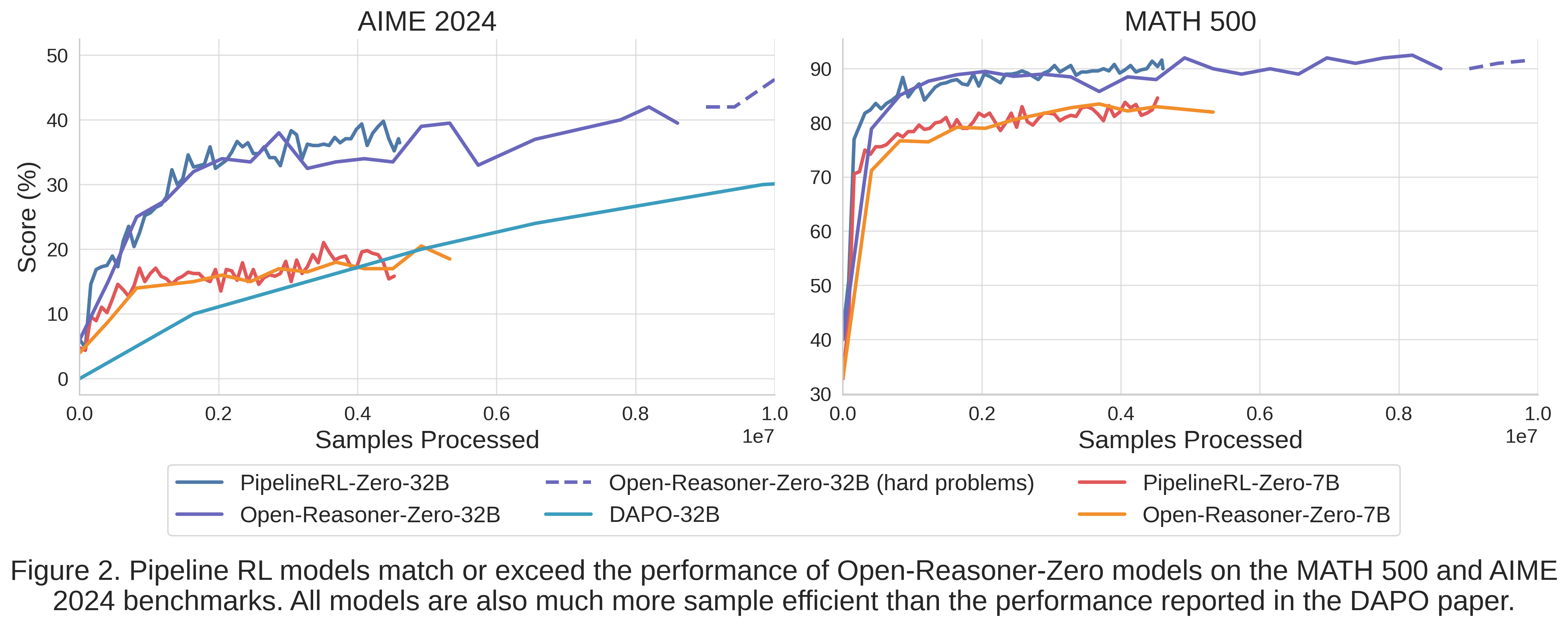
- In experiments on 7B and 32B models (batch size 4096, lr=1e-6, max tokens=8192), PipelineRL matches or exceeds Open-Reasoner-Zero on AIME-2024 and MATH-500.
- Uses a simplified GRPO algorithm: no value network, no trust-region clamping, no KL or entropy bonuses by default (though KL support is available).
Get started
PipelineRL is agent framework agnostic, meaning you can use it to train any agent by implementing a load_problems and generate_rollout functions for your task. For example, we can easily design and train a multi-turn LLM agent that must guess a number between 1 and 1024. After each guess, the agent receives feedback whether the guess was higher or lower than the target number.
First, we must implement load_problems to generate a list of train and test problems. Each problem is a dictionary with an answer key and a dataset key indicating whether it belongs to the training or testing dataset.
def load_problems(dataset_names: list[str]) -> list[dict]:
    n = 1024
    c = 191
    problems = []
    for name in dataset_names:
        if name == "train":
            problems.extend([
                {"answer": (2 * i * c) % n + 1, "dataset": "train"} for i in range(512)
            ])
        elif name == "test":
            problems.extend([
                {"answer": ((2 * i + 1) * c) % n + 1, "dataset": "test"} for i in range(512)
            ])
    return problems
Then, we must implement a generate_rollout function which takes a problem from the load_problems function and generate a RolloutResult. RolloutResult contains the a list of TrainingText (token ids, log probs, reward, etc.), BaseMetrics (reward, success, etc.), latency of the rollout in seconds, and the dataset_name which will be used for grouping the metrics. Here, the function should use an LLM to generate guesses and provide feedback based on the problem's answer.
async def generate_rollout(
    cfg: DictConfig,
    llm: TrainableLLM,
    problem: dict,
    session: aiohttp.ClientSession,
) -> RolloutResult:
    initial_messages = [
        {
            "role": "system",
            "content": "You are a helpful assistant",
        },
        {
            "role": "user",
            "content": f"You must guess a number between 1 and 1024. Output the answer as <answer>number</answer>."
                        " After each guess I will tell you if your answer is higher or lower than the target number."
        }
    ]
    time_start = time.time()
    llm_calls = []
    guess_history = []
    reward = 0
    success = 0
    error = 0
    for i in range(13):
        messages = initial_messages.copy()
        if i > 0:
            last_message = f"Your {i} previous guesses:"
            for guess in guess_history:
                relation = "lower" if guess < problem["answer"] else "higher"
                last_message += f"\n{guess}, which is {relation} than the target number."
            else:
                last_message += "\n<wrong output>"
            messages.append({
                "role": "user",
                "content": last_message
            })
        llm_call = await llm_async_generate(llm, Prompt(messages=messages), session)
        llm_calls.append(llm_call)

        output_text = llm_call.output.content or ""
        answer = re.search("<answer>(\d+)</answer>", output_text)
        if answer:
            answer = int(answer.group(1))
            if answer == problem["answer"]:
                reward = 2 - i / 10
                success = 1
                break
            else:
                guess_history.append(answer)
        else:
            # bonus for using the correct output format in the first turns
            reward = -2 + i / 10
            error = 1
            break
    latency = time.time() - time_start

    # TrainingText contains the prompt and output tokens, reward, and the log probs of the output tokens necessary for RL training.
    training_texts = [make_training_text(llm, llm_call) for llm_call in llm_calls]
    for text in training_texts:
        text.reward = reward

    metrics = BaseMetrics(
        reward=reward,
        success=success,
        no_error=not error,
        no_answer=error,
    )

    return RolloutResult(
        training_texts=training_texts,
        metrics=metrics,
        latency=latency,
        dataset_name=problem["dataset"],
    )
Finally you need to create a Hydra config file that points to the rollout function and the dataset loader. Additional hyper-parameters such as model path, learning rate, etc. can also be modified. For example, guessing.yaml:
defaults:
    - base
    - _self_

actor:
    rollout_policy: pipelinerl.domains.guessing.generate_guessing_rollout
environment: null
dataset_loader: pipelinerl.domains.guessing.load_problems
train_dataset_names:
    - train
test_dataset_names:
    - test
You can now launch the training with the following command:
python -m pipelinerl.launch --config-name=guessing output_dir=results/guessing
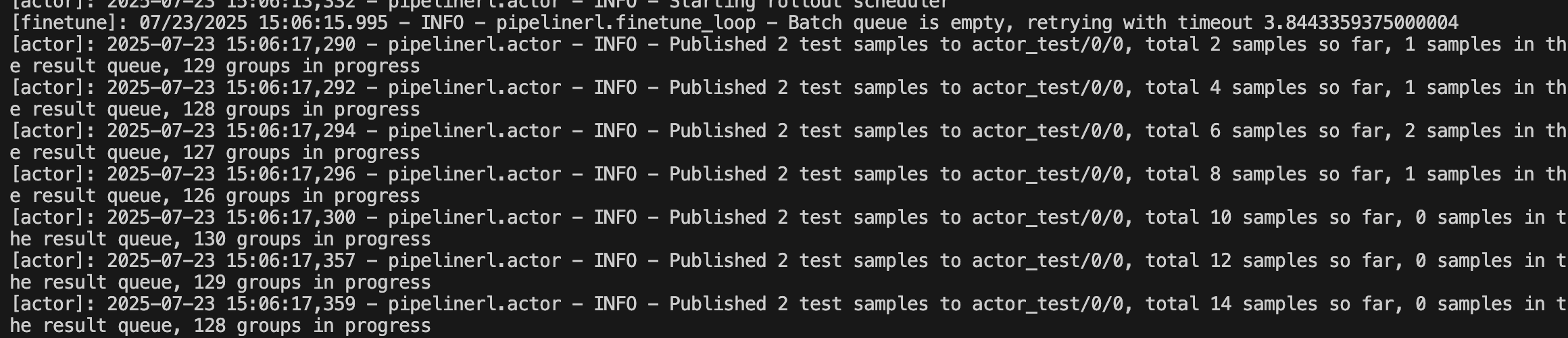
Once the LLMs are served, the actor will be evaluated on the test dataset before collecting training rollouts.
When enough data has been collected, the trainer will perform a RL step and update the actor's weights.
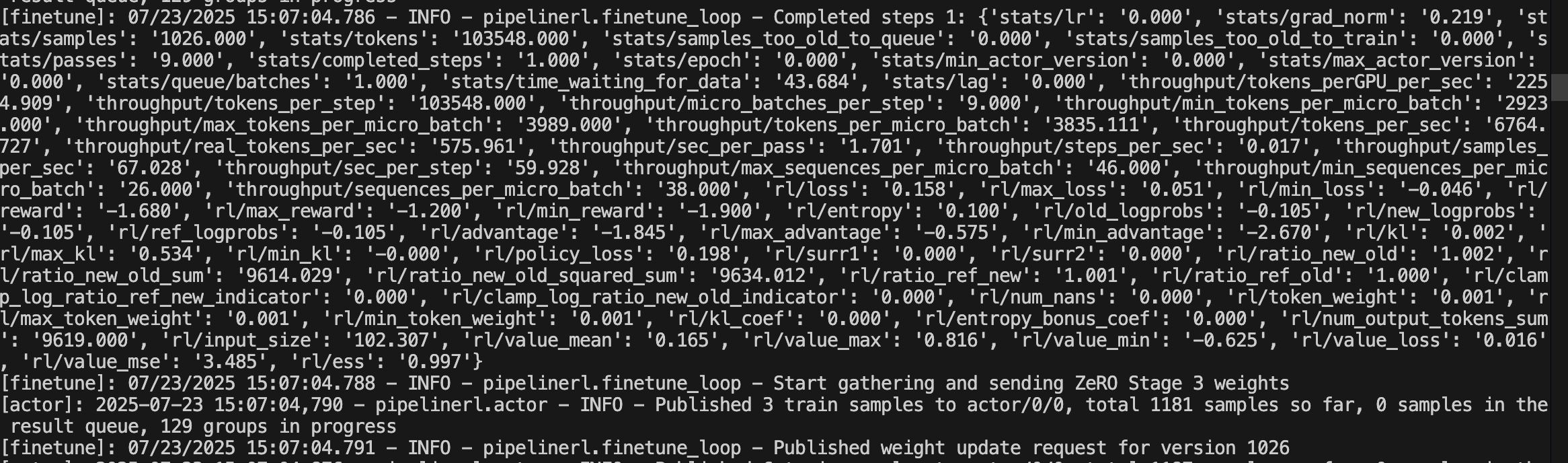
The streaming logs can be overwhelming, and it is therefore easier to debug using the each process log files in the results/guessing:
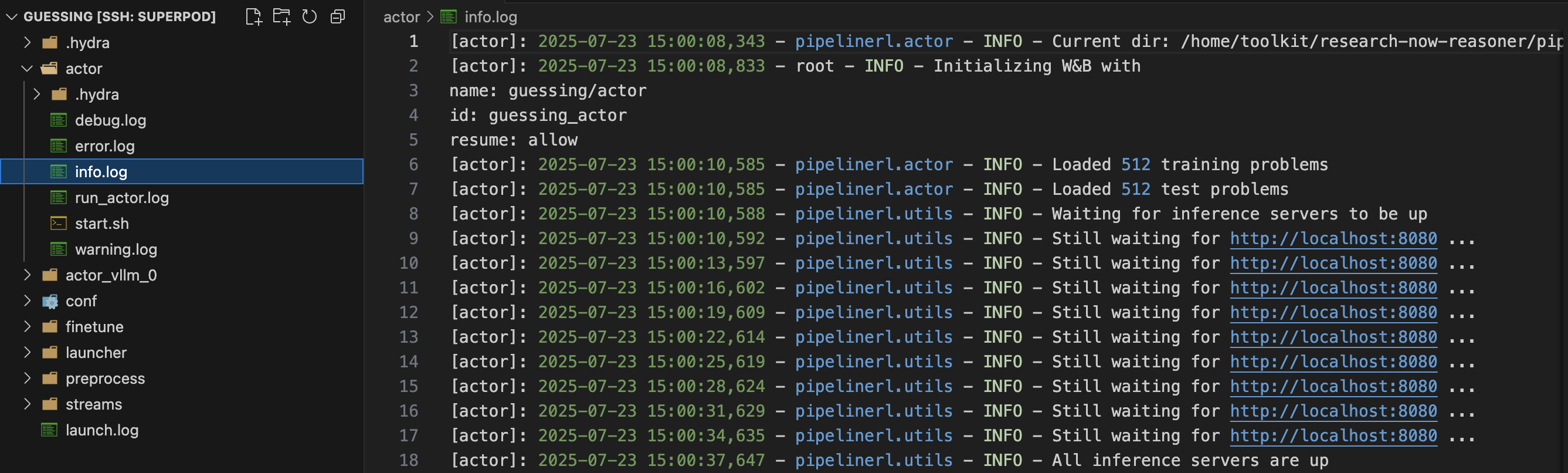
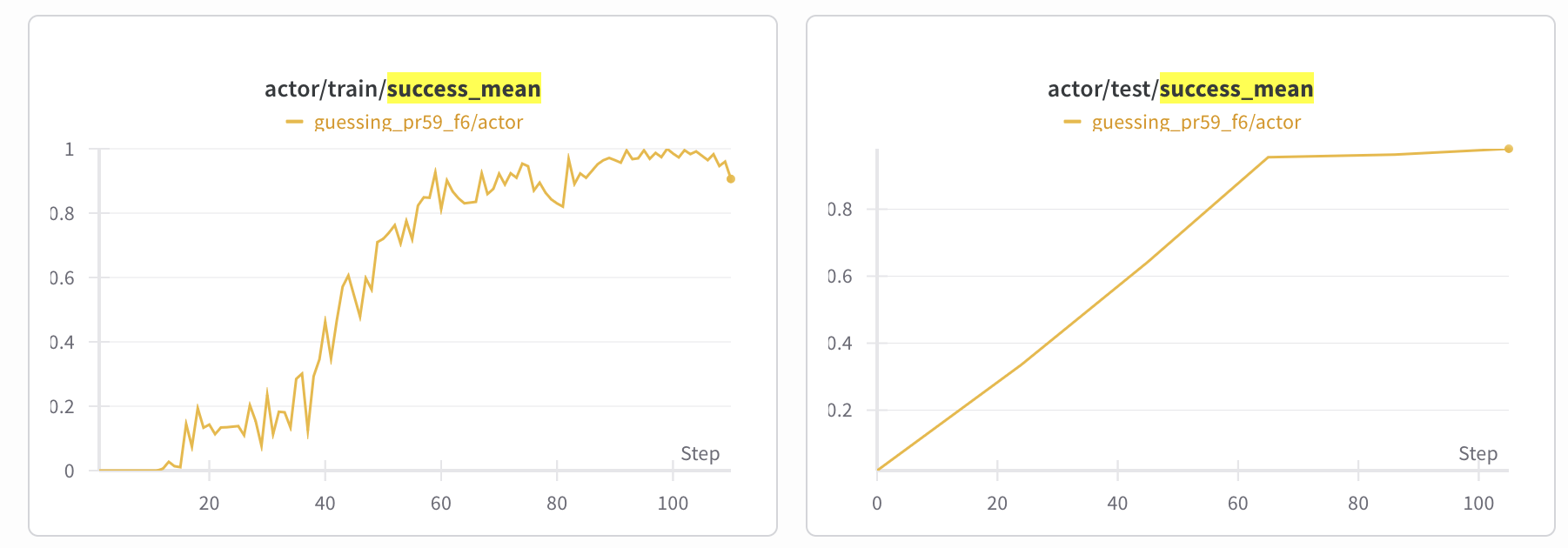
After roughly 20 minutes, the actor will have learned a strategy to guess the number correctly. The training can be monitored in real-time using WANDB, which will show the training and test metrics:
Setup
Clone the repository and change the directory to pipelinerl
git clone git@github.com:ServiceNow/PipelineRL.git
cd PipelineRL
Create the environments with dependencies.
conda create -n pipeline-rl -y python=3.12
conda run --no-capture-output -n pipeline-rl pip install -e .
conda run --no-capture-output -n pipeline-rl pip install flash-attn==2.8.3 --no-build-isolation
Alternatively for flash-attn, you can install it via prebuilt packages (on Linux):
# Check your PyTorch's C++ ABI setting first:
# python -c "import torch; print(torch._C._GLIBCXX_USE_CXX11_ABI)"
# Use cxx11abiTRUE or cxx11abiFALSE in the URL accordingly
conda run --no-capture-output -n pipeline-rl pip install https://github.com/lesj0610/flash-attention/releases/download/v2.8.3-cu12-torch2.10-cp312/flash_attn-2.8.3%2Bcu12torch2.10cxx11abiTRUE-cp312-cp312-linux_x86_64.whl
By default Pipeline-RL will use the file system as the medium for streaming the generated data to the trainer processes. This works on one node, but the files can get quite large. To use Redis instead you will need to install the Redis server in the same conda environment:
conda install redis-server==7.4.0 -c conda-forge
Optional: SandboxFusion for coding verification
PipelineRL supports using SandboxFusion to execute and verify coding-task outputs in a remote sandbox.
To run SandboxFusion locally, follow the deployment guide and startup logs here: https://bytedance.github.io/SandboxFusion/docs/docs/get-started#local-deployment
Then point PipelineRL to your sandbox endpoint by setting sandbox_endpoint in your config (for example in conf/coding.yaml) or by exporting SANDBOX_ENDPOINT:
export SANDBOX_ENDPOINT=http://127.0.0.1:8080
Optional: SandboxFusion for coding verification
PipelineRL supports using SandboxFusion to execute and verify coding-task outputs in a remote sandbox.
To run SandboxFusion locally, follow the deployment guide and startup logs here: https://bytedance.github.io/SandboxFusion/docs/docs/get-started#local-deployment
Then point PipelineRL to your sandbox endpoint by setting sandbox_endpoint in your config (for example in conf/coding.yaml) or by exporting SANDBOX_ENDPOINT:
export SANDBOX_ENDPOINT=http://127.0.0.1:8080
Run experiments
First, activate the conda environment:
conda activate pipeline-rl
Single node with 8 H100 GPUs:
python -m pipelinerl.launch output_dir=results/base1
If you only have 4 H100 GPUs:
python -m pipelinerl.launch --config-name base_4gpu output_dir=results/base1
To use Redis instead of the filesystem for data streaming:
python -m pipelinerl.launch streams=redis output_dir=results/base1
Architecture and pipeline stages
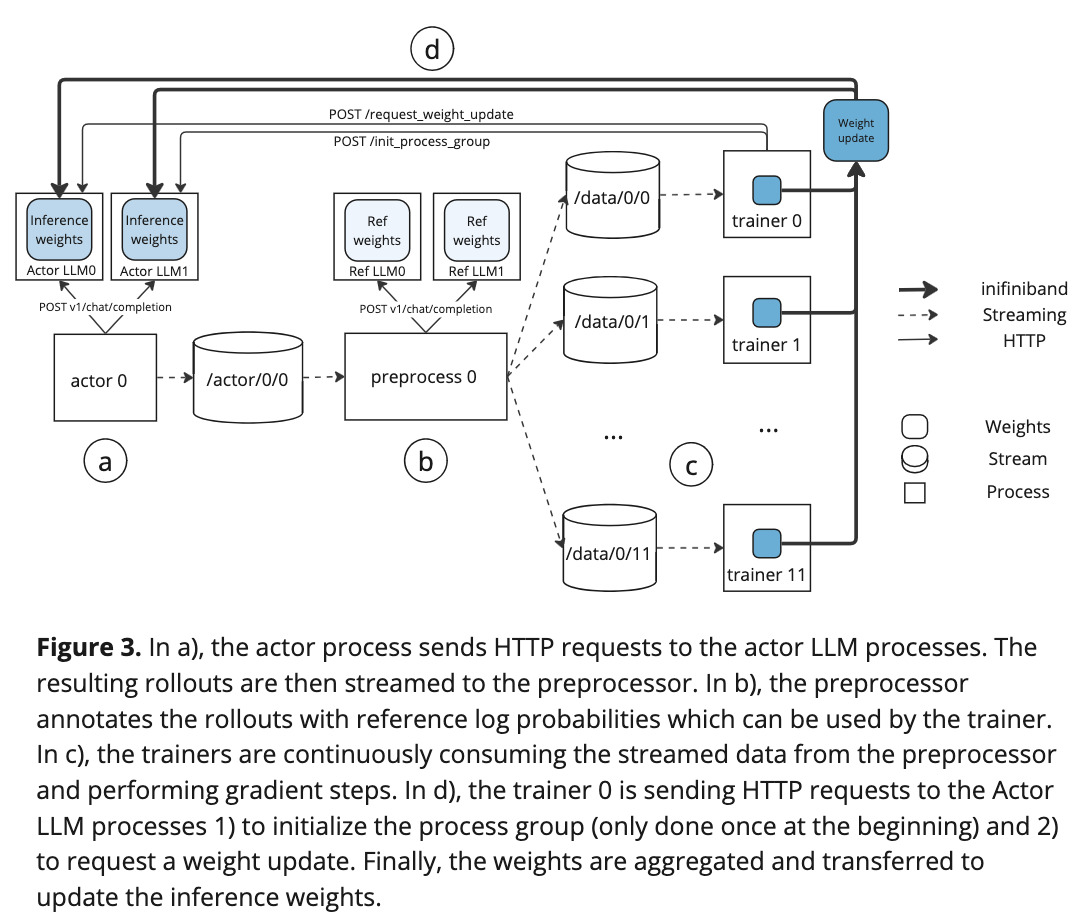
PipelineRL is organized as a modular, Hydra-driven pipeline with 6 core components driving 3 main stages of the RL training: actor, verifier and trainer. Below is a code-grounded mapping of each component:
1. Orchestrator
- File:
pipelinerl/launch.py - Entrypoint:
@hydra.main(...) def main(cfg) - Responsibilities:
- Parse & validate the Hydra config, initalize directories, set up logging and streams backend.
- Build a WorldMap (in
pipelinerl/world.py) for rank-aware job & GPU placement:- Reads environment variables
WORLD_SIZE,RANK, andMASTER_ADDRto determine cluster topology. - Computes
gpus_per_llmfrom tensor/pipeline parallel settings and allocates each node’s GPUs into actor, preprocessor, and trainer pools based oncfg.world.*_fraction.
- Reads environment variables
- Creates Job entries for all roles:
actor_llm,preprocessor_llm,actor,preprocessor,verifier, andfinetune. - Launch subprocesses through
launch_jobs(...), which invokes:run_ref_llm→ Reference LLM servers for KL penalties.run_actor_llm→ Actor LLM servers for policy sampling.run_actor→ Actor processes generating raw rollouts.run_preprocess→ Preprocessor workers computing advantages & reference log-probs.run_finetune→ Trainer workers updating weights via Accelerate, DeepSpeed, or FSDP.run_verifier→ Optional verifier servers for final reward checks.
2. Inference servers
- Reference LLMs: spawned by
run_ref_llm(inlaunch.py), runningvllm.entrypoints.openai.api_serverto serve reference log-probs. - Actor LLMs: launched via
run_actor_llm→pipelinerl/entrypoints/llm.py→pipelinerl/run_llm.py:- Subclasses vLLM’s
Workerto add:init_actor_update_group(...)for NCCL process-group setup.receive_weight_update(request)to pause inference, broadcast new weights via NCCL, and reload model parameters.
- Exposes HTTP endpoints:
POST /v1/chat/completionfor sampling.POST /receive_weight_updatefor weight updates.
- Subclasses vLLM’s
3. Actor processes
- Entrypoint:
pipelinerl/entrypoints/actor.py - Setup & initialization:
- Load train/test datasets via
load_datasets. - Wait for inference servers (
wait_for_inference_servers) and optional verifier (wait_for_verifier). - Initialize
TrainerState(exp_path), start listening for weight updates, and block until the first model version arrives.
- Load train/test datasets via
- Rollout scheduling (
ActorLoop&rollout_maker_entrypoint):ActorLoopcreatesproblem_queueandresult_queue, then spawns multiple worker processes (viamp.Process) to runrollout_maker_entrypoint.- Each worker process:
- Sets up a uvloop-based asyncio event loop.
- Listens for weight‐update broadcasts via
TrainerStateto get model version. - Calls
schedule_rollouts(cfg, attempts, problem_queue, result_queue, trainer_state, llms, name), which:- Pulls problems from
problem_queue(random sampling for training, sequential for testing). - For each GRPO group, issues exactly
cfg.attemptsconcurrent HTTP calls to Actor LLM servers (generate_math_rollout). - Collects
RolloutResultobjects (texts, log-probs, rewards, latencies) and pushes the full batch intoresult_queueonce all attempts complete.
- Pulls problems from
- Writing and stats (
ActorLoop.run):- On each generator step:
- Update allowed outstanding groups if a new
propagated_weight_versionarrived. - Refill
problem_queueup to the lag-controlled limit (cfg.finetune.max_lag/cfg.attempts). - Read one batch of
RolloutResultfromresult_queue. - Write each sample dict to the
actorstream. - Aggregate prompt/output token counts, rewards, and success metrics via a sliding window (
SlidingWindowAggregator) and write stats to thestatsstream and WANDB.
- Update allowed outstanding groups if a new
- Training loops run indefinitely; test loops stop after one pass.
- On each generator step:
- Evaluation & backpressure:
run_actor_loopcan pause training scheduling to run a one-shot test loop (is_training=False), based oncfg.eval_every_n_versions.- Scheduling backpressure is controlled via
cfg.finetune.max_lagandcfg.finetune.weight_update_interval, ensuring on-policy data freshness.
4. Preprocessor
- Entrypoint:
pipelinerl/entrypoints/preprocess.py - Workflow:
run_dataset_loader(thread) reads raw actor traces in chunks from the input stream.ProcessPoolExecutorworkers runprocess_chunk(...), which:- Tokenizes and preprocesses sequences.
- Optionally attaches reference log-probs.
- Writes processed micro-batches to
StreamRangeSpec(topic=cfg.preprocess.output).
5. Trainer (fine-tuner)
- Entrypoint:
pipelinerl/entrypoints/finetune.py - Loop structure:
- Creates the input stream to consume preprocessed batches.
- Background threads:
run_sample_loaderreads JSON micro-batches from the input stream into a local queue.run_fixed_batch_data_loaderorrun_dynamic_batch_size_data_loadercollates samples into PyTorch tensors.
- Main training loop:
- Pull a batch → call
rl_step(...)(inpipelinerl/finetune/rl/utils.py) to compute policy-gradient (+ KL penalty if configured) →optimizer.step()→lr_scheduler.step(). - On rank 0, use
WeightUpdateManager.send_weight_update(version)to gather model parameters, sendWeightUpdateRequestto Actor LLMs (HTTP), broadcast tensors via NCCL, and write aWeightUpdateSuccessmessage to the update stream.
- Pull a batch → call
6. Verifier
- Entrypoint:
pipelinerl/entrypoints/verifier.py - Serves a FastAPI app with:
POST /: checks model outputs (math or countdown puzzles) viamath_verifyorcountdown_utils.GET /health: readiness probe.
Streams backend
- Defined in
pipelinerl/streams.py. - Implements
SingleStreamSpecandStreamRangeSpecfor file-system or Redis-based queues. write_to_streams(...)andread_stream(...)provide a JSON-line protocol for inter-process messaging.- Available backends:
- File system: default.
- Redis: requires Redis server.
Streams & Queues
problem_queue(multiprocessing.Queue): produced byActorLoop.runto hold raw problems; consumed by rollout worker processes inrollout_maker_entrypointviaschedule_rollouts.result_queue(multiprocessing.Queue): produced by rollout workers (lists ofRolloutResult); consumed byActorLoop.runto publish completed rollouts.actorstream (SingleStreamSpec(topic="actor")): file- or Redis-backed stream. Produced byActorLoop.runwriting each sample dict; consumed by the Preprocessor stage (configured viacfg.preprocess.input).training_datastream (StreamRangeSpec(topic="training_data")): File- or Redis-backed stream used to transfer processed training micro-batches from the Preprocessor to the Trainer. Configured viacfg.preprocess.outputandcfg.finetune.input(defaulting to "training_data") inconf/base.yaml. Written inpipelinerl/run_preprocess.pyand consumed inpipelinerl/run_finetune.py.actor_testandstats_teststreams: analogous streams used for evaluation loops (test samples and test metrics).statsstream (SingleStreamSpec(topic="stats")): produced byActorLoop.publish_statswith sliding-window metrics; consumed by external monitoring (e.g. WANDB, logging viewers).


Similar repos


Languages
Python
100.0%
A scalable asynchronous reinforcement learning implementation with in-flight weight updates.
See the codeREADME
PipelineRL: Fast LLM Agent Training
Table of Contents
Overview
A scalable asynchronous reinforcement learning implementation with in-flight weight updates. Designed to maximize GPU utilization while staying as on-policy as possible.
PipelineRL tackles the classic trade-off between inference throughput (large batches on many GPUs) and on-policy data freshness by performing inflight weight updates. After each optimizer step, updated weights are broadcast to the inference servers without halting sampling. This keeps batch sizes optimal and data near on-policy, yielding fast, stable RL for large language models.
- In experiments on 7B and 32B models (batch size 4096, lr=1e-6, max tokens=8192), PipelineRL matches or exceeds Open-Reasoner-Zero on AIME-2024 and MATH-500.
- Uses a simplified GRPO algorithm: no value network, no trust-region clamping, no KL or entropy bonuses by default (though KL support is available).
Get started
PipelineRL is agent framework agnostic, meaning you can use it to train any agent by implementing a load_problems and generate_rollout functions for your task. For example, we can easily design and train a multi-turn LLM agent that must guess a number between 1 and 1024. After each guess, the agent receives feedback whether the guess was higher or lower than the target number.
First, we must implement load_problems to generate a list of train and test problems. Each problem is a dictionary with an answer key and a dataset key indicating whether it belongs to the training or testing dataset.
def load_problems(dataset_names: list[str]) -> list[dict]:
    n = 1024
    c = 191
    problems = []
    for name in dataset_names:
        if name == "train":
            problems.extend([
                {"answer": (2 * i * c) % n + 1, "dataset": "train"} for i in range(512)
            ])
        elif name == "test":
            problems.extend([
                {"answer": ((2 * i + 1) * c) % n + 1, "dataset": "test"} for i in range(512)
            ])
    return problems
Then, we must implement a generate_rollout function which takes a problem from the load_problems function and generate a RolloutResult. RolloutResult contains the a list of TrainingText (token ids, log probs, reward, etc.), BaseMetrics (reward, success, etc.), latency of the rollout in seconds, and the dataset_name which will be used for grouping the metrics. Here, the function should use an LLM to generate guesses and provide feedback based on the problem's answer.
async def generate_rollout(
    cfg: DictConfig,
    llm: TrainableLLM,
    problem: dict,
    session: aiohttp.ClientSession,
) -> RolloutResult:
    initial_messages = [
        {
            "role": "system",
            "content": "You are a helpful assistant",
        },
        {
            "role": "user",
            "content": f"You must guess a number between 1 and 1024. Output the answer as <answer>number</answer>."
                        " After each guess I will tell you if your answer is higher or lower than the target number."
        }
    ]
    time_start = time.time()
    llm_calls = []
    guess_history = []
    reward = 0
    success = 0
    error = 0
    for i in range(13):
        messages = initial_messages.copy()
        if i > 0:
            last_message = f"Your {i} previous guesses:"
            for guess in guess_history:
                relation = "lower" if guess < problem["answer"] else "higher"
                last_message += f"\n{guess}, which is {relation} than the target number."
            else:
                last_message += "\n<wrong output>"
            messages.append({
                "role": "user",
                "content": last_message
            })
        llm_call = await llm_async_generate(llm, Prompt(messages=messages), session)
        llm_calls.append(llm_call)

        output_text = llm_call.output.content or ""
        answer = re.search("<answer>(\d+)</answer>", output_text)
        if answer:
            answer = int(answer.group(1))
            if answer == problem["answer"]:
                reward = 2 - i / 10
                success = 1
                break
            else:
                guess_history.append(answer)
        else:
            # bonus for using the correct output format in the first turns
            reward = -2 + i / 10
            error = 1
            break
    latency = time.time() - time_start

    # TrainingText contains the prompt and output tokens, reward, and the log probs of the output tokens necessary for RL training.
    training_texts = [make_training_text(llm, llm_call) for llm_call in llm_calls]
    for text in training_texts:
        text.reward = reward

    metrics = BaseMetrics(
        reward=reward,
        success=success,
        no_error=not error,
        no_answer=error,
    )

    return RolloutResult(
        training_texts=training_texts,
        metrics=metrics,
        latency=latency,
        dataset_name=problem["dataset"],
    )
Finally you need to create a Hydra config file that points to the rollout function and the dataset loader. Additional hyper-parameters such as model path, learning rate, etc. can also be modified. For example, guessing.yaml:
defaults:
    - base
    - _self_

actor:
    rollout_policy: pipelinerl.domains.guessing.generate_guessing_rollout
environment: null
dataset_loader: pipelinerl.domains.guessing.load_problems
train_dataset_names:
    - train
test_dataset_names:
    - test
You can now launch the training with the following command:
python -m pipelinerl.launch --config-name=guessing output_dir=results/guessing
Once the LLMs are served, the actor will be evaluated on the test dataset before collecting training rollouts.
When enough data has been collected, the trainer will perform a RL step and update the actor's weights.
The streaming logs can be overwhelming, and it is therefore easier to debug using the each process log files in the results/guessing:
After roughly 20 minutes, the actor will have learned a strategy to guess the number correctly. The training can be monitored in real-time using WANDB, which will show the training and test metrics:
Setup
Clone the repository and change the directory to pipelinerl
git clone git@github.com:ServiceNow/PipelineRL.git
cd PipelineRL
Create the environments with dependencies.
conda create -n pipeline-rl -y python=3.12
conda run --no-capture-output -n pipeline-rl pip install -e .
conda run --no-capture-output -n pipeline-rl pip install flash-attn==2.8.3 --no-build-isolation
Alternatively for flash-attn, you can install it via prebuilt packages (on Linux):
# Check your PyTorch's C++ ABI setting first:
# python -c "import torch; print(torch._C._GLIBCXX_USE_CXX11_ABI)"
# Use cxx11abiTRUE or cxx11abiFALSE in the URL accordingly
conda run --no-capture-output -n pipeline-rl pip install https://github.com/lesj0610/flash-attention/releases/download/v2.8.3-cu12-torch2.10-cp312/flash_attn-2.8.3%2Bcu12torch2.10cxx11abiTRUE-cp312-cp312-linux_x86_64.whl
By default Pipeline-RL will use the file system as the medium for streaming the generated data to the trainer processes. This works on one node, but the files can get quite large. To use Redis instead you will need to install the Redis server in the same conda environment:
conda install redis-server==7.4.0 -c conda-forge
Optional: SandboxFusion for coding verification
PipelineRL supports using SandboxFusion to execute and verify coding-task outputs in a remote sandbox.
To run SandboxFusion locally, follow the deployment guide and startup logs here: https://bytedance.github.io/SandboxFusion/docs/docs/get-started#local-deployment
Then point PipelineRL to your sandbox endpoint by setting sandbox_endpoint in your config (for example in conf/coding.yaml) or by exporting SANDBOX_ENDPOINT:
export SANDBOX_ENDPOINT=http://127.0.0.1:8080
Optional: SandboxFusion for coding verification
PipelineRL supports using SandboxFusion to execute and verify coding-task outputs in a remote sandbox.
To run SandboxFusion locally, follow the deployment guide and startup logs here: https://bytedance.github.io/SandboxFusion/docs/docs/get-started#local-deployment
Then point PipelineRL to your sandbox endpoint by setting sandbox_endpoint in your config (for example in conf/coding.yaml) or by exporting SANDBOX_ENDPOINT:
export SANDBOX_ENDPOINT=http://127.0.0.1:8080
Run experiments
First, activate the conda environment:
conda activate pipeline-rl
Single node with 8 H100 GPUs:
python -m pipelinerl.launch output_dir=results/base1
If you only have 4 H100 GPUs:
python -m pipelinerl.launch --config-name base_4gpu output_dir=results/base1
To use Redis instead of the filesystem for data streaming:
python -m pipelinerl.launch streams=redis output_dir=results/base1
Architecture and pipeline stages
PipelineRL is organized as a modular, Hydra-driven pipeline with 6 core components driving 3 main stages of the RL training: actor, verifier and trainer. Below is a code-grounded mapping of each component:
1. Orchestrator
- File:
pipelinerl/launch.py - Entrypoint:
@hydra.main(...) def main(cfg) - Responsibilities:
- Parse & validate the Hydra config, initalize directories, set up logging and streams backend.
- Build a WorldMap (in
pipelinerl/world.py) for rank-aware job & GPU placement:- Reads environment variables
WORLD_SIZE,RANK, andMASTER_ADDRto determine cluster topology. - Computes
gpus_per_llmfrom tensor/pipeline parallel settings and allocates each node’s GPUs into actor, preprocessor, and trainer pools based oncfg.world.*_fraction.
- Reads environment variables
- Creates Job entries for all roles:
actor_llm,preprocessor_llm,actor,preprocessor,verifier, andfinetune. - Launch subprocesses through
launch_jobs(...), which invokes:run_ref_llm→ Reference LLM servers for KL penalties.run_actor_llm→ Actor LLM servers for policy sampling.run_actor→ Actor processes generating raw rollouts.run_preprocess→ Preprocessor workers computing advantages & reference log-probs.run_finetune→ Trainer workers updating weights via Accelerate, DeepSpeed, or FSDP.run_verifier→ Optional verifier servers for final reward checks.
2. Inference servers
- Reference LLMs: spawned by
run_ref_llm(inlaunch.py), runningvllm.entrypoints.openai.api_serverto serve reference log-probs. - Actor LLMs: launched via
run_actor_llm→pipelinerl/entrypoints/llm.py→pipelinerl/run_llm.py:- Subclasses vLLM’s
Workerto add:init_actor_update_group(...)for NCCL process-group setup.receive_weight_update(request)to pause inference, broadcast new weights via NCCL, and reload model parameters.
- Exposes HTTP endpoints:
POST /v1/chat/completionfor sampling.POST /receive_weight_updatefor weight updates.
- Subclasses vLLM’s
3. Actor processes
- Entrypoint:
pipelinerl/entrypoints/actor.py - Setup & initialization:
- Load train/test datasets via
load_datasets. - Wait for inference servers (
wait_for_inference_servers) and optional verifier (wait_for_verifier). - Initialize
TrainerState(exp_path), start listening for weight updates, and block until the first model version arrives.
- Load train/test datasets via
- Rollout scheduling (
ActorLoop&rollout_maker_entrypoint):ActorLoopcreatesproblem_queueandresult_queue, then spawns multiple worker processes (viamp.Process) to runrollout_maker_entrypoint.- Each worker process:
- Sets up a uvloop-based asyncio event loop.
- Listens for weight‐update broadcasts via
TrainerStateto get model version. - Calls
schedule_rollouts(cfg, attempts, problem_queue, result_queue, trainer_state, llms, name), which:- Pulls problems from
problem_queue(random sampling for training, sequential for testing). - For each GRPO group, issues exactly
cfg.attemptsconcurrent HTTP calls to Actor LLM servers (generate_math_rollout). - Collects
RolloutResultobjects (texts, log-probs, rewards, latencies) and pushes the full batch intoresult_queueonce all attempts complete.
- Pulls problems from
- Writing and stats (
ActorLoop.run):- On each generator step:
- Update allowed outstanding groups if a new
propagated_weight_versionarrived. - Refill
problem_queueup to the lag-controlled limit (cfg.finetune.max_lag/cfg.attempts). - Read one batch of
RolloutResultfromresult_queue. - Write each sample dict to the
actorstream. - Aggregate prompt/output token counts, rewards, and success metrics via a sliding window (
SlidingWindowAggregator) and write stats to thestatsstream and WANDB.
- Update allowed outstanding groups if a new
- Training loops run indefinitely; test loops stop after one pass.
- On each generator step:
- Evaluation & backpressure:
run_actor_loopcan pause training scheduling to run a one-shot test loop (is_training=False), based oncfg.eval_every_n_versions.- Scheduling backpressure is controlled via
cfg.finetune.max_lagandcfg.finetune.weight_update_interval, ensuring on-policy data freshness.
4. Preprocessor
- Entrypoint:
pipelinerl/entrypoints/preprocess.py - Workflow:
run_dataset_loader(thread) reads raw actor traces in chunks from the input stream.ProcessPoolExecutorworkers runprocess_chunk(...), which:- Tokenizes and preprocesses sequences.
- Optionally attaches reference log-probs.
- Writes processed micro-batches to
StreamRangeSpec(topic=cfg.preprocess.output).
5. Trainer (fine-tuner)
- Entrypoint:
pipelinerl/entrypoints/finetune.py - Loop structure:
- Creates the input stream to consume preprocessed batches.
- Background threads:
run_sample_loaderreads JSON micro-batches from the input stream into a local queue.run_fixed_batch_data_loaderorrun_dynamic_batch_size_data_loadercollates samples into PyTorch tensors.
- Main training loop:
- Pull a batch → call
rl_step(...)(inpipelinerl/finetune/rl/utils.py) to compute policy-gradient (+ KL penalty if configured) →optimizer.step()→lr_scheduler.step(). - On rank 0, use
WeightUpdateManager.send_weight_update(version)to gather model parameters, sendWeightUpdateRequestto Actor LLMs (HTTP), broadcast tensors via NCCL, and write aWeightUpdateSuccessmessage to the update stream.
- Pull a batch → call
6. Verifier
- Entrypoint:
pipelinerl/entrypoints/verifier.py - Serves a FastAPI app with:
POST /: checks model outputs (math or countdown puzzles) viamath_verifyorcountdown_utils.GET /health: readiness probe.
Streams backend
- Defined in
pipelinerl/streams.py. - Implements
SingleStreamSpecandStreamRangeSpecfor file-system or Redis-based queues. write_to_streams(...)andread_stream(...)provide a JSON-line protocol for inter-process messaging.- Available backends:
- File system: default.
- Redis: requires Redis server.
Streams & Queues
problem_queue(multiprocessing.Queue): produced byActorLoop.runto hold raw problems; consumed by rollout worker processes inrollout_maker_entrypointviaschedule_rollouts.result_queue(multiprocessing.Queue): produced by rollout workers (lists ofRolloutResult); consumed byActorLoop.runto publish completed rollouts.actorstream (SingleStreamSpec(topic="actor")): file- or Redis-backed stream. Produced byActorLoop.runwriting each sample dict; consumed by the Preprocessor stage (configured viacfg.preprocess.input).training_datastream (StreamRangeSpec(topic="training_data")): File- or Redis-backed stream used to transfer processed training micro-batches from the Preprocessor to the Trainer. Configured viacfg.preprocess.outputandcfg.finetune.input(defaulting to "training_data") inconf/base.yaml. Written inpipelinerl/run_preprocess.pyand consumed inpipelinerl/run_finetune.py.actor_testandstats_teststreams: analogous streams used for evaluation loops (test samples and test metrics).statsstream (SingleStreamSpec(topic="stats")): produced byActorLoop.publish_statswith sliding-window metrics; consumed by external monitoring (e.g. WANDB, logging viewers).
Similar repos
Languages
Python
100.0%