addyosmani/squish

Squish - Batch Browser-based Image Compression

TypeScript

1,047

16 commits

updated Jan 16, 2025

See the code

README

Squish 🎨

License: MIT

A modern, browser-based image compression tool that leverages WebAssembly for high-performance image optimization. Squish supports multiple formats and provides an intuitive interface for compressing your images without compromising quality.
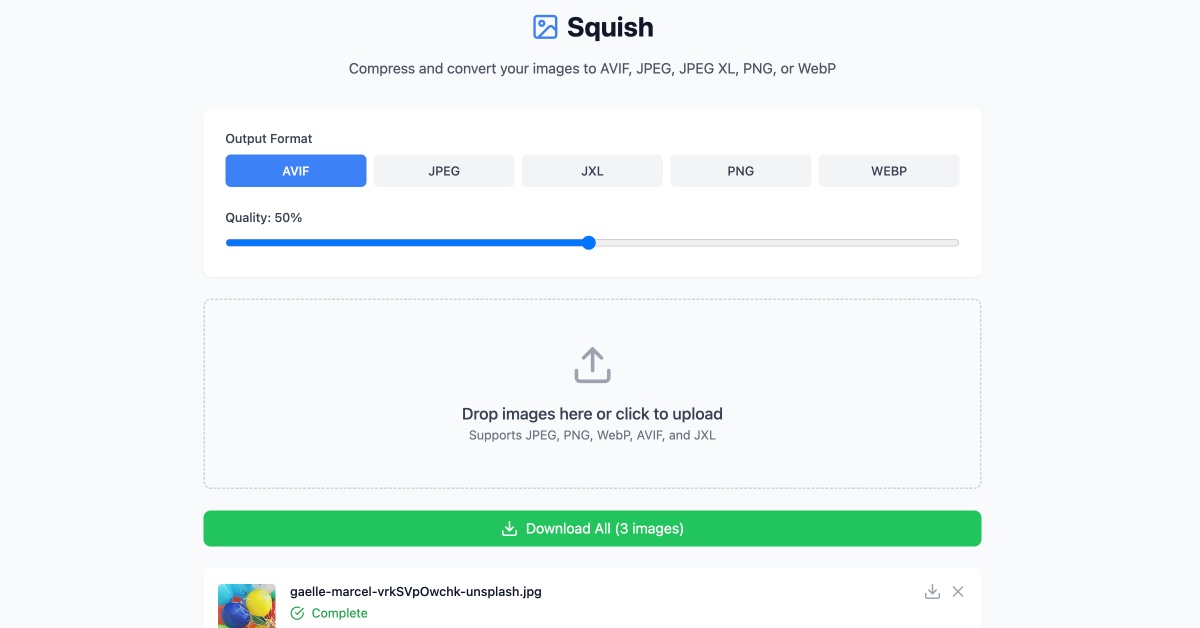
✨ Features

  • πŸ–ΌοΈ Support for multiple image formats:

    • AVIF (AV1 Image Format)
    • JPEG (using MozJPEG)
    • JPEG XL
    • PNG (using OxiPNG)
    • WebP
  • πŸš€ Key capabilities:

    • Browser-based compression (no server uploads needed)
    • Batch processing support
    • Format conversion
    • Quality adjustment per format
    • Real-time preview
    • Size reduction statistics
    • Drag and drop interface
    • Smart queue for compressing large number of files

πŸ› οΈ Technology

Squish is built with modern web technologies:

  • React + TypeScript for the UI
  • Vite for blazing fast development
  • WebAssembly for native-speed image processing
  • Tailwind CSS for styling
  • jSquash for image codec implementations

πŸš€ Getting Started

Prerequisites

  • Node.js 18 or later
  • npm 7 or later

Installation

  1. Clone the repository:
git clone https://github.com/addyosmani/squish.git
cd squish
  1. Install dependencies:
npm install
  1. Start the development server:
npm run dev
  1. Build for production:
npm run build

πŸ’‘ Usage

  1. Drop or Select Images: Drag and drop images onto the upload area or click to select files
  2. Choose Output Format: Select your desired output format (AVIF, JPEG, JPEG XL, PNG, or WebP)
  3. Adjust Quality: Use the quality slider to balance between file size and image quality
  4. Download: Download individual images or use the "Download All" button for batch downloads

πŸ”§ Default Quality Settings

  • AVIF: 50%
  • JPEG: 75%
  • JPEG XL: 75%
  • PNG: Lossless
  • WebP: 75%

🀝 Contributing

Contributions are welcome! Please feel free to submit a Pull Request. For major changes, please open an issue first to discuss what you would like to change.

  1. Fork the repository
  2. Create your feature branch (git checkout -b feature/AmazingFeature)
  3. Commit your changes (git commit -m 'Add some AmazingFeature')
  4. Push to the branch (git push origin feature/AmazingFeature)
  5. Open a Pull Request

πŸ“ License

This project is licensed under the MIT License - see the LICENSE file for details.

πŸ™ Acknowledgments

batch
batch-processing
image-compression
image-processing

addyosmani/squish

Squish - Batch Browser-based Image Compression

TypeScript

1,047

16 commits

updated Jan 16, 2025

See the code

README

Squish 🎨

License: MIT

A modern, browser-based image compression tool that leverages WebAssembly for high-performance image optimization. Squish supports multiple formats and provides an intuitive interface for compressing your images without compromising quality.

✨ Features

  • πŸ–ΌοΈ Support for multiple image formats:

    • AVIF (AV1 Image Format)
    • JPEG (using MozJPEG)
    • JPEG XL
    • PNG (using OxiPNG)
    • WebP
  • πŸš€ Key capabilities:

    • Browser-based compression (no server uploads needed)
    • Batch processing support
    • Format conversion
    • Quality adjustment per format
    • Real-time preview
    • Size reduction statistics
    • Drag and drop interface
    • Smart queue for compressing large number of files

πŸ› οΈ Technology

Squish is built with modern web technologies:

  • React + TypeScript for the UI
  • Vite for blazing fast development
  • WebAssembly for native-speed image processing
  • Tailwind CSS for styling
  • jSquash for image codec implementations

πŸš€ Getting Started

Prerequisites

  • Node.js 18 or later
  • npm 7 or later

Installation

  1. Clone the repository:
git clone https://github.com/addyosmani/squish.git
cd squish
  1. Install dependencies:
npm install
  1. Start the development server:
npm run dev
  1. Build for production:
npm run build

πŸ’‘ Usage

  1. Drop or Select Images: Drag and drop images onto the upload area or click to select files
  2. Choose Output Format: Select your desired output format (AVIF, JPEG, JPEG XL, PNG, or WebP)
  3. Adjust Quality: Use the quality slider to balance between file size and image quality
  4. Download: Download individual images or use the "Download All" button for batch downloads

πŸ”§ Default Quality Settings

  • AVIF: 50%
  • JPEG: 75%
  • JPEG XL: 75%
  • PNG: Lossless
  • WebP: 75%

🀝 Contributing

Contributions are welcome! Please feel free to submit a Pull Request. For major changes, please open an issue first to discuss what you would like to change.

  1. Fork the repository
  2. Create your feature branch (git checkout -b feature/AmazingFeature)
  3. Commit your changes (git commit -m 'Add some AmazingFeature')
  4. Push to the branch (git push origin feature/AmazingFeature)
  5. Open a Pull Request

πŸ“ License

This project is licensed under the MIT License - see the LICENSE file for details.

πŸ™ Acknowledgments

batch
batch-processing
image-compression
image-processing

Significant stargazers

Christian Oliff

561 followers Β· starred Dec 2024

fregante

1,984 followers Β· starred Dec 2024

Johann Schopplich

950 followers Β· starred Feb 2025

Corentin Leruth

115 followers Β· starred Dec 2024
