
See what people are saying
README
 |
LuxeA simple, opinionated RAW photo editor, powered by darktable's image-processing engine. |
Luxe is a desktop photo editor built with Godot 4. Instead of reimplementing RAW processing from scratch, it embeds darktable's real pixel pipeline in-process through a small C++ GDExtension, so every slider you drag is processed by the same code darktable's own darkroom uses.
https://github.com/user-attachments/assets/257148fa-0ed2-4830-85a8-caf0972ba8f7
Contents
What is Luxe
Luxe is a RAW photo editor with a deliberately small surface. You open a file, drag a handful of well-chosen sliders, and export. There is no module browser, no plugin marketplace, and no wall of technical settings: just the adjustments that actually move a photograph.
Under the hood it is darktable. Luxe runs darktable's core library (lib_darktable) inside the same process as the editor and drives its pixel pipeline directly, so the preview you see and the file you export are produced by darktable's genuine processing code, not an approximation. The frontend is Godot, which gives us a fast, GPU-accelerated, cross-platform UI shell.
The result is a small, fast editor with a serious processing engine underneath.
Currently only support M-Series MacOS
Features
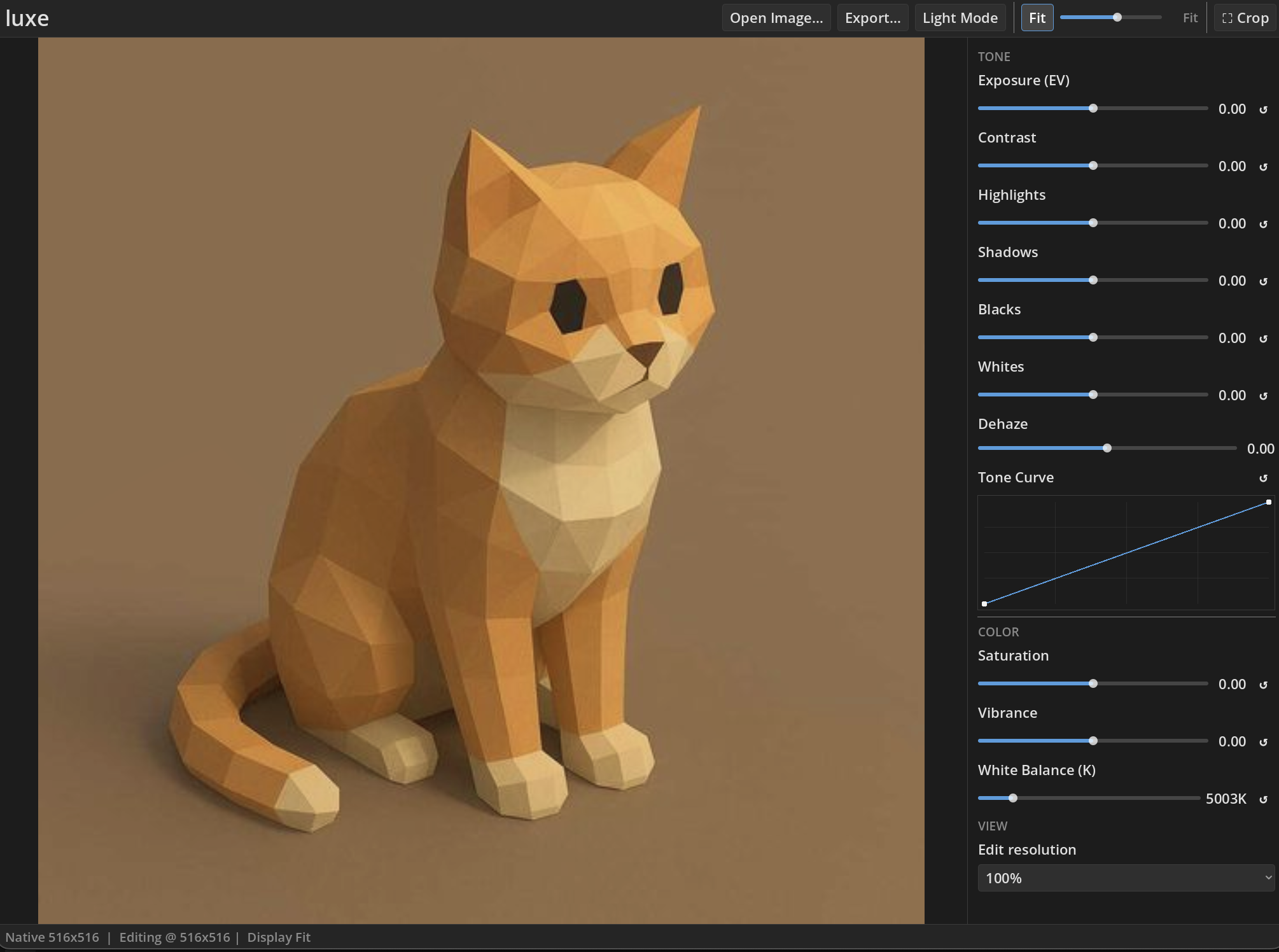
- Exposure
- Contrast
- Highlights
- Shadows
- Blacks
- Whites
- Saturation
- Vibrance
- Tone curve
- Dehaze
- White balance
- Crop
- Export
The UI also gives you:
- Edit resolution (25% - 100%)
- Chooses the resolution the pipeline actually processes at
- Lower is meaningfully faster
- Dynamically chosen to keep editing fast when importing
- Display zoom and pan
- a continuous 10%-400% zoom plus Fit, decoupled from edit resolution
- Light and dark themes
Progress
v0.1.3 -- Speed up edits by 5x, add advanced sliders, add Crop
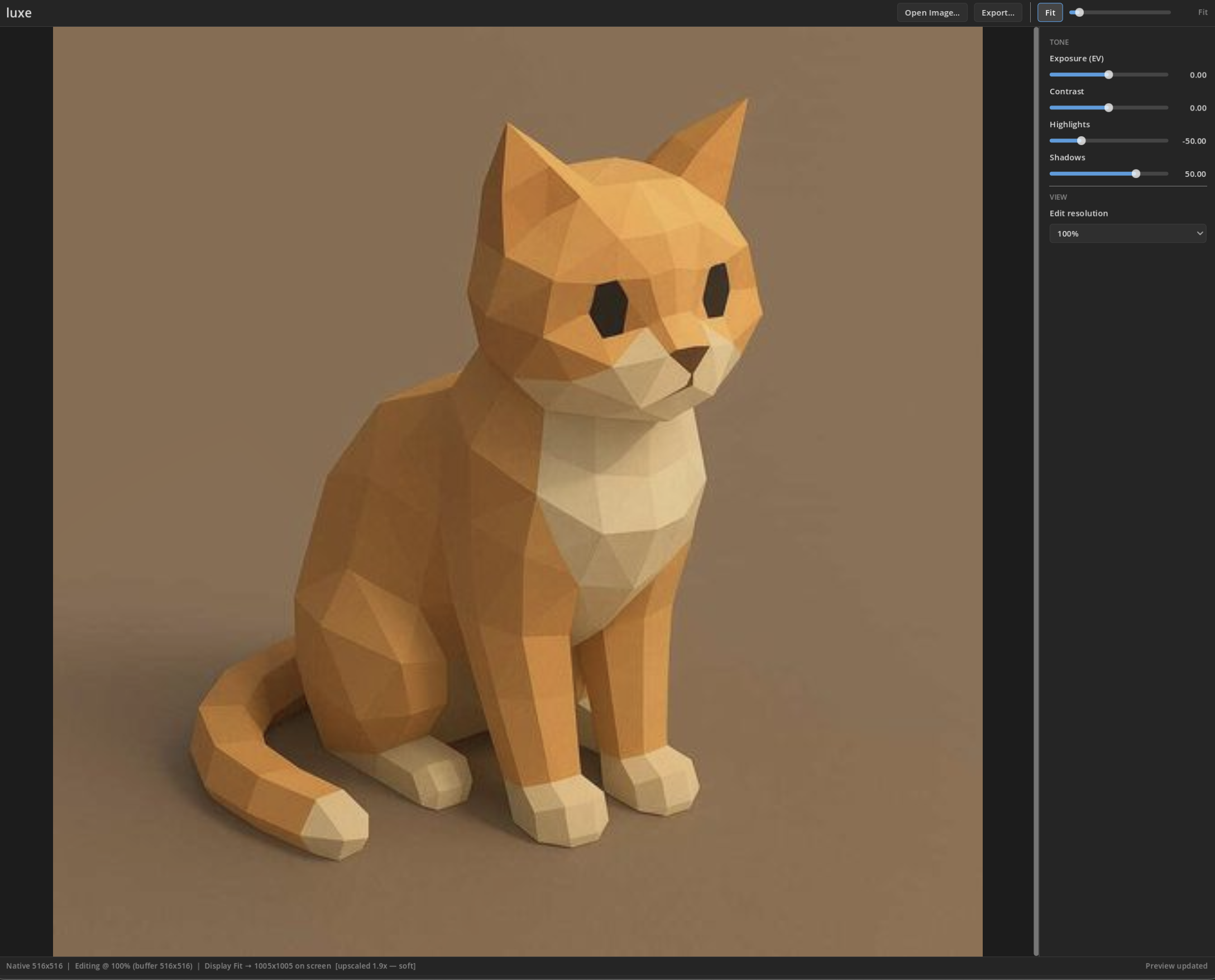
v0.1.2 -- Add extra sliders
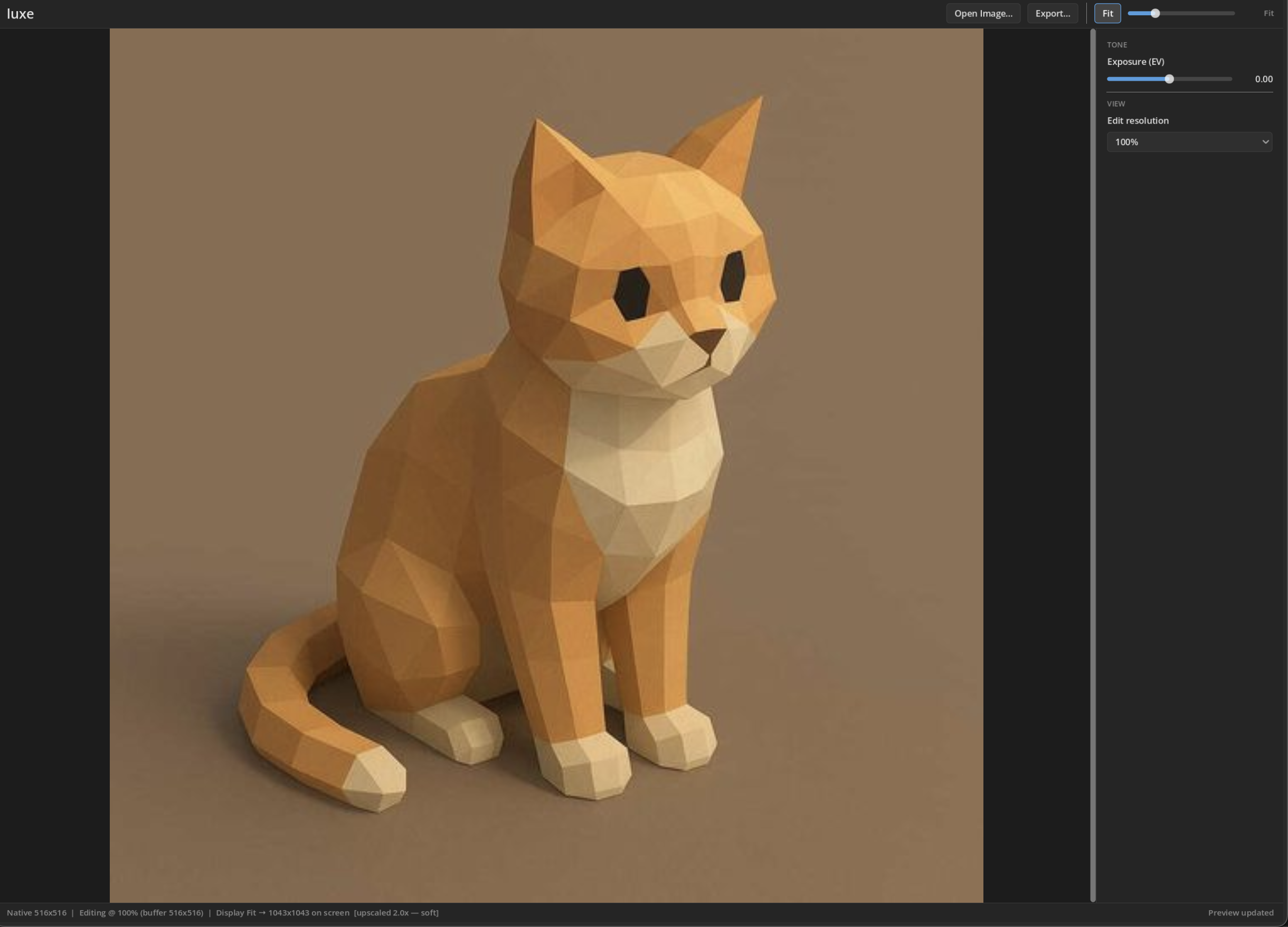
v0.1.1 -- light/dark theme system and macOS export.
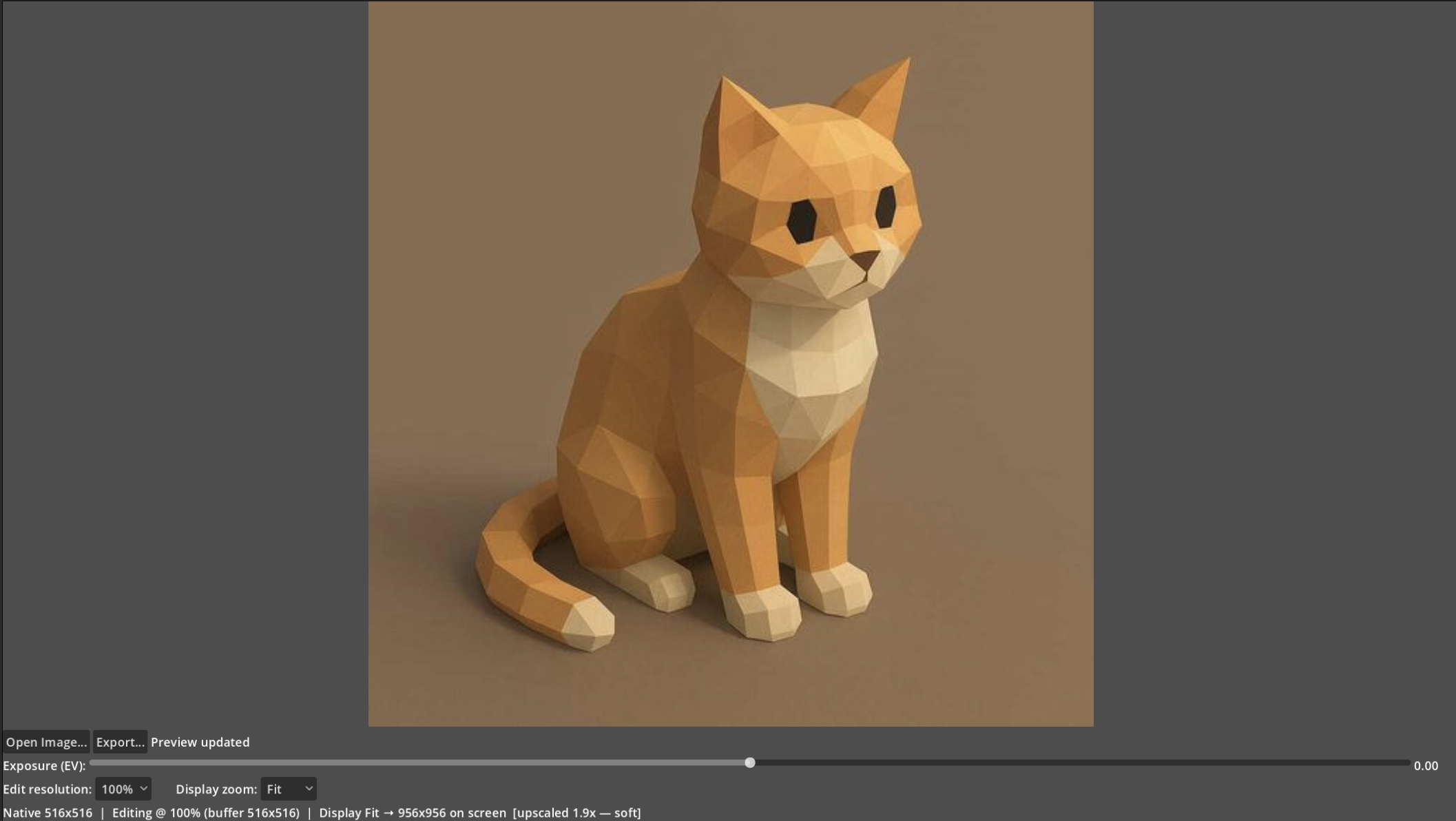
v0.1 -- the first editor shell: open a RAW, drag exposure, watch the preview re-render live.
Getting started
Prerequisites
- macOS on Apple Silicon is the currently supported development platform.
- Godot 4.6 (targets
4.6.beta3). - Python 3 + SCons (
pip install scons). - A C++ toolchain (Xcode Command Line Tools:
xcode-select --install). - A darktable build and godot-cpp
Building darktable
Luxe does not vendor darktable; the extension is built against your own darktable checkout. Build a headless configuration of darktable from source (see darktable's build docs) and place the checkout as a source/ directory beside this repo, so the relative paths in project/project.godot resolve.
Building the GDExtension
Clone the branch matching this repo's Godot version and build both targets:
git clone --branch 4.5 --depth 1 https://github.com/godotengine/godot-cpp extension/godot-cpp
cd extension/godot-cpp
scons target=template_debug arch=arm64
Then build the C++ shim itself:
cd extension
scons arch=arm64
scons arch=arm64 target=template_debug
The build writes compiled frameworks into project/bin/, which project/dt_backend.gdextension points at.
How it works
Architecture
Godot knows nothing about RAW processing and darktable knows nothing about Godot, so a GDExtension bridges them: one C++ class, DtBackend, that GDScript can call.
- GDScript calls plain methods like
backend.set_exposure(1.5)orbackend.export_image("out.jpg"). DtBackendtranslates each call into the actual darktable C API calls thatdarktable-cliuses internally.- Everything runs in one process and one memory space. No sockets, no IPC, no serializing image data across a boundary.
flowchart LR
    UI["GDScript UI"] --> BE["DtBackend<br/>(C++ GDExtension)"]
    BE --> DT["darktable core<br/>(headless)"]
    DT --> UI
The internals of the bridge are not documented here; read the source if you're curious. It is single-session (one image open at a time) and keeps the UI responsive while the pipeline runs.
Roadmap
- More adjustments: selected darktable IOP modules plus purpose-built Luxe tools. Darktable modules with masks, drawn shapes, splines, or color pickers need real custom UI first.
- A universal (arm64 + x86_64) GDExtension build.
Contributing
Contributions are welcome. See CONTRIBUTING.md for the full guide. The short version:
- Read Getting started and build darktable, godot-cpp, and the GDExtension.
- Run
scripts/smoke_test.shto confirm the pipeline works end to end. - Install the tracked git hooks once after cloning:
scripts/install-hooks.sh(the pre-commit hook rebuilds the GDExtension when its sources change and aborts the commit on a build failure). - Keep changes focused, make sure the smoke test passes, and explain the "why" in the commit message.
License
Luxe is free software, released under the GNU General Public License, version 3 or (at your option) any later version (GPL-3.0-or-later). See LICENSE for the full text.
- darktable, which Luxe embeds and links against as its image-processing engine, is licensed under GPL-3.0 (see
NOTICE). - godot-cpp, which provides the C++ bindings for the GDExtension, is licensed under the MIT License and is not covered by Luxe's GPL-3.0 licensing.
Because Luxe links against GPLv3 darktable, the combined work is distributed under the GPL. By contributing, you agree to license your contributions under GPL-3.0-or-later.


See what people are saying
README
|
LuxeA simple, opinionated RAW photo editor, powered by darktable's image-processing engine. |
Luxe is a desktop photo editor built with Godot 4. Instead of reimplementing RAW processing from scratch, it embeds darktable's real pixel pipeline in-process through a small C++ GDExtension, so every slider you drag is processed by the same code darktable's own darkroom uses.
https://github.com/user-attachments/assets/257148fa-0ed2-4830-85a8-caf0972ba8f7
Contents
What is Luxe
Luxe is a RAW photo editor with a deliberately small surface. You open a file, drag a handful of well-chosen sliders, and export. There is no module browser, no plugin marketplace, and no wall of technical settings: just the adjustments that actually move a photograph.
Under the hood it is darktable. Luxe runs darktable's core library (lib_darktable) inside the same process as the editor and drives its pixel pipeline directly, so the preview you see and the file you export are produced by darktable's genuine processing code, not an approximation. The frontend is Godot, which gives us a fast, GPU-accelerated, cross-platform UI shell.
The result is a small, fast editor with a serious processing engine underneath.
Currently only support M-Series MacOS
Features
- Exposure
- Contrast
- Highlights
- Shadows
- Blacks
- Whites
- Saturation
- Vibrance
- Tone curve
- Dehaze
- White balance
- Crop
- Export
The UI also gives you:
- Edit resolution (25% - 100%)
- Chooses the resolution the pipeline actually processes at
- Lower is meaningfully faster
- Dynamically chosen to keep editing fast when importing
- Display zoom and pan
- a continuous 10%-400% zoom plus Fit, decoupled from edit resolution
- Light and dark themes
Progress
v0.1.3 -- Speed up edits by 5x, add advanced sliders, add Crop
v0.1.2 -- Add extra sliders
v0.1.1 -- light/dark theme system and macOS export.
v0.1 -- the first editor shell: open a RAW, drag exposure, watch the preview re-render live.
Getting started
Prerequisites
- macOS on Apple Silicon is the currently supported development platform.
- Godot 4.6 (targets
4.6.beta3). - Python 3 + SCons (
pip install scons). - A C++ toolchain (Xcode Command Line Tools:
xcode-select --install). - A darktable build and godot-cpp
Building darktable
Luxe does not vendor darktable; the extension is built against your own darktable checkout. Build a headless configuration of darktable from source (see darktable's build docs) and place the checkout as a source/ directory beside this repo, so the relative paths in project/project.godot resolve.
Building the GDExtension
Clone the branch matching this repo's Godot version and build both targets:
git clone --branch 4.5 --depth 1 https://github.com/godotengine/godot-cpp extension/godot-cpp
cd extension/godot-cpp
scons target=template_debug arch=arm64
Then build the C++ shim itself:
cd extension
scons arch=arm64
scons arch=arm64 target=template_debug
The build writes compiled frameworks into project/bin/, which project/dt_backend.gdextension points at.
How it works
Architecture
Godot knows nothing about RAW processing and darktable knows nothing about Godot, so a GDExtension bridges them: one C++ class, DtBackend, that GDScript can call.
- GDScript calls plain methods like
backend.set_exposure(1.5)orbackend.export_image("out.jpg"). DtBackendtranslates each call into the actual darktable C API calls thatdarktable-cliuses internally.- Everything runs in one process and one memory space. No sockets, no IPC, no serializing image data across a boundary.
flowchart LR
    UI["GDScript UI"] --> BE["DtBackend<br/>(C++ GDExtension)"]
    BE --> DT["darktable core<br/>(headless)"]
    DT --> UI
The internals of the bridge are not documented here; read the source if you're curious. It is single-session (one image open at a time) and keeps the UI responsive while the pipeline runs.
Roadmap
- More adjustments: selected darktable IOP modules plus purpose-built Luxe tools. Darktable modules with masks, drawn shapes, splines, or color pickers need real custom UI first.
- A universal (arm64 + x86_64) GDExtension build.
Contributing
Contributions are welcome. See CONTRIBUTING.md for the full guide. The short version:
- Read Getting started and build darktable, godot-cpp, and the GDExtension.
- Run
scripts/smoke_test.shto confirm the pipeline works end to end. - Install the tracked git hooks once after cloning:
scripts/install-hooks.sh(the pre-commit hook rebuilds the GDExtension when its sources change and aborts the commit on a build failure). - Keep changes focused, make sure the smoke test passes, and explain the "why" in the commit message.
License
Luxe is free software, released under the GNU General Public License, version 3 or (at your option) any later version (GPL-3.0-or-later). See LICENSE for the full text.
- darktable, which Luxe embeds and links against as its image-processing engine, is licensed under GPL-3.0 (see
NOTICE). - godot-cpp, which provides the C++ bindings for the GDExtension, is licensed under the MIT License and is not covered by Luxe's GPL-3.0 licensing.
Because Luxe links against GPLv3 darktable, the combined work is distributed under the GPL. By contributing, you agree to license your contributions under GPL-3.0-or-later.