
Backstage plugin for managing AI Agents stored as catalog Components — dedicated card view with live status probing.
See the codeSee what people are saying
README
AI Agents plugin for Backstage
Catalog your AI agents in Backstage and give people one place to find them, check that they are up, run them and see what they did.
An agent is an ordinary catalog Component with spec.type: ai-agent, so it
keeps ownership, relations, search and permissions like any other component.
The plugin adds:
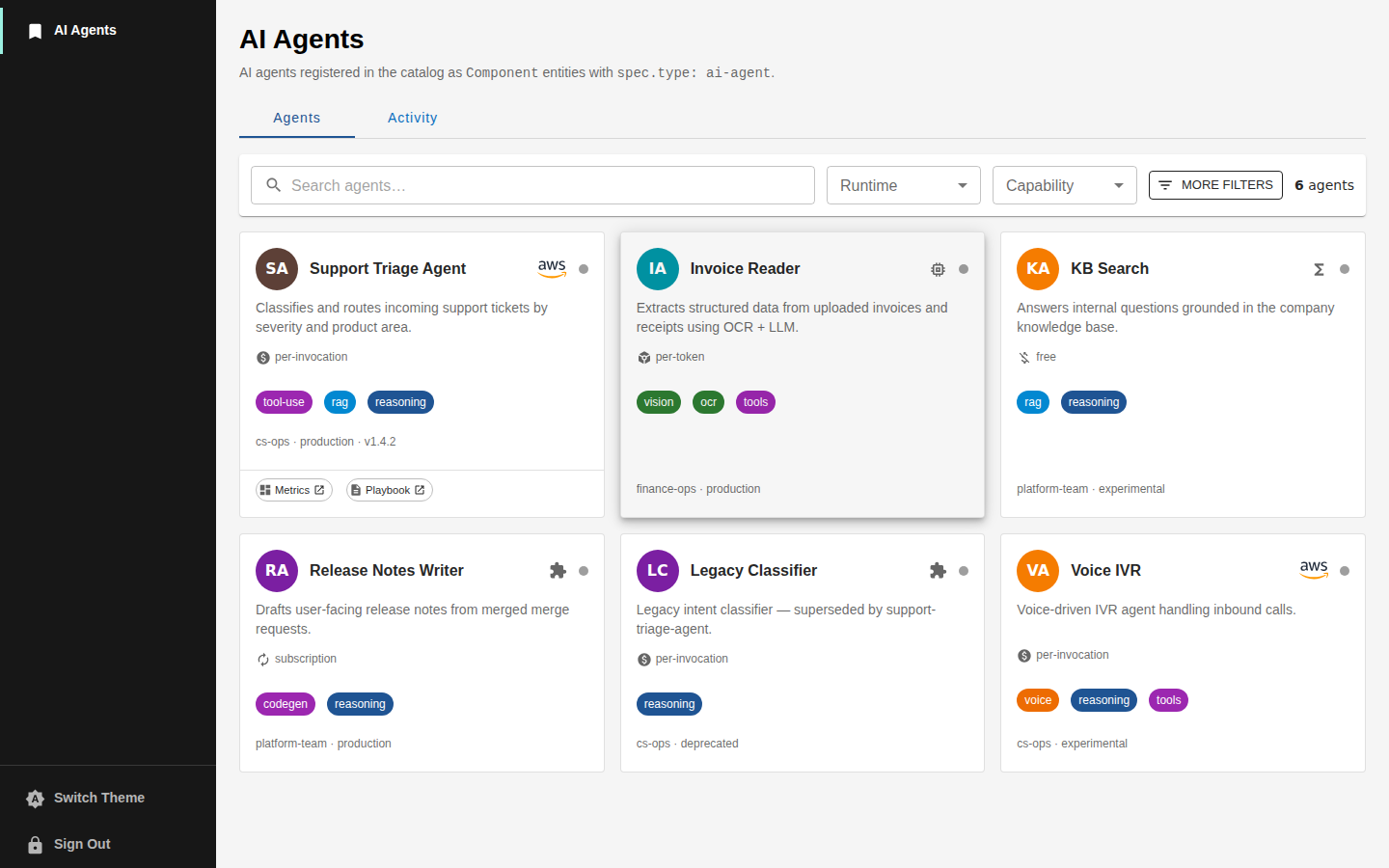
- an AI Agents page (
/ai-agents) with a card per agent, filters and a detail drawer; - live status (healthy / degraded / down) from each agent's health URL;
- a Hire dialog that runs an agent from Backstage as a multi-turn conversation, dry run first;
- reviews (0–5 stars) and invocation history;
- spend per agent and per conversation, read from a LiteLLM proxy;
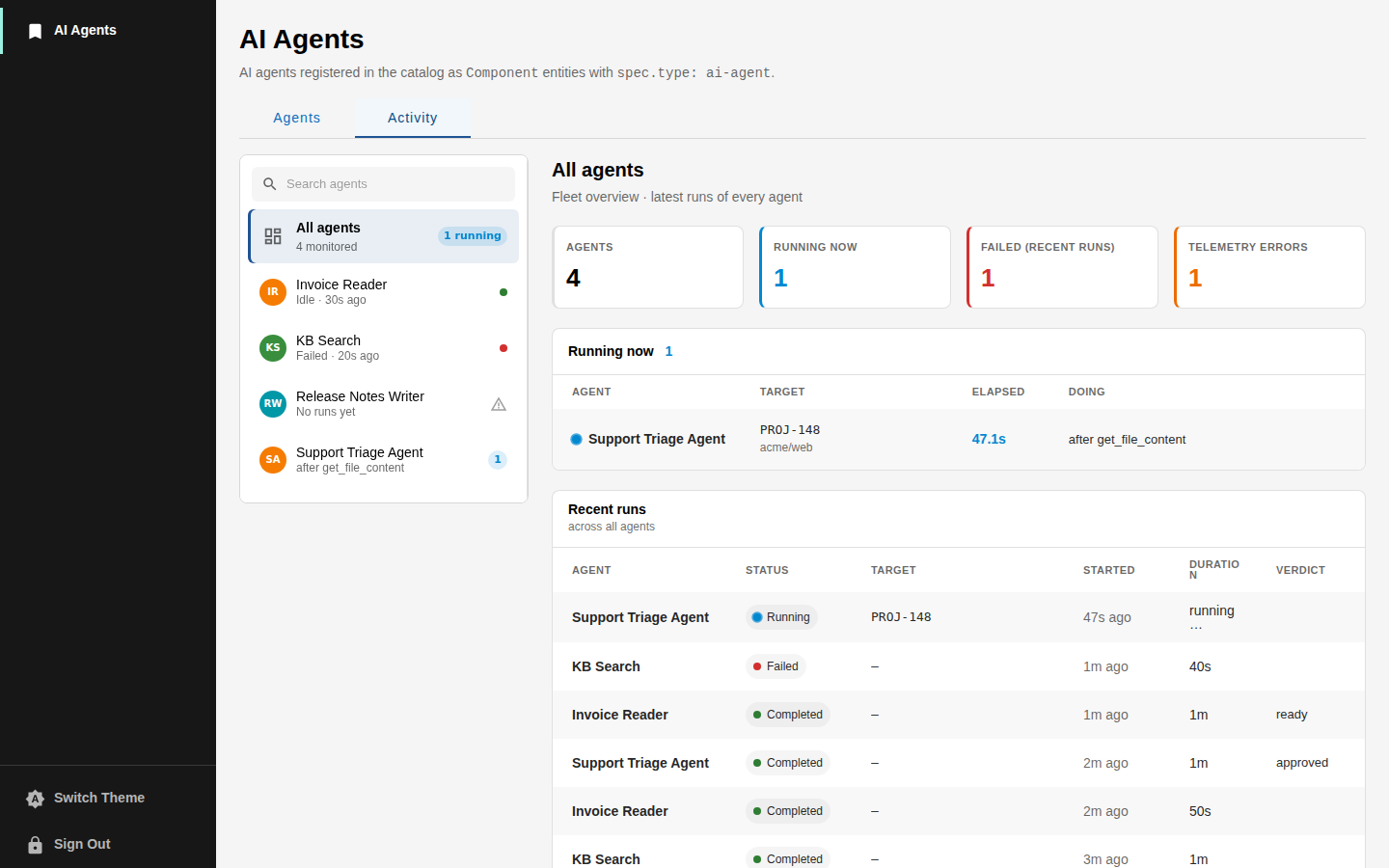
- an Activity view of runs and tool calls, read from your telemetry store;
- an overview card, an invocations card and an Activity tab on the agent's entity page.
Each backend feature is optional. Without the backend the page still lists agents; it just has no status, runs or history.
| Agents | Activity |
|---|---|
 |  |
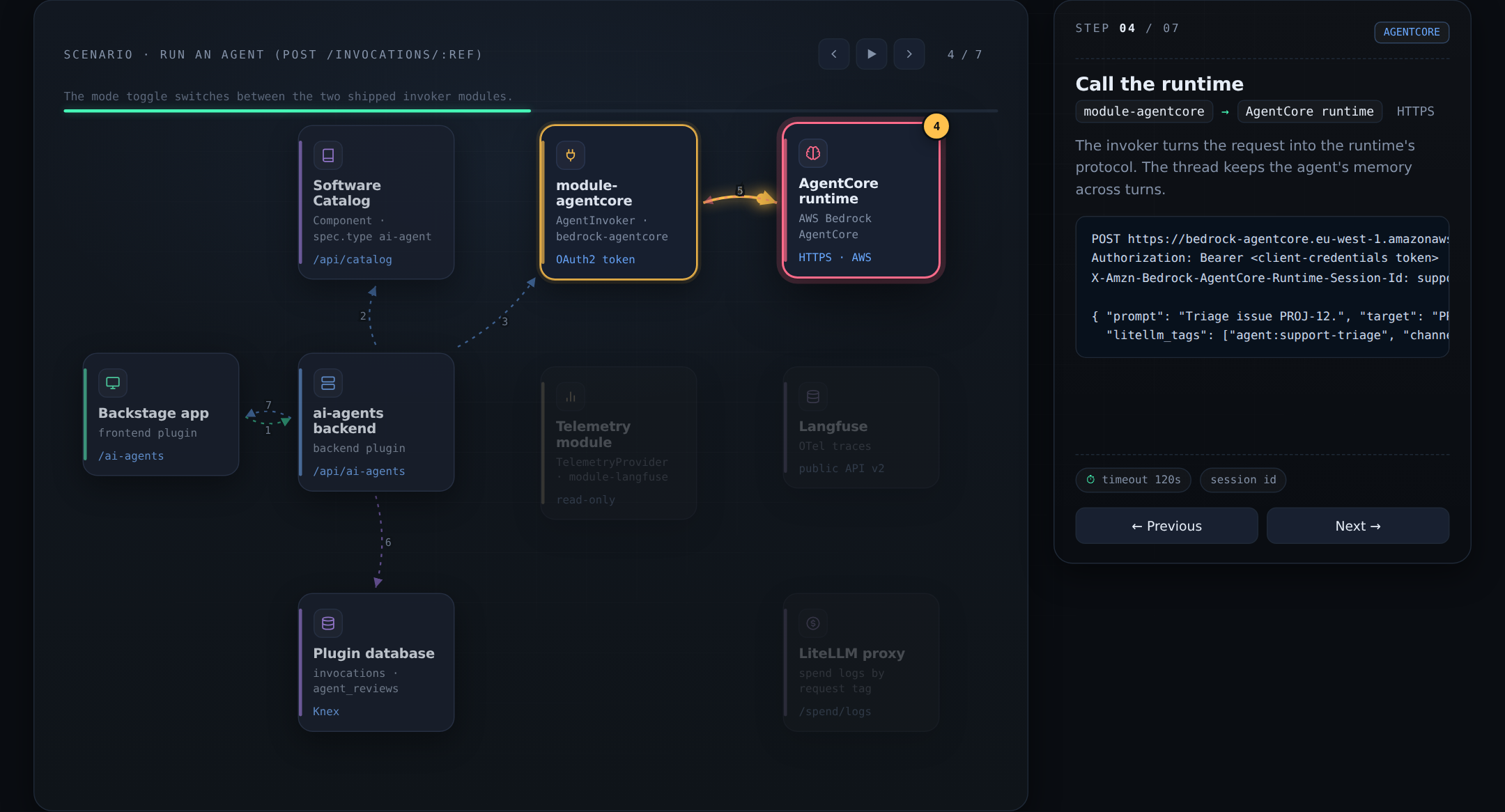
How the frontend, the backend and its modules work together is described in docs/architecture.md, with an interactive version in docs/architecture.html:
Packages
| Package | What it does |
|---|---|
@acarmisc/backstage-plugin-ai-agents | Frontend: page, cards, drawer, Hire dialog, Activity view |
@acarmisc/backstage-plugin-ai-agents-backend | Backend: status probing, invocations, reviews, spend, routes |
@acarmisc/backstage-plugin-ai-agents-backend-module-agentcore | Runs agents hosted on AWS Bedrock AgentCore |
@acarmisc/backstage-plugin-ai-agents-backend-module-kagent | Runs agents hosted on kagent (A2A) |
@acarmisc/backstage-plugin-ai-agents-backend-module-langfuse | Reads agent runs from Langfuse |
Each package README covers its installation and configuration.
Requirements
- Backstage 1.53 or later.
- The new frontend system and the new backend system. Apps on the legacy frontend system are not supported.
- A database for invocation history and reviews (the plugin's own Knex
migrations create the tables). Without one those features return
501.
Getting started
-
Install the frontend and backend:
yarn --cwd packages/app add @acarmisc/backstage-plugin-ai-agents yarn --cwd packages/backend add @acarmisc/backstage-plugin-ai-agents-backend -
Register the backend in
packages/backend/src/index.ts:backend.add(import('@acarmisc/backstage-plugin-ai-agents-backend')); -
If your app does not discover features automatically, add the frontend plugin to
createApp:import aiAgentsPlugin from '@acarmisc/backstage-plugin-ai-agents'; export default createApp({ features: [aiAgentsPlugin] }); -
Allow the backend to probe your agents' health URLs:
# app-config.yaml ai-agents: probeAllowlist: - https://*.agents.example.com -
Add the modules for the runtimes and telemetry store you use (see their READMEs), then describe an agent in the catalog.
Describing an agent
apiVersion: backstage.io/v1alpha1
kind: Component
metadata:
  name: support-triage
  title: Support Triage
  description: Classifies incoming tickets by severity and product area.
  annotations:
    ai-agent.io/runtime: kagent
    ai-agent.io/runtime-handle: support-triage
    ai-agent.io/health: https://support-triage.agents.example.com/healthz
    ai-agent.io/capabilities: 'tool-use:tools,rag:retrieval'
    ai-agent.io/billing-model: per-token
  links:
    - url: https://grafana.example.com/d/support-triage
      title: Metrics
spec:
  type: ai-agent
  lifecycle: production
  owner: group:default/support
Only spec.type: ai-agent is required (the match is case-sensitive). Agents
reach the catalog the same way as other components, through a location or an
entity provider.
Annotations
All annotations are optional. Entities that still use the old
ai-agent.acarmisc.org/ prefix keep working.
| Annotation | Purpose |
|---|---|
ai-agent.io/runtime | Runtime name, e.g. bedrock-agentcore or kagent. Picks the invoker module and the badge. Default custom. |
ai-agent.io/runtime-handle | The runtime's id for the agent: AgentCore runtime ARN, kagent agent name. |
ai-agent.io/region | AWS region of an AgentCore runtime. |
ai-agent.io/namespace | Kubernetes namespace of a kagent agent. |
ai-agent.io/endpoint | The agent's endpoint. Probed when health is not set. For kagent, overrides the controller URL. |
ai-agent.io/health | URL probed for live status. |
ai-agent.io/telemetry-id | The agent's name in the telemetry store. Enables the Activity view. |
ai-agent.io/purpose | Card text; defaults to metadata.description. |
ai-agent.io/avatar | Image: http(s) URL, data:image/* URI or app-relative path. Private-repo images load through the backend. Initials otherwise. |
ai-agent.io/version | Shown in the card footer. |
ai-agent.io/capabilities | Comma- or newline-separated chips, label or label:category (reasoning, retrieval, tools, vision, voice, data, safety). |
ai-agent.io/billing-model | per-invocation, per-token, subscription or free (default). |
ai-agent.io/cost-per-1k | Cost per 1000 invocations, or per 1M tokens for per-token. |
ai-agent.io/budget | Monthly budget. |
ai-agent.io/hire-schema | JSON array describing the Hire form. See Running agents. |
ai-agent.io/prompt-template | Prompt with {field} placeholders filled from the Hire form. |
Running agents
An agent with a hire-schema gets a Hire button. The schema is a JSON
array of form fields:
ai-agent.io/hire-schema: >-
  [{"name":"target","label":"Issue","type":"text","required":true},
   {"name":"action","label":"Action","type":"select","options":["dry-run","post"],"default":"dry-run"}]
ai-agent.io/prompt-template: 'Triage issue {target}.'
| Field | Description |
|---|---|
name | Key of the value and of the {name} placeholder (required) |
label | Input label (required) |
type | text (default), url, textarea, select or number |
required | Whether the field must be filled |
default | Initial value |
options | Choices of a select |
help | Helper text under the input |
An invalid schema hides the button instead of breaking the card.
The backend sends the filled prompt together with structured fields
(target, project, model, mode, post). Two of them need care:
postis always sent and defaults tofalse. Agents can treat it as "allowed to write" (post a comment, open a ticket). The dialog runs a dry run first and only sendspost: truefrom its Confirm and publish button, shown when the schema has anactionorpostfield.- Conversations keep their thread. Follow-up messages reuse the thread id,
which becomes the AgentCore session id or the A2A
contextId, so the agent keeps its memory across turns.
Without an invoker module for the agent's runtime the dialog falls back to a
copyable request preview. To support another runtime, implement AgentInvoker
and register it from a backend module; see the
backend README.
Permissions
| Permission | Action | Checked on |
|---|---|---|
ai-agent.invoke | update | POST /invocations/:ref |
ai-agent.history.read | read | GET /invocations/:ref, GET /invocations/:ref/spend |
Every route also reads the catalog on behalf of the caller, so a user only sees, probes and runs agents their catalog permissions let them read.
Security notes
- Status probing is deny-by-default: the backend only fetches URLs whose origin
matches
ai-agents.probeAllowlist. - Agent avatars are fetched through the backend with the integrations'
credentials, only from the integrations' hosts (or
ai-agents.avatarProxy.allowlist), and only image content is served. - Catalog authors control annotations, so annotation values are treated as
untrusted: links are rendered only for
http(s), the AgentCore region must be a valid AWS region, and the kagentauthHeaderis only sent to the configured controller. - The Langfuse module reads observation metadata only, never prompts, model output or tool arguments.
Report vulnerabilities as described in SECURITY.md.
Development
npm install --legacy-peer-deps
npm run build      # build before typecheck and test: modules use the backend's dist types
npm run lint
npm run typecheck
npm test
cd packages/plugin-ai-agents && npm start   # frontend with sample agents, no backend
See CONTRIBUTING.md for conventions and the release process, docs/architecture.md for how the pieces talk to each other and docs/activity.md for the Activity view and the telemetry provider contract.
License
Similar repos


Languages
TypeScript
98.7%
JavaScript
1.3%
Backstage plugin for managing AI Agents stored as catalog Components — dedicated card view with live status probing.
See the codeSee what people are saying
README
AI Agents plugin for Backstage
Catalog your AI agents in Backstage and give people one place to find them, check that they are up, run them and see what they did.
An agent is an ordinary catalog Component with spec.type: ai-agent, so it
keeps ownership, relations, search and permissions like any other component.
The plugin adds:
- an AI Agents page (
/ai-agents) with a card per agent, filters and a detail drawer; - live status (healthy / degraded / down) from each agent's health URL;
- a Hire dialog that runs an agent from Backstage as a multi-turn conversation, dry run first;
- reviews (0–5 stars) and invocation history;
- spend per agent and per conversation, read from a LiteLLM proxy;
- an Activity view of runs and tool calls, read from your telemetry store;
- an overview card, an invocations card and an Activity tab on the agent's entity page.
Each backend feature is optional. Without the backend the page still lists agents; it just has no status, runs or history.
| Agents | Activity |
|---|---|
| |
How the frontend, the backend and its modules work together is described in docs/architecture.md, with an interactive version in docs/architecture.html:
Packages
| Package | What it does |
|---|---|
@acarmisc/backstage-plugin-ai-agents | Frontend: page, cards, drawer, Hire dialog, Activity view |
@acarmisc/backstage-plugin-ai-agents-backend | Backend: status probing, invocations, reviews, spend, routes |
@acarmisc/backstage-plugin-ai-agents-backend-module-agentcore | Runs agents hosted on AWS Bedrock AgentCore |
@acarmisc/backstage-plugin-ai-agents-backend-module-kagent | Runs agents hosted on kagent (A2A) |
@acarmisc/backstage-plugin-ai-agents-backend-module-langfuse | Reads agent runs from Langfuse |
Each package README covers its installation and configuration.
Requirements
- Backstage 1.53 or later.
- The new frontend system and the new backend system. Apps on the legacy frontend system are not supported.
- A database for invocation history and reviews (the plugin's own Knex
migrations create the tables). Without one those features return
501.
Getting started
-
Install the frontend and backend:
yarn --cwd packages/app add @acarmisc/backstage-plugin-ai-agents yarn --cwd packages/backend add @acarmisc/backstage-plugin-ai-agents-backend -
Register the backend in
packages/backend/src/index.ts:backend.add(import('@acarmisc/backstage-plugin-ai-agents-backend')); -
If your app does not discover features automatically, add the frontend plugin to
createApp:import aiAgentsPlugin from '@acarmisc/backstage-plugin-ai-agents'; export default createApp({ features: [aiAgentsPlugin] }); -
Allow the backend to probe your agents' health URLs:
# app-config.yaml ai-agents: probeAllowlist: - https://*.agents.example.com -
Add the modules for the runtimes and telemetry store you use (see their READMEs), then describe an agent in the catalog.
Describing an agent
apiVersion: backstage.io/v1alpha1
kind: Component
metadata:
  name: support-triage
  title: Support Triage
  description: Classifies incoming tickets by severity and product area.
  annotations:
    ai-agent.io/runtime: kagent
    ai-agent.io/runtime-handle: support-triage
    ai-agent.io/health: https://support-triage.agents.example.com/healthz
    ai-agent.io/capabilities: 'tool-use:tools,rag:retrieval'
    ai-agent.io/billing-model: per-token
  links:
    - url: https://grafana.example.com/d/support-triage
      title: Metrics
spec:
  type: ai-agent
  lifecycle: production
  owner: group:default/support
Only spec.type: ai-agent is required (the match is case-sensitive). Agents
reach the catalog the same way as other components, through a location or an
entity provider.
Annotations
All annotations are optional. Entities that still use the old
ai-agent.acarmisc.org/ prefix keep working.
| Annotation | Purpose |
|---|---|
ai-agent.io/runtime | Runtime name, e.g. bedrock-agentcore or kagent. Picks the invoker module and the badge. Default custom. |
ai-agent.io/runtime-handle | The runtime's id for the agent: AgentCore runtime ARN, kagent agent name. |
ai-agent.io/region | AWS region of an AgentCore runtime. |
ai-agent.io/namespace | Kubernetes namespace of a kagent agent. |
ai-agent.io/endpoint | The agent's endpoint. Probed when health is not set. For kagent, overrides the controller URL. |
ai-agent.io/health | URL probed for live status. |
ai-agent.io/telemetry-id | The agent's name in the telemetry store. Enables the Activity view. |
ai-agent.io/purpose | Card text; defaults to metadata.description. |
ai-agent.io/avatar | Image: http(s) URL, data:image/* URI or app-relative path. Private-repo images load through the backend. Initials otherwise. |
ai-agent.io/version | Shown in the card footer. |
ai-agent.io/capabilities | Comma- or newline-separated chips, label or label:category (reasoning, retrieval, tools, vision, voice, data, safety). |
ai-agent.io/billing-model | per-invocation, per-token, subscription or free (default). |
ai-agent.io/cost-per-1k | Cost per 1000 invocations, or per 1M tokens for per-token. |
ai-agent.io/budget | Monthly budget. |
ai-agent.io/hire-schema | JSON array describing the Hire form. See Running agents. |
ai-agent.io/prompt-template | Prompt with {field} placeholders filled from the Hire form. |
Running agents
An agent with a hire-schema gets a Hire button. The schema is a JSON
array of form fields:
ai-agent.io/hire-schema: >-
  [{"name":"target","label":"Issue","type":"text","required":true},
   {"name":"action","label":"Action","type":"select","options":["dry-run","post"],"default":"dry-run"}]
ai-agent.io/prompt-template: 'Triage issue {target}.'
| Field | Description |
|---|---|
name | Key of the value and of the {name} placeholder (required) |
label | Input label (required) |
type | text (default), url, textarea, select or number |
required | Whether the field must be filled |
default | Initial value |
options | Choices of a select |
help | Helper text under the input |
An invalid schema hides the button instead of breaking the card.
The backend sends the filled prompt together with structured fields
(target, project, model, mode, post). Two of them need care:
postis always sent and defaults tofalse. Agents can treat it as "allowed to write" (post a comment, open a ticket). The dialog runs a dry run first and only sendspost: truefrom its Confirm and publish button, shown when the schema has anactionorpostfield.- Conversations keep their thread. Follow-up messages reuse the thread id,
which becomes the AgentCore session id or the A2A
contextId, so the agent keeps its memory across turns.
Without an invoker module for the agent's runtime the dialog falls back to a
copyable request preview. To support another runtime, implement AgentInvoker
and register it from a backend module; see the
backend README.
Permissions
| Permission | Action | Checked on |
|---|---|---|
ai-agent.invoke | update | POST /invocations/:ref |
ai-agent.history.read | read | GET /invocations/:ref, GET /invocations/:ref/spend |
Every route also reads the catalog on behalf of the caller, so a user only sees, probes and runs agents their catalog permissions let them read.
Security notes
- Status probing is deny-by-default: the backend only fetches URLs whose origin
matches
ai-agents.probeAllowlist. - Agent avatars are fetched through the backend with the integrations'
credentials, only from the integrations' hosts (or
ai-agents.avatarProxy.allowlist), and only image content is served. - Catalog authors control annotations, so annotation values are treated as
untrusted: links are rendered only for
http(s), the AgentCore region must be a valid AWS region, and the kagentauthHeaderis only sent to the configured controller. - The Langfuse module reads observation metadata only, never prompts, model output or tool arguments.
Report vulnerabilities as described in SECURITY.md.
Development
npm install --legacy-peer-deps
npm run build      # build before typecheck and test: modules use the backend's dist types
npm run lint
npm run typecheck
npm test
cd packages/plugin-ai-agents && npm start   # frontend with sample agents, no backend
See CONTRIBUTING.md for conventions and the release process, docs/architecture.md for how the pieces talk to each other and docs/activity.md for the Activity view and the telemetry provider contract.
License
Similar repos
Languages
TypeScript
98.7%
JavaScript
1.3%