
See what people are saying
README

Modern actor-based agent framework for Python 3.12+
A comprehensive framework for building intelligent multi-agent systems with LLM integration, dynamic team composition, and actor-based architecture.
| Package | CI | Coverage | Dependencies |
|---|---|---|---|
| akgentic-core Actor framework, messaging, and orchestrator |  |  | — |
| akgentic-llm Multi-provider LLM integration and REACT pattern |  |  | — |
| akgentic-tool Tool abstractions, workspace, planning, web search, MCP, ... |  |  | core |
| akgentic-team Team lifecycle, event sourcing, YAML/MongoDB persistence |  |  | core |
| akgentic-agent LLM-powered agents with typed message routing |  |  | core, llm, tool |
| akgentic-catalog Configuration registry for teams, YAML/MongoDB persistence |  |  | core, llm, tool, team |
| akgentic-infra Infrastructure backend — protocol abstractions, community/department/enterprise tiers |  |  | core, llm, tool, agent, catalog, team |
| akgentic-frontend Angular-based web UI | — | — | — |
Quick Start
This root package serves as the quick-start entry point for the Akgentic framework, providing complete examples that demonstrate the full capabilities of multi-agent team coordination.
Installation
Akgentic is on PyPI. To install the whole framework:
pip install "akgentic-framework[all]"
Add the optional backends and heavier tool extras (Mongo persistence, vector search, document parsing, …):
pip install "akgentic-framework[all-extras]"
akgentic-framework is a meta-distribution: it contains no code of its own,
only a pinned set of requirements, so an extra installs the exact subpackage
versions that were built and tested together for that release.
À la carte
Extras compose, and each one pins its whole akgentic dependency closure at
the versions of this release — so [agent] fixes akgentic-llm and
akgentic-tool too, rather than letting them resolve to whatever is newest.
| Extra | Installs |
|---|---|
core | akgentic-core |
llm | akgentic-llm |
tool | akgentic-tool + akgentic-core |
agent | akgentic-agent + akgentic-llm, akgentic-tool, akgentic-core |
team | akgentic-team + akgentic-core |
catalog | akgentic-catalog + akgentic-team, akgentic-tool, akgentic-core |
infra | akgentic-infra + the whole set |
postgres | akgentic-catalog[postgres], akgentic-team[postgres] + their closure |
pip install "akgentic-framework[agent,catalog]"
mongo and postgres are mutually exclusive persistence backends, so
[all-extras] ships the Mongo flavour. Compose the other one explicitly:
pip install "akgentic-framework[all,postgres]"
The base install is the actor framework alone (akgentic.core), so it stays a
usable minimal floor:
pip install akgentic-framework
Subpackages can also be installed directly — pip install akgentic-agent —
which is the right choice when you depend on one part and do not want a
release-wide pin.
Running from a clone
Cloning this repository and syncing installs the release set from PyPI — no submodules needed. This is what you want to try the examples below:
git clone https://github.com/b12consulting/akgentic-framework.git
cd akgentic-framework
uv sync
source .venv/bin/activate
uv sync installs every subpackage with its optional extras, so the demos run
immediately. (Published metadata stays lean: pip install akgentic-framework
still gets akgentic.core alone. The full set comes from a uv dependency group,
which pip ignores.)
Working on the sources
To change subpackage code rather than just use it, switch the same checkout into source mode. Initialise the submodules first — uv reports a confusing error if a workspace member directory is missing:
# 1. Fetch the sources, pinned at the release tags this version pins
git submodule update --init

# 2. Uncomment the two blocks under "SOURCE MODE" in pyproject.toml

# 3. Re-sync; akgentic-* now resolve to the local sources, editable
uv sync
The submodules are pinned at the exact commits their release tags point to, so
what you get is the code this release was built from — uv run python scripts/verify_submodules.py checks it. Because every package's own CI resolves
its dependencies from PyPI, this is the only place unreleased cross-package
changes are exercised together.
Two things to expect:
uv.lockis rewritten when you switch modes. That diff is expected; don't commit it —git checkout uv.lockwhen you're done.- The
==pins still apply to the local sources. Bump a submodule's version anduv syncfails until you regenerate the pins withscripts/sync_versions.py. That's deliberate: the pin table is the declared release set.
To check how the published metadata resolves without re-commenting anything, use
uv sync --no-sources.
Running the Server and Frontend
After installation, open two terminals to launch the backend and the web UI:
Terminal 1 — Start the backend server:
source .venv/bin/activate

# Set your API keys (get them from https://platform.openai.com/api-keys and https://app.tavily.com/)
export OPENAI_API_KEY="your-openai-api-key"
export TAVILY_API_KEY="your-tavily-api-key"

# Launch the server (param --logfire enables structured logging, https://logfire-eu.pydantic.dev/)
python src/infra_server.py
Terminal 2 — Start the web UI:
The frontend is an Angular app published from its own repository, and it is not part of the Python install — fetch its sources before the first run:
git submodule update --init packages/akgentic-frontend
cd packages/akgentic-frontend
npm install
npm start
Once both are running:
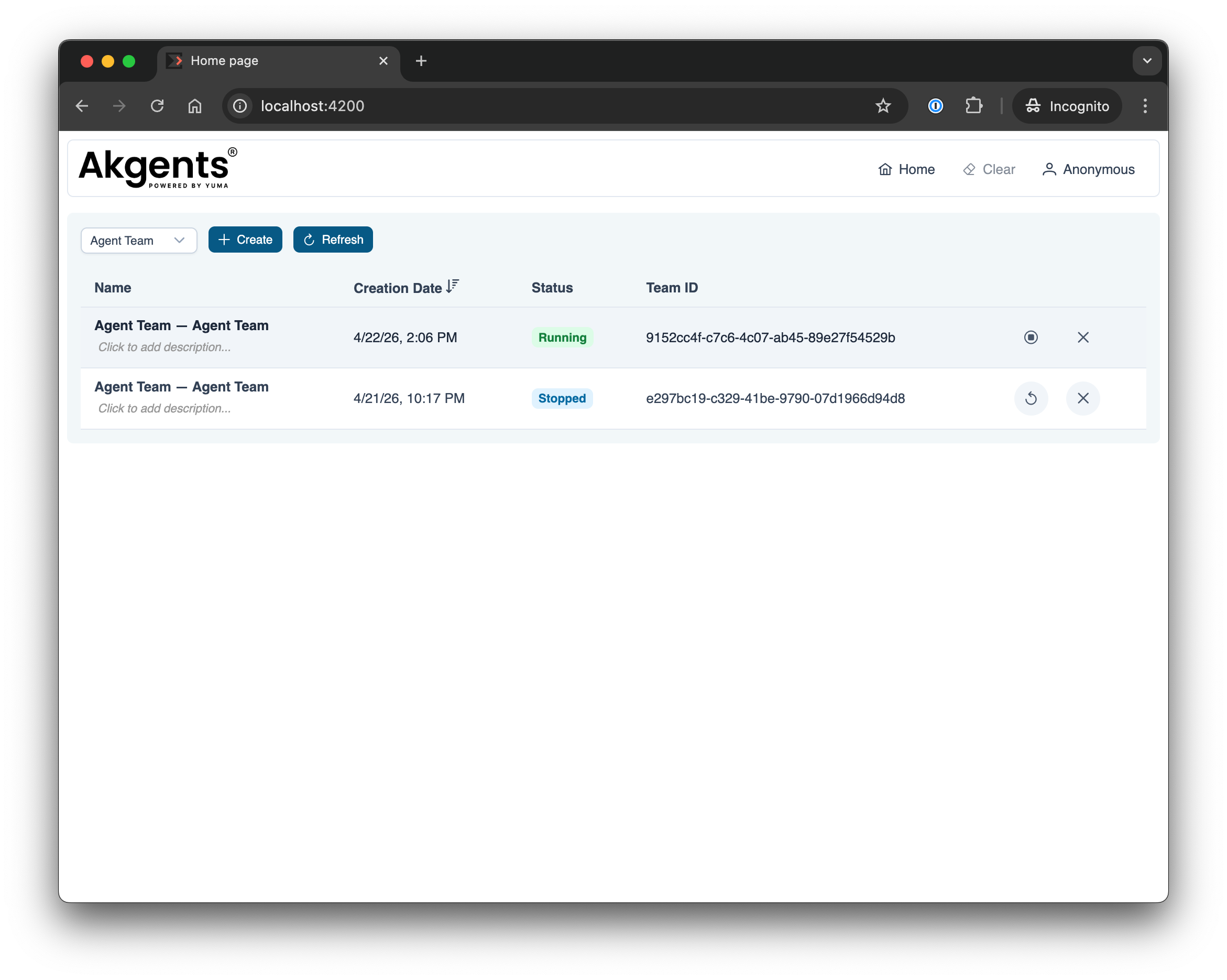
- Web UI — http://localhost:4200 — create and interact with agent teams visually
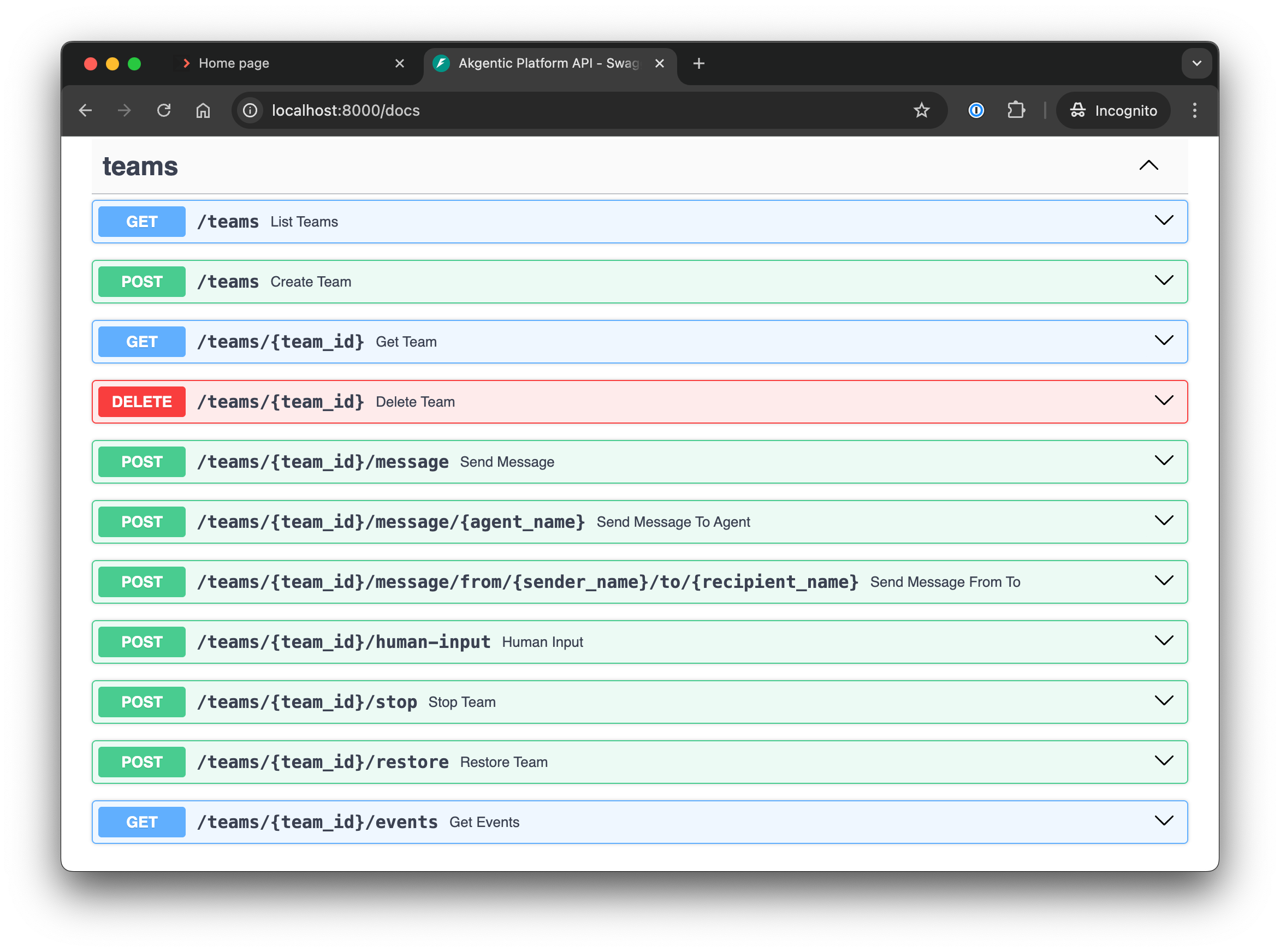
- API docs — http://localhost:8000/docs — interactive OpenAPI (Swagger) interface to explore and test all REST endpoints
By default, the server stores team catalogs in ./data/catalog/ and the event store in ./data/event_store/. These paths are configurable via the CommunitySettings class or environment variables prefixed with AKGENTIC_.
Command line Agent Team Example
The src/agent_team/main.py example demonstrates a complete multi-agent team system from a simple python script without the full infrastructure.
What it demonstrates:
- Building a team with Manager, Assistant, and Expert roles using
AgentCard - Interactive chat loop with
@mentionrouting (e.g.,@Expert help me) HumanProxyfor human-to-agent communicationEventSubscriberfor real-time message flow visibility- Dynamic team composition (Manager can hire Assistant/Expert on demand)
- Slash commands:
/team,/roles,/planning,/hire <role>,/fire <name>
Team Structure:
- Manager: Coordinates team, can hire Assistant and Expert roles
- Assistant: Provides support and research
- Expert: Provides specialized knowledge
- HumanProxy: Routes human input to Manager
Key Concepts:
AgentCard— Defines agent roles with a description, skills, and config (prompt, model, tools)BaseAgent— LLM-powered agent with typedAgentMessageprotocolregister_agent_profiles()— RegistersAgentCardcatalog with orchestratorEventSubscriber.on_message()— Event-driven message monitoringHumanProxy.send()— SendsAgentMessagefrom human to agents
Run the example:
# Set your OpenAI and TAVILY API key
export OPENAI_API_KEY="your-openai-api-key" # https://platform.openai.com/api-keys
export TAVILY_API_KEY="your-tavily-api-key" # https://app.tavily.com/

# Activate the environment
source .venv/bin/activate

# Run the team example
python src/agent_team/main.py
Interactive Features:
In this example, as a human user, we instruct the manager to ask the expert (@Expert) about his role in the team. The manager routes an AgentMessage(request) to the expert, who replies with AgentMessage(response). The manager then relays the answer back to the human.
By default messages are addressed to the Manager, but you can route them to specific agents using @AgentName prefix — e.g., @Expert what is your role? sends directly to the Expert. Use /help to see all available slash commands.
Team members:
  - @Human (Human)
  - @Manager (Manager)
  - @Assistant (Assistant)
  - @Expert (Expert)

Type your message (start the message with @{agent_name} to route to specific agent, 'exit' to quit or '/help' for help):
----------------------------------------------------------------------------------------------------
Ask @Expert what is his role in the team

----------------------------------------------------------------------------------------------------
[@Manager] -> AgentMessage(request) [@Expert]:
You received a request from @Manager:

Could you please describe your role and main responsibilities within the team?

----------------------------------------------------------------------------------------------------
[@Manager] -> AgentMessage(response) [@Human]:
I'll reach out to @Expert to clarify his role in the team.

----------------------------------------------------------------------------------------------------
[@Expert] -> AgentMessage(response) [@Manager]:
You received a response from @Expert:

Certainly, @Manager. As the Expert within the team, my primary role is to provide deep, specialized knowledge and technical guidance. My responsibilities include:

1. Offering in-depth analysis and solutions for complex problems...

----------------------------------------------------------------------------------------------------
[@Manager] -> AgentMessage(response) [@Human]:
@Human, here is @Expert's response regarding his role:

As the Expert, his primary role is to provide deep, specialized knowledge and technical guidance. His responsibilities include:

1. Offering in-depth analysis and solutions for complex problems...


exit

Exiting chat loop.
This example showcases the akgentic-agent package capabilities. For LLM-driven agent patterns and the typed message protocol, see the akgentic-agent README.
Catalog-Driven Agent Teams
The same multi-agent team can be assembled entirely from YAML — prompt templates, tools, agents, and team structure — via the akgentic-catalog package. This repository ships that data in two forms:
data/catalog/— file-per-entry namespaces (agent-team,general-team,software-engineer-team-v3,global, …), the layout the server reads directly;data/catalog-import/— one bundle YAML per namespace, the import/export form for seeding a fresh deployment.
Instead of defining AgentCard objects in Python, entries are declared in a namespace and resolved at runtime through the unified Catalog. The ak-catalog CLI works against the bundled data directly:
# Strict-validate a namespace, resolve the team into a runnable TeamCard
ak-catalog --root data/catalog validate --namespace agent-team
ak-catalog --root data/catalog load-team --namespace agent-team

# Round-trip a namespace as a single bundle document
ak-catalog --root data/catalog export --namespace agent-team
ak-catalog --root data/catalog validate data/catalog-import/catalog.agent-team.yaml
See the akgentic-catalog README for catalog documentation.
Architecture
Each package lives in its own repository and publishes itself to PyPI. This
repository is the entry point: it pins a coherent set of them and, in source
mode, mounts them as submodules under packages/.
packages/                 (submodules — empty until `git submodule update --init`)
  akgentic-core/        → Zero-dependency actor framework (Pykka, messaging, orchestrator)
  akgentic-llm/         → LLM integration layer (pydantic-ai, multi-provider, REACT pattern)
  akgentic-tool/        → Tool abstractions (ToolCard, ToolFactory, workspace, planning, search, KG, MCP)
  akgentic-agent/       → Collaborative agent patterns (BaseAgent, typed message protocol, HumanProxy)
  akgentic-catalog/     → Configuration registry (YAML-driven CRUD catalogs)
  akgentic-team/        → Team lifecycle management (create/resume/stop/delete, event sourcing)
  akgentic-infra/       → Infrastructure backend (three-tier: community, department, enterprise)
  akgentic-frontend/    → Angular web UI (REST + WebSocket client for akgentic-infra)
Dependency graph (lower layers have no upward dependencies):
akgentic-frontend ──depends on──>  akgentic-infra (REST + WebSocket API)
akgentic-infra    ──depends on──>  akgentic-core + akgentic-llm + akgentic-tool + akgentic-agent + akgentic-catalog + akgentic-team
akgentic-catalog  ──depends on──>  akgentic-core + akgentic-llm + akgentic-tool + akgentic-team
akgentic-team     ──depends on──>  akgentic-core (only)
akgentic-agent    ──depends on──>  akgentic-core + akgentic-llm + akgentic-tool
akgentic-tool     ──depends on──>  akgentic-core + (pydantic, pydantic-ai, tavily-python, httpx)
akgentic-llm      ──depends on──>  (pydantic-ai, httpx, tenacity)
akgentic-core     ──depends on──>  (pydantic, pykka)  ← zero infrastructure deps
akgentic-core
Core actor framework with zero infrastructure dependencies.
Features:
- Actor-Based Architecture - Scalable message-passing concurrency model
- Type-Safe Messaging - Pydantic-validated message definitions
- Orchestrator Pattern - Centralized agent coordination and event observation
- AgentCard System - Role-based agent definitions and dynamic hiring
- In-Memory Execution - Fast, testable, and easy to deploy
Quick Example:
from akgentic.core import ActorSystem, Akgent
from akgentic.core.messages import Message

class EchoMessage(Message):
    content: str

class EchoAgent(Akgent):
    def receiveMsg_EchoMessage(self, message: EchoMessage, sender):
        print(f"Received: {message.content}")

system = ActorSystem()
agent = system.createActor(EchoAgent)
system.tell(agent, EchoMessage(content="Hello!"))
See the akgentic-core README for full documentation.
akgentic-llm
LLM integration layer supporting OpenAI, Anthropic, Google, and more.
Features:
- Multi-Provider Support - OpenAI, Azure, Anthropic, Google, Mistral, NVIDIA
- REACT Pattern - Reasoning and Acting with tool execution
- Usage Limits - Cost control and safety with granular token limits
- HTTP Retry Logic - Production-grade reliability with configurable backoff
- Context Management - Checkpointing, rewind, and compactification
- Dynamic Prompts - Programmatic system prompt registry
See the akgentic-llm README for details.
akgentic-tool
Tool infrastructure and domain tool implementations.
Features:
- ToolCard / ToolFactory — Pydantic-serializable tool definitions; factory aggregates cards into LLM-callable tools, system prompts, and programmatic commands
- 3-Channel System —
TOOL_CALL(LLM invokes),SYSTEM_PROMPT(injected context),COMMAND(programmatic API) - WorkspaceTool — Read/write filesystem access with glob, grep, edit, patch, PDF/image reading, sandboxed execution and semantic search
- PlanningTool — Shared actor-based task board with semantic search
- KnowledgeGraphTool — Persistent entity/relation storage with hybrid search
- SearchTool — Tavily web search and content fetching
- MCPTool — Model Context Protocol server integration (HTTP+SSE and stdio)
- TeamTool — Hire/fire members, role profiles, roster and who-is-working activity
- SkillTool — A library of skills: the menu in the system prompt, the bodies loaded on demand
- MetadataTool — The team's business context, rendered into every agent's prompt
- ModelTool — Runtime model switching from a configured roster
- MailboxTool — Mid-run message acknowledgement and cancellation
- NotificationTool — Schedule a delayed message to yourself via the deferred-result actor mechanism
- Vector store service — Shared in-memory, local, Qdrant or Weaviate backends behind the semantic search of the other tools
- RetriableError — Framework-agnostic retry signal for recoverable failures
See the akgentic-tool README for complete documentation.
akgentic-agent
Collaborative agent patterns — the integration layer combining core, llm, and tool.
Features:
- BaseAgent — LLM-powered agent composing
ReactAgentandToolFactory - Typed Message Protocol — 5-type intent system (
request,response,notification,instruction,acknowledgment) - Intent-Driven Routing — LLM chooses recipients and message types via
StructuredOutput; schema-constrained recipients prevent invalid routing - Dynamic Team Composition — Hire/fire agents by role at runtime
- HumanProxy — Seamless human-in-the-loop interactions
- Media Expansion —
!!file.pngand!!*.mdinline file injection into LLM prompts
See the akgentic-agent README for complete documentation.
akgentic-catalog
Configuration-driven team assembly from YAML files — no code changes needed.
Features:
- Unified
Entrymodel — one Pydantic shape for every kind (team,agent,tool,model,prompt,meta), each namespace anchored by a team or meta entry - One namespace, one agent team — the namespace is the organising unit;
globalnamespaces share entries cross-namespace viashareable/public - Strict validation — unknown payload keys are errors, never silent drops; payloads validate against their
model_typePydantic class - Ref markers — a payload embeds
{"__ref__": "global.id_gpt_41"}as a pure pointer, resolved at load time - Namespace bundles — export/import every entry in a namespace as a single YAML document
- YAML / MongoDB / PostgreSQL backends — file-per-entry YAML (default) or database collections
- Delete protection — prevents removing entries still referenced by others
- CLI + REST API —
ak-catalogCLI and FastAPI REST layer for all CRUD operations
See the akgentic-catalog README for complete documentation.
akgentic-team
Team lifecycle management with crash-recovery and event sourcing.
Features:
- TeamManager — Create, resume, stop, delete teams via a lifecycle facade
- Event Sourcing — Events persisted live as they flow; crash recovery without explicit checkpoints
- TeamCard — Declarative team definition (agents, entry point, supervisors)
- YAML / MongoDB / PostgreSQL stores — Zero-infra default (YAML), scalable alternatives via the
[mongo]or[postgres]extra - Resume from any STOPPED team — Rebuild LLM conversation history from event replay log
See the akgentic-team README for complete documentation.
akgentic-infra
Infrastructure backend for the Akgentic platform. Provides protocol abstractions that decouple the server and CLI from any specific deployment model, available in three tiers:
| Tier | Target | Key characteristics |
|---|---|---|
| Community | Single process | NoAuth, local placement, YAML event store, local filesystem — zero external dependencies |
| Department | Docker Compose | OAuth2 + API key, Redis-backed cache and channels, MongoDB persistence, HTTP remote workers |
| Enterprise | Kubernetes / Dapr | SSO + RBAC, Dapr service invocation, auto-restore recovery, OTel observability, NFS/EFS storage |
Features:
- Protocol abstractions — Auth, placement, worker lifecycle, team interaction, persistence, and observability are all swappable interfaces
- Community tier — Fully functional single-process deployment with no external services required
- Department tier — Redis-backed channels and state, MongoDB event store, HTTP remote workers for Docker Compose setups
- Enterprise tier — Dapr-native service mesh, auto-restore recovery, zone-aware placement, and full OpenTelemetry integration
See the akgentic-infra README for the full three-tier architecture and deployment guide.
akgentic-frontend
Angular single-page application providing real-time visualization and management of multi-agent teams. Connects to akgentic-infra via REST and WebSocket.
Features:
- Directed agent graph — Live ECharts visualization of agents (nodes) and message flows (edges); updates incrementally as events arrive
- Real-time message stream — Color-coded chat panel with per-agent message history and playback controls (play / pause / step-forward / step-back)
- Agent inspection — LLM context viewer and schema-driven state editor per agent
- Workspace explorer — File browser for agent workspaces with upload support
- Knowledge graph — Entity/relation visualization for agents using
KnowledgeGraphTool - Auth-ready — API key and OAuth2 authentication with route guards
Key libraries: Angular 19, PrimeNG 19, ECharts (ngx-echarts), RxJS, ngx-markdown, Monaco Editor.
See the akgentic-frontend README for setup and development instructions.
🛠️ Development
Where the work happens
Each package is its own repository, with its own CI, lint rules and coverage gate. Changes to a package are made, reviewed and released there — this repository holds no subpackage code.
What it does hold is the release set, and the one place unreleased packages are exercised together. Every package's CI resolves its dependencies from PyPI, so no package's own pipeline ever sees an unreleased sibling. Source mode here is where that combination gets tried:
git submodule update --init
# uncomment the two blocks under "SOURCE MODE" in pyproject.toml
uv sync
Each submodule is a normal checkout of its repository, so branch and commit in it as usual — and open the PR against that repository, not this one. The submodules are pinned at release tags, so you start from exactly the code this release was built from:
uv run python scripts/verify_submodules.py
Run a package's own tests and checks from its directory, under its own configuration:
cd packages/akgentic-core
uv run pytest tests/
uv run mypy src/
uv run ruff check src/
This repository's own gates cover scripts/ and src/ only — it has no test
suite, and deliberately does not collect the submodules'.
Cutting a release
The umbrella's version is a release-set counter: it is bumped by hand when a set of package versions is worth publishing together. The pins are not — they are generated from the submodules.
# 1. Move the submodules to the release tags you want in the set
git submodule update --init
git -C packages/akgentic-core checkout v1.6.0

# 2. Regenerate the pins and extras from those submodules
uv run python scripts/sync_versions.py

# 3. Bump [project].version by hand, then open a PR with both changes
Once merged, and once every package version in the set is on PyPI, dispatch Release (tags the commit, attaches the umbrella wheel and sdist to a GitHub Release) and then Publish to PyPI from the Actions tab. Both refuse to run if a pinned version is missing from the index, if a submodule is not sitting on its release tag, or if the committed pins disagree with the submodules.
The PyPI project page shows the description of the latest release, baked into that release's metadata. It cannot be edited in place — a README fix reaches PyPI only on the next version bump.
Design Principles
- Zero infrastructure dependencies in core
- 80% minimum test coverage (enforced)
- Comprehensive type hints (mypy strict mode)
- Modular packages (use what you need)
- 10-minute time-to-first-agent target
Testing Standards
All packages maintain:
- ✅ 90%+ test coverage
- ✅ mypy strict mode compliance
- ✅ Comprehensive unit tests
- ✅ Integration tests for cross-package features
Documentation
- akgentic-core README - Core framework documentation
- akgentic-core examples - Hands-on tutorials
- akgentic-llm README - LLM integration and multi-provider support
- akgentic-tool README - Tool infrastructure and domain tools
- akgentic-agent README - LLM agents and typed message protocol
- akgentic-catalog README - Configuration registry
- akgentic-team README - Team lifecycle management
- akgentic-infra README - Infrastructure backend plugins
Contributing
See CONTRIBUTING.md for development guidelines, branch naming conventions, commit standards, and how to open a PR from a fork.
License
This project is licensed under the GNU Affero General Public License v3.0 (AGPL-3.0).
Dual licensing & CLA — Akgentic is available under the AGPL-3.0 open-source license. A commercial license is also planned for organizations that require alternative terms. Contact Yuma for more information. External contributions will be accepted once a Contributor License Agreement (CLA) is in place. Until then, please hold off on submitting pull requests.
Similar repos




Languages
Python
99.8%
See what people are saying
README
Modern actor-based agent framework for Python 3.12+
A comprehensive framework for building intelligent multi-agent systems with LLM integration, dynamic team composition, and actor-based architecture.
| Package | CI | Coverage | Dependencies |
|---|---|---|---|
| akgentic-core Actor framework, messaging, and orchestrator | | | — |
| akgentic-llm Multi-provider LLM integration and REACT pattern | | | — |
| akgentic-tool Tool abstractions, workspace, planning, web search, MCP, ... | | | core |
| akgentic-team Team lifecycle, event sourcing, YAML/MongoDB persistence | | | core |
| akgentic-agent LLM-powered agents with typed message routing | | | core, llm, tool |
| akgentic-catalog Configuration registry for teams, YAML/MongoDB persistence | | | core, llm, tool, team |
| akgentic-infra Infrastructure backend — protocol abstractions, community/department/enterprise tiers | | | core, llm, tool, agent, catalog, team |
| akgentic-frontend Angular-based web UI | — | — | — |
Quick Start
This root package serves as the quick-start entry point for the Akgentic framework, providing complete examples that demonstrate the full capabilities of multi-agent team coordination.
Installation
Akgentic is on PyPI. To install the whole framework:
pip install "akgentic-framework[all]"
Add the optional backends and heavier tool extras (Mongo persistence, vector search, document parsing, …):
pip install "akgentic-framework[all-extras]"
akgentic-framework is a meta-distribution: it contains no code of its own,
only a pinned set of requirements, so an extra installs the exact subpackage
versions that were built and tested together for that release.
À la carte
Extras compose, and each one pins its whole akgentic dependency closure at
the versions of this release — so [agent] fixes akgentic-llm and
akgentic-tool too, rather than letting them resolve to whatever is newest.
| Extra | Installs |
|---|---|
core | akgentic-core |
llm | akgentic-llm |
tool | akgentic-tool + akgentic-core |
agent | akgentic-agent + akgentic-llm, akgentic-tool, akgentic-core |
team | akgentic-team + akgentic-core |
catalog | akgentic-catalog + akgentic-team, akgentic-tool, akgentic-core |
infra | akgentic-infra + the whole set |
postgres | akgentic-catalog[postgres], akgentic-team[postgres] + their closure |
pip install "akgentic-framework[agent,catalog]"
mongo and postgres are mutually exclusive persistence backends, so
[all-extras] ships the Mongo flavour. Compose the other one explicitly:
pip install "akgentic-framework[all,postgres]"
The base install is the actor framework alone (akgentic.core), so it stays a
usable minimal floor:
pip install akgentic-framework
Subpackages can also be installed directly — pip install akgentic-agent —
which is the right choice when you depend on one part and do not want a
release-wide pin.
Running from a clone
Cloning this repository and syncing installs the release set from PyPI — no submodules needed. This is what you want to try the examples below:
git clone https://github.com/b12consulting/akgentic-framework.git
cd akgentic-framework
uv sync
source .venv/bin/activate
uv sync installs every subpackage with its optional extras, so the demos run
immediately. (Published metadata stays lean: pip install akgentic-framework
still gets akgentic.core alone. The full set comes from a uv dependency group,
which pip ignores.)
Working on the sources
To change subpackage code rather than just use it, switch the same checkout into source mode. Initialise the submodules first — uv reports a confusing error if a workspace member directory is missing:
# 1. Fetch the sources, pinned at the release tags this version pins
git submodule update --init

# 2. Uncomment the two blocks under "SOURCE MODE" in pyproject.toml

# 3. Re-sync; akgentic-* now resolve to the local sources, editable
uv sync
The submodules are pinned at the exact commits their release tags point to, so
what you get is the code this release was built from — uv run python scripts/verify_submodules.py checks it. Because every package's own CI resolves
its dependencies from PyPI, this is the only place unreleased cross-package
changes are exercised together.
Two things to expect:
uv.lockis rewritten when you switch modes. That diff is expected; don't commit it —git checkout uv.lockwhen you're done.- The
==pins still apply to the local sources. Bump a submodule's version anduv syncfails until you regenerate the pins withscripts/sync_versions.py. That's deliberate: the pin table is the declared release set.
To check how the published metadata resolves without re-commenting anything, use
uv sync --no-sources.
Running the Server and Frontend
After installation, open two terminals to launch the backend and the web UI:
Terminal 1 — Start the backend server:
source .venv/bin/activate

# Set your API keys (get them from https://platform.openai.com/api-keys and https://app.tavily.com/)
export OPENAI_API_KEY="your-openai-api-key"
export TAVILY_API_KEY="your-tavily-api-key"

# Launch the server (param --logfire enables structured logging, https://logfire-eu.pydantic.dev/)
python src/infra_server.py
Terminal 2 — Start the web UI:
The frontend is an Angular app published from its own repository, and it is not part of the Python install — fetch its sources before the first run:
git submodule update --init packages/akgentic-frontend
cd packages/akgentic-frontend
npm install
npm start
Once both are running:
- Web UI — http://localhost:4200 — create and interact with agent teams visually
- API docs — http://localhost:8000/docs — interactive OpenAPI (Swagger) interface to explore and test all REST endpoints
By default, the server stores team catalogs in ./data/catalog/ and the event store in ./data/event_store/. These paths are configurable via the CommunitySettings class or environment variables prefixed with AKGENTIC_.
Command line Agent Team Example
The src/agent_team/main.py example demonstrates a complete multi-agent team system from a simple python script without the full infrastructure.
What it demonstrates:
- Building a team with Manager, Assistant, and Expert roles using
AgentCard - Interactive chat loop with
@mentionrouting (e.g.,@Expert help me) HumanProxyfor human-to-agent communicationEventSubscriberfor real-time message flow visibility- Dynamic team composition (Manager can hire Assistant/Expert on demand)
- Slash commands:
/team,/roles,/planning,/hire <role>,/fire <name>
Team Structure:
- Manager: Coordinates team, can hire Assistant and Expert roles
- Assistant: Provides support and research
- Expert: Provides specialized knowledge
- HumanProxy: Routes human input to Manager
Key Concepts:
AgentCard— Defines agent roles with a description, skills, and config (prompt, model, tools)BaseAgent— LLM-powered agent with typedAgentMessageprotocolregister_agent_profiles()— RegistersAgentCardcatalog with orchestratorEventSubscriber.on_message()— Event-driven message monitoringHumanProxy.send()— SendsAgentMessagefrom human to agents
Run the example:
# Set your OpenAI and TAVILY API key
export OPENAI_API_KEY="your-openai-api-key" # https://platform.openai.com/api-keys
export TAVILY_API_KEY="your-tavily-api-key" # https://app.tavily.com/

# Activate the environment
source .venv/bin/activate

# Run the team example
python src/agent_team/main.py
Interactive Features:
In this example, as a human user, we instruct the manager to ask the expert (@Expert) about his role in the team. The manager routes an AgentMessage(request) to the expert, who replies with AgentMessage(response). The manager then relays the answer back to the human.
By default messages are addressed to the Manager, but you can route them to specific agents using @AgentName prefix — e.g., @Expert what is your role? sends directly to the Expert. Use /help to see all available slash commands.
Team members:
  - @Human (Human)
  - @Manager (Manager)
  - @Assistant (Assistant)
  - @Expert (Expert)

Type your message (start the message with @{agent_name} to route to specific agent, 'exit' to quit or '/help' for help):
----------------------------------------------------------------------------------------------------
Ask @Expert what is his role in the team

----------------------------------------------------------------------------------------------------
[@Manager] -> AgentMessage(request) [@Expert]:
You received a request from @Manager:

Could you please describe your role and main responsibilities within the team?

----------------------------------------------------------------------------------------------------
[@Manager] -> AgentMessage(response) [@Human]:
I'll reach out to @Expert to clarify his role in the team.

----------------------------------------------------------------------------------------------------
[@Expert] -> AgentMessage(response) [@Manager]:
You received a response from @Expert:

Certainly, @Manager. As the Expert within the team, my primary role is to provide deep, specialized knowledge and technical guidance. My responsibilities include:

1. Offering in-depth analysis and solutions for complex problems...

----------------------------------------------------------------------------------------------------
[@Manager] -> AgentMessage(response) [@Human]:
@Human, here is @Expert's response regarding his role:

As the Expert, his primary role is to provide deep, specialized knowledge and technical guidance. His responsibilities include:

1. Offering in-depth analysis and solutions for complex problems...


exit

Exiting chat loop.
This example showcases the akgentic-agent package capabilities. For LLM-driven agent patterns and the typed message protocol, see the akgentic-agent README.
Catalog-Driven Agent Teams
The same multi-agent team can be assembled entirely from YAML — prompt templates, tools, agents, and team structure — via the akgentic-catalog package. This repository ships that data in two forms:
data/catalog/— file-per-entry namespaces (agent-team,general-team,software-engineer-team-v3,global, …), the layout the server reads directly;data/catalog-import/— one bundle YAML per namespace, the import/export form for seeding a fresh deployment.
Instead of defining AgentCard objects in Python, entries are declared in a namespace and resolved at runtime through the unified Catalog. The ak-catalog CLI works against the bundled data directly:
# Strict-validate a namespace, resolve the team into a runnable TeamCard
ak-catalog --root data/catalog validate --namespace agent-team
ak-catalog --root data/catalog load-team --namespace agent-team

# Round-trip a namespace as a single bundle document
ak-catalog --root data/catalog export --namespace agent-team
ak-catalog --root data/catalog validate data/catalog-import/catalog.agent-team.yaml
See the akgentic-catalog README for catalog documentation.
Architecture
Each package lives in its own repository and publishes itself to PyPI. This
repository is the entry point: it pins a coherent set of them and, in source
mode, mounts them as submodules under packages/.
packages/                 (submodules — empty until `git submodule update --init`)
  akgentic-core/        → Zero-dependency actor framework (Pykka, messaging, orchestrator)
  akgentic-llm/         → LLM integration layer (pydantic-ai, multi-provider, REACT pattern)
  akgentic-tool/        → Tool abstractions (ToolCard, ToolFactory, workspace, planning, search, KG, MCP)
  akgentic-agent/       → Collaborative agent patterns (BaseAgent, typed message protocol, HumanProxy)
  akgentic-catalog/     → Configuration registry (YAML-driven CRUD catalogs)
  akgentic-team/        → Team lifecycle management (create/resume/stop/delete, event sourcing)
  akgentic-infra/       → Infrastructure backend (three-tier: community, department, enterprise)
  akgentic-frontend/    → Angular web UI (REST + WebSocket client for akgentic-infra)
Dependency graph (lower layers have no upward dependencies):
akgentic-frontend ──depends on──>  akgentic-infra (REST + WebSocket API)
akgentic-infra    ──depends on──>  akgentic-core + akgentic-llm + akgentic-tool + akgentic-agent + akgentic-catalog + akgentic-team
akgentic-catalog  ──depends on──>  akgentic-core + akgentic-llm + akgentic-tool + akgentic-team
akgentic-team     ──depends on──>  akgentic-core (only)
akgentic-agent    ──depends on──>  akgentic-core + akgentic-llm + akgentic-tool
akgentic-tool     ──depends on──>  akgentic-core + (pydantic, pydantic-ai, tavily-python, httpx)
akgentic-llm      ──depends on──>  (pydantic-ai, httpx, tenacity)
akgentic-core     ──depends on──>  (pydantic, pykka)  ← zero infrastructure deps
akgentic-core
Core actor framework with zero infrastructure dependencies.
Features:
- Actor-Based Architecture - Scalable message-passing concurrency model
- Type-Safe Messaging - Pydantic-validated message definitions
- Orchestrator Pattern - Centralized agent coordination and event observation
- AgentCard System - Role-based agent definitions and dynamic hiring
- In-Memory Execution - Fast, testable, and easy to deploy
Quick Example:
from akgentic.core import ActorSystem, Akgent
from akgentic.core.messages import Message

class EchoMessage(Message):
    content: str

class EchoAgent(Akgent):
    def receiveMsg_EchoMessage(self, message: EchoMessage, sender):
        print(f"Received: {message.content}")

system = ActorSystem()
agent = system.createActor(EchoAgent)
system.tell(agent, EchoMessage(content="Hello!"))
See the akgentic-core README for full documentation.
akgentic-llm
LLM integration layer supporting OpenAI, Anthropic, Google, and more.
Features:
- Multi-Provider Support - OpenAI, Azure, Anthropic, Google, Mistral, NVIDIA
- REACT Pattern - Reasoning and Acting with tool execution
- Usage Limits - Cost control and safety with granular token limits
- HTTP Retry Logic - Production-grade reliability with configurable backoff
- Context Management - Checkpointing, rewind, and compactification
- Dynamic Prompts - Programmatic system prompt registry
See the akgentic-llm README for details.
akgentic-tool
Tool infrastructure and domain tool implementations.
Features:
- ToolCard / ToolFactory — Pydantic-serializable tool definitions; factory aggregates cards into LLM-callable tools, system prompts, and programmatic commands
- 3-Channel System —
TOOL_CALL(LLM invokes),SYSTEM_PROMPT(injected context),COMMAND(programmatic API) - WorkspaceTool — Read/write filesystem access with glob, grep, edit, patch, PDF/image reading, sandboxed execution and semantic search
- PlanningTool — Shared actor-based task board with semantic search
- KnowledgeGraphTool — Persistent entity/relation storage with hybrid search
- SearchTool — Tavily web search and content fetching
- MCPTool — Model Context Protocol server integration (HTTP+SSE and stdio)
- TeamTool — Hire/fire members, role profiles, roster and who-is-working activity
- SkillTool — A library of skills: the menu in the system prompt, the bodies loaded on demand
- MetadataTool — The team's business context, rendered into every agent's prompt
- ModelTool — Runtime model switching from a configured roster
- MailboxTool — Mid-run message acknowledgement and cancellation
- NotificationTool — Schedule a delayed message to yourself via the deferred-result actor mechanism
- Vector store service — Shared in-memory, local, Qdrant or Weaviate backends behind the semantic search of the other tools
- RetriableError — Framework-agnostic retry signal for recoverable failures
See the akgentic-tool README for complete documentation.
akgentic-agent
Collaborative agent patterns — the integration layer combining core, llm, and tool.
Features:
- BaseAgent — LLM-powered agent composing
ReactAgentandToolFactory - Typed Message Protocol — 5-type intent system (
request,response,notification,instruction,acknowledgment) - Intent-Driven Routing — LLM chooses recipients and message types via
StructuredOutput; schema-constrained recipients prevent invalid routing - Dynamic Team Composition — Hire/fire agents by role at runtime
- HumanProxy — Seamless human-in-the-loop interactions
- Media Expansion —
!!file.pngand!!*.mdinline file injection into LLM prompts
See the akgentic-agent README for complete documentation.
akgentic-catalog
Configuration-driven team assembly from YAML files — no code changes needed.
Features:
- Unified
Entrymodel — one Pydantic shape for every kind (team,agent,tool,model,prompt,meta), each namespace anchored by a team or meta entry - One namespace, one agent team — the namespace is the organising unit;
globalnamespaces share entries cross-namespace viashareable/public - Strict validation — unknown payload keys are errors, never silent drops; payloads validate against their
model_typePydantic class - Ref markers — a payload embeds
{"__ref__": "global.id_gpt_41"}as a pure pointer, resolved at load time - Namespace bundles — export/import every entry in a namespace as a single YAML document
- YAML / MongoDB / PostgreSQL backends — file-per-entry YAML (default) or database collections
- Delete protection — prevents removing entries still referenced by others
- CLI + REST API —
ak-catalogCLI and FastAPI REST layer for all CRUD operations
See the akgentic-catalog README for complete documentation.
akgentic-team
Team lifecycle management with crash-recovery and event sourcing.
Features:
- TeamManager — Create, resume, stop, delete teams via a lifecycle facade
- Event Sourcing — Events persisted live as they flow; crash recovery without explicit checkpoints
- TeamCard — Declarative team definition (agents, entry point, supervisors)
- YAML / MongoDB / PostgreSQL stores — Zero-infra default (YAML), scalable alternatives via the
[mongo]or[postgres]extra - Resume from any STOPPED team — Rebuild LLM conversation history from event replay log
See the akgentic-team README for complete documentation.
akgentic-infra
Infrastructure backend for the Akgentic platform. Provides protocol abstractions that decouple the server and CLI from any specific deployment model, available in three tiers:
| Tier | Target | Key characteristics |
|---|---|---|
| Community | Single process | NoAuth, local placement, YAML event store, local filesystem — zero external dependencies |
| Department | Docker Compose | OAuth2 + API key, Redis-backed cache and channels, MongoDB persistence, HTTP remote workers |
| Enterprise | Kubernetes / Dapr | SSO + RBAC, Dapr service invocation, auto-restore recovery, OTel observability, NFS/EFS storage |
Features:
- Protocol abstractions — Auth, placement, worker lifecycle, team interaction, persistence, and observability are all swappable interfaces
- Community tier — Fully functional single-process deployment with no external services required
- Department tier — Redis-backed channels and state, MongoDB event store, HTTP remote workers for Docker Compose setups
- Enterprise tier — Dapr-native service mesh, auto-restore recovery, zone-aware placement, and full OpenTelemetry integration
See the akgentic-infra README for the full three-tier architecture and deployment guide.
akgentic-frontend
Angular single-page application providing real-time visualization and management of multi-agent teams. Connects to akgentic-infra via REST and WebSocket.
Features:
- Directed agent graph — Live ECharts visualization of agents (nodes) and message flows (edges); updates incrementally as events arrive
- Real-time message stream — Color-coded chat panel with per-agent message history and playback controls (play / pause / step-forward / step-back)
- Agent inspection — LLM context viewer and schema-driven state editor per agent
- Workspace explorer — File browser for agent workspaces with upload support
- Knowledge graph — Entity/relation visualization for agents using
KnowledgeGraphTool - Auth-ready — API key and OAuth2 authentication with route guards
Key libraries: Angular 19, PrimeNG 19, ECharts (ngx-echarts), RxJS, ngx-markdown, Monaco Editor.
See the akgentic-frontend README for setup and development instructions.
🛠️ Development
Where the work happens
Each package is its own repository, with its own CI, lint rules and coverage gate. Changes to a package are made, reviewed and released there — this repository holds no subpackage code.
What it does hold is the release set, and the one place unreleased packages are exercised together. Every package's CI resolves its dependencies from PyPI, so no package's own pipeline ever sees an unreleased sibling. Source mode here is where that combination gets tried:
git submodule update --init
# uncomment the two blocks under "SOURCE MODE" in pyproject.toml
uv sync
Each submodule is a normal checkout of its repository, so branch and commit in it as usual — and open the PR against that repository, not this one. The submodules are pinned at release tags, so you start from exactly the code this release was built from:
uv run python scripts/verify_submodules.py
Run a package's own tests and checks from its directory, under its own configuration:
cd packages/akgentic-core
uv run pytest tests/
uv run mypy src/
uv run ruff check src/
This repository's own gates cover scripts/ and src/ only — it has no test
suite, and deliberately does not collect the submodules'.
Cutting a release
The umbrella's version is a release-set counter: it is bumped by hand when a set of package versions is worth publishing together. The pins are not — they are generated from the submodules.
# 1. Move the submodules to the release tags you want in the set
git submodule update --init
git -C packages/akgentic-core checkout v1.6.0

# 2. Regenerate the pins and extras from those submodules
uv run python scripts/sync_versions.py

# 3. Bump [project].version by hand, then open a PR with both changes
Once merged, and once every package version in the set is on PyPI, dispatch Release (tags the commit, attaches the umbrella wheel and sdist to a GitHub Release) and then Publish to PyPI from the Actions tab. Both refuse to run if a pinned version is missing from the index, if a submodule is not sitting on its release tag, or if the committed pins disagree with the submodules.
The PyPI project page shows the description of the latest release, baked into that release's metadata. It cannot be edited in place — a README fix reaches PyPI only on the next version bump.
Design Principles
- Zero infrastructure dependencies in core
- 80% minimum test coverage (enforced)
- Comprehensive type hints (mypy strict mode)
- Modular packages (use what you need)
- 10-minute time-to-first-agent target
Testing Standards
All packages maintain:
- ✅ 90%+ test coverage
- ✅ mypy strict mode compliance
- ✅ Comprehensive unit tests
- ✅ Integration tests for cross-package features
Documentation
- akgentic-core README - Core framework documentation
- akgentic-core examples - Hands-on tutorials
- akgentic-llm README - LLM integration and multi-provider support
- akgentic-tool README - Tool infrastructure and domain tools
- akgentic-agent README - LLM agents and typed message protocol
- akgentic-catalog README - Configuration registry
- akgentic-team README - Team lifecycle management
- akgentic-infra README - Infrastructure backend plugins
Contributing
See CONTRIBUTING.md for development guidelines, branch naming conventions, commit standards, and how to open a PR from a fork.
License
This project is licensed under the GNU Affero General Public License v3.0 (AGPL-3.0).
Dual licensing & CLA — Akgentic is available under the AGPL-3.0 open-source license. A commercial license is also planned for organizations that require alternative terms. Contact Yuma for more information. External contributions will be accepted once a Contributor License Agreement (CLA) is in place. Until then, please hold off on submitting pull requests.
Similar repos
Languages
Python
99.8%