Browser-native side panel for Hermes Agent — connect web context to your local Hermes runtime.
JavaScript
1,661
286 commits
updated Oct 11, 2026
Browser-native side panel for Hermes Agent — connect active web context through a local gateway, Hermes Cloud, or a self-hosted remote gateway.
Created by Jon Komet (
@abundantbeing). Community extension for Hermes Agent by Nous Research.
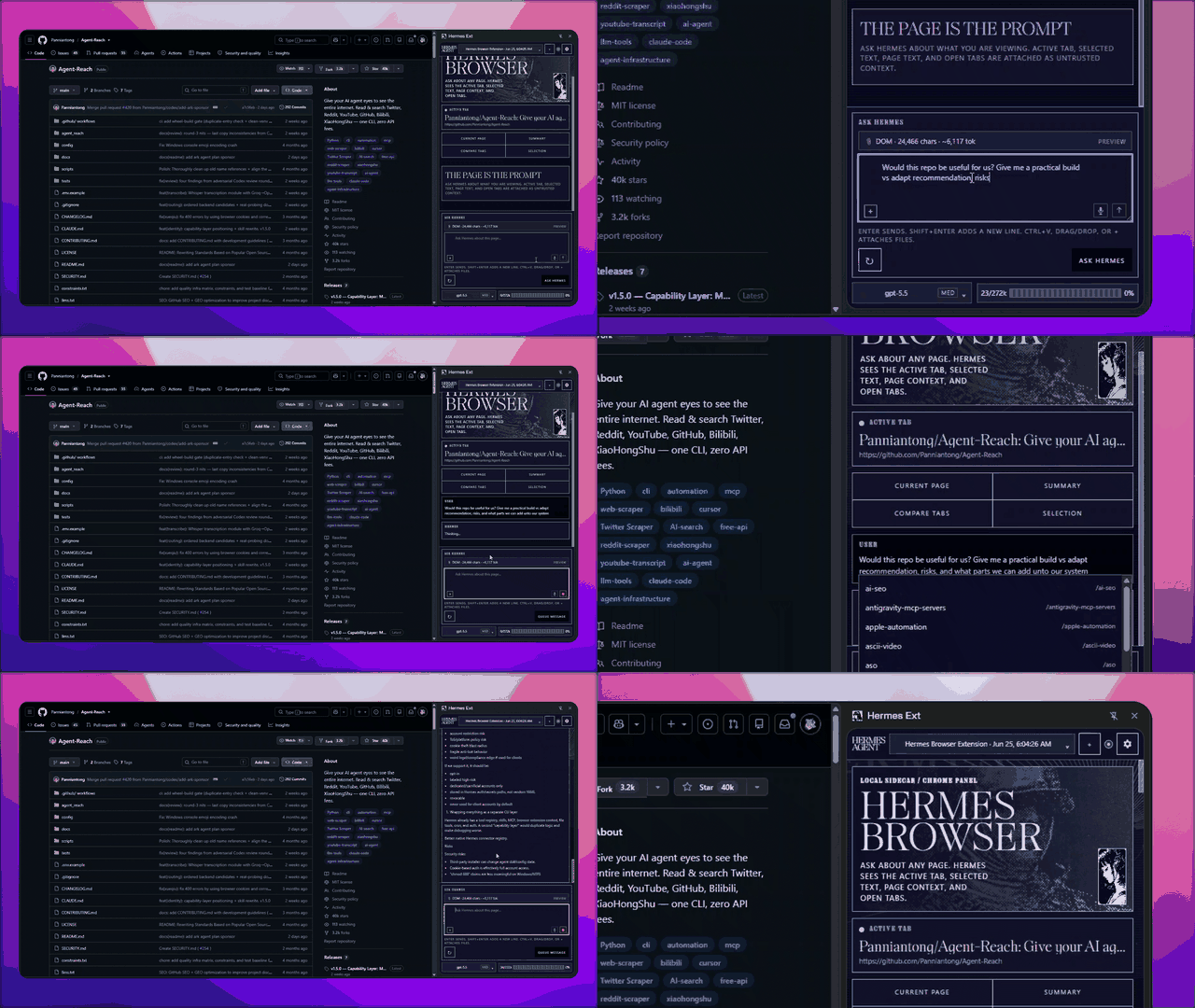
Public v0.3.4 · Load unpacked · Local / Hermes Cloud / Remote · Full Hermes runtime tools

Hermes Browser Extension is not a browser chatbot. It is a Chrome/Edge/Chromium side panel for the real Hermes Agent runtime. Choose a local gateway, attach to a signed-in Hermes Cloud agent tab, or connect to a self-hosted remote API/dashboard. Local and remote API connections can use the models, tools, skills, sessions, memory, and MCP servers already configured in Hermes; Cloud and dashboard-ticket connections are intentionally Chat-only.
The full list of changes per version lives in the changelog and the releases.
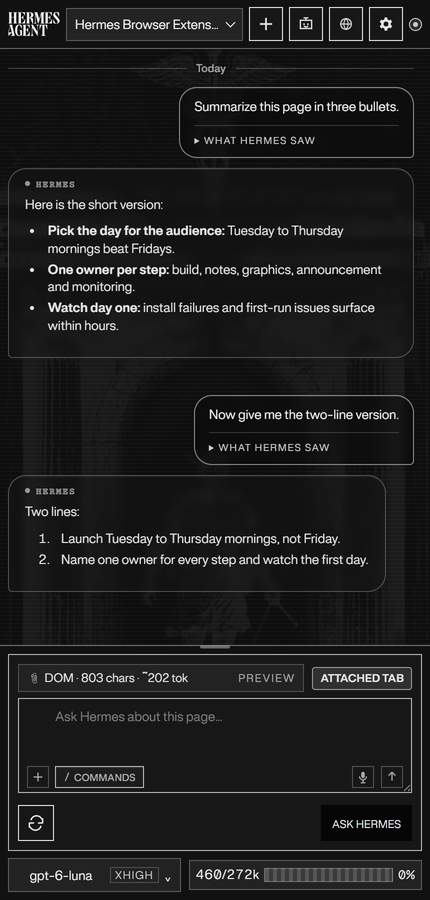
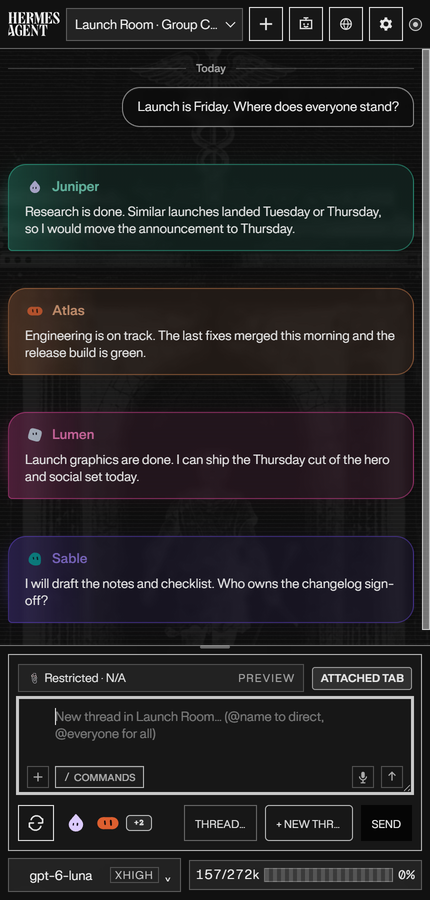
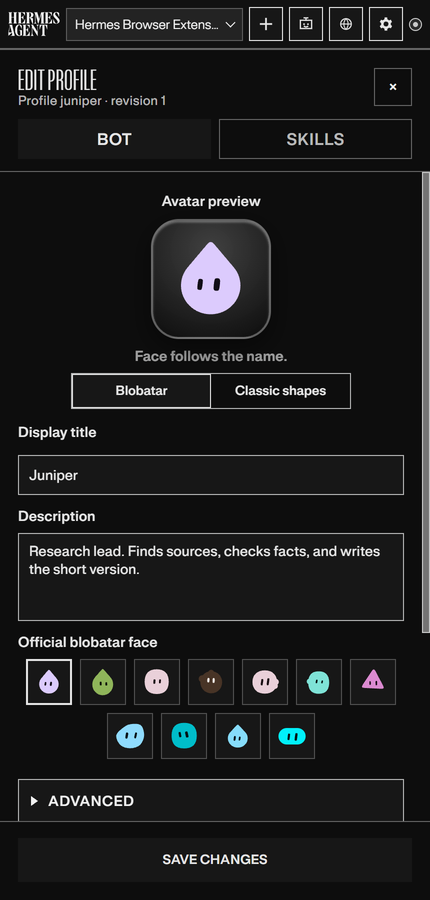
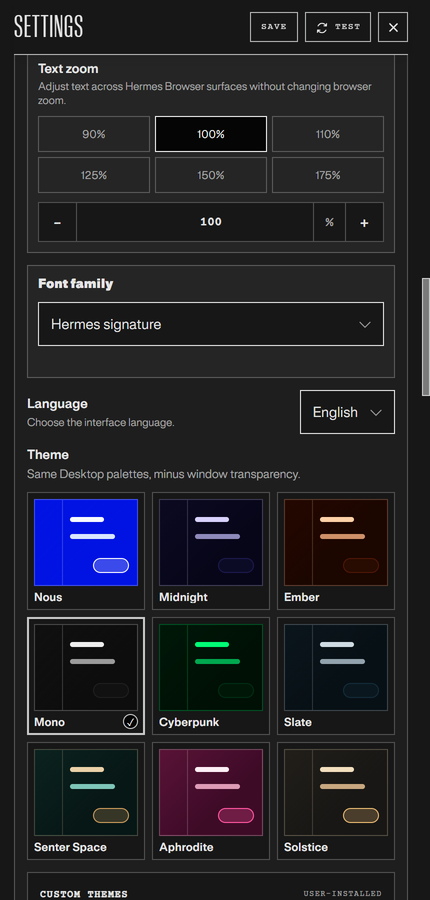
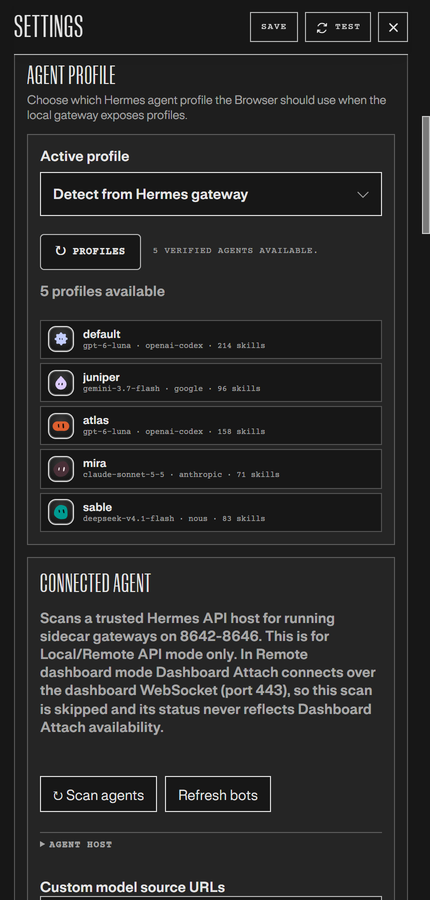
Screenshots use the Mono theme in Dark mode.
| Side panel | Bot chats | Edit a bot |
|---|---|---|
 |  |  |
| Theme settings | Local agents | Hermes Control |
 |  | 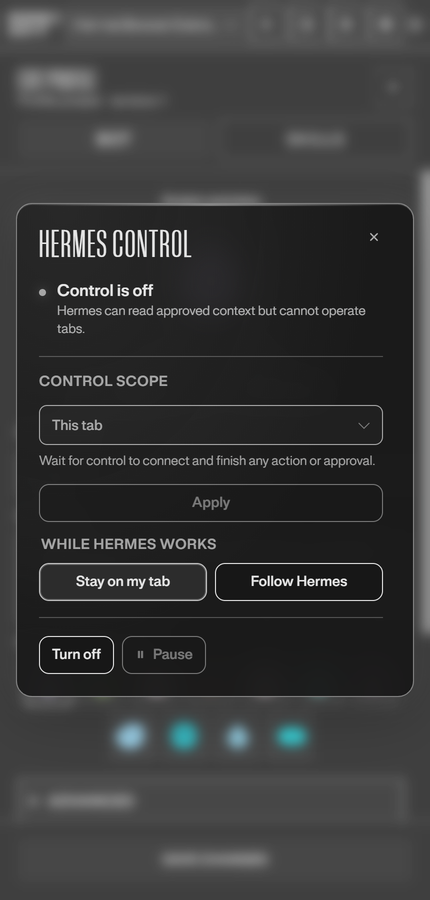 |
npm run build:firefox is for local/dev Firefox builds only.Hermes Browser Extension on Firefox is a chat-and-context client: pairing, the side panel, streaming replies, attachments, and page-context capture all work, but real-tab attach ("Hermes Control") is Chromium-only. Firefox WebExtensions have no equivalent to Chromium's debugger API, so the Firefox package omits that permission and the panel reports Control unavailable with an explanation instead of failing silently.
If you need Hermes to click, type, scroll, or operate tabs on your behalf, load the extension in Chrome, Edge, Brave, or another Chromium browser. The full compatibility matrix is in guides/connection-guide.md.
git clone https://github.com/abundantbeing/hermes-browser-extension.git
cd hermes-browser-extension
npm install
npm run build
The loadable extension is generated at:
dist/
chrome://extensions or edge://extensions.dist/ folder — not the repo root and not extension/.After code updates, run npm run build again and click Reload on the Hermes Browser Extension card in the browser extensions page.
Because this package is Mozilla-hosted on AMO, Firefox receives future signed updates through AMO automatically. No separate update manifest or manual reinstall is required.
Do not sideload the GitHub source zip/tar.gz. Those are source archives, not a Firefox add-on.
Settings exposes the same three product-level choices as Hermes Desktop:
| Connection mode | Use it for | Transport and boundary |
|---|---|---|
| Local gateway | Hermes running on this machine | Local API server, default http://127.0.0.1:8642, with a scoped browser token or API_SERVER_KEY. |
| Hermes Cloud | A signed-in Hermes Cloud agent open in a normal browser tab | Trusted Dashboard Attach mints a short-lived, single-use WebSocket ticket from the active HTTPS agent tab. Chat-only; no page text, selected text, open-tab context, or attachments are sent. |
| Remote gateway | A self-hosted Hermes backend on another machine or behind a trusted proxy | With a key: remote API server. Without a key: signed-in HTTPS dashboard ticket/WebSocket. |
Existing installations migrate automatically: prior local-api settings become Local gateway, while prior remote-api and remote-dashboard settings remain Remote gateway. A legacy remote dashboard is never silently relabeled as Hermes Cloud.
Local-only is the safest default. Put this in your Hermes .env on the machine running Hermes: %LOCALAPPDATA%\hermes\.env on native Windows, ~/.hermes/.env on Linux/macOS/WSL, or $HERMES_HOME/.env if you relocated the data dir or use a named profile:
API_SERVER_ENABLED=true
API_SERVER_HOST=127.0.0.1
API_SERVER_PORT=8642
API_SERVER_KEY=<your-api-server-key>
API_SERVER_CORS_ORIGINS=chrome-extension://<your-extension-id>
Start or restart the gateway:
hermes gateway run
Verify the API server:
HERMES_GATEWAY_URL=http://127.0.0.1:8642
HERMES_API_TOKEN='<your-api-server-key-or-browser-token>'
curl "$HERMES_GATEWAY_URL/health"
curl -H "Authorization: Bearer $HERMES_API_TOKEN" "$HERMES_GATEWAY_URL/v1/models"
Then in the extension side panel:
http://127.0.0.1:8642.API_SERVER_KEY.https:// page and ask: Summarize this page in one sentence.For a remote machine, bind the API server to a reachable trusted interface and keep CORS narrow. Use a private same-LAN/Tailscale/VPN host with HTTP, or put the API server behind a trusted HTTPS reverse proxy. Do not expose the Hermes API server naked to the public internet.
Hermes Cloud uses Trusted Dashboard Attach: open your Hermes Cloud agent in a normal browser tab, sign in, choose Hermes Cloud in Settings, and click Connect to Hermes. The ticket stays in memory only and is never persisted or logged. Cloud is Chat-only in this release.
Full setup for remote API servers, self-hosted dashboards, and what syncs after connection is in guides/connection-guide.md.
Hermes Browser Extension is intentionally conservative in v0.3.0:
debugger, nativeMessaging, cookies, history, or bookmarks permissions. downloads is limited to explicit user-requested generated-image/artifact saves.See SECURITY.md, PERMISSIONS.md, DATA-FLOW.md, and PRIVACY.md for details.
Make sure you loaded dist/, not the repo root. The selected folder must contain manifest.json directly.
The browser is still using an old unpacked folder or an unpacked extension card that was not reloaded. For v0.3.4, the source manifest, built dist/ manifest, and release archive should all contain manifest.json version 0.3.4.
Fix:
npm run build locally.chrome://extensions or edge://extensions.dist/ folder.Startup shows Skills and Profiles separately. If either catalog stalls, the panel reports a fallback instead of waiting indefinitely; chat still requires a working connection and session binding. A connected gateway does not guarantee that its catalog routes are working.
After the Hermes backend is responding again, reopen the panel or use Test connection to retry. Existing skills and profiles are not deleted by a catalog timeout.
Open Settings → Support diagnostics → Copy Diagnostics and paste the report into the GitHub issue or support thread.
The copied block includes version/build, browser family, gateway origin, connection state, runtime capability flags, selected model/provider, context mode, extractor mode, last visible error, and a bounded gateway failure classification when available. It intentionally excludes API keys, bearer tokens, cookies, page text, selected text, tab titles, raw tracebacks, local paths, and full tab URLs.
Check that Hermes Gateway/API server is running and reachable from the browser:
curl http://127.0.0.1:8642/health
# or, for remote mode:
curl http://<trusted-remote-host>:8642/health
If /v1/models fails, check API_SERVER_KEY, the extension's stored API key/browser token, and API_SERVER_CORS_ORIGINS. For remote mode, the browser extension origin (chrome-extension://<id>) must be allowlisted on the Hermes machine.
If the browser only reports a failed fetch, it cannot prove whether the gateway refused the connection, blocked the request, or received a turn before the response was lost. The side panel keeps the draft and offers Check connection. It never resends automatically. Check the session history before manually sending again, since a dropped response can leave delivery unconfirmed and a second send could duplicate the turn. An answered /health probe confirms reachability at probe time, not that the earlier turn failed because of CORS.
More troubleshooting, including runtime warnings and native Hermes computer use, is in guides/troubleshooting.md.
npm test
npm run check:js
npm run check:manifest
npm run verify
npm run build
npm run package
extension/          MV3 source: sidepanel, background worker, content scripts, lib/
companion-plugin/   optional read-only Browser context cache tools and hooks
scripts/            build, Firefox packaging, manifest checks
tests/              node:test suite
dist/               generated unpacked build (load this one)
Hermes Agent is an open-source project by Nous Research. Hermes Browser Extension is a community extension by Jon Komet that connects through a local gateway, Hermes Cloud agent tab, or self-hosted remote gateway. It is designed to live at the edge of the ecosystem without adding core tool-schema footprint.
Useful links:
External contributions that have shipped are credited in CONTRIBUTORS.md.
Built by Jon Komet (@abundantbeing). If this extension saves you time, support the work on Ko-fi.
MIT. See LICENSE.
155 followers · starred Aug 2026
6,991 followers · starred Aug 2026
102 followers · starred Jul 2026
122 followers · starred Jul 2026
Browser-native side panel for Hermes Agent — connect web context to your local Hermes runtime.
JavaScript
1,661
286 commits
updated Oct 11, 2026
Browser-native side panel for Hermes Agent — connect active web context through a local gateway, Hermes Cloud, or a self-hosted remote gateway.
Created by Jon Komet (
@abundantbeing). Community extension for Hermes Agent by Nous Research.
Public v0.3.4 · Load unpacked · Local / Hermes Cloud / Remote · Full Hermes runtime tools
Hermes Browser Extension is not a browser chatbot. It is a Chrome/Edge/Chromium side panel for the real Hermes Agent runtime. Choose a local gateway, attach to a signed-in Hermes Cloud agent tab, or connect to a self-hosted remote API/dashboard. Local and remote API connections can use the models, tools, skills, sessions, memory, and MCP servers already configured in Hermes; Cloud and dashboard-ticket connections are intentionally Chat-only.
The full list of changes per version lives in the changelog and the releases.
Screenshots use the Mono theme in Dark mode.
| Side panel | Bot chats | Edit a bot |
|---|---|---|
| | |
| Theme settings | Local agents | Hermes Control |
| | |
npm run build:firefox is for local/dev Firefox builds only.Hermes Browser Extension on Firefox is a chat-and-context client: pairing, the side panel, streaming replies, attachments, and page-context capture all work, but real-tab attach ("Hermes Control") is Chromium-only. Firefox WebExtensions have no equivalent to Chromium's debugger API, so the Firefox package omits that permission and the panel reports Control unavailable with an explanation instead of failing silently.
If you need Hermes to click, type, scroll, or operate tabs on your behalf, load the extension in Chrome, Edge, Brave, or another Chromium browser. The full compatibility matrix is in guides/connection-guide.md.
git clone https://github.com/abundantbeing/hermes-browser-extension.git
cd hermes-browser-extension
npm install
npm run build
The loadable extension is generated at:
dist/
chrome://extensions or edge://extensions.dist/ folder — not the repo root and not extension/.After code updates, run npm run build again and click Reload on the Hermes Browser Extension card in the browser extensions page.
Because this package is Mozilla-hosted on AMO, Firefox receives future signed updates through AMO automatically. No separate update manifest or manual reinstall is required.
Do not sideload the GitHub source zip/tar.gz. Those are source archives, not a Firefox add-on.
Settings exposes the same three product-level choices as Hermes Desktop:
| Connection mode | Use it for | Transport and boundary |
|---|---|---|
| Local gateway | Hermes running on this machine | Local API server, default http://127.0.0.1:8642, with a scoped browser token or API_SERVER_KEY. |
| Hermes Cloud | A signed-in Hermes Cloud agent open in a normal browser tab | Trusted Dashboard Attach mints a short-lived, single-use WebSocket ticket from the active HTTPS agent tab. Chat-only; no page text, selected text, open-tab context, or attachments are sent. |
| Remote gateway | A self-hosted Hermes backend on another machine or behind a trusted proxy | With a key: remote API server. Without a key: signed-in HTTPS dashboard ticket/WebSocket. |
Existing installations migrate automatically: prior local-api settings become Local gateway, while prior remote-api and remote-dashboard settings remain Remote gateway. A legacy remote dashboard is never silently relabeled as Hermes Cloud.
Local-only is the safest default. Put this in your Hermes .env on the machine running Hermes: %LOCALAPPDATA%\hermes\.env on native Windows, ~/.hermes/.env on Linux/macOS/WSL, or $HERMES_HOME/.env if you relocated the data dir or use a named profile:
API_SERVER_ENABLED=true
API_SERVER_HOST=127.0.0.1
API_SERVER_PORT=8642
API_SERVER_KEY=<your-api-server-key>
API_SERVER_CORS_ORIGINS=chrome-extension://<your-extension-id>
Start or restart the gateway:
hermes gateway run
Verify the API server:
HERMES_GATEWAY_URL=http://127.0.0.1:8642
HERMES_API_TOKEN='<your-api-server-key-or-browser-token>'
curl "$HERMES_GATEWAY_URL/health"
curl -H "Authorization: Bearer $HERMES_API_TOKEN" "$HERMES_GATEWAY_URL/v1/models"
Then in the extension side panel:
http://127.0.0.1:8642.API_SERVER_KEY.https:// page and ask: Summarize this page in one sentence.For a remote machine, bind the API server to a reachable trusted interface and keep CORS narrow. Use a private same-LAN/Tailscale/VPN host with HTTP, or put the API server behind a trusted HTTPS reverse proxy. Do not expose the Hermes API server naked to the public internet.
Hermes Cloud uses Trusted Dashboard Attach: open your Hermes Cloud agent in a normal browser tab, sign in, choose Hermes Cloud in Settings, and click Connect to Hermes. The ticket stays in memory only and is never persisted or logged. Cloud is Chat-only in this release.
Full setup for remote API servers, self-hosted dashboards, and what syncs after connection is in guides/connection-guide.md.
Hermes Browser Extension is intentionally conservative in v0.3.0:
debugger, nativeMessaging, cookies, history, or bookmarks permissions. downloads is limited to explicit user-requested generated-image/artifact saves.See SECURITY.md, PERMISSIONS.md, DATA-FLOW.md, and PRIVACY.md for details.
Make sure you loaded dist/, not the repo root. The selected folder must contain manifest.json directly.
The browser is still using an old unpacked folder or an unpacked extension card that was not reloaded. For v0.3.4, the source manifest, built dist/ manifest, and release archive should all contain manifest.json version 0.3.4.
Fix:
npm run build locally.chrome://extensions or edge://extensions.dist/ folder.Startup shows Skills and Profiles separately. If either catalog stalls, the panel reports a fallback instead of waiting indefinitely; chat still requires a working connection and session binding. A connected gateway does not guarantee that its catalog routes are working.
After the Hermes backend is responding again, reopen the panel or use Test connection to retry. Existing skills and profiles are not deleted by a catalog timeout.
Open Settings → Support diagnostics → Copy Diagnostics and paste the report into the GitHub issue or support thread.
The copied block includes version/build, browser family, gateway origin, connection state, runtime capability flags, selected model/provider, context mode, extractor mode, last visible error, and a bounded gateway failure classification when available. It intentionally excludes API keys, bearer tokens, cookies, page text, selected text, tab titles, raw tracebacks, local paths, and full tab URLs.
Check that Hermes Gateway/API server is running and reachable from the browser:
curl http://127.0.0.1:8642/health
# or, for remote mode:
curl http://<trusted-remote-host>:8642/health
If /v1/models fails, check API_SERVER_KEY, the extension's stored API key/browser token, and API_SERVER_CORS_ORIGINS. For remote mode, the browser extension origin (chrome-extension://<id>) must be allowlisted on the Hermes machine.
If the browser only reports a failed fetch, it cannot prove whether the gateway refused the connection, blocked the request, or received a turn before the response was lost. The side panel keeps the draft and offers Check connection. It never resends automatically. Check the session history before manually sending again, since a dropped response can leave delivery unconfirmed and a second send could duplicate the turn. An answered /health probe confirms reachability at probe time, not that the earlier turn failed because of CORS.
More troubleshooting, including runtime warnings and native Hermes computer use, is in guides/troubleshooting.md.
npm test
npm run check:js
npm run check:manifest
npm run verify
npm run build
npm run package
extension/          MV3 source: sidepanel, background worker, content scripts, lib/
companion-plugin/   optional read-only Browser context cache tools and hooks
scripts/            build, Firefox packaging, manifest checks
tests/              node:test suite
dist/               generated unpacked build (load this one)
Hermes Agent is an open-source project by Nous Research. Hermes Browser Extension is a community extension by Jon Komet that connects through a local gateway, Hermes Cloud agent tab, or self-hosted remote gateway. It is designed to live at the edge of the ecosystem without adding core tool-schema footprint.
Useful links:
External contributions that have shipped are credited in CONTRIBUTORS.md.
Built by Jon Komet (@abundantbeing). If this extension saves you time, support the work on Ko-fi.
MIT. See LICENSE.
155 followers · starred Aug 2026
6,991 followers · starred Aug 2026
102 followers · starred Jul 2026
122 followers · starred Jul 2026



