
Free, open-source native macOS speed reader. RSVP for EPUB, PDF, DOCX, Markdown and web articles, with a full-text view.
Swift
5
38 commits
updated Oct 7, 2026
See what people are saying
README
Rapid Reader
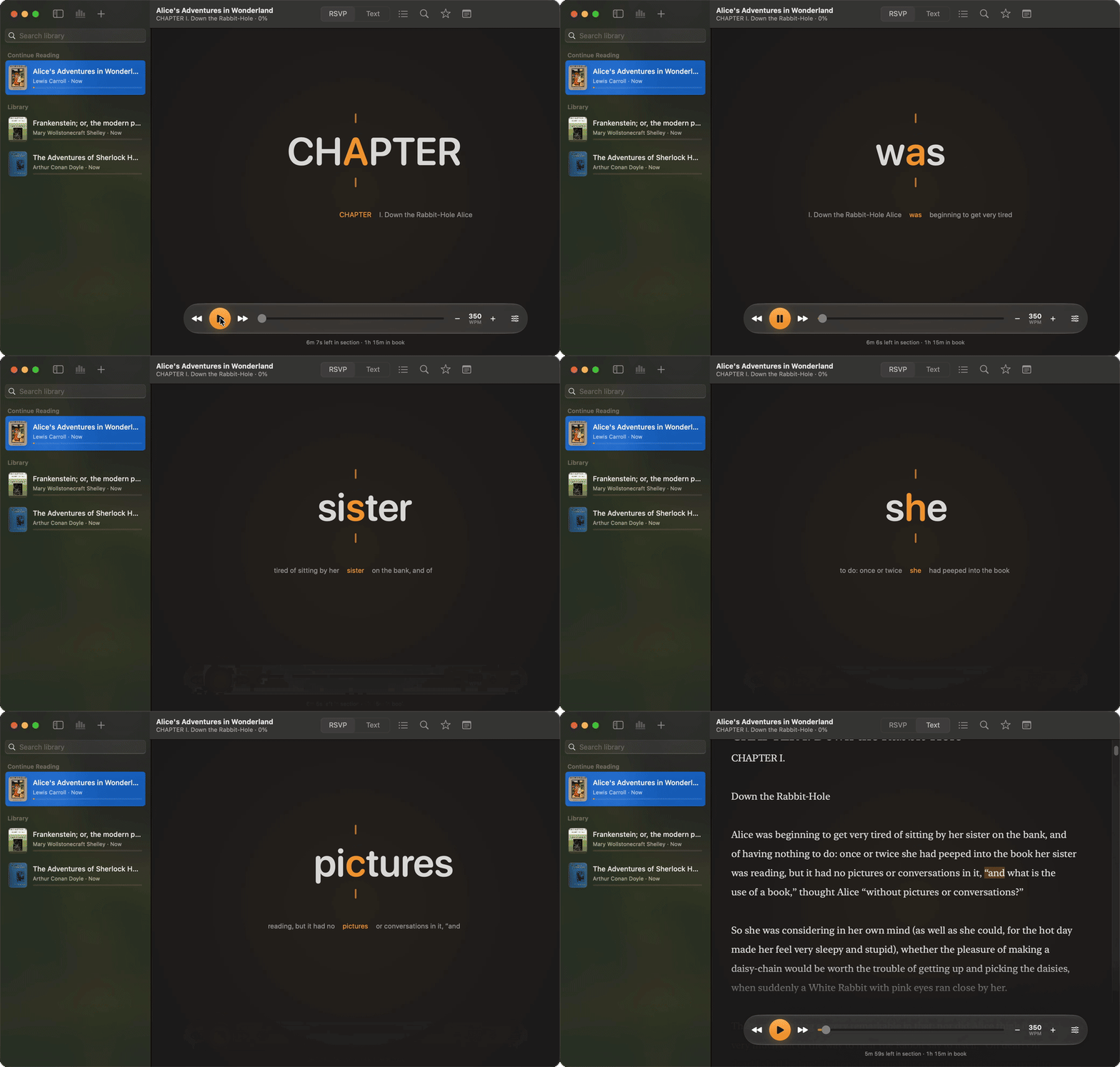
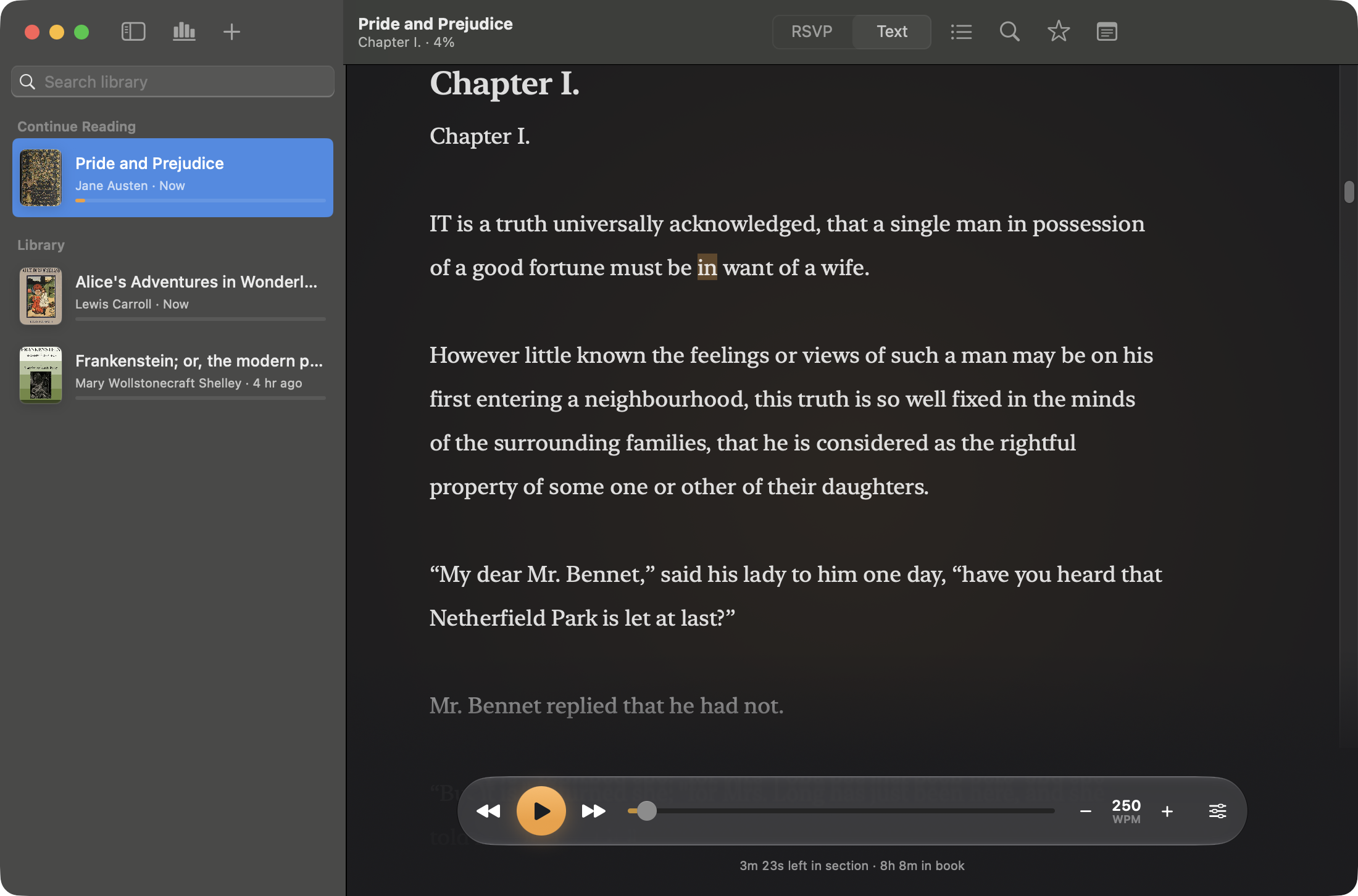
Rapid Reader 2.0 is a free, open-source native macOS app for focused long-form reading, redesigned around a quiet stage, Liquid Glass controls, and a new focus-point icon. It combines rapid serial visual presentation (RSVP) with a normal full-text reader, so you can move quickly through books and articles while still being able to inspect the original text and resume from any word.
Highlights
- Import EPUB, PDF, DOCX, RTF, HTML, Markdown, plain text, pasted text, and web articles.
- Keep a local library with reading progress, favorite documents, notes, preferences, sections, and EPUB cover art.
- Read in RSVP mode with pivot-letter highlighting, context preview, punctuation pauses, and adjustable chunk size.
- Switch to full-text mode whenever you want to browse normally, then click a word to resume from that exact position.
- Read on a quiet stage: a floating glass control bar (Liquid Glass on macOS 26 and later, a material fallback on macOS 14 and 15) that hides while you read and returns when the mouse moves. Arrow Up and Down change speed.
- Tune speed, font size, focus mode, section navigation, and playback controls from one compact reading surface.
- Recover gracefully from image-only EPUB cover pages and older library data.
- Search inside a document, choose a light, dark, or sepia reader, and review reading time and speed in Statistics.
- Store everything locally in
~/Library/Application Support/Rapid Reader.
Download
The latest DMG is attached to the GitHub release for this repository.
- Download
RapidReader-<version>.dmgfrom Releases. - Open the DMG.
- Drag
Rapid Reader.appintoApplications. - Launch Rapid Reader.
The DMG contains a universal app for Apple Silicon and Intel Macs. Unless a release says it is notarized, the app is ad-hoc signed: if macOS blocks the first launch, open System Settings -> Privacy & Security and allow the app after your first launch attempt.
How It Compares
Rapid Reader is for reading on a Mac with local files and no account. Two established speed readers for comparison:
| Rapid Reader | Outread | Spreeder | |
|---|---|---|---|
| Platforms | macOS 14 or later | iOS, iPadOS, macOS | Web, Mac, Windows, iOS, Android, Chrome OS |
| Price | Free | Commercial app | Commercial license, with a free web app |
| Open source | Yes, MIT | No | No |
| Imports | EPUB, PDF, DOCX, RTF, HTML, Markdown, plain text, pasted text, web articles | DRM-free EPUB, PDF, DOC, RTF, TXT, web articles | 52 file and ebook formats |
| Reading modes | RSVP and full text, with click-to-resume | RSVP and a guided highlighter | RSVP |
Outread and Spreeder also run on phones and tablets. Outread includes reading exercises, and Spreeder adds AI summaries and a cloud profile. Rapid Reader is Mac only, keeps its library in a local folder, and does none of that.
Details for the other apps come from the Outread and Spreeder websites, checked in October 2026.
Build From Source
Requirements:
- macOS 14 or newer
- Xcode command line tools
- Swift 6 compatible toolchain
Run the app:
./script/build_and_run.sh
Build the app bundle without launching:
./script/build_and_run.sh --build-only
Run tests:
swift test
Create a universal release DMG (release configuration, arm64 and x86_64, version and build number in Info.plist):
./script/package_dmg.sh 2.0
The packaged app is written to dist/Rapid Reader.app, and the DMG is written to build/package/. build_and_run.sh accepts the same settings through CONFIGURATION=release, UNIVERSAL=1, APP_VERSION, and BUILD_NUMBER.
Optional signing and notarization, with credentials on the build Mac:
DEVELOPER_ID_APPLICATION="Developer ID Application: Name (TEAMID)" \
NOTARY_PROFILE=rapid-reader-notary \
./script/package_dmg.sh 2.0
NOTARY_PROFILE is a keychain profile created with xcrun notarytool store-credentials.
Updates
Rapid Reader uses Sparkle for updates. The updater and the Check for Updates… menu item are enabled only in builds made with SPARKLE_PUBLIC_KEY. The app reads appcast.xml from the latest GitHub release.
One-time setup by the owner:
- Run
.build/artifacts/sparkle/Sparkle/bin/generate_keysafterswift package resolve. It stores the private key in the login keychain and prints the public key. - Export the private key with
generate_keys -x sparkle-private.key, keep a backup offline, and add its contents as theSPARKLE_PRIVATE_KEYrepository secret. Add the public key as theSPARKLE_PUBLIC_KEYrepository variable.
Local release with updates:
SPARKLE_PUBLIC_KEY=<public key> ./script/package_dmg.sh 2.0
./script/make_appcast.sh 2.0   # uses the keychain key, or SPARKLE_PRIVATE_KEY_FILE
Upload the DMG and build/appcast/appcast.xml to the v2.0 release. The tag workflow does this automatically when the secret and variable exist. Optional release notes go in docs/release-notes/<version>.html. Losing the private key means existing installs can no longer verify updates.
Releases
Pushing a tag such as v2.0 runs .github/workflows/release.yml, which tests, packages the DMG, and attaches it to a draft GitHub release for review. The workflow can also be started manually to build a DMG artifact without creating a release. CI signs ad-hoc; Developer ID signing and notarization currently run locally.
Keyboard And Reader Controls
Space: play or pause RSVP playback.Left Arrow/Right Arrow: move backward or forward.Up Arrow/Down Arrow: raise or lower the speed.Command-,: open Settings.Command-O: import files.Command-F: search in the current document.- Section picker: jump to a specific chapter or section.
- Text mode: click a word to set the resume position.
Development Notes
Rapid Reader is implemented with SwiftUI and SwiftPM. The core import, parsing, text-processing, and persistence logic lives in RapidReaderCore, while the macOS UI target owns the reading surface, sidebar, app resources, and packaging entrypoints.
The project includes regression tests for:
- EPUB cover extraction.
- Image-only EPUB cover-page filtering.
- Library repair for older imported documents.
- Markdown section splitting.
- Reading progress and preference persistence.
- RSVP pivot-letter calculation.
License
Rapid Reader is released under the MIT License. ZIPFoundation, SwiftSoup and Sparkle keep their own licenses.
Similar repos


Free, open-source native macOS speed reader. RSVP for EPUB, PDF, DOCX, Markdown and web articles, with a full-text view.
Swift
5
38 commits
updated Oct 7, 2026
See what people are saying
README
Rapid Reader
Rapid Reader 2.0 is a free, open-source native macOS app for focused long-form reading, redesigned around a quiet stage, Liquid Glass controls, and a new focus-point icon. It combines rapid serial visual presentation (RSVP) with a normal full-text reader, so you can move quickly through books and articles while still being able to inspect the original text and resume from any word.
Highlights
- Import EPUB, PDF, DOCX, RTF, HTML, Markdown, plain text, pasted text, and web articles.
- Keep a local library with reading progress, favorite documents, notes, preferences, sections, and EPUB cover art.
- Read in RSVP mode with pivot-letter highlighting, context preview, punctuation pauses, and adjustable chunk size.
- Switch to full-text mode whenever you want to browse normally, then click a word to resume from that exact position.
- Read on a quiet stage: a floating glass control bar (Liquid Glass on macOS 26 and later, a material fallback on macOS 14 and 15) that hides while you read and returns when the mouse moves. Arrow Up and Down change speed.
- Tune speed, font size, focus mode, section navigation, and playback controls from one compact reading surface.
- Recover gracefully from image-only EPUB cover pages and older library data.
- Search inside a document, choose a light, dark, or sepia reader, and review reading time and speed in Statistics.
- Store everything locally in
~/Library/Application Support/Rapid Reader.
Download
The latest DMG is attached to the GitHub release for this repository.
- Download
RapidReader-<version>.dmgfrom Releases. - Open the DMG.
- Drag
Rapid Reader.appintoApplications. - Launch Rapid Reader.
The DMG contains a universal app for Apple Silicon and Intel Macs. Unless a release says it is notarized, the app is ad-hoc signed: if macOS blocks the first launch, open System Settings -> Privacy & Security and allow the app after your first launch attempt.
How It Compares
Rapid Reader is for reading on a Mac with local files and no account. Two established speed readers for comparison:
| Rapid Reader | Outread | Spreeder | |
|---|---|---|---|
| Platforms | macOS 14 or later | iOS, iPadOS, macOS | Web, Mac, Windows, iOS, Android, Chrome OS |
| Price | Free | Commercial app | Commercial license, with a free web app |
| Open source | Yes, MIT | No | No |
| Imports | EPUB, PDF, DOCX, RTF, HTML, Markdown, plain text, pasted text, web articles | DRM-free EPUB, PDF, DOC, RTF, TXT, web articles | 52 file and ebook formats |
| Reading modes | RSVP and full text, with click-to-resume | RSVP and a guided highlighter | RSVP |
Outread and Spreeder also run on phones and tablets. Outread includes reading exercises, and Spreeder adds AI summaries and a cloud profile. Rapid Reader is Mac only, keeps its library in a local folder, and does none of that.
Details for the other apps come from the Outread and Spreeder websites, checked in October 2026.
Build From Source
Requirements:
- macOS 14 or newer
- Xcode command line tools
- Swift 6 compatible toolchain
Run the app:
./script/build_and_run.sh
Build the app bundle without launching:
./script/build_and_run.sh --build-only
Run tests:
swift test
Create a universal release DMG (release configuration, arm64 and x86_64, version and build number in Info.plist):
./script/package_dmg.sh 2.0
The packaged app is written to dist/Rapid Reader.app, and the DMG is written to build/package/. build_and_run.sh accepts the same settings through CONFIGURATION=release, UNIVERSAL=1, APP_VERSION, and BUILD_NUMBER.
Optional signing and notarization, with credentials on the build Mac:
DEVELOPER_ID_APPLICATION="Developer ID Application: Name (TEAMID)" \
NOTARY_PROFILE=rapid-reader-notary \
./script/package_dmg.sh 2.0
NOTARY_PROFILE is a keychain profile created with xcrun notarytool store-credentials.
Updates
Rapid Reader uses Sparkle for updates. The updater and the Check for Updates… menu item are enabled only in builds made with SPARKLE_PUBLIC_KEY. The app reads appcast.xml from the latest GitHub release.
One-time setup by the owner:
- Run
.build/artifacts/sparkle/Sparkle/bin/generate_keysafterswift package resolve. It stores the private key in the login keychain and prints the public key. - Export the private key with
generate_keys -x sparkle-private.key, keep a backup offline, and add its contents as theSPARKLE_PRIVATE_KEYrepository secret. Add the public key as theSPARKLE_PUBLIC_KEYrepository variable.
Local release with updates:
SPARKLE_PUBLIC_KEY=<public key> ./script/package_dmg.sh 2.0
./script/make_appcast.sh 2.0   # uses the keychain key, or SPARKLE_PRIVATE_KEY_FILE
Upload the DMG and build/appcast/appcast.xml to the v2.0 release. The tag workflow does this automatically when the secret and variable exist. Optional release notes go in docs/release-notes/<version>.html. Losing the private key means existing installs can no longer verify updates.
Releases
Pushing a tag such as v2.0 runs .github/workflows/release.yml, which tests, packages the DMG, and attaches it to a draft GitHub release for review. The workflow can also be started manually to build a DMG artifact without creating a release. CI signs ad-hoc; Developer ID signing and notarization currently run locally.
Keyboard And Reader Controls
Space: play or pause RSVP playback.Left Arrow/Right Arrow: move backward or forward.Up Arrow/Down Arrow: raise or lower the speed.Command-,: open Settings.Command-O: import files.Command-F: search in the current document.- Section picker: jump to a specific chapter or section.
- Text mode: click a word to set the resume position.
Development Notes
Rapid Reader is implemented with SwiftUI and SwiftPM. The core import, parsing, text-processing, and persistence logic lives in RapidReaderCore, while the macOS UI target owns the reading surface, sidebar, app resources, and packaging entrypoints.
The project includes regression tests for:
- EPUB cover extraction.
- Image-only EPUB cover-page filtering.
- Library repair for older imported documents.
- Markdown section splitting.
- Reading progress and preference persistence.
- RSVP pivot-letter calculation.
License
Rapid Reader is released under the MIT License. ZIPFoundation, SwiftSoup and Sparkle keep their own licenses.