ZS-nus/DSS5105_Pioneer_Project

HTML

5

186 commits

updated Nov 15, 2024

See the code

README

DSS5105 Pioneer Project - ESG Data Analysis Platform

A comprehensive platform for extracting and analyzing Environmental, Social, and Governance (ESG) data from corporate reports using:
  1. Rule-based pattern matching for structured data extraction
  2. RoBERTa-based token classification for identifying ESG-related information
  3. Template-based natural language generation for trend analysis

πŸ“Š Web App Overview

ESG Analysis Dashboard

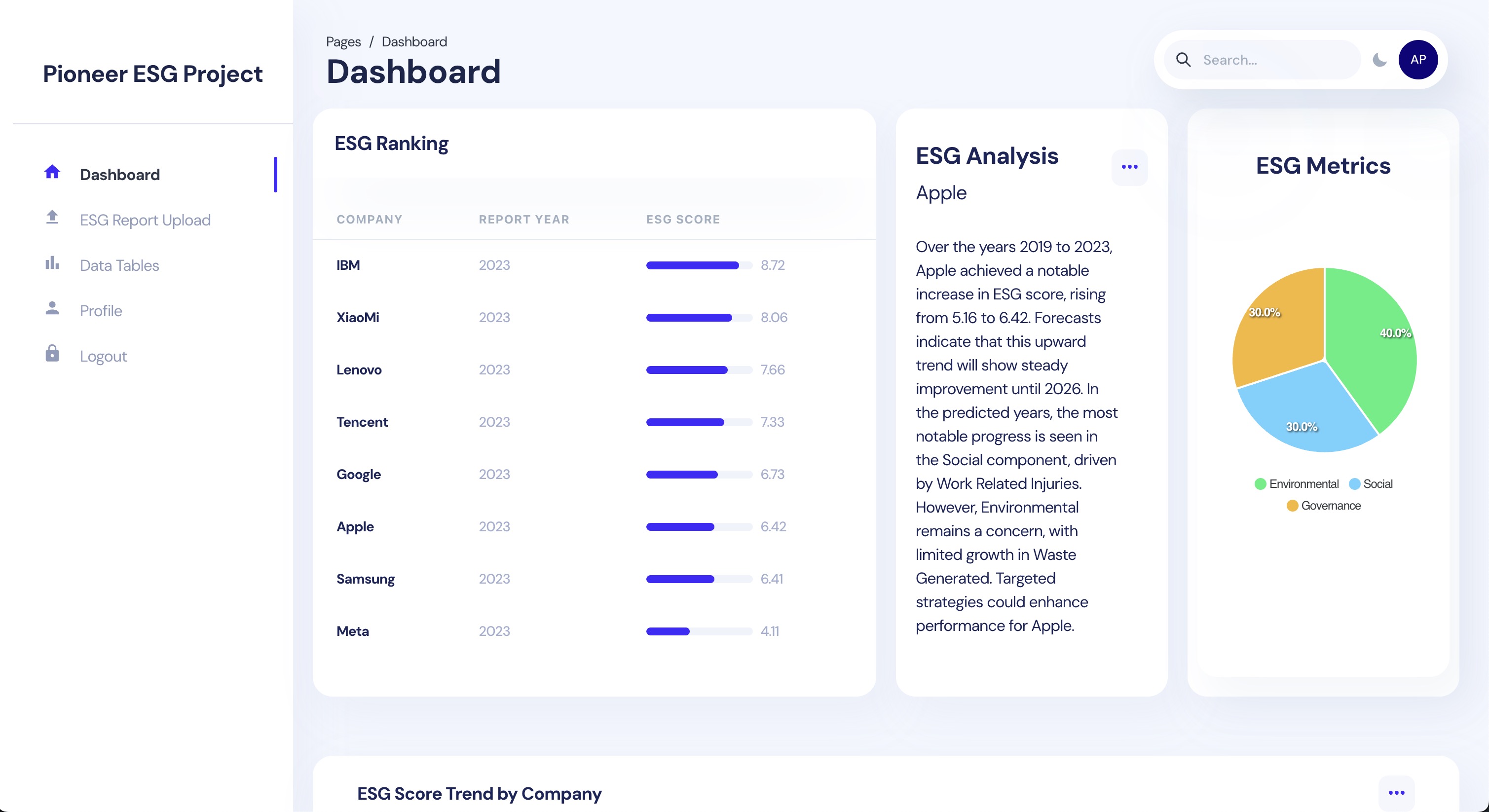
  • ESG Ranking: Real-time ranking of companies based on their ESG performance scores
  • ESG Analysis & Recommendations:
    • Detailed trend analysis with natural language insights about company performance
    • Component-specific analysis highlighting strongest and weakest areas
    • Strategic recommendations for ESG improvement:
      • Environmental: Suggestions for improving energy consumption, emissions, waste management
      • Social: Recommendations for enhancing workforce diversity, safety measures, data security
      • Governance: Guidelines for strengthening board composition, risk management, ethical practices
  • ESG Metrics: Visual breakdown of Environmental (40%), Social (30%), and Governance (30%) components
  • Interactive Dashboard: User-friendly interface for exploring ESG data and company comparisons
  • Dynamic Updates: Real-time score updates and trend analysis
  • Company Selection: Easy company switching through dropdown menu

ESG Analysis Dashboard

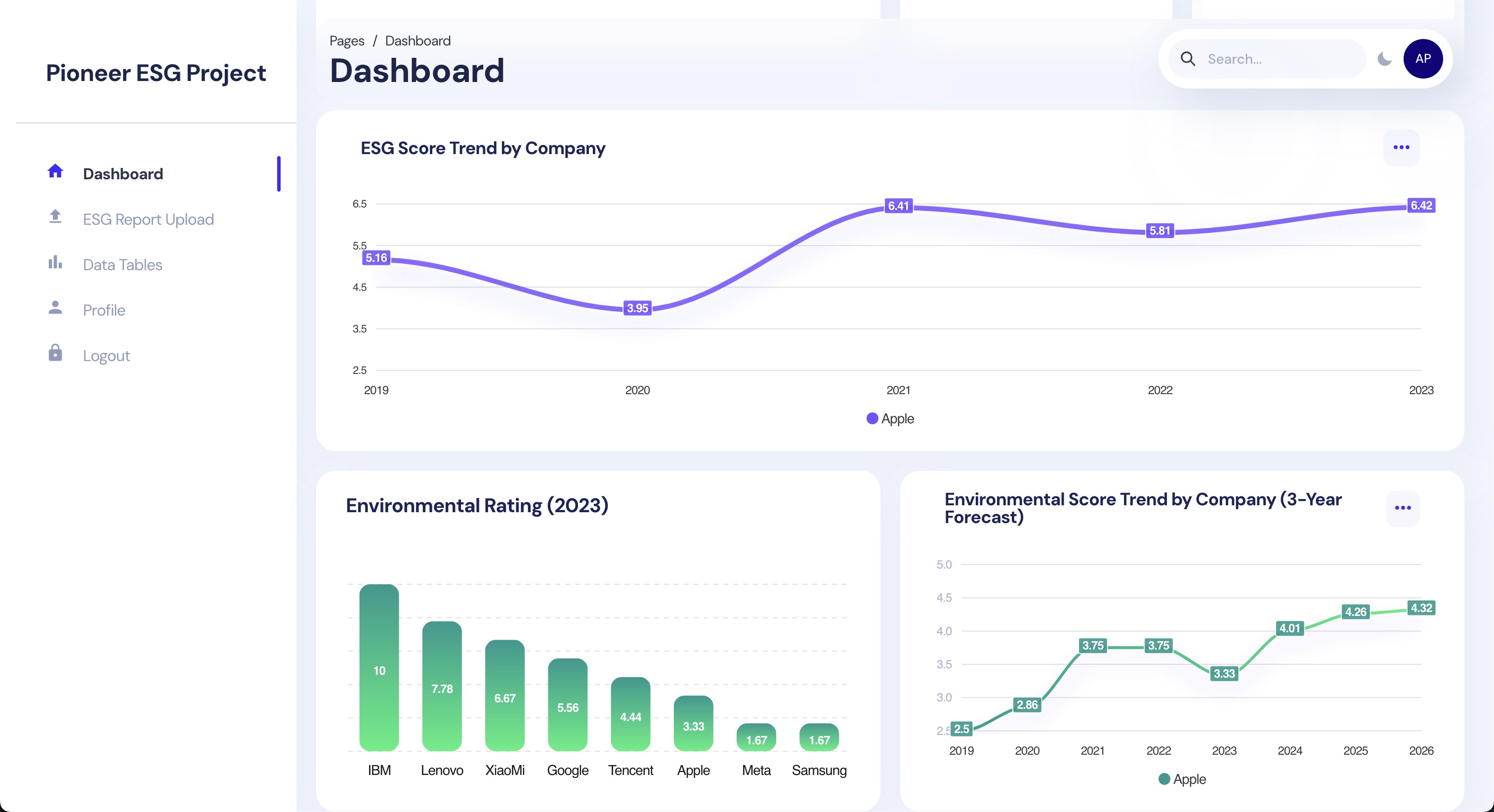
  • ESG Score Trend: Historical and current ESG performance tracking
  • 3-Year Forecast in ESG: Predictive analytics showing future ESG score trajectories
  • Component-Specific Analysis: Detailed breakdown of environmental, social, and governance metrics
  • Interactive Visualizations: Dynamic charts and graphs for trend analysis
  • Comparative Analysis: Tools for benchmarking against industry peers

πŸ†• New Updates

ESG Analysis Dashboard

🌱 Enhanced Environmental Analytics

The dashboard now includes detailed environmental performance tracking and analysis:

1. πŸ“Š Environmental Metrics Table

  • Comprehensive year-by-year tracking of key metrics:
    • ⚑ Energy Consumption
    • 🌫️ GHG Emissions
    • πŸ’§ Water Usage
    • ♻️ Waste Generated
  • πŸ”„ Interactive company selection
  • πŸ“ˆ Sortable metrics for easy comparison

2. πŸ“ Environmental Analysis & Recommendations

  • πŸ“ˆ Real-time analysis of environmental performance trends
  • 🎯 Structured performance breakdown:
    • πŸ“Š Significant Changes: Detailed tracking of metric movements
    • ⭐ Performance Highlights: Identification of strongest and priority areas
    • πŸ’‘ Key Recommendations: Actionable insights for improvement
  • πŸ“… Company-specific insights with historical context (2019-2023)
  • πŸ”„ Dynamic updates based on company selection

These new features provide deeper insights into companies' environmental performance and offer actionable recommendations for sustainability improvements.


πŸ“š Documentation


Technical Stack

Frontend

  • React.js with Chakra UI
  • Interactive data visualization
  • Real-time ESG score updates
  • Company comparison tools
  • Responsive dashboard design

Backend Services

  1. Node.js Backend

    • RESTful API endpoints
    • Database management
    • Authentication services
    • Real-time data processing
  2. Python Backend (FastAPI)

    • NLP processing engine
    • BERT model integration
    • PDF text extraction
    • ESG scoring algorithms

Infrastructure

  • Docker containerization
  • GPU acceleration support
  • AWS cloud deployment
  • Firebase integration
  • MySQL database

πŸ— Project Structure tree

pioneer/
β”œβ”€β”€ python/ # Python Backend (FastAPI)
β”‚ β”œβ”€β”€ Dockerfile # Python service container
β”‚ β”œβ”€β”€ Dockerfile.nvidia # NVIDIA GPU support
β”‚ β”œβ”€β”€ requirements.txt # Python dependencies
β”‚ └── main.py # FastAPI application
β”‚
β”œβ”€β”€ groupA/ # NLP Processing Module
β”‚ β”œβ”€β”€ README.md # NLP workflow documentation
β”‚ β”œβ”€β”€ requirements.txt # Python NLP dependencies
β”‚ β”œβ”€β”€ main.py # NLP processing script
β”‚ └── notebooks/ # Jupyter notebooks for NLP
β”‚
β”œβ”€β”€ groupB/
β”‚ └── dashboard/
β”‚ β”œβ”€β”€ client/ # React Frontend
β”‚ β”‚ β”œβ”€β”€ Dockerfile # Frontend container
β”‚ β”‚ └── package.json # Node.js dependencies
β”‚ β”‚
β”‚ └── server/ # Node.js Backend
β”‚ β”œβ”€β”€ Dockerfile # Node.js service container
β”‚ └── package.json # Node.js dependencies
β”‚
β”œβ”€β”€ .gitignore # Git ignore rules
β”œβ”€β”€ .env # Environment variables
β”œβ”€β”€ docker-compose.yml # Root level container orchestration
β”œβ”€β”€ docker-compose.nvidia.yml # Root level GPU container setup
β”œβ”€β”€ README.md # Project documentation
└── requirements.txt # Global Python dependencies

πŸš€ Quick Start

Login Credentials πŸ”

Email: [email protected]
Password: 123456

Prerequisites

  • Docker & Docker Compose
  • Node.js >= 20.0
  • Python >= 3.12.5
  • NVIDIA drivers (for GPU support)

For CPU systems

docker-compose up -d

For NVIDIA GPU systems

docker-compose -f docker-compose.nvidia.yml up -d

Option 2: Docker Build πŸ—οΈ

Build React Frontend

bash

cd groupB/dashboard/client

docker build -t pioneer-frontend .

docker run -d \
  --name pioneer-client \
  -p 3000:3000 \
  -e REACT_APP_API_URL=http://localhost:5106 \
  pioneer-client

Build Node.js Backend

bash

cd groupB/dashboard/server

docker build -t pioneer-server-1 .

docker run -d \
--name pioneer-server-1 \
-p 5105:5105 \
-v "$(pwd)/pioneer_key.json:/usr/src/app/pioneer_key.json" \
--env-file .env \
--log-driver json-file \
--log-opt max-size=10m \
pioneer-server-1

Build Python Backend

bash

docker build -t pioneer-server-2 .

docker run -d \
  --name pioneer-server-2 \
  --gpus all \
  -p 5106:5106 \
  pioneer-server-2

Stop and Remove Containers

bash

docker stop pioneer-client pioneer-server-1 pioneer-server-2
docker rmi pioneer-frontend pioneer-server-1 pioneer-server-2

Option 3: Traditional Setup (Development) πŸ’»

1. Python Backend Setup

First, clone the repository and set up the Python environment:

Create and activate virtual environment
python -m venv venv
For macOS/Linux
source venv/bin/activate
for windows
.\venv\Scripts\Activate
Install dependencies
pip install -r requirements.txt
Quit the venv
deactivate

1. Start Python server

python main.py

2. Node.js Backend Setup

Open a new terminal and set up the Node.js backend:

cd groupB/dashboard/server
npm install
npm start

3. React Frontend Setup

Open another terminal for the frontend:

cd groupB/dashboard/client
npm install
npm start

The frontend will automatically open at http://localhost:3000

4. Verify Installation


ZS-nus/DSS5105_Pioneer_Project

HTML

5

186 commits

updated Nov 15, 2024

See the code

README

DSS5105 Pioneer Project - ESG Data Analysis Platform

A comprehensive platform for extracting and analyzing Environmental, Social, and Governance (ESG) data from corporate reports using:
  1. Rule-based pattern matching for structured data extraction
  2. RoBERTa-based token classification for identifying ESG-related information
  3. Template-based natural language generation for trend analysis

πŸ“Š Web App Overview

ESG Analysis Dashboard

  • ESG Ranking: Real-time ranking of companies based on their ESG performance scores
  • ESG Analysis & Recommendations:
    • Detailed trend analysis with natural language insights about company performance
    • Component-specific analysis highlighting strongest and weakest areas
    • Strategic recommendations for ESG improvement:
      • Environmental: Suggestions for improving energy consumption, emissions, waste management
      • Social: Recommendations for enhancing workforce diversity, safety measures, data security
      • Governance: Guidelines for strengthening board composition, risk management, ethical practices
  • ESG Metrics: Visual breakdown of Environmental (40%), Social (30%), and Governance (30%) components
  • Interactive Dashboard: User-friendly interface for exploring ESG data and company comparisons
  • Dynamic Updates: Real-time score updates and trend analysis
  • Company Selection: Easy company switching through dropdown menu

ESG Analysis Dashboard

  • ESG Score Trend: Historical and current ESG performance tracking
  • 3-Year Forecast in ESG: Predictive analytics showing future ESG score trajectories
  • Component-Specific Analysis: Detailed breakdown of environmental, social, and governance metrics
  • Interactive Visualizations: Dynamic charts and graphs for trend analysis
  • Comparative Analysis: Tools for benchmarking against industry peers

πŸ†• New Updates

ESG Analysis Dashboard

🌱 Enhanced Environmental Analytics

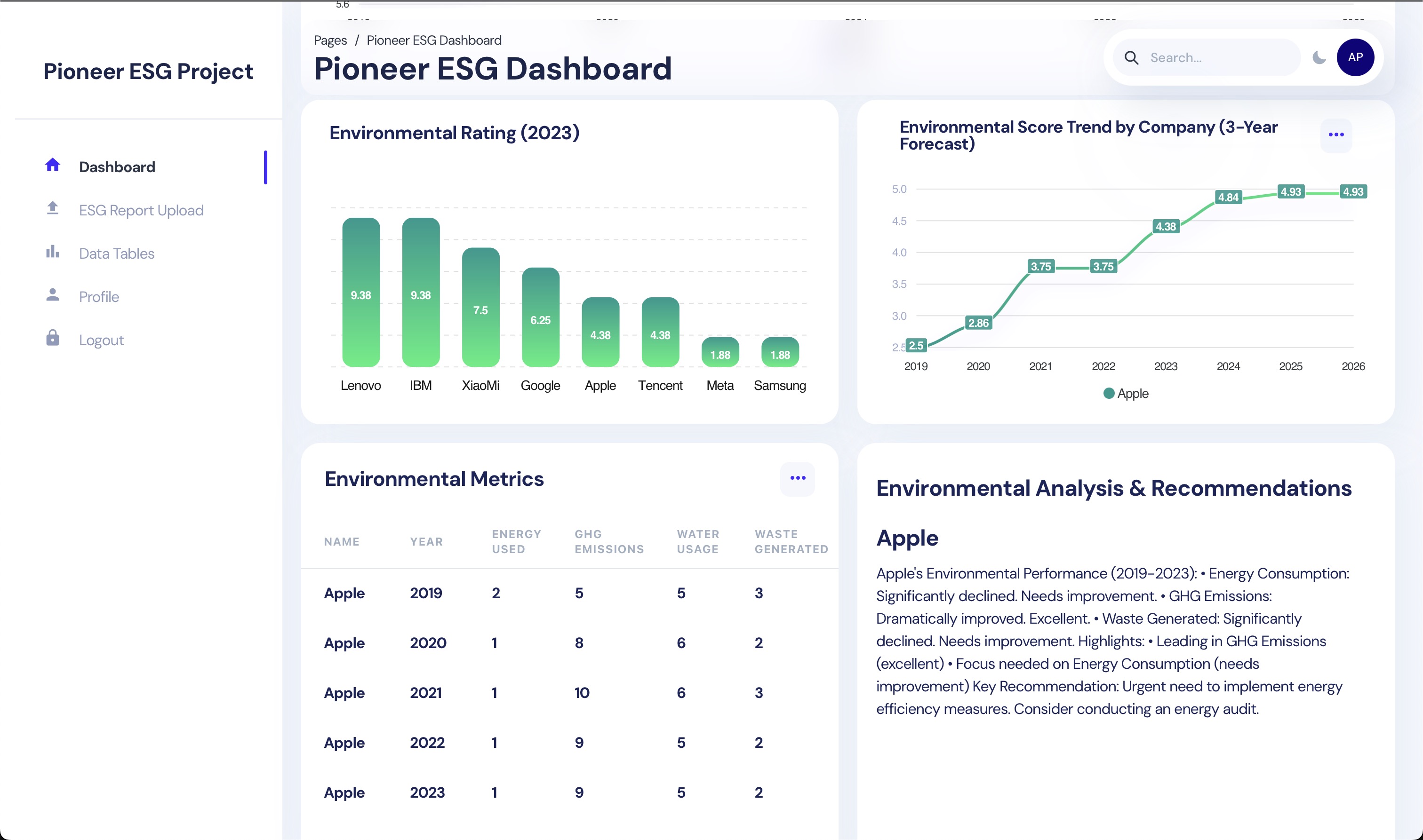
The dashboard now includes detailed environmental performance tracking and analysis:

1. πŸ“Š Environmental Metrics Table

  • Comprehensive year-by-year tracking of key metrics:
    • ⚑ Energy Consumption
    • 🌫️ GHG Emissions
    • πŸ’§ Water Usage
    • ♻️ Waste Generated
  • πŸ”„ Interactive company selection
  • πŸ“ˆ Sortable metrics for easy comparison

2. πŸ“ Environmental Analysis & Recommendations

  • πŸ“ˆ Real-time analysis of environmental performance trends
  • 🎯 Structured performance breakdown:
    • πŸ“Š Significant Changes: Detailed tracking of metric movements
    • ⭐ Performance Highlights: Identification of strongest and priority areas
    • πŸ’‘ Key Recommendations: Actionable insights for improvement
  • πŸ“… Company-specific insights with historical context (2019-2023)
  • πŸ”„ Dynamic updates based on company selection

These new features provide deeper insights into companies' environmental performance and offer actionable recommendations for sustainability improvements.


πŸ“š Documentation


Technical Stack

Frontend

  • React.js with Chakra UI
  • Interactive data visualization
  • Real-time ESG score updates
  • Company comparison tools
  • Responsive dashboard design

Backend Services

  1. Node.js Backend

    • RESTful API endpoints
    • Database management
    • Authentication services
    • Real-time data processing
  2. Python Backend (FastAPI)

    • NLP processing engine
    • BERT model integration
    • PDF text extraction
    • ESG scoring algorithms

Infrastructure

  • Docker containerization
  • GPU acceleration support
  • AWS cloud deployment
  • Firebase integration
  • MySQL database

πŸ— Project Structure tree

pioneer/
β”œβ”€β”€ python/ # Python Backend (FastAPI)
β”‚ β”œβ”€β”€ Dockerfile # Python service container
β”‚ β”œβ”€β”€ Dockerfile.nvidia # NVIDIA GPU support
β”‚ β”œβ”€β”€ requirements.txt # Python dependencies
β”‚ └── main.py # FastAPI application
β”‚
β”œβ”€β”€ groupA/ # NLP Processing Module
β”‚ β”œβ”€β”€ README.md # NLP workflow documentation
β”‚ β”œβ”€β”€ requirements.txt # Python NLP dependencies
β”‚ β”œβ”€β”€ main.py # NLP processing script
β”‚ └── notebooks/ # Jupyter notebooks for NLP
β”‚
β”œβ”€β”€ groupB/
β”‚ └── dashboard/
β”‚ β”œβ”€β”€ client/ # React Frontend
β”‚ β”‚ β”œβ”€β”€ Dockerfile # Frontend container
β”‚ β”‚ └── package.json # Node.js dependencies
β”‚ β”‚
β”‚ └── server/ # Node.js Backend
β”‚ β”œβ”€β”€ Dockerfile # Node.js service container
β”‚ └── package.json # Node.js dependencies
β”‚
β”œβ”€β”€ .gitignore # Git ignore rules
β”œβ”€β”€ .env # Environment variables
β”œβ”€β”€ docker-compose.yml # Root level container orchestration
β”œβ”€β”€ docker-compose.nvidia.yml # Root level GPU container setup
β”œβ”€β”€ README.md # Project documentation
└── requirements.txt # Global Python dependencies

πŸš€ Quick Start

Login Credentials πŸ”

Email: [email protected]
Password: 123456

Prerequisites

  • Docker & Docker Compose
  • Node.js >= 20.0
  • Python >= 3.12.5
  • NVIDIA drivers (for GPU support)

For CPU systems

docker-compose up -d

For NVIDIA GPU systems

docker-compose -f docker-compose.nvidia.yml up -d

Option 2: Docker Build πŸ—οΈ

Build React Frontend

bash

cd groupB/dashboard/client

docker build -t pioneer-frontend .

docker run -d \
  --name pioneer-client \
  -p 3000:3000 \
  -e REACT_APP_API_URL=http://localhost:5106 \
  pioneer-client

Build Node.js Backend

bash

cd groupB/dashboard/server

docker build -t pioneer-server-1 .

docker run -d \
--name pioneer-server-1 \
-p 5105:5105 \
-v "$(pwd)/pioneer_key.json:/usr/src/app/pioneer_key.json" \
--env-file .env \
--log-driver json-file \
--log-opt max-size=10m \
pioneer-server-1

Build Python Backend

bash

docker build -t pioneer-server-2 .

docker run -d \
  --name pioneer-server-2 \
  --gpus all \
  -p 5106:5106 \
  pioneer-server-2

Stop and Remove Containers

bash

docker stop pioneer-client pioneer-server-1 pioneer-server-2
docker rmi pioneer-frontend pioneer-server-1 pioneer-server-2

Option 3: Traditional Setup (Development) πŸ’»

1. Python Backend Setup

First, clone the repository and set up the Python environment:

Create and activate virtual environment
python -m venv venv
For macOS/Linux
source venv/bin/activate
for windows
.\venv\Scripts\Activate
Install dependencies
pip install -r requirements.txt
Quit the venv
deactivate

1. Start Python server

python main.py

2. Node.js Backend Setup

Open a new terminal and set up the Node.js backend:

cd groupB/dashboard/server
npm install
npm start

3. React Frontend Setup

Open another terminal for the frontend:

cd groupB/dashboard/client
npm install
npm start

The frontend will automatically open at http://localhost:3000

4. Verify Installation
