Python
1
10 commits
updated Jun 16, 2025
A sophisticated AI-powered financial document processing system that extracts data from annual reports and financial statements while preserving critical semantic relationships between financial line items and their explanatory notes.




The Financial Document Extractor is a comprehensive solution designed to automate the extraction of financial data from PDF documents. This system combines advanced computer vision, natural language processing, and machine learning techniques to deliver highly accurate financial data extraction while maintaining the integrity of note references and contextual relationships.
Traditional OCR and basic NLP solutions fail to preserve the critical semantic relationships between financial line items and their explanatory notes. This system addresses that gap by implementing a multi-strategy extraction approach that maintains note reference integrity while delivering high-accuracy financial data extraction.
git clone https://github.com/LasaK97/End-to-End-Multi-Stage-Intelligent-Financial-Data-Extraction-System.git
cd End-to-End-Multi-Stage-Intelligent-Financial-Data-Extraction-System/backend
python -m venv venv
source venv/bin/activate  # On Windows: venv\Scripts\activate
pip install -r requirements.txt
python scripts/download_models.py
cp .env.example .env
# Edit .env with following configurations (see Backend Configuration section below)
python -m uvicorn src.api:app --reload --host 0.0.0.0 --port 8000
cd ../frontend
npm install
cp .env.local.example .env.local
# Edit .env.local with following configuration (see Frontend Configuration section below)
npm run dev
The application will be available at:
| Service | URL | Description |
|---|---|---|
| 🎨 Frontend | http://localhost:5173 | Main user interface |
| 🔧 Backend API | http://localhost:8000 | REST API endpoints |
| 📚 API Docs | http://localhost:8000/docs | Interactive API documentation |
📤 Upload Documents
⚙️ Process Documents
📊 View Results
# 🗄️ Database Configuration
MONGODB_URL=mongodb://localhost:27017/findoc_extractor
MONGODB_DB_NAME=findoc_extractor

# 🤖 Model Configuration
MODELS_PATH=./models
CACHE_SIZE=1000

# ⚙️ Processing Configuration
MAX_FILE_SIZE_MB=50
BATCH_SIZE=5
WORKER_THREADS=4

# 🌐 API Configuration
API_HOST=0.0.0.0
API_PORT=8000
CORS_ORIGINS=["http://localhost:3000"]

# 📝 Logging
LOG_LEVEL=INFO
LOG_FILE=./logs/app.log
# 🌐 API Configuration
VITE_API_BASE_URL=http://localhost:8000
VITE_WS_URL=ws://localhost:8000/ws

# ⚙️ Application Configuration
VITE_ENVIRONMENT=development
VITE_MAX_FILE_SIZE_MB=50

# 🚀 Feature Flags
VITE_ENABLE_ANALYTICS=true
VITE_ENABLE_EXPORT=true
The system requires several pre-trained models that are automatically downloaded:
Model storage and configuration can be customized in src/config.py.
Please use the GitHub issue tracker to report bugs or request features. Include:
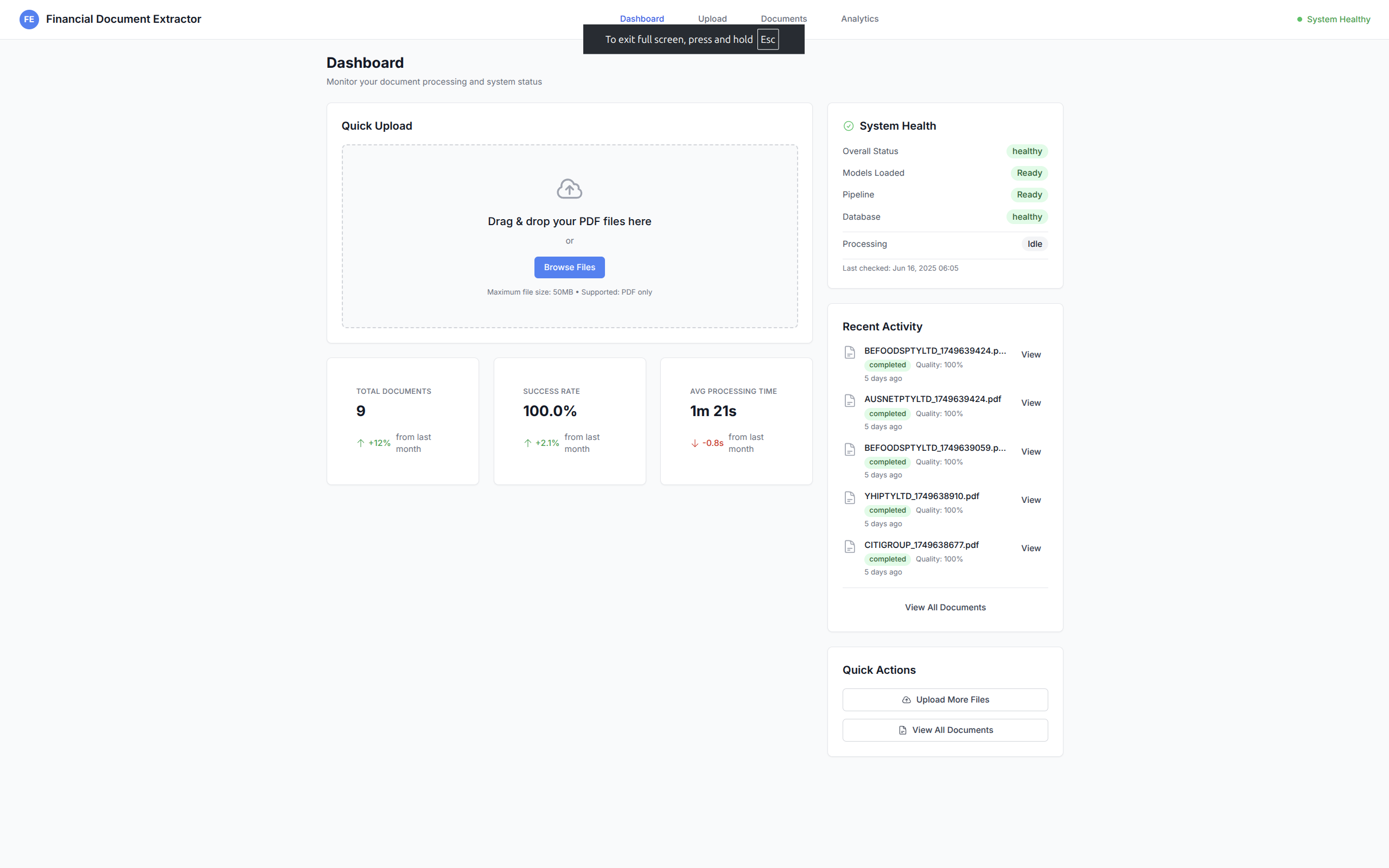 Main dashboard showing system health, processing statistics, and recent activity
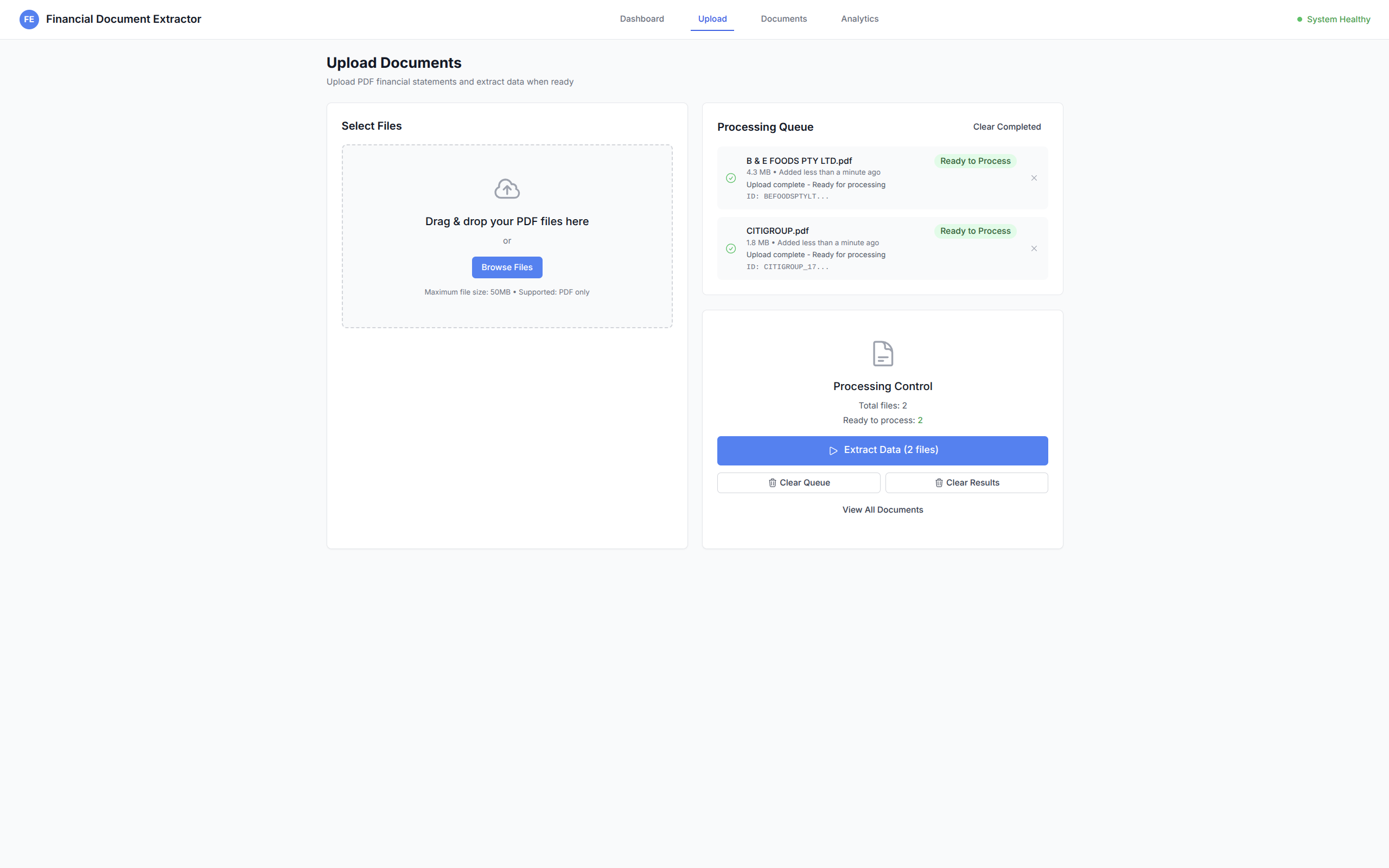 Drag-and-drop file upload with real-time progress tracking
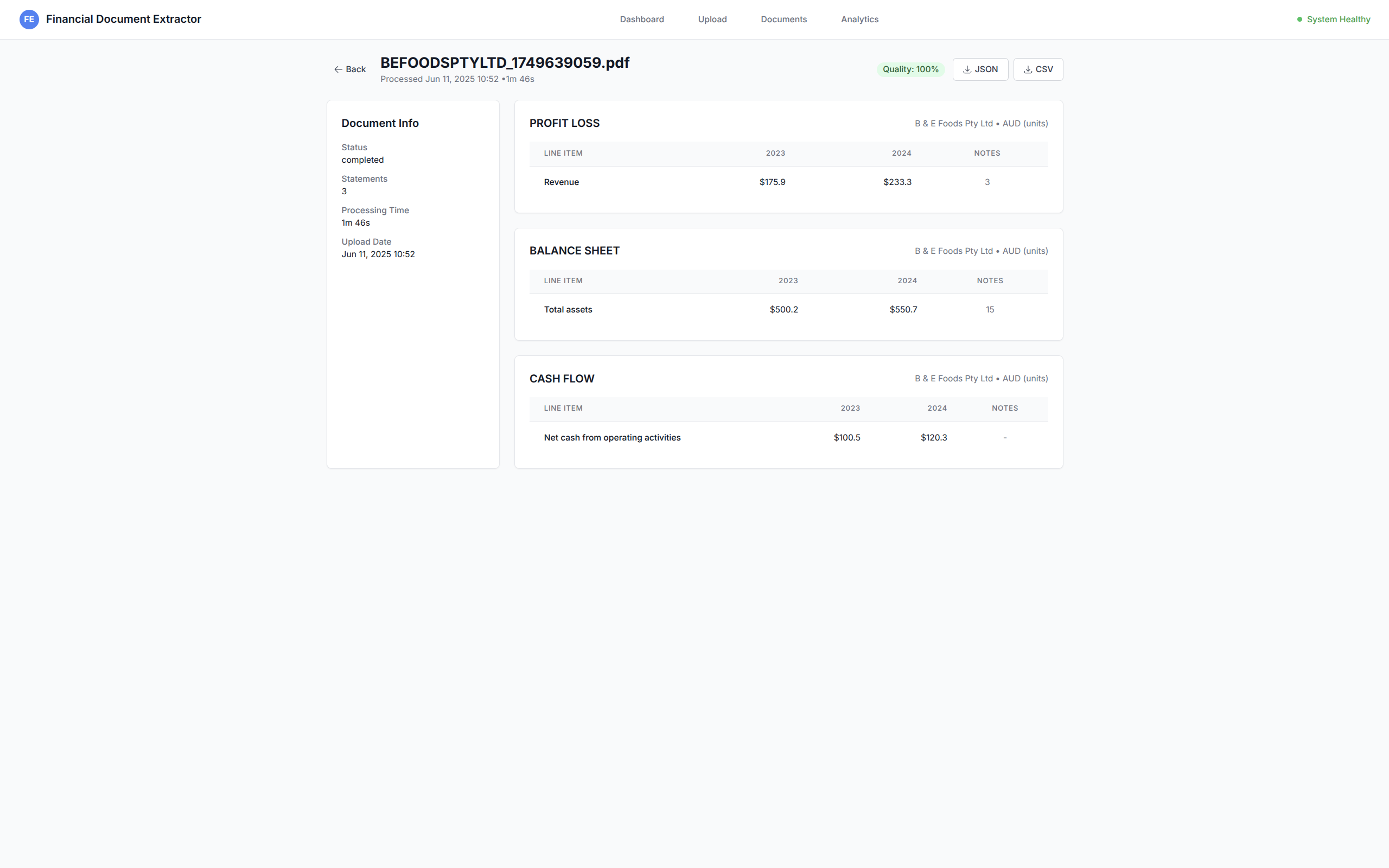 Financial statement viewer with extracted data and quality indicators
The system follows a modern microservices architecture with intelligent data processing pipelines:
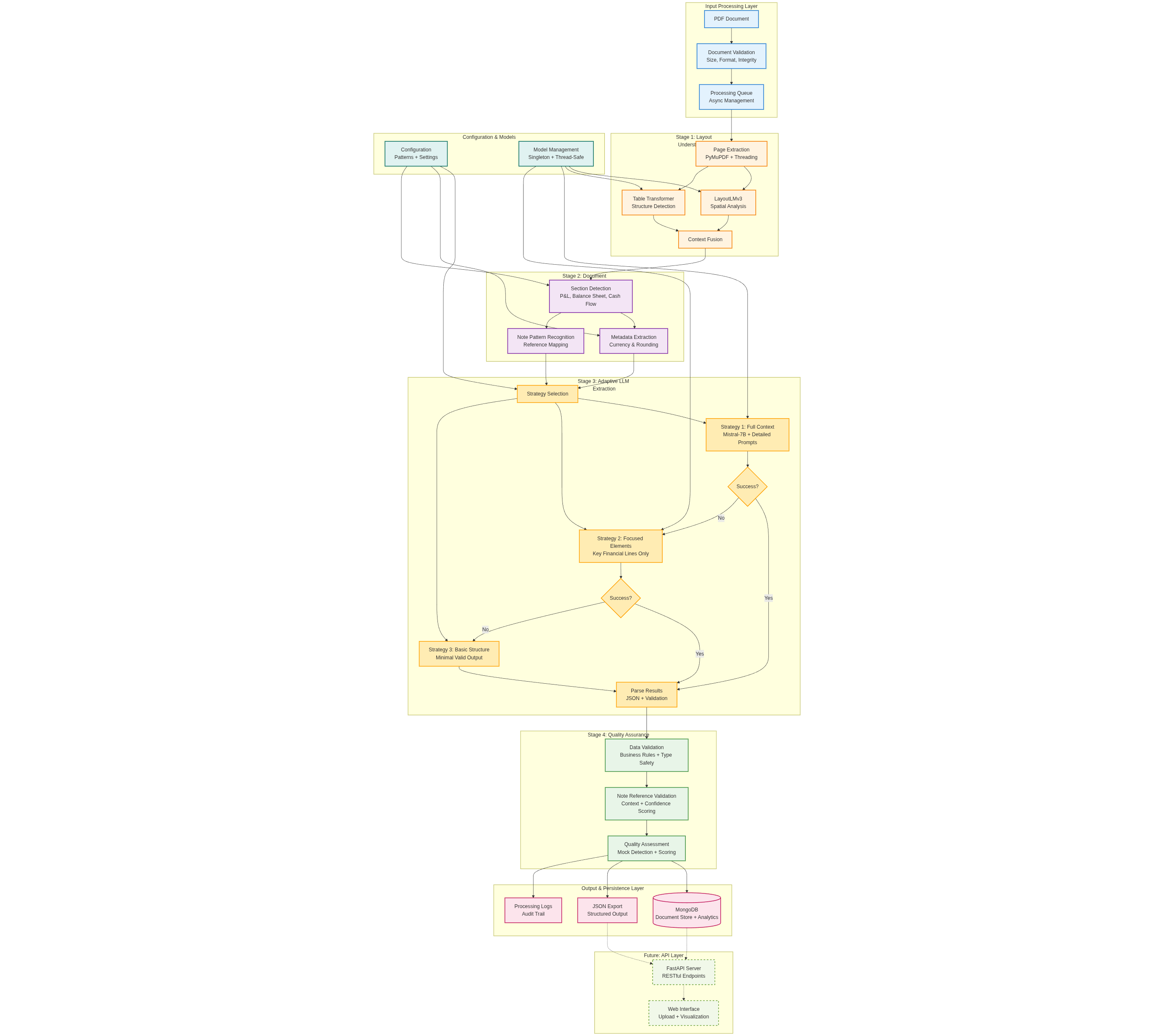 Complete backend system architecture showing all components and their interactions
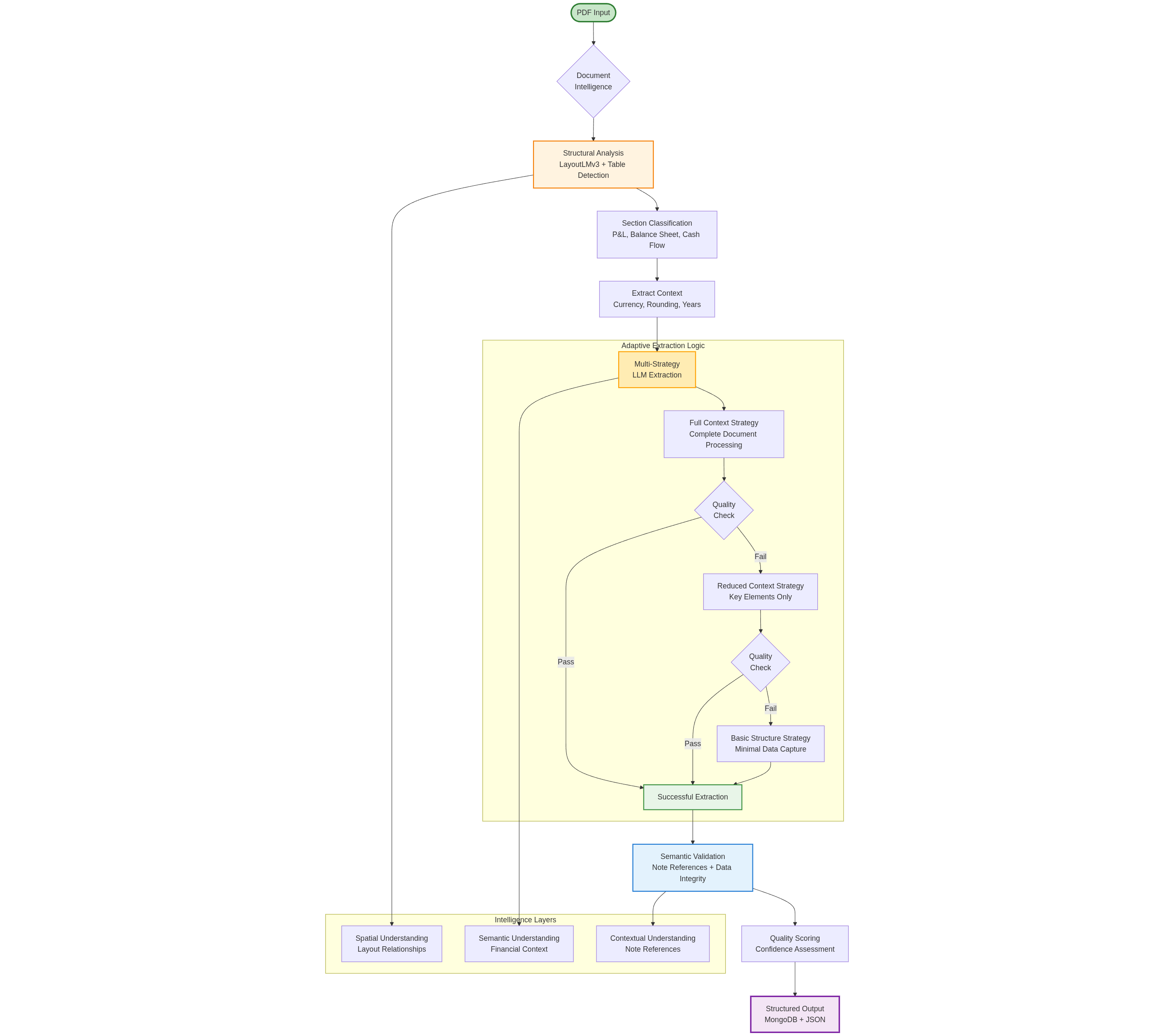 Complete data flow showing the multi-stage processing pipeline from document upload to structured output
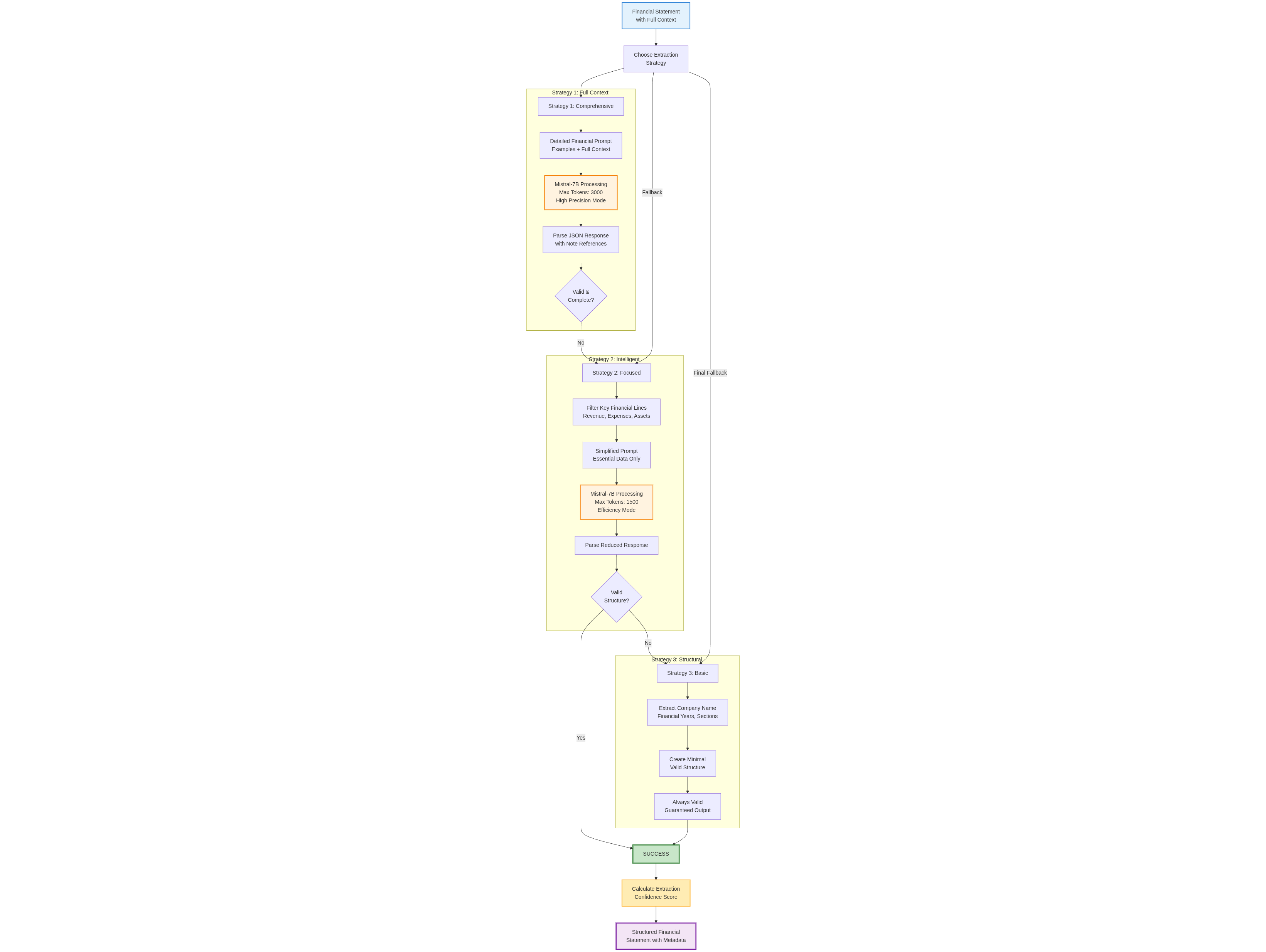 Multi-strategy adaptive extraction approach with progressive fallback mechanisms
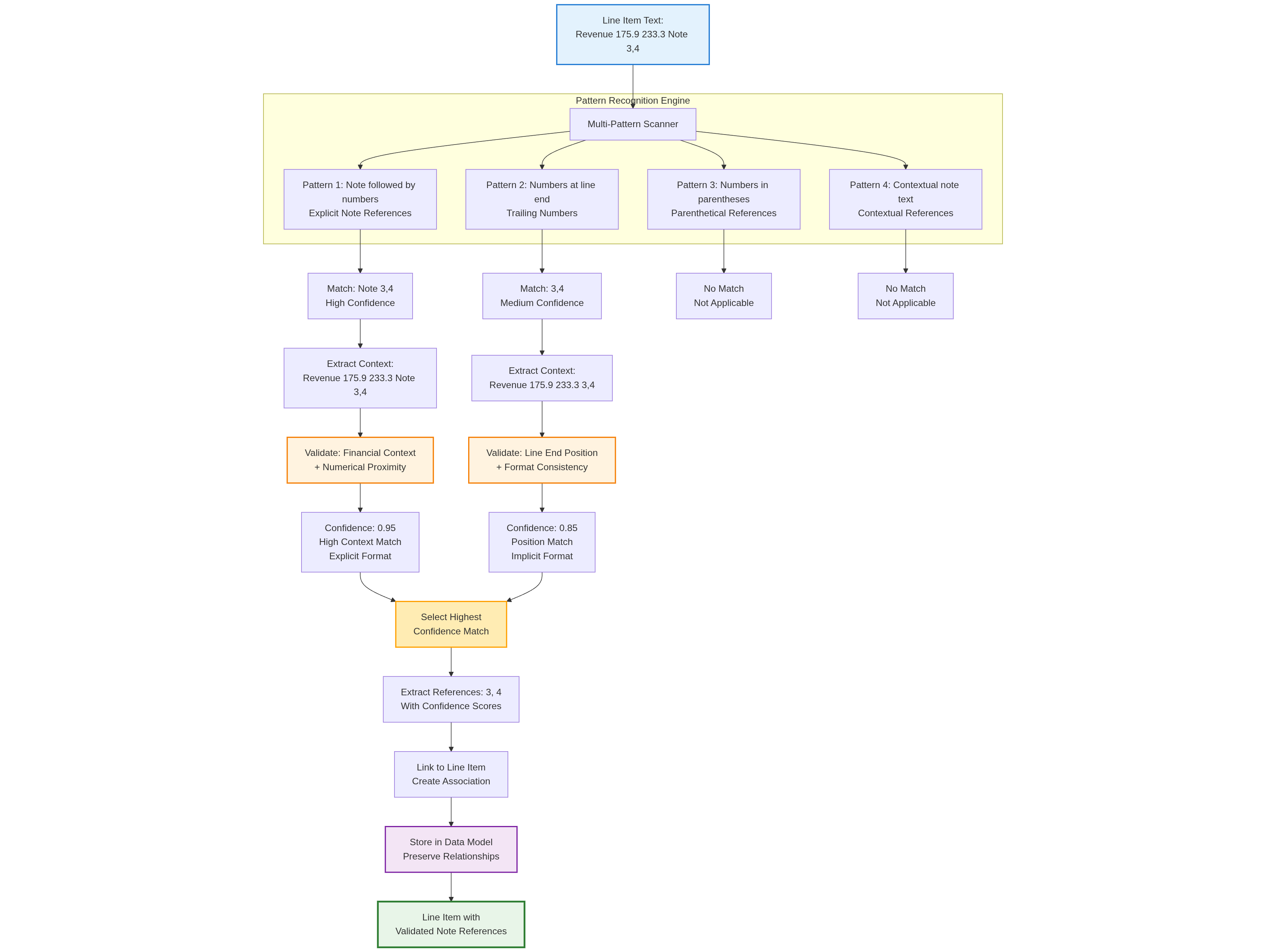 Advanced pattern recognition system for maintaining financial line item to note relationships
| Component | Technology | Purpose |
|---|---|---|
| 🎨 Frontend | React + TypeScript | Modern UI with type safety |
| ⚡ Build Tool | Vite | Fast development and optimized builds |
| 🎯 Backend | FastAPI | High-performance async API |
| 🗄️ Database | MongoDB | Document storage and metadata |
| 🤖 AI Models | LayoutLMv3, Mistral-7B | Document understanding and extraction |
| 📡 Communication | REST + WebSocket | API and real-time updates |
This project is licensed under the MIT License - see the LICENSE file for details.
Python
1
10 commits
updated Jun 16, 2025
A sophisticated AI-powered financial document processing system that extracts data from annual reports and financial statements while preserving critical semantic relationships between financial line items and their explanatory notes.
The Financial Document Extractor is a comprehensive solution designed to automate the extraction of financial data from PDF documents. This system combines advanced computer vision, natural language processing, and machine learning techniques to deliver highly accurate financial data extraction while maintaining the integrity of note references and contextual relationships.
Traditional OCR and basic NLP solutions fail to preserve the critical semantic relationships between financial line items and their explanatory notes. This system addresses that gap by implementing a multi-strategy extraction approach that maintains note reference integrity while delivering high-accuracy financial data extraction.
git clone https://github.com/LasaK97/End-to-End-Multi-Stage-Intelligent-Financial-Data-Extraction-System.git
cd End-to-End-Multi-Stage-Intelligent-Financial-Data-Extraction-System/backend
python -m venv venv
source venv/bin/activate  # On Windows: venv\Scripts\activate
pip install -r requirements.txt
python scripts/download_models.py
cp .env.example .env
# Edit .env with following configurations (see Backend Configuration section below)
python -m uvicorn src.api:app --reload --host 0.0.0.0 --port 8000
cd ../frontend
npm install
cp .env.local.example .env.local
# Edit .env.local with following configuration (see Frontend Configuration section below)
npm run dev
The application will be available at:
| Service | URL | Description |
|---|---|---|
| 🎨 Frontend | http://localhost:5173 | Main user interface |
| 🔧 Backend API | http://localhost:8000 | REST API endpoints |
| 📚 API Docs | http://localhost:8000/docs | Interactive API documentation |
📤 Upload Documents
⚙️ Process Documents
📊 View Results
# 🗄️ Database Configuration
MONGODB_URL=mongodb://localhost:27017/findoc_extractor
MONGODB_DB_NAME=findoc_extractor

# 🤖 Model Configuration
MODELS_PATH=./models
CACHE_SIZE=1000

# ⚙️ Processing Configuration
MAX_FILE_SIZE_MB=50
BATCH_SIZE=5
WORKER_THREADS=4

# 🌐 API Configuration
API_HOST=0.0.0.0
API_PORT=8000
CORS_ORIGINS=["http://localhost:3000"]

# 📝 Logging
LOG_LEVEL=INFO
LOG_FILE=./logs/app.log
# 🌐 API Configuration
VITE_API_BASE_URL=http://localhost:8000
VITE_WS_URL=ws://localhost:8000/ws

# ⚙️ Application Configuration
VITE_ENVIRONMENT=development
VITE_MAX_FILE_SIZE_MB=50

# 🚀 Feature Flags
VITE_ENABLE_ANALYTICS=true
VITE_ENABLE_EXPORT=true
The system requires several pre-trained models that are automatically downloaded:
Model storage and configuration can be customized in src/config.py.
Please use the GitHub issue tracker to report bugs or request features. Include:
Main dashboard showing system health, processing statistics, and recent activity
Drag-and-drop file upload with real-time progress tracking
Financial statement viewer with extracted data and quality indicators
The system follows a modern microservices architecture with intelligent data processing pipelines:
Complete backend system architecture showing all components and their interactions
Complete data flow showing the multi-stage processing pipeline from document upload to structured output
Multi-strategy adaptive extraction approach with progressive fallback mechanisms
Advanced pattern recognition system for maintaining financial line item to note relationships
| Component | Technology | Purpose |
|---|---|---|
| 🎨 Frontend | React + TypeScript | Modern UI with type safety |
| ⚡ Build Tool | Vite | Fast development and optimized builds |
| 🎯 Backend | FastAPI | High-performance async API |
| 🗄️ Database | MongoDB | Document storage and metadata |
| 🤖 AI Models | LayoutLMv3, Mistral-7B | Document understanding and extraction |
| 📡 Communication | REST + WebSocket | API and real-time updates |
This project is licensed under the MIT License - see the LICENSE file for details.



