Your cluster, alive. A Kubernetes cockpit where every pod is a pixel-art tamagotchi — k9s meets Freelens, with Flux as a first-class citizen.



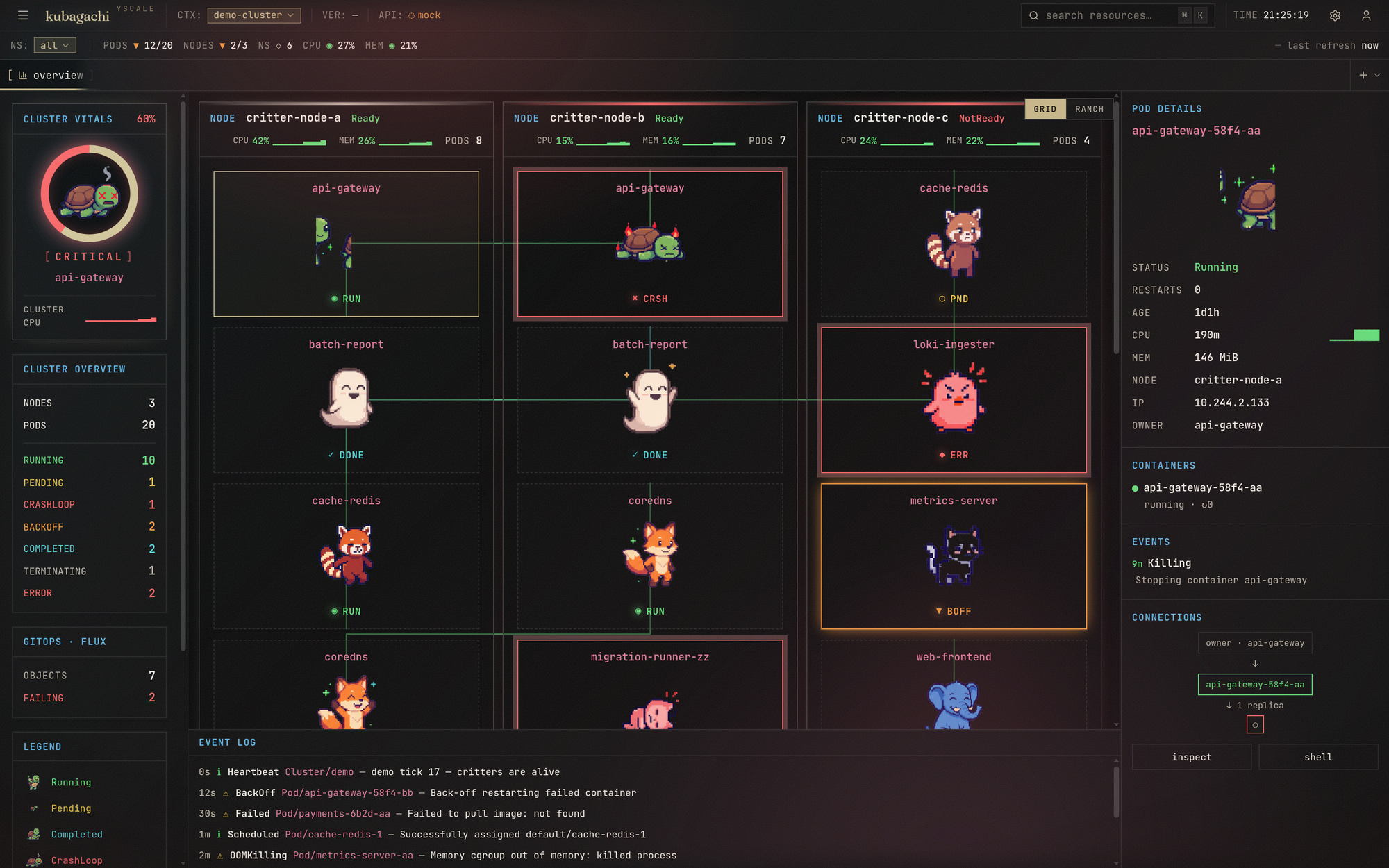
kubagachi is a browser cockpit first. --web serves your live cluster as a
clickable dashboard — a habitat of pixel critters whose mood is each pod's
health, an embedded terminal (real kubectl exec over a websocket), resource
drawers with edit-and-apply, and Flux as a first-class citizen. --app opens it
in a chromeless window.
It ships a terminal UI too — the same live cluster and actions as a k9s-style
TUI (: commands, habitat view, logs / describe / shell / delete, a dedicated
flux view) — for when you'd rather stay in the shell. One binary, both faces, one
ClusterSource seam underneath.
 /\_/\        /\_/\         _____
( o.o )      ( ?.?)       ( x.x )
 > ^ <        > ^ <        /|||\
 running      pending       RIP
A pod's health is its critter's mood: a content cat for Running, a sleepy
critter for BackOff, a tombstone for CrashLoopBackOff, a fading ghost for
Terminating. Restarts make them sick. You care for them with real
operations — logs, shells, deletes, flux reconciles.
--web serves the same live cluster as a clickable dashboard — the full
keyboard layer, resource detail drawers, a navigable resource tree, an embedded
terminal (real kubectl exec over a websocket), and pixel-art critters whose
mood is the pod's health. The whole room reacts: a healthy cluster glows
warm, a degraded one tenses up, and sick pods get a colored halo and pulse.
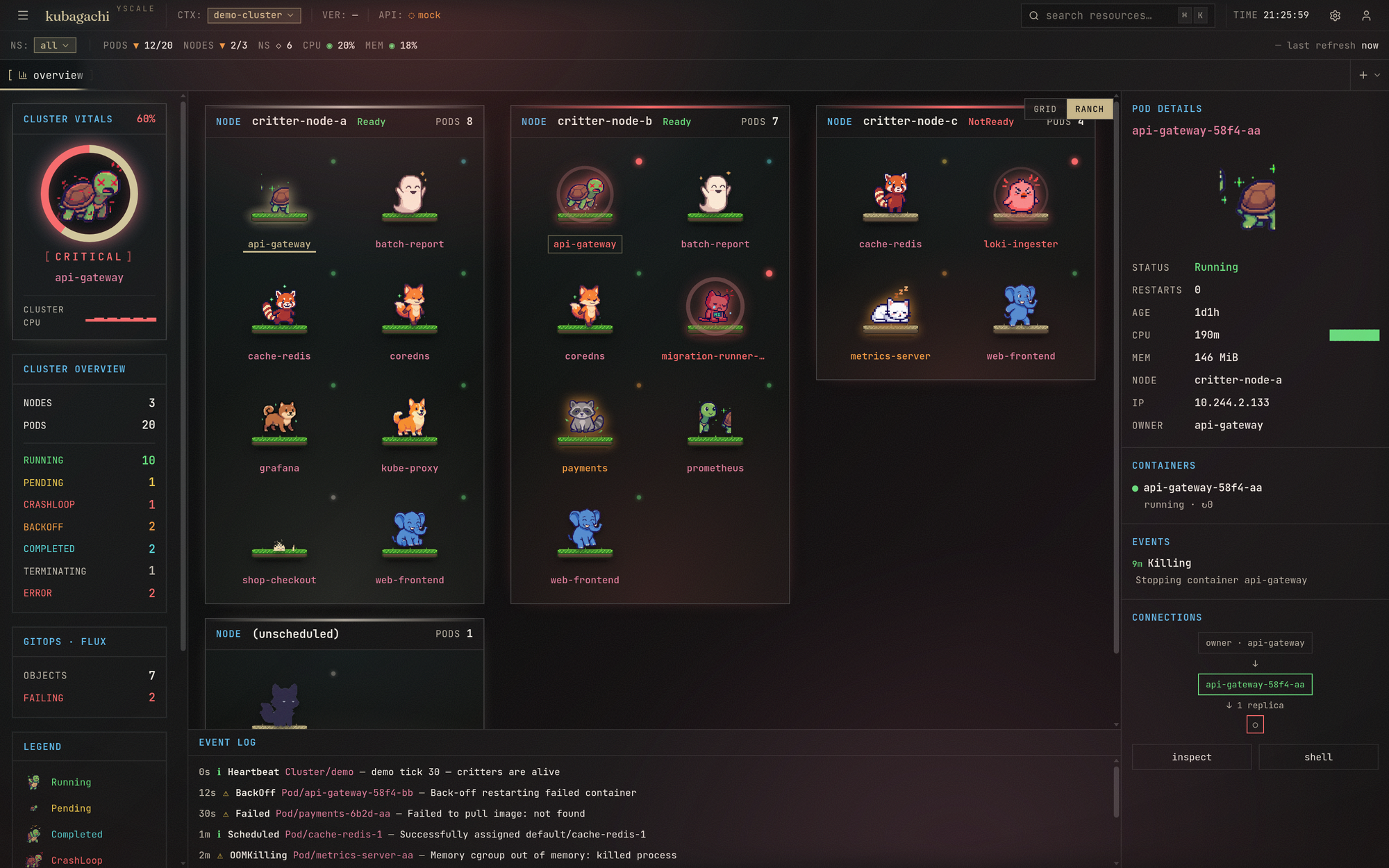
Ranch view — press v to swap the habitat grid for a calm, Pokémon-ranch
layout: each node becomes a grassy platform and its pods are critters scattered
across it.
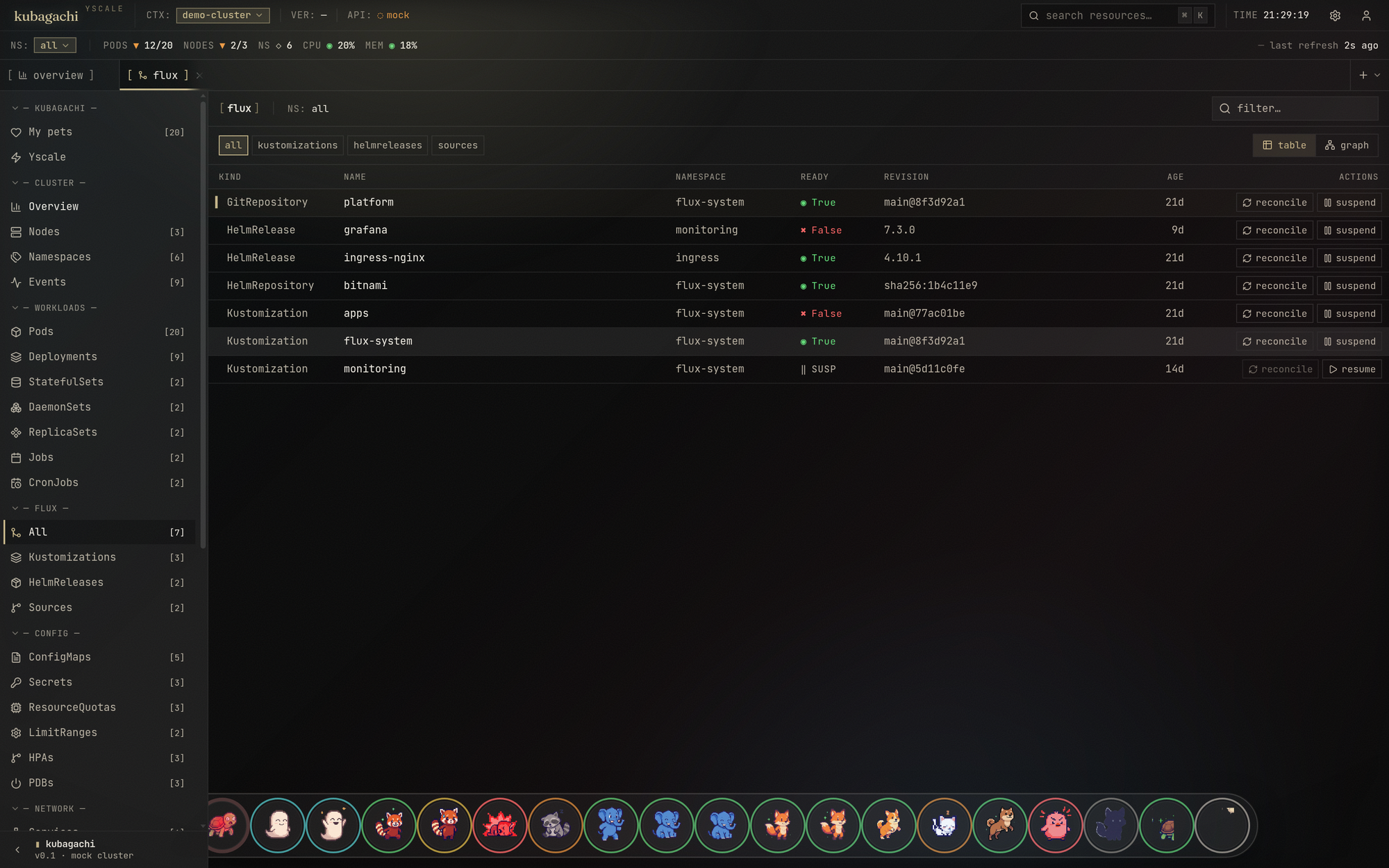
Flux, first-class — the : palette (:flux) opens a k9s-style view of your
GitOps state: Kustomizations, HelmReleases and sources with readiness, source
chain and revision, plus one-key reconcile / suspend. Toggle table ↔ dependency
graph.
The browser cockpit — the main way in (serves the built web app + live SSE stream + exec websocket):
go run ./cmd/kubagachi --web            # http://127.0.0.1:8787
go run ./cmd/kubagachi --app            # same, in a chromeless app window
go run ./cmd/kubagachi --demo --web     # demo data in the browser, no cluster
Prefer the terminal? Drop --web:
go run ./cmd/kubagachi -A                # live cluster (current kubeconfig), TUI
go run ./cmd/kubagachi --demo            # demo data, TUI
Build:
go build -o kubagachi ./cmd/kubagachi
The web UI ships embedded in the binary. To rebuild it:
cd web && npm install && npm run build # output is embedded via web/embed.go
For normal Kubernetes installs, use the Helm chart. The root deploy.yaml is
for Yscale's unreleased Internal Developer Platform (idpctl); it is not a
Kubernetes manifest, Helm values file, or supported external install path.
CI builds the image multi-arch (amd64 + arm64) and pushes both the image and the Helm chart to GHCR as OCI artifacts — no external chart repo to add:
helm install kubagachi \
  oci://ghcr.io/yscale-sh/charts/kubagachi \
  --version 0.1.0 \
  --namespace kubagachi --create-namespace

# then open the cockpit
kubectl -n kubagachi port-forward svc/kubagachi 8080:80   # http://127.0.0.1:8080
In-cluster mode (the default) watches the cluster it runs in via the pod's
ServiceAccount — the chart provisions the cluster-read + pods/exec RBAC the
cockpit needs. --set mode=demo runs the fake habitat with no cluster access;
--set mode=kubeconfig targets a different cluster. See
charts/kubagachi for all values.
Image: ghcr.io/yscale-sh/kubagachi. Chart:
ghcr.io/yscale-sh/charts/kubagachi. Both names are derived from the repo by
CI, so nothing is hardcoded.
About
deploy.yaml. That file is an internal IDP contract for a future one-command deploy flow throughidpctl, reconciled by Flux on Yscale's platform. IDP deploys are not released for external users yet. Use Helm above unless you already know you are deploying through that platform.
| Flag | Description |
|---|---|
| (none) | Connect to the current kubeconfig context, terminal UI. |
--namespace, -n NAME | Watch a single namespace. |
--all-namespaces, -A | Watch every namespace. |
--context NAME | Use a specific kube context. |
--demo | Fake cluster data (no Kubernetes access). |
--web | Serve the browser UI instead of the terminal UI. |
--web-addr HOST:PORT | Address for --web (default 127.0.0.1:8787). |
--app | Open the browser UI in a native-feeling app window (implies --web). |
--pixel-critters DIR | critterforge sprite directory (auto-detects ./critters). |
| Key | Action |
|---|---|
↑ ↓ ← → / j k h | Move the selection |
: | Command mode — pods, habitat, flux, events, ns <name>, all, quit |
/ | Filter pods (name, namespace, status) |
v | Toggle habitat ↔ table view |
f | Flux view (kustomizations, helmreleases, sources) |
l | Logs for the selected pod (tail 200, r to refresh) |
d | Describe the selected pod (spec, conditions, events) |
s | Shell into the selected pod (kubectl exec passthrough; bash→sh probe) |
ctrl+d | Delete the selected pod (with confirm) |
enter | Inspect (focus details) |
tab / e | Cycle panes / focus events |
esc | Back / clear filter |
? | Help |
q / ctrl+c | Quit |
In the flux view: r reconciles the selected object (stamps
reconcile.fluxcd.io/requestedAt, exactly like flux reconcile), s
suspends/resumes, enter shows the full status message.
kubagachi discovers the Flux toolkit CRDs (Kustomization, HelmRelease, GitRepository, OCIRepository, HelmRepository, Bucket) via the dynamic client and keeps them in every snapshot: readiness, suspension, revision, source chain and the last condition message. Both UIs surface them with reconcile / suspend / resume actions. No Flux on the cluster? The view just says so.
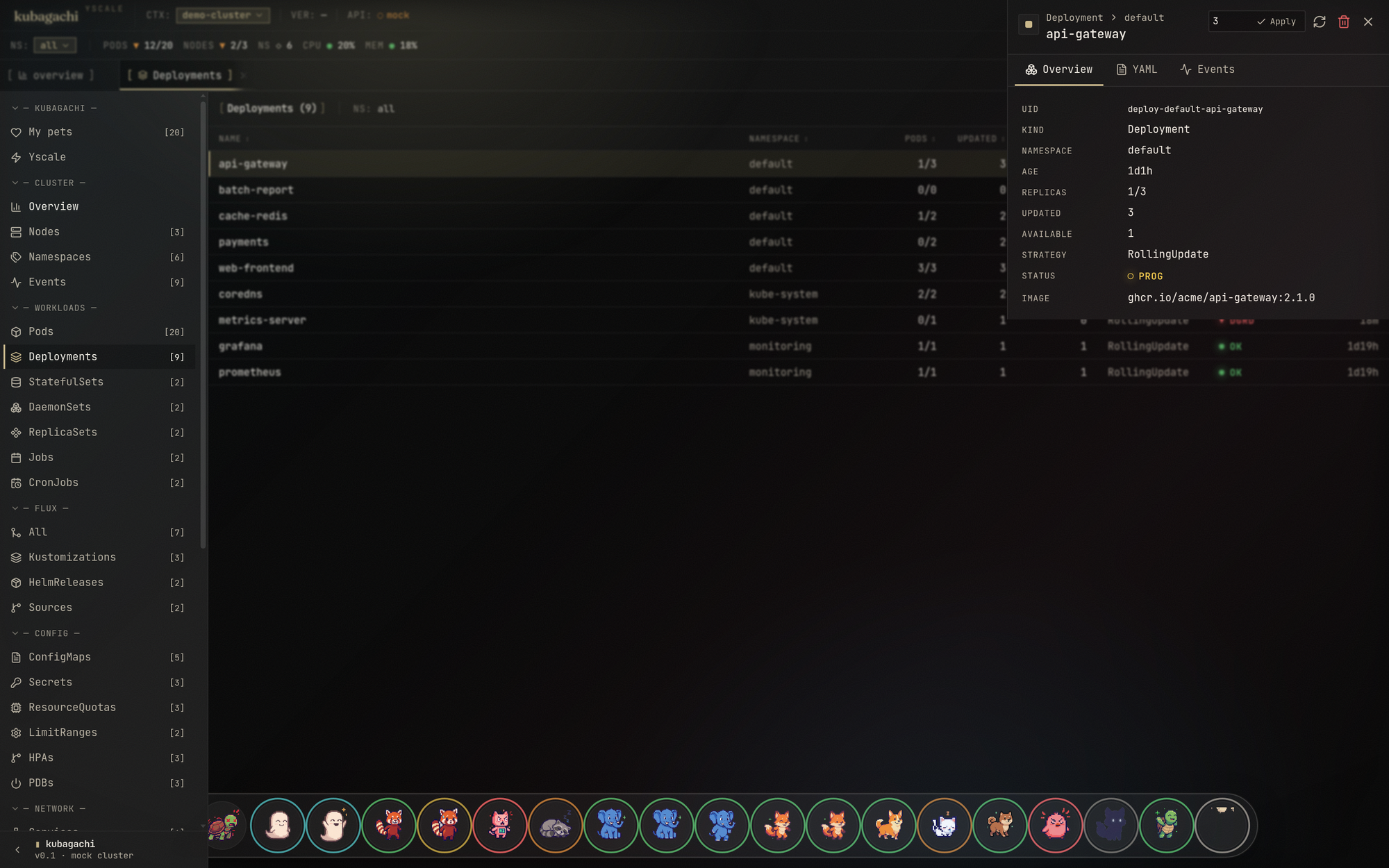
The drawer is a full operate surface — Freelens-parity actions on the live cluster:
kubectl get -o yaml, managedFields stripped) and an Edit mode that
server-side-applies your changes back (fieldManager: kubagachi).localhost: links and stop buttons in the Pod drawer.helm.sh/release.v1 secrets (no helm binary needed to read); the drawer
shows revision history, values, manifest and notes, with rollback / uninstall
when the helm CLI is on the host.Ctrl+] / Ctrl+[).Writes need write RBAC: deploy/rbac.yaml ships the cockpit ClusterRole
(read + operate verbs + exec/port-forward) — kubectl apply -f deploy/rbac.yaml,
and scope it down for anything beyond a homelab.
The browser cockpit has no built-in authentication, and its operate surface
(edit/apply, delete, exec, port-forward, Helm) runs with whatever the pod's
ServiceAccount is granted — deploy/rbac.yaml ships a broad read and write
ClusterRole meant for a homelab. So:
--web binds 127.0.0.1 by default (local only). Keep it there for solo use.Full hardening guide + scoped-credential recipe: docs/security.md.
kubagachi --web exposes the UI plus a small JSON API:
| Endpoint | Description |
|---|---|
GET /api/snapshot | Current cluster snapshot (pods, nodes, events, flux, helm). |
GET /api/stream | Server-sent events — one snapshot per cluster change. |
GET /api/critters | Sprite-sheet manifest for the pixel critters. |
GET /api/contexts · POST /api/contexts/select | List kubeconfig contexts / switch the active one. |
GET /api/logs?namespace=&pod=&container=&tail= | Pod logs. |
GET /api/describe?namespace=&pod= | kubectl-describe-style summary. |
GET /api/object?apiVersion=&kind=&namespace=&name= | Any object as real YAML (managedFields stripped). |
POST /api/object/apply | {yaml} — server-side apply, any kind. |
GET /api/secret?namespace=&name= | Secret data, base64 + decoded per key. |
GET /api/customresources?group=&version=&resource=&namespace= | Live instances of any CRD. |
POST /api/pods/delete | {namespace,name} — delete a pod. |
POST /api/resource/delete · /scale · /restart | Generic actions: {apiVersion,kind,namespace,name[,replicas]}. |
POST /api/node/cordon | {name,cordon} — (un)mark a node schedulable. |
POST /api/portforward/start · /stop · GET /api/portforward/list | Pod port-forward tunnels. |
GET /api/helm/history · GET /api/helm/release | Release revisions / values+manifest+notes (decoded from Helm storage). |
POST /api/helm/rollback · /uninstall | Helm mutations (need the helm CLI on the host). |
POST /api/flux/action | {kind,namespace,name,action} — reconcile/suspend/resume. |
WS /api/exec?namespace=&pod=&container= | Interactive shell. JSON frames: stdin/stdout/resize/connected/ping/exit. |
kubagachi acts with exactly the permissions of the credentials you give it — there's no separate login. Three ways in:
$KUBECONFIG if set, else ~/.kube/config;
--context picks the context (current-context by default), -n / -A the
namespaces. It runs as you, so point it at a read-only context if you don't
want the write surface live. A bad context fails fast, before the UI starts.rbac.* values scope it).--set mode=kubeconfig with a scoped, read-only
kubeconfig stored in a Secret (kubeconfig.existingSecret).→ Full walkthrough — including how to mint a scoped read-only credential and harden the deployment — is in docs/security.md.
cmd/kubagachi/           CLI entrypoint (TUI + web server)
cmd/critterforge/        sprite generator CLI (experimental)
cmd/critterview/         sprite gallery dev server
internal/app/            flags, ClusterSource seam, demo data, web server
internal/tui/            Bubble Tea model / update / view, Yscale styles, keys
internal/k8s/            client-go client, informers, flux watcher, actions
internal/state/          normalized cluster model (no client-go types leak out)
internal/critters/       ASCII critter registry, frames, deterministic assignment
internal/sprites/        sprite-sheet scanner shared by web + critterview
pkg/critterforge/        AI sprite generation library (Gemini-backed)
web/                     React browser UI (Vite + Tailwind), embedded via embed.go
The TUI never imports client-go. app.ClusterSource is the only seam between
data and presentation — the live informer watcher and the demo generator both
stream state.ClusterState snapshots over a channel, and expose the same
Actions surface (logs, describe, delete, exec, flux) to both UIs.
display), never re-fetched or repositioned.pod.Status.Phase,
DeletionTimestamp, waiting reasons (CrashLoopBackOff,
ImagePullBackOff), terminated reasons (OOMKilled).kubectl exec -it … -- sh -c 'command -v bash >/dev/null && exec bash || exec sh',
restore on exit. The web terminal runs the same argv under a PTY bridged to
xterm.js over a websocket.go test ./... exercises the model lifecycle,
rendering, search and the demo source.Each critter is a single keyed sprite sheet — eight moods in one transparent row. These two are the regulars, Nori and Cartogopher:
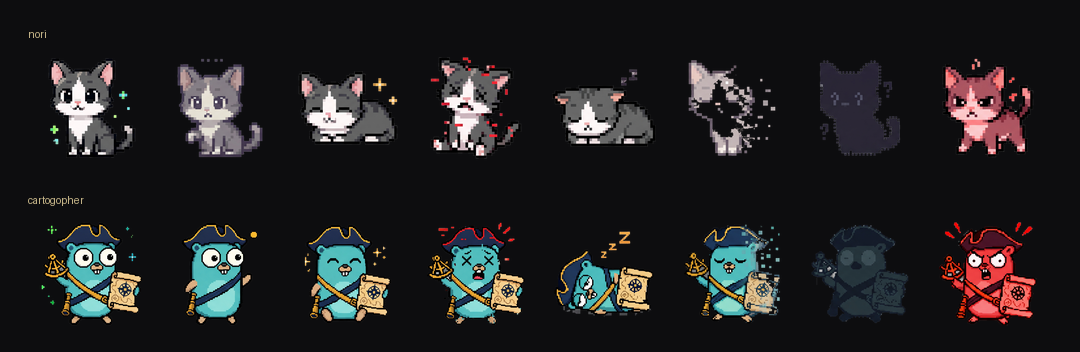
Nothing repaints to animate. The UI slices the sheet into its eight frames once,
stacks them, and just toggles which one is display: block — so a pod's mood is
a single style flip, never a re-fetch or a re-layout. A Running pod sits on
frame one; a CrashLoopBackOff pod snaps to the angry red frame.
Even at eight frames the read is clear, and it scales with the sheet: generate more frames and tune the swap delay, and the same frame-replace mechanism plays them as full looping animations — idle bobs, breathing, a tail flick — straight from whatever sheet you generate, no engine changes.
The critters that ship in critters/ were made with pkg/critterforge +
cmd/critterforge on Gemini's image API at high quality. Each critter is
anchored to a canonical base sprite, fed back into every frame so the mascot
stays the same character across all of its moods.
The canonical pipeline is two sheet-based stages:
# keyed status sheet — every state in one transparent row, flood-keyed to alpha
go run ./cmd/critterforge sheet  --provider gemini --quality high

# per-state animation decks (idle bob, etc.)
go run ./cmd/spriteanim          --provider gemini --quality high
Put a Google AI Studio key in .env at the repo
root (GEMINI_API_KEY=…); OpenAI's gpt-image works too via --provider openai.
Input is critters.yaml; PNGs + manifest.json are written to ./critters/,
and cached sprites are skipped unless --force. Preview the gallery with
go run ./cmd/critterview.
critters:
  - name: api-gateway
    mascot: white cat
    personality: poised, watchful, routes-everything-cleanly
    visual_role: API gateway / ingress pod mascot
    visual_design: [white cat body, subtle pink details, small whiskers, dark outline]
    instructions: keep the silhouette clean and readable
Contributions of all kinds are welcome — code, critters, docs, ideas. The one
rule: use your brain and make sure it makes sense. AI-assisted work is fine
(encouraged, even), but you own every line you submit, and every issue/PR needs a
short section written by you. See CONTRIBUTING.md; if an
agent is doing the typing, it must follow AGENTS.md. UI changes
need before/after screenshots.
This is meant to be a happy Freelens-like experience, with some k9s-like controls, and cute characters to make Kubernetes more approachable.
Your cluster, alive. A Kubernetes cockpit where every pod is a pixel-art tamagotchi — k9s meets Freelens, with Flux as a first-class citizen.
kubagachi is a browser cockpit first. --web serves your live cluster as a
clickable dashboard — a habitat of pixel critters whose mood is each pod's
health, an embedded terminal (real kubectl exec over a websocket), resource
drawers with edit-and-apply, and Flux as a first-class citizen. --app opens it
in a chromeless window.
It ships a terminal UI too — the same live cluster and actions as a k9s-style
TUI (: commands, habitat view, logs / describe / shell / delete, a dedicated
flux view) — for when you'd rather stay in the shell. One binary, both faces, one
ClusterSource seam underneath.
 /\_/\        /\_/\         _____
( o.o )      ( ?.?)       ( x.x )
 > ^ <        > ^ <        /|||\
 running      pending       RIP
A pod's health is its critter's mood: a content cat for Running, a sleepy
critter for BackOff, a tombstone for CrashLoopBackOff, a fading ghost for
Terminating. Restarts make them sick. You care for them with real
operations — logs, shells, deletes, flux reconciles.
--web serves the same live cluster as a clickable dashboard — the full
keyboard layer, resource detail drawers, a navigable resource tree, an embedded
terminal (real kubectl exec over a websocket), and pixel-art critters whose
mood is the pod's health. The whole room reacts: a healthy cluster glows
warm, a degraded one tenses up, and sick pods get a colored halo and pulse.
Ranch view — press v to swap the habitat grid for a calm, Pokémon-ranch
layout: each node becomes a grassy platform and its pods are critters scattered
across it.
Flux, first-class — the : palette (:flux) opens a k9s-style view of your
GitOps state: Kustomizations, HelmReleases and sources with readiness, source
chain and revision, plus one-key reconcile / suspend. Toggle table ↔ dependency
graph.
The browser cockpit — the main way in (serves the built web app + live SSE stream + exec websocket):
go run ./cmd/kubagachi --web            # http://127.0.0.1:8787
go run ./cmd/kubagachi --app            # same, in a chromeless app window
go run ./cmd/kubagachi --demo --web     # demo data in the browser, no cluster
Prefer the terminal? Drop --web:
go run ./cmd/kubagachi -A                # live cluster (current kubeconfig), TUI
go run ./cmd/kubagachi --demo            # demo data, TUI
Build:
go build -o kubagachi ./cmd/kubagachi
The web UI ships embedded in the binary. To rebuild it:
cd web && npm install && npm run build # output is embedded via web/embed.go
For normal Kubernetes installs, use the Helm chart. The root deploy.yaml is
for Yscale's unreleased Internal Developer Platform (idpctl); it is not a
Kubernetes manifest, Helm values file, or supported external install path.
CI builds the image multi-arch (amd64 + arm64) and pushes both the image and the Helm chart to GHCR as OCI artifacts — no external chart repo to add:
helm install kubagachi \
  oci://ghcr.io/yscale-sh/charts/kubagachi \
  --version 0.1.0 \
  --namespace kubagachi --create-namespace

# then open the cockpit
kubectl -n kubagachi port-forward svc/kubagachi 8080:80   # http://127.0.0.1:8080
In-cluster mode (the default) watches the cluster it runs in via the pod's
ServiceAccount — the chart provisions the cluster-read + pods/exec RBAC the
cockpit needs. --set mode=demo runs the fake habitat with no cluster access;
--set mode=kubeconfig targets a different cluster. See
charts/kubagachi for all values.
Image: ghcr.io/yscale-sh/kubagachi. Chart:
ghcr.io/yscale-sh/charts/kubagachi. Both names are derived from the repo by
CI, so nothing is hardcoded.
About
deploy.yaml. That file is an internal IDP contract for a future one-command deploy flow throughidpctl, reconciled by Flux on Yscale's platform. IDP deploys are not released for external users yet. Use Helm above unless you already know you are deploying through that platform.
| Flag | Description |
|---|---|
| (none) | Connect to the current kubeconfig context, terminal UI. |
--namespace, -n NAME | Watch a single namespace. |
--all-namespaces, -A | Watch every namespace. |
--context NAME | Use a specific kube context. |
--demo | Fake cluster data (no Kubernetes access). |
--web | Serve the browser UI instead of the terminal UI. |
--web-addr HOST:PORT | Address for --web (default 127.0.0.1:8787). |
--app | Open the browser UI in a native-feeling app window (implies --web). |
--pixel-critters DIR | critterforge sprite directory (auto-detects ./critters). |
| Key | Action |
|---|---|
↑ ↓ ← → / j k h | Move the selection |
: | Command mode — pods, habitat, flux, events, ns <name>, all, quit |
/ | Filter pods (name, namespace, status) |
v | Toggle habitat ↔ table view |
f | Flux view (kustomizations, helmreleases, sources) |
l | Logs for the selected pod (tail 200, r to refresh) |
d | Describe the selected pod (spec, conditions, events) |
s | Shell into the selected pod (kubectl exec passthrough; bash→sh probe) |
ctrl+d | Delete the selected pod (with confirm) |
enter | Inspect (focus details) |
tab / e | Cycle panes / focus events |
esc | Back / clear filter |
? | Help |
q / ctrl+c | Quit |
In the flux view: r reconciles the selected object (stamps
reconcile.fluxcd.io/requestedAt, exactly like flux reconcile), s
suspends/resumes, enter shows the full status message.
kubagachi discovers the Flux toolkit CRDs (Kustomization, HelmRelease, GitRepository, OCIRepository, HelmRepository, Bucket) via the dynamic client and keeps them in every snapshot: readiness, suspension, revision, source chain and the last condition message. Both UIs surface them with reconcile / suspend / resume actions. No Flux on the cluster? The view just says so.
The drawer is a full operate surface — Freelens-parity actions on the live cluster:
kubectl get -o yaml, managedFields stripped) and an Edit mode that
server-side-applies your changes back (fieldManager: kubagachi).localhost: links and stop buttons in the Pod drawer.helm.sh/release.v1 secrets (no helm binary needed to read); the drawer
shows revision history, values, manifest and notes, with rollback / uninstall
when the helm CLI is on the host.Ctrl+] / Ctrl+[).Writes need write RBAC: deploy/rbac.yaml ships the cockpit ClusterRole
(read + operate verbs + exec/port-forward) — kubectl apply -f deploy/rbac.yaml,
and scope it down for anything beyond a homelab.
The browser cockpit has no built-in authentication, and its operate surface
(edit/apply, delete, exec, port-forward, Helm) runs with whatever the pod's
ServiceAccount is granted — deploy/rbac.yaml ships a broad read and write
ClusterRole meant for a homelab. So:
--web binds 127.0.0.1 by default (local only). Keep it there for solo use.Full hardening guide + scoped-credential recipe: docs/security.md.
kubagachi --web exposes the UI plus a small JSON API:
| Endpoint | Description |
|---|---|
GET /api/snapshot | Current cluster snapshot (pods, nodes, events, flux, helm). |
GET /api/stream | Server-sent events — one snapshot per cluster change. |
GET /api/critters | Sprite-sheet manifest for the pixel critters. |
GET /api/contexts · POST /api/contexts/select | List kubeconfig contexts / switch the active one. |
GET /api/logs?namespace=&pod=&container=&tail= | Pod logs. |
GET /api/describe?namespace=&pod= | kubectl-describe-style summary. |
GET /api/object?apiVersion=&kind=&namespace=&name= | Any object as real YAML (managedFields stripped). |
POST /api/object/apply | {yaml} — server-side apply, any kind. |
GET /api/secret?namespace=&name= | Secret data, base64 + decoded per key. |
GET /api/customresources?group=&version=&resource=&namespace= | Live instances of any CRD. |
POST /api/pods/delete | {namespace,name} — delete a pod. |
POST /api/resource/delete · /scale · /restart | Generic actions: {apiVersion,kind,namespace,name[,replicas]}. |
POST /api/node/cordon | {name,cordon} — (un)mark a node schedulable. |
POST /api/portforward/start · /stop · GET /api/portforward/list | Pod port-forward tunnels. |
GET /api/helm/history · GET /api/helm/release | Release revisions / values+manifest+notes (decoded from Helm storage). |
POST /api/helm/rollback · /uninstall | Helm mutations (need the helm CLI on the host). |
POST /api/flux/action | {kind,namespace,name,action} — reconcile/suspend/resume. |
WS /api/exec?namespace=&pod=&container= | Interactive shell. JSON frames: stdin/stdout/resize/connected/ping/exit. |
kubagachi acts with exactly the permissions of the credentials you give it — there's no separate login. Three ways in:
$KUBECONFIG if set, else ~/.kube/config;
--context picks the context (current-context by default), -n / -A the
namespaces. It runs as you, so point it at a read-only context if you don't
want the write surface live. A bad context fails fast, before the UI starts.rbac.* values scope it).--set mode=kubeconfig with a scoped, read-only
kubeconfig stored in a Secret (kubeconfig.existingSecret).→ Full walkthrough — including how to mint a scoped read-only credential and harden the deployment — is in docs/security.md.
cmd/kubagachi/           CLI entrypoint (TUI + web server)
cmd/critterforge/        sprite generator CLI (experimental)
cmd/critterview/         sprite gallery dev server
internal/app/            flags, ClusterSource seam, demo data, web server
internal/tui/            Bubble Tea model / update / view, Yscale styles, keys
internal/k8s/            client-go client, informers, flux watcher, actions
internal/state/          normalized cluster model (no client-go types leak out)
internal/critters/       ASCII critter registry, frames, deterministic assignment
internal/sprites/        sprite-sheet scanner shared by web + critterview
pkg/critterforge/        AI sprite generation library (Gemini-backed)
web/                     React browser UI (Vite + Tailwind), embedded via embed.go
The TUI never imports client-go. app.ClusterSource is the only seam between
data and presentation — the live informer watcher and the demo generator both
stream state.ClusterState snapshots over a channel, and expose the same
Actions surface (logs, describe, delete, exec, flux) to both UIs.
display), never re-fetched or repositioned.pod.Status.Phase,
DeletionTimestamp, waiting reasons (CrashLoopBackOff,
ImagePullBackOff), terminated reasons (OOMKilled).kubectl exec -it … -- sh -c 'command -v bash >/dev/null && exec bash || exec sh',
restore on exit. The web terminal runs the same argv under a PTY bridged to
xterm.js over a websocket.go test ./... exercises the model lifecycle,
rendering, search and the demo source.Each critter is a single keyed sprite sheet — eight moods in one transparent row. These two are the regulars, Nori and Cartogopher:
Nothing repaints to animate. The UI slices the sheet into its eight frames once,
stacks them, and just toggles which one is display: block — so a pod's mood is
a single style flip, never a re-fetch or a re-layout. A Running pod sits on
frame one; a CrashLoopBackOff pod snaps to the angry red frame.
Even at eight frames the read is clear, and it scales with the sheet: generate more frames and tune the swap delay, and the same frame-replace mechanism plays them as full looping animations — idle bobs, breathing, a tail flick — straight from whatever sheet you generate, no engine changes.
The critters that ship in critters/ were made with pkg/critterforge +
cmd/critterforge on Gemini's image API at high quality. Each critter is
anchored to a canonical base sprite, fed back into every frame so the mascot
stays the same character across all of its moods.
The canonical pipeline is two sheet-based stages:
# keyed status sheet — every state in one transparent row, flood-keyed to alpha
go run ./cmd/critterforge sheet  --provider gemini --quality high

# per-state animation decks (idle bob, etc.)
go run ./cmd/spriteanim          --provider gemini --quality high
Put a Google AI Studio key in .env at the repo
root (GEMINI_API_KEY=…); OpenAI's gpt-image works too via --provider openai.
Input is critters.yaml; PNGs + manifest.json are written to ./critters/,
and cached sprites are skipped unless --force. Preview the gallery with
go run ./cmd/critterview.
critters:
  - name: api-gateway
    mascot: white cat
    personality: poised, watchful, routes-everything-cleanly
    visual_role: API gateway / ingress pod mascot
    visual_design: [white cat body, subtle pink details, small whiskers, dark outline]
    instructions: keep the silhouette clean and readable
Contributions of all kinds are welcome — code, critters, docs, ideas. The one
rule: use your brain and make sure it makes sense. AI-assisted work is fine
(encouraged, even), but you own every line you submit, and every issue/PR needs a
short section written by you. See CONTRIBUTING.md; if an
agent is doing the typing, it must follow AGENTS.md. UI changes
need before/after screenshots.
This is meant to be a happy Freelens-like experience, with some k9s-like controls, and cute characters to make Kubernetes more approachable.



