
Official Implementation of Visual Abstraction: A Plug-and-Play Approach for Text-Visual Retrieval
Python
26
43 commits
updated Sep 4, 2026
README
Visual Abstraction: A Plug-and-Play Approach for Text-Visual Retrieval
-
Authors: Guofeng Ding, Yiding Lu, Peng Hu, Mouxing Yang, Yijie Lin, Xi Peng
-
Resources: Paper
Accepted by ICML 2025
News
- [2025/05/01] VISA is accepted by ICML 2025
Highlights
- Natural language exhibits higher semantic density compared to visual signals.
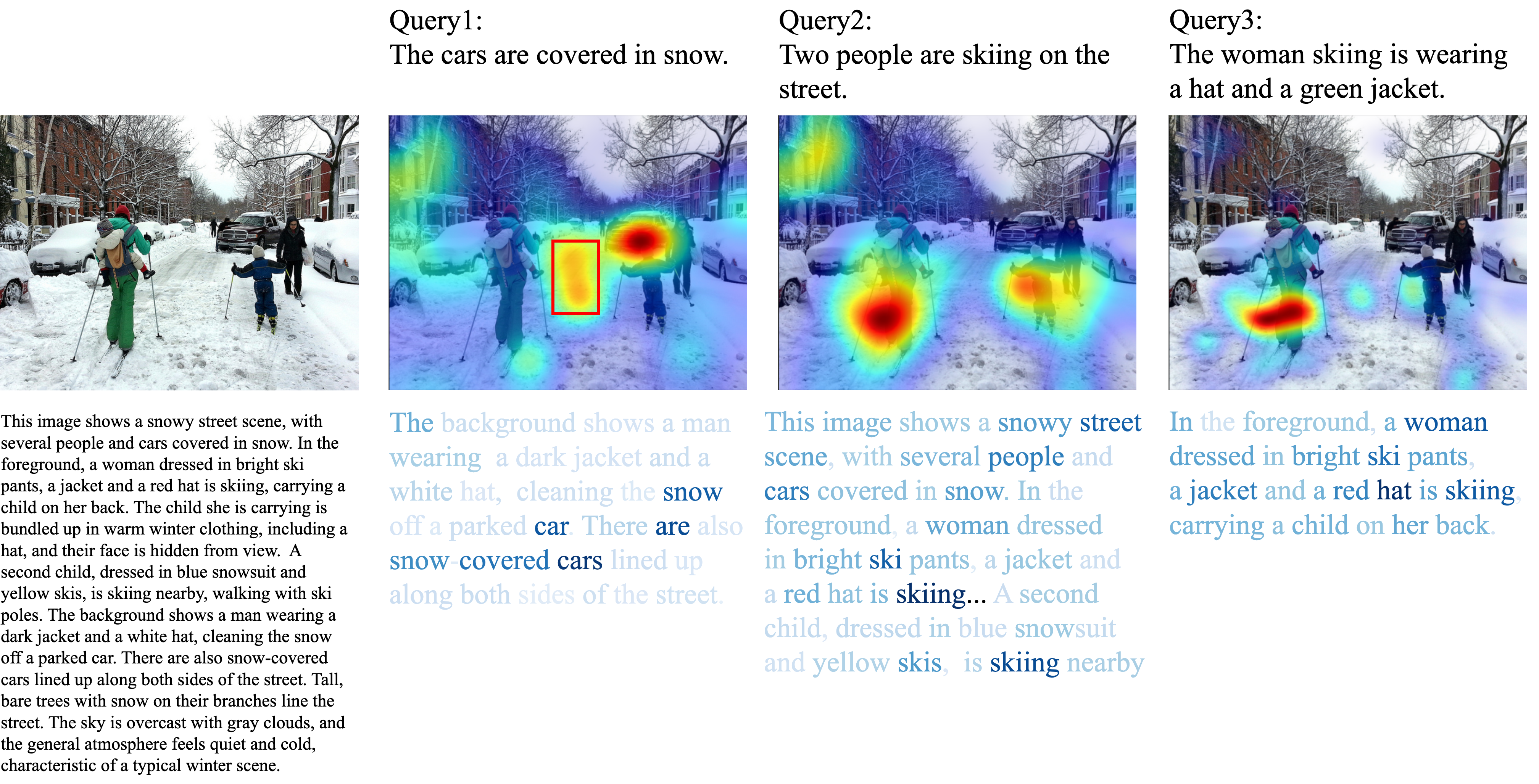
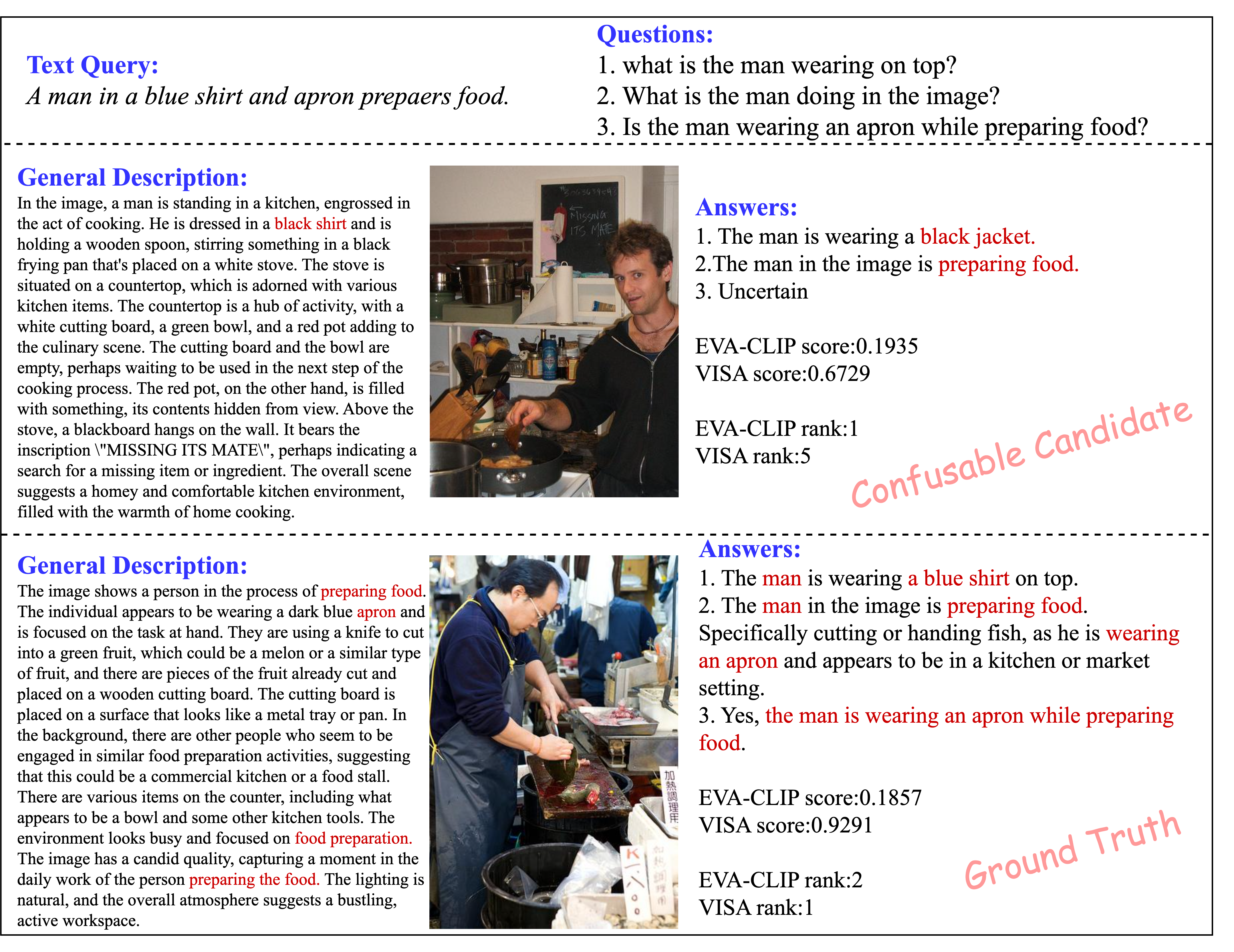
- Proposes abstracting visual signals into natural language and aligning modalities via a question-answering mechanism, effectively resolving cross-modal inconsistencies in semantic density and granularity, and significantly improving retrieval performance.
Install
First,
conda create -n VISA python=3.10
conda activate VISA

pip install -r requirements.txt
Then, download the .whl files for FlashAttention and FlashInfer , then install them using pip:
pip install flash_attn-2.6.3+cu123torch2.4cxx11abiFALSE-cp310-cp310-linux_x86_64.whl
pip install flashinfer-0.1.6+cu121torch2.4-cp310-cp310-linux_x86_64.whl
Datasets
For usage instructions of all datasets, please refer to EVAL_DATASETS.md.
Retrieval
Use the Flickr30K (EVA-CLIP-based) dataset as an example
- Launch the SGLang inference server with 4 GPUs, loading the Qwen2.5-32B-Instruct model and exposing it via HTTP
CUDA_VISIBLE_DEVICES=0,1,2,3 \
$$/path/to/anaconda3/envs/VISA/bin/python$$ -m sglang.launch_server \
  --model-path $$/path/to/Qwen2.5-32B-Instruct$$ \
  --tp 4 \
  --enable-p2p-check \
  --mem-fraction-static 0.8 \
  --host "0.0.0.0" \
  --disable-cuda-graph \
  --port 12345
- retrieval
bash run.sh src/step1_generate_question.py -- \
src/step2_answer_question.py -- \
src/step3_get_text_score.py -- \
src/step4_get_retrieval_result.py
Multi-GPU Inference
For step2, the inference process can be split into multiple parts and assigned to different GPUs for parallel execution.
python src/step2_answer_question.py
Key parameters (set in Flickr30K(EVA-CLIP).yaml):
Qwen2VL_cnt_parts: total number of parts to divide the dataset into (e.g., 4)Qwen2VL_current_part: the index of the current part to process (starting from 0)Qwen2VL_current_gpu: the GPU ID to use for the current part
This setup allows you to run multiple processes in parallel, each handling a different slice of the dataset on a different GPU.
You can run step 2 independently from other steps. Step 3 works in the same way, using its own parameters:
gemma2_cnt_parts, gemma2_current_part, and gemma2_current_gpu.
Another dataset
To evaluate on a different dataset, open config/EVAL_DATASET.yaml and uncomment the line corresponding to the dataset you want to use by setting:
EVAL_DATASET_name: "Flickr30K(EVA-CLIP)"
Only one dataset should be active at a time.
Intermediate files
All intermediate files required for this project are available at the following Hugging Face link:
👉 https://huggingface.co/datasets/XLearning-SCU/VISA
You can download them directly and place them in the appropriate data directory.
Evaluation Results
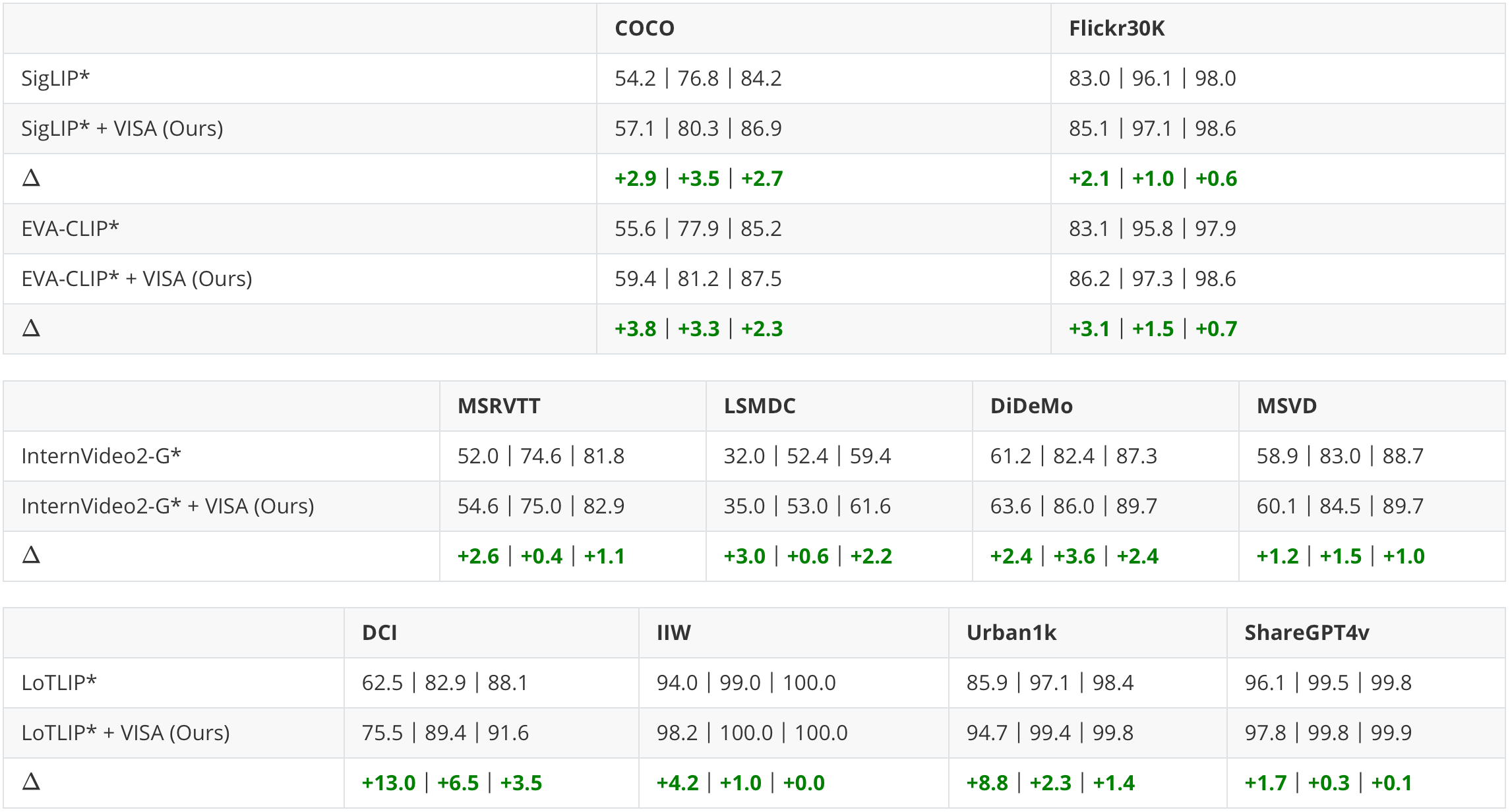
The retrieval results are presented in the format of (R@1 | R@5 | R@10). * indicates results are re-evaluated using official checkpoints from HuggingFace.
Bibtex
If you find this repository helpful, please consider giving it a ⭐️ and citing our work — your support is greatly appreciated!
@inproceedings{ding2025visual,
  title={Visual Abstraction: A Plug-and-Play Approach for Text-Visual Retrieval},
  author={Ding, Guofeng and Lu, Yiding and Hu, Peng and Yang, Mouxing and Lin, Yijie and Peng, Xi},
  booktitle={Proceedings of the 42nd International Conference on Machine Learning (ICML)},
  year={2025},
}
Acknowledgements
We would like to express our gratitude to SigLIP, EVA-CLIP, InterVideo2, and LoTLIP for their excellent work, as well as to LLaVA, Qwen, and BGE for providing powerful foundation models.
Similar repos





Languages
Python
90.1%
Shell
9.9%
Official Implementation of Visual Abstraction: A Plug-and-Play Approach for Text-Visual Retrieval
Python
26
43 commits
updated Sep 4, 2026
README
Visual Abstraction: A Plug-and-Play Approach for Text-Visual Retrieval
-
Authors: Guofeng Ding, Yiding Lu, Peng Hu, Mouxing Yang, Yijie Lin, Xi Peng
-
Resources: Paper
Accepted by ICML 2025
News
- [2025/05/01] VISA is accepted by ICML 2025
Highlights
- Natural language exhibits higher semantic density compared to visual signals.
- Proposes abstracting visual signals into natural language and aligning modalities via a question-answering mechanism, effectively resolving cross-modal inconsistencies in semantic density and granularity, and significantly improving retrieval performance.
Install
First,
conda create -n VISA python=3.10
conda activate VISA

pip install -r requirements.txt
Then, download the .whl files for FlashAttention and FlashInfer , then install them using pip:
pip install flash_attn-2.6.3+cu123torch2.4cxx11abiFALSE-cp310-cp310-linux_x86_64.whl
pip install flashinfer-0.1.6+cu121torch2.4-cp310-cp310-linux_x86_64.whl
Datasets
For usage instructions of all datasets, please refer to EVAL_DATASETS.md.
Retrieval
Use the Flickr30K (EVA-CLIP-based) dataset as an example
- Launch the SGLang inference server with 4 GPUs, loading the Qwen2.5-32B-Instruct model and exposing it via HTTP
CUDA_VISIBLE_DEVICES=0,1,2,3 \
$$/path/to/anaconda3/envs/VISA/bin/python$$ -m sglang.launch_server \
  --model-path $$/path/to/Qwen2.5-32B-Instruct$$ \
  --tp 4 \
  --enable-p2p-check \
  --mem-fraction-static 0.8 \
  --host "0.0.0.0" \
  --disable-cuda-graph \
  --port 12345
- retrieval
bash run.sh src/step1_generate_question.py -- \
src/step2_answer_question.py -- \
src/step3_get_text_score.py -- \
src/step4_get_retrieval_result.py
Multi-GPU Inference
For step2, the inference process can be split into multiple parts and assigned to different GPUs for parallel execution.
python src/step2_answer_question.py
Key parameters (set in Flickr30K(EVA-CLIP).yaml):
Qwen2VL_cnt_parts: total number of parts to divide the dataset into (e.g., 4)Qwen2VL_current_part: the index of the current part to process (starting from 0)Qwen2VL_current_gpu: the GPU ID to use for the current part
This setup allows you to run multiple processes in parallel, each handling a different slice of the dataset on a different GPU.
You can run step 2 independently from other steps. Step 3 works in the same way, using its own parameters:
gemma2_cnt_parts, gemma2_current_part, and gemma2_current_gpu.
Another dataset
To evaluate on a different dataset, open config/EVAL_DATASET.yaml and uncomment the line corresponding to the dataset you want to use by setting:
EVAL_DATASET_name: "Flickr30K(EVA-CLIP)"
Only one dataset should be active at a time.
Intermediate files
All intermediate files required for this project are available at the following Hugging Face link:
👉 https://huggingface.co/datasets/XLearning-SCU/VISA
You can download them directly and place them in the appropriate data directory.
Evaluation Results
The retrieval results are presented in the format of (R@1 | R@5 | R@10). * indicates results are re-evaluated using official checkpoints from HuggingFace.
Bibtex
If you find this repository helpful, please consider giving it a ⭐️ and citing our work — your support is greatly appreciated!
@inproceedings{ding2025visual,
  title={Visual Abstraction: A Plug-and-Play Approach for Text-Visual Retrieval},
  author={Ding, Guofeng and Lu, Yiding and Hu, Peng and Yang, Mouxing and Lin, Yijie and Peng, Xi},
  booktitle={Proceedings of the 42nd International Conference on Machine Learning (ICML)},
  year={2025},
}
Acknowledgements
We would like to express our gratitude to SigLIP, EVA-CLIP, InterVideo2, and LoTLIP for their excellent work, as well as to LLaVA, Qwen, and BGE for providing powerful foundation models.
Similar repos
Languages
Python
90.1%
Shell
9.9%