Run Minecraft Bedrock for Windows seamlessly on Linux.
See the codeMinecraft Bedrock for Windows, running on Linux, with real Xbox sign-in, Friends, servers and Realms.






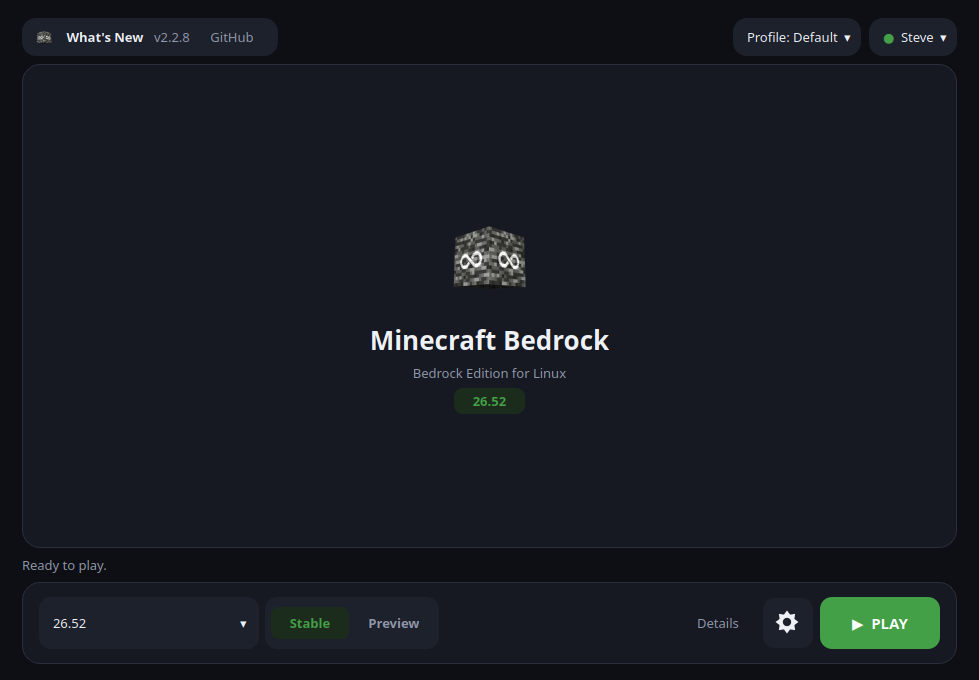
BedrockOnLinux installs and runs the Windows version of Minecraft Bedrock on Linux. It downloads the game from the Microsoft Store with your own account, sets everything up for you, and starts it. No Windows, no second machine, nothing to compile.
You sign in to Microsoft from inside Minecraft, exactly as on Windows, so Friends, invitations, public servers, Realms and the Marketplace work like they should. Nothing goes through a third party.
You can also play without signing in to Xbox Live: single-player worlds and LAN games work, only the online features are out of reach. Starting the game does need an internet connection, though: a game downloaded from the Microsoft Store stays encrypted on disk, and Microsoft hands out the key to it each time it starts. Achievements show up in the game, but they don't unlock yet.
Download the file you want from the latest release.
| Format | Best for | How to start it |
|---|---|---|
| AppImage | Most Linux desktops | ./BedrockOnLinux-*-x86_64.AppImage |
.deb | Debian, Ubuntu, Mint, LMDE | sudo apt install ./bedrock-on-linux_*_amd64.deb |
.rpm | Fedora, Nobara | sudo dnf install ./bedrock-on-linux-*.x86_64.rpm |
| Flatpak | Atomic systems such as Bazzite | flatpak install --user ./BedrockOnLinux-*-x86_64.flatpak |
| Nix | NixOS, or any Linux with Nix installed | nix run github:Wyze3306/BedrockOnLinux |
The launcher tells you when a new version is out. The AppImage updates itself.
The .deb and .rpm update themselves too, through apt or dnf: Update now
downloads the new package, checks it against the release's checksums, and
asks for your password to install it. For the Flatpak, download the new file
and install it with the same command.
Keep --user for the Flatpak: without it, Flatpak installs a second,
system-wide copy, and the menu keeps starting the per-user one at the old
version. flatpak uninstall --system io.github.wyze3306.BedrockOnLinux removes
that extra copy.
Try it without installing anything:
nix run github:Wyze3306/BedrockOnLinux
Or add it as a flake input to install it declaratively, for example into
environment.systemPackages:
# flake.nix
{
  inputs = {
    nixpkgs.url = "github:NixOS/nixpkgs/nixos-unstable";
    bedrock-on-linux = {
      url = "github:Wyze3306/BedrockOnLinux";
      inputs.nixpkgs.follows = "nixpkgs";
    };
  };

  outputs = { self, nixpkgs, bedrock-on-linux, ... }: {
    nixosConfigurations.your-host = nixpkgs.lib.nixosSystem {
      system = "x86_64-linux";
      modules = [
        {
          environment.systemPackages = [
            bedrock-on-linux.packages.x86_64-linux.default
          ];
        }
        # ...your other modules
      ];
    };
  };
}
The first launch downloads the game and everything it needs, so give it a while; after that it starts straight away. You can install an older version too, which is handy when a server hasn't updated yet.
The launcher can be used with a controller — the d-pad or left stick moves the highlight, A selects, B goes back, the shoulder buttons change tab and Start plays — and Tools ▸ Create direct launch shortcut adds a Minecraft Bedrock entry to your app menu or to Steam. That is the one to use on a Steam Deck.
On a laptop with two graphics cards, Settings ▸ Advanced ▸ Graphics card chooses the one Minecraft plays on.
Mojang's Bedrock Editor is part of the game: open it from Settings ▸
Tools ▸ Open Bedrock Editor, the Open Bedrock Editor action of the app menu
entry, or bedrock-on-linux play --editor.
BetterRTX presets install from Settings ▸ Tools ▸ BetterRTX, or from a terminal:
bedrock-on-linux betterrtx list
bedrock-on-linux betterrtx install default
bedrock-on-linux betterrtx restore
A preset only works with the Minecraft version it was built for, so the
launcher installs one only when its shaders match the selected version, and
keeps the game's own shaders so restore can put them back. install also
takes a .rtpack file.
The launcher can install a tested OptiScaler v10 setup for Minecraft RTX under
Wine/vkd3d-proton, including the physical nvngx.dll workaround needed to
expose Bedrock's native DLSS input on the tested non-NVIDIA setup:
bedrock-on-linux optiscaler install
bedrock-on-linux optiscaler status
OptiScaler is downloaded from upstream and is not bundled with this project. Frame generation remains opt-in in the OptiScaler overlay. See docs/OPTISCALER.md for the exact setup, management commands, tested pipeline and compatibility notes.
Start with the built-in check, which looks at your system and tells you what is wrong:
bedrock-on-linux doctor
If the game itself misbehaves after an update or a crash, bedrock-on-linux repair rebuilds the Windows environment without touching your worlds. Logs are
one click away in Settings, and the same commands are available from the
AppImage or Flatpak through their own entry point.
Still stuck? Ask on Discord or open an issue with your launcher version, your distribution, your GPU and the log, but never your account details.
Removing the app leaves what it downloaded where it was: the game, the Wine prefix with your worlds in it, the game engine and its runtime, several gigabytes in all. A package manager does not know about those files, and an AppImage has no uninstaller at all. To remove everything:
~/.local/share/bedrock-on-linux/compatdata/pfx/drive_c/users/steamuser/AppData/Roaming/Minecraft Bedrock
somewhere first.~/.local/share/bedrock-on-linux, or the folder you moved the
installation to in Settings (~/.config/bedrock-on-linux records it;
delete that too).~/.local/share/applications/bedrock-on-linux-*.desktop, and the
Minecraft Bedrock entry you added to Steam. Launchers before 2.2.2 also
left ~/.xodus-keyring.ron in your home folder.For the Flatpak, flatpak uninstall --delete-data io.github.wyze3306.BedrockOnLinux
does all of it.
Everything is built from source by a public, reproducible pipeline, and each
release is signed. The details are in docs/BUILD.md.
BedrockOnLinux ships no Minecraft game files. The game is downloaded from Microsoft's own servers, under your own account's licence, by Xodus, so you have to own Minecraft, and the terms that come with it still apply.
BedrockOnLinux is MIT licensed, see LICENSE; the components it
bundles keep their own licences. This is an independent project, not affiliated
with or supported by Mojang or Microsoft.
194 followers · starred Sep 2026
28 followers · starred Jul 2026
122 followers · starred Jul 2026
157 followers · starred Aug 2026
Run Minecraft Bedrock for Windows seamlessly on Linux.
See the codeMinecraft Bedrock for Windows, running on Linux, with real Xbox sign-in, Friends, servers and Realms.
BedrockOnLinux installs and runs the Windows version of Minecraft Bedrock on Linux. It downloads the game from the Microsoft Store with your own account, sets everything up for you, and starts it. No Windows, no second machine, nothing to compile.
You sign in to Microsoft from inside Minecraft, exactly as on Windows, so Friends, invitations, public servers, Realms and the Marketplace work like they should. Nothing goes through a third party.
You can also play without signing in to Xbox Live: single-player worlds and LAN games work, only the online features are out of reach. Starting the game does need an internet connection, though: a game downloaded from the Microsoft Store stays encrypted on disk, and Microsoft hands out the key to it each time it starts. Achievements show up in the game, but they don't unlock yet.
Download the file you want from the latest release.
| Format | Best for | How to start it |
|---|---|---|
| AppImage | Most Linux desktops | ./BedrockOnLinux-*-x86_64.AppImage |
.deb | Debian, Ubuntu, Mint, LMDE | sudo apt install ./bedrock-on-linux_*_amd64.deb |
.rpm | Fedora, Nobara | sudo dnf install ./bedrock-on-linux-*.x86_64.rpm |
| Flatpak | Atomic systems such as Bazzite | flatpak install --user ./BedrockOnLinux-*-x86_64.flatpak |
| Nix | NixOS, or any Linux with Nix installed | nix run github:Wyze3306/BedrockOnLinux |
The launcher tells you when a new version is out. The AppImage updates itself.
The .deb and .rpm update themselves too, through apt or dnf: Update now
downloads the new package, checks it against the release's checksums, and
asks for your password to install it. For the Flatpak, download the new file
and install it with the same command.
Keep --user for the Flatpak: without it, Flatpak installs a second,
system-wide copy, and the menu keeps starting the per-user one at the old
version. flatpak uninstall --system io.github.wyze3306.BedrockOnLinux removes
that extra copy.
Try it without installing anything:
nix run github:Wyze3306/BedrockOnLinux
Or add it as a flake input to install it declaratively, for example into
environment.systemPackages:
# flake.nix
{
  inputs = {
    nixpkgs.url = "github:NixOS/nixpkgs/nixos-unstable";
    bedrock-on-linux = {
      url = "github:Wyze3306/BedrockOnLinux";
      inputs.nixpkgs.follows = "nixpkgs";
    };
  };

  outputs = { self, nixpkgs, bedrock-on-linux, ... }: {
    nixosConfigurations.your-host = nixpkgs.lib.nixosSystem {
      system = "x86_64-linux";
      modules = [
        {
          environment.systemPackages = [
            bedrock-on-linux.packages.x86_64-linux.default
          ];
        }
        # ...your other modules
      ];
    };
  };
}
The first launch downloads the game and everything it needs, so give it a while; after that it starts straight away. You can install an older version too, which is handy when a server hasn't updated yet.
The launcher can be used with a controller — the d-pad or left stick moves the highlight, A selects, B goes back, the shoulder buttons change tab and Start plays — and Tools ▸ Create direct launch shortcut adds a Minecraft Bedrock entry to your app menu or to Steam. That is the one to use on a Steam Deck.
On a laptop with two graphics cards, Settings ▸ Advanced ▸ Graphics card chooses the one Minecraft plays on.
Mojang's Bedrock Editor is part of the game: open it from Settings ▸
Tools ▸ Open Bedrock Editor, the Open Bedrock Editor action of the app menu
entry, or bedrock-on-linux play --editor.
BetterRTX presets install from Settings ▸ Tools ▸ BetterRTX, or from a terminal:
bedrock-on-linux betterrtx list
bedrock-on-linux betterrtx install default
bedrock-on-linux betterrtx restore
A preset only works with the Minecraft version it was built for, so the
launcher installs one only when its shaders match the selected version, and
keeps the game's own shaders so restore can put them back. install also
takes a .rtpack file.
The launcher can install a tested OptiScaler v10 setup for Minecraft RTX under
Wine/vkd3d-proton, including the physical nvngx.dll workaround needed to
expose Bedrock's native DLSS input on the tested non-NVIDIA setup:
bedrock-on-linux optiscaler install
bedrock-on-linux optiscaler status
OptiScaler is downloaded from upstream and is not bundled with this project. Frame generation remains opt-in in the OptiScaler overlay. See docs/OPTISCALER.md for the exact setup, management commands, tested pipeline and compatibility notes.
Start with the built-in check, which looks at your system and tells you what is wrong:
bedrock-on-linux doctor
If the game itself misbehaves after an update or a crash, bedrock-on-linux repair rebuilds the Windows environment without touching your worlds. Logs are
one click away in Settings, and the same commands are available from the
AppImage or Flatpak through their own entry point.
Still stuck? Ask on Discord or open an issue with your launcher version, your distribution, your GPU and the log, but never your account details.
Removing the app leaves what it downloaded where it was: the game, the Wine prefix with your worlds in it, the game engine and its runtime, several gigabytes in all. A package manager does not know about those files, and an AppImage has no uninstaller at all. To remove everything:
~/.local/share/bedrock-on-linux/compatdata/pfx/drive_c/users/steamuser/AppData/Roaming/Minecraft Bedrock
somewhere first.~/.local/share/bedrock-on-linux, or the folder you moved the
installation to in Settings (~/.config/bedrock-on-linux records it;
delete that too).~/.local/share/applications/bedrock-on-linux-*.desktop, and the
Minecraft Bedrock entry you added to Steam. Launchers before 2.2.2 also
left ~/.xodus-keyring.ron in your home folder.For the Flatpak, flatpak uninstall --delete-data io.github.wyze3306.BedrockOnLinux
does all of it.
Everything is built from source by a public, reproducible pipeline, and each
release is signed. The details are in docs/BUILD.md.
BedrockOnLinux ships no Minecraft game files. The game is downloaded from Microsoft's own servers, under your own account's licence, by Xodus, so you have to own Minecraft, and the terms that come with it still apply.
BedrockOnLinux is MIT licensed, see LICENSE; the components it
bundles keep their own licences. This is an independent project, not affiliated
with or supported by Mojang or Microsoft.
194 followers · starred Sep 2026
28 followers · starred Jul 2026
122 followers · starred Jul 2026
157 followers · starred Aug 2026





