
A modern development experience for VBA, inside the Visual Basic Editor. Native add-in, live analysis, single-file install.
C#
18
806 commits
updated Sep 23, 2026
See what people are saying
README
xlide



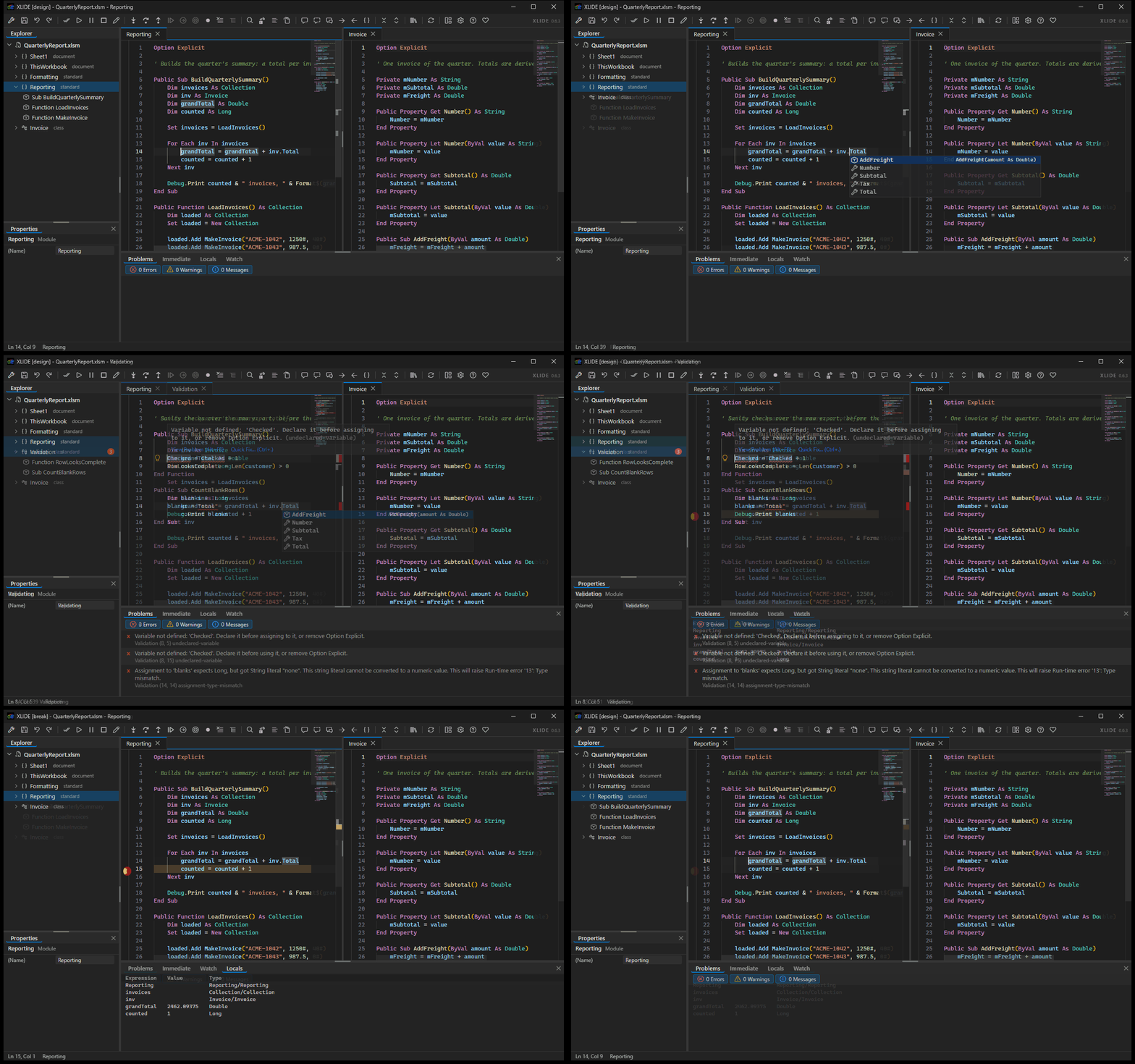 (Yes! This is really the VBA Editor in Excel)
The Visual Basic Editor has looked the same since 1998. One module on screen at a time, a find dialog that covers the code you are searching, less than helpful (or missing) completions, and no idea that anything is wrong until you press F5 and it stops. xlide replaces that surface with Monaco, the editor behind VS Code, running inside the VBE itself. Your workbooks stay where they are, your macros run the way they always did, and F5, F8, and break mode behave exactly as before.
It installs in one double click, for your account only, with no administrator rights and nothing to install first.
What it is
xlide is a native add-in that the VBE loads through its own extensibility model - the same editor Excel, Word, PowerPoint and Access all share, so one install reaches every one of them. It draws over the VBE's document area and puts a modern editing surface there: every open module live at once, editors side by side, diagnostics as you type. The native editor keeps running underneath as the text of record, the compile target, and the debugger, so nothing about how your code compiles or runs changes.
The analysis comes from a VBA analyzer validated against the real compiler over a corpus of thousands of modules, and it runs in its own process. That matters because the VBE is single threaded and owns the thread you type on: a project large enough to take seconds to analyse cannot stall your typing if the analysis is not happening there. The add-in is compiled ahead of time to native code, so Excel never loads a .NET runtime on its account.
What you get
- Monaco editing over every code pane, with VBA syntax highlighting, folding, multi-cursor, and bookmarks that stay with the module.
- Diagnostics as you type, with severity filters and a Problems panel that navigates to the line.
- Completion, hover, and signature help from the analyzer, plus typing that follows VBA's own conventions: auto-casing, block closers, smart Enter and Tab, and auto-indent.
- Every open module holds a live editor. Switching tabs takes a median of 2.5ms and keeps your undo history, scroll position, and squiggles.
- Editor groups. Split right or down with Ctrl+, drag a tab to a group's edge, and work in two modules at once.
- Nine tool panes that dock where you put them: Explorer, Properties, Problems, Immediate, Locals, Watch, Tests, Changes and Source Control. Drag one by its title and a five-zone compass appears over the region under the pointer. The arrangement persists.
- Search as one floating widget, scoped to the module, the workbook, or every open workbook. Find All lists every match with a preview, and Replace All applies as a single edit that one undo reverts.
- Locals and Watch track the debugger through every step, with breakpoints, Run to Cursor, Set Next Statement, and the rest of the debug commands on the toolbar.
- An Object Browser as a floating themed window, covering your open projects and every referenced type library, read directly from the type libraries themselves. Members of your own modules jump to their definition on a double click.
- The hidden attributes, through annotations:
'@PredeclaredId,'@Description("..."),'@DefaultMember,'@Enumerator,'@ExcelHotkey("D")and the rest of the Rubberduck set are read from the code, the drift from what the saved module carries is filed in the Problems pane, and saving the workbook writes them - the one thing in the VBE nothing else can set. - A project explorer rooted at each open workbook, with project-qualified addressing, so two
workbooks can both hold a Module1 and xlide knows which one you mean. A second layout groups
modules into folders by the
'@Folder("Parent.Child")comment at the top of each one, the Rubberduck convention, so a project organised there is organised here without editing a line. - The procedure the caret is in, on the status bar beside the module name and marked in the explorer, so where you are reads off the screen without scrolling up.
- An Immediate panel that mirrors the native window live, and a close-confirm on a dirty tab that reverts everywhere when you choose not to save.
- A UserForm designer: drag, resize, nudge and reparent controls on a canvas, with a text view of the same form beside it that edits the same document. Both halves are one undo stack, and the form is not touched until you press Ctrl+S.
- A test runner. Mark procedures with
@xlide-test, run them against the live project, and read the outcomes in a Tests pane that shows nothing rather than stale green when the project cannot execute a line. - A Changes pane: what an agent, or you, changed in this project, in rounds, newest first, with the text from before kept so you can read it - and restored from: any round, one module or the whole project, or Reject everything since you last accepted. A restore is recorded as a round like any other change, so it can itself be restored away.
- A Source Control pane, backed by the git you already have. Your modules live against the branch head; tick the ones to commit and type a message, pre-filled from what changed since the last commit. History opens to the modules each commit touched, with Open this version and Restore, and Undo on the branch head to take a commit back into the rows with its message back in the box; blame paints author, date and hash at the end of every committed line; the branch is a select that also cuts a new one and lists the remote's after a fetch; a remote is attached by pasting its URL, and Fetch, Pull and Push are buttons. Git for Windows' own credential manager handles signing in, and xlide never sees a credential.
- Analyzer rules you can change. A searchable dialog, a right-click on any finding to suppress it here or turn it off on this machine, and the same switch on the lightbulb. Rules that mirror a VBE compile failure say so instead of offering a switch that would be ignored.
- A local api, off by default, that lets an agent read a module, write one, run a test and drive the editor. One switch on a card that explains exactly what turning it on allows.
Installing
Download xlide-setup.exe from Releases
and run it.
It installs to %LOCALAPPDATA%\Programs\xlide for the current user. It asks for no administrator
rights, changes nothing outside your own profile, and needs no runtime, framework, or tool to be
present first. Everything it needs is inside the one executable. Windows will warn before running
it, because it carries no code signature yet.
Close Excel first. If it is open, the installer says so and offers to wait while you close it, or to force close it for you.
Then start Excel and press Alt+F11.
Uninstalling
Settings, then Apps, then Installed apps. Find xlide and choose Uninstall. You can also run
xlide-setup.exe --uninstall from %LOCALAPPDATA%\Programs\xlide, where a copy of the installer is
kept so that removing xlide never depends on still having the download.
Removal takes out the program files, the per-user registration, and xlide's own logs and cache. Your VBA is untouched throughout: it lives in your workbooks and xlide never writes to them.
One thing to expect afterwards. xlide hides the VBE's own tool windows while it is covering the screen, and the editor remembers the window layout it was last left with. So the first time you open the VBE after removing xlide, it will be empty. Use the View menu to bring back the ones you want: Project Explorer, Properties Window, Immediate Window, Locals Window, and Watch Window.
For developers
Everything below this line is about working on xlide. None of it is needed to use it. If you installed from the release, you are done: start Excel and press Alt+F11.
Building from source
What you need first
-
Windows, and 64-bit Microsoft 365. The add-in is a COM add-in for the VBE, so it can only be built and run where that editor is.
-
The .NET 10 SDK. The shim targets
net10.0-windows. -
The C++ build tools, which is what ahead-of-time compilation links against. Install the "Desktop development with C++" workload from the Visual Studio Installer; Build Tools alone is enough, Visual Studio itself is not required.
-
Node 20 or newer, for the language engine and the editor page.
-
The analyzer checkout, beside this one. This is the part that is easy to miss. The engine does not vendor the analyzer, it compiles it from xlide_vscode's own source, so that both products agree on what VBA means. Clone it as a sibling directory:
...\xlide\
    xlide_vbide\      this repository
    xlide_vscode\     the analyzer, cloned beside it
Without it the engine build stops and says so. The path is
engine/build.mjsif you keep your checkouts somewhere else.
The first build
npm install --prefix engine        # the language engine's dependencies
npm install --prefix ui\editor     # the editor page's dependencies
tools\dev.ps1                      # build everything, register, and open a real editor
tools\dev.ps1 is the whole loop in one command: it builds and tests the engine and the page,
publishes the shim ahead-of-time, registers it for the current user, then starts Excel and
verifies the add-in actually loaded. It builds Release by default; pass
-Configuration Debug for a build with the local api door in it, which is what the harness and
every suite in tools\harness drive. -KeepOpen leaves Excel running to work in,
-NoRun stops after registering, and -Unregister takes the registration off the machine again.
Building one part at a time
tools\page.ps1                     # rebuild the editor surface and reload it live, ~1s
npm run build --prefix engine      # bundle the engine
npm run package --prefix engine    # bundle it and produce xlide-engine.exe
dotnet build xlide_vbide.slnx      # the shim and its unit tests, without publishing
tools\page.ps1 is the fast loop: it typechecks, builds, copies the bundle into the published
shim and reloads the page in a running editor, without restarting Excel or republishing anything.
Checking it
tools\verify.ps1                   # 19 headless steps, about ninety seconds
tools\verify.ps1 -Live             # adds four steps that need an open editor
tools\verify.ps1 -Deep             # four more; the tier to run before a release
The live tiers drive real hosts against fixtures in artifacts\fixtures, which are build output
rather than checked in. Each has a generator in tools - New-TestFixture.ps1,
New-AccessFixture.ps1, New-WordFixture.ps1 and the rest - and they need a Debug build
registered first, because they are built through the local api door rather than through the VBA
project object model, which means "Trust access to the VBA project object model" does not have
to be on.
The installer
installer\build.ps1 # produces artifacts\xlide-setup.exe
It refuses to build without a packaged engine and a built page, so an incomplete build fails here rather than being discovered by whoever downloads it.
Repository layout
| Path | Purpose |
|---|---|
src/Xlide.Vbe.Shim | The native add-in: editor integration, tool windows, browser surface |
src/Xlide.Vbe.Core | Host-independent logic for the add-in, with no COM or Win32 |
engine/ | The language engine sidecar |
ui/ | The editor surface rendered in the browser control |
installer/ | The single-file installer |
tools/ | Development scripts and the integration harness |
tests/ | Unit tests. None of them need Excel |
docs/ | Architecture, decisions, and findings |
Documentation
docs/status.md is the current snapshot: what is proven and how.
docs/architecture.md covers the design, and
docs/decisions.md records the choices that would be expensive to reverse along
with the reasoning behind each. docs/lessons.md,
docs/ui-lessons.md, and docs/editor-windows.md hold
behaviour of the host that is documented nowhere else and was established by measurement.
The newest handover is written for someone starting cold: the highest-dated docs/handoff-*.md. They are dated because each supersedes the last, so the most recent one wins and the others are history.
About the code
This is a clean-room implementation built on Microsoft's documented interfaces: the editor extensibility model, the forms designer object model, Win32, and published binary format specifications. The analyzer is the author's own prior work, shared with the XLIDE editor extension so that both products agree on what VBA means.
License
MIT.
Contributors

806 commits
Similar repos


Languages
C#
43.6%
TypeScript
25.5%
JavaScript
21.5%
PowerShell
6.9%
CSS
2.5%
A modern development experience for VBA, inside the Visual Basic Editor. Native add-in, live analysis, single-file install.
C#
18
806 commits
updated Sep 23, 2026
See what people are saying
README
xlide
(Yes! This is really the VBA Editor in Excel)
The Visual Basic Editor has looked the same since 1998. One module on screen at a time, a find dialog that covers the code you are searching, less than helpful (or missing) completions, and no idea that anything is wrong until you press F5 and it stops. xlide replaces that surface with Monaco, the editor behind VS Code, running inside the VBE itself. Your workbooks stay where they are, your macros run the way they always did, and F5, F8, and break mode behave exactly as before.
It installs in one double click, for your account only, with no administrator rights and nothing to install first.
What it is
xlide is a native add-in that the VBE loads through its own extensibility model - the same editor Excel, Word, PowerPoint and Access all share, so one install reaches every one of them. It draws over the VBE's document area and puts a modern editing surface there: every open module live at once, editors side by side, diagnostics as you type. The native editor keeps running underneath as the text of record, the compile target, and the debugger, so nothing about how your code compiles or runs changes.
The analysis comes from a VBA analyzer validated against the real compiler over a corpus of thousands of modules, and it runs in its own process. That matters because the VBE is single threaded and owns the thread you type on: a project large enough to take seconds to analyse cannot stall your typing if the analysis is not happening there. The add-in is compiled ahead of time to native code, so Excel never loads a .NET runtime on its account.
What you get
- Monaco editing over every code pane, with VBA syntax highlighting, folding, multi-cursor, and bookmarks that stay with the module.
- Diagnostics as you type, with severity filters and a Problems panel that navigates to the line.
- Completion, hover, and signature help from the analyzer, plus typing that follows VBA's own conventions: auto-casing, block closers, smart Enter and Tab, and auto-indent.
- Every open module holds a live editor. Switching tabs takes a median of 2.5ms and keeps your undo history, scroll position, and squiggles.
- Editor groups. Split right or down with Ctrl+, drag a tab to a group's edge, and work in two modules at once.
- Nine tool panes that dock where you put them: Explorer, Properties, Problems, Immediate, Locals, Watch, Tests, Changes and Source Control. Drag one by its title and a five-zone compass appears over the region under the pointer. The arrangement persists.
- Search as one floating widget, scoped to the module, the workbook, or every open workbook. Find All lists every match with a preview, and Replace All applies as a single edit that one undo reverts.
- Locals and Watch track the debugger through every step, with breakpoints, Run to Cursor, Set Next Statement, and the rest of the debug commands on the toolbar.
- An Object Browser as a floating themed window, covering your open projects and every referenced type library, read directly from the type libraries themselves. Members of your own modules jump to their definition on a double click.
- The hidden attributes, through annotations:
'@PredeclaredId,'@Description("..."),'@DefaultMember,'@Enumerator,'@ExcelHotkey("D")and the rest of the Rubberduck set are read from the code, the drift from what the saved module carries is filed in the Problems pane, and saving the workbook writes them - the one thing in the VBE nothing else can set. - A project explorer rooted at each open workbook, with project-qualified addressing, so two
workbooks can both hold a Module1 and xlide knows which one you mean. A second layout groups
modules into folders by the
'@Folder("Parent.Child")comment at the top of each one, the Rubberduck convention, so a project organised there is organised here without editing a line. - The procedure the caret is in, on the status bar beside the module name and marked in the explorer, so where you are reads off the screen without scrolling up.
- An Immediate panel that mirrors the native window live, and a close-confirm on a dirty tab that reverts everywhere when you choose not to save.
- A UserForm designer: drag, resize, nudge and reparent controls on a canvas, with a text view of the same form beside it that edits the same document. Both halves are one undo stack, and the form is not touched until you press Ctrl+S.
- A test runner. Mark procedures with
@xlide-test, run them against the live project, and read the outcomes in a Tests pane that shows nothing rather than stale green when the project cannot execute a line. - A Changes pane: what an agent, or you, changed in this project, in rounds, newest first, with the text from before kept so you can read it - and restored from: any round, one module or the whole project, or Reject everything since you last accepted. A restore is recorded as a round like any other change, so it can itself be restored away.
- A Source Control pane, backed by the git you already have. Your modules live against the branch head; tick the ones to commit and type a message, pre-filled from what changed since the last commit. History opens to the modules each commit touched, with Open this version and Restore, and Undo on the branch head to take a commit back into the rows with its message back in the box; blame paints author, date and hash at the end of every committed line; the branch is a select that also cuts a new one and lists the remote's after a fetch; a remote is attached by pasting its URL, and Fetch, Pull and Push are buttons. Git for Windows' own credential manager handles signing in, and xlide never sees a credential.
- Analyzer rules you can change. A searchable dialog, a right-click on any finding to suppress it here or turn it off on this machine, and the same switch on the lightbulb. Rules that mirror a VBE compile failure say so instead of offering a switch that would be ignored.
- A local api, off by default, that lets an agent read a module, write one, run a test and drive the editor. One switch on a card that explains exactly what turning it on allows.
Installing
Download xlide-setup.exe from Releases
and run it.
It installs to %LOCALAPPDATA%\Programs\xlide for the current user. It asks for no administrator
rights, changes nothing outside your own profile, and needs no runtime, framework, or tool to be
present first. Everything it needs is inside the one executable. Windows will warn before running
it, because it carries no code signature yet.
Close Excel first. If it is open, the installer says so and offers to wait while you close it, or to force close it for you.
Then start Excel and press Alt+F11.
Uninstalling
Settings, then Apps, then Installed apps. Find xlide and choose Uninstall. You can also run
xlide-setup.exe --uninstall from %LOCALAPPDATA%\Programs\xlide, where a copy of the installer is
kept so that removing xlide never depends on still having the download.
Removal takes out the program files, the per-user registration, and xlide's own logs and cache. Your VBA is untouched throughout: it lives in your workbooks and xlide never writes to them.
One thing to expect afterwards. xlide hides the VBE's own tool windows while it is covering the screen, and the editor remembers the window layout it was last left with. So the first time you open the VBE after removing xlide, it will be empty. Use the View menu to bring back the ones you want: Project Explorer, Properties Window, Immediate Window, Locals Window, and Watch Window.
For developers
Everything below this line is about working on xlide. None of it is needed to use it. If you installed from the release, you are done: start Excel and press Alt+F11.
Building from source
What you need first
-
Windows, and 64-bit Microsoft 365. The add-in is a COM add-in for the VBE, so it can only be built and run where that editor is.
-
The .NET 10 SDK. The shim targets
net10.0-windows. -
The C++ build tools, which is what ahead-of-time compilation links against. Install the "Desktop development with C++" workload from the Visual Studio Installer; Build Tools alone is enough, Visual Studio itself is not required.
-
Node 20 or newer, for the language engine and the editor page.
-
The analyzer checkout, beside this one. This is the part that is easy to miss. The engine does not vendor the analyzer, it compiles it from xlide_vscode's own source, so that both products agree on what VBA means. Clone it as a sibling directory:
...\xlide\
    xlide_vbide\      this repository
    xlide_vscode\     the analyzer, cloned beside it
Without it the engine build stops and says so. The path is
engine/build.mjsif you keep your checkouts somewhere else.
The first build
npm install --prefix engine        # the language engine's dependencies
npm install --prefix ui\editor     # the editor page's dependencies
tools\dev.ps1                      # build everything, register, and open a real editor
tools\dev.ps1 is the whole loop in one command: it builds and tests the engine and the page,
publishes the shim ahead-of-time, registers it for the current user, then starts Excel and
verifies the add-in actually loaded. It builds Release by default; pass
-Configuration Debug for a build with the local api door in it, which is what the harness and
every suite in tools\harness drive. -KeepOpen leaves Excel running to work in,
-NoRun stops after registering, and -Unregister takes the registration off the machine again.
Building one part at a time
tools\page.ps1                     # rebuild the editor surface and reload it live, ~1s
npm run build --prefix engine      # bundle the engine
npm run package --prefix engine    # bundle it and produce xlide-engine.exe
dotnet build xlide_vbide.slnx      # the shim and its unit tests, without publishing
tools\page.ps1 is the fast loop: it typechecks, builds, copies the bundle into the published
shim and reloads the page in a running editor, without restarting Excel or republishing anything.
Checking it
tools\verify.ps1                   # 19 headless steps, about ninety seconds
tools\verify.ps1 -Live             # adds four steps that need an open editor
tools\verify.ps1 -Deep             # four more; the tier to run before a release
The live tiers drive real hosts against fixtures in artifacts\fixtures, which are build output
rather than checked in. Each has a generator in tools - New-TestFixture.ps1,
New-AccessFixture.ps1, New-WordFixture.ps1 and the rest - and they need a Debug build
registered first, because they are built through the local api door rather than through the VBA
project object model, which means "Trust access to the VBA project object model" does not have
to be on.
The installer
installer\build.ps1 # produces artifacts\xlide-setup.exe
It refuses to build without a packaged engine and a built page, so an incomplete build fails here rather than being discovered by whoever downloads it.
Repository layout
| Path | Purpose |
|---|---|
src/Xlide.Vbe.Shim | The native add-in: editor integration, tool windows, browser surface |
src/Xlide.Vbe.Core | Host-independent logic for the add-in, with no COM or Win32 |
engine/ | The language engine sidecar |
ui/ | The editor surface rendered in the browser control |
installer/ | The single-file installer |
tools/ | Development scripts and the integration harness |
tests/ | Unit tests. None of them need Excel |
docs/ | Architecture, decisions, and findings |
Documentation
docs/status.md is the current snapshot: what is proven and how.
docs/architecture.md covers the design, and
docs/decisions.md records the choices that would be expensive to reverse along
with the reasoning behind each. docs/lessons.md,
docs/ui-lessons.md, and docs/editor-windows.md hold
behaviour of the host that is documented nowhere else and was established by measurement.
The newest handover is written for someone starting cold: the highest-dated docs/handoff-*.md. They are dated because each supersedes the last, so the most recent one wins and the others are history.
About the code
This is a clean-room implementation built on Microsoft's documented interfaces: the editor extensibility model, the forms designer object model, Win32, and published binary format specifications. The analyzer is the author's own prior work, shared with the XLIDE editor extension so that both products agree on what VBA means.
License
MIT.
Similar repos
Contributors
806 commits
Languages
C#
43.6%
TypeScript
25.5%
JavaScript
21.5%
PowerShell
6.9%
CSS
2.5%