This is a Ghidra analyzer and UI plugin that helps in reverse engineering binaries compiled using .NET Native AOT technology introduced in .NET 8.0 and above, for which the symbols are not available and thus no FunctionID (FID) databases can be made easily.
See also the accompanied blog post explaining how it works.
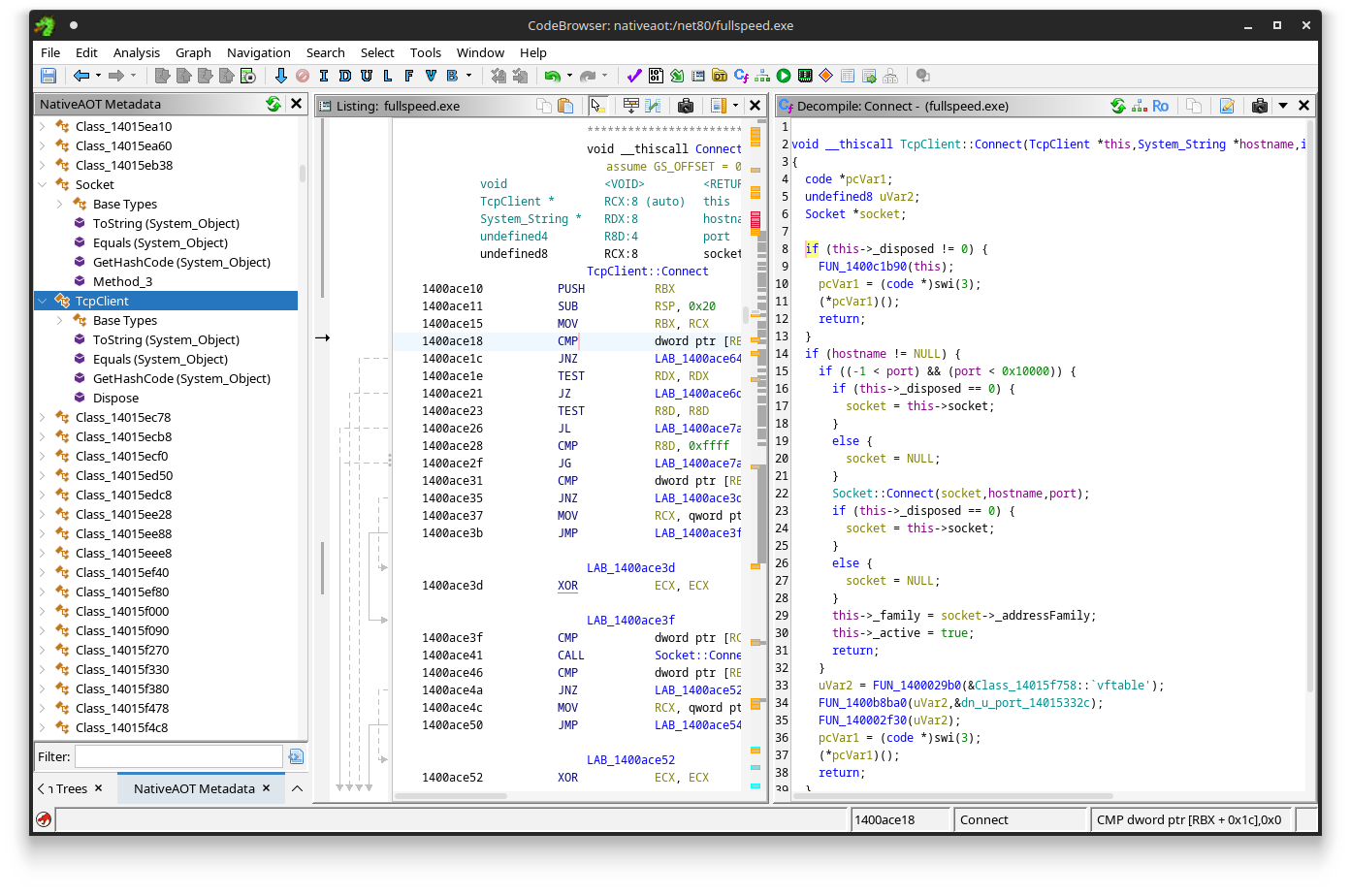
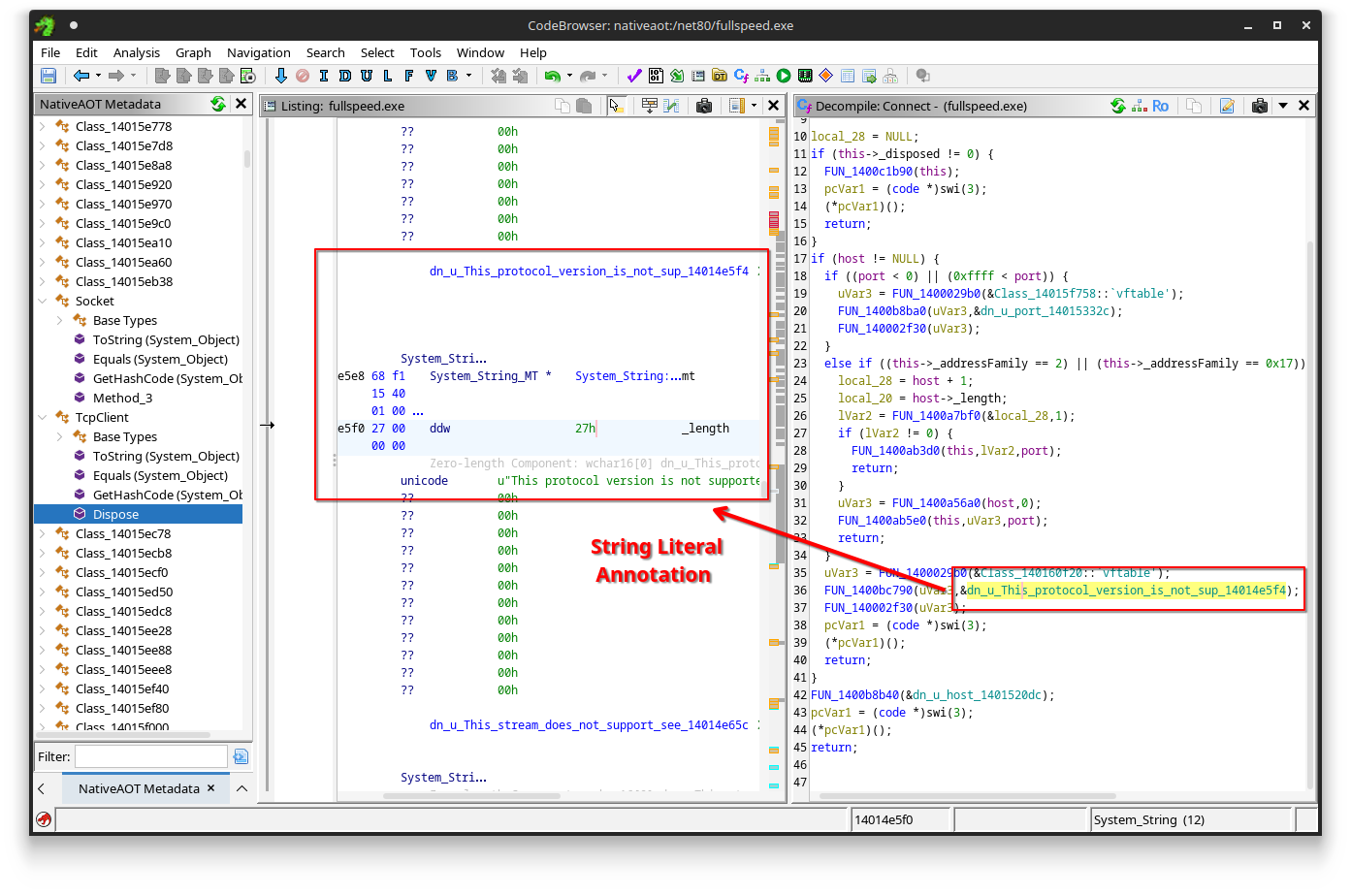
Automatic Frozen object (e.g., string literal) annotations.
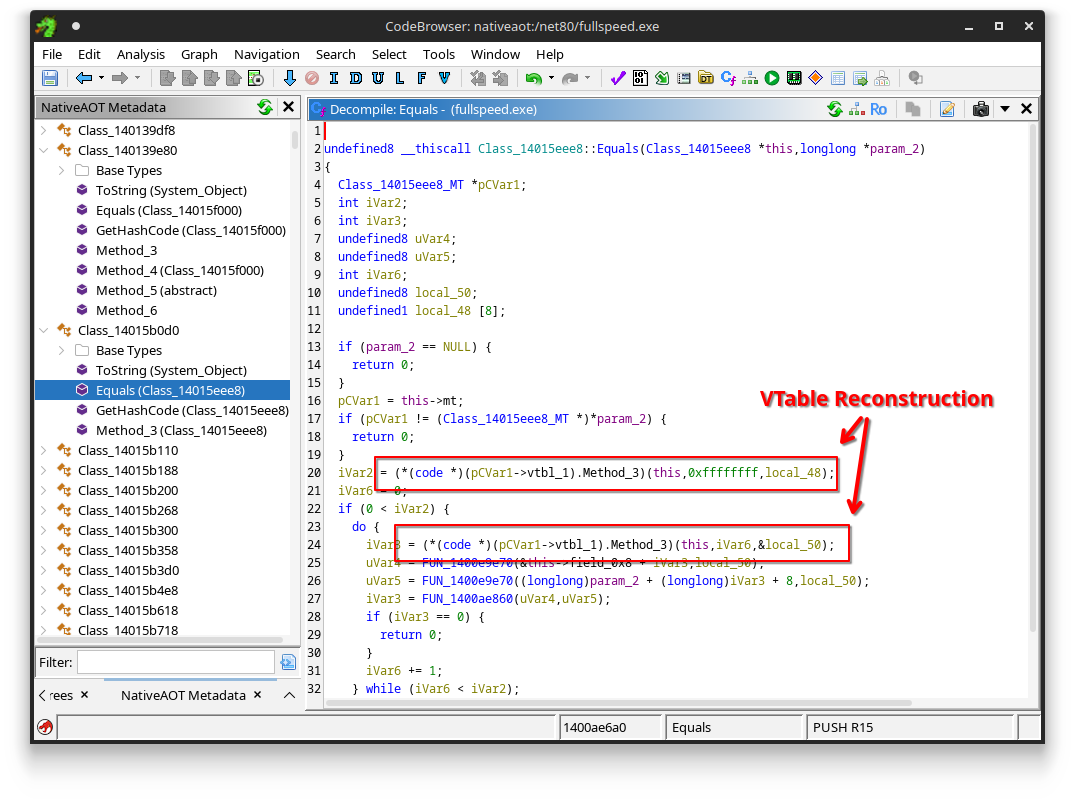
Automatic VTable redirection detection.
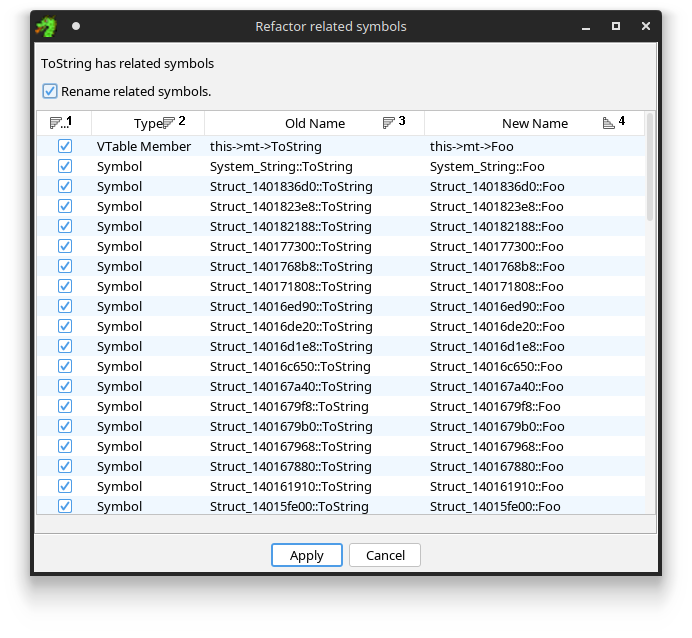
Refactor virtual methods and related symbols.
Run gradle in the root directory:
$ gradle
This will produce a plugin ZIP in the dist/ folder.
Running the above command assumes Ghidra to be installed under /opt/ghidra.
If you have Ghidra installed somewhere else on your machine, you may need to specify the Ghidra installation directory for it to find the appropriate dependencies:
$ gradle -PGHIDRA_INSTALL_DIR=/path/to/ghidra
Install the plugin using File > Install Extensions menu in the main project window.
Steps:
__ReadyToRunHeader (see below).The ReadyToRun data directory is the root of all .NET Native AOT metadata. As the directory is not a normal PE data directory specified in its header, the plugin tries to heuristically find it in the following manner:
__ReadyToRunHeader or the symbol pair __modules_a and __modules_z which mark a list of directories.RTR\0 signature and a few expected fields in its header).If you find that this process does not work for you (e.g., no matches or too many matches), the RTR directory list (i.e., __modules_a) is also referenced in the startup code of any NativeAOT binary.
Specifically it is referenced as the second argument in a call to S_P_CoreLib_Internal_Runtime_CompilerHelpers_StartupCodeHelpers__InitializeModules in wmain.
You can find this call by e.g., compiling a simple Hello World application using Native AOT with symbols, and using Ghidra's Version Tracking Tool to compare functions.
Left: Hello World app, Right: Unknown Native AOT Binary (Challenge fullspeed.exe of Flare-On 11):
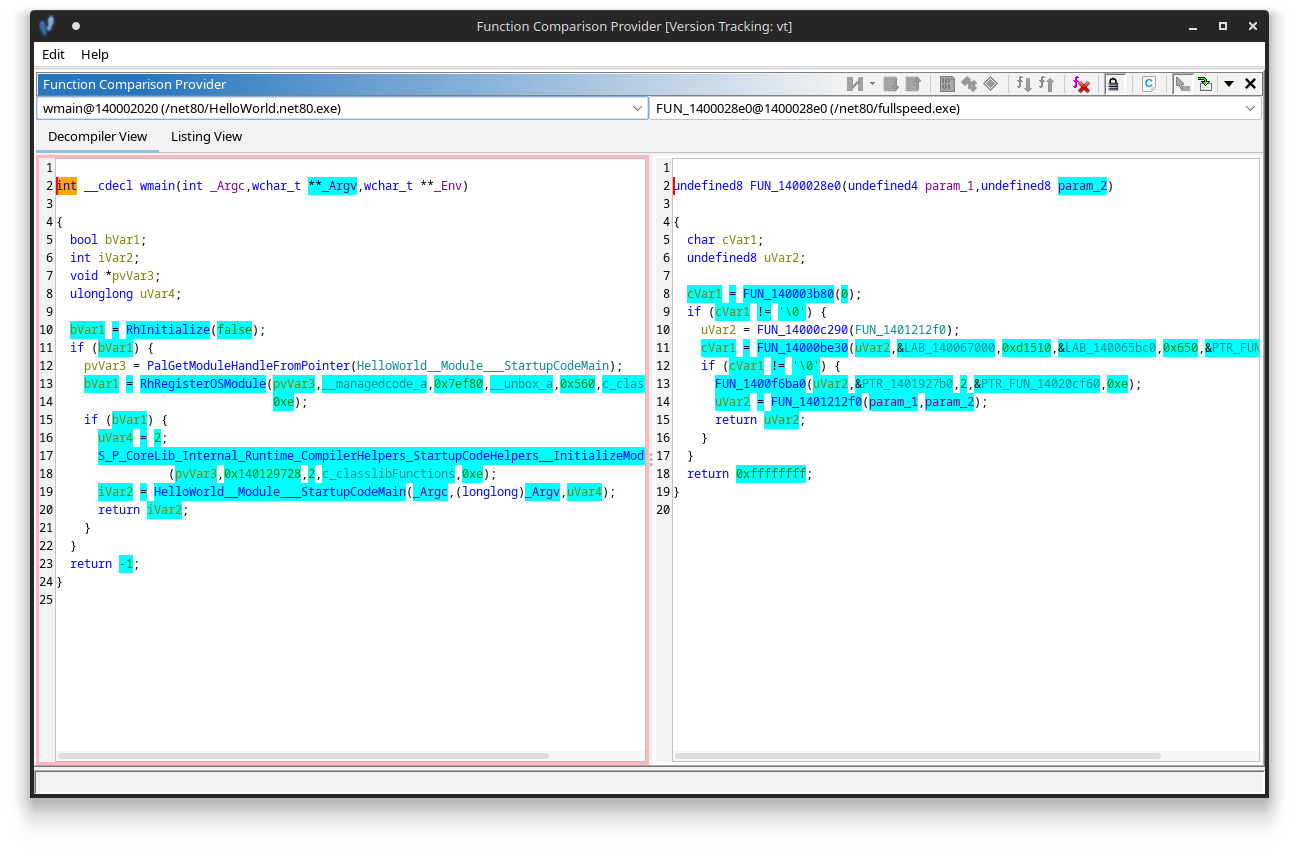
The second argument (PTR_1401927b0 in the screenshot) of the InitializeModules call is an array of pointers:
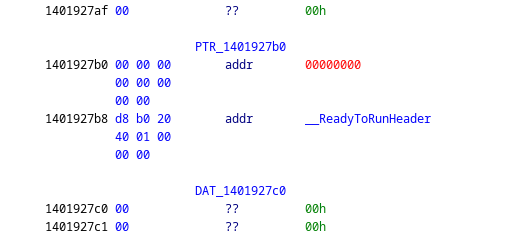
You can recognize the pointer is referencing the ReadyToRun directory when it points to data starting with RTR\0:
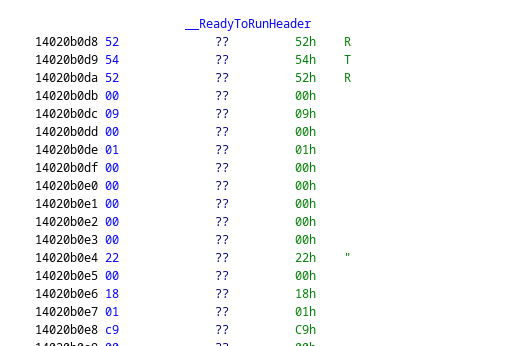
Once you have this data with the label __ReadyToRunHeader, you can use the analyzer.
Any editor supporting Gradle should work, including Eclipse, IntelliJ and Visual Studio Code.
For quickly reinstalling the plugin as well as starting ghidra, use a command like the following (change file paths accordingly):
Linux (Bash):
$ gradle && unzip -o dist/*.zip -d ~/.config/ghidra/ghidra_X.X_PUBLIC/Extensions/ && ghidra
Windows (Powershell):
gradle; Expand-Archive .\dist\*.zip -DestinationPath $env:APPDATA\ghidra\ghidra_X.X_PUBLIC\Extensions -Force; Z:\Path\To\Ghidra\ghidraRun.bat
MIT
Browser icons from https://intellij-icons.jetbrains.design/ (Apache 2 Licensed)
221 followers · starred Apr 2025
208 followers · starred Sep 2026
352 followers · starred Apr 2025
37 followers · starred Jul 2026
This is a Ghidra analyzer and UI plugin that helps in reverse engineering binaries compiled using .NET Native AOT technology introduced in .NET 8.0 and above, for which the symbols are not available and thus no FunctionID (FID) databases can be made easily.
See also the accompanied blog post explaining how it works.
Automatic Frozen object (e.g., string literal) annotations.
Automatic VTable redirection detection.
Refactor virtual methods and related symbols.
Run gradle in the root directory:
$ gradle
This will produce a plugin ZIP in the dist/ folder.
Running the above command assumes Ghidra to be installed under /opt/ghidra.
If you have Ghidra installed somewhere else on your machine, you may need to specify the Ghidra installation directory for it to find the appropriate dependencies:
$ gradle -PGHIDRA_INSTALL_DIR=/path/to/ghidra
Install the plugin using File > Install Extensions menu in the main project window.
Steps:
__ReadyToRunHeader (see below).The ReadyToRun data directory is the root of all .NET Native AOT metadata. As the directory is not a normal PE data directory specified in its header, the plugin tries to heuristically find it in the following manner:
__ReadyToRunHeader or the symbol pair __modules_a and __modules_z which mark a list of directories.RTR\0 signature and a few expected fields in its header).If you find that this process does not work for you (e.g., no matches or too many matches), the RTR directory list (i.e., __modules_a) is also referenced in the startup code of any NativeAOT binary.
Specifically it is referenced as the second argument in a call to S_P_CoreLib_Internal_Runtime_CompilerHelpers_StartupCodeHelpers__InitializeModules in wmain.
You can find this call by e.g., compiling a simple Hello World application using Native AOT with symbols, and using Ghidra's Version Tracking Tool to compare functions.
Left: Hello World app, Right: Unknown Native AOT Binary (Challenge fullspeed.exe of Flare-On 11):
The second argument (PTR_1401927b0 in the screenshot) of the InitializeModules call is an array of pointers:
You can recognize the pointer is referencing the ReadyToRun directory when it points to data starting with RTR\0:
Once you have this data with the label __ReadyToRunHeader, you can use the analyzer.
Any editor supporting Gradle should work, including Eclipse, IntelliJ and Visual Studio Code.
For quickly reinstalling the plugin as well as starting ghidra, use a command like the following (change file paths accordingly):
Linux (Bash):
$ gradle && unzip -o dist/*.zip -d ~/.config/ghidra/ghidra_X.X_PUBLIC/Extensions/ && ghidra
Windows (Powershell):
gradle; Expand-Archive .\dist\*.zip -DestinationPath $env:APPDATA\ghidra\ghidra_X.X_PUBLIC\Extensions -Force; Z:\Path\To\Ghidra\ghidraRun.bat
MIT
Browser icons from https://intellij-icons.jetbrains.design/ (Apache 2 Licensed)
221 followers · starred Apr 2025
208 followers · starred Sep 2026
352 followers · starred Apr 2025
37 followers · starred Jul 2026



