EgorBo/Disasmo

VS2022 Add-in. Click on any method or class to see what .NET Core's JIT generates for them (ASM).

C#

706

169 commits

updated Jul 20, 2025

See the code

README

Disasmo

VS2022 Add-in. Click on any method or class to see JIT's codegen and more.
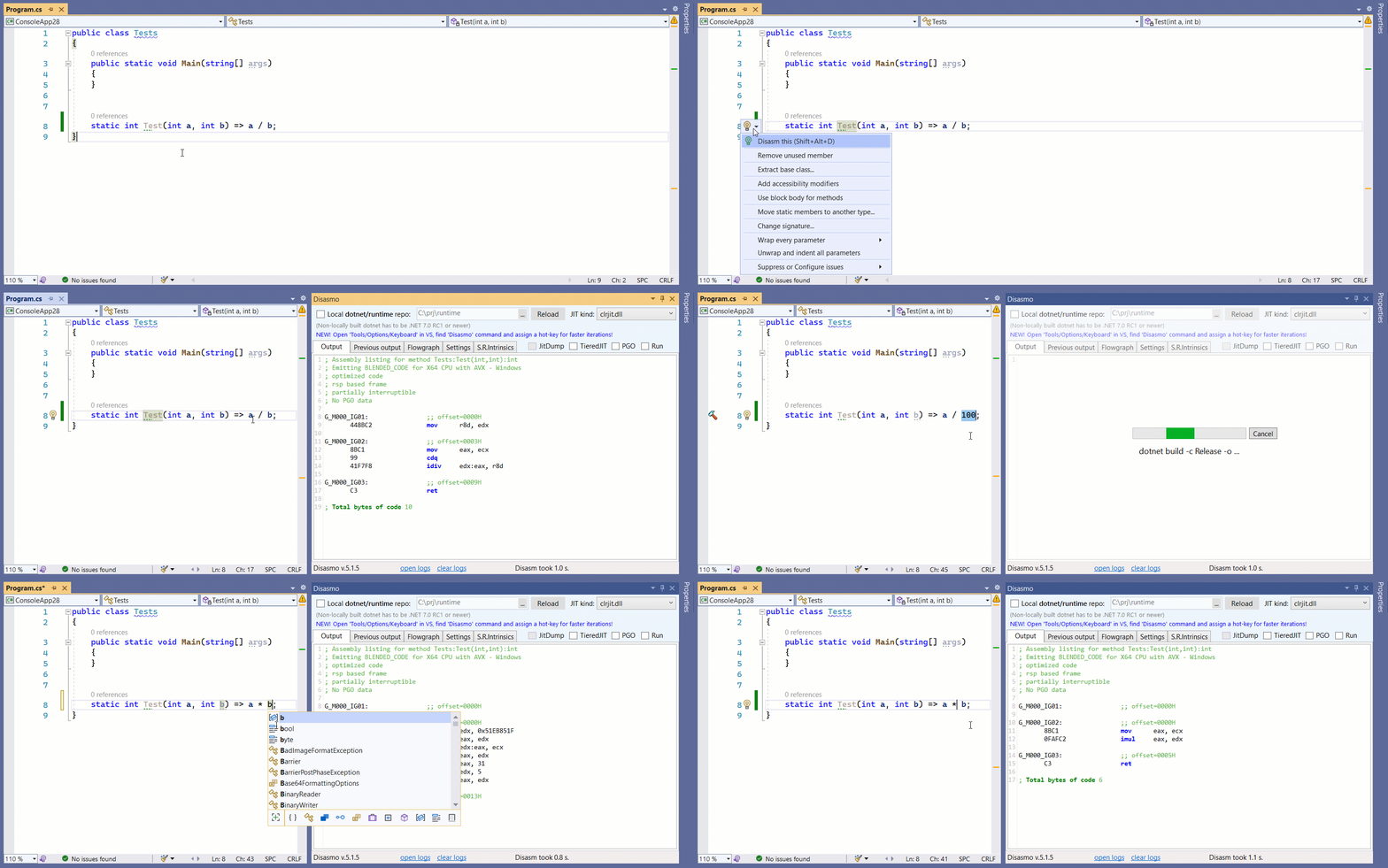
demo

Starting with .NET 7.0 RC1 this add-in no longer requires a local build of dotnet/runtime repo. However, it offers more features with a local one, to obtain a local one please follow these steps:

git clone [email protected]:dotnet/runtime.git
cd runtime
build.cmd Clr+Clr.Aot+Libs -c Release -rc Checked

# optional (for crossgen2 + arm64 for hw intrinsics):
build.cmd Clr.CoreLib -c Release -a arm64

See windows-requirements.md.

Release notes

See RELEASE_NOTES.md

Installation

Click on Extensions\Manage Extensions menu, select Online tab and type Disasmo in the "Search" text box. Once the add-in is installed you have to close all active instances of VS2022 to let the installer finish its job.

Features

  • Hot-key to quickly see codegen (Alt+Shift+D by default, can be changed in VS's settings)
  • Is able to show codegen for ARM64
  • Flowgraphs and JitDumps for JIT contributors
  • Diffs
  • "System.Runtime.Intrinsics quick search" tab
  • Inliner's decisions
  • 'Run' mode. Is useful for e.g. PGO inspection

Known Issues

  • Only .NET 6.0 and later projects are supported with custom runtime
  • .NET 7.0 RC1 (or newer) is needed for non-custom runtime mode
  • I only tested it for simple Console Apps, but it should work for libs as well
  • Generic methods are only supported in 'Run' mode
  • Resharper hides Roslyn actions by default (Uncheck "Do not show Visual Studio Light Bulb").
  • The lightbulb can be slow on first launch
  • When disassembling a method from a class, the associated C# Visual Studio project or one of its project files must the active/selected in the solution explorer, otherwise it will generate a blank disassembly window.
  • When disassembling a method that uses a code coming from a NuGet package, Disasmo will not be able to find the assembly. The workaround is to copy the assembly to the disasmo folder created in the output bin folder of the project.

3rd party dependencies

asm
csharp
disassembler
netcore
visual-studio-extension

EgorBo/Disasmo

VS2022 Add-in. Click on any method or class to see what .NET Core's JIT generates for them (ASM).

C#

706

169 commits

updated Jul 20, 2025

See the code

README

Disasmo

VS2022 Add-in. Click on any method or class to see JIT's codegen and more.

demo

Starting with .NET 7.0 RC1 this add-in no longer requires a local build of dotnet/runtime repo. However, it offers more features with a local one, to obtain a local one please follow these steps:

git clone [email protected]:dotnet/runtime.git
cd runtime
build.cmd Clr+Clr.Aot+Libs -c Release -rc Checked

# optional (for crossgen2 + arm64 for hw intrinsics):
build.cmd Clr.CoreLib -c Release -a arm64

See windows-requirements.md.

Release notes

See RELEASE_NOTES.md

Installation

Click on Extensions\Manage Extensions menu, select Online tab and type Disasmo in the "Search" text box. Once the add-in is installed you have to close all active instances of VS2022 to let the installer finish its job.

Features

  • Hot-key to quickly see codegen (Alt+Shift+D by default, can be changed in VS's settings)
  • Is able to show codegen for ARM64
  • Flowgraphs and JitDumps for JIT contributors
  • Diffs
  • "System.Runtime.Intrinsics quick search" tab
  • Inliner's decisions
  • 'Run' mode. Is useful for e.g. PGO inspection

Known Issues

  • Only .NET 6.0 and later projects are supported with custom runtime
  • .NET 7.0 RC1 (or newer) is needed for non-custom runtime mode
  • I only tested it for simple Console Apps, but it should work for libs as well
  • Generic methods are only supported in 'Run' mode
  • Resharper hides Roslyn actions by default (Uncheck "Do not show Visual Studio Light Bulb").
  • The lightbulb can be slow on first launch
  • When disassembling a method from a class, the associated C# Visual Studio project or one of its project files must the active/selected in the solution explorer, otherwise it will generate a blank disassembly window.
  • When disassembling a method that uses a code coming from a NuGet package, Disasmo will not be able to find the assembly. The workaround is to copy the assembly to the disasmo folder created in the output bin folder of the project.

3rd party dependencies

asm
csharp
disassembler
netcore
visual-studio-extension

Significant stargazers

Drew Noakes

606 followers · starred Dec 2020

Yoshifumi Kawai

4,144 followers · starred Dec 2020

Theodore Tsirpanis

123 followers · starred Jan 2023

Sergio Pedri

975 followers · starred Feb 2022