Make private info disappear before AI sees it. Redact PDFs, Word, Excel, images and text entirely in your browser. No uploads.
See the code
Make private info disappear before AI sees it.
Remove names, addresses, account numbers and 50+ other kinds of personal data from PDFs, Word, Excel, images and text, entirely in your browser. Nothing is uploaded.



![A lab report's name, birthday, patient ID, address and doctor turn into [PERSON_1], [DATE_1] and so on, while the results stay](https://raw.githubusercontent.com/WannaBeSolopreneur/redacto/1433b667bd549817dfb5b3f5ce2efefb56372558/docs/demo.gif)
You ask ChatGPT, Claude or Grok "What should I be concerned about?" and attach your lab results. The AI needs the numbers. It doesn't need your name, birthday, patient ID, address or doctor, but it gets all of them, and they're stored on someone else's servers.
Redacto takes those details out first, on your device, and replaces them with consistent labels:
- Patient: Maria Delgado   DOB: 04/12/1987   MRN: 00483921
- Ordered by: Dr. James Whitfield
+ Patient: [PERSON_1]   DOB: [DATE_1]   MRN: [ID_NUMBER_1]
+ Ordered by: [PERSON_2]
  HbA1c 6.8% (HIGH) · LDL 168 mg/dL (HIGH)
The same name always gets the same label, so the AI can still follow who is who, and the answer is just as useful.
[PERSON_1]), realistic fake data, or [REDACTED]. PDFs and images get black
boxes burned in, with no hidden text, metadata or annotations left behind.| Review a document | The redacted result |
|---|---|
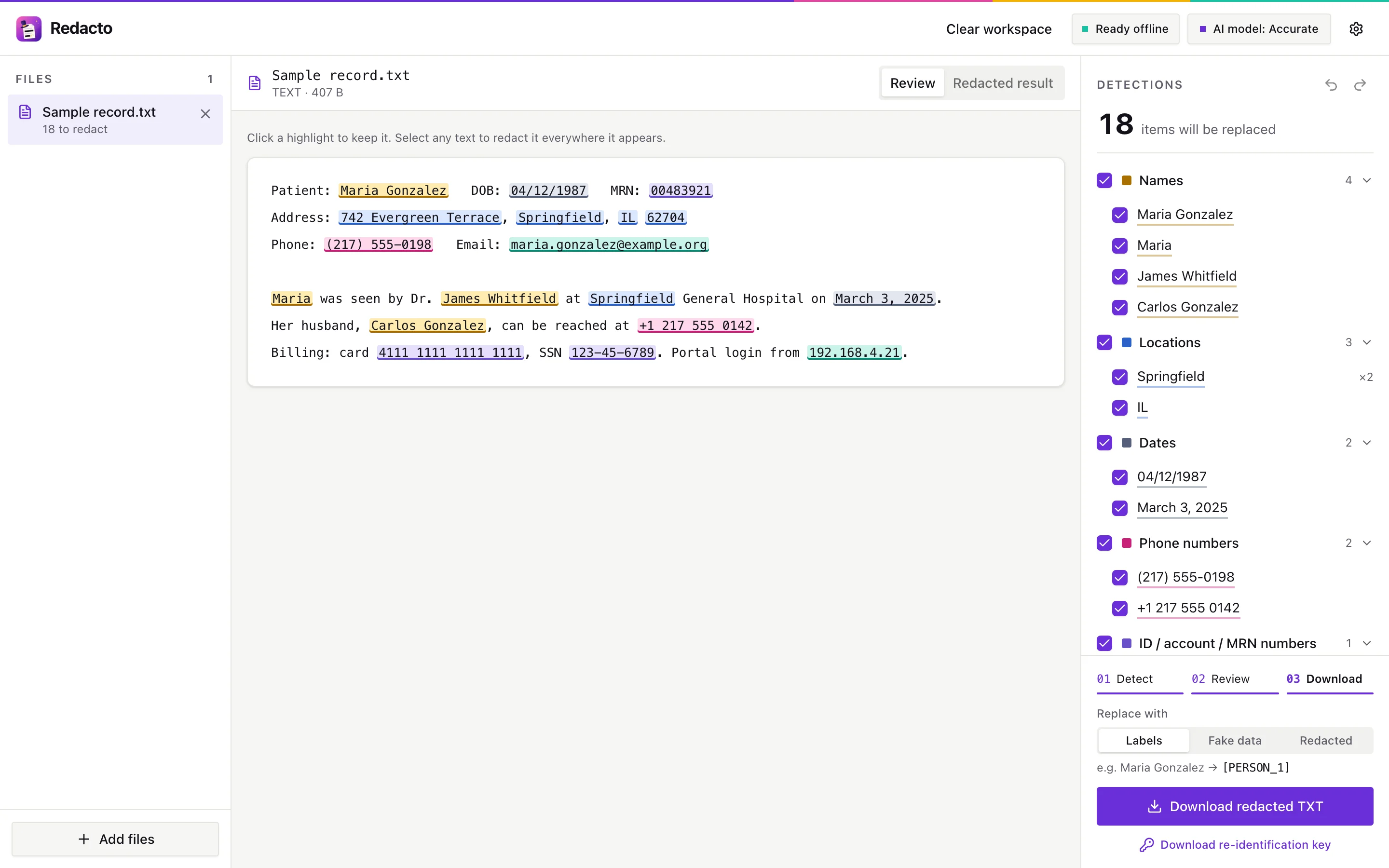 | 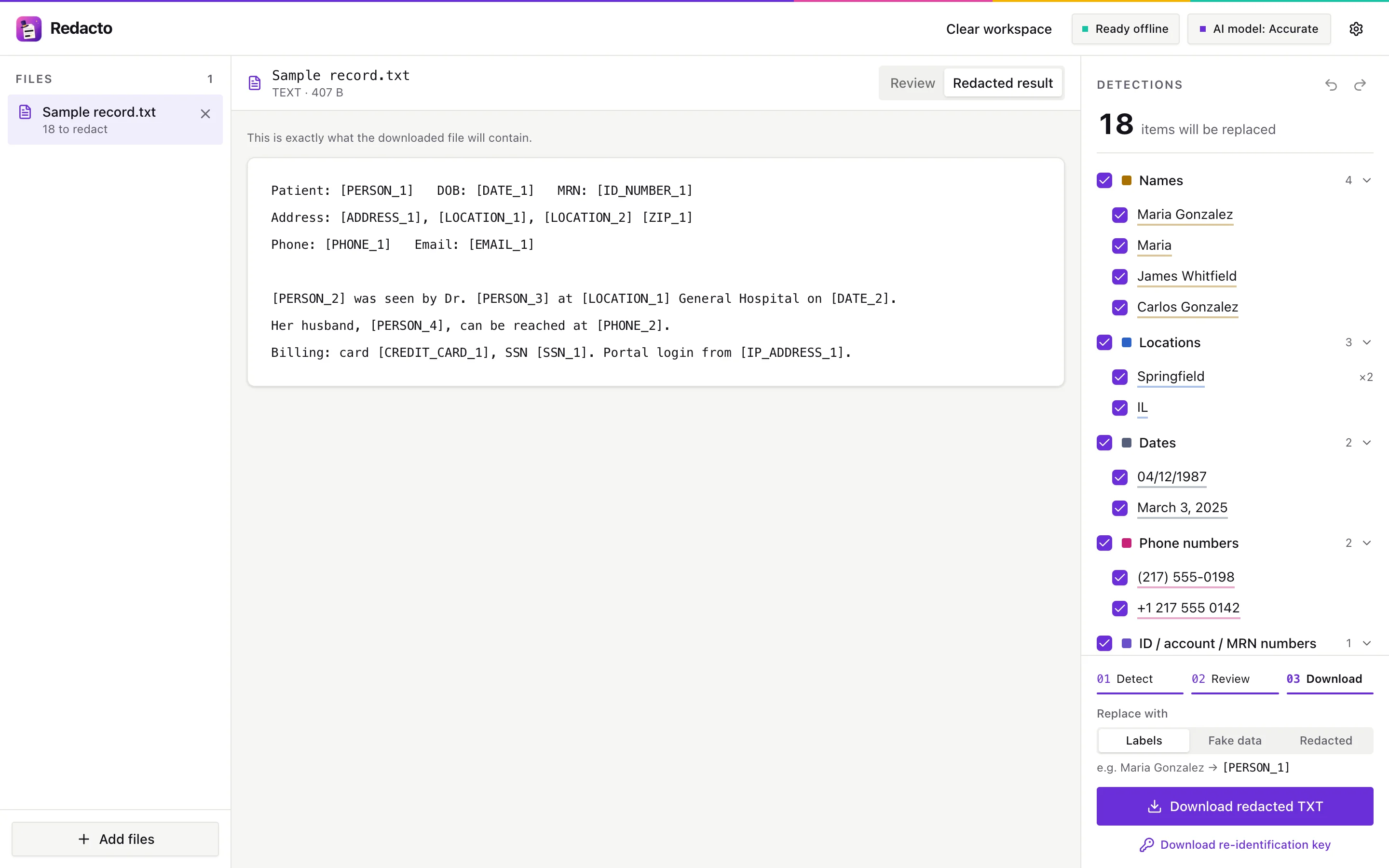 |
| PDFs: black boxes burned into the pages | Spreadsheets: cell-by-cell review |
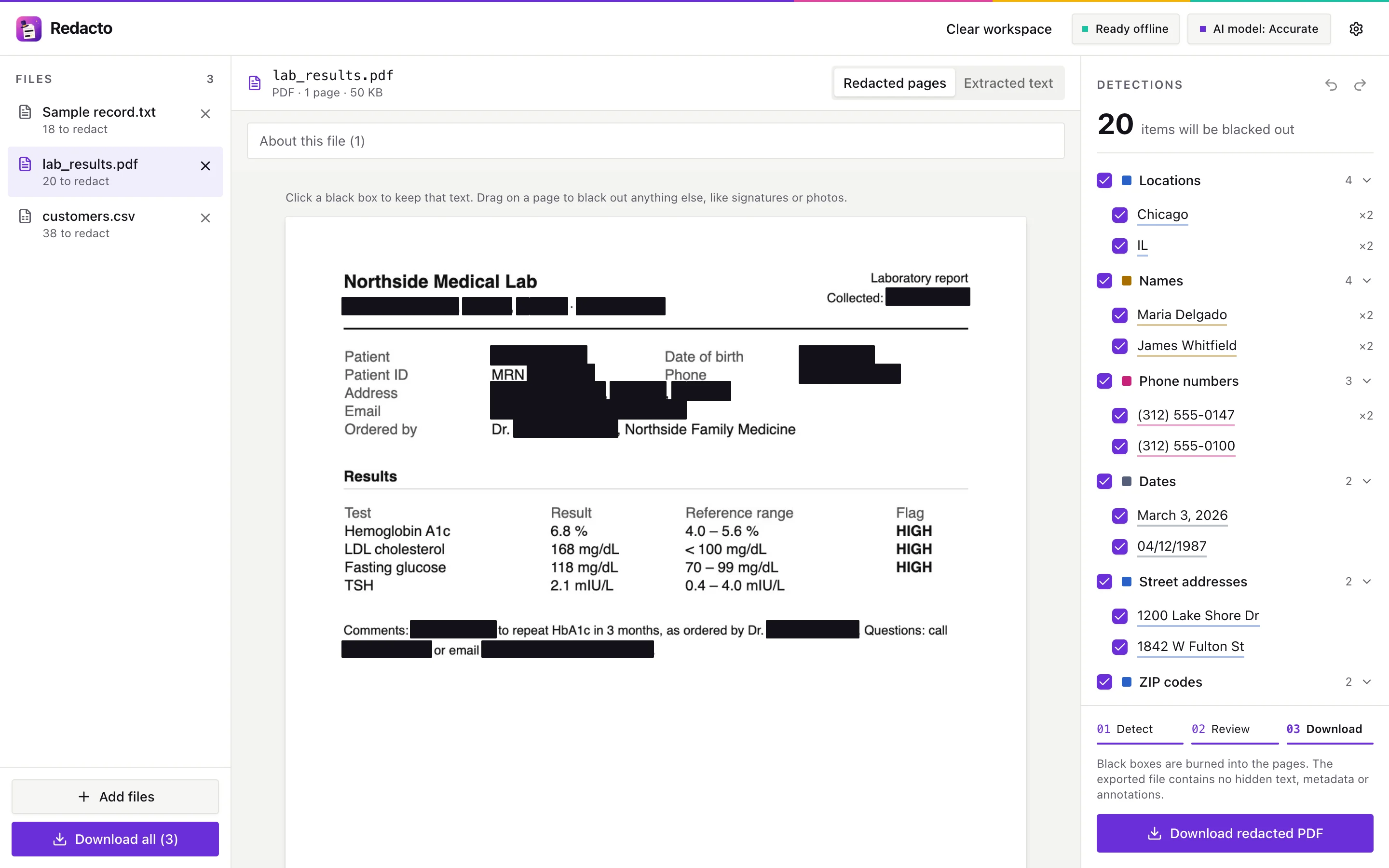 | 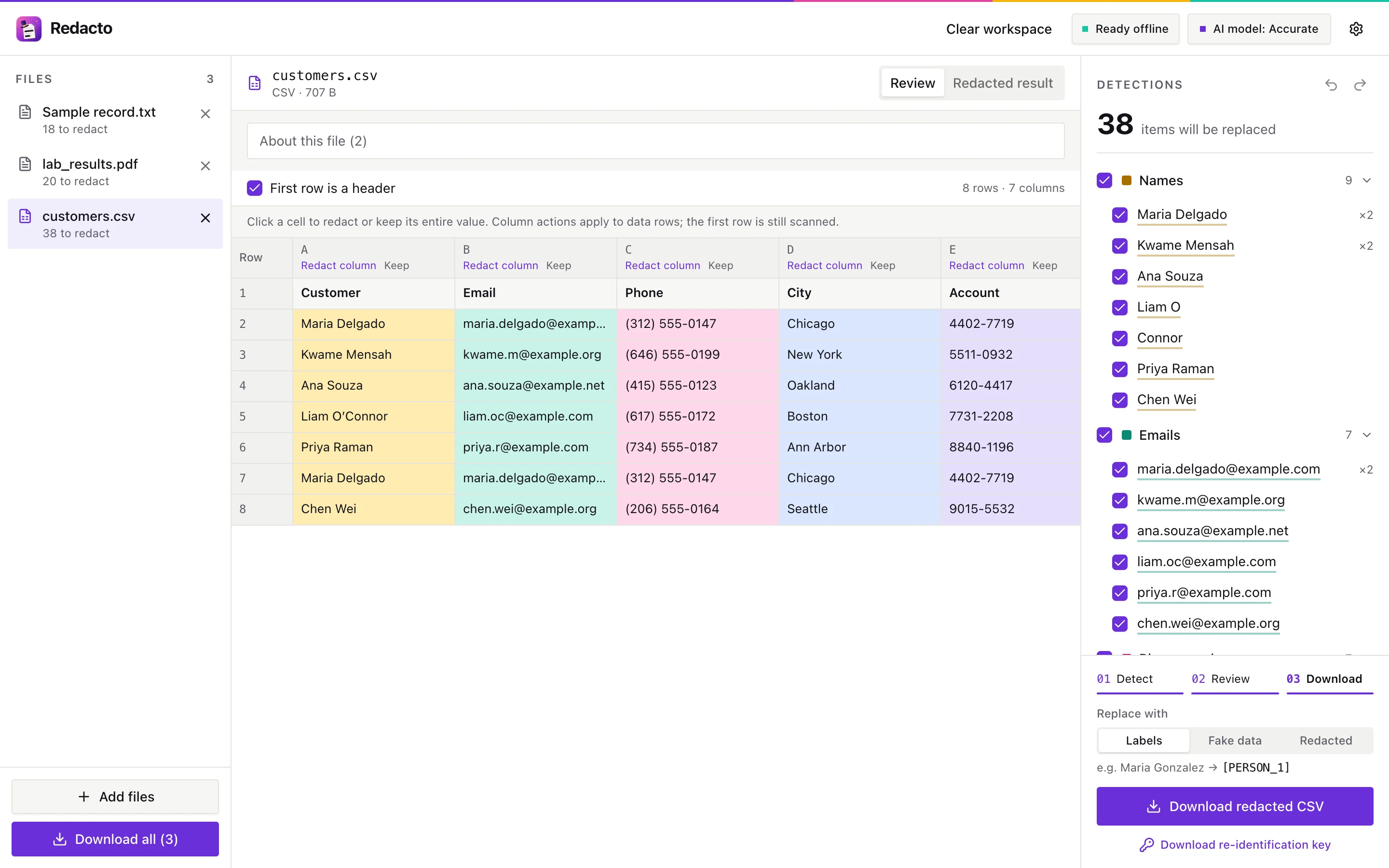 |
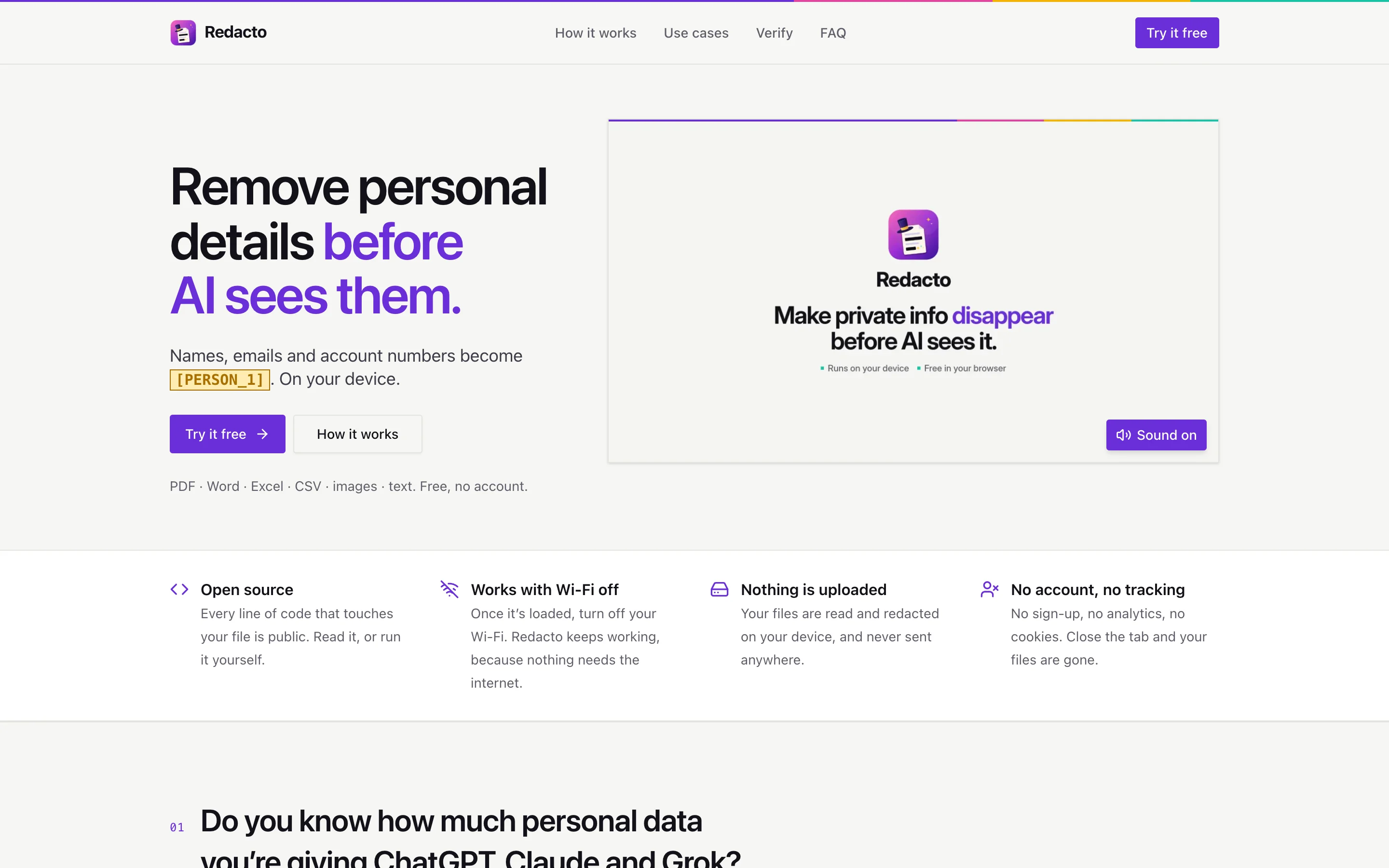
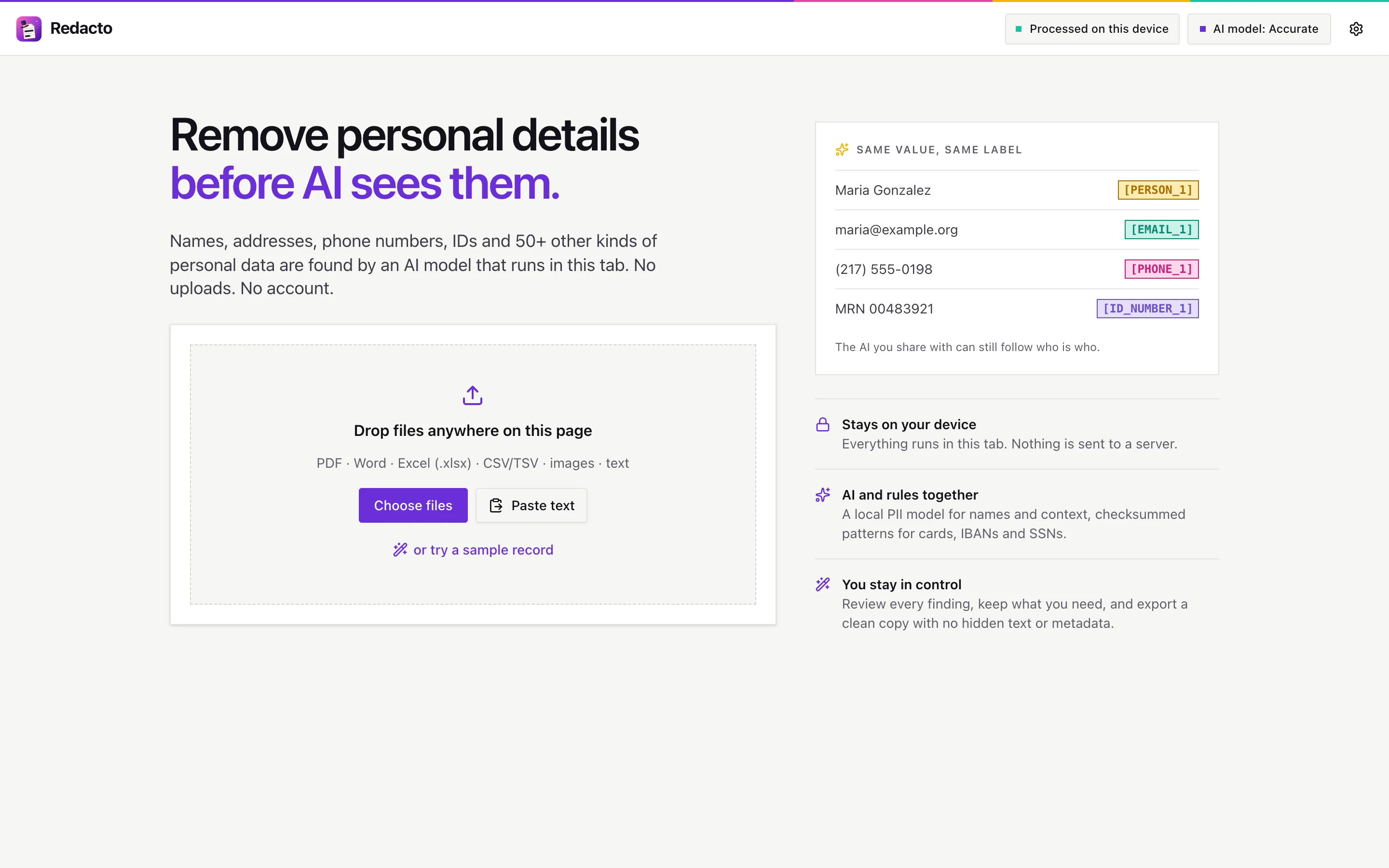
All documents in the screenshots and demo are fictional.
Redacto is a static web app. Everything happens in your browser tab:
scripts/check-offline.mjs proves it on every format with the network cut.Check it yourself: open your browser's developer tools, watch the Network tab while you redact, and see that nothing is sent.
[!IMPORTANT] Automatic detection can miss things: unusual names, text inside photos, details that identify someone indirectly. Review every result before you share it. Redacto reduces what you share; it is not a compliance certification.
Requirements: Node 20.19+ (or 22.12+) and Python 3 (only for building the models once).
git clone https://github.com/WannaBeSolopreneur/redacto.git
cd redacto
npm install        # also copies wasm runtimes, OCR data and the fallback model into public/
npm run models     # one-time: builds the OpenMed PII models (python3; no PyTorch needed)
npm run dev        # http://localhost:5173 (landing page) and http://localhost:5173/app/ (the app)
Production build:
npm run build && npm run preview # http://localhost:4173, with the strict Content-Security-Policy
file ─► reader (pdf.js · OCR · docx · xlsx · csv) ─► text + positions
                                                        │
          regex & checksum rules ◄──────────────────────┤  instant
          local PII model (Web Worker) ◄────────────────┘  a few seconds
                                                        │
                    review: keep, add, undo  ◄──────────┘
                                                        │
          export: labels / fake data / [REDACTED] / black boxes, metadata scrubbed
| Input | Output |
|---|---|
| Pasted text, .txt/.md/.json | Text with [PERSON_1] labels, fake values, or [REDACTED] |
| Flattened image PDF with black boxes burned in (text layer, metadata and annotations removed). Pages with no text layer are OCR'd | |
| PNG/JPG scans | PNG with black boxes, EXIF stripped |
| DOCX | Same document with text replaced in place; author, company and revision metadata scrubbed; tracked deletions included |
| CSV/TSV | Every cell scanned, optional header-based detection, original delimiter kept; formula-like strings exported as inert text |
| Excel (.xlsx) | Multi-sheet review including hidden cells; a fresh values-only workbook with generic sheet names and no formulas, comments, links, metadata or embedded files |
| Model | Download | F1 | PII recall | Notes |
|---|---|---|---|---|
| OpenMed SuperMedical-Large-355M | 357 MB | 0.950 | 0.951 | "Best": misses the least; slower |
| OpenMed SuperMedical-Base-125M (default) | 125 MB | 0.934 | 0.939 | 54 PII/PHI types |
| OpenMed LiteClinical-Small-66M | 67 MB | 0.939 | 0.923 | ~2x faster; automatic fallback |
| Xenova/bert-base-NER | 104 MB | n/a | n/a | names, places and organisations only |
The OpenMed models are built by scripts/convert_models.py from OpenMed's official fp32 ONNX: the transformer graph
is fused offline (so browsers skip most optimisation at load), int8-quantised including the embedding table, and
verified against fp32 on 400 held-out Nemotron-PII documents; a build is rejected if it loses more than 0.005 F1.
If the chosen model fails to load within 90 s, the app falls back to the fast model, then to rules only, and says so.
Any static host works. Whatever serves the app must follow three rules (vite dev and preview already do, see
vite.config.ts):
Cross-Origin-Opener-Policy: same-origin
Cross-Origin-Embedder-Policy: require-corp
Cross-Origin-Resource-Policy: same-origin
/models/ and /vendor/ (.onnx, .wasm). Weights barely shrink, and without a
Content-Length the loader can't preallocate: first load went from ~1 s to ~28 s in Firefox.Cache-Control: public, max-age=31536000, immutable for /models/, /vendor/ and the
content-hashed /assets/. This is also what makes "Ready offline" true: after load the app prefetches every
format's code, the workers and pdf.js's files (src/offline.ts), and the browser must be allowed to keep them.Without rule 1 it still works on one thread (~3x slower), and the UI says so.
The repo deploys as a Cloudflare Worker with static assets (wrangler.jsonc, cloudflare/worker.ts). Static files
are capped at 25 MiB, so the models live in an R2 bucket and the Worker streams them at /models/* from the same
origin, which keeps the Content-Security-Policy intact. The Worker runs first on every request to add the three
rules above, 304s included, and redirects any other host (www, workers.dev) to CANONICAL_HOST. The custom
domains are set in wrangler.jsonc under routes. Everything fits the free plan.
npx wrangler login                              # once
npx wrangler r2 bucket create redacto-models    # once
npm run deploy:models                           # uploads public/models/ (files up to 315 MB)
npm run deploy                                  # build + deploy
APP_URL=https://<your-worker>/app/ node scripts/check-offline.mjs   # verify the live site
Model files over 315 MB (the 355M model) need an S3-compatible uploader such as rclone with an R2 API token;
until it's uploaded, choosing that model falls back to the fast one automatically.
| Path | What's there |
|---|---|
src/core/ | Detection rules, overlap resolution, replacement strategies. Pure and unit-tested |
src/ml/ | Model registry, the model worker and its client (one model in memory, runs queued and cancellable) |
src/formats/ | Per-format load and export: pdf.js + pdf-lib, tesseract.js, fflate, PapaParse, @xmldom/xmldom |
src/state/ | The app store, outside React: every document, its detections and review decisions. Late results for a closed document or a replaced model are dropped |
src/ui/ | React components: file list, document views (text, page images with live boxes, virtualized spreadsheet grid), detections panel, settings |
src/components/ui/ | shadcn/ui components, copied into the repo |
src/landing/ | The landing page (its own entry; loads none of the app) |
src/index.css | Tailwind v4 entry and design tokens: brand colours and one colour pair per kind of personal data |
scripts/ | Asset setup, model conversion, benchmarks and browser checks |
video/ | The demo film, rendered from code: see video/README.md |
Adding a shadcn component: npx shadcn@latest add <name>, then change its import { cn } from "cn" to
@/lib/utils and uninstall the unrelated cn package the CLI adds.
npm test                                   # unit tests: rules, formats, state, workers
npm run lint                               # oxlint
npm run build && npm run preview           # then, with the preview running:
node scripts/check-offline.mjs             # every format opens, scans and exports with the network off
node scripts/check-doc-switching.mjs       # adding and switching documents
node scripts/check-spreadsheet-ui.mjs webkit   # spreadsheet review end to end (chromium | firefox | webkit)
node scripts/check-spreadsheet-worker.mjs  # the production spreadsheet worker: 2,000-row CSV and XLSX round-trip
npm run bench                              # model load, speed and accuracy in Chromium, Firefox and WebKit
node scripts/readme-shots.mjs              # regenerate the screenshots above
Playwright's WebKit is not Safari: test on real Safari and real phones before a release.
Sheet 1, Sheet 2…; dates become ISO text; formatting, comments, links, charts, images and metadata are not
copied. Formulas are never executed: their saved results are exported. You confirm this before downloading..xlsx. Not supported: password-protected,
.xls, .xlsm, .xlsb. Limits: 30 MB, 100 sheets, 100,000 rows and 1,024 columns per sheet.Issues and pull requests are welcome. Please keep the core promise intact: no network requests to other origins,
nothing persisted beyond general preferences, and every claim on the landing page backed by a check in scripts/.
Never commit real personal data, even in tests: use fictional values like the ones in fixtures/.
Redacto is licensed under the Apache License 2.0. Bundled models and libraries keep their own licences; see NOTICE.
Make private info disappear before AI sees it. Redact PDFs, Word, Excel, images and text entirely in your browser. No uploads.
See the code
Make private info disappear before AI sees it.
Remove names, addresses, account numbers and 50+ other kinds of personal data from PDFs, Word, Excel, images and text, entirely in your browser. Nothing is uploaded.
You ask ChatGPT, Claude or Grok "What should I be concerned about?" and attach your lab results. The AI needs the numbers. It doesn't need your name, birthday, patient ID, address or doctor, but it gets all of them, and they're stored on someone else's servers.
Redacto takes those details out first, on your device, and replaces them with consistent labels:
- Patient: Maria Delgado   DOB: 04/12/1987   MRN: 00483921
- Ordered by: Dr. James Whitfield
+ Patient: [PERSON_1]   DOB: [DATE_1]   MRN: [ID_NUMBER_1]
+ Ordered by: [PERSON_2]
  HbA1c 6.8% (HIGH) · LDL 168 mg/dL (HIGH)
The same name always gets the same label, so the AI can still follow who is who, and the answer is just as useful.
[PERSON_1]), realistic fake data, or [REDACTED]. PDFs and images get black
boxes burned in, with no hidden text, metadata or annotations left behind.| Review a document | The redacted result |
|---|---|
| |
| PDFs: black boxes burned into the pages | Spreadsheets: cell-by-cell review |
| |
All documents in the screenshots and demo are fictional.
Redacto is a static web app. Everything happens in your browser tab:
scripts/check-offline.mjs proves it on every format with the network cut.Check it yourself: open your browser's developer tools, watch the Network tab while you redact, and see that nothing is sent.
[!IMPORTANT] Automatic detection can miss things: unusual names, text inside photos, details that identify someone indirectly. Review every result before you share it. Redacto reduces what you share; it is not a compliance certification.
Requirements: Node 20.19+ (or 22.12+) and Python 3 (only for building the models once).
git clone https://github.com/WannaBeSolopreneur/redacto.git
cd redacto
npm install        # also copies wasm runtimes, OCR data and the fallback model into public/
npm run models     # one-time: builds the OpenMed PII models (python3; no PyTorch needed)
npm run dev        # http://localhost:5173 (landing page) and http://localhost:5173/app/ (the app)
Production build:
npm run build && npm run preview # http://localhost:4173, with the strict Content-Security-Policy
file ─► reader (pdf.js · OCR · docx · xlsx · csv) ─► text + positions
                                                        │
          regex & checksum rules ◄──────────────────────┤  instant
          local PII model (Web Worker) ◄────────────────┘  a few seconds
                                                        │
                    review: keep, add, undo  ◄──────────┘
                                                        │
          export: labels / fake data / [REDACTED] / black boxes, metadata scrubbed
| Input | Output |
|---|---|
| Pasted text, .txt/.md/.json | Text with [PERSON_1] labels, fake values, or [REDACTED] |
| Flattened image PDF with black boxes burned in (text layer, metadata and annotations removed). Pages with no text layer are OCR'd | |
| PNG/JPG scans | PNG with black boxes, EXIF stripped |
| DOCX | Same document with text replaced in place; author, company and revision metadata scrubbed; tracked deletions included |
| CSV/TSV | Every cell scanned, optional header-based detection, original delimiter kept; formula-like strings exported as inert text |
| Excel (.xlsx) | Multi-sheet review including hidden cells; a fresh values-only workbook with generic sheet names and no formulas, comments, links, metadata or embedded files |
| Model | Download | F1 | PII recall | Notes |
|---|---|---|---|---|
| OpenMed SuperMedical-Large-355M | 357 MB | 0.950 | 0.951 | "Best": misses the least; slower |
| OpenMed SuperMedical-Base-125M (default) | 125 MB | 0.934 | 0.939 | 54 PII/PHI types |
| OpenMed LiteClinical-Small-66M | 67 MB | 0.939 | 0.923 | ~2x faster; automatic fallback |
| Xenova/bert-base-NER | 104 MB | n/a | n/a | names, places and organisations only |
The OpenMed models are built by scripts/convert_models.py from OpenMed's official fp32 ONNX: the transformer graph
is fused offline (so browsers skip most optimisation at load), int8-quantised including the embedding table, and
verified against fp32 on 400 held-out Nemotron-PII documents; a build is rejected if it loses more than 0.005 F1.
If the chosen model fails to load within 90 s, the app falls back to the fast model, then to rules only, and says so.
Any static host works. Whatever serves the app must follow three rules (vite dev and preview already do, see
vite.config.ts):
Cross-Origin-Opener-Policy: same-origin
Cross-Origin-Embedder-Policy: require-corp
Cross-Origin-Resource-Policy: same-origin
/models/ and /vendor/ (.onnx, .wasm). Weights barely shrink, and without a
Content-Length the loader can't preallocate: first load went from ~1 s to ~28 s in Firefox.Cache-Control: public, max-age=31536000, immutable for /models/, /vendor/ and the
content-hashed /assets/. This is also what makes "Ready offline" true: after load the app prefetches every
format's code, the workers and pdf.js's files (src/offline.ts), and the browser must be allowed to keep them.Without rule 1 it still works on one thread (~3x slower), and the UI says so.
The repo deploys as a Cloudflare Worker with static assets (wrangler.jsonc, cloudflare/worker.ts). Static files
are capped at 25 MiB, so the models live in an R2 bucket and the Worker streams them at /models/* from the same
origin, which keeps the Content-Security-Policy intact. The Worker runs first on every request to add the three
rules above, 304s included, and redirects any other host (www, workers.dev) to CANONICAL_HOST. The custom
domains are set in wrangler.jsonc under routes. Everything fits the free plan.
npx wrangler login                              # once
npx wrangler r2 bucket create redacto-models    # once
npm run deploy:models                           # uploads public/models/ (files up to 315 MB)
npm run deploy                                  # build + deploy
APP_URL=https://<your-worker>/app/ node scripts/check-offline.mjs   # verify the live site
Model files over 315 MB (the 355M model) need an S3-compatible uploader such as rclone with an R2 API token;
until it's uploaded, choosing that model falls back to the fast one automatically.
| Path | What's there |
|---|---|
src/core/ | Detection rules, overlap resolution, replacement strategies. Pure and unit-tested |
src/ml/ | Model registry, the model worker and its client (one model in memory, runs queued and cancellable) |
src/formats/ | Per-format load and export: pdf.js + pdf-lib, tesseract.js, fflate, PapaParse, @xmldom/xmldom |
src/state/ | The app store, outside React: every document, its detections and review decisions. Late results for a closed document or a replaced model are dropped |
src/ui/ | React components: file list, document views (text, page images with live boxes, virtualized spreadsheet grid), detections panel, settings |
src/components/ui/ | shadcn/ui components, copied into the repo |
src/landing/ | The landing page (its own entry; loads none of the app) |
src/index.css | Tailwind v4 entry and design tokens: brand colours and one colour pair per kind of personal data |
scripts/ | Asset setup, model conversion, benchmarks and browser checks |
video/ | The demo film, rendered from code: see video/README.md |
Adding a shadcn component: npx shadcn@latest add <name>, then change its import { cn } from "cn" to
@/lib/utils and uninstall the unrelated cn package the CLI adds.
npm test                                   # unit tests: rules, formats, state, workers
npm run lint                               # oxlint
npm run build && npm run preview           # then, with the preview running:
node scripts/check-offline.mjs             # every format opens, scans and exports with the network off
node scripts/check-doc-switching.mjs       # adding and switching documents
node scripts/check-spreadsheet-ui.mjs webkit   # spreadsheet review end to end (chromium | firefox | webkit)
node scripts/check-spreadsheet-worker.mjs  # the production spreadsheet worker: 2,000-row CSV and XLSX round-trip
npm run bench                              # model load, speed and accuracy in Chromium, Firefox and WebKit
node scripts/readme-shots.mjs              # regenerate the screenshots above
Playwright's WebKit is not Safari: test on real Safari and real phones before a release.
Sheet 1, Sheet 2…; dates become ISO text; formatting, comments, links, charts, images and metadata are not
copied. Formulas are never executed: their saved results are exported. You confirm this before downloading..xlsx. Not supported: password-protected,
.xls, .xlsm, .xlsb. Limits: 30 MB, 100 sheets, 100,000 rows and 1,024 columns per sheet.Issues and pull requests are welcome. Please keep the core promise intact: no network requests to other origins,
nothing persisted beyond general preferences, and every claim on the landing page backed by a check in scripts/.
Never commit real personal data, even in tests: use fictional values like the ones in fixtures/.
Redacto is licensed under the Apache License 2.0. Bundled models and libraries keep their own licences; see NOTICE.





