A browser-based document anonymizer that strips PII before sharing with AI services and restores original names in responses. No server, no API calls - everything runs locally via WebAssembly.
TypeScript
26
54 commits
updated Sep 26, 2026

Use AI without leaking client data.

DocCloak is an open-source document anonymizer that strips personally identifiable information (PII) before you share documents with AI services - and restores the original names in the AI's response.
Everything runs in your browser. No server, no API calls, no data leaves your machine.
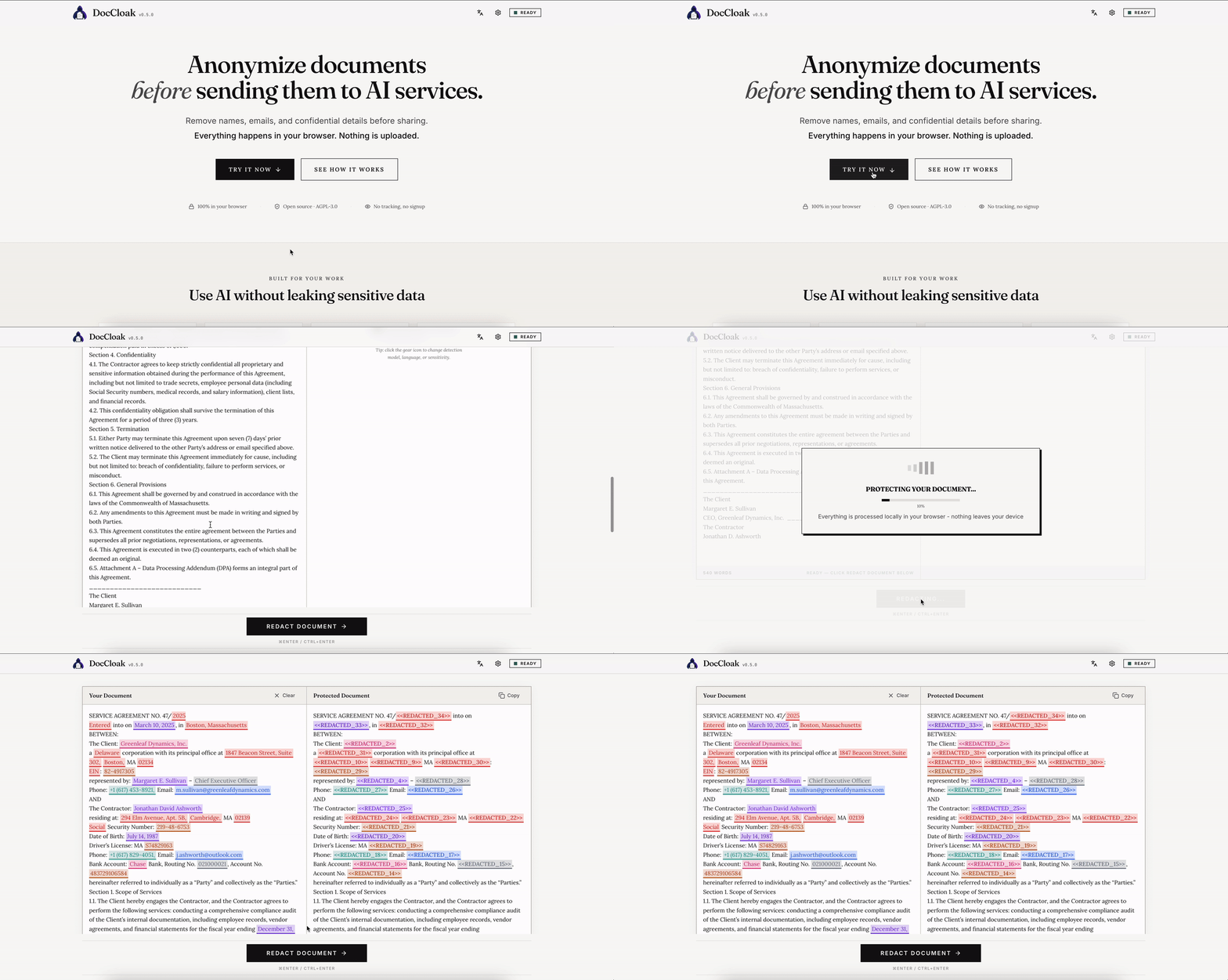
.doc/.docx/.pdf file or an image (.png, .jpg) - image text is extracted locally with OCRThe AI never sees the real data. You get the full power of AI assistance without the privacy risk.
[PERSON_1], [EMAIL_1], [DATE_2] tell the AI what kind of thing was redacted, so its answers stay coherent (pronouns, date reasoning, formatting) and the protected text stays readable.doc and .docx files, redact PII, and download the protected file with formatting preserved. The exported file also has its metadata scrubbed; see What DocCloak changes in your file and Known limits.png, .jpg, .webp, .bmp, .gif); text is extracted locally with Tesseract WebAssembly, run through the same PII detection, and you can download a redacted copy of the image with the sensitive words blacked outdoccloak-models cache, so a fresh visit without a network connection still opens the app and loads the model. See Storage and offline use**[PERSON_1]**, [person_1], PERSON_1), restore still recognizes it; anything ambiguous is left untouched rather than guessed at[PERSON_3] → [CLIENT_NAME]) for clearer AI promptsmedical condition, job title) to detect domain-specific information[PERSON_1], reversible) or blanked out (________, permanent)# Clone the repository
git clone https://github.com/WLojek/DocCloak.git
cd DocCloak
# Install dependencies
npm install
# Start development server
npm run dev
Open http://localhost:5173 in your browser.
npm run build
npm run preview
The output in dist/ is a static SPA that can be deployed to any static hosting provider (Vercel, Cloudflare Pages, Netlify, etc.) or served locally.
| Layer | Choice |
|---|---|
| Framework | React 19 |
| Language | TypeScript 5.8 |
| Build | Vite 6 |
| Styling | Tailwind CSS v4 + shadcn/ui (Radix primitives) |
| PII Engine | @doccloak/core (Apache-2.0, source) |
| ML Runtime | ONNX Runtime WebAssembly |
pdf.js (text cross-check and rasterization, self-hosted worker) + pdf-lib + fontkit inside @doccloak/core/pdf, loaded on first PDF upload; Liberation fonts as fallback faces | |
| NER Models | GLiNER PII Small v1.0 (~83 MB) / GLiNER PII Base v1.0 (~197 MB) / BardS.ai EU PII (~279 MB) |
| Tokenizers | @huggingface/transformers v4 tokenizer classes; the tokenizer files themselves are downloaded and verified by @doccloak/core from the same pinned commit as the model |
| Testing | Vitest |
DocCloak is a family of tools built around one shared engine:
| Repository | What it is | License |
|---|---|---|
| DocCloak (this repo) | The web app - UI, worker wiring, hosting | AGPL-3.0 |
| DocCloak.Core | The PII detection and anonymization engine, published to npm as @doccloak/core | Apache-2.0 |
| DocCloak browser extension | Closed-source MV3 extension that brings the same detection to any web page, also built on @doccloak/core | Proprietary |
The engine (ML providers, regex rules, pipeline, DOCX/DOC/PDF/OCR handling) was extracted from this
repository into DocCloak.Core so that other tools can embed it. The web app consumes it as a
regular npm dependency; its behavior is unchanged by the split. If you want to build your own
anonymization tool, depend on @doccloak/core directly - the permissive Apache-2.0 license
applies to the engine, while this web app remains AGPL-3.0.
DocCloak doesn't ask you to trust a server, a company, or a privacy policy. It's built so you don't have to trust anyone.
tokenizer.json, tokenizer_config.json) from huggingface.co, each from an immutable resolve/<commit>/ URL - and only after you accept the one-time setup; nothing downloads without asking. Choosing a model before accepting only changes which model the prompt offers. The OCR engine and its language data, and the PDF engine (pdf.js worker, CMaps, fonts), are served from the app's own origin (no third-party CDN), fetched only when you first use image OCR or open a PDF. No Google Fonts, no third-party scripts, no telemetry. No data you paste or upload ever leaves your browser - OCR runs entirely locally.sha256:size); a cached file whose size no longer matches its marker is re-hashed instead of trusted.Everything DocCloak keeps on your device, and how to remove it:
| Where | Name | What it holds | How to clear |
|---|---|---|---|
| localStorage | doccloak-model-consented, doccloak-active-provider, doccloak-regex-enabled, doccloak-regex-region, doccloak-lang | Download consent, chosen model, regex options (the text language is picked next to the Redact button and, until picked, follows the interface language), interface language | Settings, or browser site data |
| localStorage | doccloak-custom-labels, doccloak-dictionary, doccloak-ignore-list | Custom detection labels, dictionary words, ignore-list words: text you typed yourself, often names or company names | Remove entries in Settings, or clear the site data in your browser |
| Cache Storage | doccloak-models | The model file, tokenizer.json and tokenizer_config.json of every model you have loaded, plus one small verification marker per file (sha256:size) | DevTools → Application → Cache Storage → delete the cache; the next visit re-downloads and re-verifies |
| Cache Storage | doccloak-shell-<build>, doccloak-runtime-<build> | Service Worker caches: the app shell (index.html and the hashed /assets/* files, about 4.1 MB, stored on first visit) and the runtime files stored on first use (ONNX Runtime WASM, Tesseract worker, core and language data, and the /pdf/* assets: pdf.js worker, CMaps, standard fonts, image decoders and Liberation fonts, about 10 MB, cached on the first PDF upload) | Replaced automatically when a new build activates; browser site data removes them |
| IndexedDB | keyval-store | Tesseract.js language data (*.traineddata) after your first OCR | Browser site data |
There is no transformers-cache: since web 0.13.0 the tokenizer files go through the same verified download path as the model and land in doccloak-models; the old unverified bucket left by earlier versions is deleted once on first start. Document content, detected entities and placeholder mappings are never written to any of these stores.
Offline. The Service Worker is registered in production builds only. It precaches only the app shell (about 4.1 MB) and never downloads the 26 MB ONNX runtime, the 28 MB OCR files or the 10 MB PDF assets up front: those are cached the first time you use detection, OCR or a PDF. Model and tokenizer requests to huggingface.co, Range requests and anything that is not a plain GET bypass the worker entirely, so the doccloak-models cache and resumable downloads are untouched. Navigation is network-first: when you are online, a new build is picked up on the next visit and a toast asks you to refresh; when you are offline, the cached shell is served. After one online visit with the model downloaded (and one OCR run or PDF upload, if you use images or PDFs), a fresh visit without a network connection opens the app and loads the model.
Caching is best-effort. If your browser refuses to cache the model - for example because the per-origin storage quota is exceeded, you're using an Incognito/Private window with restricted quota, or the model file is larger than the browser allows for a single Cache entry - DocCloak still loads the model into memory and works normally for the current session. The next visit will simply re-download it instead of using the cache. The BardS.ai EU PII model (~279 MB) is most likely to hit quota limits, especially in Incognito mode. GLiNER PII Small (~83 MB) caches reliably almost everywhere.
The regex rule packs that power structured-pattern detection also live in DocCloak.Core (rules/*.json) and are shared unchanged with the DocCloak command-line tool.
For an uploaded .docx, the downloaded file contains the placeholder text wherever detected entities were, in every text-bearing part of the package: body, headers and footers, footnotes and endnotes, comments, text boxes, charts, diagrams (SmartArt), custom XML data, the glossary (building blocks) and the attributes that carry text (field instructions, alternative text of images, bookmark names, numbering text). A bookmark whose name contained an entity is renamed and every reference to it is updated. On top of that, the engine scrubs the package whether or not anything was detected:
w:rsid*), the page-preview thumbnail, the attached template, mail-merge settings, document variables (w:docVars), hyperlink tooltips, content-control tags without a data binding, and the external data links of charts (the chart keeps its cached data).docProps/core.xml); company, manager, hyperlink base, template and every heading, sheet or defined-name title in the document statistics (docProps/app.xml); custom property values (names kept); the comment-author registry (word/people.xml); author and initials on comments and tracked changes.2000-01-01T00:00:00Z; dates on comments, insertions, deletions and formatting-change records to 2000-01-01T00:00:00Z (the only change you can see: comment and revision dates in the downloaded file); page, word, character, line and paragraph counts and total editing time to 0; every ZIP entry dated 1980-01-01 with entry and archive comments removed, so the file no longer reveals which parts were touched; mailto: link targets replaced by mailto:redacted@example.invalid.For a legacy .doc, the text is replaced through the piece table, the property sets and string tables (authors, reviewers, comment owners, bookmarks, save history, autosave path) are space-filled, and every remaining byte occurrence of each original value is overwritten with spaces of the same length in the WordDocument, Table and Data streams, without moving any structure.
For a .pdf, the text layer is kept: the glyphs of each detected span are cut out of the page content streams and the placeholder is written back as real text, in the document's own font when that font can show every character of the placeholder, otherwise in a metrics-compatible Liberation face (Sans, Serif or Mono, matched to the original's style) fitted to the original span: the rest of the line moves right as far as the next column and the page's text edge allow, and only what still does not fit is reduced in size (down to 75 %) and width (down to 80 %). Everything else on the page stays live, selectable text. On top of that:
ToUnicode map of an edited font is trimmed to the glyphs that are still used, and ActualText / Alt marked-content properties (which can carry the original text) are stripped.2000-01-01 and the producer set to DocCloak..docx, .doc or .pdf stays as it is (a scanned PDF page is reported as unredactable and exported as it is if you continue). Upload the image on its own to redact it with OCR..docx contains an embedded workbook or other OLE object, a VBA project, an altChunk HTML fragment, a data connection or printer settings, DocCloak lists them and asks you before exporting: Continue exports the file with those parts unchanged (the rest of the file is redacted and the known values are still scrubbed from every XML part), Cancel stops the export. A .doc with an ObjectPool (embedded objects) or Macros storage gets the same question, and those storages are copied unchanged..doc files are refused. A .doc saved incrementally keeps deleted text outside the visible document, where no detector can see it, so DocCloak refuses it with the remedy: open it in Word and use Save As, or save it as .docx. Encrypted or obfuscated .doc files are refused too; remove the password first.The web app offers two replacement styles: labeled placeholders ([PERSON_1], exactly reversible) and blanked out (________, permanent). The engine, @doccloak/core, also has a surrogate mode that swaps each value for a realistic stand-in. It is not yet exposed in the web app's settings; if you use it through the engine, know what surrogates deliberately preserve so the AI's answer stays coherent:
+CC, 00CC or a leading trunk 0); every subscriber digit is replaced.Placeholder mode is the exact one: it reveals only the entity type, and restore is lossless. Surrogate restore matches by value and is best-effort.
npm run dev        # Start dev server
npm run build      # Type-check + production build
npm run preview    # Preview production build
npm run lint       # Run ESLint
npm test           # Run tests
npm run test:watch # Run tests in watch mode
Contributions are welcome! UI, translations, and app-level fixes belong in this repository. Detection logic (regex rules for new regions, ML providers, pipeline improvements) now lives in DocCloak.Core - contribute engine changes there.
git checkout -b feature/my-feature)npm test)The web app (this repository) is licensed under AGPL-3.0.
The detection engine it depends on, @doccloak/core, is licensed separately under Apache-2.0.
448 followers · starred Jul 2026
A browser-based document anonymizer that strips PII before sharing with AI services and restores original names in responses. No server, no API calls - everything runs locally via WebAssembly.
TypeScript
26
54 commits
updated Sep 26, 2026
Use AI without leaking client data.
DocCloak is an open-source document anonymizer that strips personally identifiable information (PII) before you share documents with AI services - and restores the original names in the AI's response.
Everything runs in your browser. No server, no API calls, no data leaves your machine.
.doc/.docx/.pdf file or an image (.png, .jpg) - image text is extracted locally with OCRThe AI never sees the real data. You get the full power of AI assistance without the privacy risk.
[PERSON_1], [EMAIL_1], [DATE_2] tell the AI what kind of thing was redacted, so its answers stay coherent (pronouns, date reasoning, formatting) and the protected text stays readable.doc and .docx files, redact PII, and download the protected file with formatting preserved. The exported file also has its metadata scrubbed; see What DocCloak changes in your file and Known limits.png, .jpg, .webp, .bmp, .gif); text is extracted locally with Tesseract WebAssembly, run through the same PII detection, and you can download a redacted copy of the image with the sensitive words blacked outdoccloak-models cache, so a fresh visit without a network connection still opens the app and loads the model. See Storage and offline use**[PERSON_1]**, [person_1], PERSON_1), restore still recognizes it; anything ambiguous is left untouched rather than guessed at[PERSON_3] → [CLIENT_NAME]) for clearer AI promptsmedical condition, job title) to detect domain-specific information[PERSON_1], reversible) or blanked out (________, permanent)# Clone the repository
git clone https://github.com/WLojek/DocCloak.git
cd DocCloak
# Install dependencies
npm install
# Start development server
npm run dev
Open http://localhost:5173 in your browser.
npm run build
npm run preview
The output in dist/ is a static SPA that can be deployed to any static hosting provider (Vercel, Cloudflare Pages, Netlify, etc.) or served locally.
| Layer | Choice |
|---|---|
| Framework | React 19 |
| Language | TypeScript 5.8 |
| Build | Vite 6 |
| Styling | Tailwind CSS v4 + shadcn/ui (Radix primitives) |
| PII Engine | @doccloak/core (Apache-2.0, source) |
| ML Runtime | ONNX Runtime WebAssembly |
pdf.js (text cross-check and rasterization, self-hosted worker) + pdf-lib + fontkit inside @doccloak/core/pdf, loaded on first PDF upload; Liberation fonts as fallback faces | |
| NER Models | GLiNER PII Small v1.0 (~83 MB) / GLiNER PII Base v1.0 (~197 MB) / BardS.ai EU PII (~279 MB) |
| Tokenizers | @huggingface/transformers v4 tokenizer classes; the tokenizer files themselves are downloaded and verified by @doccloak/core from the same pinned commit as the model |
| Testing | Vitest |
DocCloak is a family of tools built around one shared engine:
| Repository | What it is | License |
|---|---|---|
| DocCloak (this repo) | The web app - UI, worker wiring, hosting | AGPL-3.0 |
| DocCloak.Core | The PII detection and anonymization engine, published to npm as @doccloak/core | Apache-2.0 |
| DocCloak browser extension | Closed-source MV3 extension that brings the same detection to any web page, also built on @doccloak/core | Proprietary |
The engine (ML providers, regex rules, pipeline, DOCX/DOC/PDF/OCR handling) was extracted from this
repository into DocCloak.Core so that other tools can embed it. The web app consumes it as a
regular npm dependency; its behavior is unchanged by the split. If you want to build your own
anonymization tool, depend on @doccloak/core directly - the permissive Apache-2.0 license
applies to the engine, while this web app remains AGPL-3.0.
DocCloak doesn't ask you to trust a server, a company, or a privacy policy. It's built so you don't have to trust anyone.
tokenizer.json, tokenizer_config.json) from huggingface.co, each from an immutable resolve/<commit>/ URL - and only after you accept the one-time setup; nothing downloads without asking. Choosing a model before accepting only changes which model the prompt offers. The OCR engine and its language data, and the PDF engine (pdf.js worker, CMaps, fonts), are served from the app's own origin (no third-party CDN), fetched only when you first use image OCR or open a PDF. No Google Fonts, no third-party scripts, no telemetry. No data you paste or upload ever leaves your browser - OCR runs entirely locally.sha256:size); a cached file whose size no longer matches its marker is re-hashed instead of trusted.Everything DocCloak keeps on your device, and how to remove it:
| Where | Name | What it holds | How to clear |
|---|---|---|---|
| localStorage | doccloak-model-consented, doccloak-active-provider, doccloak-regex-enabled, doccloak-regex-region, doccloak-lang | Download consent, chosen model, regex options (the text language is picked next to the Redact button and, until picked, follows the interface language), interface language | Settings, or browser site data |
| localStorage | doccloak-custom-labels, doccloak-dictionary, doccloak-ignore-list | Custom detection labels, dictionary words, ignore-list words: text you typed yourself, often names or company names | Remove entries in Settings, or clear the site data in your browser |
| Cache Storage | doccloak-models | The model file, tokenizer.json and tokenizer_config.json of every model you have loaded, plus one small verification marker per file (sha256:size) | DevTools → Application → Cache Storage → delete the cache; the next visit re-downloads and re-verifies |
| Cache Storage | doccloak-shell-<build>, doccloak-runtime-<build> | Service Worker caches: the app shell (index.html and the hashed /assets/* files, about 4.1 MB, stored on first visit) and the runtime files stored on first use (ONNX Runtime WASM, Tesseract worker, core and language data, and the /pdf/* assets: pdf.js worker, CMaps, standard fonts, image decoders and Liberation fonts, about 10 MB, cached on the first PDF upload) | Replaced automatically when a new build activates; browser site data removes them |
| IndexedDB | keyval-store | Tesseract.js language data (*.traineddata) after your first OCR | Browser site data |
There is no transformers-cache: since web 0.13.0 the tokenizer files go through the same verified download path as the model and land in doccloak-models; the old unverified bucket left by earlier versions is deleted once on first start. Document content, detected entities and placeholder mappings are never written to any of these stores.
Offline. The Service Worker is registered in production builds only. It precaches only the app shell (about 4.1 MB) and never downloads the 26 MB ONNX runtime, the 28 MB OCR files or the 10 MB PDF assets up front: those are cached the first time you use detection, OCR or a PDF. Model and tokenizer requests to huggingface.co, Range requests and anything that is not a plain GET bypass the worker entirely, so the doccloak-models cache and resumable downloads are untouched. Navigation is network-first: when you are online, a new build is picked up on the next visit and a toast asks you to refresh; when you are offline, the cached shell is served. After one online visit with the model downloaded (and one OCR run or PDF upload, if you use images or PDFs), a fresh visit without a network connection opens the app and loads the model.
Caching is best-effort. If your browser refuses to cache the model - for example because the per-origin storage quota is exceeded, you're using an Incognito/Private window with restricted quota, or the model file is larger than the browser allows for a single Cache entry - DocCloak still loads the model into memory and works normally for the current session. The next visit will simply re-download it instead of using the cache. The BardS.ai EU PII model (~279 MB) is most likely to hit quota limits, especially in Incognito mode. GLiNER PII Small (~83 MB) caches reliably almost everywhere.
The regex rule packs that power structured-pattern detection also live in DocCloak.Core (rules/*.json) and are shared unchanged with the DocCloak command-line tool.
For an uploaded .docx, the downloaded file contains the placeholder text wherever detected entities were, in every text-bearing part of the package: body, headers and footers, footnotes and endnotes, comments, text boxes, charts, diagrams (SmartArt), custom XML data, the glossary (building blocks) and the attributes that carry text (field instructions, alternative text of images, bookmark names, numbering text). A bookmark whose name contained an entity is renamed and every reference to it is updated. On top of that, the engine scrubs the package whether or not anything was detected:
w:rsid*), the page-preview thumbnail, the attached template, mail-merge settings, document variables (w:docVars), hyperlink tooltips, content-control tags without a data binding, and the external data links of charts (the chart keeps its cached data).docProps/core.xml); company, manager, hyperlink base, template and every heading, sheet or defined-name title in the document statistics (docProps/app.xml); custom property values (names kept); the comment-author registry (word/people.xml); author and initials on comments and tracked changes.2000-01-01T00:00:00Z; dates on comments, insertions, deletions and formatting-change records to 2000-01-01T00:00:00Z (the only change you can see: comment and revision dates in the downloaded file); page, word, character, line and paragraph counts and total editing time to 0; every ZIP entry dated 1980-01-01 with entry and archive comments removed, so the file no longer reveals which parts were touched; mailto: link targets replaced by mailto:redacted@example.invalid.For a legacy .doc, the text is replaced through the piece table, the property sets and string tables (authors, reviewers, comment owners, bookmarks, save history, autosave path) are space-filled, and every remaining byte occurrence of each original value is overwritten with spaces of the same length in the WordDocument, Table and Data streams, without moving any structure.
For a .pdf, the text layer is kept: the glyphs of each detected span are cut out of the page content streams and the placeholder is written back as real text, in the document's own font when that font can show every character of the placeholder, otherwise in a metrics-compatible Liberation face (Sans, Serif or Mono, matched to the original's style) fitted to the original span: the rest of the line moves right as far as the next column and the page's text edge allow, and only what still does not fit is reduced in size (down to 75 %) and width (down to 80 %). Everything else on the page stays live, selectable text. On top of that:
ToUnicode map of an edited font is trimmed to the glyphs that are still used, and ActualText / Alt marked-content properties (which can carry the original text) are stripped.2000-01-01 and the producer set to DocCloak..docx, .doc or .pdf stays as it is (a scanned PDF page is reported as unredactable and exported as it is if you continue). Upload the image on its own to redact it with OCR..docx contains an embedded workbook or other OLE object, a VBA project, an altChunk HTML fragment, a data connection or printer settings, DocCloak lists them and asks you before exporting: Continue exports the file with those parts unchanged (the rest of the file is redacted and the known values are still scrubbed from every XML part), Cancel stops the export. A .doc with an ObjectPool (embedded objects) or Macros storage gets the same question, and those storages are copied unchanged..doc files are refused. A .doc saved incrementally keeps deleted text outside the visible document, where no detector can see it, so DocCloak refuses it with the remedy: open it in Word and use Save As, or save it as .docx. Encrypted or obfuscated .doc files are refused too; remove the password first.The web app offers two replacement styles: labeled placeholders ([PERSON_1], exactly reversible) and blanked out (________, permanent). The engine, @doccloak/core, also has a surrogate mode that swaps each value for a realistic stand-in. It is not yet exposed in the web app's settings; if you use it through the engine, know what surrogates deliberately preserve so the AI's answer stays coherent:
+CC, 00CC or a leading trunk 0); every subscriber digit is replaced.Placeholder mode is the exact one: it reveals only the entity type, and restore is lossless. Surrogate restore matches by value and is best-effort.
npm run dev        # Start dev server
npm run build      # Type-check + production build
npm run preview    # Preview production build
npm run lint       # Run ESLint
npm test           # Run tests
npm run test:watch # Run tests in watch mode
Contributions are welcome! UI, translations, and app-level fixes belong in this repository. Detection logic (regex rules for new regions, ML providers, pipeline improvements) now lives in DocCloak.Core - contribute engine changes there.
git checkout -b feature/my-feature)npm test)The web app (this repository) is licensed under AGPL-3.0.
The detection engine it depends on, @doccloak/core, is licensed separately under Apache-2.0.
448 followers · starred Jul 2026