Provides a set of Systemd units and helpers to set up the environment and manage standalone Wayland compositor sessions.
Aside from environment setup/cleanup, it makes Systemd do most of the work and
does not require any extra daemons running in background (except for a tiny
waitpid process and a simple shell signal handler in the lightest case).
This setup provides robust session management, overridable compositor- and session-aware environment management, XDG autostart, bi-directional binding with login session, clean shutdown, solutions for a set of small but annoying gotchas of systemd session management.
For compositors this is an opportunity to offload: Systemd integration, session/XDG autostart management, Systemd/DBus activation environment interaction with its caveats.
[!IMPORTANT] This project is currently in a stable phase with a slow-burning refactoring. Although no drastic changes are planned, keep an eye for commits with breaking changes, indicated by an exclamation point (e.g.
fix!: ...,chore!: ...,feat!: ..., etc.).
[!IMPORTANT] v0.26.0 now has special treatment of transient session vars:
XDG_SEAT,XDG_SEAT_PATH,XDG_SESSION_ID,XDG_SESSION_PATH,XDG_VTNR. Those vars are not exported to activation environment(s) since they are highly session-specific. Instead they are fed to compositor unit viaEnvironmentFile=directive pointing to a runtime file.uwsm appwill pass them to launched services automatically. Also static unit files are now permanent, and shell code is moved to separate files in libexec dir. Compositor's executable basename will only be auto-added to XDG_CURRENT_DESKTOP if other sources came up empty.
[!NOTE] It is highly recommended to use dbus-broker as the D-Bus daemon implementation. Among other benefits, it reuses the systemd activation environment instead of having a separate one. This simplifies environment management and allows proper cleanup. Reference D-Bus implementation is also supported, but it doesn't allow unsetting vars, so a best effort cleanup is performed by setting them to an empty string instead. The only way to properly clean up the separate environment of the reference D-Bus daemon is to run
loginctl terminate-user "".
graphical-session-pre.target, graphical-session.target,
xdg-desktop-autostart.target.app-graphical.slice,
background-graphical.slice, session-graphical.slice to put apps in and
terminate them cleanly on exit.name-.d drop-ins.Using waitpid utility (or a built-in shim) together with native systemd
mechanisms, uwsm binds lifetime of a login session (session-N.scope system
unit) to graphical session (a set of user units) and vice versa.
Currently included:
swaywayfirelabwchyprlandnirimangoLXQt variants of the above are provided by the experimental LXQt Universal Wayland Session.
uwsm start command or sourcing
shell profile by itselfuwsm/env, uwsm/env.d/*, uwsm/env-${desktop},
uwsm/env-${desktop}.d/* files from each dir of reversed sequence
${XDG_CONFIG_HOME}:${XDG_CONFIG_DIRS}:${XDG_DATA_DIRS} (in
increasing priority), where ${desktop} is each item of
${XDG_CURRENT_DESKTOP}, lowercaseduwsm finalize actionExec for argument listDesktopNames for XDG_CURRENT_DESKTOP and XDG_SESSION_DESKTOPName and Comment for unit Description${XDG_DATA_HOME}/wayland-sessions/whiptail), choice is saved in
${XDG_CONFIG_HOME}/uwsm/default-id, default is read from it, falling back
all the way through ${XDG_CONFIG_DIRS}:${XDG_DATA_DIRS}wayland-wm-env@${compositor}.service.d/50_custom.conf
wayland-wm@${compositor}.service.d/50_custom.conf
app-*@autostart.service units) are placed into
app-graphical.slice that receives stop action before compositor is stopped.wayland-session-xdg-autostart@${compositor}.targetBasic provided unit files (can be transient if project built with
static-units=disabled):
background-graphical.slice
app-graphical.slice
session-graphical.slice
wayland-session-envelope@.target
wayland-session-pre@.target
wayland-session-shutdown.target
wayland-session-xdg-autostart@.target
wayland-session@.target
wayland-wm-app-daemon.service
wayland-wm-env@.service
wayland-wm@.service
wayland-session-bindpid@.service
wayland-session-waitenv.service
Managed generated files (in ${XDG_RUNTIME_DIR}/systemd/user or
${XDG_CONFIG_HOME}/systemd/user depending on -U option):
Compositor metadata customization drop-ins:
wayland-wm-env@${compositor}.service.d/50_custom.conf
wayland-wm@${compositor}.service.d/50_custom.conf
Tweaks for other units:
app-@autostart.service.d/slice-tweak.conf
plasma-xdg-desktop-portal-kde.service.d/order-tweak.conf
See Longer story section below for descriptions.
uwsm finalize: for explicitly exporting variables to activation environments
and signal compositor's unit readiness (compositor service unit uses
Type=notify)uwsm check may-start: for checking conditions for launch at login (for
integration into login shell profile)uwsm app: for launching applications as scopes or services in proper slices
uwsm-app: a simple and fast shell client to app-daemon feature of uwsm, a
drop-in replacement of uwsm app. The daemon (started on-demand) handles
finding requested desktop entries, parsing and generation of commands for
client to execute. This avoids the overhead of repeated python startup and
increases app launch speed.uuctl: optional graphical (requires a dmenu-like menu) tool for managing
user units.fumon: optional background service for notifying about failed units
(requires notify-send from libnotify or libnotify-bin package).ttyautolock: optional background service for locking session when its TTY
loses focus (requires inotifywait from inotify-tools package).Checkout the last version-tagged commit. Untagged commits are WIP.
meson setup --prefix=/usr/local -Duuctl=enabled -Dfumon=enabled -Duwsm-app=enabled -Dttyautolock=enabled build
meson install -C build
The example enables optional tools uuctl, fumon, ttyautolock, and
uwsm-app available in this project (see helpers and tools spoiler in
concepts section above).
Read and run ./build-deb.sh -i
Alternatively,
IFS='()' read -r _ current_version _ < debian/changelog
sudo apt install devscripts
mk-build-deps
sudo apt install --mark-auto ./uwsm-build-deps_${current_version}_all.deb
dpkg-buildpackage -b -tc --no-sign
sudo apt install ../uwsm_${current_version}_all.deb
pacman -S uwsm
Enable it using programs.uwsm.enable and configure available compositors using
programs.uwsm.waylandCompositors. Please see the
options' descriptions
for more information.
Runtime dependencies:
waitpid (optional, but recommended for resources; from util-linux or
util-linux-extra package)whiptail (optional, for select feature; from whiptail or libnewt
package)uuctl script), supported:
vicinaefuzzelwalkerwofirofihyprlaunchertofibemenuwmenudmenunotify-send (optional, for feedback from uwsm app commands and
optional failed unit monitor fumon service; from libnotify-bin or
libnotify package)inotifywait (optional, for ttyautolock script and service; from
inotify-tools package)Potentially tricky part.
TLDR; if your compositor puts WAYLAND_DISPLAY (and along with it
DISPLAY, or other important or useful variables) into systemd activation
environment, uwsm will make everything work automagically, proceed to section 3.
Otherwise configure compositor to run uwsm finalize command at the end of its
startup. It will deal with putting WAYLAND_DISPLAY and DISPLAY (if set)
variables into activation environments in the best possible ways and signal unit
readiness to systemd.
List names of variable as arguments to uwsm finalize, or append them to
whitespace-separated list in UWSM_FINALIZE_VARNAMES variable (do it
beforehand, i.e. in env files or shell profile).
Example snippet for sway config (these vars are already covered by sway plugin
via UWSM_FINALIZE_VARNAMES var and listed here just for clearness):
exec exec uwsm finalize SWAYSOCK I3SOCK XCURSOR_SIZE XCURSOR_THEME
Undefined variables will be are silently ignored.
Append names of variables to whitespace-separated list in
UWSM_WAIT_VARNAMES variable (do it beforehand, i.e. in env files or shell
profile). This will make uwsm delay graphical session startup until those vars
appear in the systemd activation environment.
Depending on the situation, combine this with with uwsm finalize command to
put more variables into activation environments and gain more control over delay
mechanism of uwsm.
Be aware that uwsm finalize skips undefined vars, so be sure that all
vars listed in UWSM_WAIT_VARNAMES are really being set, or use explicit
assignment to serve as a marker. Example:
# in env file:
export UWSM_WAIT_VARNAMES="${UWSM_WAIT_VARNAMES} FINALIZED"
# in compositor's autostart:
uwsm finalize FINALIZED="I'm here" SWAYSOCK I3SOCK XCURSOR_SIZE XCURSOR_THEME
You can also tweak UWSM_WAIT_VARNAMES_SETTLETIME (float, default: 0.2) to
change pause duration after all expected vars are found.
Inside wayland-wm@${compositor}.service before executing compositor itself,
uwsm forks a process that probes systemd activation environment for
WAYLAND_DISPLAY var and vars listed in UWSM_WAIT_VARNAMES variable
(whitespace-separated). When all expected vars appear, it pauses for
UWSM_WAIT_VARNAMES_SETTLETIME seconds (float, default: 0.2) and signals unit
readiness. It also updates cleanup list with delta between states of activation
environment at unit startup time and the end of settle pause. If classic D-Bus
implementation is used, this delta is also synched to its activation
environment.
A separate unit, wayland-session-waitenv.service is launched alongside
compositor, with similar ordering after graphical-session-pre.target, before
graphical-session.target. It also waits for the same variables in the same
manner, then successfully exits (or times out). Its job is to delay
graphical-session.target activation in case compositor signals its readiness
prematurely. Or to fail startup if expected vars do not appear.
The uwsm finalize command fills systemd and D-Bus environments with essential
vars set by the compositor: WAYLAND_DISPLAY (mandatory) and DISPLAY (if
present). Optional vars are taken by name from arguments and
UWSM_FINALIZE_VARNAMES var, which is also pre-filled by plugins. D-Bus
implementation quirks are handled. Undefined vars are silently ignored. Any
exported variables are also added to cleanup list.
Timeout for unit startup is 10 seconds.
Applications should be launched in their own user-level systemd units.
Some applications (usually those intended to be autostarted in a graphical
session) are shipped with their own units. Check and enable them with:
systemctl --user enable ....
systemctl --user enable this-app.service (if it provides
WantedBy=graphical-session.target)systemctl --user add-wants graphical-session.target that-app.service (if it
does not)In the end autostarted unit should have both dependency and ordering (be wanted by a target and ordered after it) see example-units.
Or just start with systemctl --user start not-a-service.service.
Units can be fully or partially overridden/edited via standard systemd mechanisms.
Other apps are shipped with XDG autostart entries. Systemd automatically
converts them to app-*@autostart.service units and starts.
Their OnlyShowIn=/NotShowIn= lists should align with $XDG_CURRENT_DESKTOP
items or be absent. Autostart entries can be overridden by copying and editing
them in ${XDG_CONFIG_HOME}/autostart/. Generated
app-*@autostart.service units are editable via drop-ins.
Also see example-units and refer to Desktop Application Autostart Specification
To launch any other app use:
uwsm app -- {executable|entry.desktop[:action]} [args ...]
A one-shot app launcher can be started directly, but either configured to run
things via uwsm app or wrapped in a shell expression to feed output,
preferably Desktop Entry path or ID, to uwsm app.
Not all launchers are able to provide Desktop Entry ID, most just provide the resulting command, so units will lack fancy description.
Fuzzel since 1.14.0 exports app metadata via DESKTOP_ENTRY_* vars, hopefully
starting a good trend. Those vars are supported transparently by uwsm app.
See relevant PR
for more info.
Some examples:
| Launcher | Via | What | Metadata |
|---|---|---|---|
| vicinae | gui | Vicinae settings > Extensions > Applications > Launch Prefix=uwsm app -- | no |
| fuzzel | command | fuzzel "--launch-prefix=uwsm app --" | env |
| fuzzel | config | launch-prefix=uwsm app -- | env |
| albert | env var | ALBERT_APPLICATIONS_COMMAND_PREFIX: uwsm;app;-- | no |
| albert | shell | ALBERT_APPLICATIONS_COMMAND_PREFIX="uwsm;app;--" albert | no |
| walker | config | app_launch_prefix = "uwsm app -- " | no |
| wofi | shell | uwsm app -- "$(wofi --show drun --define=drun-print_desktop_file=true | sed -E "s/(\.desktop) /\1:/")" | entry |
| wofi | shell | uwsm app -- "$(D=$(wofi --show drun --define=drun-print_desktop_file=true); case "$D" in *'.desktop '*) echo "${D%.desktop *}.desktop:${D#*.desktop }";; *) echo "$D";; esac)" | entry |
| hyprlauncher | config | desktop_launch_prefix = uwsm app -- | no |
| tofi | shell | uwsm app -- $(tofi-drun) | no |
| rofi | command | rofi -show drun -run-command "uwsm app -- {cmd}" | no |
Compositor itself runs in session.slice which has priority in some resource
allocation. It would be a bad practice to accumulate all apps there, and
extremely bad practice to accumulate processes inside compositor's unit itself.
uwsm app can be quite slow on some setups due to repeated python startup
overhead.
Included optional uwsm-app script uitilizes uwsm's on-demand app daemon for
more responsiveness in repeated interactive launching.
app2unit is a faster shell alternative, with feature parity. It can also be used outside uwsm environment and can integrate with Fuzzel.
runapp a fast C++ executable, although it is not feature-complete yet.
uwsm launches the compositor's service as wayland-wm@${compositor}.service
in session.slice.
Processes descendent from the compositor will be a part of its unit which might be mostly OK for short-lived one-off commands, i.e. volume adjustment. But processes inside comopositor's unit will have brief access to its notification socket before it is restricted after startup is complete. This may lead to unforeseen consequences, like compositor unit being erroneously declared entering stopping state.
Systemd
documentation
recommends launching apps as their own units (scopes or services). app.slice
would be the default destination, background.slice and session.slice are
available for low-priority non-interactive tasks and high-priority
responsiveness-aware tasks respectively, (see man systemd.special)
uwsm provides a convenient way of handling this: special nested slices that
will also receive stop action before
wayland-wm@${compositor}.service shutdown:
app-graphical.slice (default destination)background-graphical.slicesession-graphical.sliceapp-*@autostart.service units of XDG autostart entries are also modified to be
started in app-graphical.slice.
To launch an app inside one of those slices, use:
uwsm app [-s a|b|s|custom.slice] [-t scope|service] -- your_app [with args]
Launching desktop entries via a
valid ID
is also supported (optionally with an
action ID
appended via :):
uwsm app [-s a|b|s|custom.slice] [-t scope|service] -- your_app.desktop[:action] [with args]
In this case args must be supported by the entry or its selected action according to the XDG Desktop Entry Specification.
Specifying paths to executables or desktop entry files is also supported.
Always use -- to disambiguate command line if any dashed arguments are
intended for the app being launched.
Scopes are the default type of units for launching apps via uwsm app, they
are executed in-place and behave like simple commands, inheriting environment
and pty of origin.
Services are launched in the background by the systemd user manager and are
given an environment based on the current state of the activation environment of
systemd; their output is routed to the journal. uwsm app will return
immediately after launch. This allows more control over the application, i.e.
restarting it with an updated environment.
Example snippets for sway config for launching apps:
Launch proposed default terminal:
bindsym --to-code $mod+t exec exec uwsm app -T
Fuzzel has a very handy launch-prefix option:
bindsym --to-code $mod+r exec exec fuzzel --launch-prefix='uwsm app --'
Walker can prefix launching apps by setting app_launch_prefix variable in the config, so "app_launch_prefix": "uwsm app -- ".
Launch SpaceFM via a desktop entry:
bindsym --to-code $mod+e exec exec uwsm app spacefm.desktop
Featherpad desktop entry has "standalone-window" action:
bindsym --to-code $mod+n exec exec uwsm app featherpad.desktop:standalone-window
Unit type of launched apps can be controlled by -t service|scope argument or
setting its default via UWSM_APP_UNIT_TYPE env var.
There are three general groups of environment variables in graphical session operation:
Summary of where to put a user-level var for the first two categories:
${XDG_CONFIG_HOME}/environment.d/*.conf. It does not affect login sessions
or systemd user manager itself (see man 5 environment.d).${XDG_CONFIG_HOME}/uwsm/env
or ${XDG_CONFIG_HOME}/uwsm/env.d/my_vars${XDG_CONFIG_HOME}/uwsm/env-${desktop} or
${XDG_CONFIG_HOME}/uwsm/env-${desktop}.d/my_varsChoose whatever scope suits your needs.
If startup was initiated via uwsm start command, its environment will be
saved and picked up by environment preloader (since uwsm start is supposed to
be started from login session context, it is assumed that profile of the login
shell was already sourced).
Otherwise, environment preloader will source POSIX shell (/bin/sh) profile by
itself (/etc/profile, ${HOME}/.profile). Other shells compatibility with
these files may vary.
Environment preloader only exports difference between initial activation
environment state and resulting environment provided by preparation process.
Exported variables are marked for cleanup. There are internal sets of
"always"/"never" overrides, which can be amended by listing names of variables
(whitespace-separated) as VAR, +VAR (to add) or -VAR (to
remove) in variables:
UWSM_ALWAYS_EXPORT_VARNAMESUWSM_NEVER_EXPORT_VARNAMESUWSM_ALWAYS_CLEANUP_VARNAMESUWSM_NEVER_CLEANUP_VARNAMES-h|--help option is available for uwsm and all of its subcommands.
Basics:
uwsm start [options] -- ${compositor} [arguments]
Always use -- to disambiguate command line if any dashed arguments are
intended for the launched compositor.
${compositor} can be an executable or a valid
desktop entry ID
(optionally with an
action ID
appended via ':'), or one of special the values: select|default.
If ${compositor} is given as a path, or -F option is given, "hardcode" mode
is engaged: the resulting command line will always be written to unit drop-ins
and contain full path to executable as seen by uwsm start. Path to executable
will also be written if encountered in a desktop entry's Exec.
Optional parameters to provide more metadata:
-[a|e]D DesktopName1[:DesktopName2:...]: append (-a) or exclusively set
(-e) ${XDG_CURRENT_DESKTOP}-N Name-C "Compositor description"Arguments and metadata are stored in specifier unit drop-ins if needed.
The uwsm start ... command will wait until the graphical session ends, also
holding open the login session it resides in. The graphical session will also
deactivate if the process that started it ends.
uwsm start \
[-[a|e]D DesktopName1[:DesktopName2:...]] \
[-N Name] \
[-C "Compositor description"] \
[-F] \
[-g|-G seconds] \
[-o] \
[-U run|home] \
[-t] \
[-n] \
-- ${compositor} [with "any complex" --arguments]
If ${compositor} is a desktop entry ID, uwsm will find it in
wayland-sessions data hierarchy. Exec will be used for command line, and
DesktopNames will fill $XDG_CURRENT_DESKTOP, Name and Comment will go to
units' description.
Arguments provided on the command line are appended to the command line from
session's desktop entry (unlike application entries); no argument processing is
done. (Please
file a bug report if
you encounter any wayland-sessions desktop entry with %-fields which would
require this behavior to be altered.)
If you want to customize compositor execution provided with a desktop entry,
copy it to ~/.local/share/wayland-sessions/ and change to your liking,
including adding
actions.
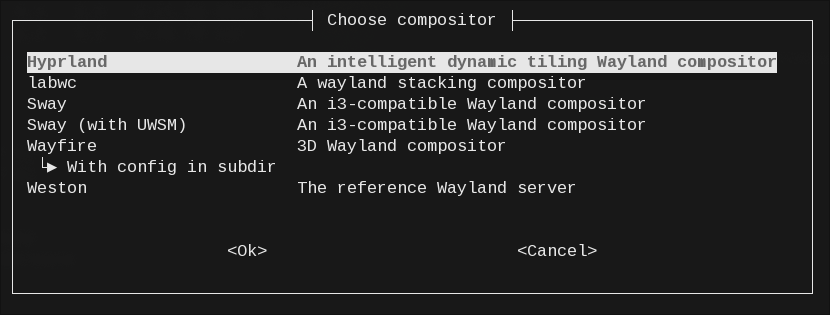
If ${compositor} is select or default, uwsm invokes a menu to select
desktop entries available in wayland-sessions data hierarchy (including their
actions). Selection is saved, previous selection is highlighted (or launched
right away in case of default). Selected entry is used as instance ID.
There is also a separate select action (uwsm select) that only selects and
saves default ${compositor} and does nothing else, which is handy for seamless
shell profile integration.
uwsm will also wait for activation of system graphical.target and either
warn or abort if timed out, or if graphical.target was not found in queue.
This behavior can be controlled via -g|-G option. It can not however stop
automatically if system graphical.target becomes deactivated.
Things uwsm start ... will do:
TERM and HUP signals that will find future
compositor unit's MainPID and wait for it to end, ensuring login session is
kept open until graphical session ends.wayland-session-bindpid@.service unit pointing to uwsm's own PID to
rig graphical session shutdown in case uwsm (or login session) ends.systemctl command which will actually start the
compositor unit and wait while wayland session is running.To launch automatically after login on virtual console 1, if systemd is at
graphical.target, add this code (or equivalent) to your shell's profile:
if uwsm check may-start && uwsm select; then
exec uwsm start default
fi
The main statement should be protected by a condition that will return false
in situations when running uwsm start is not desired. I.e. if this is
~/.profile and uwsm environment preloader sources it by itself (it can do that
if compositor's unit was activated without the use of uwsm start command).
uwsm check may-start subcommand serves as a collection of useful checks.
By default: user's dbus is available, parent is a login shell (process name
starts with -), tty1 is in foreground, login session's tty matches, login
session is local, system's graphical.target is active or activating, user's
graphical-session.target and other related units are inactive.
Also for convenience environment preloader defines IN_UWSM_ENV_PRELOADER=true
variable (not exported), which can be probed from shell profile to do things
conditionally.
uwsm select shows whiptail menu to select the default desktop entry from
wayland-sessions directories. At this point one can cancel and continue with
the normal login shell.
exec in shell profile causes uwsm to replace login shell, binding it to
user's login session.
uwsm start default launches the previously selected default compositor.
To launch uwsm from a display/login manager, uwsm can be used inside desktop
entries.
These entries are placed in wayland-sessions subdirectory of XDG_DATA_DIRS.
Usually, if XDG_DATA_DIRS contains /usr/local/share and /usr/share, user
defined entries are placed in /usr/local/share/wayland-sessions.
Example /usr/local/share/wayland-sessions/my-compositor-uwsm.desktop:
[Desktop Entry]
Name=My compositor (with UWSM)
Comment=My cool compositor, UWSM session
# a reference to another entry (preferred since some DMs may fail on quoted arguments)
Exec=uwsm start -- my-compositor.desktop
# or a full command line with metadata and executable
#Exec=uwsm start -N "My compositor" -D mycompositor:mylib -C "My cool compositor" -- mywm
# invalidates entry if uwsm is missing
TryExec=uwsm
DesktopNames=mycompositor;mylib
Type=Application
Things to keep in mind:
Exec= should start with uwsm start.uwsm will not have access to those strings.uwsm.Potentially such entries may be found and used by uwsm itself, i.e. in shell
profile integration situation, or when launched manually. Following the
principles above ensures uwsm will properly recognize itself and parse
requested arguments inside the entry without any side effects.
Some display managers may fail to handle quoting correctly. Workaround in this case is to use single-word arguments and/or point to another entry.
Alternatively, if a display manager supports wrapper commands/scripts, uwsm
can be inserted there to receive either Entry and Action IDs, or a parsed
command line.
Testing and feedback is needed.
Either of:
loginctl terminate-user "" (this ends all login sessions and units of
current user, good for resetting everything, including runtime units,
environments, etc.)loginctl terminate-session "$XDG_SESSION_ID" (this ends login session
that uwsm was launched in, special unit wayland-session-bindpid@.service
waiting for the former login shell process will exit and bring down graphical
session units. Empty argument will only work if loginctl is called from
within login session scope itself, so variable should be used when calling
from graphical session units)uwsm stop (brings down graphical session units. Login session will end if
uwsm start replaced login shell)systemctl --user stop wayland-wm@*.service (effectively the same as previous
one)Do not use compositor's native exit mechanism or kill its process directly, this will yank compositor from under all the clients and interfere with ordered unit deactivation sequence.
Some extended examples and partial recreation of some behaviors via excessive shell code, just for deeper explanation.
Depending on static-units build option, units files are provided or generated
on the fly. Customization drop-ins are always generated if needed. Tweak
drop-ins can be disabled by -t option.
Run uwsm start -o ${compositor} to populate systemd/user/ conriguration
with them and do nothing else (-o). Destination rung can be $XDG_RUNTIME_DIR
or $XDG_CONFIG_HOME, depending on $UWSM_UNIT_RUNG or -U option. Managed
files in the other rung are removed.
Any remainder arguments are appended to compositor argument list (even when
${compositor} is a desktop entry). Use -- to disambiguate:
uwsm start -o -- ${compositor} with "any complex" --arguments
Desktop entries can be overridden or added in
${XDG_DATA_HOME}/wayland-sessions/.
Basic set of unit files:
wayland-session-pre@.targetwayland-session@.targetwayland-session-xdg-autostart@.targetwayland-wm-env@.service - environment preloader servicewayland-wm@.service - main compositor servicewayland-wm-app-daemon.service - fast app command generatorapp-graphical.slicebackground-graphical.slicesession-graphical.slicewayland-wm-env@${compositor}.service.d/50_custom.conf,
wayland-wm@${compositor}.service.d/50_custom.conf - if arguments and/or
various names, path to executable were given on command line, they go here.app-@autostart.service.d/slice-tweak.conf - assigns XDG autostart apps to
app-graphical.sliceplasma-xdg-desktop-portal-kde.service.d/order-tweak.conf - adds ordering
After=graphical-session.target to KDE desktop portal.wayland-session-envelope@.target - initiates/propagates startup and
shutdown, itself brought up on startup, lives throughout whole startup,
session lifetime, and shutdown.wayland-session-bindpid@.service - starts waitpid utility for a given
PID. Invokes wayland-session-shutdown.target when deactivated.
uwsm start starts this unit pointing to itself just before replacing
itself with a shell signal handler and systemctl unit startup command.wayland-session-shutdown.target - conflicts with operational units.
Triggered by deactivation of wayland-wm*@*.service and
wayland-session-bindpid@*.service units, both successful or failed. But
can also be called manually for shutdown.After unit files are generated, compositor can be started by:
systemctl --user start wayland-wm@${compositor}.service
But this would run it completely disconnected from a login session or any
process that started it. To fix that use wayland-session-bindpid@.service to
track PID of login shell ($$) and stop graphical session when it exits:
systemctl --user start wayland-session-bindpid@$$.service
Add --wait to hold the terminal until session ends, exec it to replace login
shell with systemctl invocation reusing its PID, also use
wayland-session-envelope@${compositor}.target instead of main service to
wait until proper environment teardown at the end.
exec systemctl --user start --wait wayland-session-envelope@${compositor}.target
This makes the end of login shell also be the end of wayland session and vice versa.
Alternatively, for graceful handling of the parent login process one can use
trap for TERM and HUP signals in the shell for forking systemctl process
protected from direct termination and run
systemctl --user stop wayland-wm@${compositor}.service (also protected from
signals) upon receiving SIGTERM.
When wayland-wm-env@.service is started during graphical-session-pre.target
startup, uwsm aux prepare-env ${compositor} is launched (with shared set of
custom arguments).
It looks for environment saved by uwsm start command, then runs shell code to
prepare environment. The code sources POSIX shell profile (if environment from
uwsm start was not found), common and desktop-matching uwsm/env*,
uwsm/env*.d/* files, anything that plugins dictate.
Environment state at the end of shell code is given back to the main process.
uwsm is also smart enough to find login session associated with current TTY
and set $XDG_SESSION_ID, $XDG_VTNR if it was not found in the context saved
by uwsm start. In this case the presence of wayland-session-bindpid@.service
being active is also checked, and an instance pointing to login session leader
is launched automatically if none found, as the last best effort at binding to
login session lifetime.
The difference between initial env (that is the state of activation environment)
and after all the sourcing and setting is done, plus Varnames.always_export,
minus Varnames.never_export, is added to activation environment of systemd
user manager and D-Bus.
Those variable names, plus Varnames.always_cleanup minus
Varnames.never_cleanup are written to a cleanup list file in runtime dir.
This step is not needed if compositor at least puts WAYLAND_DISPLAY into
systemd activation environment: uwsm will autodetect this and handle the rest.
If something goes wrong, startup can be fixed by using combination of
uwsm finalize command and configuration variables UWSM_FINALIZE_VARNAMES,
UWSM_WAIT_VARNAMES, UWSM_WAIT_VARNAMES_SETTLETIME
wayland-wm@.service uses Type=notify and waits for compositor to signal
started state. Activation environments will also need to receive essential
variables like WAYLAND_DISPLAY to launch graphical applications successfully.
A forked process inside wayland-wm@.service waits for WAYLAND_DISPLAY and
all vars mentioned in UWSM_WAIT_VARNAMES, then signals unit readiness and
restricts notification socket access from all to exec. It also appends
variable cleanup list with any delta it has seen since unit startup.
Separate wayland-session-waitenv.service does the same waiting thing and
either exits successfully allowing graphical-session.target to proceed, or
times out, bringing everything down.
uwsm finalize [VAR [VAR2...]] can be run by compositor, essentially it
performs actions analogous to:
dbus-update-activation-environment WAYLAND_DISPLAY DISPLAY [VAR [VAR3...]]
systemctl --user import-environment WAYLAND_DISPLAY DISPLAY [VAR [VAR3...]]
systemd-notify READY=1 NOTIFYACCESS=exec
(dbus-update-activation-environment action equivalent is redundant for
dbus-broker and is skipped automatically)
Additional variable names are taken from UWSM_FINALIZE_VARNAMES var.
Only defined variables are used. Variables that are not blacklisted by
Varnames.never_cleanup set are also added to cleanup list in the runtime dir.
Just stop the main service:
systemctl --user stop "wayland-wm@${compositor}.service", everything else will
be stopped by systemd.
Wildcard systemctl --user stop "wayland-wm@*.service" will also work, as does
stopping wayland-session@*.target
Or activate shutdown target:
systemctl --user start wayland-session-shutdown.target
If an instance of wayland-session-bindpid@.service is active and pointing to a
PID in login session, any of the above stop commands also doubles as a logout
command.
When wayland-wm-env@${compositor}.service is stopped, uwsm aux cleanup-env
is launched. It looks for any cleanup files (uwsm/env_cleanup_*.list) in
runtime dir. Listed variables, plus Varnames.always_cleanup minus
Varnames.never_cleanup are emptied in D-Bus activation environment and unset
from systemd user manager environment.
When no compositor is running, units can be removed (-r) by uwsm stop -r.
Add compositor to -r to remove only customization drop-ins:
uwsm stop -r ${compositor}.
This example does the same thing as check may-start + start subcommand
combination described earlier: starts wayland session automatically upon login
on tty1 if system is in graphical.target
Screening for being in interactive login shell here is essential
([ "${0}" != "${0#-}" ]). wayland-wm-env@${compositor}.service sources
profile, which has a potential for nasty loops if run unconditionally. Other
conditions are a recommendation:
MY_COMPOSITOR=sway
if [ "${0}" != "${0#-}" ] &&
! systemctl --user is-active -q wayland-wm@*.service &&
[ "$XDG_VTNR" = "1" ] &&
{
# wait while graphical.target is in startup queue
while case "$(systemctl list-jobs --plain --no-legend --full graphical.target)" in
*start*) true ;; *) false ;; esac; do
sleep 1
done
systemctl is-active -q graphical.target
}
then
# generate units
uwsm start -o ${MY_COMPOSITOR}
# save login environment
mkdir -p "$XDG_RUNTIME_DIR/uwsm"
env -0 > "$XDG_RUNTIME_DIR/uwsm/env_login"
# bind wayland session to login shell PID $$ and start compositor
echo Starting ${MY_COMPOSITOR} compositor
systemctl --user start wayland-session-bindpid@$$.service
# do not die right away on signals, stop gracefully
trap "trap '' TERM HUP INT; systemctl --user stop --wait wayland-wm@${MY_COMPOSITOR}.service; wait \$SCPID; exit" TERM HUP INT
{
trap '' TERM HUP INT
exec systemctl --user start --wait wayland-wm@${MY_COMPOSITOR}.service
} &
SCPID=$!
# hold session open
wait $SCPID
fi
uwsm start also replaces itself with lightweight shell signal handler with
similar algorithm that holds the login session open until the compositor unit is
deactivated and prevents premature end of login session and login process.
Shell plugins provide compositor-specific functions during environment preparation.
Named ${__WM_BIN_ID__}.sh, they should only contain specifically named
functions.
${__WM_BIN_ID__} is derived from the item 0 of compositor command line by
applying s/(^[^a-zA-Z]|[^a-zA-Z0-9_])+/_/ and converting to lower case.
It is used as plugin id and suffix in function names.
Variables available to plugins:
__WM_ID__ - compositor ID, effective first argument of start.__WM_ID_UNIT_STRING__ - compositor ID escaped for systemd unit name.__WM_BIN_ID__ - processed first item of compositor argv.__WM_DESKTOP_NAMES__ - :-separated desktop names from DesktopNames= of
entry and -D CLI argument.__WM_FIRST_DESKTOP_NAME__ - first of the above.__WM_DESKTOP_NAMES_LOWERCASE__ - same as the above, but in lower case.__WM_FIRST_DESKTOP_NAME_LOWERCASE__ - first of the above.__WM_DESKTOP_NAMES_EXCLUSIVE__ - (true|false) indicates that
__WM_DESKTOP_NAMES__ came from CLI argument and are marked as exclusive.__OIFS__ - contains shell default field separator (space, tab, newline) for
convenient restoring.Standard functions:
load_wm_env - standard function for loading env filesprocess_config_dirs - called by load_wm_env, iterates over whole
XDG Config and system XDG Data hierarchies (decreasing priority)in_each_config_dir - called by process_config_dirs for each config dir,
does nothing ATMprocess_config_dirs_reversed - called by load_wm_env, same as
process_config_dirs, but in reverse (increasing priority)in_each_config_dir_reversed - called by process_config_dirs_reversed for
each config dir, loads uwsm/env, uwsm/env.d/*, uwsm/env-${desktop},
uwsm/env-${desktop}.d/* filessource_file - sources $1 file, providing messages for log.See code inside uwsm/main.py for more auxiliary functions.
Functions that can be added by plugins, replacing standard functions:
quirks__${__WM_BIN_ID__} - called before env loading.load_wm_env__${__WM_BIN_ID__}process_config_dirs_reversed__${__WM_BIN_ID__}in_each_config_dir_reversed__${__WM_BIN_ID__}process_config_dirs__${__WM_BIN_ID__}in_each_config_dir__${__WM_BIN_ID__}Original functions are still available for calling explicitly if combined effect is needed.
Example:
#!/bin/false
# function to make arbitrary actions before loading environment
quirks__my_cool_wm() {
# here additional vars can be set or unset
export I_WANT_THIS_IN_SESSION=yes
unset I_DO_NOT_WANT_THAT
# or prepare a config for compositor
# or set a var to modify what sourcing uwsm/env, uwsm/env-${__WM_ID__}
# in the next stage will do
...
# add a var to be exported by uwsm finalize:
UWSM_FINALIZE_VARNAMES="${UWSM_FINALIZE_VARNAMES}${UWSM_FINALIZE_VARNAMES:+ }ANOTHER_VAR1 ANOTHER_VAR2"
# add a var to wait and depend on before graphical session:
UWSM_WAIT_VARNAMES="${UWSM_WAIT_VARNAMES}${UWSM_WAIT_VARNAMES:+ }ANOTHER_VAR1 ANOTHER_VAR2"
}
in_each_config_dir_reversed__my_cool_wm() {
# custom mechanism for loading of env files (or a stub)
# replaces standard function, but we want it also
# so call it explicitly
in_each_config_dir_reversed "$1"
# and additionally source our file
source_file "${1}/${__WM_ID__}/env"
}
Inspired by and adapted some techniques from:
Special thanks to:
(top 24 of 48)
2,563 followers · starred Mar 2024
213 followers · starred Mar 2026
162 followers · starred Aug 2025
336 followers · starred Apr 2026
Provides a set of Systemd units and helpers to set up the environment and manage standalone Wayland compositor sessions.
Aside from environment setup/cleanup, it makes Systemd do most of the work and
does not require any extra daemons running in background (except for a tiny
waitpid process and a simple shell signal handler in the lightest case).
This setup provides robust session management, overridable compositor- and session-aware environment management, XDG autostart, bi-directional binding with login session, clean shutdown, solutions for a set of small but annoying gotchas of systemd session management.
For compositors this is an opportunity to offload: Systemd integration, session/XDG autostart management, Systemd/DBus activation environment interaction with its caveats.
[!IMPORTANT] This project is currently in a stable phase with a slow-burning refactoring. Although no drastic changes are planned, keep an eye for commits with breaking changes, indicated by an exclamation point (e.g.
fix!: ...,chore!: ...,feat!: ..., etc.).
[!IMPORTANT] v0.26.0 now has special treatment of transient session vars:
XDG_SEAT,XDG_SEAT_PATH,XDG_SESSION_ID,XDG_SESSION_PATH,XDG_VTNR. Those vars are not exported to activation environment(s) since they are highly session-specific. Instead they are fed to compositor unit viaEnvironmentFile=directive pointing to a runtime file.uwsm appwill pass them to launched services automatically. Also static unit files are now permanent, and shell code is moved to separate files in libexec dir. Compositor's executable basename will only be auto-added to XDG_CURRENT_DESKTOP if other sources came up empty.
[!NOTE] It is highly recommended to use dbus-broker as the D-Bus daemon implementation. Among other benefits, it reuses the systemd activation environment instead of having a separate one. This simplifies environment management and allows proper cleanup. Reference D-Bus implementation is also supported, but it doesn't allow unsetting vars, so a best effort cleanup is performed by setting them to an empty string instead. The only way to properly clean up the separate environment of the reference D-Bus daemon is to run
loginctl terminate-user "".
graphical-session-pre.target, graphical-session.target,
xdg-desktop-autostart.target.app-graphical.slice,
background-graphical.slice, session-graphical.slice to put apps in and
terminate them cleanly on exit.name-.d drop-ins.Using waitpid utility (or a built-in shim) together with native systemd
mechanisms, uwsm binds lifetime of a login session (session-N.scope system
unit) to graphical session (a set of user units) and vice versa.
Currently included:
swaywayfirelabwchyprlandnirimangoLXQt variants of the above are provided by the experimental LXQt Universal Wayland Session.
uwsm start command or sourcing
shell profile by itselfuwsm/env, uwsm/env.d/*, uwsm/env-${desktop},
uwsm/env-${desktop}.d/* files from each dir of reversed sequence
${XDG_CONFIG_HOME}:${XDG_CONFIG_DIRS}:${XDG_DATA_DIRS} (in
increasing priority), where ${desktop} is each item of
${XDG_CURRENT_DESKTOP}, lowercaseduwsm finalize actionExec for argument listDesktopNames for XDG_CURRENT_DESKTOP and XDG_SESSION_DESKTOPName and Comment for unit Description${XDG_DATA_HOME}/wayland-sessions/whiptail), choice is saved in
${XDG_CONFIG_HOME}/uwsm/default-id, default is read from it, falling back
all the way through ${XDG_CONFIG_DIRS}:${XDG_DATA_DIRS}wayland-wm-env@${compositor}.service.d/50_custom.conf
wayland-wm@${compositor}.service.d/50_custom.conf
app-*@autostart.service units) are placed into
app-graphical.slice that receives stop action before compositor is stopped.wayland-session-xdg-autostart@${compositor}.targetBasic provided unit files (can be transient if project built with
static-units=disabled):
background-graphical.slice
app-graphical.slice
session-graphical.slice
wayland-session-envelope@.target
wayland-session-pre@.target
wayland-session-shutdown.target
wayland-session-xdg-autostart@.target
wayland-session@.target
wayland-wm-app-daemon.service
wayland-wm-env@.service
wayland-wm@.service
wayland-session-bindpid@.service
wayland-session-waitenv.service
Managed generated files (in ${XDG_RUNTIME_DIR}/systemd/user or
${XDG_CONFIG_HOME}/systemd/user depending on -U option):
Compositor metadata customization drop-ins:
wayland-wm-env@${compositor}.service.d/50_custom.conf
wayland-wm@${compositor}.service.d/50_custom.conf
Tweaks for other units:
app-@autostart.service.d/slice-tweak.conf
plasma-xdg-desktop-portal-kde.service.d/order-tweak.conf
See Longer story section below for descriptions.
uwsm finalize: for explicitly exporting variables to activation environments
and signal compositor's unit readiness (compositor service unit uses
Type=notify)uwsm check may-start: for checking conditions for launch at login (for
integration into login shell profile)uwsm app: for launching applications as scopes or services in proper slices
uwsm-app: a simple and fast shell client to app-daemon feature of uwsm, a
drop-in replacement of uwsm app. The daemon (started on-demand) handles
finding requested desktop entries, parsing and generation of commands for
client to execute. This avoids the overhead of repeated python startup and
increases app launch speed.uuctl: optional graphical (requires a dmenu-like menu) tool for managing
user units.fumon: optional background service for notifying about failed units
(requires notify-send from libnotify or libnotify-bin package).ttyautolock: optional background service for locking session when its TTY
loses focus (requires inotifywait from inotify-tools package).Checkout the last version-tagged commit. Untagged commits are WIP.
meson setup --prefix=/usr/local -Duuctl=enabled -Dfumon=enabled -Duwsm-app=enabled -Dttyautolock=enabled build
meson install -C build
The example enables optional tools uuctl, fumon, ttyautolock, and
uwsm-app available in this project (see helpers and tools spoiler in
concepts section above).
Read and run ./build-deb.sh -i
Alternatively,
IFS='()' read -r _ current_version _ < debian/changelog
sudo apt install devscripts
mk-build-deps
sudo apt install --mark-auto ./uwsm-build-deps_${current_version}_all.deb
dpkg-buildpackage -b -tc --no-sign
sudo apt install ../uwsm_${current_version}_all.deb
pacman -S uwsm
Enable it using programs.uwsm.enable and configure available compositors using
programs.uwsm.waylandCompositors. Please see the
options' descriptions
for more information.
Runtime dependencies:
waitpid (optional, but recommended for resources; from util-linux or
util-linux-extra package)whiptail (optional, for select feature; from whiptail or libnewt
package)uuctl script), supported:
vicinaefuzzelwalkerwofirofihyprlaunchertofibemenuwmenudmenunotify-send (optional, for feedback from uwsm app commands and
optional failed unit monitor fumon service; from libnotify-bin or
libnotify package)inotifywait (optional, for ttyautolock script and service; from
inotify-tools package)Potentially tricky part.
TLDR; if your compositor puts WAYLAND_DISPLAY (and along with it
DISPLAY, or other important or useful variables) into systemd activation
environment, uwsm will make everything work automagically, proceed to section 3.
Otherwise configure compositor to run uwsm finalize command at the end of its
startup. It will deal with putting WAYLAND_DISPLAY and DISPLAY (if set)
variables into activation environments in the best possible ways and signal unit
readiness to systemd.
List names of variable as arguments to uwsm finalize, or append them to
whitespace-separated list in UWSM_FINALIZE_VARNAMES variable (do it
beforehand, i.e. in env files or shell profile).
Example snippet for sway config (these vars are already covered by sway plugin
via UWSM_FINALIZE_VARNAMES var and listed here just for clearness):
exec exec uwsm finalize SWAYSOCK I3SOCK XCURSOR_SIZE XCURSOR_THEME
Undefined variables will be are silently ignored.
Append names of variables to whitespace-separated list in
UWSM_WAIT_VARNAMES variable (do it beforehand, i.e. in env files or shell
profile). This will make uwsm delay graphical session startup until those vars
appear in the systemd activation environment.
Depending on the situation, combine this with with uwsm finalize command to
put more variables into activation environments and gain more control over delay
mechanism of uwsm.
Be aware that uwsm finalize skips undefined vars, so be sure that all
vars listed in UWSM_WAIT_VARNAMES are really being set, or use explicit
assignment to serve as a marker. Example:
# in env file:
export UWSM_WAIT_VARNAMES="${UWSM_WAIT_VARNAMES} FINALIZED"

# in compositor's autostart:
uwsm finalize FINALIZED="I'm here" SWAYSOCK I3SOCK XCURSOR_SIZE XCURSOR_THEME
You can also tweak UWSM_WAIT_VARNAMES_SETTLETIME (float, default: 0.2) to
change pause duration after all expected vars are found.
Inside wayland-wm@${compositor}.service before executing compositor itself,
uwsm forks a process that probes systemd activation environment for
WAYLAND_DISPLAY var and vars listed in UWSM_WAIT_VARNAMES variable
(whitespace-separated). When all expected vars appear, it pauses for
UWSM_WAIT_VARNAMES_SETTLETIME seconds (float, default: 0.2) and signals unit
readiness. It also updates cleanup list with delta between states of activation
environment at unit startup time and the end of settle pause. If classic D-Bus
implementation is used, this delta is also synched to its activation
environment.
A separate unit, wayland-session-waitenv.service is launched alongside
compositor, with similar ordering after graphical-session-pre.target, before
graphical-session.target. It also waits for the same variables in the same
manner, then successfully exits (or times out). Its job is to delay
graphical-session.target activation in case compositor signals its readiness
prematurely. Or to fail startup if expected vars do not appear.
The uwsm finalize command fills systemd and D-Bus environments with essential
vars set by the compositor: WAYLAND_DISPLAY (mandatory) and DISPLAY (if
present). Optional vars are taken by name from arguments and
UWSM_FINALIZE_VARNAMES var, which is also pre-filled by plugins. D-Bus
implementation quirks are handled. Undefined vars are silently ignored. Any
exported variables are also added to cleanup list.
Timeout for unit startup is 10 seconds.
Applications should be launched in their own user-level systemd units.
Some applications (usually those intended to be autostarted in a graphical
session) are shipped with their own units. Check and enable them with:
systemctl --user enable ....
systemctl --user enable this-app.service (if it provides
WantedBy=graphical-session.target)systemctl --user add-wants graphical-session.target that-app.service (if it
does not)In the end autostarted unit should have both dependency and ordering (be wanted by a target and ordered after it) see example-units.
Or just start with systemctl --user start not-a-service.service.
Units can be fully or partially overridden/edited via standard systemd mechanisms.
Other apps are shipped with XDG autostart entries. Systemd automatically
converts them to app-*@autostart.service units and starts.
Their OnlyShowIn=/NotShowIn= lists should align with $XDG_CURRENT_DESKTOP
items or be absent. Autostart entries can be overridden by copying and editing
them in ${XDG_CONFIG_HOME}/autostart/. Generated
app-*@autostart.service units are editable via drop-ins.
Also see example-units and refer to Desktop Application Autostart Specification
To launch any other app use:
uwsm app -- {executable|entry.desktop[:action]} [args ...]
A one-shot app launcher can be started directly, but either configured to run
things via uwsm app or wrapped in a shell expression to feed output,
preferably Desktop Entry path or ID, to uwsm app.
Not all launchers are able to provide Desktop Entry ID, most just provide the resulting command, so units will lack fancy description.
Fuzzel since 1.14.0 exports app metadata via DESKTOP_ENTRY_* vars, hopefully
starting a good trend. Those vars are supported transparently by uwsm app.
See relevant PR
for more info.
Some examples:
| Launcher | Via | What | Metadata |
|---|---|---|---|
| vicinae | gui | Vicinae settings > Extensions > Applications > Launch Prefix=uwsm app -- | no |
| fuzzel | command | fuzzel "--launch-prefix=uwsm app --" | env |
| fuzzel | config | launch-prefix=uwsm app -- | env |
| albert | env var | ALBERT_APPLICATIONS_COMMAND_PREFIX: uwsm;app;-- | no |
| albert | shell | ALBERT_APPLICATIONS_COMMAND_PREFIX="uwsm;app;--" albert | no |
| walker | config | app_launch_prefix = "uwsm app -- " | no |
| wofi | shell | uwsm app -- "$(wofi --show drun --define=drun-print_desktop_file=true | sed -E "s/(\.desktop) /\1:/")" | entry |
| wofi | shell | uwsm app -- "$(D=$(wofi --show drun --define=drun-print_desktop_file=true); case "$D" in *'.desktop '*) echo "${D%.desktop *}.desktop:${D#*.desktop }";; *) echo "$D";; esac)" | entry |
| hyprlauncher | config | desktop_launch_prefix = uwsm app -- | no |
| tofi | shell | uwsm app -- $(tofi-drun) | no |
| rofi | command | rofi -show drun -run-command "uwsm app -- {cmd}" | no |
Compositor itself runs in session.slice which has priority in some resource
allocation. It would be a bad practice to accumulate all apps there, and
extremely bad practice to accumulate processes inside compositor's unit itself.
uwsm app can be quite slow on some setups due to repeated python startup
overhead.
Included optional uwsm-app script uitilizes uwsm's on-demand app daemon for
more responsiveness in repeated interactive launching.
app2unit is a faster shell alternative, with feature parity. It can also be used outside uwsm environment and can integrate with Fuzzel.
runapp a fast C++ executable, although it is not feature-complete yet.
uwsm launches the compositor's service as wayland-wm@${compositor}.service
in session.slice.
Processes descendent from the compositor will be a part of its unit which might be mostly OK for short-lived one-off commands, i.e. volume adjustment. But processes inside comopositor's unit will have brief access to its notification socket before it is restricted after startup is complete. This may lead to unforeseen consequences, like compositor unit being erroneously declared entering stopping state.
Systemd
documentation
recommends launching apps as their own units (scopes or services). app.slice
would be the default destination, background.slice and session.slice are
available for low-priority non-interactive tasks and high-priority
responsiveness-aware tasks respectively, (see man systemd.special)
uwsm provides a convenient way of handling this: special nested slices that
will also receive stop action before
wayland-wm@${compositor}.service shutdown:
app-graphical.slice (default destination)background-graphical.slicesession-graphical.sliceapp-*@autostart.service units of XDG autostart entries are also modified to be
started in app-graphical.slice.
To launch an app inside one of those slices, use:
uwsm app [-s a|b|s|custom.slice] [-t scope|service] -- your_app [with args]
Launching desktop entries via a
valid ID
is also supported (optionally with an
action ID
appended via :):
uwsm app [-s a|b|s|custom.slice] [-t scope|service] -- your_app.desktop[:action] [with args]
In this case args must be supported by the entry or its selected action according to the XDG Desktop Entry Specification.
Specifying paths to executables or desktop entry files is also supported.
Always use -- to disambiguate command line if any dashed arguments are
intended for the app being launched.
Scopes are the default type of units for launching apps via uwsm app, they
are executed in-place and behave like simple commands, inheriting environment
and pty of origin.
Services are launched in the background by the systemd user manager and are
given an environment based on the current state of the activation environment of
systemd; their output is routed to the journal. uwsm app will return
immediately after launch. This allows more control over the application, i.e.
restarting it with an updated environment.
Example snippets for sway config for launching apps:
Launch proposed default terminal:
bindsym --to-code $mod+t exec exec uwsm app -T
Fuzzel has a very handy launch-prefix option:
bindsym --to-code $mod+r exec exec fuzzel --launch-prefix='uwsm app --'
Walker can prefix launching apps by setting app_launch_prefix variable in the config, so "app_launch_prefix": "uwsm app -- ".
Launch SpaceFM via a desktop entry:
bindsym --to-code $mod+e exec exec uwsm app spacefm.desktop
Featherpad desktop entry has "standalone-window" action:
bindsym --to-code $mod+n exec exec uwsm app featherpad.desktop:standalone-window
Unit type of launched apps can be controlled by -t service|scope argument or
setting its default via UWSM_APP_UNIT_TYPE env var.
There are three general groups of environment variables in graphical session operation:
Summary of where to put a user-level var for the first two categories:
${XDG_CONFIG_HOME}/environment.d/*.conf. It does not affect login sessions
or systemd user manager itself (see man 5 environment.d).${XDG_CONFIG_HOME}/uwsm/env
or ${XDG_CONFIG_HOME}/uwsm/env.d/my_vars${XDG_CONFIG_HOME}/uwsm/env-${desktop} or
${XDG_CONFIG_HOME}/uwsm/env-${desktop}.d/my_varsChoose whatever scope suits your needs.
If startup was initiated via uwsm start command, its environment will be
saved and picked up by environment preloader (since uwsm start is supposed to
be started from login session context, it is assumed that profile of the login
shell was already sourced).
Otherwise, environment preloader will source POSIX shell (/bin/sh) profile by
itself (/etc/profile, ${HOME}/.profile). Other shells compatibility with
these files may vary.
Environment preloader only exports difference between initial activation
environment state and resulting environment provided by preparation process.
Exported variables are marked for cleanup. There are internal sets of
"always"/"never" overrides, which can be amended by listing names of variables
(whitespace-separated) as VAR, +VAR (to add) or -VAR (to
remove) in variables:
UWSM_ALWAYS_EXPORT_VARNAMESUWSM_NEVER_EXPORT_VARNAMESUWSM_ALWAYS_CLEANUP_VARNAMESUWSM_NEVER_CLEANUP_VARNAMES-h|--help option is available for uwsm and all of its subcommands.
Basics:
uwsm start [options] -- ${compositor} [arguments]
Always use -- to disambiguate command line if any dashed arguments are
intended for the launched compositor.
${compositor} can be an executable or a valid
desktop entry ID
(optionally with an
action ID
appended via ':'), or one of special the values: select|default.
If ${compositor} is given as a path, or -F option is given, "hardcode" mode
is engaged: the resulting command line will always be written to unit drop-ins
and contain full path to executable as seen by uwsm start. Path to executable
will also be written if encountered in a desktop entry's Exec.
Optional parameters to provide more metadata:
-[a|e]D DesktopName1[:DesktopName2:...]: append (-a) or exclusively set
(-e) ${XDG_CURRENT_DESKTOP}-N Name-C "Compositor description"Arguments and metadata are stored in specifier unit drop-ins if needed.
The uwsm start ... command will wait until the graphical session ends, also
holding open the login session it resides in. The graphical session will also
deactivate if the process that started it ends.
uwsm start \
	[-[a|e]D DesktopName1[:DesktopName2:...]] \
	[-N Name] \
	[-C "Compositor description"] \
	[-F] \
	[-g|-G seconds] \
	[-o] \
	[-U run|home] \
	[-t] \
	[-n] \
	-- ${compositor} [with "any complex" --arguments]
If ${compositor} is a desktop entry ID, uwsm will find it in
wayland-sessions data hierarchy. Exec will be used for command line, and
DesktopNames will fill $XDG_CURRENT_DESKTOP, Name and Comment will go to
units' description.
Arguments provided on the command line are appended to the command line from
session's desktop entry (unlike application entries); no argument processing is
done. (Please
file a bug report if
you encounter any wayland-sessions desktop entry with %-fields which would
require this behavior to be altered.)
If you want to customize compositor execution provided with a desktop entry,
copy it to ~/.local/share/wayland-sessions/ and change to your liking,
including adding
actions.
If ${compositor} is select or default, uwsm invokes a menu to select
desktop entries available in wayland-sessions data hierarchy (including their
actions). Selection is saved, previous selection is highlighted (or launched
right away in case of default). Selected entry is used as instance ID.
There is also a separate select action (uwsm select) that only selects and
saves default ${compositor} and does nothing else, which is handy for seamless
shell profile integration.
uwsm will also wait for activation of system graphical.target and either
warn or abort if timed out, or if graphical.target was not found in queue.
This behavior can be controlled via -g|-G option. It can not however stop
automatically if system graphical.target becomes deactivated.
Things uwsm start ... will do:
TERM and HUP signals that will find future
compositor unit's MainPID and wait for it to end, ensuring login session is
kept open until graphical session ends.wayland-session-bindpid@.service unit pointing to uwsm's own PID to
rig graphical session shutdown in case uwsm (or login session) ends.systemctl command which will actually start the
compositor unit and wait while wayland session is running.To launch automatically after login on virtual console 1, if systemd is at
graphical.target, add this code (or equivalent) to your shell's profile:
if uwsm check may-start && uwsm select; then
	exec uwsm start default
fi
The main statement should be protected by a condition that will return false
in situations when running uwsm start is not desired. I.e. if this is
~/.profile and uwsm environment preloader sources it by itself (it can do that
if compositor's unit was activated without the use of uwsm start command).
uwsm check may-start subcommand serves as a collection of useful checks.
By default: user's dbus is available, parent is a login shell (process name
starts with -), tty1 is in foreground, login session's tty matches, login
session is local, system's graphical.target is active or activating, user's
graphical-session.target and other related units are inactive.
Also for convenience environment preloader defines IN_UWSM_ENV_PRELOADER=true
variable (not exported), which can be probed from shell profile to do things
conditionally.
uwsm select shows whiptail menu to select the default desktop entry from
wayland-sessions directories. At this point one can cancel and continue with
the normal login shell.
exec in shell profile causes uwsm to replace login shell, binding it to
user's login session.
uwsm start default launches the previously selected default compositor.
To launch uwsm from a display/login manager, uwsm can be used inside desktop
entries.
These entries are placed in wayland-sessions subdirectory of XDG_DATA_DIRS.
Usually, if XDG_DATA_DIRS contains /usr/local/share and /usr/share, user
defined entries are placed in /usr/local/share/wayland-sessions.
Example /usr/local/share/wayland-sessions/my-compositor-uwsm.desktop:
[Desktop Entry]
Name=My compositor (with UWSM)
Comment=My cool compositor, UWSM session

# a reference to another entry (preferred since some DMs may fail on quoted arguments)
Exec=uwsm start -- my-compositor.desktop

# or a full command line with metadata and executable
#Exec=uwsm start -N "My compositor" -D mycompositor:mylib -C "My cool compositor" -- mywm

# invalidates entry if uwsm is missing
TryExec=uwsm

DesktopNames=mycompositor;mylib
Type=Application
Things to keep in mind:
Exec= should start with uwsm start.uwsm will not have access to those strings.uwsm.Potentially such entries may be found and used by uwsm itself, i.e. in shell
profile integration situation, or when launched manually. Following the
principles above ensures uwsm will properly recognize itself and parse
requested arguments inside the entry without any side effects.
Some display managers may fail to handle quoting correctly. Workaround in this case is to use single-word arguments and/or point to another entry.
Alternatively, if a display manager supports wrapper commands/scripts, uwsm
can be inserted there to receive either Entry and Action IDs, or a parsed
command line.
Testing and feedback is needed.
Either of:
loginctl terminate-user "" (this ends all login sessions and units of
current user, good for resetting everything, including runtime units,
environments, etc.)loginctl terminate-session "$XDG_SESSION_ID" (this ends login session
that uwsm was launched in, special unit wayland-session-bindpid@.service
waiting for the former login shell process will exit and bring down graphical
session units. Empty argument will only work if loginctl is called from
within login session scope itself, so variable should be used when calling
from graphical session units)uwsm stop (brings down graphical session units. Login session will end if
uwsm start replaced login shell)systemctl --user stop wayland-wm@*.service (effectively the same as previous
one)Do not use compositor's native exit mechanism or kill its process directly, this will yank compositor from under all the clients and interfere with ordered unit deactivation sequence.
Some extended examples and partial recreation of some behaviors via excessive shell code, just for deeper explanation.
Depending on static-units build option, units files are provided or generated
on the fly. Customization drop-ins are always generated if needed. Tweak
drop-ins can be disabled by -t option.
Run uwsm start -o ${compositor} to populate systemd/user/ conriguration
with them and do nothing else (-o). Destination rung can be $XDG_RUNTIME_DIR
or $XDG_CONFIG_HOME, depending on $UWSM_UNIT_RUNG or -U option. Managed
files in the other rung are removed.
Any remainder arguments are appended to compositor argument list (even when
${compositor} is a desktop entry). Use -- to disambiguate:
uwsm start -o -- ${compositor} with "any complex" --arguments
Desktop entries can be overridden or added in
${XDG_DATA_HOME}/wayland-sessions/.
Basic set of unit files:
wayland-session-pre@.targetwayland-session@.targetwayland-session-xdg-autostart@.targetwayland-wm-env@.service - environment preloader servicewayland-wm@.service - main compositor servicewayland-wm-app-daemon.service - fast app command generatorapp-graphical.slicebackground-graphical.slicesession-graphical.slicewayland-wm-env@${compositor}.service.d/50_custom.conf,
wayland-wm@${compositor}.service.d/50_custom.conf - if arguments and/or
various names, path to executable were given on command line, they go here.app-@autostart.service.d/slice-tweak.conf - assigns XDG autostart apps to
app-graphical.sliceplasma-xdg-desktop-portal-kde.service.d/order-tweak.conf - adds ordering
After=graphical-session.target to KDE desktop portal.wayland-session-envelope@.target - initiates/propagates startup and
shutdown, itself brought up on startup, lives throughout whole startup,
session lifetime, and shutdown.wayland-session-bindpid@.service - starts waitpid utility for a given
PID. Invokes wayland-session-shutdown.target when deactivated.
uwsm start starts this unit pointing to itself just before replacing
itself with a shell signal handler and systemctl unit startup command.wayland-session-shutdown.target - conflicts with operational units.
Triggered by deactivation of wayland-wm*@*.service and
wayland-session-bindpid@*.service units, both successful or failed. But
can also be called manually for shutdown.After unit files are generated, compositor can be started by:
systemctl --user start wayland-wm@${compositor}.service
But this would run it completely disconnected from a login session or any
process that started it. To fix that use wayland-session-bindpid@.service to
track PID of login shell ($$) and stop graphical session when it exits:
systemctl --user start wayland-session-bindpid@$$.service
Add --wait to hold the terminal until session ends, exec it to replace login
shell with systemctl invocation reusing its PID, also use
wayland-session-envelope@${compositor}.target instead of main service to
wait until proper environment teardown at the end.
exec systemctl --user start --wait wayland-session-envelope@${compositor}.target
This makes the end of login shell also be the end of wayland session and vice versa.
Alternatively, for graceful handling of the parent login process one can use
trap for TERM and HUP signals in the shell for forking systemctl process
protected from direct termination and run
systemctl --user stop wayland-wm@${compositor}.service (also protected from
signals) upon receiving SIGTERM.
When wayland-wm-env@.service is started during graphical-session-pre.target
startup, uwsm aux prepare-env ${compositor} is launched (with shared set of
custom arguments).
It looks for environment saved by uwsm start command, then runs shell code to
prepare environment. The code sources POSIX shell profile (if environment from
uwsm start was not found), common and desktop-matching uwsm/env*,
uwsm/env*.d/* files, anything that plugins dictate.
Environment state at the end of shell code is given back to the main process.
uwsm is also smart enough to find login session associated with current TTY
and set $XDG_SESSION_ID, $XDG_VTNR if it was not found in the context saved
by uwsm start. In this case the presence of wayland-session-bindpid@.service
being active is also checked, and an instance pointing to login session leader
is launched automatically if none found, as the last best effort at binding to
login session lifetime.
The difference between initial env (that is the state of activation environment)
and after all the sourcing and setting is done, plus Varnames.always_export,
minus Varnames.never_export, is added to activation environment of systemd
user manager and D-Bus.
Those variable names, plus Varnames.always_cleanup minus
Varnames.never_cleanup are written to a cleanup list file in runtime dir.
This step is not needed if compositor at least puts WAYLAND_DISPLAY into
systemd activation environment: uwsm will autodetect this and handle the rest.
If something goes wrong, startup can be fixed by using combination of
uwsm finalize command and configuration variables UWSM_FINALIZE_VARNAMES,
UWSM_WAIT_VARNAMES, UWSM_WAIT_VARNAMES_SETTLETIME
wayland-wm@.service uses Type=notify and waits for compositor to signal
started state. Activation environments will also need to receive essential
variables like WAYLAND_DISPLAY to launch graphical applications successfully.
A forked process inside wayland-wm@.service waits for WAYLAND_DISPLAY and
all vars mentioned in UWSM_WAIT_VARNAMES, then signals unit readiness and
restricts notification socket access from all to exec. It also appends
variable cleanup list with any delta it has seen since unit startup.
Separate wayland-session-waitenv.service does the same waiting thing and
either exits successfully allowing graphical-session.target to proceed, or
times out, bringing everything down.
uwsm finalize [VAR [VAR2...]] can be run by compositor, essentially it
performs actions analogous to:
dbus-update-activation-environment WAYLAND_DISPLAY DISPLAY [VAR [VAR3...]]
systemctl --user import-environment WAYLAND_DISPLAY DISPLAY [VAR [VAR3...]]
systemd-notify READY=1 NOTIFYACCESS=exec
(dbus-update-activation-environment action equivalent is redundant for
dbus-broker and is skipped automatically)
Additional variable names are taken from UWSM_FINALIZE_VARNAMES var.
Only defined variables are used. Variables that are not blacklisted by
Varnames.never_cleanup set are also added to cleanup list in the runtime dir.
Just stop the main service:
systemctl --user stop "wayland-wm@${compositor}.service", everything else will
be stopped by systemd.
Wildcard systemctl --user stop "wayland-wm@*.service" will also work, as does
stopping wayland-session@*.target
Or activate shutdown target:
systemctl --user start wayland-session-shutdown.target
If an instance of wayland-session-bindpid@.service is active and pointing to a
PID in login session, any of the above stop commands also doubles as a logout
command.
When wayland-wm-env@${compositor}.service is stopped, uwsm aux cleanup-env
is launched. It looks for any cleanup files (uwsm/env_cleanup_*.list) in
runtime dir. Listed variables, plus Varnames.always_cleanup minus
Varnames.never_cleanup are emptied in D-Bus activation environment and unset
from systemd user manager environment.
When no compositor is running, units can be removed (-r) by uwsm stop -r.
Add compositor to -r to remove only customization drop-ins:
uwsm stop -r ${compositor}.
This example does the same thing as check may-start + start subcommand
combination described earlier: starts wayland session automatically upon login
on tty1 if system is in graphical.target
Screening for being in interactive login shell here is essential
([ "${0}" != "${0#-}" ]). wayland-wm-env@${compositor}.service sources
profile, which has a potential for nasty loops if run unconditionally. Other
conditions are a recommendation:
MY_COMPOSITOR=sway
if [ "${0}" != "${0#-}" ] &&
   ! systemctl --user is-active -q wayland-wm@*.service &&
   [ "$XDG_VTNR" = "1" ] &&
   {
       # wait while graphical.target is in startup queue
       while case "$(systemctl list-jobs --plain --no-legend --full graphical.target)" in
       *start*) true ;; *) false ;; esac; do
         sleep 1
       done
       systemctl is-active -q graphical.target
   }
then
    # generate units
    uwsm start -o ${MY_COMPOSITOR}

    # save login environment
    mkdir -p "$XDG_RUNTIME_DIR/uwsm"
    env -0 > "$XDG_RUNTIME_DIR/uwsm/env_login"

    # bind wayland session to login shell PID $$ and start compositor
    echo Starting ${MY_COMPOSITOR} compositor
    systemctl --user start wayland-session-bindpid@$$.service

    # do not die right away on signals, stop gracefully
    trap "trap '' TERM HUP INT; systemctl --user stop --wait wayland-wm@${MY_COMPOSITOR}.service; wait \$SCPID; exit" TERM HUP INT
    {
    	trap '' TERM HUP INT
    	exec systemctl --user start --wait wayland-wm@${MY_COMPOSITOR}.service
    } &
    SCPID=$!
    # hold session open
    wait $SCPID
fi
uwsm start also replaces itself with lightweight shell signal handler with
similar algorithm that holds the login session open until the compositor unit is
deactivated and prevents premature end of login session and login process.
Shell plugins provide compositor-specific functions during environment preparation.
Named ${__WM_BIN_ID__}.sh, they should only contain specifically named
functions.
${__WM_BIN_ID__} is derived from the item 0 of compositor command line by
applying s/(^[^a-zA-Z]|[^a-zA-Z0-9_])+/_/ and converting to lower case.
It is used as plugin id and suffix in function names.
Variables available to plugins:
__WM_ID__ - compositor ID, effective first argument of start.__WM_ID_UNIT_STRING__ - compositor ID escaped for systemd unit name.__WM_BIN_ID__ - processed first item of compositor argv.__WM_DESKTOP_NAMES__ - :-separated desktop names from DesktopNames= of
entry and -D CLI argument.__WM_FIRST_DESKTOP_NAME__ - first of the above.__WM_DESKTOP_NAMES_LOWERCASE__ - same as the above, but in lower case.__WM_FIRST_DESKTOP_NAME_LOWERCASE__ - first of the above.__WM_DESKTOP_NAMES_EXCLUSIVE__ - (true|false) indicates that
__WM_DESKTOP_NAMES__ came from CLI argument and are marked as exclusive.__OIFS__ - contains shell default field separator (space, tab, newline) for
convenient restoring.Standard functions:
load_wm_env - standard function for loading env filesprocess_config_dirs - called by load_wm_env, iterates over whole
XDG Config and system XDG Data hierarchies (decreasing priority)in_each_config_dir - called by process_config_dirs for each config dir,
does nothing ATMprocess_config_dirs_reversed - called by load_wm_env, same as
process_config_dirs, but in reverse (increasing priority)in_each_config_dir_reversed - called by process_config_dirs_reversed for
each config dir, loads uwsm/env, uwsm/env.d/*, uwsm/env-${desktop},
uwsm/env-${desktop}.d/* filessource_file - sources $1 file, providing messages for log.See code inside uwsm/main.py for more auxiliary functions.
Functions that can be added by plugins, replacing standard functions:
quirks__${__WM_BIN_ID__} - called before env loading.load_wm_env__${__WM_BIN_ID__}process_config_dirs_reversed__${__WM_BIN_ID__}in_each_config_dir_reversed__${__WM_BIN_ID__}process_config_dirs__${__WM_BIN_ID__}in_each_config_dir__${__WM_BIN_ID__}Original functions are still available for calling explicitly if combined effect is needed.
Example:
#!/bin/false

# function to make arbitrary actions before loading environment
quirks__my_cool_wm() {
  # here additional vars can be set or unset
  export I_WANT_THIS_IN_SESSION=yes
  unset I_DO_NOT_WANT_THAT
  # or prepare a config for compositor
  # or set a var to modify what sourcing uwsm/env, uwsm/env-${__WM_ID__}
  # in the next stage will do
  ...
  # add a var to be exported by uwsm finalize:
  UWSM_FINALIZE_VARNAMES="${UWSM_FINALIZE_VARNAMES}${UWSM_FINALIZE_VARNAMES:+ }ANOTHER_VAR1 ANOTHER_VAR2"
  # add a var to wait and depend on before graphical session:
  UWSM_WAIT_VARNAMES="${UWSM_WAIT_VARNAMES}${UWSM_WAIT_VARNAMES:+ }ANOTHER_VAR1 ANOTHER_VAR2"
}

in_each_config_dir_reversed__my_cool_wm() {
  # custom mechanism for loading of env files (or a stub)
  # replaces standard function, but we want it also
  # so call it explicitly
  in_each_config_dir_reversed "$1"
  # and additionally source our file
  source_file "${1}/${__WM_ID__}/env"
}
Inspired by and adapted some techniques from:
Special thanks to:
(top 24 of 48)
2,563 followers · starred Mar 2024
213 followers · starred Mar 2026
162 followers · starred Aug 2025
336 followers · starred Apr 2026