Alt+Tab for Chrome tabs. Press Alt+Q to see live previews of every open tab, search them, jump between windows, and reopen the ones you just closed.
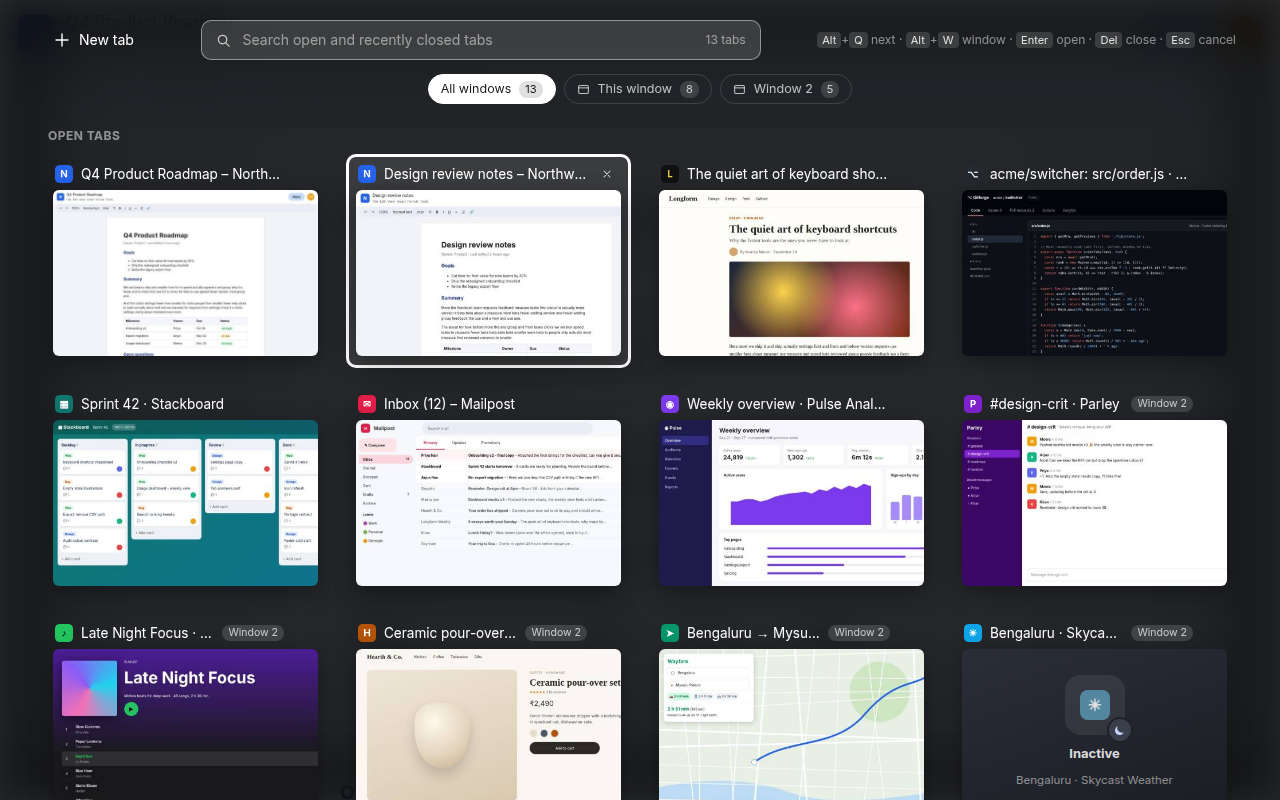
https://chromewebstore.google.com/detail/edjglhlabdmgacehahfdjjffapbkaekk?utm_source=item-share-cb
chrome://, the Web Store) it opens in a small popup window instead.Current: 1.3.2 (no shortcut changes since 1.3.1). Older versions are kept below under "Shortcut history".
| Keys | Action |
|---|---|
| Alt+Q / Alt+Shift+Q | Open (stays open), then next / previous tab |
| Alt+W | Cycle window filter |
| Arrows, Tab | Move selection |
| Enter or click | Switch to selected tab |
| Release Alt after pressing Q again | Switch to selected tab (Alt+Tab style) |
| Del / ⌘+⌫ (Mac) | Close selected tab |
| Esc or click outside | Clear search / close |
On macOS, Alt is Option. To change the shortcut, go to chrome://extensions/shortcuts.
1.3.1 (30 Sep 2026)
1.3.0 (27 Sep 2026, first release)
| Keys | Action |
|---|---|
| Alt+Q / Alt+Shift+Q | Open, next / previous tab |
| Alt+W | Cycle window filter |
| Arrows, Tab | Move selection |
| Enter or release Alt | Switch to selected tab |
| Del | Close selected tab |
| Esc | Clear search / close |
1.3.2 (2 Oct 2026, amended 4 Oct before submission): tab groups as sections, with closed groups kept until you remove them (optional tabGroups permission, off until you switch it on); a first-run notice and tour; a review reminder (a quiet banner a few times, one dialog much later; it offers a review and a feedback link whatever your answer); previews are saved on disk and survive a browser restart; a preview is kept while a tab with that page is open (7 days after it closes); "Sleeping" only for tabs Chrome really put to sleep while you browse, so tabs restored after a restart show their preview normally; a 7-day closed-tab list (200 tabs, beyond Chrome's 25-item limit) that search can reach; no more nonsense time on closed windows. Full notes: releases/v1.3.2/release-notes.md.
1.3.1 (30 Sep 2026): tap-to-open; recently closed limited to the last 4 hours (max 8, max 2 windows); site and window shown on every card, window numbers that stay put; "Inactive" now means unloaded by Chrome, with "No preview yet" for uncaptured tabs; Mac fixes (Option+W, Option+key typing, ⌘⌫); Buy Me a Coffee button. Full notes: releases/v1.3.1/release-notes.md.
1.3.0 (27 Sep 2026): first public release. Live previews, hold-and-release switching, search, window filter, recently closed, close from the switcher, popup fallback. Notes: releases/v1.3.0/release-notes.md.
chrome://extensions and turn on Developer mode.extension/ folder.Requires Chrome 116+.
extension/            the extension source (what gets zipped and published)
releases/v<version>/  per-release artefacts: submitted zip, store listing text, screenshots, promo tiles, notes
tools/screenshots/    scripts that regenerate the store screenshots with fictional demo sites
PRIVACY.md            privacy policy (linked from the Chrome Web Store)
background.js (service worker) tracks tab usage order, captures a downscaled screenshot whenever a tab becomes visible, and opens the switcher.switcher.html/js/css) is injected as a full-page iframe over the current tab. On pages where that's impossible, it opens in a popup window.hotkey.js is a tiny content-script fallback for Alt+Q, in case Chrome's shortcut is taken by another app.chrome.storage.local (on disk, keyed by URL; kept while any open tab has that URL, else 7 days; max 300 / ~6 MB). Everything else (tab order, one-time tokens) lives in chrome.storage.session (memory only).Alt+Tab for Chrome tabs. Press Alt+Q to see live previews of every open tab, search them, jump between windows, and reopen the ones you just closed.
https://chromewebstore.google.com/detail/edjglhlabdmgacehahfdjjffapbkaekk?utm_source=item-share-cb
chrome://, the Web Store) it opens in a small popup window instead.Current: 1.3.2 (no shortcut changes since 1.3.1). Older versions are kept below under "Shortcut history".
| Keys | Action |
|---|---|
| Alt+Q / Alt+Shift+Q | Open (stays open), then next / previous tab |
| Alt+W | Cycle window filter |
| Arrows, Tab | Move selection |
| Enter or click | Switch to selected tab |
| Release Alt after pressing Q again | Switch to selected tab (Alt+Tab style) |
| Del / ⌘+⌫ (Mac) | Close selected tab |
| Esc or click outside | Clear search / close |
On macOS, Alt is Option. To change the shortcut, go to chrome://extensions/shortcuts.
1.3.1 (30 Sep 2026)
1.3.0 (27 Sep 2026, first release)
| Keys | Action |
|---|---|
| Alt+Q / Alt+Shift+Q | Open, next / previous tab |
| Alt+W | Cycle window filter |
| Arrows, Tab | Move selection |
| Enter or release Alt | Switch to selected tab |
| Del | Close selected tab |
| Esc | Clear search / close |
1.3.2 (2 Oct 2026, amended 4 Oct before submission): tab groups as sections, with closed groups kept until you remove them (optional tabGroups permission, off until you switch it on); a first-run notice and tour; a review reminder (a quiet banner a few times, one dialog much later; it offers a review and a feedback link whatever your answer); previews are saved on disk and survive a browser restart; a preview is kept while a tab with that page is open (7 days after it closes); "Sleeping" only for tabs Chrome really put to sleep while you browse, so tabs restored after a restart show their preview normally; a 7-day closed-tab list (200 tabs, beyond Chrome's 25-item limit) that search can reach; no more nonsense time on closed windows. Full notes: releases/v1.3.2/release-notes.md.
1.3.1 (30 Sep 2026): tap-to-open; recently closed limited to the last 4 hours (max 8, max 2 windows); site and window shown on every card, window numbers that stay put; "Inactive" now means unloaded by Chrome, with "No preview yet" for uncaptured tabs; Mac fixes (Option+W, Option+key typing, ⌘⌫); Buy Me a Coffee button. Full notes: releases/v1.3.1/release-notes.md.
1.3.0 (27 Sep 2026): first public release. Live previews, hold-and-release switching, search, window filter, recently closed, close from the switcher, popup fallback. Notes: releases/v1.3.0/release-notes.md.
chrome://extensions and turn on Developer mode.extension/ folder.Requires Chrome 116+.
extension/            the extension source (what gets zipped and published)
releases/v<version>/  per-release artefacts: submitted zip, store listing text, screenshots, promo tiles, notes
tools/screenshots/    scripts that regenerate the store screenshots with fictional demo sites
PRIVACY.md            privacy policy (linked from the Chrome Web Store)
background.js (service worker) tracks tab usage order, captures a downscaled screenshot whenever a tab becomes visible, and opens the switcher.switcher.html/js/css) is injected as a full-page iframe over the current tab. On pages where that's impossible, it opens in a popup window.hotkey.js is a tiny content-script fallback for Alt+Q, in case Chrome's shortcut is taken by another app.chrome.storage.local (on disk, keyed by URL; kept while any open tab has that URL, else 7 days; max 300 / ~6 MB). Everything else (tab order, one-time tokens) lives in chrome.storage.session (memory only).


