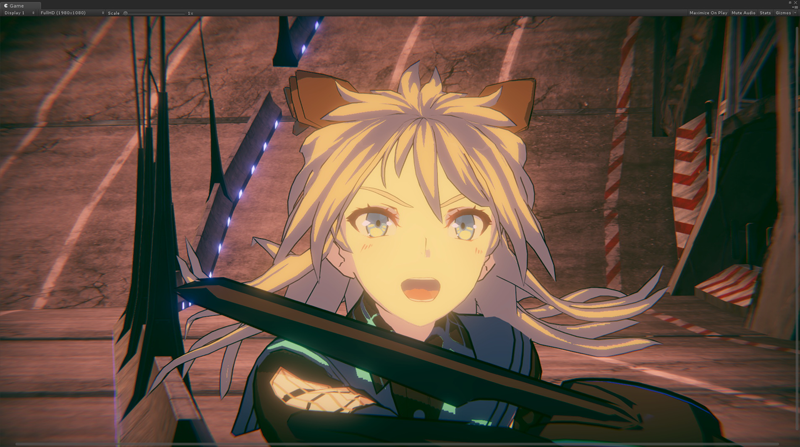
The Unity Toon Shader (UTS3) is a set of toon shaders designed to meet the needs of creators working on cel-shaded 3D-CG animations.
The Unity Toon Shader is compatible with all render pipelines: the Built-in Render Pipeline, the Universal Render Pipeline (URP), and the High Definition Render Pipeline (HDRP). However, there are some differences in the features supported by different render pipelines. Please refer to Feature Difference for details about each render pipeline.
Unity Toon Shader is the successor to Unity-chan Toon Shader ver 2.0 (UTS2), which was popular for years in games and animations. However, UTS2 was designed solely for the Built-in Render Pipeline, consisted of many different shaders, could not be installed through the Package Manager window, and had a different license from other Unity software.
In animation production, color specialists specify detailed color designs for every scene. UTS can apply these color specifications as written in the design instructions. UTS allows users to apply specific colors for light and shadow areas regardless of the actual light colors in the scene. This feature is essential for cel-shaded character designs. UTS provides detailed control over whether the directional light color affects materials.
Typical color design instruction example:
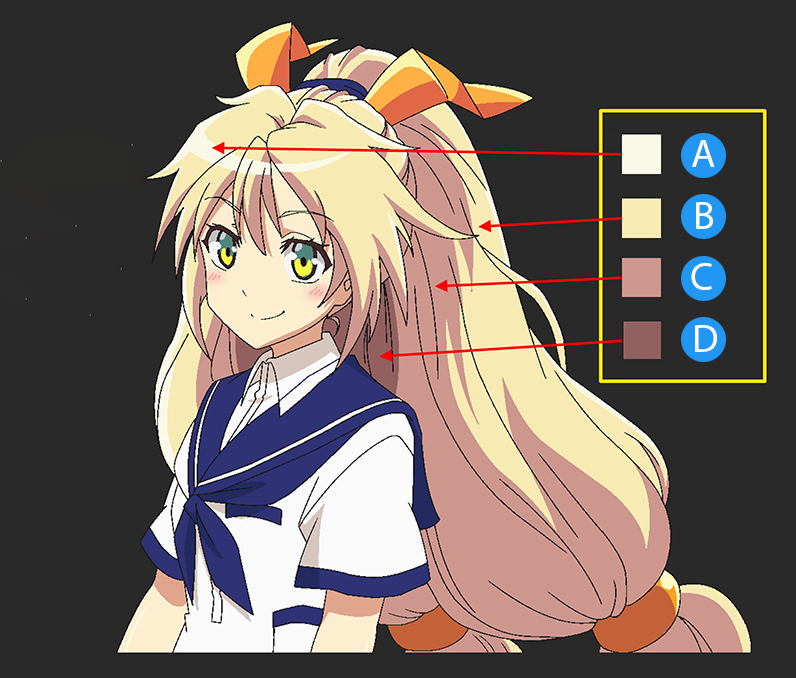
Three basic colors—base color, 1st shading color, and 2nd shading color—play key roles in character design with the Unity Toon Shader. Please refer to Three Color Map and Control Map Settings for more information.
Besides the three basic colors, the Unity Toon Shader provides a wide variety of features such as Highlight, Rim Light, Emission, Angel Ring, Material Capture (MatCap), and some special maps.
To get started with cel-shading, see Getting Started.
The Unity Toon Shader supports 3D projects across the Built-in Render Pipeline, Universal Render Pipeline (URP), and High Definition Render Pipeline (HDRP).
For 2D projects, starting with Unity 6.3, the Unity Toon Shader partially supports URP by rendering 3D GameObjects in 2D URP scenes.
Feature availability varies between pipelines and between 3D/2D projects.
Please review the feature differences to confirm which features are supported in your target pipeline:
The use of linear color space is strongly recommended.
This repository utilizes symbolic links to share code across multiple projects. On Windows 10 or later, symbolic link creation is restricted by default for regular users, which can lead to issues when working with this repository.
To resolve this, follow the steps below to enable symbolic link creation and configure Git appropriately.
secpol.msc on Windows Command Prompt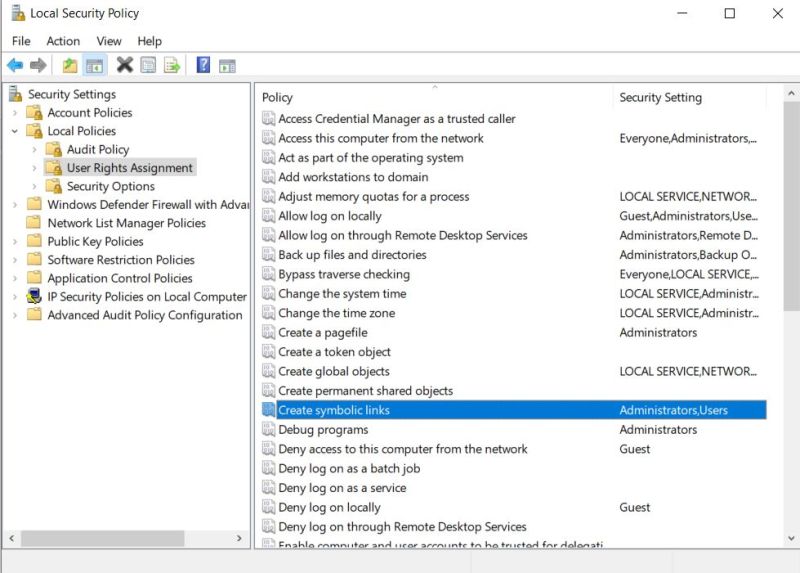
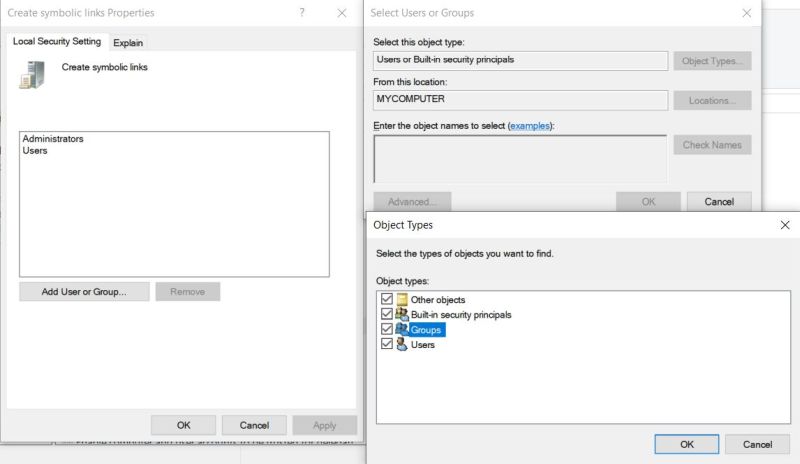
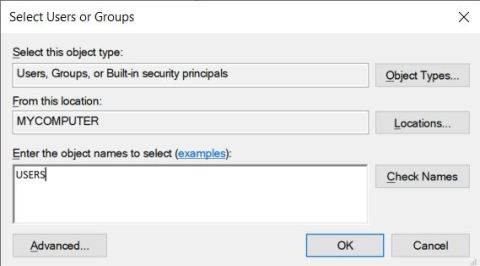
git config --local core.symlinks true
git config --global core.symlinks true
com.unity.toonshader/Samples~Auto-generated on Mon Apr 6 13:20:41 UTC 2026
958 followers · starred Nov 2025
30 followers · starred Sep 2021
194 followers · starred Sep 2022
The Unity Toon Shader (UTS3) is a set of toon shaders designed to meet the needs of creators working on cel-shaded 3D-CG animations.
The Unity Toon Shader is compatible with all render pipelines: the Built-in Render Pipeline, the Universal Render Pipeline (URP), and the High Definition Render Pipeline (HDRP). However, there are some differences in the features supported by different render pipelines. Please refer to Feature Difference for details about each render pipeline.
Unity Toon Shader is the successor to Unity-chan Toon Shader ver 2.0 (UTS2), which was popular for years in games and animations. However, UTS2 was designed solely for the Built-in Render Pipeline, consisted of many different shaders, could not be installed through the Package Manager window, and had a different license from other Unity software.
In animation production, color specialists specify detailed color designs for every scene. UTS can apply these color specifications as written in the design instructions. UTS allows users to apply specific colors for light and shadow areas regardless of the actual light colors in the scene. This feature is essential for cel-shaded character designs. UTS provides detailed control over whether the directional light color affects materials.
Typical color design instruction example:
Three basic colors—base color, 1st shading color, and 2nd shading color—play key roles in character design with the Unity Toon Shader. Please refer to Three Color Map and Control Map Settings for more information.
Besides the three basic colors, the Unity Toon Shader provides a wide variety of features such as Highlight, Rim Light, Emission, Angel Ring, Material Capture (MatCap), and some special maps.
To get started with cel-shading, see Getting Started.
The Unity Toon Shader supports 3D projects across the Built-in Render Pipeline, Universal Render Pipeline (URP), and High Definition Render Pipeline (HDRP).
For 2D projects, starting with Unity 6.3, the Unity Toon Shader partially supports URP by rendering 3D GameObjects in 2D URP scenes.
Feature availability varies between pipelines and between 3D/2D projects.
Please review the feature differences to confirm which features are supported in your target pipeline:
The use of linear color space is strongly recommended.
This repository utilizes symbolic links to share code across multiple projects. On Windows 10 or later, symbolic link creation is restricted by default for regular users, which can lead to issues when working with this repository.
To resolve this, follow the steps below to enable symbolic link creation and configure Git appropriately.
secpol.msc on Windows Command Prompt
git config --local core.symlinks true
git config --global core.symlinks true
com.unity.toonshader/Samples~Auto-generated on Mon Apr 6 13:20:41 UTC 2026
958 followers · starred Nov 2025
30 followers · starred Sep 2021
194 followers · starred Sep 2022