
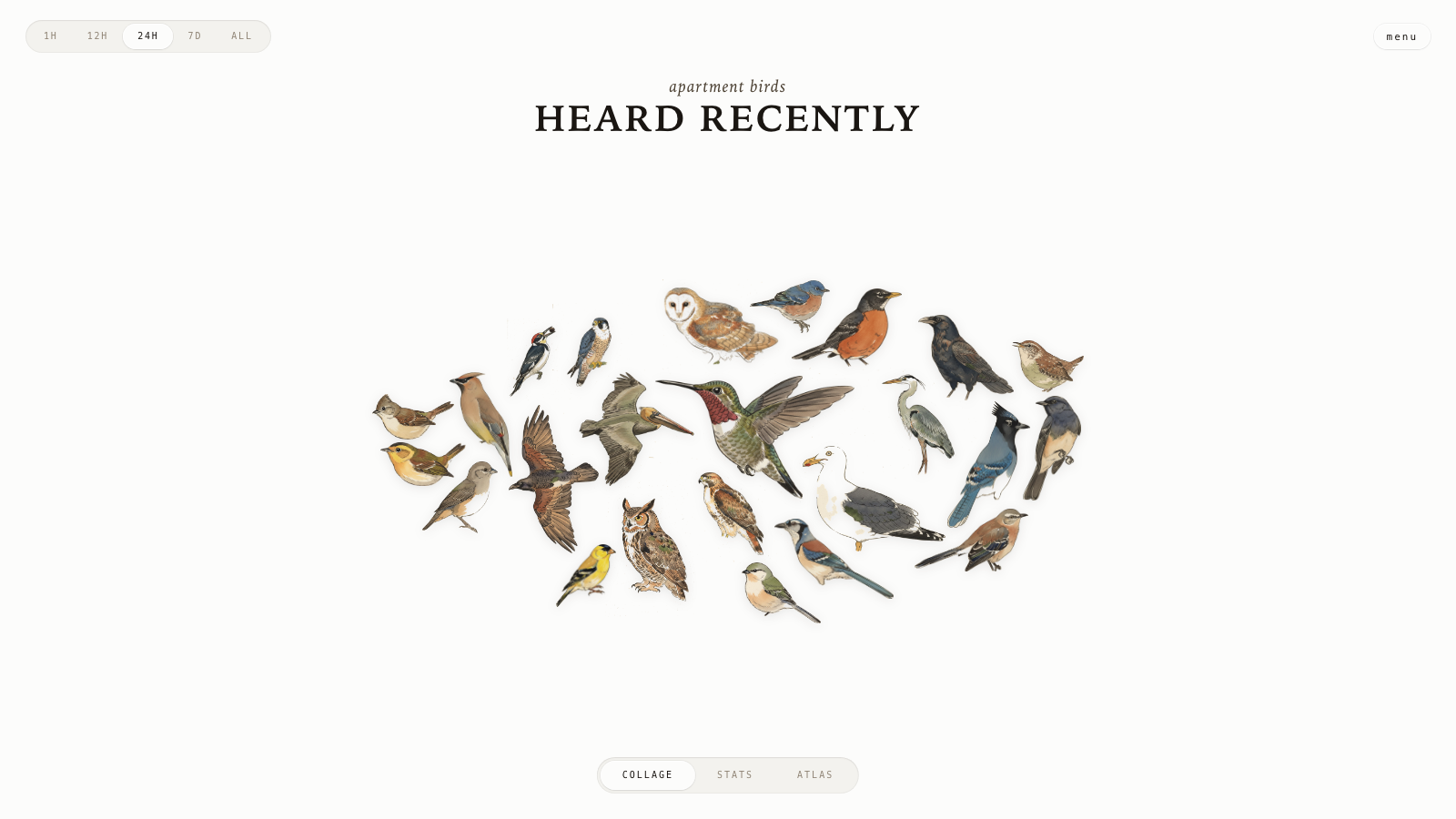
A live bird collage from your window.
567
stars
3,088
commits
JavaScript
primary language
Sep 6, 2026
updated
README
AvianVisitors
A live bird collage from your window.
See it running at bird.onethreenine.net.
BOM
| Qty | Description | Price | Link | Notes |
|---|---|---|---|---|
| 1 | Raspberry Pi (4B / 5 / 3A+ / Zero 2W) | ~$25-80 | Amazon | See note for 512 MB Pis |
| 1 | Micro SD Card (≥32 GB) | ~$10 | Amazon | |
| 1 | USB lavalier microphone | $16.95 | Amazon | |
| 1 | Pi power supply | ~$10 | - |
Optional: a Gemini API key to restyle illustrations, an eBird API key to filter species by region.
Kits
I offer the bird mic and the wall frame as separate electronics kits. I put up a store for some of my open-source projects and will soon be able to offer kits cheaper than buying all the components individually, once I start buying in bulk.
1. Flash the SD card
Use Raspberry Pi Imager. Pick Raspberry Pi OS Lite (64-bit). In the customisation dialog set:
- Username
- WiFi SSID + password
- Hostname:
birdnet - Enable SSH with password auth
Plug the USB mic into the Pi. Place the capsule in a window or mount it outside. Boot.
2. Run the installer
Installer assumes passwordless sudo (Raspberry Pi OS Lite default - if you've tightened it, run sudo raspi-config -> System Options -> restore the default first).
ssh <your-username>@birdnet.local
curl -s https://raw.githubusercontent.com/Twarner491/AvianVisitors/avian-visitors/newinstaller.sh | bash
Clones this fork, installs BirdNET-Pi, symlinks the AvianVisitors overlay into the Caddy web root. Takes 20-40 minutes. Reboots when done.
Collage: http://birdnet.local/. Stock BirdNET-Pi UI: http://birdnet.local/index.php. The menu button in the top right opens an admin overlay with Settings, System, Logs, and Tools.
Stock BirdNET-Pi pages still render, but privileged legacy controls are not enabled. Use the Avian Visitors menu for the station controls it exposes, and SSH for remaining maintenance.
Optional Google Drive backups are set up under Settings → Nightly Drive backup. Local cleanup stays unavailable until an archive run has been verified.
Local admin access
Optional password protection for local administrator controls can be enabled in Settings. Public bird pages remain available without signing in, while live audio is unavailable when protection is on.
If no password is configured, or the state is missing or invalid, recover it from an SSH session:
sudo /usr/local/sbin/avian-admin-control password-reset
The command prompts privately for a new password. Return to Settings after it finishes.
Educators mode
Educators mode is an optional profile for the BirdNET-Pi website. It adds a fifth menu page for starting, pausing, organizing, and reviewing listening periods. Enable it after installation over SSH:
sudo /usr/local/sbin/avian-educators enable
New stations can also install with the profile enabled:
curl -fsSL https://raw.githubusercontent.com/Twarner491/AvianVisitors/avian-visitors/newinstaller.sh | bash -s -- --educators
Listening periods scope the Collage, Stats, Atlas, and available detection clips without copying or protecting audio files from normal retention. Saved period and folder exports require a direct local connection. See the Educators guide for the full workflow and privacy details.
Updating an existing station
For the first v1 update, keep the existing checkout and run:
upgrade=$(mktemp "$HOME/avian-v1-upgrade.XXXXXX")
curl -fsSL https://raw.githubusercontent.com/Twarner491/AvianVisitors/avian-visitors/scripts/bootstrap_v1.sh -o "$upgrade"
sudo bash "$upgrade"
rm -f "$upgrade"
After v1, use Tools → Pull latest or run:
cd ~/BirdNET-Pi
./scripts/update_birdnet.sh
The updater keeps generated mask data and stops if tracked files have local edits. If its service setup needs repair, use Tools → Reinstall services or run:
cd ~/BirdNET-Pi
./scripts/reinstall_services.sh
3. (Optional) Restyle the illustrations
The repo ships with 666 bundled illustrations (333 species, perched + flight). To restyle them or generate a set for your own region:
pip install -r ~/BirdNET-Pi/avian/scripts/requirements.txt
export GEMINI_API_KEY='your-key'  # image generation requires billing enabled

# generate on a cream ground, cut the ground off, rebuild the collage masks
python3 ~/BirdNET-Pi/avian/scripts/pregen.py --labels ~/BirdNET-Pi/model/labels.txt --force
python3 ~/BirdNET-Pi/avian/scripts/cutout.py
python3 ~/BirdNET-Pi/avian/scripts/build_masks.py
On a Pi with 4 GB of RAM or less, add --model u2net to the cutout.py command; the default model may be OOM-killed.
Filter to your region with --ebird-region US-CA (needs EBIRD_API_KEY). The full pipeline, prompt, reference images, and per-species tuning live in avian/scripts/README.md. Style lives in prompt.template.md.
See illustration bundles for pregenerated bundles shared by other folks in the community, or share your own for others to use!
4. (Optional) Forward off your LAN
See avian/forwarding/ for three independent recipes:
- Cloudflare Tunnel for a public HTTPS URL.
- Home Assistant REST sensor that exposes the latest detection.
- MQTT bridge that publishes every new detection.
Repo layout
avian/                  # everything we add to BirdNET-Pi
├── frontend/           # static HTML/JS/CSS for the collage
├── assets/             # 666 bundled illustrations + photo-cutout fallbacks
├── api/                # PHP shims served by BirdNET-Pi's PHP-FPM
├── scripts/            # generate -> cutout -> masks pipeline + prompt
└── forwarding/         # optional HA / MQTT / Cloudflare configs
frame/                  # optional e-ink wall display
Everything outside avian/ and frame/ is upstream BirdNET-Pi.
Wall frame
An optional e-ink frame puts the bird collage on a panel by your window. Build it from frame/. It can run off your own BirdNET mic, from BirdWeather around a ZIP code, or from one public BirdWeather station with frame/install.sh --station-id <ID>.
License
CC-BY-NC-SA-4.0, inherited from BirdNET-Pi. Non-commercial use only. See the BirdNET-Pi README for full Cornell attribution.
Contributors
(top 30 of 69)


See what people are saying
Similar repos


Languages
JavaScript
36.4%
PHP
35.2%
Shell
14.1%
Python
7.2%
CSS
6.2%
A live bird collage from your window.
567
stars
3,088
commits
JavaScript
primary language
Sep 6, 2026
updated
README
AvianVisitors
A live bird collage from your window.
See it running at bird.onethreenine.net.
BOM
| Qty | Description | Price | Link | Notes |
|---|---|---|---|---|
| 1 | Raspberry Pi (4B / 5 / 3A+ / Zero 2W) | ~$25-80 | Amazon | See note for 512 MB Pis |
| 1 | Micro SD Card (≥32 GB) | ~$10 | Amazon | |
| 1 | USB lavalier microphone | $16.95 | Amazon | |
| 1 | Pi power supply | ~$10 | - |
Optional: a Gemini API key to restyle illustrations, an eBird API key to filter species by region.
Kits
I offer the bird mic and the wall frame as separate electronics kits. I put up a store for some of my open-source projects and will soon be able to offer kits cheaper than buying all the components individually, once I start buying in bulk.
1. Flash the SD card
Use Raspberry Pi Imager. Pick Raspberry Pi OS Lite (64-bit). In the customisation dialog set:
- Username
- WiFi SSID + password
- Hostname:
birdnet - Enable SSH with password auth
Plug the USB mic into the Pi. Place the capsule in a window or mount it outside. Boot.
2. Run the installer
Installer assumes passwordless sudo (Raspberry Pi OS Lite default - if you've tightened it, run sudo raspi-config -> System Options -> restore the default first).
ssh <your-username>@birdnet.local
curl -s https://raw.githubusercontent.com/Twarner491/AvianVisitors/avian-visitors/newinstaller.sh | bash
Clones this fork, installs BirdNET-Pi, symlinks the AvianVisitors overlay into the Caddy web root. Takes 20-40 minutes. Reboots when done.
Collage: http://birdnet.local/. Stock BirdNET-Pi UI: http://birdnet.local/index.php. The menu button in the top right opens an admin overlay with Settings, System, Logs, and Tools.
Stock BirdNET-Pi pages still render, but privileged legacy controls are not enabled. Use the Avian Visitors menu for the station controls it exposes, and SSH for remaining maintenance.
Optional Google Drive backups are set up under Settings → Nightly Drive backup. Local cleanup stays unavailable until an archive run has been verified.
Local admin access
Optional password protection for local administrator controls can be enabled in Settings. Public bird pages remain available without signing in, while live audio is unavailable when protection is on.
If no password is configured, or the state is missing or invalid, recover it from an SSH session:
sudo /usr/local/sbin/avian-admin-control password-reset
The command prompts privately for a new password. Return to Settings after it finishes.
Educators mode
Educators mode is an optional profile for the BirdNET-Pi website. It adds a fifth menu page for starting, pausing, organizing, and reviewing listening periods. Enable it after installation over SSH:
sudo /usr/local/sbin/avian-educators enable
New stations can also install with the profile enabled:
curl -fsSL https://raw.githubusercontent.com/Twarner491/AvianVisitors/avian-visitors/newinstaller.sh | bash -s -- --educators
Listening periods scope the Collage, Stats, Atlas, and available detection clips without copying or protecting audio files from normal retention. Saved period and folder exports require a direct local connection. See the Educators guide for the full workflow and privacy details.
Updating an existing station
For the first v1 update, keep the existing checkout and run:
upgrade=$(mktemp "$HOME/avian-v1-upgrade.XXXXXX")
curl -fsSL https://raw.githubusercontent.com/Twarner491/AvianVisitors/avian-visitors/scripts/bootstrap_v1.sh -o "$upgrade"
sudo bash "$upgrade"
rm -f "$upgrade"
After v1, use Tools → Pull latest or run:
cd ~/BirdNET-Pi
./scripts/update_birdnet.sh
The updater keeps generated mask data and stops if tracked files have local edits. If its service setup needs repair, use Tools → Reinstall services or run:
cd ~/BirdNET-Pi
./scripts/reinstall_services.sh
3. (Optional) Restyle the illustrations
The repo ships with 666 bundled illustrations (333 species, perched + flight). To restyle them or generate a set for your own region:
pip install -r ~/BirdNET-Pi/avian/scripts/requirements.txt
export GEMINI_API_KEY='your-key'  # image generation requires billing enabled

# generate on a cream ground, cut the ground off, rebuild the collage masks
python3 ~/BirdNET-Pi/avian/scripts/pregen.py --labels ~/BirdNET-Pi/model/labels.txt --force
python3 ~/BirdNET-Pi/avian/scripts/cutout.py
python3 ~/BirdNET-Pi/avian/scripts/build_masks.py
On a Pi with 4 GB of RAM or less, add --model u2net to the cutout.py command; the default model may be OOM-killed.
Filter to your region with --ebird-region US-CA (needs EBIRD_API_KEY). The full pipeline, prompt, reference images, and per-species tuning live in avian/scripts/README.md. Style lives in prompt.template.md.
See illustration bundles for pregenerated bundles shared by other folks in the community, or share your own for others to use!
4. (Optional) Forward off your LAN
See avian/forwarding/ for three independent recipes:
- Cloudflare Tunnel for a public HTTPS URL.
- Home Assistant REST sensor that exposes the latest detection.
- MQTT bridge that publishes every new detection.
Repo layout
avian/                  # everything we add to BirdNET-Pi
├── frontend/           # static HTML/JS/CSS for the collage
├── assets/             # 666 bundled illustrations + photo-cutout fallbacks
├── api/                # PHP shims served by BirdNET-Pi's PHP-FPM
├── scripts/            # generate -> cutout -> masks pipeline + prompt
└── forwarding/         # optional HA / MQTT / Cloudflare configs
frame/                  # optional e-ink wall display
Everything outside avian/ and frame/ is upstream BirdNET-Pi.
Wall frame
An optional e-ink frame puts the bird collage on a panel by your window. Build it from frame/. It can run off your own BirdNET mic, from BirdWeather around a ZIP code, or from one public BirdWeather station with frame/install.sh --station-id <ID>.
License
CC-BY-NC-SA-4.0, inherited from BirdNET-Pi. Non-commercial use only. See the BirdNET-Pi README for full Cornell attribution.
See what people are saying
Similar repos
Contributors
(top 30 of 69)
Languages
JavaScript
36.4%
PHP
35.2%
Shell
14.1%
Python
7.2%
CSS
6.2%