Perfect Implementation of Diffusion Pipe in Comfyui
Python
69
117 commits
updated Jan 20, 2026

Diffusion-Pipe In ComfyUI custom nodes is a powerful extension plugin that provides complete Diffusion model training and fine-tuning functionality for ComfyUI. This project allows users to configure and launch training for various advanced AI models through ComfyUI's graphical interface, supporting both LoRA and full fine-tuning, covering the most popular image generation and video generation models.
Video Demo: https://www.bilibili.com/video/BV1CRk9BYErw/?vd_source=7fd137e57a445e84bd9ffea9b632c98d
20260117: flux2 support, and follow the super huge update of the original project,deepspeed updated,comfyui submodules updated
20260103: add qwen2512 support, same as qwen_image
20260102: qwen2511 support, supports both Diffusers and ComfyUI format models
20251231, Zimage FP8 Comfy format training, supported by hunyuan-video_15 model.
20251130: Z-Image support, supports both Diffusers and ComfyUI format models
You need to download the latest diffusers development version to support training, e.g.:
pip install git+https://github.com/huggingface/diffusers
Z-Image-Turbo
merge_adapters = ['/data2/imagegen_models/comfyui-models/zimage_turbo_training_adapter_v1.safetensors']
Model files support using the ComfyUI version.
Also supports diffusers
If training Z-Image-Turbo, make sure to merge the adapter.
Credit to Ostris and AI Toolkit for making this adapter.
Z-Image LoRAs are saved in ComfyUI format. This is different from Diffusers format.
20251026:support eval
20251030:Supports training Aura models
20251103:support MultiImage Edit (qwen2509)
20251105:support mask trainning,Fix off-by-one error in plots when using examples as x-axis,Allow using captions.json without tar files,add reset_optimizer flag,--reset_optimizer_params flag(Reset optimizer parameters, which allows resetting the optimizer during resuming training),Fix datasets issue,Cast to float16 in dataset caching to cut size on disk in half
Make sure you have ComfyUI on Linux or WSL2 system, refer to https://docs.comfy.org/installation/manual_install
ps: ComfyUI on WSL2 works so well that I even want to delete my ComfyUI on Windows
conda create -n comfyui_DP python=3.12
conda activate comfyui_DP
cd ~/comfy/ComfyUI/custom_nodes/
git clone --recurse-submodules https://github.com/TianDongL/Diffusion_pipe_in_ComfyUI.git
If you haven't installed submodules, follow these steps
If you don't do this step, training will not work
git submodule init
git submodule update
conda activate comfyui_DP
Here are the necessary dependencies for deepspeed, first install PyTorch. It is not listed in the requirements document because some GPUs sometimes require different versions of PyTorch or CUDA, and you may have to find a combination that suits your hardware.
pip install torch==2.7.1 torchvision==0.22.1 torchaudio==2.7.1 --index-url https://download.pytorch.org/whl/cu128
cd ~/comfy/ComfyUI/custom_nodes/Diffusion_pipe_in_ComfyUI
pip install -r requirements.txt
To get you started quickly, we provide pre-configured ComfyUI workflow files:
📋 Click to Import Complete Workflow
Drag this file into the ComfyUI interface to import the complete training workflow, including all necessary node configurations.
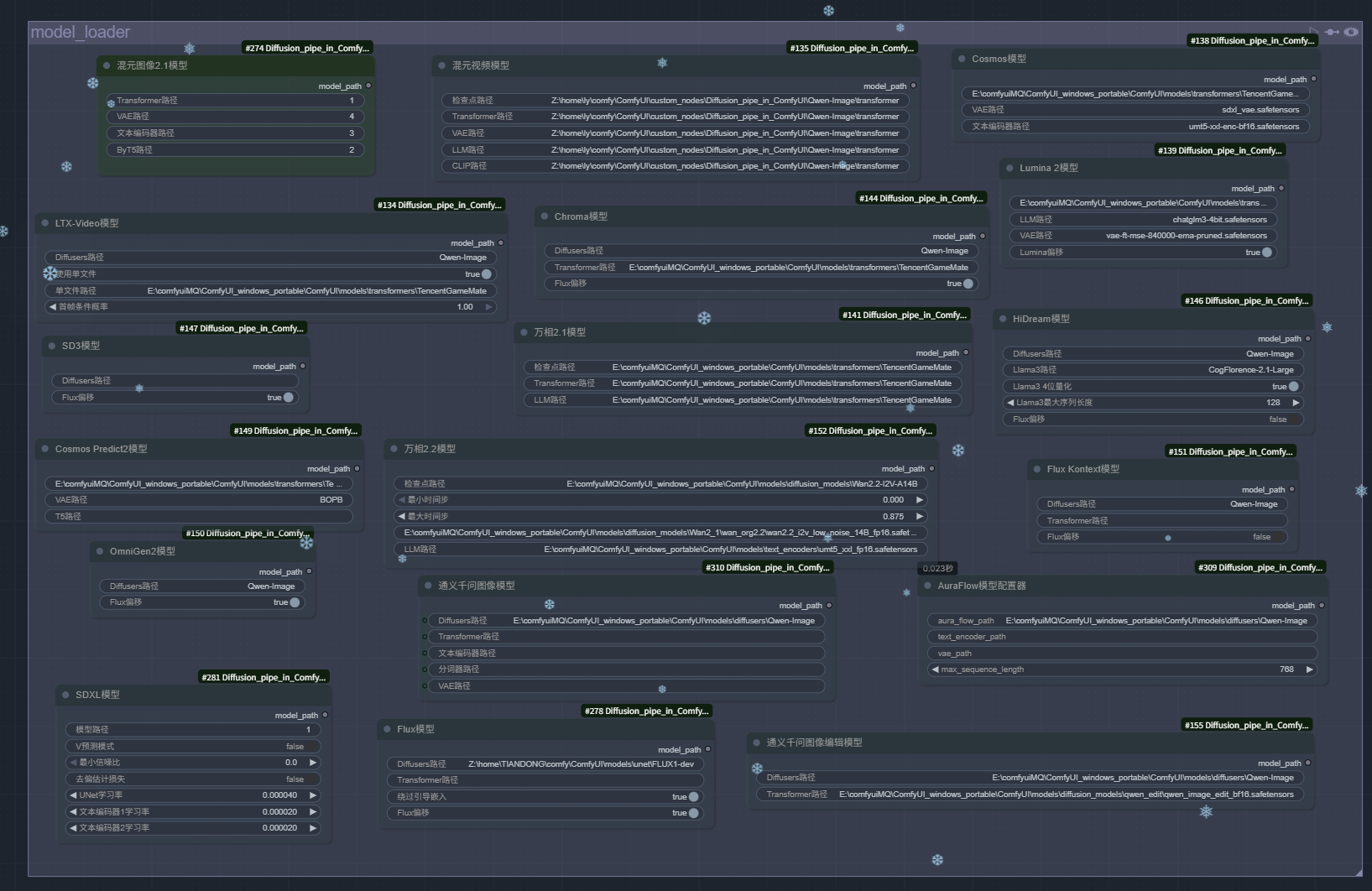 Models can be stored in the ComfyUI model directory
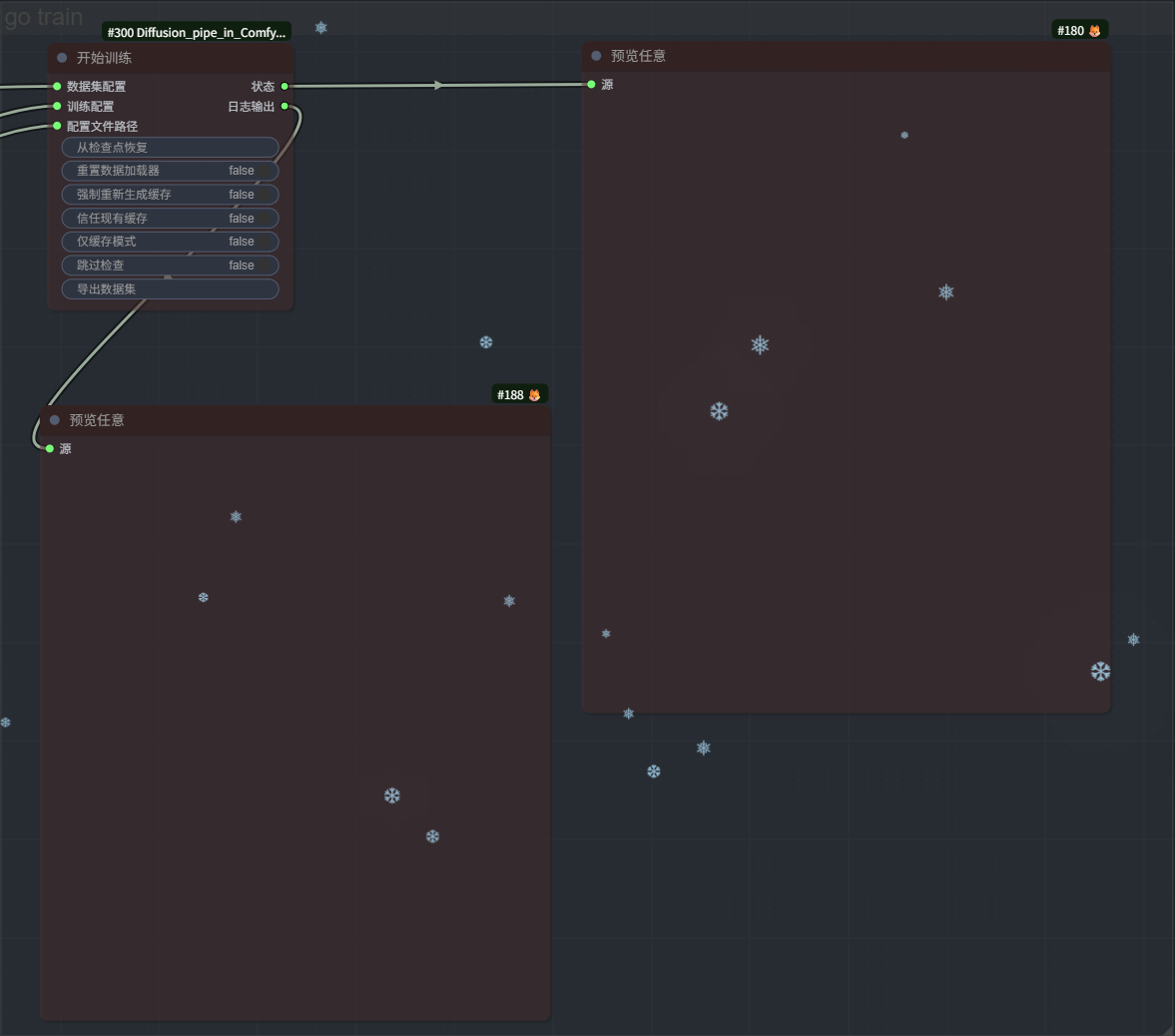 Disable Train node when debugging
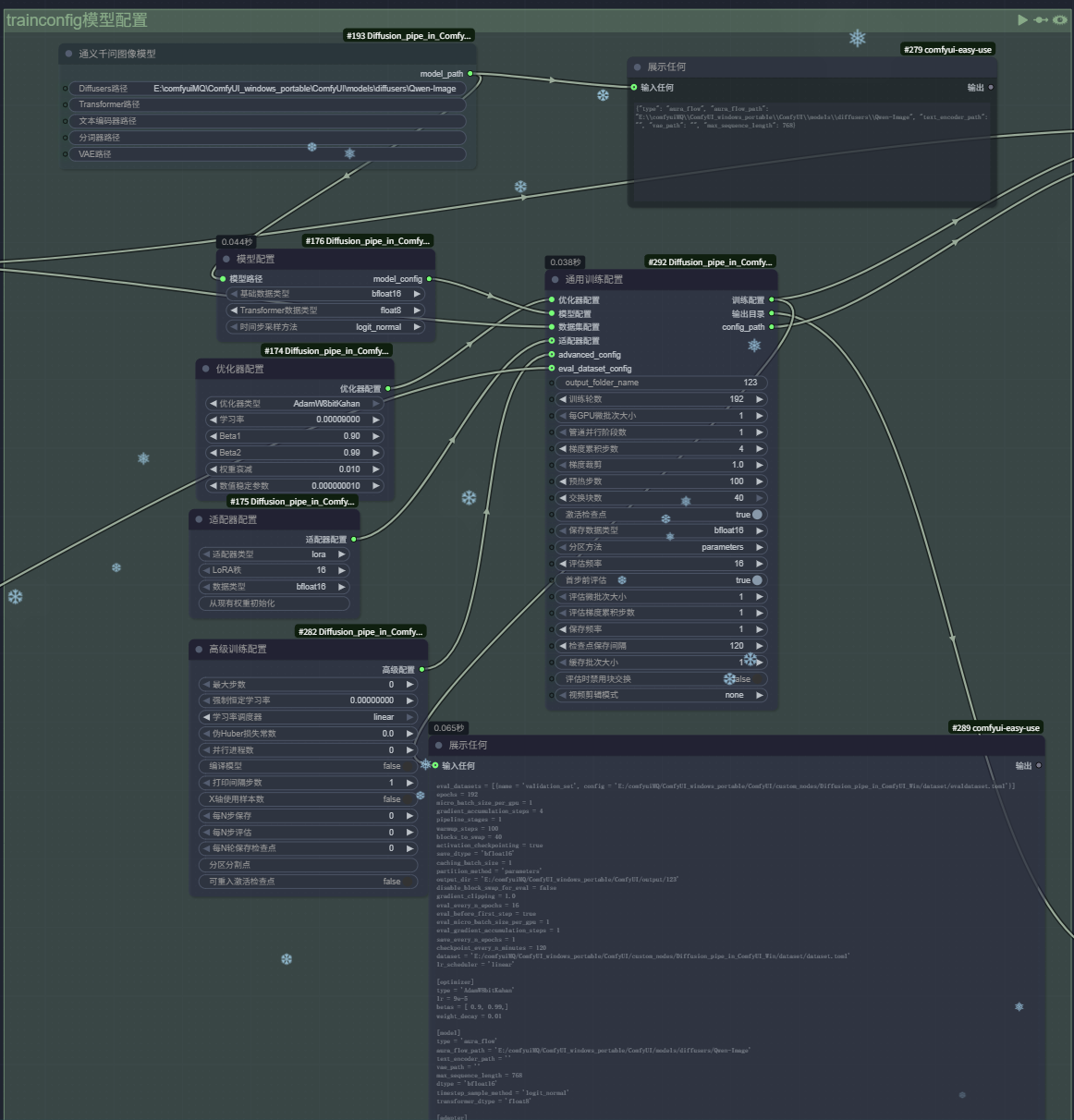 Models can be stored in the ComfyUI model directory
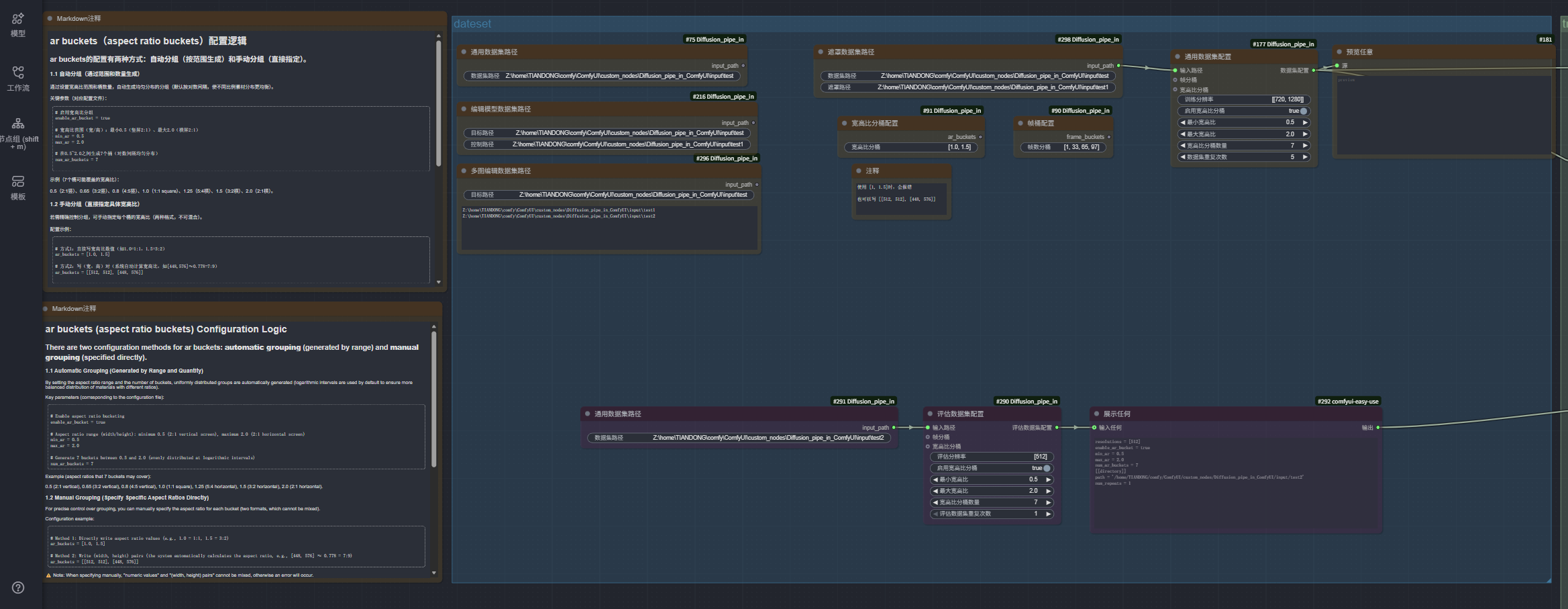 Dataset Configuration
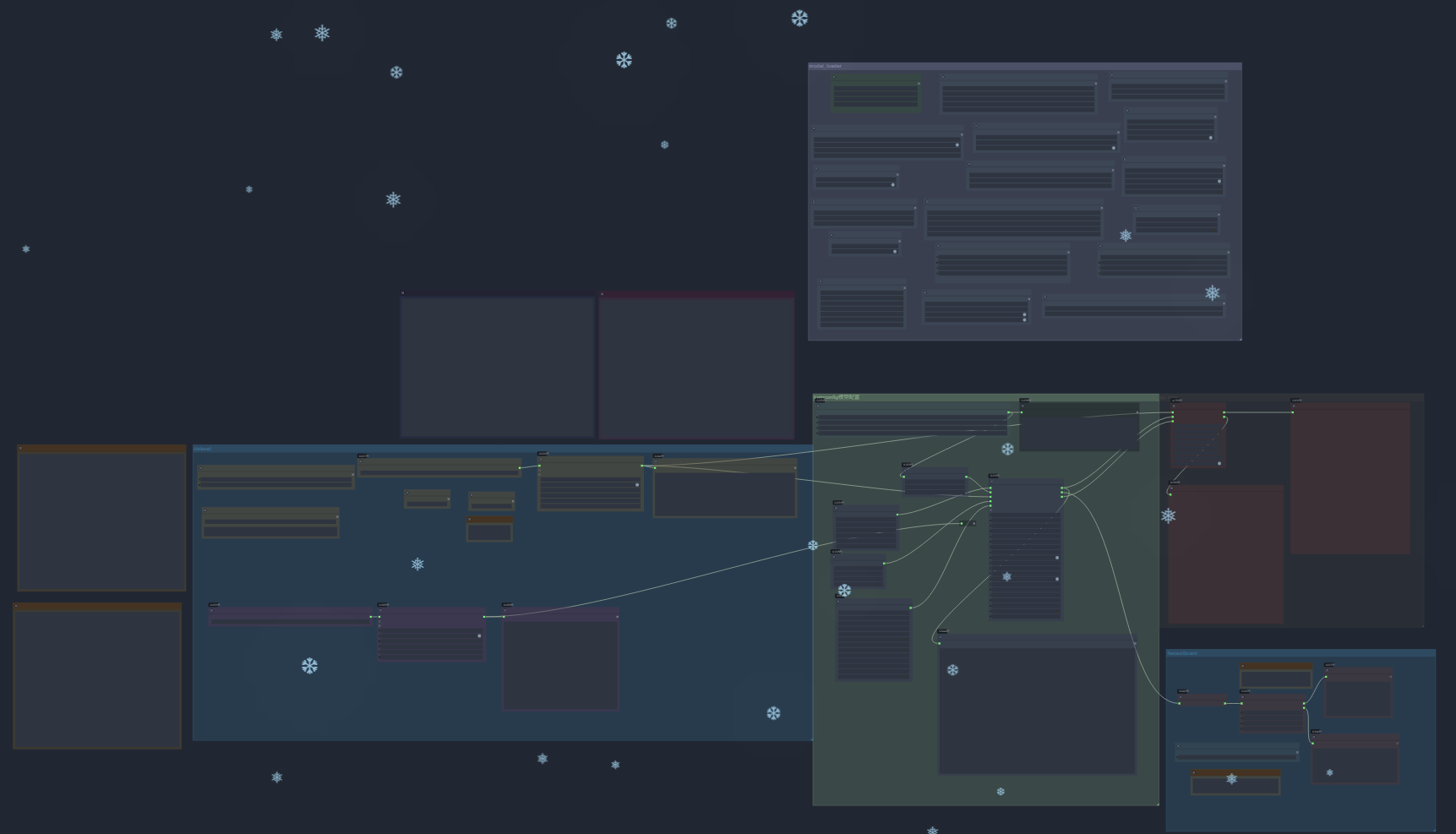 Workflow Overview
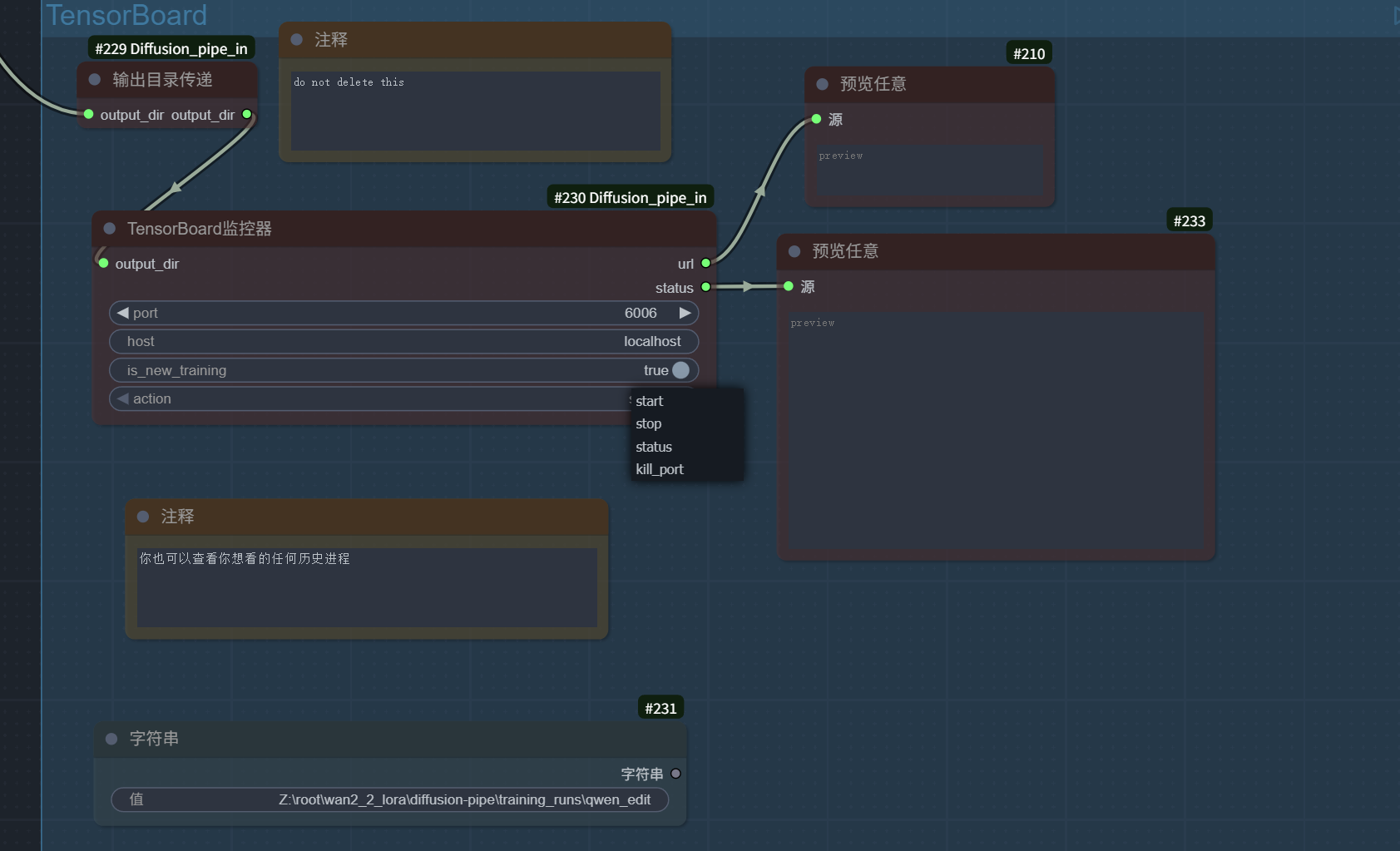 kill port will stop all monitoring processes on the current port
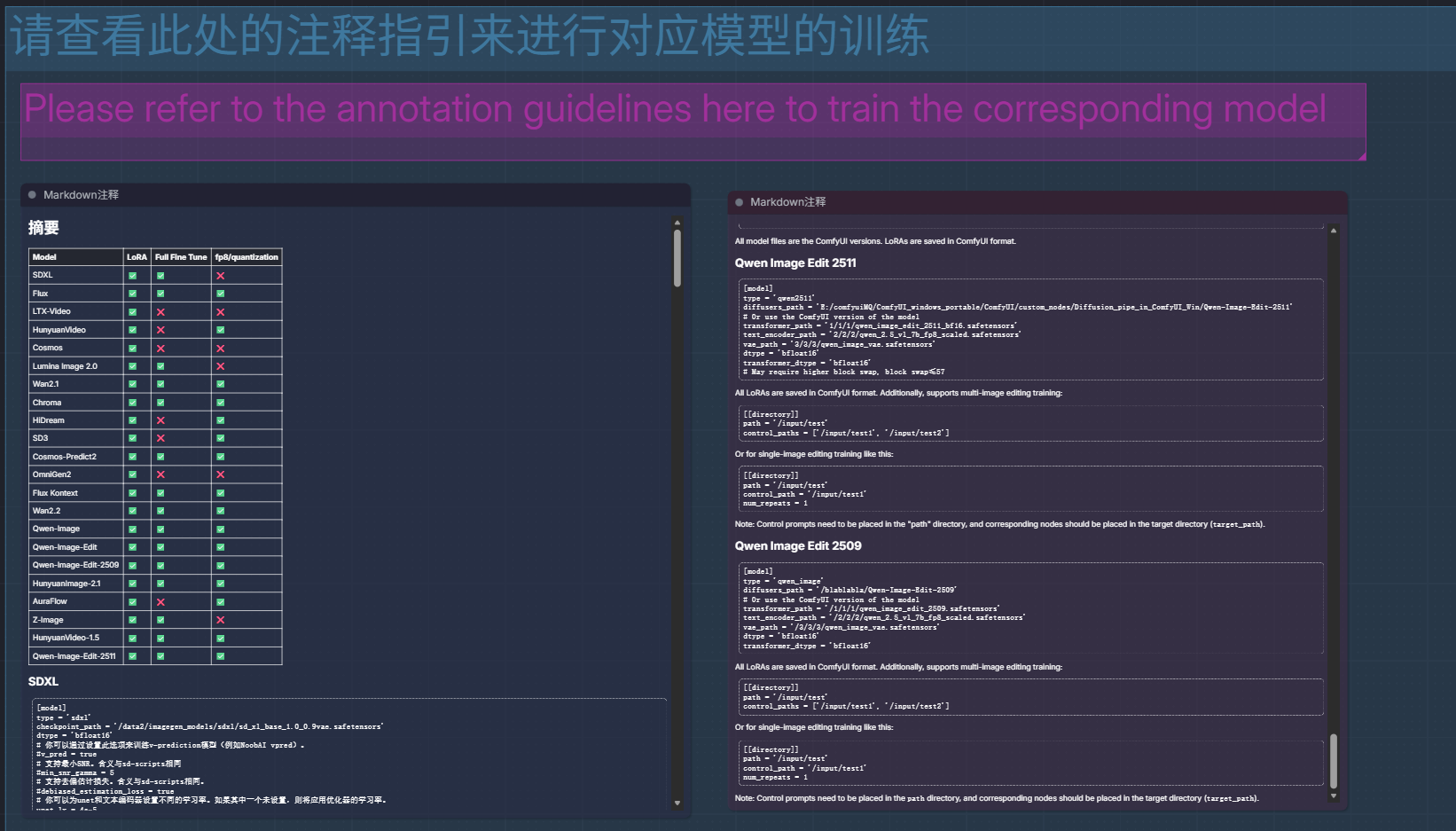
This plugin supports over 20 latest Diffusion models, including:
| Model | LoRA | Full Fine Tune | fp8/quantization |
|---|---|---|---|
| SDXL | ✅ | ✅ | ❌ |
| Flux | ✅ | ✅ | ✅ |
| LTX-Video | ✅ | ❌ | ❌ |
| HunyuanVideo | ✅ | ❌ | ✅ |
| Cosmos | ✅ | ❌ | ❌ |
| Lumina Image 2.0 | ✅ | ✅ | ❌ |
| Wan2.1 | ✅ | ✅ | ✅ |
| Chroma | ✅ | ✅ | ✅ |
| HiDream | ✅ | ❌ | ✅ |
| SD3 | ✅ | ❌ | ✅ |
| Cosmos-Predict2 | ✅ | ✅ | ✅ |
| OmniGen2 | ✅ | ❌ | ❌ |
| Flux Kontext | ✅ | ✅ | ✅ |
| Wan2.2 | ✅ | ✅ | ✅ |
| Qwen-Image | ✅ | ✅ | ✅ |
| Qwen-Image-Edit-2509 | ✅ | ✅ | ✅ |
| HunyuanImage-2.1 | ✅ | ✅ | ✅ |
| AuraFlow | ✅ | ❌ | ✅ |
| Z-Image | ✅ | ✅ | ❌ |
| HunyuanVideo-1.5 | ✅ | ✅ | ✅ |
| Qwen-Image-Edit-2511 | ✅ | ✅ | ✅ |
| Flux 2(both dev and klein) | ✅ | ✅ | ✅ |
This project is open source under the Apache License 2.0.
Issues and Pull Requests are welcome!
Thanks to the following projects and teams:
Perfect Implementation of Diffusion Pipe in Comfyui
Python
69
117 commits
updated Jan 20, 2026
Diffusion-Pipe In ComfyUI custom nodes is a powerful extension plugin that provides complete Diffusion model training and fine-tuning functionality for ComfyUI. This project allows users to configure and launch training for various advanced AI models through ComfyUI's graphical interface, supporting both LoRA and full fine-tuning, covering the most popular image generation and video generation models.
Video Demo: https://www.bilibili.com/video/BV1CRk9BYErw/?vd_source=7fd137e57a445e84bd9ffea9b632c98d
20260117: flux2 support, and follow the super huge update of the original project,deepspeed updated,comfyui submodules updated
20260103: add qwen2512 support, same as qwen_image
20260102: qwen2511 support, supports both Diffusers and ComfyUI format models
20251231, Zimage FP8 Comfy format training, supported by hunyuan-video_15 model.
20251130: Z-Image support, supports both Diffusers and ComfyUI format models
You need to download the latest diffusers development version to support training, e.g.:
pip install git+https://github.com/huggingface/diffusers
Z-Image-Turbo
merge_adapters = ['/data2/imagegen_models/comfyui-models/zimage_turbo_training_adapter_v1.safetensors']
Model files support using the ComfyUI version.
Also supports diffusers
If training Z-Image-Turbo, make sure to merge the adapter.
Credit to Ostris and AI Toolkit for making this adapter.
Z-Image LoRAs are saved in ComfyUI format. This is different from Diffusers format.
20251026:support eval
20251030:Supports training Aura models
20251103:support MultiImage Edit (qwen2509)
20251105:support mask trainning,Fix off-by-one error in plots when using examples as x-axis,Allow using captions.json without tar files,add reset_optimizer flag,--reset_optimizer_params flag(Reset optimizer parameters, which allows resetting the optimizer during resuming training),Fix datasets issue,Cast to float16 in dataset caching to cut size on disk in half
Make sure you have ComfyUI on Linux or WSL2 system, refer to https://docs.comfy.org/installation/manual_install
ps: ComfyUI on WSL2 works so well that I even want to delete my ComfyUI on Windows
conda create -n comfyui_DP python=3.12
conda activate comfyui_DP
cd ~/comfy/ComfyUI/custom_nodes/
git clone --recurse-submodules https://github.com/TianDongL/Diffusion_pipe_in_ComfyUI.git
If you haven't installed submodules, follow these steps
If you don't do this step, training will not work
git submodule init
git submodule update
conda activate comfyui_DP
Here are the necessary dependencies for deepspeed, first install PyTorch. It is not listed in the requirements document because some GPUs sometimes require different versions of PyTorch or CUDA, and you may have to find a combination that suits your hardware.
pip install torch==2.7.1 torchvision==0.22.1 torchaudio==2.7.1 --index-url https://download.pytorch.org/whl/cu128
cd ~/comfy/ComfyUI/custom_nodes/Diffusion_pipe_in_ComfyUI
pip install -r requirements.txt
To get you started quickly, we provide pre-configured ComfyUI workflow files:
📋 Click to Import Complete Workflow
Drag this file into the ComfyUI interface to import the complete training workflow, including all necessary node configurations.
Models can be stored in the ComfyUI model directory
Disable Train node when debugging
Models can be stored in the ComfyUI model directory
Dataset Configuration
Workflow Overview
kill port will stop all monitoring processes on the current port
This plugin supports over 20 latest Diffusion models, including:
| Model | LoRA | Full Fine Tune | fp8/quantization |
|---|---|---|---|
| SDXL | ✅ | ✅ | ❌ |
| Flux | ✅ | ✅ | ✅ |
| LTX-Video | ✅ | ❌ | ❌ |
| HunyuanVideo | ✅ | ❌ | ✅ |
| Cosmos | ✅ | ❌ | ❌ |
| Lumina Image 2.0 | ✅ | ✅ | ❌ |
| Wan2.1 | ✅ | ✅ | ✅ |
| Chroma | ✅ | ✅ | ✅ |
| HiDream | ✅ | ❌ | ✅ |
| SD3 | ✅ | ❌ | ✅ |
| Cosmos-Predict2 | ✅ | ✅ | ✅ |
| OmniGen2 | ✅ | ❌ | ❌ |
| Flux Kontext | ✅ | ✅ | ✅ |
| Wan2.2 | ✅ | ✅ | ✅ |
| Qwen-Image | ✅ | ✅ | ✅ |
| Qwen-Image-Edit-2509 | ✅ | ✅ | ✅ |
| HunyuanImage-2.1 | ✅ | ✅ | ✅ |
| AuraFlow | ✅ | ❌ | ✅ |
| Z-Image | ✅ | ✅ | ❌ |
| HunyuanVideo-1.5 | ✅ | ✅ | ✅ |
| Qwen-Image-Edit-2511 | ✅ | ✅ | ✅ |
| Flux 2(both dev and klein) | ✅ | ✅ | ✅ |
This project is open source under the Apache License 2.0.
Issues and Pull Requests are welcome!
Thanks to the following projects and teams:





