ThembaTman0/apex-download-manager

Free, open source download manager for Windows. A native Rust engine splits each file across up to 32 connections, resumes from the exact byte, and captures downloads from the browser. No account, no ads, no telemetry. GPL v3.

Rust

23

127 commits

updated Oct 15, 2026

See the code

See what people are saying

SourceMessageScoreDate

Apex: a free, open-source download manager for Windows, built in Rust (4 MB, no ads, no account) (r/coolgithubprojects)

I'm the developer. I used IDM for years but got tired of paying and the constant nagging, so I built a free alternative. What it does: \- Splits each download across up to 32 connections, and when one connection finishes it takes over part of a slow one, so downloads don't crawl at the end \- Pause…

2

Oct 14, 2026

README

Apex Download Manager

A free, open source download manager for Windows.

A native Rust engine splits every download across up to 32 parallel connections and resumes from the exact byte after pauses, restarts and network drops, so a transfer uses the whole connection instead of one stream. No account, no ads, no telemetry, and every line is yours to read. GPL v3.

⚡ Single native binary (Tauri v2 + Rust). No Electron, no JVM, no bloat.

Download for Windows · also on Chrome, Edge and Firefox for browser capture · Website
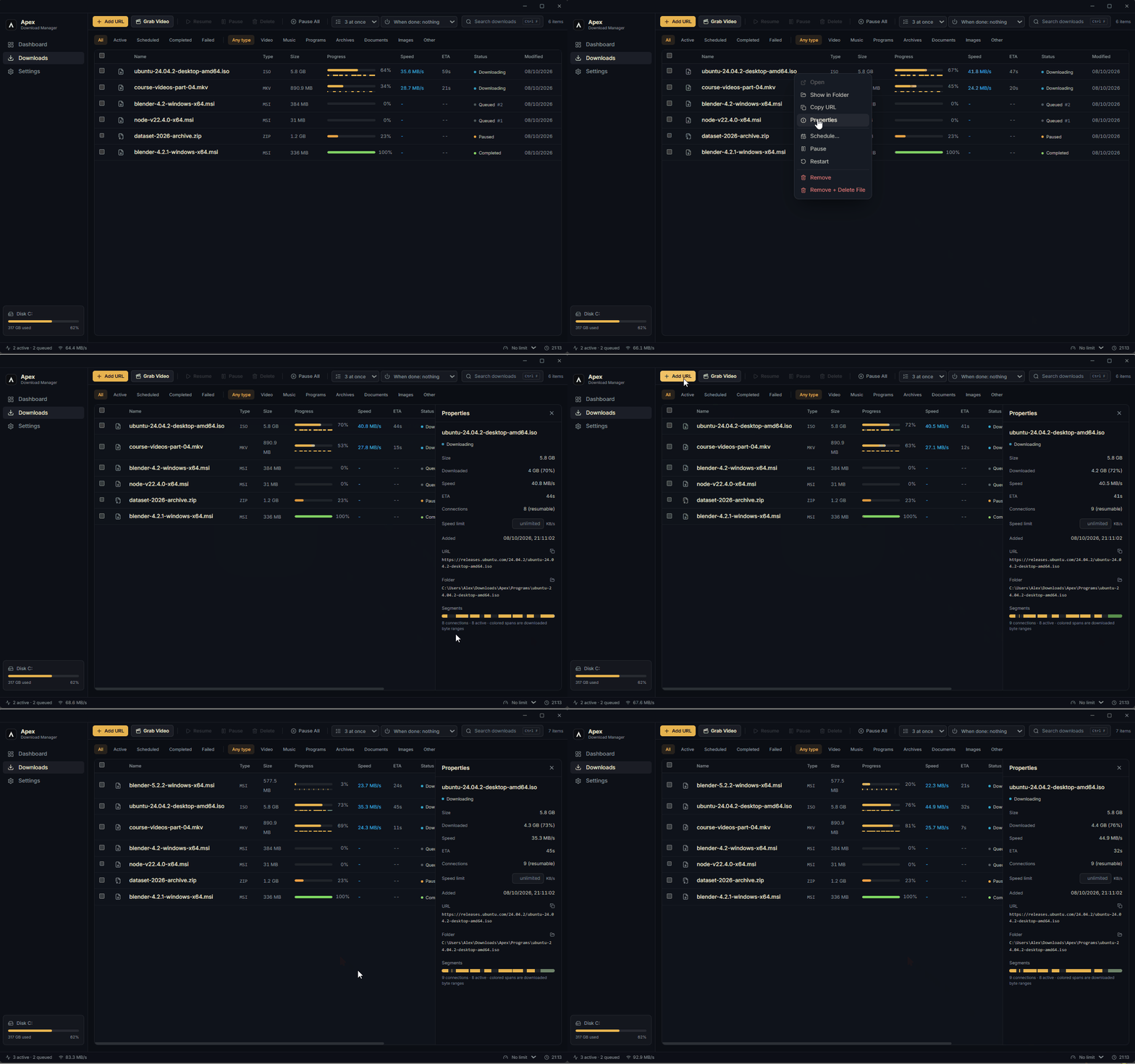
Apex downloading two files over parallel connections, with live speed, per-segment progress, queue positions and a paused download

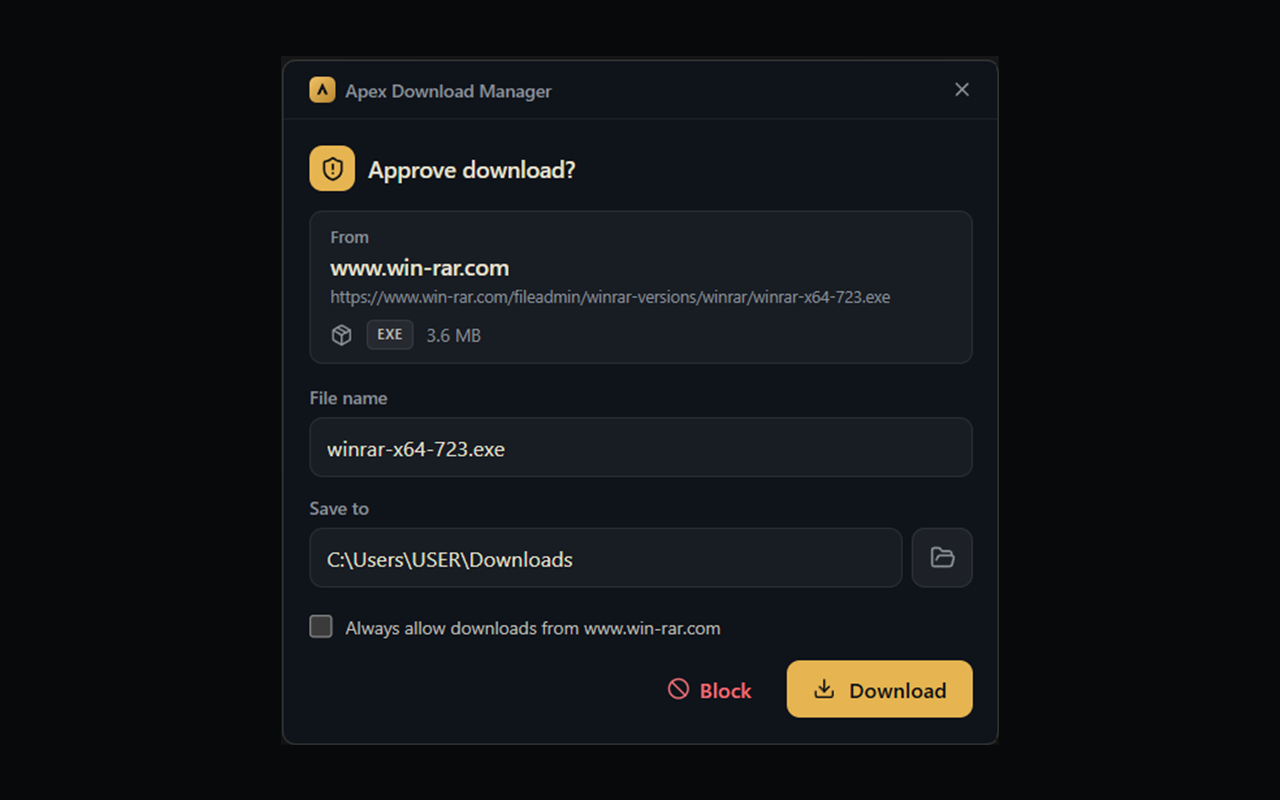
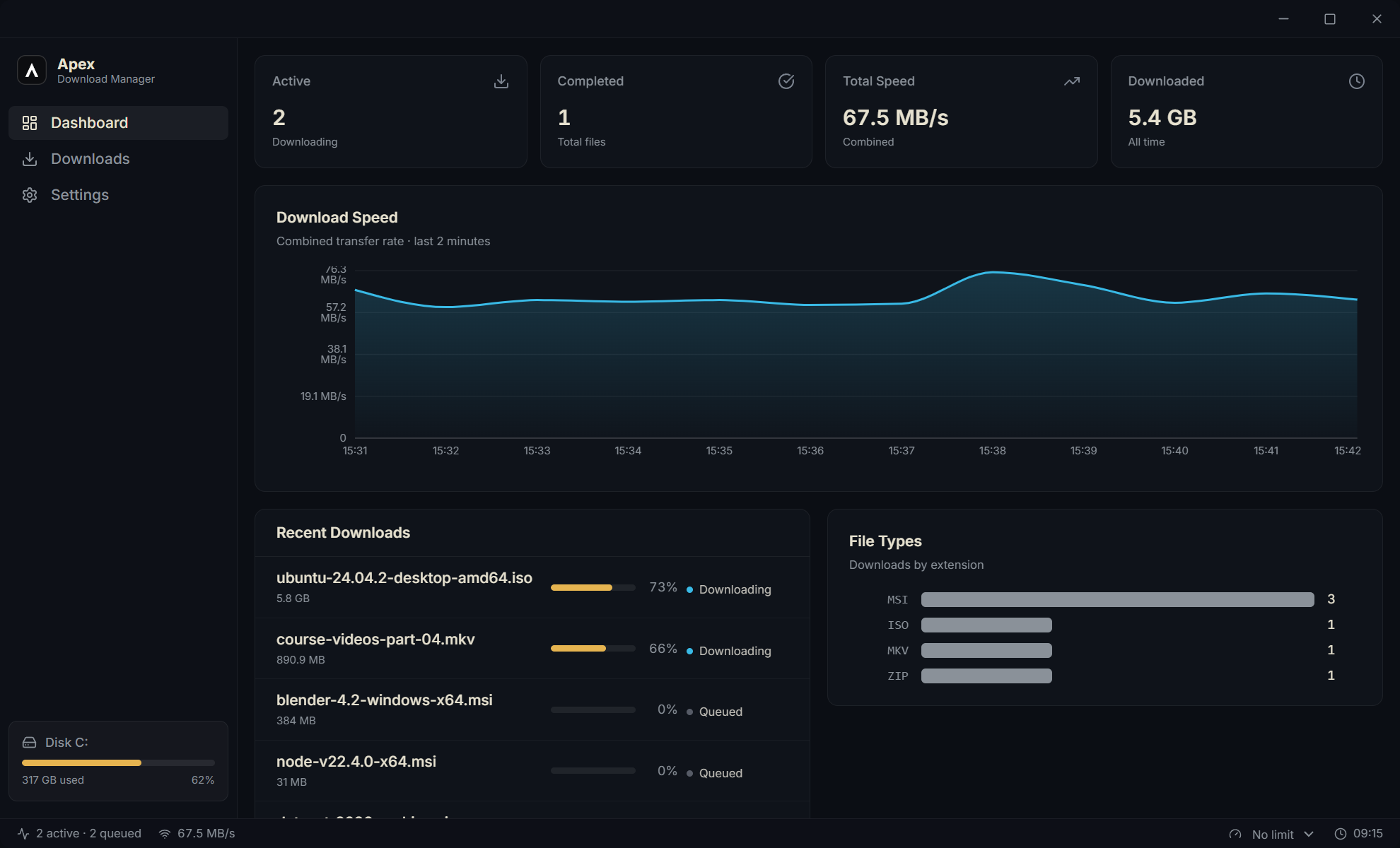
Dashboard with live combined download speed chart, totals and recent downloadsApproval prompt for a download handed over from the browser, showing source site, file name and save folder
Live speed and totalsDownloads from your browser, approved in one click

Install

  • Installer: download for Windows 10/11 (x64). Apex updates itself from then on.
  • Scoop:
    scoop bucket add apex https://github.com/ThembaTman0/apex-download-manager
    scoop install apex/apex-download-manager
    
  • winget: winget install ThembaTman0.ApexDownloadManager
  • Chocolatey: choco install apex-download-manager

The winget package is waiting for approval and the Chocolatey package is not published yet; until they are, those two commands won't find Apex.

Features

Engine

  • Multi-connection segmented downloads (up to 32 parallel streams per file)
  • Pause / resume that survives app restarts - per-segment progress is persisted
  • Resume integrity: ETag/If-Range validation prevents silently corrupted files
  • Automatic retry with backoff on stalls and dropped connections
  • Download queue with a concurrency limit and global speed limiting
  • Per-download speed caps, adjustable live while the download runs
  • Proxy support (HTTP / HTTPS / SOCKS5, with authentication)
  • Scheduling: start any download at a chosen time, sleep/shut down when the queue finishes
  • Video grabber: yt-dlp integration with quality picker, playlists, and one-click tool install (ffmpeg merging for highest resolutions)
  • Stream grab: on Firefox and Edge the extension sniffs the .m3u8/.mpd manifest and passes the player's referer through, so players that build the stream in script work even though there is no address to copy. The Chrome Web Store build ships without the grab feature, by their policy
  • Download progress on the Windows taskbar

Capture

  • Browser extension (Chrome / Edge / Brave / Firefox) that hands downloads to Apex - and safely falls back to the browser when Apex isn't running
  • Cookie/referer handoff so downloads behind logins just work
  • Clipboard watcher: copy a download link anywhere, get a one-click toast
  • Drag & drop URLs onto the window, batch-add multiple URLs at once

Safety

  • Carries its own up-to-date list of trusted certificate authorities alongside the Windows one, so sites with newer certificates work on the first try
  • Every completed file is tagged with Mark-of-the-Web so Windows SmartScreen and Defender scan it like a browser download
  • Built-in SHA-256 checksum verification against publisher-provided hashes
  • The extension requests zero website permissions - it cannot read your pages
  • Local-only: no accounts, no telemetry, nothing leaves your machine

Interface

  • Minimal dark UI: dashboard with live speed chart, filterable download list, per-download properties panel with live segment view
  • Keyboard-first: Ctrl+N new download, Ctrl+F search, Space pause/resume, Del delete, Enter open
  • System tray: close the window, keep downloading

Project layout

apex-download-manager/
├── desktop-ui/            # Tauri v2 app
│   ├── src/               # React 19 + TypeScript + Tailwind v4 frontend
│   └── src-tauri/         # Rust: download engine, SQLite, capture server
├── browser-extension/     # Chrome MV3 extension (capture + context menu)
└── website/               # Landing page (static, self-contained)

Building from source

Prerequisites: Rust (stable, MSVC toolchain), Node.js ≥ 20, and the Visual Studio Build Tools (C++ workload + Windows SDK).

cd desktop-ui
npm install
npm run tauri dev      # development
npm run tauri build    # produces MSI / NSIS installers

Browser extension

  1. Open chrome://extensions, enable Developer mode, click Load unpacked, select the browser-extension/ folder.
  2. In Apex: Settings → Browser Integration, copy the pairing token.
  3. Click the extension icon, paste the token, Save - the status dot turns green.

Architecture notes

  • The engine probes each URL with a ranged request, plans segments, and writes all connections into one preallocated temp file (.adm), renamed on completion.
  • State lives in SQLite (WAL) under %APPDATA%/com.apex.download-manager/.
  • The extension talks to a token-gated HTTP endpoint bound to 127.0.0.1:43666. Interception is cancel-then-hand-off: the browser download is cancelled immediately (before any Save As dialog), then handed to Apex - and restarted in the browser if Apex is unreachable or rejects it, so nothing is lost.

Roadmap

  • Video grabber (yt-dlp integration)
  • Cookie handoff for authenticated downloads
  • Proxy support
  • Firefox extension
  • Auto-updates (GitHub Releases)
  • Dynamic segment re-splitting (finished connections take over the tail of slow ones)
  • Code signing
  • Extension store publishing (Chrome Web Store / Edge Add-ons / AMO)
  • Bandwidth scheduler (off-peak speed profiles)
  • Package managers: Scoop (own bucket, available now), winget (submitted, awaiting approval), Chocolatey (package ready, not yet published)
  • Linux build (considering; 👍 #1 if you want it)

Support Apex

Apex is free and built by one person. If it saves you time:

License

Copyright © 2026 ThembaTman0.

Apex Download Manager is free software: you can redistribute it and/or modify it under the terms of the GNU General Public License as published by the Free Software Foundation, either version 3 of the License, or (at your option) any later version. See LICENSE for the full text.

It is distributed in the hope that it will be useful, but WITHOUT ANY WARRANTY; without even the implied warranty of MERCHANTABILITY or FITNESS FOR A PARTICULAR PURPOSE.

browser-extension
download-accelerator
downloader
download-manager
idm-alternative
no-telemetry
open-source
privacy
react
rust
tauri
windows
yt-dlp

ThembaTman0/apex-download-manager

Free, open source download manager for Windows. A native Rust engine splits each file across up to 32 connections, resumes from the exact byte, and captures downloads from the browser. No account, no ads, no telemetry. GPL v3.

Rust

23

127 commits

updated Oct 15, 2026

See the code

See what people are saying

SourceMessageScoreDate

Apex: a free, open-source download manager for Windows, built in Rust (4 MB, no ads, no account) (r/coolgithubprojects)

I'm the developer. I used IDM for years but got tired of paying and the constant nagging, so I built a free alternative. What it does: \- Splits each download across up to 32 connections, and when one connection finishes it takes over part of a slow one, so downloads don't crawl at the end \- Pause…

2

Oct 14, 2026

README

Apex Download Manager

A free, open source download manager for Windows.

A native Rust engine splits every download across up to 32 parallel connections and resumes from the exact byte after pauses, restarts and network drops, so a transfer uses the whole connection instead of one stream. No account, no ads, no telemetry, and every line is yours to read. GPL v3.

⚡ Single native binary (Tauri v2 + Rust). No Electron, no JVM, no bloat.

Download for Windows · also on Chrome, Edge and Firefox for browser capture · Website
Apex downloading two files over parallel connections, with live speed, per-segment progress, queue positions and a paused download

Dashboard with live combined download speed chart, totals and recent downloadsApproval prompt for a download handed over from the browser, showing source site, file name and save folder
Live speed and totalsDownloads from your browser, approved in one click

Install

  • Installer: download for Windows 10/11 (x64). Apex updates itself from then on.
  • Scoop:
    scoop bucket add apex https://github.com/ThembaTman0/apex-download-manager
    scoop install apex/apex-download-manager
    
  • winget: winget install ThembaTman0.ApexDownloadManager
  • Chocolatey: choco install apex-download-manager

The winget package is waiting for approval and the Chocolatey package is not published yet; until they are, those two commands won't find Apex.

Features

Engine

  • Multi-connection segmented downloads (up to 32 parallel streams per file)
  • Pause / resume that survives app restarts - per-segment progress is persisted
  • Resume integrity: ETag/If-Range validation prevents silently corrupted files
  • Automatic retry with backoff on stalls and dropped connections
  • Download queue with a concurrency limit and global speed limiting
  • Per-download speed caps, adjustable live while the download runs
  • Proxy support (HTTP / HTTPS / SOCKS5, with authentication)
  • Scheduling: start any download at a chosen time, sleep/shut down when the queue finishes
  • Video grabber: yt-dlp integration with quality picker, playlists, and one-click tool install (ffmpeg merging for highest resolutions)
  • Stream grab: on Firefox and Edge the extension sniffs the .m3u8/.mpd manifest and passes the player's referer through, so players that build the stream in script work even though there is no address to copy. The Chrome Web Store build ships without the grab feature, by their policy
  • Download progress on the Windows taskbar

Capture

  • Browser extension (Chrome / Edge / Brave / Firefox) that hands downloads to Apex - and safely falls back to the browser when Apex isn't running
  • Cookie/referer handoff so downloads behind logins just work
  • Clipboard watcher: copy a download link anywhere, get a one-click toast
  • Drag & drop URLs onto the window, batch-add multiple URLs at once

Safety

  • Carries its own up-to-date list of trusted certificate authorities alongside the Windows one, so sites with newer certificates work on the first try
  • Every completed file is tagged with Mark-of-the-Web so Windows SmartScreen and Defender scan it like a browser download
  • Built-in SHA-256 checksum verification against publisher-provided hashes
  • The extension requests zero website permissions - it cannot read your pages
  • Local-only: no accounts, no telemetry, nothing leaves your machine

Interface

  • Minimal dark UI: dashboard with live speed chart, filterable download list, per-download properties panel with live segment view
  • Keyboard-first: Ctrl+N new download, Ctrl+F search, Space pause/resume, Del delete, Enter open
  • System tray: close the window, keep downloading

Project layout

apex-download-manager/
├── desktop-ui/            # Tauri v2 app
│   ├── src/               # React 19 + TypeScript + Tailwind v4 frontend
│   └── src-tauri/         # Rust: download engine, SQLite, capture server
├── browser-extension/     # Chrome MV3 extension (capture + context menu)
└── website/               # Landing page (static, self-contained)

Building from source

Prerequisites: Rust (stable, MSVC toolchain), Node.js ≥ 20, and the Visual Studio Build Tools (C++ workload + Windows SDK).

cd desktop-ui
npm install
npm run tauri dev      # development
npm run tauri build    # produces MSI / NSIS installers

Browser extension

  1. Open chrome://extensions, enable Developer mode, click Load unpacked, select the browser-extension/ folder.
  2. In Apex: Settings → Browser Integration, copy the pairing token.
  3. Click the extension icon, paste the token, Save - the status dot turns green.

Architecture notes

  • The engine probes each URL with a ranged request, plans segments, and writes all connections into one preallocated temp file (.adm), renamed on completion.
  • State lives in SQLite (WAL) under %APPDATA%/com.apex.download-manager/.
  • The extension talks to a token-gated HTTP endpoint bound to 127.0.0.1:43666. Interception is cancel-then-hand-off: the browser download is cancelled immediately (before any Save As dialog), then handed to Apex - and restarted in the browser if Apex is unreachable or rejects it, so nothing is lost.

Roadmap

  • Video grabber (yt-dlp integration)
  • Cookie handoff for authenticated downloads
  • Proxy support
  • Firefox extension
  • Auto-updates (GitHub Releases)
  • Dynamic segment re-splitting (finished connections take over the tail of slow ones)
  • Code signing
  • Extension store publishing (Chrome Web Store / Edge Add-ons / AMO)
  • Bandwidth scheduler (off-peak speed profiles)
  • Package managers: Scoop (own bucket, available now), winget (submitted, awaiting approval), Chocolatey (package ready, not yet published)
  • Linux build (considering; 👍 #1 if you want it)

Support Apex

Apex is free and built by one person. If it saves you time:

License

Copyright © 2026 ThembaTman0.

Apex Download Manager is free software: you can redistribute it and/or modify it under the terms of the GNU General Public License as published by the Free Software Foundation, either version 3 of the License, or (at your option) any later version. See LICENSE for the full text.

It is distributed in the hope that it will be useful, but WITHOUT ANY WARRANTY; without even the implied warranty of MERCHANTABILITY or FITNESS FOR A PARTICULAR PURPOSE.

browser-extension
download-accelerator
downloader
download-manager
idm-alternative
no-telemetry
open-source
privacy
react
rust
tauri
windows
yt-dlp