Open-source Windows download manager for files, media and torrents. Rust/Tauri desktop with Chromium and Firefox integration.
See the code
One desktop queue for files, media and torrents.
Open-source Windows download manager · Rust engine · Chromium and Firefox integration





English · Türkçe
Download · What's new · Features · Installation · Validation · Development
Flux combines segmented HTTP transfers, accessible video/audio capture, native BitTorrent, a persistent local history and separate desktop approval windows. It is built with Tauri 2, React 19, Tokio and SQLite WAL. The name refers to flow: files and media moving from your browser into your download queue.
Before downloading: connect your browser. Install and enable the Flux extension, grant its requested site/native messaging permissions, and refresh open tabs. Launch Flux once: the installed and portable editions automatically register and repair the local browser bridge. If the extension still cannot connect, use Settings → Browser integration → Repair browser bridge. The desktop shows this guidance on first use; dismissing it keeps it hidden on later launches. Bridge registration does not install the extension.
Current release: Flux 2.2.0, Windows x64.
Code signing policy · Privacy policy
| Package | Purpose |
|---|---|
| Windows installer | Recommended; per-user installation and automatic native-host registration |
| Portable application | Desktop application, extensions and bundled media tools |
| Chromium extension | Chrome, Edge, Brave and compatible Chromium browsers |
| Firefox 140+ extension | Modern Firefox |
| Firefox 120–139 extension | Older supported Firefox versions |
| Source archive | Source, build scripts, tests and release documentation |
| SHA-256 checksums | Verify downloaded package identity |
Application update packages carry a signature checked against Flux's embedded verification key. The Windows installer and executables do not have an Authenticode publisher certificate; Windows may display a publisher or SmartScreen warning. Firefox ZIPs are unsigned and require Mozilla signing for permanent installation. See release and signing and browser distribution.
Previous 2.0.0 and 1.7.0 packages remain available.
Automatic browser setup: startup repairs missing or outdated local host registration for Chrome, Edge, Brave, Chromium and Firefox without a manual Settings step. A dismissible first-use reminder explains extension permissions; Settings shows registration status and offers repair.
Media handoff repair (14 October): Chromium and Firefox wait for desktop confirmation and display transfer errors. Captured quality/output is ready in the approval window without another inspection; optional reinspection preserves the captured source, filename and output format. Empty newer fields are omitted for older native hosts. Refresh the desktop and extension packages together; this repair keeps version 2.2.0, so an existing 2.2 installation needs a manual package refresh.
Browser handoff before file selection: Chromium cancels its held transfer before releasing the filename gate; Firefox intercepts attachment navigation at response headers. Flux opens its approval window in the foreground.
Checkpoint resume without ETags: range support no longer requires a strong ETag. Saved prefixes are SHA-256 checked before appending; changed remote content cannot silently produce a mixed file.
Progress retained on non-range sources: Flux verifies and discards a replayed prefix before appending new bytes. Saved disk data and progress remain; prefix replay still costs network bandwidth.
Media-button switch: show/hide page video buttons from the extension popup, immediately in open frames. Re-enabling restores a dismissed HUD.
Automatic languages: new desktop profiles follow the OS; extensions follow the browser UI language. Unsupported locales use English; explicit choices persist.
Direct Settings access: open the separate Settings window from the top menu or toolbar.
Read the release notes, technical changes and validation.
| Area | Included capabilities |
|---|---|
| HTTP downloads | Automatic/manual 1–32 connections, checked ranges, dynamic splitting, bounded retries, stalled-connection replacement, HTTP/3 with TCP fallback |
| Disk and integrity | Sparse staging on the destination volume, disjoint positional writes, checkpoint/final SHA-256 and exclusive publication without chunk concatenation |
| Queue and history | Priorities, schedules, shared/per-task limits, pause/resume, SQLite history, creation/start/completion times, up to 500 URLs per batch and wildcard expansion |
| Video and audio | HLS, DASH, ordered TS, MP4/MKV video, MP3 audio and lossless MKA extraction |
| Media processing | Selected video/audio muxing, subtitle embedding/SRT export, chapters and two-pass audio normalization |
| Media discovery | DOM/network observation, video/audio and iframe players, accessible blob/MediaSource resources, titles, resolution, fps, audio tracks and subtitles |
| Collections | Provider-supported playlists/channel feeds and captured page-link batches |
| BitTorrent | v1, BEP 52 v2/hybrid, magnets, local/HTTP .torrent import, DHT, trackers, PEX, LSD, peers and file selection |
| Torrent sharing | Piece verification, selected-file SHA-256, upload/download budgets, peer limits and global/per-task seeding rules |
| Source recovery | Origin-scoped browser session refresh, compatible expired-source renewal and bounded native HLS/DASH manifest fallback |
| Debrid accounts | Encrypted Real-Debrid, AllDebrid/Premiumize API keys, supported-host resolution and CDN source renewal |
| Desktop | Separate approval, progress, Settings/countdown windows; virtualized table, search, sorting, multi-selection and Windows file drag-out |
| Daily use | Optional category folders, clipboard monitoring, silent queueing, Windows startup and cancellable completion actions |
| Languages and updates | 20 languages, 228 desktop keys, searchable selector, Arabic/Urdu RTL and signed updates with user approval |
Workers write bounded network buffers to non-overlapping offsets in task-owned staging. Aligned Windows transfers use unbuffered positional writes; existing unaligned checkpoints retain buffered writes. Linux/macOS allocation adapters are included in source. Completion uses one integrity read and exclusive publication without a chunk-merging pass. This is positional I/O, not a kernel-level zero-copy networking claim.
Disconnects, truncated responses, rate limits and retryable server errors have bounded recovery. Global/per-task token buckets control bandwidth. Resume checks local checkpoints and source identity; validator-free sources are compared to saved prefixes. Changed validators, sizes or prefixes are handled explicitly instead of mixing different objects.
The extension observes elements, frames, requests and bounded fetch/XHR manifest snapshots. Bundled yt-dlp resolves metadata asynchronously; FFmpeg/FFprobe inspect and assemble selected streams. Resolution choices are deduplicated, and selected audio belongs to the same provider item.
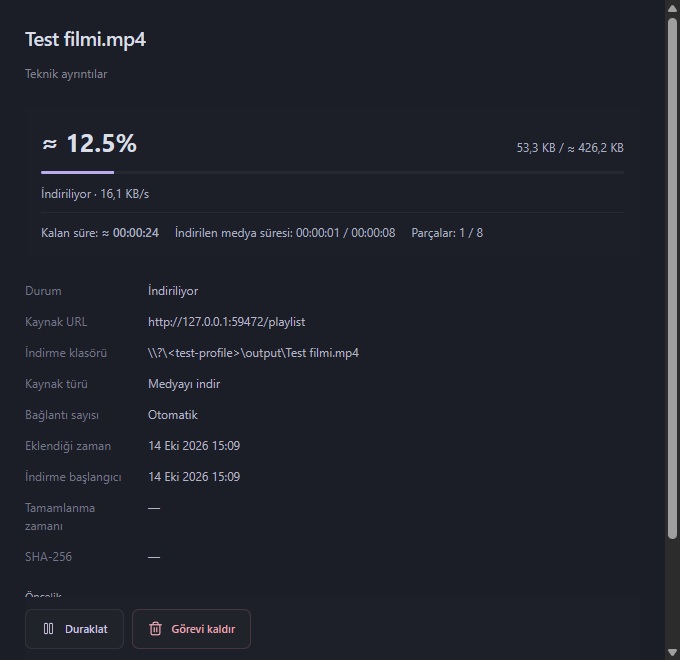
Finite media without an exact byte total can show size, percentage and ETA estimates marked ≈, using duration/segment metadata. Live streams or insufficient metadata remain indeterminate. Blob URLs need accessible underlying resources; DRM, CAPTCHA and login challenges are not bypassed.
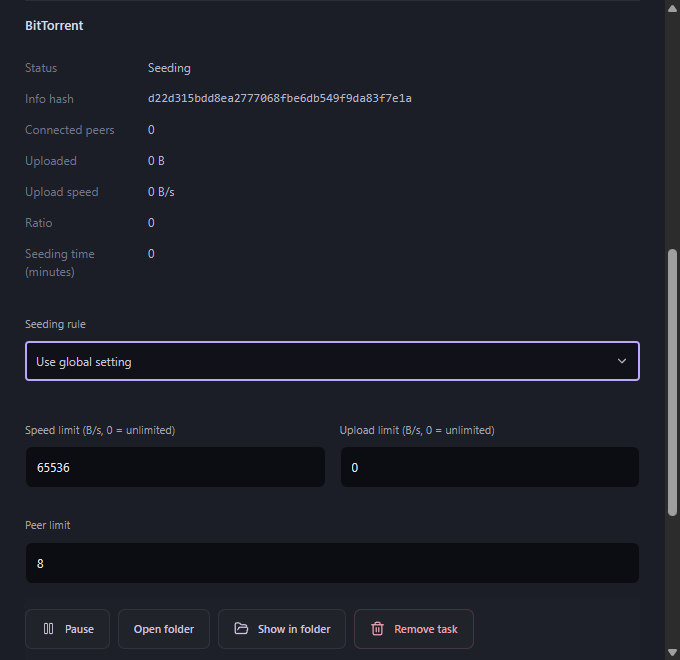
Flux embeds librqbit 9.0.1 for v1 and libtorrent 2.1.2 for v2/hybrid without a separate daemon. HTTP and torrents share bandwidth budgets. Seeding supports ratio, duration, either condition, unlimited sharing or disabled sharing. The default ratio is 1.0; global/per-task choices persist across restarts. Per-torrent speed limits accept unlimited (0) or at least 16 KiB/s.
Screenshots from isolated Windows regression tests with local fixture media.
| Media progress and estimated remaining time | Torrent sharing controls |
|---|---|
 |  |
Flux_2.2.0_x64-setup.exe; installation is per-user.Data lives under Flux in the current user's local application-data directory; downloads default to Downloads/Flux. Upgrades retain history/preferences. Back up important data before changing installations.
Upgrade from public 1.7/2.0 packages by running the 2.2 installer manually. Those older packages do not gain the new updater until 2.2 is installed.
extension directory.chrome://extensions or edge://extensions, enable Developer mode, select Load unpacked, and choose that directory.iheejmamcoeigoallciifjminjnnnlbj. Enable interception in extension settings and check the desktop connection.Use the matching 140+ or 120–139 package. Open about:debugging#/runtime/this-firefox, select Load Temporary Add-on, and choose the extracted manifest.json. Enable local Flux data transfer in extension settings and grant site access when requested.
Temporary add-ons disappear after restarting Firefox. Standard Firefox requires a Mozilla-signed XPI for permanent installation. Store publication is separate; these ZIPs do not imply a public store listing. See Firefox setup.
Another download manager installed? Disable its automatic capture in the browser Flux will handle. A system-wide hook can capture requests before Flux's extension sees them. Flux does not alter another application's settings.
English, Mandarin Chinese, Hindi, Spanish, Standard Arabic, French, Bengali, Portuguese, Russian, Urdu, Indonesian, German, Japanese, Nigerian Pidgin, Marathi, Telugu, Turkish, Tamil, Yue Chinese and Vietnamese.
New desktop profiles use the OS locale; extensions use the browser UI locale. Unsupported locales use English. Manual selections persist; Arabic/Urdu use RTL layout.
No analytics endpoint or remote Flux account. The extension sends selected URLs, titles, bounded manifests and required origin-scoped session headers to the local application. Firefox native transfer requires consent. Credentials are encrypted before durable storage; public task responses omit them. Consent can be withdrawn in settings.
Downloads contact their source; torrents contact peers/trackers/DHT. Enabled Debrid accounts contact their APIs; update checks contact GitHub. Native Messaging uses caller checks, bounded frames and an authenticated user-scoped loopback broker. See Security, IPC and privacy disclosure.
Windows x64 2.2 has 196 passing automated tests: 118 Rust, 63 extension and 15 frontend. Separate real-browser/desktop checks cover Chrome 155, Firefox 120/157, foreground approval without a browser file chooser, HUD controls, repeated detail-window closing, media ETA, torrent peer transfers, installer repair and uninstall data retention.
Strict TypeScript, production build, Rust formatting and Clippy pass. Production npm audit and modern Firefox manifest lint report zero findings. See full validation and machine-readable evidence.
These are defined regressions, not an every-site guarantee or competitor benchmark. Live paid Debrid entitlements, Linux/macOS application execution, a complete live updater installation round trip and physical OLE drops are outside this local record. Tests do not perform sleep/hibernate/shutdown. A nonfatal upstream WebView2 cleanup warning is recorded separately from passing functional checks.
Use Rust 1.99.0, Node 24.18.0, Tauri prerequisites and native torrent dependencies from the build guide.
git clone https://github.com/Hactor00/Flux.git
cd Flux
npm ci
./scripts/build-torrent-runtime.ps1
npm run tauri dev
npm run dev is a browser preview; native downloads need Tauri. Generated Firefox assets come from shared extension/ sources. Production builds exclude the test harness.
npm test
cargo fmt --all -- --check
cargo test --locked --workspace --all-features
cargo clippy --locked --workspace --all-targets --all-features -- -D warnings
For required media tests, configure FFmpeg/FFprobe and the pinned fixture encoder as described in Contributing. The full encoder is test-only, never shipped. Source export follows Git ignore rules and excludes toolchains, caches, user data and private signing keys.
| Document | Contents |
|---|---|
| 2.2 release notes | English/Turkish release overview |
| 2.2 technical changes · Türkçe | Handoff, resume, languages and desktop behavior |
| Architecture · IPC | Engine ownership, persistence and browser protocol |
| Validation | Current and historical evidence |
| Building/signing | Runtime preparation, packaging and signatures |
| Browser distribution | Registration, store packages and privacy |
| Contributing · Security | Development, bugs and private disclosure |
Use GitHub Issues for reproducible bugs and feature requests. Include versions and reproduction steps; remove private URLs, cookies and authorization headers.
Flux's owned code is MIT. FFmpeg/LAME use LGPL, libxml2 uses MIT, yt-dlp uses Unlicense; Node, libtorrent, OpenSSL and other dependencies retain their notices. Distributions include dependency inventories, required notices and media sources. SHA-256 identifies files; it does not replace Authenticode or malware scanning.
The acknowledgment for approved SignPath-signed releases is: “This project uses SignPath Foundation for code signing.”
Flux is preparing free code signing through SignPath.io, with a certificate provided by SignPath Foundation. Foundation approval and production signing configuration are pending; current 2.2.0 Windows packages do not carry an Authenticode publisher certificate. The existing updater signature is separate.
See the code signing policy for signing scope, maintainer/approver roles and release verification. Privacy Policy URL: Flux privacy disclosure.
Open-source Windows download manager for files, media and torrents. Rust/Tauri desktop with Chromium and Firefox integration.
See the code
One desktop queue for files, media and torrents.
Open-source Windows download manager · Rust engine · Chromium and Firefox integration
English · Türkçe
Download · What's new · Features · Installation · Validation · Development
Flux combines segmented HTTP transfers, accessible video/audio capture, native BitTorrent, a persistent local history and separate desktop approval windows. It is built with Tauri 2, React 19, Tokio and SQLite WAL. The name refers to flow: files and media moving from your browser into your download queue.
Before downloading: connect your browser. Install and enable the Flux extension, grant its requested site/native messaging permissions, and refresh open tabs. Launch Flux once: the installed and portable editions automatically register and repair the local browser bridge. If the extension still cannot connect, use Settings → Browser integration → Repair browser bridge. The desktop shows this guidance on first use; dismissing it keeps it hidden on later launches. Bridge registration does not install the extension.
Current release: Flux 2.2.0, Windows x64.
Code signing policy · Privacy policy
| Package | Purpose |
|---|---|
| Windows installer | Recommended; per-user installation and automatic native-host registration |
| Portable application | Desktop application, extensions and bundled media tools |
| Chromium extension | Chrome, Edge, Brave and compatible Chromium browsers |
| Firefox 140+ extension | Modern Firefox |
| Firefox 120–139 extension | Older supported Firefox versions |
| Source archive | Source, build scripts, tests and release documentation |
| SHA-256 checksums | Verify downloaded package identity |
Application update packages carry a signature checked against Flux's embedded verification key. The Windows installer and executables do not have an Authenticode publisher certificate; Windows may display a publisher or SmartScreen warning. Firefox ZIPs are unsigned and require Mozilla signing for permanent installation. See release and signing and browser distribution.
Previous 2.0.0 and 1.7.0 packages remain available.
Automatic browser setup: startup repairs missing or outdated local host registration for Chrome, Edge, Brave, Chromium and Firefox without a manual Settings step. A dismissible first-use reminder explains extension permissions; Settings shows registration status and offers repair.
Media handoff repair (14 October): Chromium and Firefox wait for desktop confirmation and display transfer errors. Captured quality/output is ready in the approval window without another inspection; optional reinspection preserves the captured source, filename and output format. Empty newer fields are omitted for older native hosts. Refresh the desktop and extension packages together; this repair keeps version 2.2.0, so an existing 2.2 installation needs a manual package refresh.
Browser handoff before file selection: Chromium cancels its held transfer before releasing the filename gate; Firefox intercepts attachment navigation at response headers. Flux opens its approval window in the foreground.
Checkpoint resume without ETags: range support no longer requires a strong ETag. Saved prefixes are SHA-256 checked before appending; changed remote content cannot silently produce a mixed file.
Progress retained on non-range sources: Flux verifies and discards a replayed prefix before appending new bytes. Saved disk data and progress remain; prefix replay still costs network bandwidth.
Media-button switch: show/hide page video buttons from the extension popup, immediately in open frames. Re-enabling restores a dismissed HUD.
Automatic languages: new desktop profiles follow the OS; extensions follow the browser UI language. Unsupported locales use English; explicit choices persist.
Direct Settings access: open the separate Settings window from the top menu or toolbar.
Read the release notes, technical changes and validation.
| Area | Included capabilities |
|---|---|
| HTTP downloads | Automatic/manual 1–32 connections, checked ranges, dynamic splitting, bounded retries, stalled-connection replacement, HTTP/3 with TCP fallback |
| Disk and integrity | Sparse staging on the destination volume, disjoint positional writes, checkpoint/final SHA-256 and exclusive publication without chunk concatenation |
| Queue and history | Priorities, schedules, shared/per-task limits, pause/resume, SQLite history, creation/start/completion times, up to 500 URLs per batch and wildcard expansion |
| Video and audio | HLS, DASH, ordered TS, MP4/MKV video, MP3 audio and lossless MKA extraction |
| Media processing | Selected video/audio muxing, subtitle embedding/SRT export, chapters and two-pass audio normalization |
| Media discovery | DOM/network observation, video/audio and iframe players, accessible blob/MediaSource resources, titles, resolution, fps, audio tracks and subtitles |
| Collections | Provider-supported playlists/channel feeds and captured page-link batches |
| BitTorrent | v1, BEP 52 v2/hybrid, magnets, local/HTTP .torrent import, DHT, trackers, PEX, LSD, peers and file selection |
| Torrent sharing | Piece verification, selected-file SHA-256, upload/download budgets, peer limits and global/per-task seeding rules |
| Source recovery | Origin-scoped browser session refresh, compatible expired-source renewal and bounded native HLS/DASH manifest fallback |
| Debrid accounts | Encrypted Real-Debrid, AllDebrid/Premiumize API keys, supported-host resolution and CDN source renewal |
| Desktop | Separate approval, progress, Settings/countdown windows; virtualized table, search, sorting, multi-selection and Windows file drag-out |
| Daily use | Optional category folders, clipboard monitoring, silent queueing, Windows startup and cancellable completion actions |
| Languages and updates | 20 languages, 228 desktop keys, searchable selector, Arabic/Urdu RTL and signed updates with user approval |
Workers write bounded network buffers to non-overlapping offsets in task-owned staging. Aligned Windows transfers use unbuffered positional writes; existing unaligned checkpoints retain buffered writes. Linux/macOS allocation adapters are included in source. Completion uses one integrity read and exclusive publication without a chunk-merging pass. This is positional I/O, not a kernel-level zero-copy networking claim.
Disconnects, truncated responses, rate limits and retryable server errors have bounded recovery. Global/per-task token buckets control bandwidth. Resume checks local checkpoints and source identity; validator-free sources are compared to saved prefixes. Changed validators, sizes or prefixes are handled explicitly instead of mixing different objects.
The extension observes elements, frames, requests and bounded fetch/XHR manifest snapshots. Bundled yt-dlp resolves metadata asynchronously; FFmpeg/FFprobe inspect and assemble selected streams. Resolution choices are deduplicated, and selected audio belongs to the same provider item.
Finite media without an exact byte total can show size, percentage and ETA estimates marked ≈, using duration/segment metadata. Live streams or insufficient metadata remain indeterminate. Blob URLs need accessible underlying resources; DRM, CAPTCHA and login challenges are not bypassed.
Flux embeds librqbit 9.0.1 for v1 and libtorrent 2.1.2 for v2/hybrid without a separate daemon. HTTP and torrents share bandwidth budgets. Seeding supports ratio, duration, either condition, unlimited sharing or disabled sharing. The default ratio is 1.0; global/per-task choices persist across restarts. Per-torrent speed limits accept unlimited (0) or at least 16 KiB/s.
Screenshots from isolated Windows regression tests with local fixture media.
| Media progress and estimated remaining time | Torrent sharing controls |
|---|---|
| |
Flux_2.2.0_x64-setup.exe; installation is per-user.Data lives under Flux in the current user's local application-data directory; downloads default to Downloads/Flux. Upgrades retain history/preferences. Back up important data before changing installations.
Upgrade from public 1.7/2.0 packages by running the 2.2 installer manually. Those older packages do not gain the new updater until 2.2 is installed.
extension directory.chrome://extensions or edge://extensions, enable Developer mode, select Load unpacked, and choose that directory.iheejmamcoeigoallciifjminjnnnlbj. Enable interception in extension settings and check the desktop connection.Use the matching 140+ or 120–139 package. Open about:debugging#/runtime/this-firefox, select Load Temporary Add-on, and choose the extracted manifest.json. Enable local Flux data transfer in extension settings and grant site access when requested.
Temporary add-ons disappear after restarting Firefox. Standard Firefox requires a Mozilla-signed XPI for permanent installation. Store publication is separate; these ZIPs do not imply a public store listing. See Firefox setup.
Another download manager installed? Disable its automatic capture in the browser Flux will handle. A system-wide hook can capture requests before Flux's extension sees them. Flux does not alter another application's settings.
English, Mandarin Chinese, Hindi, Spanish, Standard Arabic, French, Bengali, Portuguese, Russian, Urdu, Indonesian, German, Japanese, Nigerian Pidgin, Marathi, Telugu, Turkish, Tamil, Yue Chinese and Vietnamese.
New desktop profiles use the OS locale; extensions use the browser UI locale. Unsupported locales use English. Manual selections persist; Arabic/Urdu use RTL layout.
No analytics endpoint or remote Flux account. The extension sends selected URLs, titles, bounded manifests and required origin-scoped session headers to the local application. Firefox native transfer requires consent. Credentials are encrypted before durable storage; public task responses omit them. Consent can be withdrawn in settings.
Downloads contact their source; torrents contact peers/trackers/DHT. Enabled Debrid accounts contact their APIs; update checks contact GitHub. Native Messaging uses caller checks, bounded frames and an authenticated user-scoped loopback broker. See Security, IPC and privacy disclosure.
Windows x64 2.2 has 196 passing automated tests: 118 Rust, 63 extension and 15 frontend. Separate real-browser/desktop checks cover Chrome 155, Firefox 120/157, foreground approval without a browser file chooser, HUD controls, repeated detail-window closing, media ETA, torrent peer transfers, installer repair and uninstall data retention.
Strict TypeScript, production build, Rust formatting and Clippy pass. Production npm audit and modern Firefox manifest lint report zero findings. See full validation and machine-readable evidence.
These are defined regressions, not an every-site guarantee or competitor benchmark. Live paid Debrid entitlements, Linux/macOS application execution, a complete live updater installation round trip and physical OLE drops are outside this local record. Tests do not perform sleep/hibernate/shutdown. A nonfatal upstream WebView2 cleanup warning is recorded separately from passing functional checks.
Use Rust 1.99.0, Node 24.18.0, Tauri prerequisites and native torrent dependencies from the build guide.
git clone https://github.com/Hactor00/Flux.git
cd Flux
npm ci
./scripts/build-torrent-runtime.ps1
npm run tauri dev
npm run dev is a browser preview; native downloads need Tauri. Generated Firefox assets come from shared extension/ sources. Production builds exclude the test harness.
npm test
cargo fmt --all -- --check
cargo test --locked --workspace --all-features
cargo clippy --locked --workspace --all-targets --all-features -- -D warnings
For required media tests, configure FFmpeg/FFprobe and the pinned fixture encoder as described in Contributing. The full encoder is test-only, never shipped. Source export follows Git ignore rules and excludes toolchains, caches, user data and private signing keys.
| Document | Contents |
|---|---|
| 2.2 release notes | English/Turkish release overview |
| 2.2 technical changes · Türkçe | Handoff, resume, languages and desktop behavior |
| Architecture · IPC | Engine ownership, persistence and browser protocol |
| Validation | Current and historical evidence |
| Building/signing | Runtime preparation, packaging and signatures |
| Browser distribution | Registration, store packages and privacy |
| Contributing · Security | Development, bugs and private disclosure |
Use GitHub Issues for reproducible bugs and feature requests. Include versions and reproduction steps; remove private URLs, cookies and authorization headers.
Flux's owned code is MIT. FFmpeg/LAME use LGPL, libxml2 uses MIT, yt-dlp uses Unlicense; Node, libtorrent, OpenSSL and other dependencies retain their notices. Distributions include dependency inventories, required notices and media sources. SHA-256 identifies files; it does not replace Authenticode or malware scanning.
The acknowledgment for approved SignPath-signed releases is: “This project uses SignPath Foundation for code signing.”
Flux is preparing free code signing through SignPath.io, with a certificate provided by SignPath Foundation. Foundation approval and production signing configuration are pending; current 2.2.0 Windows packages do not carry an Authenticode publisher certificate. The existing updater signature is separate.
See the code signing policy for signing scope, maintainer/approver roles and release verification. Privacy Policy URL: Flux privacy disclosure.



