
An MCP server that paints pictures and plays music in Mario Paint (SNES), running headless
C
4
62 commits
updated Sep 23, 2026
See what people are saying
README
MCPaint
An MCP server that lets an AI create pictures and music with Mario Paint (SNES, 1992) — the real game, running headless — and capture the result as PNG, WAV and MP4.
How it works
A libretro core runs the game with no window at all. Content is injected straight into the console's WRAM at the addresses the game itself uses, and the game renders it exactly as if it had been drawn by hand.
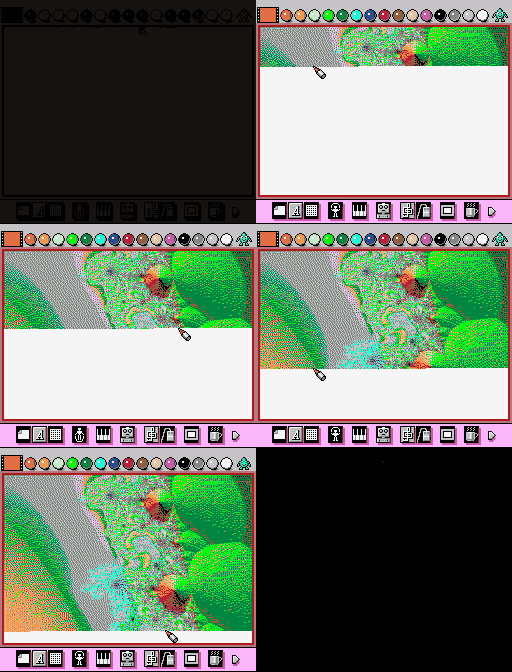
Drawing is played back step by step with the in-game cursor following the stroke, so a recording shows Mario Paint drawing the picture rather than a picture pasted into Mario Paint. It comes with sound: the canvas background track plays over the timelapse, and a recording opens on the tune's first note.
All audio is the SPC700's own output, captured from the same run that produced the frames, so picture and sound need no resynchronising.
Examples
Every example is rebuilt from its source by examples/make.sh.
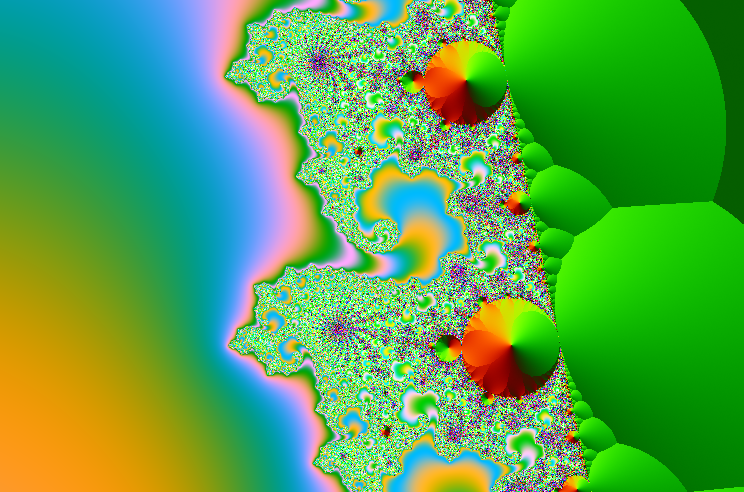
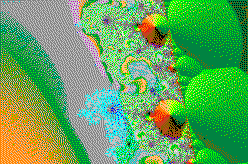
| Source | In Mario Paint | Drawn |
|---|---|---|
 |  |  |
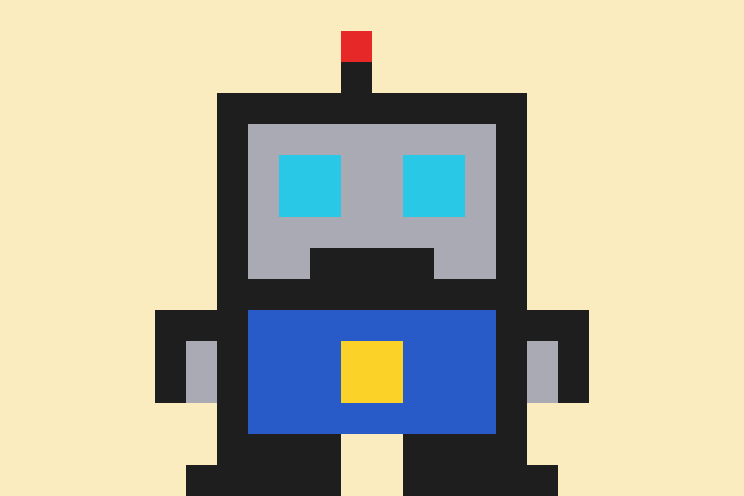 |  |  |
The fractal is a photograph as far as the palette is concerned: dithered,
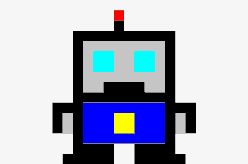
matched on lightness. The robot is flat pixel art, drawn with dithering off and
hue matched first, so every block stays a single colour.
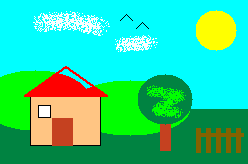
testdata/scene.json draws a scene out of the game's own
tools instead:
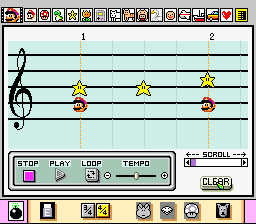
Ode to Joy, written in D major with a bass line, comes out on the staff in C across two pages: watch it play or just listen.
The guide covers doing the same with your own pictures and songs: framing, colour flags, choosing a key, tempo and instruments.
Requirements
- A Mario Paint ROM. Not included — supply your own copy.
- A libretro SNES core, e.g.
snes9x_libretro.dylib. ffmpegon PATH, for video and audio output.- Go 1.24+.
Running
export MCPAINT_CORE="$HOME/Library/Application Support/RetroArch/cores/snes9x_libretro.dylib"
export MCPAINT_ROM="/path/to/Mario Paint (JU).smc"
export MCPAINT_OUT="$HOME/mcpaint"   # optional, this is the default

go build -o build/ ./cmd/...   # mcpaint, mcpaint-cli, mcpaint-midi, mcpaint-song
Register it with an MCP client:
{
  "mcpServers": {
    "mcpaint": {
      "command": "/path/to/build/mcpaint",
      "env": {
        "MCPAINT_CORE": "/path/to/snes9x_libretro.dylib",
        "MCPAINT_ROM": "/path/to/Mario Paint (JU).smc"
      }
    }
  }
}
Tools
| Tool | What it does |
|---|---|
reference | The palette, instruments, note range and hard limits |
draw_image | Redraw an existing image, quantized to 16 colours |
draw | Draw with the game's own tools, optionally recording a timelapse with sound |
screenshot | Capture the canvas or the whole screen |
compose | Write notes into the music composer |
import_midi | Load a MIDI file, with a report of what had to give |
play | Play the song and record audio, optionally with video |
record_session | One clip: the picture being drawn, then the song playing |
Colour
Sixteen fixed colours with no blending, so how a source image is matched to them matters more than usual.
- Matching is done in Oklab. Luminance-weighted distance collapsed saturated colours onto grey, because the weighting leans so heavily on the green channel.
- Dithering makes a photograph read as one and makes flat artwork read as noise. Leave it on for photos, off for logos.
- Vivid (
-vivid) weighs hue ahead of lightness, which suits flat art. - Some colours have no honest neighbour at all. Google's amber yellow sits
between the palette's lemon and its olive, so every weighting lands on peach
or olive. Pinning (
-map "#F4B400=yellow") names the substitution instead, and pinned pixels take no dither error so flat areas stay flat.
Dark photographs are worth lifting before they are quantized -- the palette
has no dark greys, only black -- for example with
ffmpeg -i in.png -vf "eq=brightness=0.18:contrast=1.6:saturation=1.8" out.png.
Canvas music
The canvas has its own background track, and draw and record_session take a
music option: theme-1 (default), theme-2, your-song — whatever is
currently in the composer — or off.
A recording always starts on the tune's first note. Getting there is fiddlier than it looks: re-picking a track does not rewind it, because the sequencer keeps running underneath. Switching to silence stops it and switching back starts the tune again, about 36 frames later, while leaving the SELECT MUSIC screen takes roughly 32 — so the canvas is up just before the music begins. The prepared state is then nudged forward to the last silent frame, past the screen-transition sound effect, and cached.
What the game allows
The limits are tight and shape everything:
- Canvas 248×168, 16 fixed colours, no blending.
- Songs up to 96 columns holding at most three notes each.
- Pitches are 13 diatonic staff positions, B3 to G5. There are no sharps or flats, so imported music gets snapped.
Command line
cmd/mcpaint-cli drives the game directly, without the MCP server.
# Redraw an image and screenshot the result
build/mcpaint-cli -image picture.png -out out/canvas.png

# Record it being drawn stroke by stroke, from boot, with music
build/mcpaint-cli -image picture.png -strokes -title 3 \
    -video out/picture.mp4 -out out/picture.png -seconds 20

# Flat artwork: no dithering, hue-first matching, brand colours pinned
build/mcpaint-cli -image logo.png -fit contain -dither=false -vivid \
    -map "#4285F4=blue,#F4B400=yellow" -out out/logo.png

# Play a set of drawing operations
build/mcpaint-cli -ops testdata/scene.json -video out/scene.mp4 -full
cmd/mcpaint-song turns a chord chart into a composition and records it. A staff
holds 96 columns and a single tempo, so the chart is laid out across pages that
break wherever the tempo changes -- which is how a chorus can move faster than
the verse around it.
cmd/mcpaint-midi plays a MIDI file. The staff holds 96 columns, so a longer piece
is split across pages: each is loaded in turn, recorded, and the recordings are
stitched back together. Every page is cut to its exact length -- when the first
column sounds and how long a column lasts are measured from the game at the
chosen tempo -- so a rest that falls across a page break survives the seam.
# See how a piece fits before starting the emulator
build/mcpaint-midi -midi song.mid -dry -auto-key

# Play it, however many staves it takes
build/mcpaint-midi -midi song.mid -auto-key -tempo 24 \
    -instruments "0=star,1=gameboy,2=mario" -out out/song.mp4
-auto-key is worth reaching for. The staff is strictly diatonic C major, so a
tune in another key has every accidental pulled to a neighbour; shifting the
whole piece can put it in a key the staff actually has. On a Sicilian folk tune
it took the accidentals from 86 down to 19.
Instruments are chosen by register: channels are ranked by median pitch and
handed voices spanning the palette from darkest to brightest, so a bass line
does not land on the same bright voice as the melody. That ordering was
measured, not guessed from the icons -- each instrument was played and the
spectral centroid of its attack taken, running from about 320 Hz to 2250 Hz.
internal/session has the test that measures it.
What the staff cannot hold, and what is done about it
Three limits bite, and each has a different answer.
Range. Thirteen diatonic positions, B3 to G5, is under two octaves, so a piece spanning more has to fold. A note the staff can hold stays exactly where it was written. One that cannot goes to the octave nearest where its own part already is, rather than wherever the arithmetic lands, so a rising line does not jump down mid-phrase and a bass does not end up above the melody. Applying that nearness to every note is a trap: it folds any leap wider than half an octave back into a step, and on one march it moved 162 of 413 notes when only 3 were out of range.
Three voices per column. Most of what looks like a shortage is not one: arrangements double notes at the octave, and once the staff has folded them they collapse onto the same position. Playing that twice wastes a voice on a unison. Folding the doublings away recovered nearly everything on the test piece -- dropped voices went from 50 to 12. What is still too thick keeps the bass and the melody, which carry the outline, plus a note from the middle where the chord's character lives; the rest spreads onto the next column, the way a player would roll a chord by hand. One note in 394 was actually lost.
Percussion. General MIDI reserves channel 10 for drums, where the key
number picks a kit piece rather than a pitch. Reading those as notes puts
nonsense on the staff and poisons key detection along with it: on one
arrangement dropping the drums took the accidentals from 2157 to 755 and
changed which key -auto-key chose. -drums auto keeps the pattern instead,
laid on three staff positions standing for low, middle and high drums.
Too many parts. Three voices cannot hold a seven-part arrangement.
-channels "5,1,9" keeps the ones that matter -- typically a melody, a bass
and the drums -- which beats letting an arbitrary rule decide.
No accidentals. Nothing to be done: the staff has no black keys, so sharps
and flats are pulled to a neighbour. -auto-key minimises how often that
happens, but it cannot reach zero for a tune that really does change key.
Tests
go test ./...
The unit tests in internal/mp need neither a ROM nor a core, which is where
most of the logic lives. The end-to-end test in cmd/mcpaint drives the
real server over stdio and skips unless MCPAINT_CORE and MCPAINT_ROM
are set.
Notes on the game
Mario Paint's title screen has no clickable "start": a full grid sweep found
only the letter gags. The attract demo walks into the canvas by itself, so the
boot rides it in and then clears the demo flag at $7E:04E2 to take over. That
costs ~2400 emulated frames, so the resulting state is cached and reused.
Two things that look like they should work but do not:
$7E:0C24is named "scroll end" and is not a song length. It sits at 784 whatever is on the staff, and writing a column count there cuts playback off after the first note.- Pressing PLAY twice in a row plays nothing the second time. The playhead stays at the end of the previous run, so STOP has to rewind it first.
- Video has to be encoded at the console's own frame rate, 60.0988, not a round 30 or 60. Anything else and the picture drifts away from the sound.
Memory addresses come from the labelled RAM map in
Yoshifanatic1/Mario-Paint-Disassembly
and were each confirmed against the running game. The palette is decoded from
the game's own Canvas.bin rather than sampled from screenshots.
Contributors

62 commits
Similar repos


Languages
C
66.6%
Go
33.4%
An MCP server that paints pictures and plays music in Mario Paint (SNES), running headless
C
4
62 commits
updated Sep 23, 2026
See what people are saying
README
MCPaint
An MCP server that lets an AI create pictures and music with Mario Paint (SNES, 1992) — the real game, running headless — and capture the result as PNG, WAV and MP4.
How it works
A libretro core runs the game with no window at all. Content is injected straight into the console's WRAM at the addresses the game itself uses, and the game renders it exactly as if it had been drawn by hand.
Drawing is played back step by step with the in-game cursor following the stroke, so a recording shows Mario Paint drawing the picture rather than a picture pasted into Mario Paint. It comes with sound: the canvas background track plays over the timelapse, and a recording opens on the tune's first note.
All audio is the SPC700's own output, captured from the same run that produced the frames, so picture and sound need no resynchronising.
Examples
Every example is rebuilt from its source by examples/make.sh.
| Source | In Mario Paint | Drawn |
|---|---|---|
| | |
| | |
The fractal is a photograph as far as the palette is concerned: dithered,
matched on lightness. The robot is flat pixel art, drawn with dithering off and
hue matched first, so every block stays a single colour.
testdata/scene.json draws a scene out of the game's own
tools instead:
Ode to Joy, written in D major with a bass line, comes out on the staff in C across two pages: watch it play or just listen.
The guide covers doing the same with your own pictures and songs: framing, colour flags, choosing a key, tempo and instruments.
Requirements
- A Mario Paint ROM. Not included — supply your own copy.
- A libretro SNES core, e.g.
snes9x_libretro.dylib. ffmpegon PATH, for video and audio output.- Go 1.24+.
Running
export MCPAINT_CORE="$HOME/Library/Application Support/RetroArch/cores/snes9x_libretro.dylib"
export MCPAINT_ROM="/path/to/Mario Paint (JU).smc"
export MCPAINT_OUT="$HOME/mcpaint"   # optional, this is the default

go build -o build/ ./cmd/...   # mcpaint, mcpaint-cli, mcpaint-midi, mcpaint-song
Register it with an MCP client:
{
  "mcpServers": {
    "mcpaint": {
      "command": "/path/to/build/mcpaint",
      "env": {
        "MCPAINT_CORE": "/path/to/snes9x_libretro.dylib",
        "MCPAINT_ROM": "/path/to/Mario Paint (JU).smc"
      }
    }
  }
}
Tools
| Tool | What it does |
|---|---|
reference | The palette, instruments, note range and hard limits |
draw_image | Redraw an existing image, quantized to 16 colours |
draw | Draw with the game's own tools, optionally recording a timelapse with sound |
screenshot | Capture the canvas or the whole screen |
compose | Write notes into the music composer |
import_midi | Load a MIDI file, with a report of what had to give |
play | Play the song and record audio, optionally with video |
record_session | One clip: the picture being drawn, then the song playing |
Colour
Sixteen fixed colours with no blending, so how a source image is matched to them matters more than usual.
- Matching is done in Oklab. Luminance-weighted distance collapsed saturated colours onto grey, because the weighting leans so heavily on the green channel.
- Dithering makes a photograph read as one and makes flat artwork read as noise. Leave it on for photos, off for logos.
- Vivid (
-vivid) weighs hue ahead of lightness, which suits flat art. - Some colours have no honest neighbour at all. Google's amber yellow sits
between the palette's lemon and its olive, so every weighting lands on peach
or olive. Pinning (
-map "#F4B400=yellow") names the substitution instead, and pinned pixels take no dither error so flat areas stay flat.
Dark photographs are worth lifting before they are quantized -- the palette
has no dark greys, only black -- for example with
ffmpeg -i in.png -vf "eq=brightness=0.18:contrast=1.6:saturation=1.8" out.png.
Canvas music
The canvas has its own background track, and draw and record_session take a
music option: theme-1 (default), theme-2, your-song — whatever is
currently in the composer — or off.
A recording always starts on the tune's first note. Getting there is fiddlier than it looks: re-picking a track does not rewind it, because the sequencer keeps running underneath. Switching to silence stops it and switching back starts the tune again, about 36 frames later, while leaving the SELECT MUSIC screen takes roughly 32 — so the canvas is up just before the music begins. The prepared state is then nudged forward to the last silent frame, past the screen-transition sound effect, and cached.
What the game allows
The limits are tight and shape everything:
- Canvas 248×168, 16 fixed colours, no blending.
- Songs up to 96 columns holding at most three notes each.
- Pitches are 13 diatonic staff positions, B3 to G5. There are no sharps or flats, so imported music gets snapped.
Command line
cmd/mcpaint-cli drives the game directly, without the MCP server.
# Redraw an image and screenshot the result
build/mcpaint-cli -image picture.png -out out/canvas.png

# Record it being drawn stroke by stroke, from boot, with music
build/mcpaint-cli -image picture.png -strokes -title 3 \
    -video out/picture.mp4 -out out/picture.png -seconds 20

# Flat artwork: no dithering, hue-first matching, brand colours pinned
build/mcpaint-cli -image logo.png -fit contain -dither=false -vivid \
    -map "#4285F4=blue,#F4B400=yellow" -out out/logo.png

# Play a set of drawing operations
build/mcpaint-cli -ops testdata/scene.json -video out/scene.mp4 -full
cmd/mcpaint-song turns a chord chart into a composition and records it. A staff
holds 96 columns and a single tempo, so the chart is laid out across pages that
break wherever the tempo changes -- which is how a chorus can move faster than
the verse around it.
cmd/mcpaint-midi plays a MIDI file. The staff holds 96 columns, so a longer piece
is split across pages: each is loaded in turn, recorded, and the recordings are
stitched back together. Every page is cut to its exact length -- when the first
column sounds and how long a column lasts are measured from the game at the
chosen tempo -- so a rest that falls across a page break survives the seam.
# See how a piece fits before starting the emulator
build/mcpaint-midi -midi song.mid -dry -auto-key

# Play it, however many staves it takes
build/mcpaint-midi -midi song.mid -auto-key -tempo 24 \
    -instruments "0=star,1=gameboy,2=mario" -out out/song.mp4
-auto-key is worth reaching for. The staff is strictly diatonic C major, so a
tune in another key has every accidental pulled to a neighbour; shifting the
whole piece can put it in a key the staff actually has. On a Sicilian folk tune
it took the accidentals from 86 down to 19.
Instruments are chosen by register: channels are ranked by median pitch and
handed voices spanning the palette from darkest to brightest, so a bass line
does not land on the same bright voice as the melody. That ordering was
measured, not guessed from the icons -- each instrument was played and the
spectral centroid of its attack taken, running from about 320 Hz to 2250 Hz.
internal/session has the test that measures it.
What the staff cannot hold, and what is done about it
Three limits bite, and each has a different answer.
Range. Thirteen diatonic positions, B3 to G5, is under two octaves, so a piece spanning more has to fold. A note the staff can hold stays exactly where it was written. One that cannot goes to the octave nearest where its own part already is, rather than wherever the arithmetic lands, so a rising line does not jump down mid-phrase and a bass does not end up above the melody. Applying that nearness to every note is a trap: it folds any leap wider than half an octave back into a step, and on one march it moved 162 of 413 notes when only 3 were out of range.
Three voices per column. Most of what looks like a shortage is not one: arrangements double notes at the octave, and once the staff has folded them they collapse onto the same position. Playing that twice wastes a voice on a unison. Folding the doublings away recovered nearly everything on the test piece -- dropped voices went from 50 to 12. What is still too thick keeps the bass and the melody, which carry the outline, plus a note from the middle where the chord's character lives; the rest spreads onto the next column, the way a player would roll a chord by hand. One note in 394 was actually lost.
Percussion. General MIDI reserves channel 10 for drums, where the key
number picks a kit piece rather than a pitch. Reading those as notes puts
nonsense on the staff and poisons key detection along with it: on one
arrangement dropping the drums took the accidentals from 2157 to 755 and
changed which key -auto-key chose. -drums auto keeps the pattern instead,
laid on three staff positions standing for low, middle and high drums.
Too many parts. Three voices cannot hold a seven-part arrangement.
-channels "5,1,9" keeps the ones that matter -- typically a melody, a bass
and the drums -- which beats letting an arbitrary rule decide.
No accidentals. Nothing to be done: the staff has no black keys, so sharps
and flats are pulled to a neighbour. -auto-key minimises how often that
happens, but it cannot reach zero for a tune that really does change key.
Tests
go test ./...
The unit tests in internal/mp need neither a ROM nor a core, which is where
most of the logic lives. The end-to-end test in cmd/mcpaint drives the
real server over stdio and skips unless MCPAINT_CORE and MCPAINT_ROM
are set.
Notes on the game
Mario Paint's title screen has no clickable "start": a full grid sweep found
only the letter gags. The attract demo walks into the canvas by itself, so the
boot rides it in and then clears the demo flag at $7E:04E2 to take over. That
costs ~2400 emulated frames, so the resulting state is cached and reused.
Two things that look like they should work but do not:
$7E:0C24is named "scroll end" and is not a song length. It sits at 784 whatever is on the staff, and writing a column count there cuts playback off after the first note.- Pressing PLAY twice in a row plays nothing the second time. The playhead stays at the end of the previous run, so STOP has to rewind it first.
- Video has to be encoded at the console's own frame rate, 60.0988, not a round 30 or 60. Anything else and the picture drifts away from the sound.
Memory addresses come from the labelled RAM map in
Yoshifanatic1/Mario-Paint-Disassembly
and were each confirmed against the running game. The palette is decoded from
the game's own Canvas.bin rather than sampled from screenshots.
Similar repos
Contributors
62 commits
Languages
C
66.6%
Go
33.4%