
Create clips from media on your personal media server
See the codeREADME
Cliparr

Instant media clipper for your personal media server.



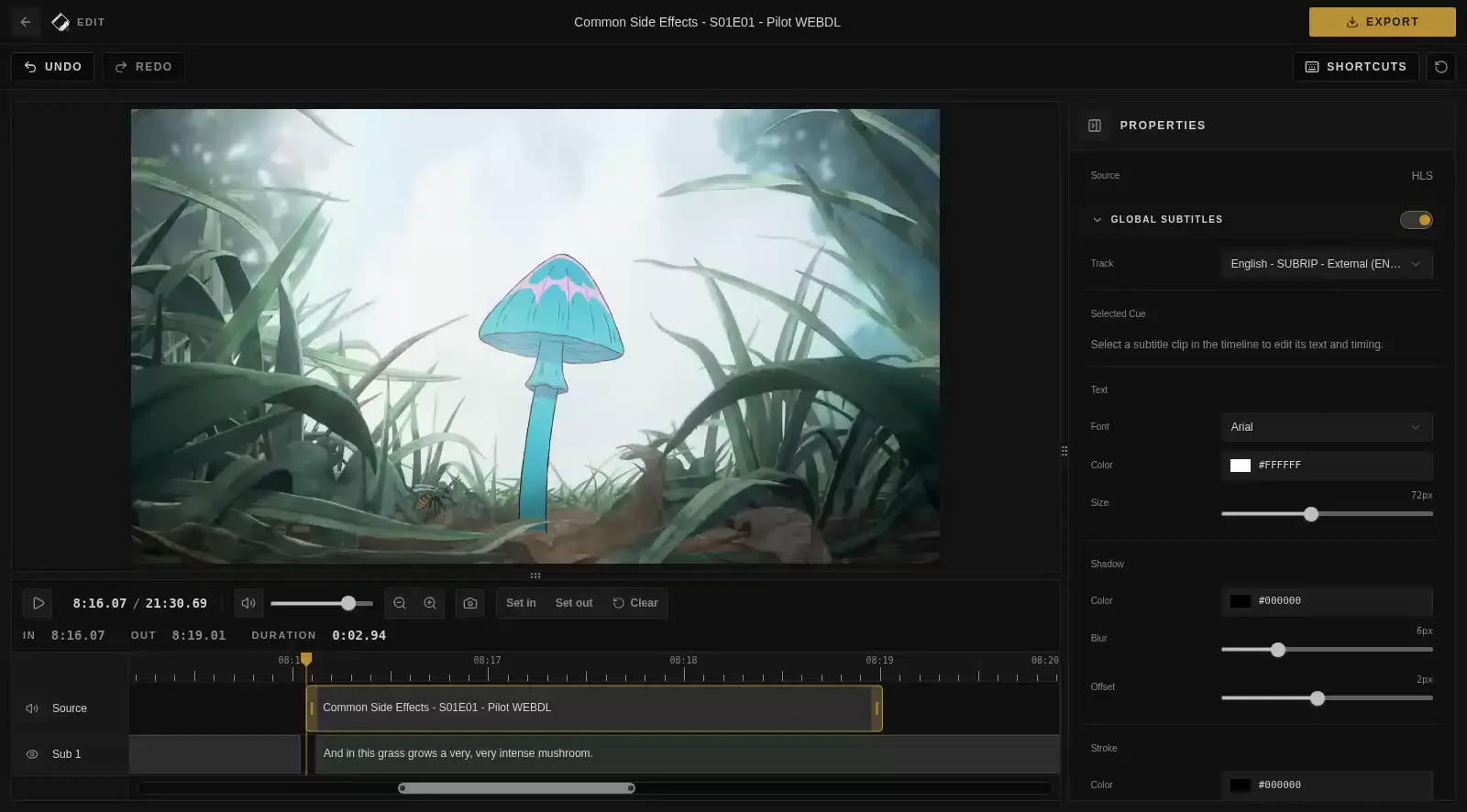
Cliparr is a streamlined media clipper that allows you to quickly create and download clips from the media currently playing on your Plex or Jellyfin server, or from a local video file opened directly in your browser.
Features
- Live session discovery: Playback starts, pauses, and stops update automatically from connected Plex and Jellyfin providers, without manual refresh.
- Open local videos: Open a local file or direct media URL before or after connecting a provider.
- Intuitive timeline editor: Drag the media block to choose your clip, trim either edge, and zoom into subtitle timing across the full video.
- Browser transcoding: Video export settings are powered by Mediabunny. GIFs are encoded with gifenc.
- Metadata included: Video exports can include season, episode, and timing metadata from your source.
- Subtitle burn-in: Burn in supported subtitles with customizable styling and local font support in Chromium.
Getting Started
Quick Start with Docker
The fastest way to get Cliparr running is via the GitHub Container Registry.
macOS / Linux
docker run -d \
  --name cliparr \
  -p 7171:7171 \
  -e APP_KEY="your-32-char-stable-random-secret" \
  -v cliparr-data:/data \
  ghcr.io/techsquidtv/cliparr:latest
PowerShell
docker run -d `
  --name cliparr `
  -p 7171:7171 `
  -e APP_KEY="your-32-char-stable-random-secret" `
  -v cliparr-data:/data `
  ghcr.io/techsquidtv/cliparr:latest
On Windows, run this from Docker Desktop or another Docker engine using Linux containers. Cliparr publishes Linux container images for linux/amd64 and linux/arm64.
[!IMPORTANT] Stable APP_KEY required: Cliparr uses APP_KEY to encrypt provider credentials at rest. Use a stable random secret at least 32 characters long. If you change it later, you will need to re-authenticate your media servers.
[!IMPORTANT] Use HTTPS for editing: Cliparr's editor uses browser WebCodecs. Supporting browsers require a secure context, so use HTTPS through a reverse proxy or open Cliparr on localhost or 127.0.0.1.
Live Provider Sessions
Connect Plex or Jellyfin, then start playing a video in that provider. Cliparr's server subscribes to playback notifications and streams updates to the dashboard without periodic session polling. If a connection drops, the dashboard keeps the last sessions visible with a warning and reconnects automatically. Use Retry connection when needed.
[!IMPORTANT] Jellyfin compatibility: Non-administrator accounts require Jellyfin 10.11 or newer for live sessions. On older versions, upgrade Jellyfin or connect an administrator account. There is no polling fallback.
See the provider guide for setup and troubleshooting.
Local Videos
Use Open Video on the connect screen or dashboard to open a file from your device or a direct media URL. Files are read by the browser with Mediabunny and are not uploaded to the Cliparr server. Browsers that support persistent file handles can reopen the selected file after refresh once you grant permission again; other file input and drag-and-drop sessions stay available only while the tab is open.
URL media streams through Cliparr's media proxy. The URL must use HTTP or HTTPS, be reachable from the Cliparr server, and not point at a blocked internal address. For smooth seeking and clipping, use URLs that support byte-range requests. HLS .m3u8 URLs can be opened when Cliparr can fetch the playlist and its segment URLs.
Using Docker Compose
For a persistent setup, we recommend using Docker Compose:
services:
  cliparr:
    image: ghcr.io/techsquidtv/cliparr:latest
    container_name: cliparr
    ports:
      - "7171:7171"
    environment:
      - APP_KEY=replace-this-with-a-32-character-secure-random-string
    volumes:
      - cliparr-data:/data
    restart: unless-stopped

volumes:
  cliparr-data:
Configuration
| Variable | Description | Default |
|---|---|---|
APP_KEY | Required secret for credential encryption. Must be at least 32 characters long. | - |
PORT | Internal port for the Express server. | 7171 prod / 3000 dev |
CLIPARR_DATA_DIR | Directory for SQLite storage. | /data |
CLIPARR_LOG_LEVEL | Server log level. Supports trace, debug, info, warning, error, and fatal. Defaults to debug in development and info in production. | debug/info |
CLIPARR_LOG_FORMAT | Production server console log format. Development console logs are always JSON. | json dev / pretty prod |
CLIPARR_LOG_FILE | Optional path for a rotating server log file. Relative paths resolve from the server working directory. | - |
CLIPARR_LOG_FILE_FORMAT | Optional log file format. Defaults to CLIPARR_LOG_FORMAT when set, otherwise json. | json |
CLIPARR_LOG_FILE_MAX_SIZE | Maximum size for each rotating server log file. Supports kb, mb, and gb suffixes. | 10mb |
CLIPARR_LOG_FILE_MAX_FILES | Total number of rotating server log files to keep, including the active file. | 5 |
CLIPARR_ALLOW_LOOPBACK_JELLYFIN_URLS | Allow Jellyfin URLs that resolve to localhost or loopback. Use only for trusted self-hosted setups. | false |
When running behind a reverse proxy, preserve the Host header and pass X-Forwarded-Proto. Cliparr trusts loopback, link-local, and private-LAN proxy ranges directly in the app, so typical Caddy/Nginx/Traefik setups on the same network do not need extra app configuration. Caddy already forwards the needed headers.
Live sessions also require unbuffered server-sent events between Cliparr and the browser. Proxies in front of your media servers must allow Plex event streams and Jellyfin WebSockets. See the reverse proxy requirements.
Cliparr does not include a full app-level user or permission system. If you need to limit who can open the app, keep it on a trusted network or put it behind an authenticated reverse proxy. See the access control guide for recommended deployment patterns.
Development
We welcome contributions! To get started with a local development environment:
- Clone:
git clone https://github.com/techsquidtv/cliparr.git - Setup:
cp .env.example .env(and fill inAPP_KEY) - Install:
pnpm install - Run:
pnpm dev
The optional Docker dev stack (docker/compose.dev.yml) seeds Plex and Jellyfin with Sintel, a Blender open movie with embedded subtitle tracks. It downloads from download.blender.org and falls back to a Blender mirror, checking the file against Blender's published MD5; set SINTEL_URL (and SINTEL_MD5) to use a different copy. Run pnpm docker:dev:build after Dockerfile or dependency changes, then pnpm docker:dev:up to start the stack. The seed is skipped when CI=true or GITHUB_ACTIONS=true so CI jobs do not download the large test movie. If you previously used the old Big Buck Bunny seed, recreate the cliparr-dev-media, plex-config, and jellyfin-config Docker volumes to force a clean library scan.
Plex library bootstrap runs the dependency-free @cliparr/plex Node entry point from the mounted package. It uses the same generated contracts as the server and fails visibly if bounded readiness or library creation retries are exhausted. See Plex contract maintenance for generation and compatibility details.
See .github/CONTRIBUTING.md for more detailed guidance.
License
Cliparr is released under the MIT License.


Similar repos


Languages
TypeScript
87.0%
JavaScript
5.6%
Astro
3.0%
MDX
2.7%
CSS
1.3%
Create clips from media on your personal media server
See the codeREADME
Cliparr
Instant media clipper for your personal media server.
Cliparr is a streamlined media clipper that allows you to quickly create and download clips from the media currently playing on your Plex or Jellyfin server, or from a local video file opened directly in your browser.
Features
- Live session discovery: Playback starts, pauses, and stops update automatically from connected Plex and Jellyfin providers, without manual refresh.
- Open local videos: Open a local file or direct media URL before or after connecting a provider.
- Intuitive timeline editor: Drag the media block to choose your clip, trim either edge, and zoom into subtitle timing across the full video.
- Browser transcoding: Video export settings are powered by Mediabunny. GIFs are encoded with gifenc.
- Metadata included: Video exports can include season, episode, and timing metadata from your source.
- Subtitle burn-in: Burn in supported subtitles with customizable styling and local font support in Chromium.
Getting Started
Quick Start with Docker
The fastest way to get Cliparr running is via the GitHub Container Registry.
macOS / Linux
docker run -d \
  --name cliparr \
  -p 7171:7171 \
  -e APP_KEY="your-32-char-stable-random-secret" \
  -v cliparr-data:/data \
  ghcr.io/techsquidtv/cliparr:latest
PowerShell
docker run -d `
  --name cliparr `
  -p 7171:7171 `
  -e APP_KEY="your-32-char-stable-random-secret" `
  -v cliparr-data:/data `
  ghcr.io/techsquidtv/cliparr:latest
On Windows, run this from Docker Desktop or another Docker engine using Linux containers. Cliparr publishes Linux container images for linux/amd64 and linux/arm64.
[!IMPORTANT] Stable APP_KEY required: Cliparr uses APP_KEY to encrypt provider credentials at rest. Use a stable random secret at least 32 characters long. If you change it later, you will need to re-authenticate your media servers.
[!IMPORTANT] Use HTTPS for editing: Cliparr's editor uses browser WebCodecs. Supporting browsers require a secure context, so use HTTPS through a reverse proxy or open Cliparr on localhost or 127.0.0.1.
Live Provider Sessions
Connect Plex or Jellyfin, then start playing a video in that provider. Cliparr's server subscribes to playback notifications and streams updates to the dashboard without periodic session polling. If a connection drops, the dashboard keeps the last sessions visible with a warning and reconnects automatically. Use Retry connection when needed.
[!IMPORTANT] Jellyfin compatibility: Non-administrator accounts require Jellyfin 10.11 or newer for live sessions. On older versions, upgrade Jellyfin or connect an administrator account. There is no polling fallback.
See the provider guide for setup and troubleshooting.
Local Videos
Use Open Video on the connect screen or dashboard to open a file from your device or a direct media URL. Files are read by the browser with Mediabunny and are not uploaded to the Cliparr server. Browsers that support persistent file handles can reopen the selected file after refresh once you grant permission again; other file input and drag-and-drop sessions stay available only while the tab is open.
URL media streams through Cliparr's media proxy. The URL must use HTTP or HTTPS, be reachable from the Cliparr server, and not point at a blocked internal address. For smooth seeking and clipping, use URLs that support byte-range requests. HLS .m3u8 URLs can be opened when Cliparr can fetch the playlist and its segment URLs.
Using Docker Compose
For a persistent setup, we recommend using Docker Compose:
services:
  cliparr:
    image: ghcr.io/techsquidtv/cliparr:latest
    container_name: cliparr
    ports:
      - "7171:7171"
    environment:
      - APP_KEY=replace-this-with-a-32-character-secure-random-string
    volumes:
      - cliparr-data:/data
    restart: unless-stopped

volumes:
  cliparr-data:
Configuration
| Variable | Description | Default |
|---|---|---|
APP_KEY | Required secret for credential encryption. Must be at least 32 characters long. | - |
PORT | Internal port for the Express server. | 7171 prod / 3000 dev |
CLIPARR_DATA_DIR | Directory for SQLite storage. | /data |
CLIPARR_LOG_LEVEL | Server log level. Supports trace, debug, info, warning, error, and fatal. Defaults to debug in development and info in production. | debug/info |
CLIPARR_LOG_FORMAT | Production server console log format. Development console logs are always JSON. | json dev / pretty prod |
CLIPARR_LOG_FILE | Optional path for a rotating server log file. Relative paths resolve from the server working directory. | - |
CLIPARR_LOG_FILE_FORMAT | Optional log file format. Defaults to CLIPARR_LOG_FORMAT when set, otherwise json. | json |
CLIPARR_LOG_FILE_MAX_SIZE | Maximum size for each rotating server log file. Supports kb, mb, and gb suffixes. | 10mb |
CLIPARR_LOG_FILE_MAX_FILES | Total number of rotating server log files to keep, including the active file. | 5 |
CLIPARR_ALLOW_LOOPBACK_JELLYFIN_URLS | Allow Jellyfin URLs that resolve to localhost or loopback. Use only for trusted self-hosted setups. | false |
When running behind a reverse proxy, preserve the Host header and pass X-Forwarded-Proto. Cliparr trusts loopback, link-local, and private-LAN proxy ranges directly in the app, so typical Caddy/Nginx/Traefik setups on the same network do not need extra app configuration. Caddy already forwards the needed headers.
Live sessions also require unbuffered server-sent events between Cliparr and the browser. Proxies in front of your media servers must allow Plex event streams and Jellyfin WebSockets. See the reverse proxy requirements.
Cliparr does not include a full app-level user or permission system. If you need to limit who can open the app, keep it on a trusted network or put it behind an authenticated reverse proxy. See the access control guide for recommended deployment patterns.
Development
We welcome contributions! To get started with a local development environment:
- Clone:
git clone https://github.com/techsquidtv/cliparr.git - Setup:
cp .env.example .env(and fill inAPP_KEY) - Install:
pnpm install - Run:
pnpm dev
The optional Docker dev stack (docker/compose.dev.yml) seeds Plex and Jellyfin with Sintel, a Blender open movie with embedded subtitle tracks. It downloads from download.blender.org and falls back to a Blender mirror, checking the file against Blender's published MD5; set SINTEL_URL (and SINTEL_MD5) to use a different copy. Run pnpm docker:dev:build after Dockerfile or dependency changes, then pnpm docker:dev:up to start the stack. The seed is skipped when CI=true or GITHUB_ACTIONS=true so CI jobs do not download the large test movie. If you previously used the old Big Buck Bunny seed, recreate the cliparr-dev-media, plex-config, and jellyfin-config Docker volumes to force a clean library scan.
Plex library bootstrap runs the dependency-free @cliparr/plex Node entry point from the mounted package. It uses the same generated contracts as the server and fails visibly if bounded readiness or library creation retries are exhausted. See Plex contract maintenance for generation and compatibility details.
See .github/CONTRIBUTING.md for more detailed guidance.
License
Cliparr is released under the MIT License.
Similar repos
Significant stargazers
Languages
TypeScript
87.0%
JavaScript
5.6%
Astro
3.0%
MDX
2.7%
CSS
1.3%