Tangle is a web app that allows the users to build and run Machine Learning pipelines without having to set up development environment.
See the codeThe Tangle system helps users create and run ML experiments and production pipelines. Any batch workflow that has beginning and end can be orchestrated via a pipeline.
To learn more about Tangle, visit https://tangleml.com
Tangle’s architecture allows it to run anywhere. We’re expanding the list of installation recipes. At this moment Tangle can be used locally (using Docker/Podman launcher) or at HuggingFace (using HuggingFace Job launcher).
The easiest way to try Tangle is via HuggingFace.
Go to TangleML/tangle at HuggingFace and start building. Creating a pipeline does not require any registration, but to run your pipeline, you’ll need a HuggingFace account with Pro subscription ($9/month).
Start with the sample XGBoost training pipeline or build a new one from scratch:
The Tangle team has deployed Tangle to HuggingFace Spaces as a multi-tenant service, which uses HF infrastructure for storage, compute, and authentication.
The shared multi-tenant instance is live at https://tangleml-tangle.hf.space (or https://huggingface.co/spaces/TangleML/tangle).
Tangle’s multi-tenant architecture maintains a central tenant database (storing user IDs, access tokens, and orchestrator configs) plus individual per-tenant SQLite databases in the main TangleML/tangle HuggingFace Space persistent storage. Each user’s pipelines run via that user’s HuggingFace Jobs, and the execution logs and output artifacts are stored in the user's own private HuggingFace Dataset repo (user/tangle_data), with clickable links in the UI to both artifacts and HuggingFace Jobs.
You can also deploy your own single-tenant instance. To do this, duplicate the Tangle space to your HF account and provide a HuggingFace token. These single-tenant Tangle deployments store their database in your own HF Space persistent storage, giving you complete control and data isolation.
If you duplicate Tangle to an organization, you’ll get a single-tenant multi-user Tangle deployment for your team, where multiple team members can see each other’s pipeline runs and enjoy org-wide cache.
You can also deploy Tangle to other environments (local or cloud).
git clone https://github.com/TangleML/tangle.git tangle/backend --branch stable
git clone https://github.com/TangleML/tangle-ui.git tangle/ui_build --branch stable_local_build
Linux and Mac OS:
cd tangle && backend/start_local.sh
Windows:
cd tangle && backend\start_local.cmd
Google Cloud Shell is free (50 hours per week) and needs a Google Cloud account.
git clone https://github.com/TangleML/tangle.git tangle/backend --branch stable
git clone https://github.com/TangleML/tangle-ui.git tangle/ui_build --branch stable_local_build
cd tangle && backend/start_local.sh
ComponentSpec/component.yaml formatA pipeline system like Tangle orchestrates containerized command-line programs. When pipeline system runs a pipeline, it executes an interconnected graph of containerized programs locally or remotely (e.g. in cloud), and facilitates the transfer of data between them.
A pipeline is a graph of interconnected component tasks.
A component describes a certain command-line program inside a container. Component specification describes its signature (inputs, outputs), metadata (name, description and annotations) and implementation which specifies which container image to use, which program to start and how to connect the inputs and outputs to the program's command-line arguments. Components can be written in any language. All Cloud Pipelines projects including Tangle supports arbitrary containers and arbitrary programs.
A task describes an instance of a component and specifies the input arguments for the component's inputs. Tasks are connected together into a graph by linking some upstream task outputs to some downstream task inputs.
The resulting graph of interconnected tasks is called a pipeline. A pipeline can be submitted for execution. During the pipeline execution, the pipeline's tasks are executed (in parallel, if possible) and produce output artifacts that are passed to downstream tasks.
This backend consists of the API Server and the Orchestrator.
The API Server receives API requests and accesses the database to fulfill them. The API documentation can be accessed at http://localhost:8000/docs.
The Orchestrator works independently from the API Server. It launches container executions and facilitates data passing between executions. The Orchestrator and the API Server communicate via the database. The Orchestrator launches container tasks using a specified Launcher, communicating with it via abstract interface. Such flexibility helps support different container execution systems and cloud providers.
The backend uses SqlAlchemy to abstract the database access, so any database engine supported by SqlAlchemy can be used. We officially support the SQLite and MySQL databases.
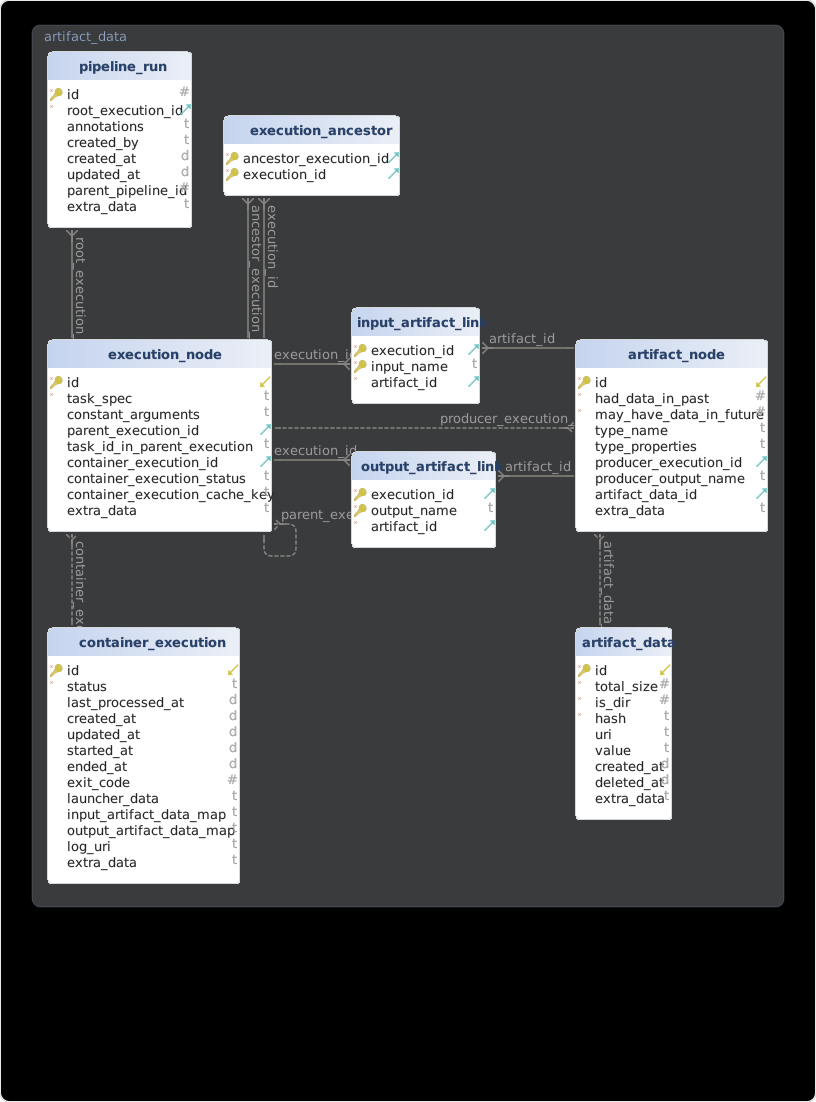
Launchers launch container executions on a local or remote computer. Currently the following launchers are supported:
More launchers may be added in the future.
This Tangle Pipelines backend is created by Alexey Volkov as part of the Cloud Pipelines project. It's derived from the Cloud Pipelines SDK orchestrator and uses parts of it under the hood.
4,600 followers · starred Sep 2026
1,390 followers · starred Sep 2026
31 followers · starred Apr 2026
175 followers · starred Apr 2026
Tangle is a web app that allows the users to build and run Machine Learning pipelines without having to set up development environment.
See the codeThe Tangle system helps users create and run ML experiments and production pipelines. Any batch workflow that has beginning and end can be orchestrated via a pipeline.
To learn more about Tangle, visit https://tangleml.com
Tangle’s architecture allows it to run anywhere. We’re expanding the list of installation recipes. At this moment Tangle can be used locally (using Docker/Podman launcher) or at HuggingFace (using HuggingFace Job launcher).
The easiest way to try Tangle is via HuggingFace.
Go to TangleML/tangle at HuggingFace and start building. Creating a pipeline does not require any registration, but to run your pipeline, you’ll need a HuggingFace account with Pro subscription ($9/month).
Start with the sample XGBoost training pipeline or build a new one from scratch:
The Tangle team has deployed Tangle to HuggingFace Spaces as a multi-tenant service, which uses HF infrastructure for storage, compute, and authentication.
The shared multi-tenant instance is live at https://tangleml-tangle.hf.space (or https://huggingface.co/spaces/TangleML/tangle).
Tangle’s multi-tenant architecture maintains a central tenant database (storing user IDs, access tokens, and orchestrator configs) plus individual per-tenant SQLite databases in the main TangleML/tangle HuggingFace Space persistent storage. Each user’s pipelines run via that user’s HuggingFace Jobs, and the execution logs and output artifacts are stored in the user's own private HuggingFace Dataset repo (user/tangle_data), with clickable links in the UI to both artifacts and HuggingFace Jobs.
You can also deploy your own single-tenant instance. To do this, duplicate the Tangle space to your HF account and provide a HuggingFace token. These single-tenant Tangle deployments store their database in your own HF Space persistent storage, giving you complete control and data isolation.
If you duplicate Tangle to an organization, you’ll get a single-tenant multi-user Tangle deployment for your team, where multiple team members can see each other’s pipeline runs and enjoy org-wide cache.
You can also deploy Tangle to other environments (local or cloud).
git clone https://github.com/TangleML/tangle.git tangle/backend --branch stable
git clone https://github.com/TangleML/tangle-ui.git tangle/ui_build --branch stable_local_build
Linux and Mac OS:
cd tangle && backend/start_local.sh
Windows:
cd tangle && backend\start_local.cmd
Google Cloud Shell is free (50 hours per week) and needs a Google Cloud account.
git clone https://github.com/TangleML/tangle.git tangle/backend --branch stable
git clone https://github.com/TangleML/tangle-ui.git tangle/ui_build --branch stable_local_build
cd tangle && backend/start_local.sh
ComponentSpec/component.yaml formatA pipeline system like Tangle orchestrates containerized command-line programs. When pipeline system runs a pipeline, it executes an interconnected graph of containerized programs locally or remotely (e.g. in cloud), and facilitates the transfer of data between them.
A pipeline is a graph of interconnected component tasks.
A component describes a certain command-line program inside a container. Component specification describes its signature (inputs, outputs), metadata (name, description and annotations) and implementation which specifies which container image to use, which program to start and how to connect the inputs and outputs to the program's command-line arguments. Components can be written in any language. All Cloud Pipelines projects including Tangle supports arbitrary containers and arbitrary programs.
A task describes an instance of a component and specifies the input arguments for the component's inputs. Tasks are connected together into a graph by linking some upstream task outputs to some downstream task inputs.
The resulting graph of interconnected tasks is called a pipeline. A pipeline can be submitted for execution. During the pipeline execution, the pipeline's tasks are executed (in parallel, if possible) and produce output artifacts that are passed to downstream tasks.
This backend consists of the API Server and the Orchestrator.
The API Server receives API requests and accesses the database to fulfill them. The API documentation can be accessed at http://localhost:8000/docs.
The Orchestrator works independently from the API Server. It launches container executions and facilitates data passing between executions. The Orchestrator and the API Server communicate via the database. The Orchestrator launches container tasks using a specified Launcher, communicating with it via abstract interface. Such flexibility helps support different container execution systems and cloud providers.
The backend uses SqlAlchemy to abstract the database access, so any database engine supported by SqlAlchemy can be used. We officially support the SQLite and MySQL databases.
Launchers launch container executions on a local or remote computer. Currently the following launchers are supported:
More launchers may be added in the future.
This Tangle Pipelines backend is created by Alexey Volkov as part of the Cloud Pipelines project. It's derived from the Cloud Pipelines SDK orchestrator and uses parts of it under the hood.
4,600 followers · starred Sep 2026
1,390 followers · starred Sep 2026
31 followers · starred Apr 2026
175 followers · starred Apr 2026