
See what people are saying
README
converge.nvim
Mix parts of installed color schemes into one. Syntax from one theme, editor UI from another, terminal colors from a third. Pick with a live preview.
Requires Neovim 0.10 or newer. No dependencies.
Demo
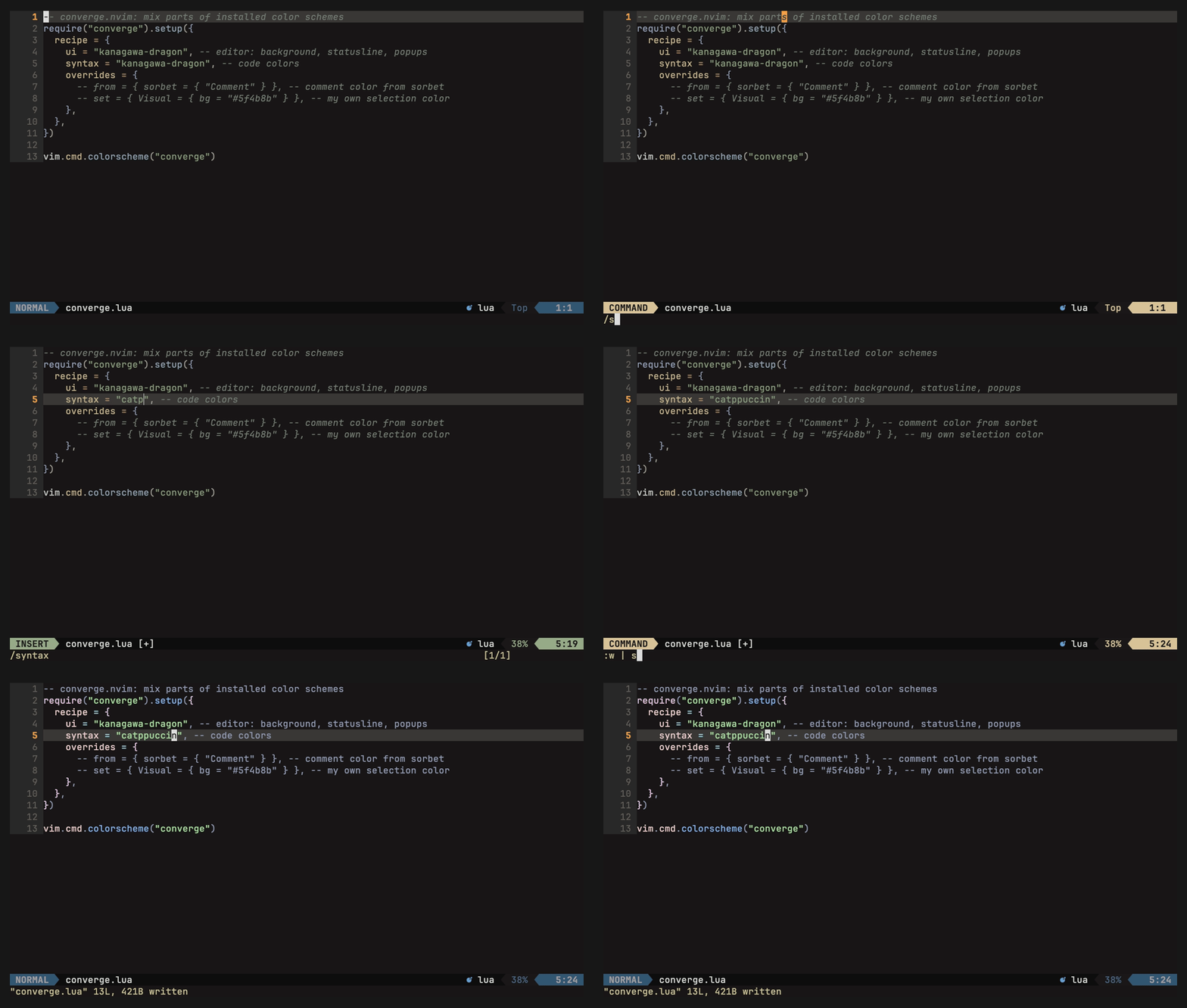
Take code colors from another theme
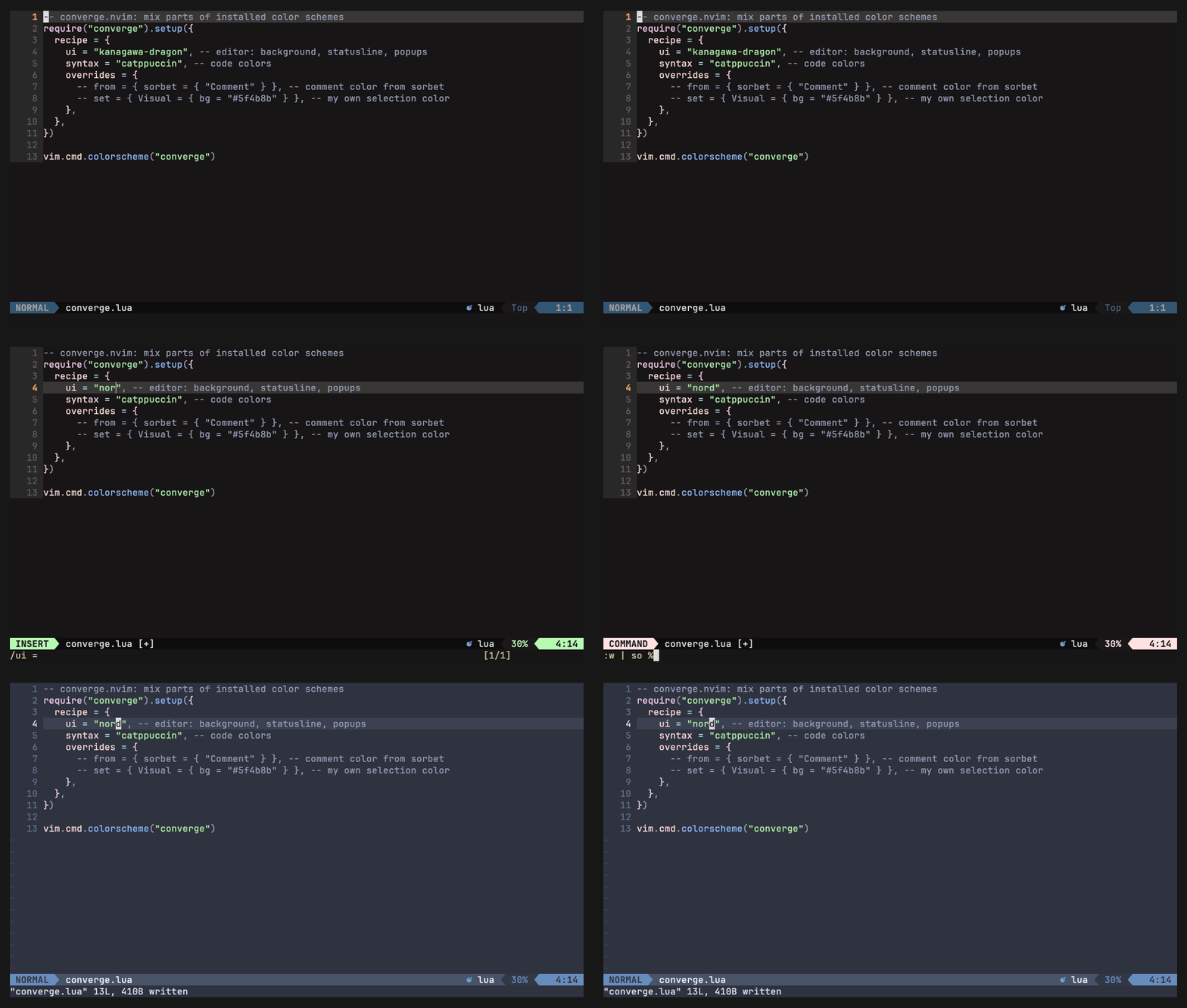
Take the editor UI from another theme
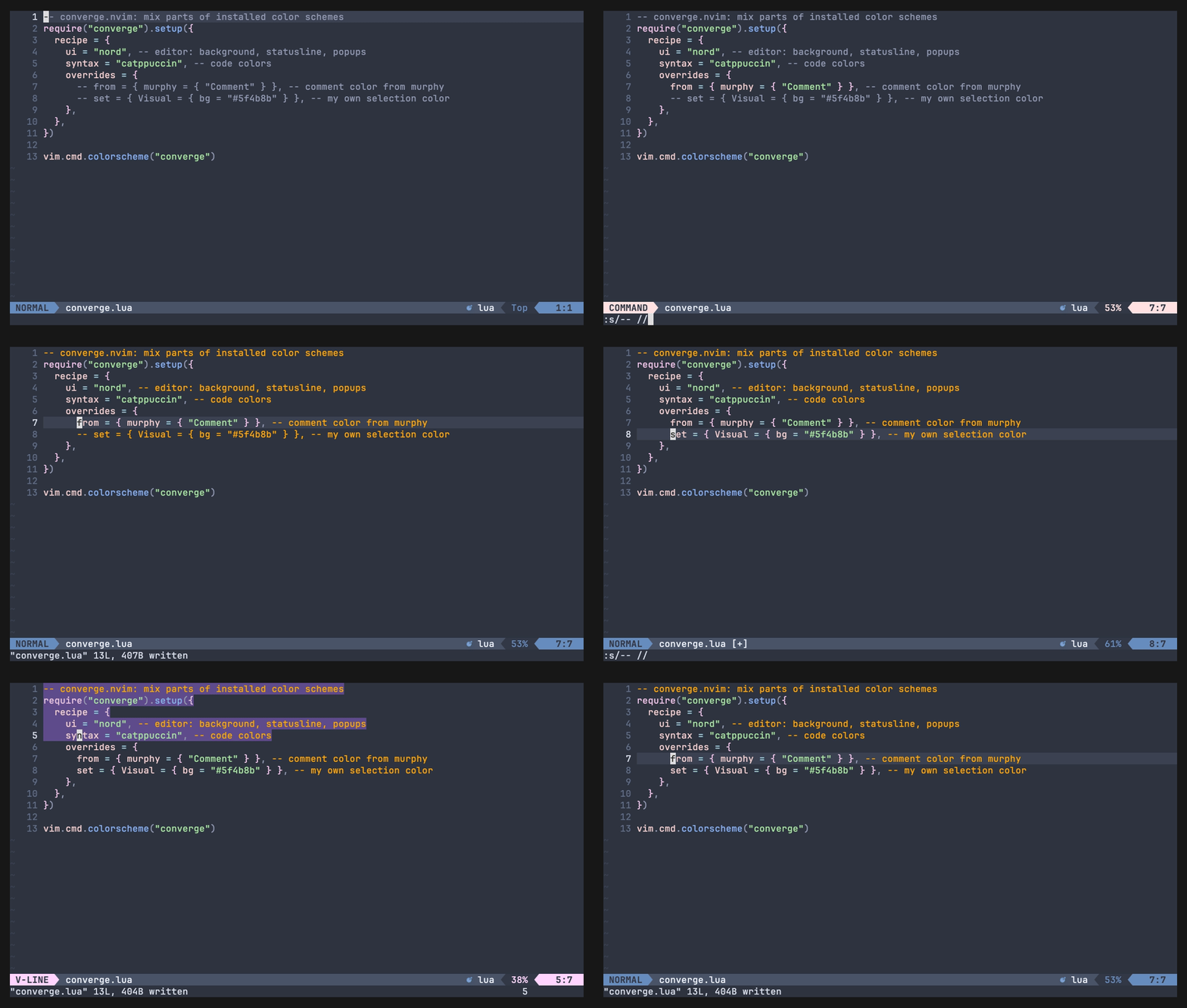
Change single colors with overrides
Pick and preview themes live with :Converge
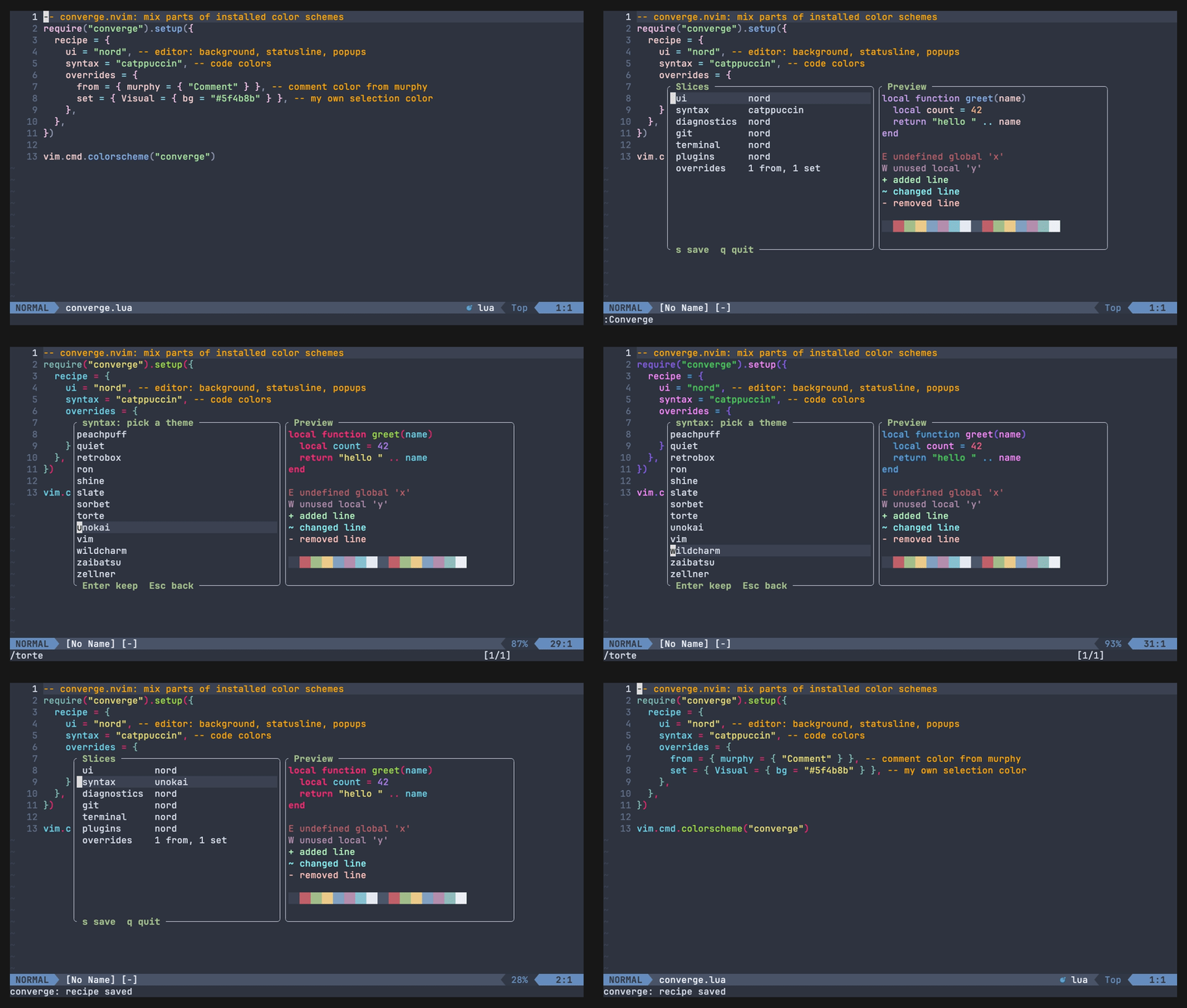
Your pick survives a restart, :Converge reset goes back to your config

Installation
converge.nvim works with any plugin manager. Install your themes as usual, then load converge after them.
lazy.nvim
{
  "sunnytamang/converge.nvim",
  lazy = false,
  priority = 1000,
  config = function()
    require("converge").setup({
      recipe = { ui = "tokyonight-night", syntax = "catppuccin-mocha" },
    })
    vim.cmd.colorscheme("converge")
  end,
},
packer.nvim
use({
  "sunnytamang/converge.nvim",
  config = function()
    require("converge").setup({
      recipe = { ui = "tokyonight-night", syntax = "catppuccin-mocha" },
    })
    vim.cmd.colorscheme("converge")
  end,
})
vim-plug
Plug 'sunnytamang/converge.nvim'

" after call plug#end()
lua << EOF
require("converge").setup({
  recipe = { ui = "tokyonight-night", syntax = "catppuccin-mocha" },
})
EOF
colorscheme converge
vim.pack (Neovim 0.12+)
vim.pack.add({ "https://github.com/sunnytamang/converge.nvim" })

require("converge").setup({
  recipe = { ui = "tokyonight-night", syntax = "catppuccin-mocha" },
})
vim.cmd.colorscheme("converge")
Notes
- Order: run
setup()andcolorscheme convergeafter your themes are installed and their ownsetup()(if any) has run, so converge reads your version of each theme. - Lazy-loaded themes: converge reads themes with
:colorscheme, which also finds themes in optional packages and lets lazy.nvim load a theme's plugin first, so recipes work with lazy-loaded themes. The picker lists themes that lazy.nvim has not loaded yet; with other managers, a theme shows up in the picker once it has been loaded.
Setup
require("converge").setup({
  recipe = {
    ui = "tokyonight-night",
    syntax = "catppuccin-mocha",
    terminal = "gruvbox",
  },
})
vim.cmd.colorscheme("converge")
Slices: ui, syntax, diagnostics, git, terminal, plugins.
A slice you leave out uses the ui theme.
Overrides
Change single highlight groups on top of the slices. Write them in your config:
recipe = {
  ui = "kanagawa-dragon",
  syntax = "kanagawa",
  overrides = {
    from = {                                 -- take groups from another theme
      nord = { "Comment" },
    },
    set = {                                  -- your own colors (nvim_set_hl format)
      Visual = { bg = "#2d4f67" },
    },
  },
}
Order: slices, then from, then set. If a group is in both, set wins.
Groups that link to an overridden group in their theme follow it. In the example,
@comment and @lsp.type.comment (which link to Comment in most themes) get nord's
comment color too. UI groups follow the same way, for example CursorLineNr -> Comment.
A group you name yourself always keeps its own override.
Overrides always come from your config, even when you saved a recipe with s.
To find a group's name, put the cursor on the text and run :Inspect.
Theme or group names with -, ., or a leading @ must be written in brackets and quotes,
because Lua would read kanagawa-dragon = ... as a subtraction:
from = {
  ["kanagawa-dragon"] = { "Comment" },   -- not: kanagawa-dragon = { ... }
},
set = {
  ["@string"] = { fg = "#a3be8c" },      -- not: @string = { ... }
},
Plain names like nord work both ways: nord = { ... } and ["nord"] = { ... } are the same.
Plugins that force their colors in a ColorScheme autocmd can win over set (as with any color scheme).
Common groups
Plain Neovim has about 380 highlight groups, and plugins add more. Any of them can be overridden. Some common ones:
| Area | Groups | What they color |
|---|---|---|
| Editor | Normal, NormalFloat, FloatBorder | Text and background, floating windows, their borders |
| Cursor and lines | CursorLine, CursorLineNr, LineNr, SignColumn | Current line, its number, other line numbers, sign column |
| Selection and search | Visual, Search, IncSearch, MatchParen | Selected text, search matches, matching bracket |
| Statusline and tabs | StatusLine, StatusLineNC, TabLine, TabLineSel, WinSeparator | Statusline (active, inactive), tabs, window borders |
| Popup menu | Pmenu, PmenuSel | Completion menu, selected item |
| Code | Comment, String, Function, Keyword, Type, Constant, Number | Code colors |
| Code (treesitter) | @comment, @string, @function, @keyword, @variable | Code colors from treesitter (most of them link to the groups above) |
| Diagnostics | DiagnosticError, DiagnosticWarn, DiagnosticUnderlineError, DiagnosticVirtualTextError | Errors and warnings |
| Git and diff | Added, Changed, Removed, DiffAdd, DiffChange, DiffDelete | Git signs and diff views |
| Other | Folded, Title, NonText, EndOfBuffer | Folds, titles, invisible characters, ~ after the last line |
Find a group and override it
-
Find the name.
- For text in a buffer: put the cursor on it and run
:Inspect. It lists the groups coloring that spot (treesitter, semantic tokens from your language server, syntax). The top one wins. - For editor parts you cannot put the cursor on (statusline, popup menu, selection):
look them up with
:help highlight-groups, or search all groups with:filter /Pmenu/ highlight(replacePmenuwith part of the name).
- For text in a buffer: put the cursor on it and run
-
Add it to your recipe, from another theme or with your own colors:
overrides = { from = { nord = { "Comment" } }, set = { PmenuSel = { bg = "#2d4f67", bold = true } }, }, -
Apply it: save your config and run
:colorscheme converge(or restart Neovim).
Picker
:Converge opens the picker.
| Key | Slice list | Theme list |
|---|---|---|
<CR> | pick a theme for this slice | keep this theme |
<Esc> | close (undo unsaved) | undo, back to slices |
s | save the recipe | |
y | copy the recipe as Lua | |
q | close (undo unsaved) | close (undo unsaved) |
A saved recipe's slices win over the ones in setup(); overrides always come from setup().
The overrides line in the slice list is read-only (edit overrides in your config).
Commands
:Converge reset- delete the saved recipe.:Converge refresh- delete the cache and read all themes again.
How it works
Each theme is loaded once. Its colors are saved in stdpath("cache")/converge/.
The cache refreshes when the theme's files change (everything in the theme's colors/ and
lua/ folders). The first time a theme is used (a cold cache), ColorScheme fires once for
each theme that is read, and the old colors stay for one moment while that happens.
Theme options (for example a setup() call of the theme) are not part of its files. After
changing a theme's options, run :Converge refresh.
Similar repos


See what people are saying
README
converge.nvim
Mix parts of installed color schemes into one. Syntax from one theme, editor UI from another, terminal colors from a third. Pick with a live preview.
Requires Neovim 0.10 or newer. No dependencies.
Demo
Take code colors from another theme
Take the editor UI from another theme
Change single colors with overrides
Pick and preview themes live with :Converge
Your pick survives a restart, :Converge reset goes back to your config
Installation
converge.nvim works with any plugin manager. Install your themes as usual, then load converge after them.
lazy.nvim
{
  "sunnytamang/converge.nvim",
  lazy = false,
  priority = 1000,
  config = function()
    require("converge").setup({
      recipe = { ui = "tokyonight-night", syntax = "catppuccin-mocha" },
    })
    vim.cmd.colorscheme("converge")
  end,
},
packer.nvim
use({
  "sunnytamang/converge.nvim",
  config = function()
    require("converge").setup({
      recipe = { ui = "tokyonight-night", syntax = "catppuccin-mocha" },
    })
    vim.cmd.colorscheme("converge")
  end,
})
vim-plug
Plug 'sunnytamang/converge.nvim'

" after call plug#end()
lua << EOF
require("converge").setup({
  recipe = { ui = "tokyonight-night", syntax = "catppuccin-mocha" },
})
EOF
colorscheme converge
vim.pack (Neovim 0.12+)
vim.pack.add({ "https://github.com/sunnytamang/converge.nvim" })

require("converge").setup({
  recipe = { ui = "tokyonight-night", syntax = "catppuccin-mocha" },
})
vim.cmd.colorscheme("converge")
Notes
- Order: run
setup()andcolorscheme convergeafter your themes are installed and their ownsetup()(if any) has run, so converge reads your version of each theme. - Lazy-loaded themes: converge reads themes with
:colorscheme, which also finds themes in optional packages and lets lazy.nvim load a theme's plugin first, so recipes work with lazy-loaded themes. The picker lists themes that lazy.nvim has not loaded yet; with other managers, a theme shows up in the picker once it has been loaded.
Setup
require("converge").setup({
  recipe = {
    ui = "tokyonight-night",
    syntax = "catppuccin-mocha",
    terminal = "gruvbox",
  },
})
vim.cmd.colorscheme("converge")
Slices: ui, syntax, diagnostics, git, terminal, plugins.
A slice you leave out uses the ui theme.
Overrides
Change single highlight groups on top of the slices. Write them in your config:
recipe = {
  ui = "kanagawa-dragon",
  syntax = "kanagawa",
  overrides = {
    from = {                                 -- take groups from another theme
      nord = { "Comment" },
    },
    set = {                                  -- your own colors (nvim_set_hl format)
      Visual = { bg = "#2d4f67" },
    },
  },
}
Order: slices, then from, then set. If a group is in both, set wins.
Groups that link to an overridden group in their theme follow it. In the example,
@comment and @lsp.type.comment (which link to Comment in most themes) get nord's
comment color too. UI groups follow the same way, for example CursorLineNr -> Comment.
A group you name yourself always keeps its own override.
Overrides always come from your config, even when you saved a recipe with s.
To find a group's name, put the cursor on the text and run :Inspect.
Theme or group names with -, ., or a leading @ must be written in brackets and quotes,
because Lua would read kanagawa-dragon = ... as a subtraction:
from = {
  ["kanagawa-dragon"] = { "Comment" },   -- not: kanagawa-dragon = { ... }
},
set = {
  ["@string"] = { fg = "#a3be8c" },      -- not: @string = { ... }
},
Plain names like nord work both ways: nord = { ... } and ["nord"] = { ... } are the same.
Plugins that force their colors in a ColorScheme autocmd can win over set (as with any color scheme).
Common groups
Plain Neovim has about 380 highlight groups, and plugins add more. Any of them can be overridden. Some common ones:
| Area | Groups | What they color |
|---|---|---|
| Editor | Normal, NormalFloat, FloatBorder | Text and background, floating windows, their borders |
| Cursor and lines | CursorLine, CursorLineNr, LineNr, SignColumn | Current line, its number, other line numbers, sign column |
| Selection and search | Visual, Search, IncSearch, MatchParen | Selected text, search matches, matching bracket |
| Statusline and tabs | StatusLine, StatusLineNC, TabLine, TabLineSel, WinSeparator | Statusline (active, inactive), tabs, window borders |
| Popup menu | Pmenu, PmenuSel | Completion menu, selected item |
| Code | Comment, String, Function, Keyword, Type, Constant, Number | Code colors |
| Code (treesitter) | @comment, @string, @function, @keyword, @variable | Code colors from treesitter (most of them link to the groups above) |
| Diagnostics | DiagnosticError, DiagnosticWarn, DiagnosticUnderlineError, DiagnosticVirtualTextError | Errors and warnings |
| Git and diff | Added, Changed, Removed, DiffAdd, DiffChange, DiffDelete | Git signs and diff views |
| Other | Folded, Title, NonText, EndOfBuffer | Folds, titles, invisible characters, ~ after the last line |
Find a group and override it
-
Find the name.
- For text in a buffer: put the cursor on it and run
:Inspect. It lists the groups coloring that spot (treesitter, semantic tokens from your language server, syntax). The top one wins. - For editor parts you cannot put the cursor on (statusline, popup menu, selection):
look them up with
:help highlight-groups, or search all groups with:filter /Pmenu/ highlight(replacePmenuwith part of the name).
- For text in a buffer: put the cursor on it and run
-
Add it to your recipe, from another theme or with your own colors:
overrides = { from = { nord = { "Comment" } }, set = { PmenuSel = { bg = "#2d4f67", bold = true } }, }, -
Apply it: save your config and run
:colorscheme converge(or restart Neovim).
Picker
:Converge opens the picker.
| Key | Slice list | Theme list |
|---|---|---|
<CR> | pick a theme for this slice | keep this theme |
<Esc> | close (undo unsaved) | undo, back to slices |
s | save the recipe | |
y | copy the recipe as Lua | |
q | close (undo unsaved) | close (undo unsaved) |
A saved recipe's slices win over the ones in setup(); overrides always come from setup().
The overrides line in the slice list is read-only (edit overrides in your config).
Commands
:Converge reset- delete the saved recipe.:Converge refresh- delete the cache and read all themes again.
How it works
Each theme is loaded once. Its colors are saved in stdpath("cache")/converge/.
The cache refreshes when the theme's files change (everything in the theme's colors/ and
lua/ folders). The first time a theme is used (a cold cache), ColorScheme fires once for
each theme that is read, and the old colors stay for one moment while that happens.
Theme options (for example a setup() call of the theme) are not part of its files. After
changing a theme's options, run :Converge refresh.