
A fast, programmable tri-layer theme engine for Neovim featuring style deduplication, interactive in-buffer cursor editing, and real-time color pipelines.
Lua
0
13 commits
updated Sep 30, 2026
See what people are saying
README
ChromaFlow / cf.nvim
Why ChromaFlow · How it fits together · Install · Quick try · Minimal theme · CFPick · Commands · Performance · Documentation
ChromaFlow replaces massive, static color tables with a highly optimized Lua-based compiler, a live in-buffer preview editor, and real-time color pipeline transformations.
Why ChromaFlow
I built ChromaFlow because large static-table themes annoyed me. For the way I build themes, they were slower than I wanted and became maintenance hell once they grew: repeated strings and highlight tables get pushed around again and again, the same conceptual style is copied across many names, relationships disappear into a giant list, and changing one idea often means hunting through several unrelated entries.
I wanted the opposite: small modules that describe intent, shared/interned styles instead of repeated definitions, semantic resolution where it helps, exact raw names where it does not, and tools that let me edit the theme from the code I am actually looking at.
That led to ChromaFlow's main pieces:
- small Lua-based
.cftheme modules; - one resolver for Vim syntax, Tree-sitter and LSP semantic highlights;
- style interning/deduplication instead of repeated highlight definitions;
- cached hot paths and early exits;
CFPickfor live theme editing at the cursor;- automatic theme watching/reload;
- runtime styles, diagnostics, ColorTrace and LineBlend in the same system.
How the pieces fit
color.cf + config.cf + .cf modules
                |
                v
        module setup / styles
                |
        resolver or raw names
                |
                v
          compiled theme
                |
                v
        Neovim highlights

runtime modules   -> sparse live overrides
CFPick / CFSave   -> inspect compiled ownership, preview, persist source edits
ColorTrace        -> explain pipeline color transformations in source
LineBlend         -> keep CursorLine visible across styles with backgrounds
Documentation map
| If you want to... | Read |
|---|---|
| install ChromaFlow and build the first theme | getting-started.md |
understand theme roots, .cf-theme, reserved files and fallback | theme-structure.md |
| define palette colors and transform them | colors.md, then pipeline.md |
| style language semantics | language.md |
| style plugin-owned groups/captures | plugin.md |
| style editor UI groups | ui.md |
| target exact Neovim highlight names | raw.md |
| understand how Type/Mod/TypeMod names become concrete highlights | resolver.md |
| apply temporary or dynamic styles after the theme is loaded | runtime.md |
| inspect and edit the style under the cursor | picker.md |
| understand diagnostics and pipeline tracing | diagnostic.md, colortrace.md |
| keep CursorLine coherent across styled backgrounds | lineblend.md |
| reuse ChromaFlow's standalone float renderer | float.md |
| run regression tests or reproduce performance measurements | tests_benchmarks.md |
Installation and setup
With Neovim's built-in vim.pack (Neovim 0.12+):
vim.pack.add({
  "https://github.com/Gnibor/chromaflow.nvim",
})
With packer.nvim:
use("Gnibor/chromaflow.nvim")
With lazy.nvim / LazyVim:
return { "Gnibor/chromaflow.nvim" }
Quick try with the bundled theme
If you want to try ChromaFlow before creating your own theme root, the repository
ships with the complete examples/themes/dark reference theme. Its installation
location does not matter: Neovim can find it through the plugin's runtimepath.
Use this setup instead of a custom theme_path:
local marker = vim.api.nvim_get_runtime_file(
  "examples/themes/.cf-theme",
  false
)[1]

assert(marker, "ChromaFlow example theme not found")

require("cf").setup({
  theme_path = vim.fs.dirname(marker),
  picker = true,
  diagnostic = {
    color_trace = true,
  },
})
This loads the bundled reference theme directly, so you can immediately try commands such as :CFPick, :CFTheme, and :CFReload, as well as features such as ColorTrace and LineBlend. When you are ready to create your own theme, point theme_path at your own theme root instead.
Configure your own theme root
Then configure ChromaFlow:
require("cf").setup({
  theme_path = vim.fn.stdpath("config") .. "/themes",
  picker = true,
})
picker = true enables :CFPick and :CFSave. Theme watching is enabled by
default. LuaSnip is optional and is only integrated when it is already loaded.
Minimal theme
A theme root can be as small as:
themes/
├── .cf-theme
└── mytheme/
    ├── color.cf
    └── lua.cf       # example name; module filenames are otherwise free
.cf-theme contains exactly two non-empty lines: default theme, then active theme.
mytheme
mytheme
color.cf provides the shared palette:
return {
  bg = "#111318",
  fg = "#d6d6d6",
  comment = "#73829a",
  variable = "#b7ccb9",
  ["function"] = "#d7ad7c",
  type = "#8dbfc8",
  keyword = "#b5a2ce",
}
A palette must exist somewhere in the active/root/default fallback chain.
A minimal language module (for example lua.cf; the filename itself is arbitrary):
local hl = require("cf.hl.setup")
local c = hl.colors
local l = hl.language

return l.setup("lua", {
  l:group("comment", { fg = c.comment, italic = true }),
  l:group("variable", { fg = c.variable }),
  l:group("function", { fg = c["function"], types = { "method" } }),
  l:group("type", {
    fg = c.type,
    types = { "class", "struct", "enum", "interface" },
  }),
  l:group("keyword", { fg = c.keyword }),
})
Theme design with CFPick
The picker exists to remove the usual loop:
:Inspect → copy name → edit theme → reload → return to source → repeat
Place the cursor on real code and run :CFPick. It shows the concrete editable
targets available at that position. LSP and Tree-sitter information can coexist;
the picker avoids inventing targets that are not actually present.
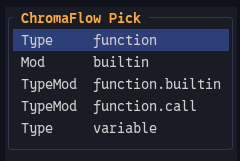
CFPick can expose several concrete Type, Mod, and TypeMod targets at the same cursor position.
Picker changes are previewed immediately through the runtime layer. When the
result is right, use :CFSave to persist the confirmed edits and reload the theme.
If a language module exists but the current style comes from generic, CFPick
can ask whether the edit should remain generic or become language-specific.
examples/showcase/ contains language playgrounds for
designing themes directly against real syntax, Tree-sitter and LSP output.
Theme layout and fallback
Only two theme-module filenames are reserved by ChromaFlow:
| Reserved file | Purpose |
|---|---|
color.cf | Palette |
config.cf | Theme-wide configuration |
All other .cf module filenames are free. Names such as generic.cf,
lang-lua.cf, plugin-telescope.cf, core-ui.cf or files below runtime/ are
conventions/examples only; the module kind comes from the module itself, not from
its filename.
examples/themes/dark is the complete reference theme.
Smaller bundled themes exercise active/default fallback and target selection.
Useful commands
| Command | Purpose |
|---|---|
:CFReload | Reload the selected theme |
:CFPick | Edit the target under the cursor |
:CFSave | Persist confirmed picker edits |
:CFTheme | Open the theme menu |
:CFTheme <name> | Select a theme |
:CFTheme <name> default=true | Select a theme and make it the default |
:LineBlendToggle | Toggle LineBlend |
:LineBlend <0..100> | Set the LineBlend amount |
:LineBlendReload | Hard-reload LineBlend state |
Runtime modules additionally expose :CFApply, :CFReplace, :CFReset and
:CFClear.
Snippets
With LuaSnip available, ChromaFlow registers starter snippets for real .cf files:
language, plugin, ui and runtime, plus smaller group/link helpers.
An unnamed buffer is not a .cf file yet; save it with a .cf filename before
expecting the snippets to appear.
Performance, tests and benchmarks
Performance is a design requirement, not an afterthought. Resolver caches, style interning/deduplication, early exits and hot-path allocation behaviour are part of the architecture.
As a concrete reference rather than a promise, the checked-in clean-state report
uses an Intel i5-10310U and the bundled dark theme (32 modules, 938 compiled
actions). In the run with a real Lua buffer open, average cf.reload() time was
about 12.8 ms in the Minimal setup and 23.1 ms with Picker + ColorTrace
enabled. The full distributions and host details are kept under tests/ so local
results can be compared against the same workload.
The canonical benchmark files are:
tests/full_benchmark.lua
tests/benchmark.lua
tests/benchmark.md
full_benchmark.lua covers end-to-end theme operations, source loading, DSL
compilation, resolver cold/hot paths, colour/pipeline work, apply/consumer work,
runtime/picker/LineBlend/watcher paths, diagnostics/ColorTrace and float rendering.
It runs separate Minimal, Picker, ColorTrace and Picker+ColorTrace scenarios.
The benchmark engine reports min, avg, p50, p90, p95, p99 and max,
with batched measurements normalized back to time per real call. See
tests/benchmark.md for the measurement model.
The tests/ directory also contains headless regression tests for the resolver,
theme compiler, picker/save flow, runtime state, diagnostics, ColorTrace,
LineBlend, theme selection and reference themes.
Documentation
The chapter map near the top of this README is the recommended reading order. The repository also contains practical reference material:
examples/themes/README.md— theme/fallback layout;examples/themes/dark/README.md— semantic reference theme;examples/showcase/— theme-design playgrounds;tests/clean_state_benchmark_report_20260930-1045.md— checked-in clean-state performance reference;tests/benchmark.md— benchmark engine and methodology;luals/library/cf/— current LuaLS API metadata.
Current status & contributions
ChromaFlow is stable, fully functional, and ready for daily theme authoring. The core engine, resolver, picker, and runtime layers are feature-complete.
Please note:
- Passive Maintenance: Due to long-term personal health reasons, this repository is maintained passively and irregularly. Issues might remain open for a long time or receive no direct replies.
- Known Quirks: There are still a few minor bugs and edge cases under the hood that do not affect the main theme compilation or picker workflows.
- Contributions welcome: If you find a bug or want to help add small features, pull requests are highly appreciated. If the project grows and stable maintainers step up, I am open to handing over co-maintenance.
Similar repos


Languages
Lua
100.0%
A fast, programmable tri-layer theme engine for Neovim featuring style deduplication, interactive in-buffer cursor editing, and real-time color pipelines.
Lua
0
13 commits
updated Sep 30, 2026
See what people are saying
README
ChromaFlow / cf.nvim
Why ChromaFlow · How it fits together · Install · Quick try · Minimal theme · CFPick · Commands · Performance · Documentation
ChromaFlow replaces massive, static color tables with a highly optimized Lua-based compiler, a live in-buffer preview editor, and real-time color pipeline transformations.
Why ChromaFlow
I built ChromaFlow because large static-table themes annoyed me. For the way I build themes, they were slower than I wanted and became maintenance hell once they grew: repeated strings and highlight tables get pushed around again and again, the same conceptual style is copied across many names, relationships disappear into a giant list, and changing one idea often means hunting through several unrelated entries.
I wanted the opposite: small modules that describe intent, shared/interned styles instead of repeated definitions, semantic resolution where it helps, exact raw names where it does not, and tools that let me edit the theme from the code I am actually looking at.
That led to ChromaFlow's main pieces:
- small Lua-based
.cftheme modules; - one resolver for Vim syntax, Tree-sitter and LSP semantic highlights;
- style interning/deduplication instead of repeated highlight definitions;
- cached hot paths and early exits;
CFPickfor live theme editing at the cursor;- automatic theme watching/reload;
- runtime styles, diagnostics, ColorTrace and LineBlend in the same system.
How the pieces fit
color.cf + config.cf + .cf modules
                |
                v
        module setup / styles
                |
        resolver or raw names
                |
                v
          compiled theme
                |
                v
        Neovim highlights

runtime modules   -> sparse live overrides
CFPick / CFSave   -> inspect compiled ownership, preview, persist source edits
ColorTrace        -> explain pipeline color transformations in source
LineBlend         -> keep CursorLine visible across styles with backgrounds
Documentation map
| If you want to... | Read |
|---|---|
| install ChromaFlow and build the first theme | getting-started.md |
understand theme roots, .cf-theme, reserved files and fallback | theme-structure.md |
| define palette colors and transform them | colors.md, then pipeline.md |
| style language semantics | language.md |
| style plugin-owned groups/captures | plugin.md |
| style editor UI groups | ui.md |
| target exact Neovim highlight names | raw.md |
| understand how Type/Mod/TypeMod names become concrete highlights | resolver.md |
| apply temporary or dynamic styles after the theme is loaded | runtime.md |
| inspect and edit the style under the cursor | picker.md |
| understand diagnostics and pipeline tracing | diagnostic.md, colortrace.md |
| keep CursorLine coherent across styled backgrounds | lineblend.md |
| reuse ChromaFlow's standalone float renderer | float.md |
| run regression tests or reproduce performance measurements | tests_benchmarks.md |
Installation and setup
With Neovim's built-in vim.pack (Neovim 0.12+):
vim.pack.add({
  "https://github.com/Gnibor/chromaflow.nvim",
})
With packer.nvim:
use("Gnibor/chromaflow.nvim")
With lazy.nvim / LazyVim:
return { "Gnibor/chromaflow.nvim" }
Quick try with the bundled theme
If you want to try ChromaFlow before creating your own theme root, the repository
ships with the complete examples/themes/dark reference theme. Its installation
location does not matter: Neovim can find it through the plugin's runtimepath.
Use this setup instead of a custom theme_path:
local marker = vim.api.nvim_get_runtime_file(
  "examples/themes/.cf-theme",
  false
)[1]

assert(marker, "ChromaFlow example theme not found")

require("cf").setup({
  theme_path = vim.fs.dirname(marker),
  picker = true,
  diagnostic = {
    color_trace = true,
  },
})
This loads the bundled reference theme directly, so you can immediately try commands such as :CFPick, :CFTheme, and :CFReload, as well as features such as ColorTrace and LineBlend. When you are ready to create your own theme, point theme_path at your own theme root instead.
Configure your own theme root
Then configure ChromaFlow:
require("cf").setup({
  theme_path = vim.fn.stdpath("config") .. "/themes",
  picker = true,
})
picker = true enables :CFPick and :CFSave. Theme watching is enabled by
default. LuaSnip is optional and is only integrated when it is already loaded.
Minimal theme
A theme root can be as small as:
themes/
├── .cf-theme
└── mytheme/
    ├── color.cf
    └── lua.cf       # example name; module filenames are otherwise free
.cf-theme contains exactly two non-empty lines: default theme, then active theme.
mytheme
mytheme
color.cf provides the shared palette:
return {
  bg = "#111318",
  fg = "#d6d6d6",
  comment = "#73829a",
  variable = "#b7ccb9",
  ["function"] = "#d7ad7c",
  type = "#8dbfc8",
  keyword = "#b5a2ce",
}
A palette must exist somewhere in the active/root/default fallback chain.
A minimal language module (for example lua.cf; the filename itself is arbitrary):
local hl = require("cf.hl.setup")
local c = hl.colors
local l = hl.language

return l.setup("lua", {
  l:group("comment", { fg = c.comment, italic = true }),
  l:group("variable", { fg = c.variable }),
  l:group("function", { fg = c["function"], types = { "method" } }),
  l:group("type", {
    fg = c.type,
    types = { "class", "struct", "enum", "interface" },
  }),
  l:group("keyword", { fg = c.keyword }),
})
Theme design with CFPick
The picker exists to remove the usual loop:
:Inspect → copy name → edit theme → reload → return to source → repeat
Place the cursor on real code and run :CFPick. It shows the concrete editable
targets available at that position. LSP and Tree-sitter information can coexist;
the picker avoids inventing targets that are not actually present.
CFPick can expose several concrete Type, Mod, and TypeMod targets at the same cursor position.
Picker changes are previewed immediately through the runtime layer. When the
result is right, use :CFSave to persist the confirmed edits and reload the theme.
If a language module exists but the current style comes from generic, CFPick
can ask whether the edit should remain generic or become language-specific.
examples/showcase/ contains language playgrounds for
designing themes directly against real syntax, Tree-sitter and LSP output.
Theme layout and fallback
Only two theme-module filenames are reserved by ChromaFlow:
| Reserved file | Purpose |
|---|---|
color.cf | Palette |
config.cf | Theme-wide configuration |
All other .cf module filenames are free. Names such as generic.cf,
lang-lua.cf, plugin-telescope.cf, core-ui.cf or files below runtime/ are
conventions/examples only; the module kind comes from the module itself, not from
its filename.
examples/themes/dark is the complete reference theme.
Smaller bundled themes exercise active/default fallback and target selection.
Useful commands
| Command | Purpose |
|---|---|
:CFReload | Reload the selected theme |
:CFPick | Edit the target under the cursor |
:CFSave | Persist confirmed picker edits |
:CFTheme | Open the theme menu |
:CFTheme <name> | Select a theme |
:CFTheme <name> default=true | Select a theme and make it the default |
:LineBlendToggle | Toggle LineBlend |
:LineBlend <0..100> | Set the LineBlend amount |
:LineBlendReload | Hard-reload LineBlend state |
Runtime modules additionally expose :CFApply, :CFReplace, :CFReset and
:CFClear.
Snippets
With LuaSnip available, ChromaFlow registers starter snippets for real .cf files:
language, plugin, ui and runtime, plus smaller group/link helpers.
An unnamed buffer is not a .cf file yet; save it with a .cf filename before
expecting the snippets to appear.
Performance, tests and benchmarks
Performance is a design requirement, not an afterthought. Resolver caches, style interning/deduplication, early exits and hot-path allocation behaviour are part of the architecture.
As a concrete reference rather than a promise, the checked-in clean-state report
uses an Intel i5-10310U and the bundled dark theme (32 modules, 938 compiled
actions). In the run with a real Lua buffer open, average cf.reload() time was
about 12.8 ms in the Minimal setup and 23.1 ms with Picker + ColorTrace
enabled. The full distributions and host details are kept under tests/ so local
results can be compared against the same workload.
The canonical benchmark files are:
tests/full_benchmark.lua
tests/benchmark.lua
tests/benchmark.md
full_benchmark.lua covers end-to-end theme operations, source loading, DSL
compilation, resolver cold/hot paths, colour/pipeline work, apply/consumer work,
runtime/picker/LineBlend/watcher paths, diagnostics/ColorTrace and float rendering.
It runs separate Minimal, Picker, ColorTrace and Picker+ColorTrace scenarios.
The benchmark engine reports min, avg, p50, p90, p95, p99 and max,
with batched measurements normalized back to time per real call. See
tests/benchmark.md for the measurement model.
The tests/ directory also contains headless regression tests for the resolver,
theme compiler, picker/save flow, runtime state, diagnostics, ColorTrace,
LineBlend, theme selection and reference themes.
Documentation
The chapter map near the top of this README is the recommended reading order. The repository also contains practical reference material:
examples/themes/README.md— theme/fallback layout;examples/themes/dark/README.md— semantic reference theme;examples/showcase/— theme-design playgrounds;tests/clean_state_benchmark_report_20260930-1045.md— checked-in clean-state performance reference;tests/benchmark.md— benchmark engine and methodology;luals/library/cf/— current LuaLS API metadata.
Current status & contributions
ChromaFlow is stable, fully functional, and ready for daily theme authoring. The core engine, resolver, picker, and runtime layers are feature-complete.
Please note:
- Passive Maintenance: Due to long-term personal health reasons, this repository is maintained passively and irregularly. Issues might remain open for a long time or receive no direct replies.
- Known Quirks: There are still a few minor bugs and edge cases under the hood that do not affect the main theme compilation or picker workflows.
- Contributions welcome: If you find a bug or want to help add small features, pull requests are highly appreciated. If the project grows and stable maintainers step up, I am open to handing over co-maintenance.
Similar repos
Languages
Lua
100.0%