
A browser-based media editor and agent-friendly foundation for creative tools. AGPL-3.0-only.
See the codeSee what people are saying
README
MasterSelects
A browser-based video editor and a workspace you can extend while you create. Edit video, mix audio, animate graphics, build 3D scenes, and work with AI in one multitrack timeline. The editor runs on React, TypeScript, WebGPU, and WebCodecs.
Open the editor · Documentation · Discord · Report an issue
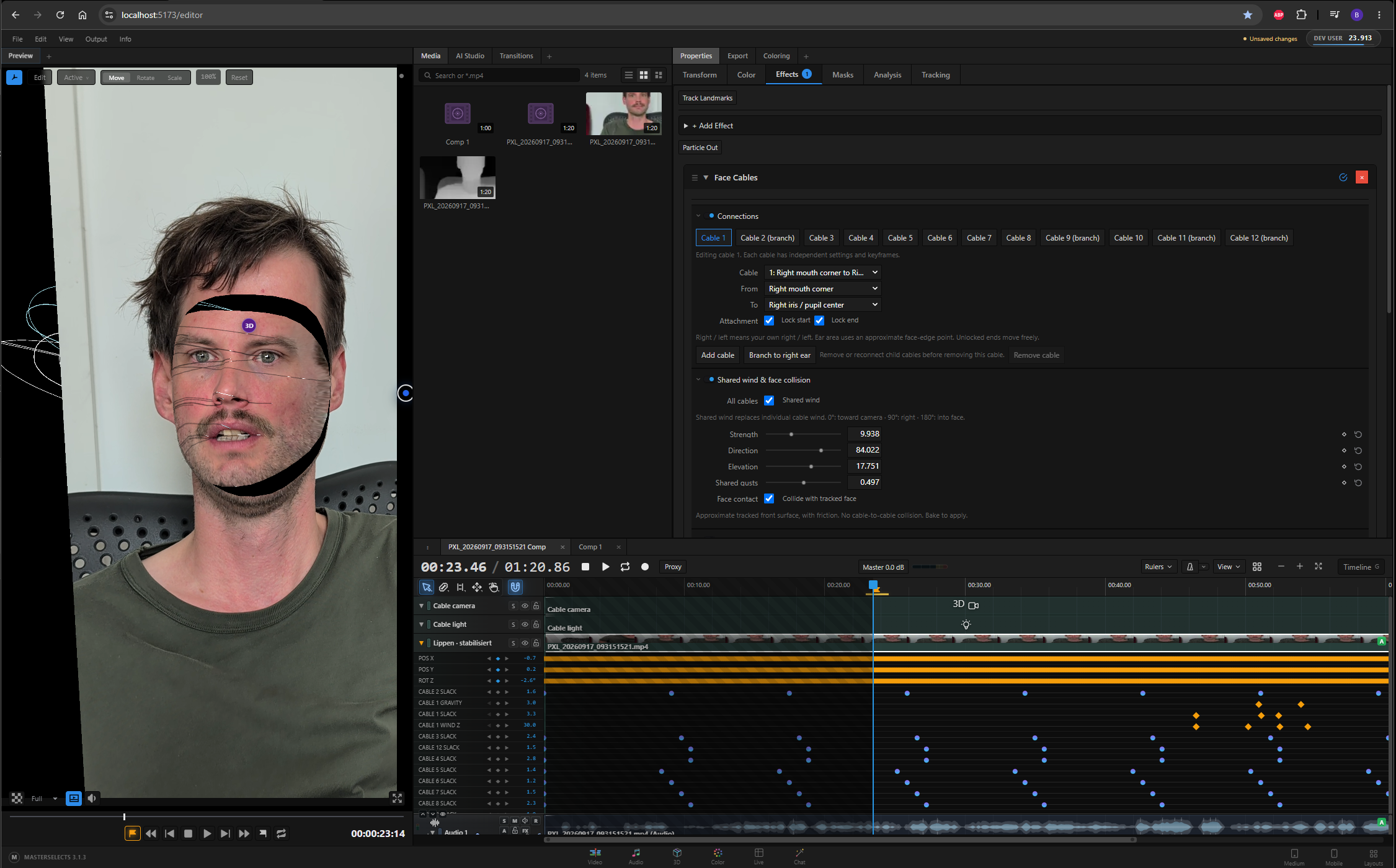
Face Cables combines face tracking, animated controls, and optional scene depth. See the feature guide for this and other workflows.
What you can make
| Workspace | Highlights |
|---|---|
| Video | Multitrack editing, nested compositions, proxies, multicam, and Premiere Pro sequence import. |
| Nodes | Build and reuse effect, color, geometry, and 3D graphs with typed connections and live previews. Unconnected cards pack compactly, separately from expanded groups. Cables fade with overlapping group depth using cached coverage and reusable paths; obstacle routing prefers clear direct lanes and removes retraced segments. |
| Color & effects | Grade footage, combine GPU effects and transitions, and animate masks and properties. |
| Audio | Edit waveforms, mix tracks, record, apply effects, and separate stems. |
| Motion & tracking | Animate text and shapes, create captions, and attach graphics to tracked footage. |
| 3D | Combine footage, models, lights, cameras, Gaussian splats, and particle effects. |
| AI | Ask the in-app agent to edit the timeline or generate media. Nodes and cables appear beside Preview as individual AI instructions arrive. AI Studio keeps Chat and Generation free of a floating credit banner. |
Node graphs
The node canvas automatically refits the full graph whenever nodes or connections are added or removed, including changes from internal and external AI agents. Deleting effects also closes the gap in the node chain, including after the last effect is removed. Agent clip selections preserve the visible panel instead of bringing Properties forward.
The Compact toggle wraps top-level effects into roughly square arrangements while preserving their internal node layout. Within flow-layout groups, loose and connected nodes share one origin to avoid oversized empty frames. Avoid routes cables around unrelated expanded effect groups as well as node cards, keeping existing routes visible while the layout and routing update. Angular cables between the same cards stay in a tight bundle, including during dragging, without diagonal Angular segments.
Time Stack blends up to 32 delayed instances of a video in an editable node group, with shared source-frame sampling, all 37 timeline blend modes, and mouse-wheel control.
Slit Scan starts with 3D geometry bypassed. It can match its time factor to the source frame rate and sample count, and optionally compensate motion between decoded frames in resident GPU history with adjustable flow strength. Its space-time slice tilts and cuts baked color/depth observations from a fixed camera. A tracked 2D shape target can also solve a time field from an anchor and target stretch, with recorded-motion fit errors shown in the inspector.
| Detail view | Full graph |
|---|---|
 |  |
Import video, audio, images, animations, 3D assets, and Premiere Pro projects. Export video, audio, still frames, and interchange formats. FAST export waits for the exact decoded source frame, including reordered frames that arrive after additional samples; multi-clip speed ramps prefetch at their animated source time. Browser, operating system, and GPU support affect available codecs and performance. See media import and export.
The Notebook is a continuous writing surface for notes and screenplays. Passages can receive labels, scene ranges, comments and media links after writing; imported PDFs retain an original-page view.
Build while you create
Dense mask overlays reuse contour transforms and interpolated paths during interaction. Project recovery retains recent entries when folder access fails. Development refreshes proceed without an unsaved-work browser prompt.
Browser Roto uses local SAM 2.1 video segmentation to select moving objects directly in Preview, watch tracking progress there, refine mask edges, and convert results into animated clip masks or export mask and transparent videos without the Native Helper. Roto masks and corrections survive panel and clip switches within the editor tab; converted clip masks are saved with the project.
I built MasterSelects because I wanted an editor I could shape around a project. When a tool is missing, a coding agent can add an effect, control, or workflow to the source; you can try it in the same project and contribute it for others to use.
The codebase includes agent instructions, feature documentation, reusable editor components, and an authenticated local bridge for inspecting and operating the running editor. The hosted AI kernel is maintained separately from this repository.
Try it
Open masterselects.com, import a clip, and drag it onto the timeline. Press Space to play, C to cut, and Ctrl/Cmd+S to save. More controls are in the keyboard shortcuts.
Chrome or Edge on desktop is a good starting point. Editing and rendering run locally in the browser; hosted AI and media generation use external services and may require credits. Local AI features may download models on first use. MasterSelects is under active development, so keep backups of important projects.
Run locally
An Android development app packages the editor for offline local editing, with Android project-folder selection, media import, export saving/sharing, and online cloud services. Android beta purchases are disabled; existing account credits remain usable. Project folders require Android 17; older Android versions use app-private storage. Build it from the final web build with node scripts/android.mjs build; device verification and store release are separate steps.
Install the Node.js version in .node-version, then run:
git clone https://github.com/Sportinger/MasterSelects.git
cd MasterSelects
npm ci
npm run dev
Open http://localhost:5173. Hosted login, credits, and AI services need the full development stack and separate service configuration. Maintainers with the private kernel checkout can use npm run dev:full.
External agents can connect to the local editor with npm run mcp; see AI bridge control for setup and access boundaries.
Contribute
Focused pull requests, reproducible bug reports, and documentation improvements are welcome. For larger features, open an issue first. Read AGENTS.md for repository conventions and use the feature guide to find the relevant architecture and workflows.
License
MasterSelects is licensed under AGPL-3.0-only. Commercial use is permitted under its terms. Videos and other ordinary media made with the editor do not inherit its license. See LICENSE, LICENSING.md, and third-party notices.
Contributors


Similar repos


Languages
TypeScript
85.4%
JavaScript
9.2%
CSS
3.5%
A browser-based media editor and agent-friendly foundation for creative tools. AGPL-3.0-only.
See the codeSee what people are saying
README
MasterSelects
A browser-based video editor and a workspace you can extend while you create. Edit video, mix audio, animate graphics, build 3D scenes, and work with AI in one multitrack timeline. The editor runs on React, TypeScript, WebGPU, and WebCodecs.
Open the editor · Documentation · Discord · Report an issue
Face Cables combines face tracking, animated controls, and optional scene depth. See the feature guide for this and other workflows.
What you can make
| Workspace | Highlights |
|---|---|
| Video | Multitrack editing, nested compositions, proxies, multicam, and Premiere Pro sequence import. |
| Nodes | Build and reuse effect, color, geometry, and 3D graphs with typed connections and live previews. Unconnected cards pack compactly, separately from expanded groups. Cables fade with overlapping group depth using cached coverage and reusable paths; obstacle routing prefers clear direct lanes and removes retraced segments. |
| Color & effects | Grade footage, combine GPU effects and transitions, and animate masks and properties. |
| Audio | Edit waveforms, mix tracks, record, apply effects, and separate stems. |
| Motion & tracking | Animate text and shapes, create captions, and attach graphics to tracked footage. |
| 3D | Combine footage, models, lights, cameras, Gaussian splats, and particle effects. |
| AI | Ask the in-app agent to edit the timeline or generate media. Nodes and cables appear beside Preview as individual AI instructions arrive. AI Studio keeps Chat and Generation free of a floating credit banner. |
Node graphs
The node canvas automatically refits the full graph whenever nodes or connections are added or removed, including changes from internal and external AI agents. Deleting effects also closes the gap in the node chain, including after the last effect is removed. Agent clip selections preserve the visible panel instead of bringing Properties forward.
The Compact toggle wraps top-level effects into roughly square arrangements while preserving their internal node layout. Within flow-layout groups, loose and connected nodes share one origin to avoid oversized empty frames. Avoid routes cables around unrelated expanded effect groups as well as node cards, keeping existing routes visible while the layout and routing update. Angular cables between the same cards stay in a tight bundle, including during dragging, without diagonal Angular segments.
Time Stack blends up to 32 delayed instances of a video in an editable node group, with shared source-frame sampling, all 37 timeline blend modes, and mouse-wheel control.
Slit Scan starts with 3D geometry bypassed. It can match its time factor to the source frame rate and sample count, and optionally compensate motion between decoded frames in resident GPU history with adjustable flow strength. Its space-time slice tilts and cuts baked color/depth observations from a fixed camera. A tracked 2D shape target can also solve a time field from an anchor and target stretch, with recorded-motion fit errors shown in the inspector.
| Detail view | Full graph |
|---|---|
| |
Import video, audio, images, animations, 3D assets, and Premiere Pro projects. Export video, audio, still frames, and interchange formats. FAST export waits for the exact decoded source frame, including reordered frames that arrive after additional samples; multi-clip speed ramps prefetch at their animated source time. Browser, operating system, and GPU support affect available codecs and performance. See media import and export.
The Notebook is a continuous writing surface for notes and screenplays. Passages can receive labels, scene ranges, comments and media links after writing; imported PDFs retain an original-page view.
Build while you create
Dense mask overlays reuse contour transforms and interpolated paths during interaction. Project recovery retains recent entries when folder access fails. Development refreshes proceed without an unsaved-work browser prompt.
Browser Roto uses local SAM 2.1 video segmentation to select moving objects directly in Preview, watch tracking progress there, refine mask edges, and convert results into animated clip masks or export mask and transparent videos without the Native Helper. Roto masks and corrections survive panel and clip switches within the editor tab; converted clip masks are saved with the project.
I built MasterSelects because I wanted an editor I could shape around a project. When a tool is missing, a coding agent can add an effect, control, or workflow to the source; you can try it in the same project and contribute it for others to use.
The codebase includes agent instructions, feature documentation, reusable editor components, and an authenticated local bridge for inspecting and operating the running editor. The hosted AI kernel is maintained separately from this repository.
Try it
Open masterselects.com, import a clip, and drag it onto the timeline. Press Space to play, C to cut, and Ctrl/Cmd+S to save. More controls are in the keyboard shortcuts.
Chrome or Edge on desktop is a good starting point. Editing and rendering run locally in the browser; hosted AI and media generation use external services and may require credits. Local AI features may download models on first use. MasterSelects is under active development, so keep backups of important projects.
Run locally
An Android development app packages the editor for offline local editing, with Android project-folder selection, media import, export saving/sharing, and online cloud services. Android beta purchases are disabled; existing account credits remain usable. Project folders require Android 17; older Android versions use app-private storage. Build it from the final web build with node scripts/android.mjs build; device verification and store release are separate steps.
Install the Node.js version in .node-version, then run:
git clone https://github.com/Sportinger/MasterSelects.git
cd MasterSelects
npm ci
npm run dev
Open http://localhost:5173. Hosted login, credits, and AI services need the full development stack and separate service configuration. Maintainers with the private kernel checkout can use npm run dev:full.
External agents can connect to the local editor with npm run mcp; see AI bridge control for setup and access boundaries.
Contribute
Focused pull requests, reproducible bug reports, and documentation improvements are welcome. For larger features, open an issue first. Read AGENTS.md for repository conventions and use the feature guide to find the relevant architecture and workflows.
License
MasterSelects is licensed under AGPL-3.0-only. Commercial use is permitted under its terms. Videos and other ordinary media made with the editor do not inherit its license. See LICENSE, LICENSING.md, and third-party notices.
Similar repos
Contributors
Languages
TypeScript
85.4%
JavaScript
9.2%
CSS
3.5%