
Zero-dependency browser video editor that AI agents can drive — JSON timeline, MCP + REST, live-reloading UI
See the codeREADME
███████╗ █████╗ ██████╗ ██╗     ███████╗ ██████╗██╗   ██╗████████╗
██╔════╝██╔══██╗██╔══██╗██║     ██╔════╝██╔════╝██║   ██║╚══██╔══╝
█████╗  ███████║██████╔╝██║     █████╗  ██║     ██║   ██║   ██║
██╔══╝  ██╔══██║██╔══██╗██║     ██╔══╝  ██║     ██║   ██║   ██║
██║     ██║  ██║██████╔╝███████╗███████╗╚██████╗╚██████╔╝   ██║
╚═╝     ╚═╝  ╚═╝╚═════╝ ╚══════╝╚══════╝ ╚═════╝ ╚═════╝    ╚═╝
A browser video editor that AI agents can drive.








English · 简体中文 · 日本語 · Español · Português (BR)
https://github.com/user-attachments/assets/2430b854-168b-4a9a-af2e-489e5efa7543
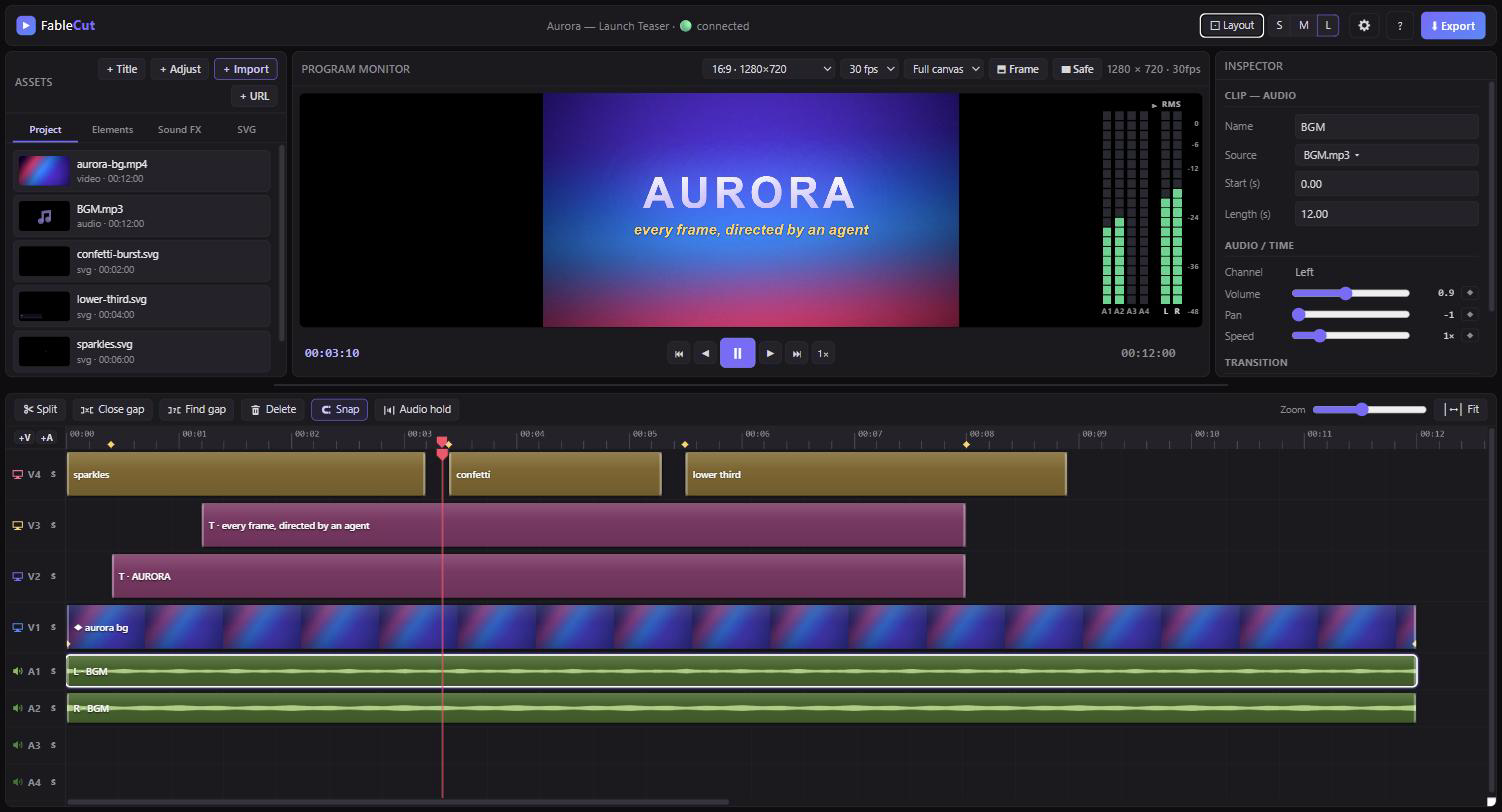
FableCut is a Premiere-style non-linear video editor that runs entirely in your browser — and exposes its whole timeline as one JSON document. Edit it by hand, from the UI, or let an AI agent (Claude Code, Claude Desktop, or anything that speaks MCP/REST) cut your video for you while you watch the timeline update live.
Zero npm dependencies. One node server.js. That's it.
Why it's interesting
Most "AI video" tools hide the edit behind an API. FableCut flips that: the
project file is the interface. project.json describes media, clips,
tracks, effects, keyframes and transitions — any process that can write JSON
can edit video, and the open browser UI hot-reloads within ~150 ms via
server-sent events. A human and an agent can work on the same timeline at the
same time.
Features
Editing
- Video + audio tracks (default 3+4; add more with +V / +A in the track header; right-click an empty header → Remove track), drag/trim/split/snap, undo/redo
- Settings (cog in the top bar) — optional prefs stored in this browser via
localStorage. Enable Link timeline and Project bin selection so picking a timeline clip highlights its media in Project, and clicking a Project item selects every timeline clip that uses it (off by default). - Video + audio tracks (default 3+4), drag/trim/split/snap, undo/redo
- +V / +A in the track header add a video or audio lane (up to 16 each)
- Right-click an empty track header → Remove track (disabled if the lane has clips, or if it would leave you with zero video/audio tracks)
- Track header S solos that lane (mutes all others); click again to restore the previous mute state. Using the mute toggle while soloed exits solo.
- Dropping a video with more audio channels than A-tracks adds the missing lanes automatically (up to 16) and toasts how many were added; each channel becomes a linked stem on its own A-track
- Direct manipulation on the monitor — click a clip or title on the preview to move, resize (corner handles), or rotate (top handle, Shift-snap) it directly
- Timeline multi-select — rubber-band marquee (drag on empty track area), Ctrl/Cmd/Shift+click to add/remove clips, Ctrl+A to select all, Esc to deselect. Drag any selected clip to move the whole group; Delete removes all selected; S splits all selected at the playhead. Inspector shows an "N clips selected" banner.
- Beat & cue markers (tap ⇧m on the beat during playback) with edge snapping
- Press Alt+t to add an in/out transition based on the playhead position over the selected clip. The last used transition is remembered as the default. Drag the overlay triangle to adjust duration; Delete clears the focused transition.
- Real decoded audio waveforms on clips
- Project bin folders — tree view with expand/collapse; drag media or folders to nest; right-click the Project tab → New folder; drop files onto a folder to import into it
- Import from URL — + URL downloads an HTTPS video/audio/image into
./media/(same-origin after import). Remote SVG is refused. Agents usefablecut_import_mediawith anhttps://path. The URL is not kept asmedia.src— that would taint the canvas and break export. - Audio Hold — timeline toolbar toggle: while paused, loops one frame of audio at the playhead (useful when stepping frame-by-frame). Scrubbing or frame-step retargets the held slice; meters stay live. Play / Pause turns it off.
- Canvas aspect presets (16:9, 9:16 reels, 4:5, 1:1) + project FPS select (24 / 25 / 30 / 50 / 60; non-preset rates show as Custom) + safe-area guides
- Export frame / reframing — composition canvas can be larger than the delivery
crop (
exportFrameinproject.json). Preview dims the overscan; drag the Export frame handle to reframe (e.g. 16:9 canvas → 9:16 export). Fast export crops to the frame; WebCodecs and Realtime export are disabled while a frame is set - Program Monitor zoom — mouse-wheel over the preview zooms the composition toward the cursor (fit → up to 2 screen pixels per canvas pixel). Magnified view uses native scrollbars so overflow stays reachable; middle-click or Alt+drag pans. The Fit button (shown while zoomed) resets to the fit-to-stage baseline
- Preview playback speed — shuttle the monitor through 1×/1.5×/2×/4× with J/K/L (from a stop J/L start playback; while playing L steps faster and J slower, K toggles play/pause and resets to 1×); affects the preview player only, never the export
- Resizable workspace: drag the divider between monitor and timeline (double-click resets), plus S/M/L timeline track-density presets (S hides thumbnails for compact tracks)
- Zoom to selection (⇧Z) frames all selected clips, not just one
- IN/OUT work area — set markers with i and o (⇧I / ⇧O to clear). The Program Monitor shows playhead as
current / sequence duration; when markers are set, IN, marked duration, and OUT stack on the right. Export has a Range dropdown (Entire timeline / IN–OUT; defaults to IN–OUT when markers exist) so you can keep markers for split/trim and still export the full sequence. Enabling Limit constrains playback to the marked range and maps Home / End to the IN and OUT positions rather than the full timeline. t splits clips at the markers; ⇧t trims clips to the work (between marker in and marker out) area. - Find & close gaps — a gap is a stretch where every enabled track is empty (black frames). g jumps the playhead to the next shared gap (wraps; respects IN/OUT when both are set). ⇧G closes the gap under the playhead by pulling later clips left on all enabled tracks.
- Reset a property — Ctrl/Cmd+click an inspector label or slider restores that effect/prop to its default and clears every keyframe on the channel (scale → 1, opacity → 1, paired fields like Crop L/R reset together; transition labels clear the in/out transition). Shift+click a label is playhead-local: if you are parked on a keyframe it removes that keyframe only; otherwise it sets the value at the playhead to the default (auto-keys if the channel is already animated).
- Replace media — the inspector's Source button (any video/audio/image/svg clip) swaps the underlying file while keeping position, trim, keyframes, transitions and every effect. Pick another item already in the bin or Browse file… to import and replace in one step. A video's linked L/R audio companions are swapped along with it; a shorter replacement clamps the trim to fit and toasts that it did so.
- Multi-channel video audio — a video with more than 2 audio channels gets a linked audio clip per channel, not just L/R (5.1, 7.1…). Extra audio tracks (A5, A6, …, capped at 16) are created automatically as needed; replacing a clip's media re-syncs the linked channel clips to the new source's channel count, adding/dropping extras and new tracks as needed.
Look
- 14 one-click filter presets (cinematic, teal-orange, noir, vintage, cyberpunk, sunset, midnight…)
- Adjustment layers — one clip grades everything below it, Premiere-style
- Full grade controls: brightness/contrast/saturation/hue, temperature & tint, blur, grayscale/sepia/invert, vignette, animated film grain
- Blend modes (screen, multiply, overlay…), fit modes (contain/cover/stretch), per-edge cropping, corner radius, flip H/V
- Chroma key (green screen) with tolerance/softness + spill suppression
- AI background removal (person cut-out, in-browser via MediaPipe)
Motion
- Keyframe animation on ~25 properties with easing
- Keyframe markers on clips — diamonds on the clip body at each unique keyframe time (tooltip lists channels; a count badge when several share a time). Ctrl/Cmd+← / Ctrl/Cmd+→ jumps the playhead to the previous / next keyframe (selected clips first, else clips under the playhead). Inspector fields show the interpolated value at the playhead; changing one updates the keyframe you’re on, or inserts one if that channel is already keyed. Dragging a clip in the program monitor (move / scale / rotate) writes the same way. The ◆ button adds a keyframe at the playhead, or removes the one you’re parked on; ✕ clears the whole channel. When the playhead is outside the selected clip, keyframed fields and ◆ buttons are disabled (they show the nearest edge value) — keyframe edits only apply where the playhead actually is; unanimated properties stay editable anywhere
- Keyframe graphs — toggle a property’s curve in the inspector to show an interpolated value graph beside the program monitor; click the graph to seek
- Speed ramps — keyframe
speedand the engine time-remaps video and the export audio mix (the fast-into-slow-mo reel move) - Camera shake and RGB-split/chromatic aberration, both animatable
- 17 transitions: fades, slides, wipes (4 directions), zoom, iris, spin, blur, whip-pan, glitch, pop
Text
- Title styles — one-tap cohesive looks (Impact, Elegant, Kinetic cut, Neon, Handwritten, Luxury, and more); new titles vary the font, placement and animation automatically instead of defaulting to one flat style
- Kinetic captions: typewriter, word-pop, word-slide, karaoke, letter-pop, wave, bounce, shake, clip-reveal, zoom-in, font-cut (rhythmic typeface cuts), rise-mask
- Neon glow for that TikTok caption look
- Font editor: system fonts, drop-in custom fonts (
library/fonts/), and any Google Font by name — loaded automatically - Gradient fills, outline, background pills, letter-spacing, line-height, weights, italic, uppercase, soft shadows
- Text layout — horizontal Align: left / center / right / justify
(extra spaces between words). Drag a title’s corner handles to create a
text box (
boxW/boxH); further corner drags resize it (opposite corner stays fixed; Ctrl/Cmd resizes from center; Shift locks aspect). Inside a box, text wraps at the fixed font size by default; enable Scale to fit to shrink the font so the whole block fits. V-align (top / middle / bottom) places the text block vertically in the box. Set Box W/H to0to return to hug-content sizing.
Animated SVG clips
- A first-class
svgclip kind: CSS-@keyframes-animated SVGs render frame-accurately in preview and export (the compositor freezes the animation at any time). Agents can author their own vector overlays — lower-thirds, confetti, sparkles — as plain.svgfiles. Starters included.
Remake a reference video
- Give it a reference edit (a reel you like) and get back an edit blueprint:
shot boundaries, music beats + BPM, a loudness curve, per-shot energy, the
drop — plus the reference's music track extracted into your media, ready
to rebuild the same idea with your own footage. Zero extra dependencies
(ffmpeg does the decoding; onset/tempo detection is plain Node).
node analyze.js ref.mp4,POST /api/analyze, or thefablecut_analyze_referenceMCP tool.
Asset library
library/folders surface as tabs in the UI: Elements (overlay art), Sound FX, SVG — drop files in, the open editor refreshes live
Export
- Fast export: browser renders every frame + an offline audio mix; ffmpeg
encodes JPEG frames via an encoding profile from
encoding-profiles.json(keeps rendering if you switch tabs). Encode and upload run ahead of the compositor so a fast timeline is not stalled bytoBlob. The Export dialog has a profile selector; pin a project default withencodeProfileinproject.json - WebCodecs export: the browser HW-encodes Annex-B H.264; the server stream-copies and muxes audio. Faster uploads; bitrate/VBR-CBR in the Export dialog. Unavailable while an export frame is set (use Fast)
- Realtime MediaRecorder fallback when ffmpeg or WebCodecs isn't available
- Export Range dropdown: Entire timeline or IN–OUT (defaults to IN–OUT when
markers are set). Effective IN/OUT export bounds are clamped to
projDur().
Quick start
git clone https://github.com/ronak-create/FableCut.git
cd FableCut
node server.js        # → http://localhost:7777
Requirements: Node 18+ and a Chromium-based browser. ffmpeg on PATH is optional but recommended (fast export + upload remuxing). AI background removal fetches its model from a CDN on first use.
The server binds 127.0.0.1 only (v1.3.1+). To use it from another device on
your LAN, opt in explicitly: HOST=0.0.0.0 FABLECUT_ALLOWED_HOSTS=<your-ip> node server.js.
Drop media into the window (or ./media/), paste an HTTPS URL via + URL,
drag clips onto the timeline, edit, export.
To keep your work outside the checkout, set FABLECUT_DATA_DIR — it moves
project.json, media/, exports/, analysis/ and library/ to a directory
you choose. Leave it unset and everything stays in the repo, exactly as before.
Or install it as a Claude Code plugin
/plugin marketplace add ronak-create/FableCut
/plugin install fablecut@fablecut
That registers the MCP server for you and adds two skills — edit-video and
remake-reel. Your timeline and footage live in the plugin's own data
directory, so an update never touches them. Node 18+ and (optionally) ffmpeg
still need to be on your machine.
Driving it with an AI agent
Everything an agent needs is in CLAUDE.md — the complete schema, semantics and recipes. Point any capable model at that file and it can operate the editor end to end.
📖 Browsable docs: for a conversational, auto-generated tour of the codebase — architecture, the
project.jsonschema, the MCP surface — see FableCut on DeepWiki. Ask it questions about the repo in natural language.
Three equivalent control surfaces:
-
MCP (best for Claude Code / Claude Desktop) — register the bundled zero-dependency MCP server once:
claude mcp add -s user fablecut -- node "<path-to>/fablecut/mcp-server.js"OpenCode can use the same stdio server from its project or global
opencode.jsonconfiguration:{ "$schema": "https://opencode.ai/config.json", "mcp": { "fablecut": { "type": "local", "command": ["node", "/absolute/path/to/FableCut/mcp-server.js"], "enabled": true } } }For another MCP client, register a local stdio server with this equivalent command. The exact key names vary by client, but the command and arguments do not:
{
  "name": "fablecut",
  "transport": "stdio",
  "command": "node",
  "args": ["/absolute/path/to/FableCut/mcp-server.js"]
}
The server is intentionally client-neutral. It speaks MCP over stdio and does not require Claude-specific environment variables. Keep the path absolute, and use Node 18 or newer.
Tools:
fablecut_status(auto-starts the editor),fablecut_docs,fablecut_get_project,fablecut_set_project,fablecut_patch_project,fablecut_import_media,fablecut_analyze_reference,fablecut_encode_profiles.FableCut is also published on the official MCP registry as
io.github.ronak-create/fablecut— each release ships an MCPB bundle (fablecut.mcpb) that MCPB-capable clients can install directly.The surface is token-efficient by design: agents patch the timeline with small ops (
fablecut_patch_project) instead of round-tripping the whole document, read a compact one-line-per-clip summary (fablecut_get_project {compact:true}), and fetch only the manual sections they need (fablecut_docs {section:"props"}). -
The file — read
project.json, modify, bumprevision, write. The UI live-reloads. -
REST —
GET/PUT /api/project,POST /api/upload,POST /api/import-url,GET /api/library,GET /api/export/profiles, SSE at/api/events. See CLAUDE.md for the full list.
Example: ask Claude Code "cut these six clips to the beat markers, add a teal-orange grade, put a word-pop caption on top and a whoosh on every cut" — and watch the timeline rebuild itself.
Or hand it a reference: "here's a reel I like — analyze it and remake it with
my clips, same music". The agent calls fablecut_analyze_reference, gets the
blueprint (cuts, beats, BPM, energy, drop, extracted music), and rebuilds the
structure shot-for-shot with your footage.
Conflict-safe concurrent editing: the UI, the MCP tools, and direct
project.json writes all agree on a revision counter. If you edit a clip in
the UI while an agent is mid-task, the agent's next write is rejected (409 from
the REST API / a conflict error from fablecut_set_project) instead of
silently overwriting your change. The UI similarly detects when an agent write
supersedes a not-yet-saved local tweak and tells you with a toast instead of
dropping it silently.
Project layout
server.js        zero-dependency HTTP server: static hosting, REST API, SSE,
                 ffmpeg export pipeline
app.js           the editor: timeline UI, compositor, keyframes, text engine,
                 SVG rasterizer, chroma key, exporters
index.html       single-page UI
style.css        dark editor theme
mcp-server.js    stdio MCP server exposing the editor to AI agents
analyze.js       reference-video analyzer: shots, beats/BPM, energy, drop,
                 music extraction (module + CLI)
CLAUDE.md        the agent manual (schema + recipes) — also served by fablecut_docs
encoding-profiles.json
                 Fast-export ffmpeg presets (hot-reloaded)
project.json     your timeline (created on first run; gitignored)
media/           project footage (gitignored)
analysis/        cached edit blueprints from /api/analyze (gitignored)
library/         default assets: elements/ sfx/ svg/ fonts/
exports/         finished renders (gitignored)
Authoring animated SVG overlays
SVGs animate with plain CSS @keyframes. One convention: never hardcode
animation-delay — set --d: 0.4s instead, and the compositor drives time by
pausing all animations and rebasing their delays. Full rules + a skeleton in
CLAUDE.md; working
examples in library/svg/.
Notes
- The repo ships with 20 Google Fonts (
library/fonts/, OFL — seeLICENSES.mdthere) and a set of self-authored SVG overlays and animated elements (library/elements/,library/svg/, MIT like the rest of the repo). library/sfx/is yours to fill (gitignored): sound-effect sites typically don't allow redistributing their files in a public repo, so FableCut doesn't —library/sfx/README.mdlists good free sources.- Export runs in the browser because the compositor is the browser; agents
ask you to click Export (or render directly with ffmpeg from
media/).
Community
Questions, ideas, showing off an edit, or want to help shape what's next? Join the FableCut Discord. Bugs and feature requests are still best filed as GitHub issues.
License
Contributors


Similar repos


Languages
JavaScript
89.5%
CSS
6.7%
HTML
3.8%
Zero-dependency browser video editor that AI agents can drive — JSON timeline, MCP + REST, live-reloading UI
See the codeREADME
███████╗ █████╗ ██████╗ ██╗     ███████╗ ██████╗██╗   ██╗████████╗
██╔════╝██╔══██╗██╔══██╗██║     ██╔════╝██╔════╝██║   ██║╚══██╔══╝
█████╗  ███████║██████╔╝██║     █████╗  ██║     ██║   ██║   ██║
██╔══╝  ██╔══██║██╔══██╗██║     ██╔══╝  ██║     ██║   ██║   ██║
██║     ██║  ██║██████╔╝███████╗███████╗╚██████╗╚██████╔╝   ██║
╚═╝     ╚═╝  ╚═╝╚═════╝ ╚══════╝╚══════╝ ╚═════╝ ╚═════╝    ╚═╝
A browser video editor that AI agents can drive.
English · 简体中文 · 日本語 · Español · Português (BR)
https://github.com/user-attachments/assets/2430b854-168b-4a9a-af2e-489e5efa7543
FableCut is a Premiere-style non-linear video editor that runs entirely in your browser — and exposes its whole timeline as one JSON document. Edit it by hand, from the UI, or let an AI agent (Claude Code, Claude Desktop, or anything that speaks MCP/REST) cut your video for you while you watch the timeline update live.
Zero npm dependencies. One node server.js. That's it.
Why it's interesting
Most "AI video" tools hide the edit behind an API. FableCut flips that: the
project file is the interface. project.json describes media, clips,
tracks, effects, keyframes and transitions — any process that can write JSON
can edit video, and the open browser UI hot-reloads within ~150 ms via
server-sent events. A human and an agent can work on the same timeline at the
same time.
Features
Editing
- Video + audio tracks (default 3+4; add more with +V / +A in the track header; right-click an empty header → Remove track), drag/trim/split/snap, undo/redo
- Settings (cog in the top bar) — optional prefs stored in this browser via
localStorage. Enable Link timeline and Project bin selection so picking a timeline clip highlights its media in Project, and clicking a Project item selects every timeline clip that uses it (off by default). - Video + audio tracks (default 3+4), drag/trim/split/snap, undo/redo
- +V / +A in the track header add a video or audio lane (up to 16 each)
- Right-click an empty track header → Remove track (disabled if the lane has clips, or if it would leave you with zero video/audio tracks)
- Track header S solos that lane (mutes all others); click again to restore the previous mute state. Using the mute toggle while soloed exits solo.
- Dropping a video with more audio channels than A-tracks adds the missing lanes automatically (up to 16) and toasts how many were added; each channel becomes a linked stem on its own A-track
- Direct manipulation on the monitor — click a clip or title on the preview to move, resize (corner handles), or rotate (top handle, Shift-snap) it directly
- Timeline multi-select — rubber-band marquee (drag on empty track area), Ctrl/Cmd/Shift+click to add/remove clips, Ctrl+A to select all, Esc to deselect. Drag any selected clip to move the whole group; Delete removes all selected; S splits all selected at the playhead. Inspector shows an "N clips selected" banner.
- Beat & cue markers (tap ⇧m on the beat during playback) with edge snapping
- Press Alt+t to add an in/out transition based on the playhead position over the selected clip. The last used transition is remembered as the default. Drag the overlay triangle to adjust duration; Delete clears the focused transition.
- Real decoded audio waveforms on clips
- Project bin folders — tree view with expand/collapse; drag media or folders to nest; right-click the Project tab → New folder; drop files onto a folder to import into it
- Import from URL — + URL downloads an HTTPS video/audio/image into
./media/(same-origin after import). Remote SVG is refused. Agents usefablecut_import_mediawith anhttps://path. The URL is not kept asmedia.src— that would taint the canvas and break export. - Audio Hold — timeline toolbar toggle: while paused, loops one frame of audio at the playhead (useful when stepping frame-by-frame). Scrubbing or frame-step retargets the held slice; meters stay live. Play / Pause turns it off.
- Canvas aspect presets (16:9, 9:16 reels, 4:5, 1:1) + project FPS select (24 / 25 / 30 / 50 / 60; non-preset rates show as Custom) + safe-area guides
- Export frame / reframing — composition canvas can be larger than the delivery
crop (
exportFrameinproject.json). Preview dims the overscan; drag the Export frame handle to reframe (e.g. 16:9 canvas → 9:16 export). Fast export crops to the frame; WebCodecs and Realtime export are disabled while a frame is set - Program Monitor zoom — mouse-wheel over the preview zooms the composition toward the cursor (fit → up to 2 screen pixels per canvas pixel). Magnified view uses native scrollbars so overflow stays reachable; middle-click or Alt+drag pans. The Fit button (shown while zoomed) resets to the fit-to-stage baseline
- Preview playback speed — shuttle the monitor through 1×/1.5×/2×/4× with J/K/L (from a stop J/L start playback; while playing L steps faster and J slower, K toggles play/pause and resets to 1×); affects the preview player only, never the export
- Resizable workspace: drag the divider between monitor and timeline (double-click resets), plus S/M/L timeline track-density presets (S hides thumbnails for compact tracks)
- Zoom to selection (⇧Z) frames all selected clips, not just one
- IN/OUT work area — set markers with i and o (⇧I / ⇧O to clear). The Program Monitor shows playhead as
current / sequence duration; when markers are set, IN, marked duration, and OUT stack on the right. Export has a Range dropdown (Entire timeline / IN–OUT; defaults to IN–OUT when markers exist) so you can keep markers for split/trim and still export the full sequence. Enabling Limit constrains playback to the marked range and maps Home / End to the IN and OUT positions rather than the full timeline. t splits clips at the markers; ⇧t trims clips to the work (between marker in and marker out) area. - Find & close gaps — a gap is a stretch where every enabled track is empty (black frames). g jumps the playhead to the next shared gap (wraps; respects IN/OUT when both are set). ⇧G closes the gap under the playhead by pulling later clips left on all enabled tracks.
- Reset a property — Ctrl/Cmd+click an inspector label or slider restores that effect/prop to its default and clears every keyframe on the channel (scale → 1, opacity → 1, paired fields like Crop L/R reset together; transition labels clear the in/out transition). Shift+click a label is playhead-local: if you are parked on a keyframe it removes that keyframe only; otherwise it sets the value at the playhead to the default (auto-keys if the channel is already animated).
- Replace media — the inspector's Source button (any video/audio/image/svg clip) swaps the underlying file while keeping position, trim, keyframes, transitions and every effect. Pick another item already in the bin or Browse file… to import and replace in one step. A video's linked L/R audio companions are swapped along with it; a shorter replacement clamps the trim to fit and toasts that it did so.
- Multi-channel video audio — a video with more than 2 audio channels gets a linked audio clip per channel, not just L/R (5.1, 7.1…). Extra audio tracks (A5, A6, …, capped at 16) are created automatically as needed; replacing a clip's media re-syncs the linked channel clips to the new source's channel count, adding/dropping extras and new tracks as needed.
Look
- 14 one-click filter presets (cinematic, teal-orange, noir, vintage, cyberpunk, sunset, midnight…)
- Adjustment layers — one clip grades everything below it, Premiere-style
- Full grade controls: brightness/contrast/saturation/hue, temperature & tint, blur, grayscale/sepia/invert, vignette, animated film grain
- Blend modes (screen, multiply, overlay…), fit modes (contain/cover/stretch), per-edge cropping, corner radius, flip H/V
- Chroma key (green screen) with tolerance/softness + spill suppression
- AI background removal (person cut-out, in-browser via MediaPipe)
Motion
- Keyframe animation on ~25 properties with easing
- Keyframe markers on clips — diamonds on the clip body at each unique keyframe time (tooltip lists channels; a count badge when several share a time). Ctrl/Cmd+← / Ctrl/Cmd+→ jumps the playhead to the previous / next keyframe (selected clips first, else clips under the playhead). Inspector fields show the interpolated value at the playhead; changing one updates the keyframe you’re on, or inserts one if that channel is already keyed. Dragging a clip in the program monitor (move / scale / rotate) writes the same way. The ◆ button adds a keyframe at the playhead, or removes the one you’re parked on; ✕ clears the whole channel. When the playhead is outside the selected clip, keyframed fields and ◆ buttons are disabled (they show the nearest edge value) — keyframe edits only apply where the playhead actually is; unanimated properties stay editable anywhere
- Keyframe graphs — toggle a property’s curve in the inspector to show an interpolated value graph beside the program monitor; click the graph to seek
- Speed ramps — keyframe
speedand the engine time-remaps video and the export audio mix (the fast-into-slow-mo reel move) - Camera shake and RGB-split/chromatic aberration, both animatable
- 17 transitions: fades, slides, wipes (4 directions), zoom, iris, spin, blur, whip-pan, glitch, pop
Text
- Title styles — one-tap cohesive looks (Impact, Elegant, Kinetic cut, Neon, Handwritten, Luxury, and more); new titles vary the font, placement and animation automatically instead of defaulting to one flat style
- Kinetic captions: typewriter, word-pop, word-slide, karaoke, letter-pop, wave, bounce, shake, clip-reveal, zoom-in, font-cut (rhythmic typeface cuts), rise-mask
- Neon glow for that TikTok caption look
- Font editor: system fonts, drop-in custom fonts (
library/fonts/), and any Google Font by name — loaded automatically - Gradient fills, outline, background pills, letter-spacing, line-height, weights, italic, uppercase, soft shadows
- Text layout — horizontal Align: left / center / right / justify
(extra spaces between words). Drag a title’s corner handles to create a
text box (
boxW/boxH); further corner drags resize it (opposite corner stays fixed; Ctrl/Cmd resizes from center; Shift locks aspect). Inside a box, text wraps at the fixed font size by default; enable Scale to fit to shrink the font so the whole block fits. V-align (top / middle / bottom) places the text block vertically in the box. Set Box W/H to0to return to hug-content sizing.
Animated SVG clips
- A first-class
svgclip kind: CSS-@keyframes-animated SVGs render frame-accurately in preview and export (the compositor freezes the animation at any time). Agents can author their own vector overlays — lower-thirds, confetti, sparkles — as plain.svgfiles. Starters included.
Remake a reference video
- Give it a reference edit (a reel you like) and get back an edit blueprint:
shot boundaries, music beats + BPM, a loudness curve, per-shot energy, the
drop — plus the reference's music track extracted into your media, ready
to rebuild the same idea with your own footage. Zero extra dependencies
(ffmpeg does the decoding; onset/tempo detection is plain Node).
node analyze.js ref.mp4,POST /api/analyze, or thefablecut_analyze_referenceMCP tool.
Asset library
library/folders surface as tabs in the UI: Elements (overlay art), Sound FX, SVG — drop files in, the open editor refreshes live
Export
- Fast export: browser renders every frame + an offline audio mix; ffmpeg
encodes JPEG frames via an encoding profile from
encoding-profiles.json(keeps rendering if you switch tabs). Encode and upload run ahead of the compositor so a fast timeline is not stalled bytoBlob. The Export dialog has a profile selector; pin a project default withencodeProfileinproject.json - WebCodecs export: the browser HW-encodes Annex-B H.264; the server stream-copies and muxes audio. Faster uploads; bitrate/VBR-CBR in the Export dialog. Unavailable while an export frame is set (use Fast)
- Realtime MediaRecorder fallback when ffmpeg or WebCodecs isn't available
- Export Range dropdown: Entire timeline or IN–OUT (defaults to IN–OUT when
markers are set). Effective IN/OUT export bounds are clamped to
projDur().
Quick start
git clone https://github.com/ronak-create/FableCut.git
cd FableCut
node server.js        # → http://localhost:7777
Requirements: Node 18+ and a Chromium-based browser. ffmpeg on PATH is optional but recommended (fast export + upload remuxing). AI background removal fetches its model from a CDN on first use.
The server binds 127.0.0.1 only (v1.3.1+). To use it from another device on
your LAN, opt in explicitly: HOST=0.0.0.0 FABLECUT_ALLOWED_HOSTS=<your-ip> node server.js.
Drop media into the window (or ./media/), paste an HTTPS URL via + URL,
drag clips onto the timeline, edit, export.
To keep your work outside the checkout, set FABLECUT_DATA_DIR — it moves
project.json, media/, exports/, analysis/ and library/ to a directory
you choose. Leave it unset and everything stays in the repo, exactly as before.
Or install it as a Claude Code plugin
/plugin marketplace add ronak-create/FableCut
/plugin install fablecut@fablecut
That registers the MCP server for you and adds two skills — edit-video and
remake-reel. Your timeline and footage live in the plugin's own data
directory, so an update never touches them. Node 18+ and (optionally) ffmpeg
still need to be on your machine.
Driving it with an AI agent
Everything an agent needs is in CLAUDE.md — the complete schema, semantics and recipes. Point any capable model at that file and it can operate the editor end to end.
📖 Browsable docs: for a conversational, auto-generated tour of the codebase — architecture, the
project.jsonschema, the MCP surface — see FableCut on DeepWiki. Ask it questions about the repo in natural language.
Three equivalent control surfaces:
-
MCP (best for Claude Code / Claude Desktop) — register the bundled zero-dependency MCP server once:
claude mcp add -s user fablecut -- node "<path-to>/fablecut/mcp-server.js"OpenCode can use the same stdio server from its project or global
opencode.jsonconfiguration:{ "$schema": "https://opencode.ai/config.json", "mcp": { "fablecut": { "type": "local", "command": ["node", "/absolute/path/to/FableCut/mcp-server.js"], "enabled": true } } }For another MCP client, register a local stdio server with this equivalent command. The exact key names vary by client, but the command and arguments do not:
{
  "name": "fablecut",
  "transport": "stdio",
  "command": "node",
  "args": ["/absolute/path/to/FableCut/mcp-server.js"]
}
The server is intentionally client-neutral. It speaks MCP over stdio and does not require Claude-specific environment variables. Keep the path absolute, and use Node 18 or newer.
Tools:
fablecut_status(auto-starts the editor),fablecut_docs,fablecut_get_project,fablecut_set_project,fablecut_patch_project,fablecut_import_media,fablecut_analyze_reference,fablecut_encode_profiles.FableCut is also published on the official MCP registry as
io.github.ronak-create/fablecut— each release ships an MCPB bundle (fablecut.mcpb) that MCPB-capable clients can install directly.The surface is token-efficient by design: agents patch the timeline with small ops (
fablecut_patch_project) instead of round-tripping the whole document, read a compact one-line-per-clip summary (fablecut_get_project {compact:true}), and fetch only the manual sections they need (fablecut_docs {section:"props"}). -
The file — read
project.json, modify, bumprevision, write. The UI live-reloads. -
REST —
GET/PUT /api/project,POST /api/upload,POST /api/import-url,GET /api/library,GET /api/export/profiles, SSE at/api/events. See CLAUDE.md for the full list.
Example: ask Claude Code "cut these six clips to the beat markers, add a teal-orange grade, put a word-pop caption on top and a whoosh on every cut" — and watch the timeline rebuild itself.
Or hand it a reference: "here's a reel I like — analyze it and remake it with
my clips, same music". The agent calls fablecut_analyze_reference, gets the
blueprint (cuts, beats, BPM, energy, drop, extracted music), and rebuilds the
structure shot-for-shot with your footage.
Conflict-safe concurrent editing: the UI, the MCP tools, and direct
project.json writes all agree on a revision counter. If you edit a clip in
the UI while an agent is mid-task, the agent's next write is rejected (409 from
the REST API / a conflict error from fablecut_set_project) instead of
silently overwriting your change. The UI similarly detects when an agent write
supersedes a not-yet-saved local tweak and tells you with a toast instead of
dropping it silently.
Project layout
server.js        zero-dependency HTTP server: static hosting, REST API, SSE,
                 ffmpeg export pipeline
app.js           the editor: timeline UI, compositor, keyframes, text engine,
                 SVG rasterizer, chroma key, exporters
index.html       single-page UI
style.css        dark editor theme
mcp-server.js    stdio MCP server exposing the editor to AI agents
analyze.js       reference-video analyzer: shots, beats/BPM, energy, drop,
                 music extraction (module + CLI)
CLAUDE.md        the agent manual (schema + recipes) — also served by fablecut_docs
encoding-profiles.json
                 Fast-export ffmpeg presets (hot-reloaded)
project.json     your timeline (created on first run; gitignored)
media/           project footage (gitignored)
analysis/        cached edit blueprints from /api/analyze (gitignored)
library/         default assets: elements/ sfx/ svg/ fonts/
exports/         finished renders (gitignored)
Authoring animated SVG overlays
SVGs animate with plain CSS @keyframes. One convention: never hardcode
animation-delay — set --d: 0.4s instead, and the compositor drives time by
pausing all animations and rebasing their delays. Full rules + a skeleton in
CLAUDE.md; working
examples in library/svg/.
Notes
- The repo ships with 20 Google Fonts (
library/fonts/, OFL — seeLICENSES.mdthere) and a set of self-authored SVG overlays and animated elements (library/elements/,library/svg/, MIT like the rest of the repo). library/sfx/is yours to fill (gitignored): sound-effect sites typically don't allow redistributing their files in a public repo, so FableCut doesn't —library/sfx/README.mdlists good free sources.- Export runs in the browser because the compositor is the browser; agents
ask you to click Export (or render directly with ffmpeg from
media/).
Community
Questions, ideas, showing off an edit, or want to help shape what's next? Join the FableCut Discord. Bugs and feature requests are still best filed as GitHub issues.
License
Similar repos
Contributors
Languages
JavaScript
89.5%
CSS
6.7%
HTML
3.8%