Implementation of <Symbolic Graphics Programming with Large Language Models>
See the code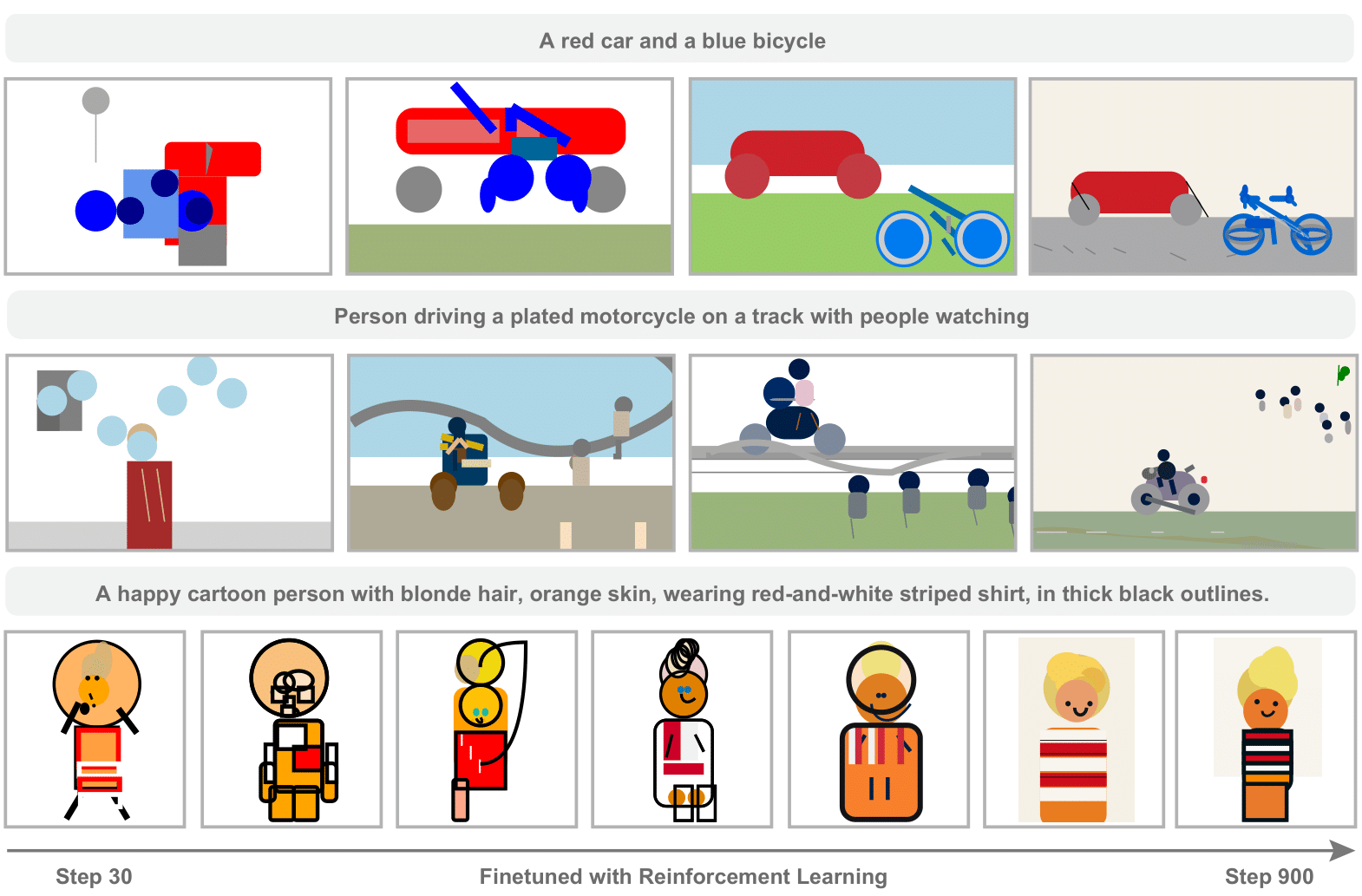
LLMs are strong at coding, but their ability to write symbolic graphics programs (SGPs) that render images (especially SVGs) is underexplored. This work studies text-to-SGP generation as a probe of visual generation, introducing SGP-GenBench to evaluate object-, scene-, and composition-level performance across open and proprietary models, revealing notable shortcomings. To improve results, we use reinforcement learning with rewards from visual–text similarity scores, which steadily enhances SVG quality and semantic alignment. Experiments show substantial gains, bringing performance close to state-of-the-art closed-source models.
conda env create -n sgp_gen -f environment.yml

conda activate sgp_gen

pip install vllm==0.7.2 && pip install oat-llm==0.0.9

git clone [email protected]:Sphere-AI-Lab/SGP-RL.git

cd SGP-RL

pip install -e .

pip install cairosvg openai-clip lxml
We provide a requirements.txt recording the version informations for reference.
We did the experiment with Qwen/Qwen2.5-7B on a 8xH100 node, the mininum requirement is a 8xA100 node.
For the experiments with Qwen/Qwen2.5-3B, we are able to run them on a 8xL40 node.
We provide a script for automatically downloading all training and evaluation datasets:
bash prepare_data.sh
Alternatively, you can also download the datasets manually.
export COCO_DIR=YOUR_COCO_DIR
cd "$COCO_DIR"
# Images
wget http://images.cocodataset.org/zips/train2017.zip
wget http://images.cocodataset.org/zips/val2017.zip

# Captions annotations
wget http://images.cocodataset.org/annotations/annotations_trainval2017.zip
unzip train2017.zip
unzip val2017.zip
unzip annotations_trainval2017.zip
You should have:
Put it into YOUR_SVG_DIR and setup environment variables:
export SVG_DIR=YOUR_SVG_DIR
Download SGP-Object dataset at
https://huggingface.co/datasets/SphereLab/SGP-Object/resolve/main/SGP-Object.json
Put it into YOUR_SVG_DIR.
bash train_zero_svg.sh
Sampling model responses and calculating DINO-score, CLIP-score and Diversity on SGP-:
# modify the sampling parameters to match your training settings
python evaluate_svg_model.py
    --model_path YOUR_MODEL_PATH
By default, the sampled responses are stored in ./evaluation_results To print out the important metrics as csv,
# modify the sampling parameters to match your training settings
bash print_results.sh
To get the VQA and HPS metrics, check eval_tools
Evaluation on SGP-CompBench: sgp-compbench
We provide a model checkpoint at training step 780 on HuggingFace and Modelscope:
# Use a pipeline as a high-level helper
from transformers import pipeline

pipe = pipeline("text-generation", model="SphereLab/SGP-RL")
from modelscope import snapshot_download
model_dir = snapshot_download('NOrangeroli/SGP_RL')
Download via git:
git clone https://huggingface.co/SphereLab/SGP-RL
git clone https://www.modelscope.cn/NOrangeroli/SGP_RL.git
We provide a script for interactively run the model:
python interactive_inference.py --model your/model/path
Always prompt in the following form:
Please write SVG code for generating the image corresponding to the following description: YOUR_DESCRIPTION
This code is based on understand-r1-zero.
@article{chen2025symbolic,
  title={Symbolic Graphics Programming with Large Language Models},
  author={Yamei Chen and Haoquan Zhang and Yangyi Huang and Zeju Qiu and Kaipeng Zhang and Yandong Wen and Weiyang Liu},
  journal={arXiv preprint arXiv:2509.05208},
  year={2025}
}
758 followers · starred Sep 2025
Implementation of <Symbolic Graphics Programming with Large Language Models>
See the code
LLMs are strong at coding, but their ability to write symbolic graphics programs (SGPs) that render images (especially SVGs) is underexplored. This work studies text-to-SGP generation as a probe of visual generation, introducing SGP-GenBench to evaluate object-, scene-, and composition-level performance across open and proprietary models, revealing notable shortcomings. To improve results, we use reinforcement learning with rewards from visual–text similarity scores, which steadily enhances SVG quality and semantic alignment. Experiments show substantial gains, bringing performance close to state-of-the-art closed-source models.
conda env create -n sgp_gen -f environment.yml

conda activate sgp_gen

pip install vllm==0.7.2 && pip install oat-llm==0.0.9

git clone [email protected]:Sphere-AI-Lab/SGP-RL.git

cd SGP-RL

pip install -e .

pip install cairosvg openai-clip lxml
We provide a requirements.txt recording the version informations for reference.
We did the experiment with Qwen/Qwen2.5-7B on a 8xH100 node, the mininum requirement is a 8xA100 node.
For the experiments with Qwen/Qwen2.5-3B, we are able to run them on a 8xL40 node.
We provide a script for automatically downloading all training and evaluation datasets:
bash prepare_data.sh
Alternatively, you can also download the datasets manually.
export COCO_DIR=YOUR_COCO_DIR
cd "$COCO_DIR"
# Images
wget http://images.cocodataset.org/zips/train2017.zip
wget http://images.cocodataset.org/zips/val2017.zip

# Captions annotations
wget http://images.cocodataset.org/annotations/annotations_trainval2017.zip
unzip train2017.zip
unzip val2017.zip
unzip annotations_trainval2017.zip
You should have:
Put it into YOUR_SVG_DIR and setup environment variables:
export SVG_DIR=YOUR_SVG_DIR
Download SGP-Object dataset at
https://huggingface.co/datasets/SphereLab/SGP-Object/resolve/main/SGP-Object.json
Put it into YOUR_SVG_DIR.
bash train_zero_svg.sh
Sampling model responses and calculating DINO-score, CLIP-score and Diversity on SGP-:
# modify the sampling parameters to match your training settings
python evaluate_svg_model.py
    --model_path YOUR_MODEL_PATH
By default, the sampled responses are stored in ./evaluation_results To print out the important metrics as csv,
# modify the sampling parameters to match your training settings
bash print_results.sh
To get the VQA and HPS metrics, check eval_tools
Evaluation on SGP-CompBench: sgp-compbench
We provide a model checkpoint at training step 780 on HuggingFace and Modelscope:
# Use a pipeline as a high-level helper
from transformers import pipeline

pipe = pipeline("text-generation", model="SphereLab/SGP-RL")
from modelscope import snapshot_download
model_dir = snapshot_download('NOrangeroli/SGP_RL')
Download via git:
git clone https://huggingface.co/SphereLab/SGP-RL
git clone https://www.modelscope.cn/NOrangeroli/SGP_RL.git
We provide a script for interactively run the model:
python interactive_inference.py --model your/model/path
Always prompt in the following form:
Please write SVG code for generating the image corresponding to the following description: YOUR_DESCRIPTION
This code is based on understand-r1-zero.
@article{chen2025symbolic,
  title={Symbolic Graphics Programming with Large Language Models},
  author={Yamei Chen and Haoquan Zhang and Yangyi Huang and Zeju Qiu and Kaipeng Zhang and Yandong Wen and Weiyang Liu},
  journal={arXiv preprint arXiv:2509.05208},
  year={2025}
}
758 followers · starred Sep 2025



