[ICLR 2026] Official repository of "InternSVG: Towards Unified SVG Tasks with Multimodal Large Language Models".
Python
128
8 commits
updated Oct 4, 2026





We present the InternSVG family, an integrated data–benchmark–model suite.
git clone https://github.com/hmwang2002/InternSVG.git
cd InternSVG

conda create -n internsvg python=3.9 -y
conda activate internsvg
pip install -r requirements.txt

# install clip
pip install git+https://github.com/openai/CLIP.git
Download ViCLIP.
mkdir sarena_ckpt
cd sarena_ckpt
# You need to login first and have the access to the repo https://huggingface.co/OpenGVLab/ViCLIP. Use the command "huggingface-cli login" to login.
huggingface-cli download --resume-download OpenGVLab/ViCLIP ViClip-InternVid-10M-FLT.pth --local-dir .
cd ..
For training, you need to install LLaMA-Factory.
pip install deepspeed==0.16.9
pip install av==14.4.0
cd LLaMA-Factory
pip install -e ".[torch,metrics]"
cd ..
(Optional) If you need to simplify your own SVG code, install svgo.
conda install nodejs
npm install -g svgo
The InternSVG-8B model is available at Hugging Face. It is based on the InternVL3-8B model, incorporating SVG-specific tokens, and undergoes Supervised Fine-Tuning (SFT) under a two-stage training strategy using the massive SVG training samples from the SAgoge dataset.
We recommend using LMDeploy for deployment. An example of launching a proxy server with 8 parallel workers (one per GPU) is provided below:
#!/bin/bash
model_path="MODEL_PATH"
model_name="InternSVG"

# proxy
lmdeploy serve proxy --server-name 0.0.0.0 --server-port 10010 --routing-strategy "min_expected_latency" &

worker_num=8
for ((i = 0; i < worker_num; i++)); do
    timestamp=$(date +"%Y-%m-%d_%H-%M-%S")
    CUDA_VISIBLE_DEVICES="${i}" lmdeploy serve api_server ${model_path} --proxy-url http://0.0.0.0:10010 \
        --model-name ${model_name} \
        --tp 1 \
        --max-batch-size 512 \
        --backend pytorch \
        --server-port $((10000 + i)) \
        --session-len 16384 \
        --chat-template "internvl2_5" \
        --log-level WARNING &>> ./logs/api_${model_name}_${timestamp}_${i}.out  &
    sleep 10s
done
If you need to train your own model, please follow these steps:
Prepare the Dataset: Download the SAgoge dataset. After that, update the paths for the SAgoge-related subdatasets in LLaMA-Factory/data/dataset_info.json to match your local file paths.
Download InternVL3-8B: Download the InternVL3-8B from link.
Add Special Tokens: Before training, you must add SVG-specific tokens to the base model. Run the utils/add_token.py script, which adds these special tokens to the original model weights and initializes their embeddings based on subwords.
Start Training: We provide example configuration scripts for the two-stage training process. You can find them at:
LLaMA-Factory/examples/train_full/stage_1.yamlLLaMA-Factory/examples/train_full/stage_2.yamlThen use llamafactory-cli train to start training.
The SAgoge dataset is available at Hugging Face. To use SAgoge, please download the dataset and extract media.tar.gz to access the image files. After extraction, you will get:
SAgoge/
├── media/
│   ├── stage1/
│   │   ├── chem/
│   │   └── icon/
│   └── stage2/
│       ├── animation/
│       ├── chem/
│       ├── icon/
│       └── illustration/
├── stage1/
│   ├── chem/
│   │   ├── img2svg/
│   │   └── text2svg/
│   └── icon/
│       ├── edit/
│       ├── generation/
│       │   ├── img2svg/
│       │   └── text2svg/
│       └── understanding/
└── stage2/
    ├── animation/
    │   ├── text2sani/
    │   └── video2sani/
    ├── chem/
    │   ├── img2svg/
    │   └── text2svg/
    ├── icon/
    │   ├── edit/
    │   ├── generation/
    │   │   ├── img2svg/
    │   │   └── text2svg/
    │   └── understanding/
    └── illustration/
        ├── img2svg/
        └── text2svg/
Statistics of SAgoge:
| Dataset | #SVGs | #Samples | Avg. Tokens |
|---|---|---|---|
| Icon | 2.8M | 11M | 846 |
| Illustration | 600K | 1.6M | 8673 |
| Animation | 61K | 122K | 847 |
| Chemistry | 1.7M | 3.4M | 1752 |
The SArena benchmark is available here. You can use the huggingface_hub command to download directly:
hf download InternSVG/SArena SArena.zip --repo-type dataset --resume-download --local-dir PATH_TO_YOUR_DIR
unzip SArena.zip
After extraction, you will get:
SArena/
├── animation/
│   ├── overall/
│   ├── svg/
│   ├── video/
│   ├── text2sani.jsonl
│   └── video2sani.jsonl
│
├── chemistry/
│   ├── images/
│   ├── svg/
│   ├── img2svg.jsonl
│   └── text2svg.jsonl
│
├── illustration/
│   ├── images/
│   ├── svg/
│   ├── caption.jsonl
│   ├── img2svg.jsonl
│   └── text2svg.jsonl
│
├── Icon/
│   ├── edit/
│   │   └── data/
│   │       ├── color_complex.jsonl
│   │       ├── color_simple.jsonl
│   │       ├── crop.jsonl
│   │       ├── flip.jsonl
│   │       ├── opacity.jsonl
│   │       ├── outline.jsonl
│   │       ├── rotate.jsonl
│   │       ├── scale.jsonl
│   │       ├── styletransform_openmoji.jsonl
│   │       └── translate.jsonl
│   │
│   ├── generation/
│   │   ├── images/
│   │   ├── svg/
│   │   ├── caption.jsonl
│   │   ├── img2svg.jsonl
│   │   └── text2svg.jsonl
│   │
│   └── understanding/
│       └── sarena_un.jsonl
Template scripts for inference can be found in the scripts/inference/ folder.
For example, for the icon/illustration/chemistry generation task, you can modify the script above by specifying your own paths and API configuration.
#!/bin/bash
export PYTHONPATH=$(pwd):$PYTHONPATH

BASE_URL="BASE_URL"
API_KEY="API_KEY"
MODEL_NAME="MODEL_NAME"
TEXT2SVG_TEST_PATH="PATH_TO_TEXT2SVG_TEST_PATH"
IMG2SVG_TEST_PATH="PATH_TO_IMG2SVG_TEST_PATH"
OUTPUT_DIR="PATH_TO_OUTPUT_DIR"
RETRY=1
TEMPERATURE=0.0
MAX_TOKENS=4000
MAX_WORKERS=32

python metrics/inference/inference.py \
--base_url ${BASE_URL} \
--api_key ${API_KEY} \
--model_name ${MODEL_NAME} \
--text2svg_test_path ${TEXT2SVG_TEST_PATH} \
--img2svg_test_path ${IMG2SVG_TEST_PATH} \
--output_dir ${OUTPUT_DIR} \
--temperature ${TEMPERATURE} \
--max_tokens ${MAX_TOKENS} \
--max_workers ${MAX_WORKERS}
Then run:
bash scripts/inference/gen/demo.sh
Specifically, for SVG animation generation task, a template inference script is provided at scripts/inference/animation/demo.sh.
When all test samples have been processed, each SVG file needs to be converted into an MP4 video for metric evaluation. Use the script utils/svg_animate.py to generate MP4 files. Note that we need two resolutions: 448×448 and 128×128. Before running, modify the OUTPUT_DIRS and FILE_DIRS variables in the run_all_mp() function. (Notably, in our code, if the output path contains '_128', it will automatically use the 128×128 resolution.)
The directory structure of the test files is as follows:
evaluate
├── .vscode
├── animation/gpt4o
│   ├── text2sani
│   │   ├── svg/
│   │   ├── video/
│   │   ├── video_128/
│   │   └── output.jsonl
│   └── video2sani
│       ├── svg/
│       ├── video/
│       ├── video_128/
│       └── output.jsonl
The scripts/evaluate/ directory contains template scripts for running evaluation across different domains (e.g., icon, illustration, chemistry, and animation).
Each subfolder corresponds to a specific domain:
scripts/evaluate/
├── icon/
│   ├── edit/
│   ├── gen/
│   └── un/
├── illustration/
├── chem/
└── animation/
Below is a demo for evaluating generation tasks (Text-to-SVG and Image-to-SVG):
#!/bin/bash
export PYTHONPATH=$(pwd):$PYTHONPATH

python evaluate_gen.py \
    --model_name "GPT-4o" \
    --text2svg_test_dir "PATH_TO_TEXT2SVG_RESULTS" \
    --img2svg_test_dir "PATH_TO_IMG2SVG_RESULTS" \
    --tokenizer_path "PATH_TO_TOKENIZER" \
    --test_file_path "PATH_TO_TEST_JSONL" \
    --gt_img_dir "PATH_TO_GT_IMAGES" \
    --gt_svg_dir "PATH_TO_GT_SVGS" \
    --caption_path "PATH_TO_CAPTIONS" \
    --bench_name "Icon"
If your model does not support either the Text-to-SVG or Image-to-SVG task, simply set the corresponding test directory argument (--text2svg_test_dir or --img2svg_test_dir) to an empty string.
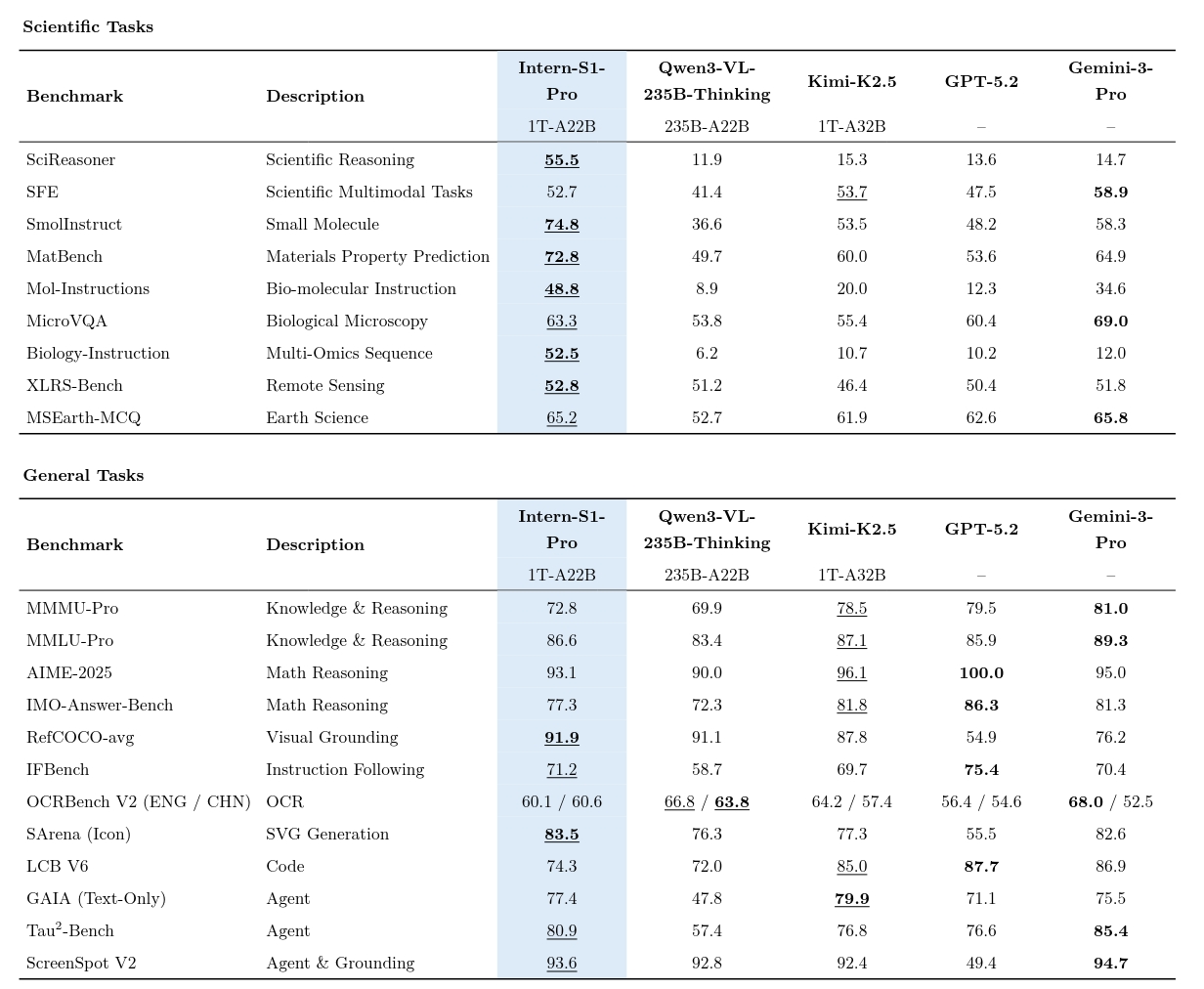
We thank the Intern-S1-Pro team for treating SVG generation as an important capability of the model, and for using SArena-Icon as a benchmark for evaluation.
To better align with the common practice in general-purpose foundation model technical reports (i.e., reporting results in a 0 – 100 scale), we additionally report a single aggregated score for SArena-Icon, computed from the original SArena metrics.
We define the final score as:
final score = 0.3 * CLIP-I2I + 0.3 * (100 * DINO) + 0.2 * (100 * SSIM) + 0.2 * (100 * (1 - LPIPS))
We would like to thank Kiyotaka, yinlikestudy, and quentin-77 for their valuable contributions to this project.
The InternSVG model is developed based on InternVL and further fine-tuned with LLaMA-Factory for SVG understanding, editing, and generation tasks.
We also acknowledge the following open-source efforts that have contributed to advancing SVG understanding and generation:
InternSVG is licensed under the Apache License 2.0.
@inproceedings{wang2026internsvg,
  title={Internsvg: Towards unified svg tasks with multimodal large language models},
  author={Wang, Haomin and Yin, Jinhui and Wei, Qi and Zeng, Wenguang and Gu, Lixin and Ye, Shenglong and Gao, Zhangwei and Wang, Yaohui and Zhang, Yanting and Li, Yuanqi and others},
  booktitle={International Conference on Learning Representations},
  volume={2026},
  pages={38649--38705},
  year={2026}
}
[ICLR 2026] Official repository of "InternSVG: Towards Unified SVG Tasks with Multimodal Large Language Models".
Python
128
8 commits
updated Oct 4, 2026
We present the InternSVG family, an integrated data–benchmark–model suite.
git clone https://github.com/hmwang2002/InternSVG.git
cd InternSVG

conda create -n internsvg python=3.9 -y
conda activate internsvg
pip install -r requirements.txt

# install clip
pip install git+https://github.com/openai/CLIP.git
Download ViCLIP.
mkdir sarena_ckpt
cd sarena_ckpt
# You need to login first and have the access to the repo https://huggingface.co/OpenGVLab/ViCLIP. Use the command "huggingface-cli login" to login.
huggingface-cli download --resume-download OpenGVLab/ViCLIP ViClip-InternVid-10M-FLT.pth --local-dir .
cd ..
For training, you need to install LLaMA-Factory.
pip install deepspeed==0.16.9
pip install av==14.4.0
cd LLaMA-Factory
pip install -e ".[torch,metrics]"
cd ..
(Optional) If you need to simplify your own SVG code, install svgo.
conda install nodejs
npm install -g svgo
The InternSVG-8B model is available at Hugging Face. It is based on the InternVL3-8B model, incorporating SVG-specific tokens, and undergoes Supervised Fine-Tuning (SFT) under a two-stage training strategy using the massive SVG training samples from the SAgoge dataset.
We recommend using LMDeploy for deployment. An example of launching a proxy server with 8 parallel workers (one per GPU) is provided below:
#!/bin/bash
model_path="MODEL_PATH"
model_name="InternSVG"

# proxy
lmdeploy serve proxy --server-name 0.0.0.0 --server-port 10010 --routing-strategy "min_expected_latency" &

worker_num=8
for ((i = 0; i < worker_num; i++)); do
    timestamp=$(date +"%Y-%m-%d_%H-%M-%S")
    CUDA_VISIBLE_DEVICES="${i}" lmdeploy serve api_server ${model_path} --proxy-url http://0.0.0.0:10010 \
        --model-name ${model_name} \
        --tp 1 \
        --max-batch-size 512 \
        --backend pytorch \
        --server-port $((10000 + i)) \
        --session-len 16384 \
        --chat-template "internvl2_5" \
        --log-level WARNING &>> ./logs/api_${model_name}_${timestamp}_${i}.out  &
    sleep 10s
done
If you need to train your own model, please follow these steps:
Prepare the Dataset: Download the SAgoge dataset. After that, update the paths for the SAgoge-related subdatasets in LLaMA-Factory/data/dataset_info.json to match your local file paths.
Download InternVL3-8B: Download the InternVL3-8B from link.
Add Special Tokens: Before training, you must add SVG-specific tokens to the base model. Run the utils/add_token.py script, which adds these special tokens to the original model weights and initializes their embeddings based on subwords.
Start Training: We provide example configuration scripts for the two-stage training process. You can find them at:
LLaMA-Factory/examples/train_full/stage_1.yamlLLaMA-Factory/examples/train_full/stage_2.yamlThen use llamafactory-cli train to start training.
The SAgoge dataset is available at Hugging Face. To use SAgoge, please download the dataset and extract media.tar.gz to access the image files. After extraction, you will get:
SAgoge/
├── media/
│   ├── stage1/
│   │   ├── chem/
│   │   └── icon/
│   └── stage2/
│       ├── animation/
│       ├── chem/
│       ├── icon/
│       └── illustration/
├── stage1/
│   ├── chem/
│   │   ├── img2svg/
│   │   └── text2svg/
│   └── icon/
│       ├── edit/
│       ├── generation/
│       │   ├── img2svg/
│       │   └── text2svg/
│       └── understanding/
└── stage2/
    ├── animation/
    │   ├── text2sani/
    │   └── video2sani/
    ├── chem/
    │   ├── img2svg/
    │   └── text2svg/
    ├── icon/
    │   ├── edit/
    │   ├── generation/
    │   │   ├── img2svg/
    │   │   └── text2svg/
    │   └── understanding/
    └── illustration/
        ├── img2svg/
        └── text2svg/
Statistics of SAgoge:
| Dataset | #SVGs | #Samples | Avg. Tokens |
|---|---|---|---|
| Icon | 2.8M | 11M | 846 |
| Illustration | 600K | 1.6M | 8673 |
| Animation | 61K | 122K | 847 |
| Chemistry | 1.7M | 3.4M | 1752 |
The SArena benchmark is available here. You can use the huggingface_hub command to download directly:
hf download InternSVG/SArena SArena.zip --repo-type dataset --resume-download --local-dir PATH_TO_YOUR_DIR
unzip SArena.zip
After extraction, you will get:
SArena/
├── animation/
│   ├── overall/
│   ├── svg/
│   ├── video/
│   ├── text2sani.jsonl
│   └── video2sani.jsonl
│
├── chemistry/
│   ├── images/
│   ├── svg/
│   ├── img2svg.jsonl
│   └── text2svg.jsonl
│
├── illustration/
│   ├── images/
│   ├── svg/
│   ├── caption.jsonl
│   ├── img2svg.jsonl
│   └── text2svg.jsonl
│
├── Icon/
│   ├── edit/
│   │   └── data/
│   │       ├── color_complex.jsonl
│   │       ├── color_simple.jsonl
│   │       ├── crop.jsonl
│   │       ├── flip.jsonl
│   │       ├── opacity.jsonl
│   │       ├── outline.jsonl
│   │       ├── rotate.jsonl
│   │       ├── scale.jsonl
│   │       ├── styletransform_openmoji.jsonl
│   │       └── translate.jsonl
│   │
│   ├── generation/
│   │   ├── images/
│   │   ├── svg/
│   │   ├── caption.jsonl
│   │   ├── img2svg.jsonl
│   │   └── text2svg.jsonl
│   │
│   └── understanding/
│       └── sarena_un.jsonl
Template scripts for inference can be found in the scripts/inference/ folder.
For example, for the icon/illustration/chemistry generation task, you can modify the script above by specifying your own paths and API configuration.
#!/bin/bash
export PYTHONPATH=$(pwd):$PYTHONPATH

BASE_URL="BASE_URL"
API_KEY="API_KEY"
MODEL_NAME="MODEL_NAME"
TEXT2SVG_TEST_PATH="PATH_TO_TEXT2SVG_TEST_PATH"
IMG2SVG_TEST_PATH="PATH_TO_IMG2SVG_TEST_PATH"
OUTPUT_DIR="PATH_TO_OUTPUT_DIR"
RETRY=1
TEMPERATURE=0.0
MAX_TOKENS=4000
MAX_WORKERS=32

python metrics/inference/inference.py \
--base_url ${BASE_URL} \
--api_key ${API_KEY} \
--model_name ${MODEL_NAME} \
--text2svg_test_path ${TEXT2SVG_TEST_PATH} \
--img2svg_test_path ${IMG2SVG_TEST_PATH} \
--output_dir ${OUTPUT_DIR} \
--temperature ${TEMPERATURE} \
--max_tokens ${MAX_TOKENS} \
--max_workers ${MAX_WORKERS}
Then run:
bash scripts/inference/gen/demo.sh
Specifically, for SVG animation generation task, a template inference script is provided at scripts/inference/animation/demo.sh.
When all test samples have been processed, each SVG file needs to be converted into an MP4 video for metric evaluation. Use the script utils/svg_animate.py to generate MP4 files. Note that we need two resolutions: 448×448 and 128×128. Before running, modify the OUTPUT_DIRS and FILE_DIRS variables in the run_all_mp() function. (Notably, in our code, if the output path contains '_128', it will automatically use the 128×128 resolution.)
The directory structure of the test files is as follows:
evaluate
├── .vscode
├── animation/gpt4o
│   ├── text2sani
│   │   ├── svg/
│   │   ├── video/
│   │   ├── video_128/
│   │   └── output.jsonl
│   └── video2sani
│       ├── svg/
│       ├── video/
│       ├── video_128/
│       └── output.jsonl
The scripts/evaluate/ directory contains template scripts for running evaluation across different domains (e.g., icon, illustration, chemistry, and animation).
Each subfolder corresponds to a specific domain:
scripts/evaluate/
├── icon/
│   ├── edit/
│   ├── gen/
│   └── un/
├── illustration/
├── chem/
└── animation/
Below is a demo for evaluating generation tasks (Text-to-SVG and Image-to-SVG):
#!/bin/bash
export PYTHONPATH=$(pwd):$PYTHONPATH

python evaluate_gen.py \
    --model_name "GPT-4o" \
    --text2svg_test_dir "PATH_TO_TEXT2SVG_RESULTS" \
    --img2svg_test_dir "PATH_TO_IMG2SVG_RESULTS" \
    --tokenizer_path "PATH_TO_TOKENIZER" \
    --test_file_path "PATH_TO_TEST_JSONL" \
    --gt_img_dir "PATH_TO_GT_IMAGES" \
    --gt_svg_dir "PATH_TO_GT_SVGS" \
    --caption_path "PATH_TO_CAPTIONS" \
    --bench_name "Icon"
If your model does not support either the Text-to-SVG or Image-to-SVG task, simply set the corresponding test directory argument (--text2svg_test_dir or --img2svg_test_dir) to an empty string.
We thank the Intern-S1-Pro team for treating SVG generation as an important capability of the model, and for using SArena-Icon as a benchmark for evaluation.
To better align with the common practice in general-purpose foundation model technical reports (i.e., reporting results in a 0 – 100 scale), we additionally report a single aggregated score for SArena-Icon, computed from the original SArena metrics.
We define the final score as:
final score = 0.3 * CLIP-I2I + 0.3 * (100 * DINO) + 0.2 * (100 * SSIM) + 0.2 * (100 * (1 - LPIPS))
We would like to thank Kiyotaka, yinlikestudy, and quentin-77 for their valuable contributions to this project.
The InternSVG model is developed based on InternVL and further fine-tuned with LLaMA-Factory for SVG understanding, editing, and generation tasks.
We also acknowledge the following open-source efforts that have contributed to advancing SVG understanding and generation:
InternSVG is licensed under the Apache License 2.0.
@inproceedings{wang2026internsvg,
  title={Internsvg: Towards unified svg tasks with multimodal large language models},
  author={Wang, Haomin and Yin, Jinhui and Wei, Qi and Zeng, Wenguang and Gu, Lixin and Ye, Shenglong and Gao, Zhangwei and Wang, Yaohui and Zhang, Yanting and Li, Yuanqi and others},
  booktitle={International Conference on Learning Representations},
  volume={2026},
  pages={38649--38705},
  year={2026}
}



