Code and evaluation for SoccerNet-FoulRet, a benchmark for semantic video-to-video retrieval of soccer fouls. Given a query foul, retrieve past fouls a referee would judge equivalently, regardless of camera angle, teams, or appearance. Accompanies the paper SoccerNet-FoulRet: Retrieving Semantically Similar Soccer Fouls.
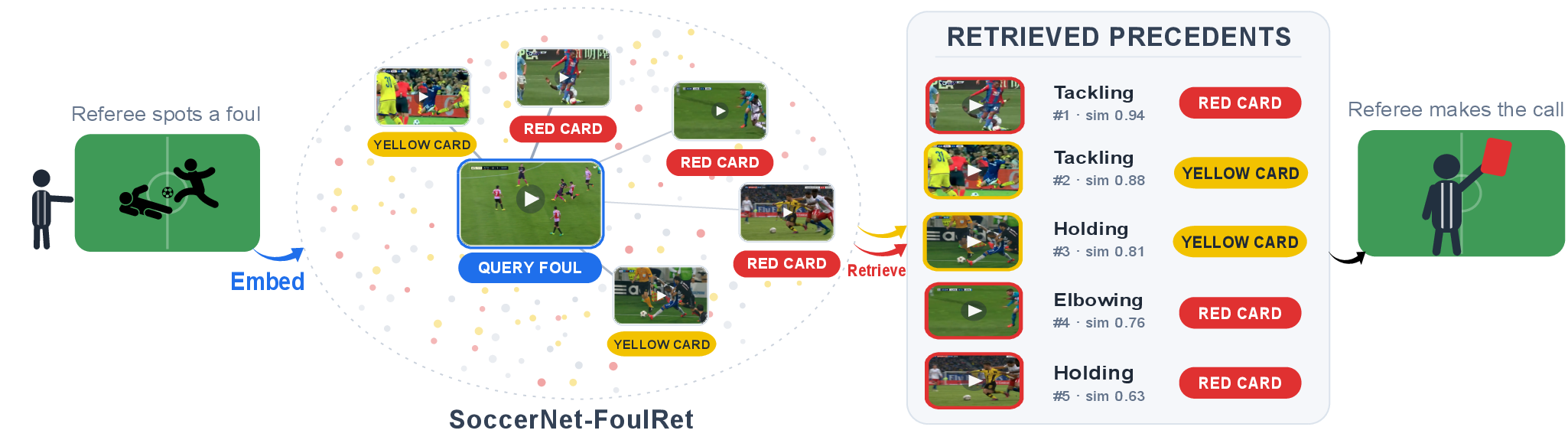
A memory bank for referees. We aim to AUGMENT referees, NOT REPLACE them. Automated classifiers and generative explainers emit a verdict directly, but can do so overconfidently and even hallucinate. Instead, our system takes a new foul (left) and retrieves semantically similar precedents together with the decisions that past referees reached on them (right). The referee reasons from these precedents and keeps the final call.
Use this repository to index SoccerNet-MVFoul clips, retrieve similar fouls with visual or text-mediated models, and evaluate any set of rankings on FoulRet.
data/foulret/        FoulRet benchmark judgments
Demo/                local Flask interface for video queries
evaluation/          precedent, category, and ablation evaluation
retrieval/           retrieval methods, indexes, and rankings
requirements/        environment-specific dependencies
scripts/             optional setup and SLURM helpers
prepare_dataset.py   create the 16-frame MVFoul dataset
train_qwen3vl.py     fine-tune Qwen3-VL-Embedding-2B
This is the shortest path to a working installation. It uses Qwen3-VL-Embedding-2B. You need Miniconda or Anaconda, the SoccerNet-MVFoul Train split, and preferably an NVIDIA GPU. A cluster is not required. Run every command from the repository root.
1. Clone and install
git clone https://github.com/SoccerNet/sn-foulret.git
cd sn-foulret

conda create -n foulret-qwen python=3.11 pip -y
conda activate foulret-qwen

# Prevent packages from other Python installations leaking into this environment.
unset PYTHONPATH
export PYTHONNOUSERSITE=1
python -m pip install --upgrade pip setuptools wheel
python -m pip install -r requirements/qwen.txt -r requirements/demo.txt
2. Add and prepare the data
Download SoccerNet-FoulRet and
unzip data.zip
into the root directory.
Then extract the 16-frame windows used by the model. Prepare Train for the gallery and Test as well if you want to query the demo with a Test-set clip:
python prepare_dataset.py Train Test
To query with a Test-set action in the demo, upload one of its prepared clips
from data/mvfouls_window/Test/action_<N>/clip_<N>.mp4. This uses the same
foul-centered 16-frame windowing as the gallery. The demo also accepts arbitrary
MP4 uploads, but those are sampled by the model rather than preprocessed into
the dataset's fixed foul-centered window.
3. Build the complete Train index
The first run downloads the Qwen3-VL model weights. Building the index is GPU-intensive.
python -m retrieval.build_full_index \
  --model qwen3vl-2b \
  --data_dir data/mvfouls_window \
  --index_dir retrieval/indexes/qwen3vl-2b \
  --nframes 16 \
  --clip_mode multi_clip
4. Start the demo
bash Demo/run_flask_app.sh
Open the URL printed by the launcher. With the default settings, it is http://localhost:5000. The demo searches the complete Train gallery.
Skip this section if you are following the quick start. Create only the environment required for the workflow you intend to run:
| Use | Environment | Additional source code |
|---|---|---|
| Evaluate included rankings | foulret-eval | none |
| Run VARS+XVARS or Qwen3-VL | foulret-qwen | none |
| Run VLM2Vec-V2 or LamRA | foulret-vlm2vec | Clones/VLM2Vec |
| Run InternVideo2 | foulret-internvideo2 | Clones/InternVideo |
Keep these as separate environments: the backends require incompatible pinned versions of Torch, Transformers, PEFT, and NumPy.
conda create -n foulret-eval python=3.11 pip -y
conda activate foulret-eval
unset PYTHONPATH
export PYTHONNOUSERSITE=1
python -m pip install --upgrade pip
python -m pip install -r requirements/evaluation.txt
conda create -n foulret-qwen python=3.11 pip -y
conda activate foulret-qwen
unset PYTHONPATH
export PYTHONNOUSERSITE=1
python -m pip install --upgrade pip setuptools wheel
python -m pip install -r requirements/qwen.txt
git submodule update --init Clones/VLM2Vec
conda create -n foulret-vlm2vec python=3.11 pip -y
conda activate foulret-vlm2vec
unset PYTHONPATH
export PYTHONNOUSERSITE=1
python -m pip install --upgrade pip setuptools wheel
python -m pip install -r requirements/vlm2vec.txt -r requirements/demo.txt
git submodule update --init Clones/InternVideo
conda create -n foulret-internvideo2 python=3.11 pip -y
conda activate foulret-internvideo2
unset PYTHONPATH
export PYTHONNOUSERSITE=1
python -m pip install --upgrade pip setuptools wheel
python -m pip install torch==2.4.1 torchvision==0.19.1 \
  --index-url https://download.pytorch.org/whl/cu121
python -m pip install -r requirements/internvideo2.txt -r requirements/demo.txt
This adapter uses InternVideo2's standard PyTorch attention path, so
FlashAttention is not required. InternVideo2-1B is gated: accept the conditions on the
model page,
then run hf auth login from the InternVideo environment. Model weights are
downloaded from Hugging Face on first use.
Equivalent optional setup scripts are available under scripts/setup/.
Obtain SoccerNet-MVFoul and place it in
data/mvfouls/. Each {Train,Valid,Test} split must contain its action folders
and annotations.json. Train is the gallery; Valid and Test are the queries.
Before building an index or running retrieval, extract the 16-frame temporal windows used by the models:
conda activate foulret-qwen     # or the required model-specific environment
python prepare_dataset.py       # -> data/mvfouls_window/
To evaluate the existing rankings already in the codebase without processing videos, copy only the annotations:
conda activate foulret-eval
python prepare_dataset.py --annotations-only
All subsequent commands use data/mvfouls_window/.
The following example retrieves Test queries with Qwen3-VL-Embedding-2B. After installing its environment and preparing the dataset:
conda activate foulret-qwen
MODEL=qwen3vl-2b

python -m retrieval.build_full_index \
  --model "$MODEL" \
  --data_dir data/mvfouls_window \
  --nframes 16 \
  --clip_mode multi_clip \
  --index_dir "retrieval/indexes/$MODEL"

python -m retrieval.retrieve \
  --model "$MODEL" \
  --index_base "retrieval/indexes/$MODEL" \
  --data_dir data/mvfouls_window \
  --nframes 16 \
  --clip_mode multi_clip \
  --instruction "Retrieve videos similar to the query video." \
  --splits Test \
  --views full \
  --top_k 20 \
  --out_dir "retrieval/rankings/$MODEL"
The retrieved Train action IDs are written to
retrieval/rankings/qwen3vl-2b/test_full.json.
Other model keys are qwen3vl-8b, vlm2vec-v2, lamra,
internvideo2-1b, and internvideo2-6b. Activate the corresponding environment
from the setup table before changing MODEL.
For category-relevance retrieval, derive the label-complete indexes and run all three gallery views:
python -m retrieval.derive_label_complete_indexes \
  --index_dir "retrieval/indexes/$MODEL" \
  --data_dir data/mvfouls_window

python -m retrieval.retrieve \
  --model "$MODEL" \
  --index_base "retrieval/indexes/$MODEL" \
  --data_dir data/mvfouls_window \
  --nframes 16 \
  --clip_mode multi_clip \
  --instruction "Retrieve videos similar to the query video." \
  --out_dir "retrieval/rankings/$MODEL"
These commands overwrite that model's included ranking files. Use git diff if
you want to compare the new rankings with the repository versions.
conda activate foulret-qwen
python -m retrieval.vars_xvars.retrieve --split Test
python -m retrieval.vars_xvars.retrieve --split Valid
Results are written to retrieval/vars_xvars/rankings/.
Configure another model or port with environment variables:
MODEL=vlm2vec-v2 PORT=8080 bash Demo/run_flask_app.sh

MODEL=qwen3vl-2b-finetuned \
LORA_PATH=finetuning_outputs/qwen3vl-2b-labelsup/best_model \
bash Demo/run_flask_app.sh
Place your rankings in one directory:
outputs/my_model/
  test_full.json
  valid_full.json
  test_action_offence.json
  valid_action_offence.json
  test_action_offence_severity.json
  valid_action_offence_severity.json
Each file maps a query action to an ordered list of Train action IDs:
{
  "action_0": ["89", "action_403", "815"]
}
Activate the evaluation environment and prepare the annotations first:
conda activate foulret-eval
python prepare_dataset.py --annotations-only

python -m evaluation.precedent \
  --rankings-dir outputs/my_model \
  --method-name "My Model"

python -m evaluation.category \
  --rankings-dir outputs/my_model \
  --method-name "My Model"
Precedent relevance uses the full files. Category relevance uses the
action_offence and action_offence_severity files.
The repository includes rankings for all methods in the paper. To evaluate them without loading the models:
conda activate foulret-eval
python prepare_dataset.py --annotations-only
python -m evaluation.precedent            # Table 3
python -m evaluation.category             # Table 4
python -m evaluation.instruction_ablation # Table 5
Fine-tune Qwen3-VL-Embedding-2B with the paper configuration, then build its indexes and rankings:
conda activate foulret-qwen

MODEL=qwen3vl-2b-finetuned
RUN_DIR=finetuning_outputs/qwen3vl-2b-labelsup
ADAPTER="$RUN_DIR/best_model"
INDEX_BASE="retrieval/indexes/$MODEL"
RANKINGS="retrieval/rankings/$MODEL"

python train_qwen3vl.py \
  --model_name Qwen/Qwen3-VL-Embedding-2B \
  --data_dir data/mvfouls_window \
  --output_dir "$RUN_DIR" \
  --label_fields action offence severity \
  --clip_mode multi_clip \
  --dev_fraction 0.1 --seed 42 \
  --epochs 10 --patience 3 \
  --batch_size 12 --samples_per_label 2 --gradient_accumulation_steps 8 \
  --lr 1e-5 --weight_decay 0.05 --temperature 0.05 \
  --warmup_ratio 0.1 --scheduler cosine \
  --tier_weights 1 1 1 \
  --lora_rank 16 --lora_alpha 16 --lora_dropout 0.10 \
  --nframes 16 --attn_implementation sdpa \
  --gradient_checkpointing

python -m retrieval.build_full_index \
  --model "$MODEL" --lora_path "$ADAPTER" \
  --data_dir data/mvfouls_window \
  --nframes 16 --clip_mode multi_clip \
  --index_dir "$INDEX_BASE" --force_rebuild

python -m retrieval.derive_label_complete_indexes \
  --index_dir "$INDEX_BASE" \
  --data_dir data/mvfouls_window

python -m retrieval.retrieve \
  --model "$MODEL" --lora_path "$ADAPTER" \
  --index_base "$INDEX_BASE" \
  --data_dir data/mvfouls_window \
  --nframes 16 --clip_mode multi_clip \
  --instruction "Retrieve videos similar to the query video." \
  --out_dir "$RANKINGS"

conda activate foulret-eval
python -m evaluation.precedent \
  --rankings-dir "$RANKINGS" \
  --method-name "Fine-tuned Qwen3-VL-Embedding-2B"
python -m evaluation.category \
  --rankings-dir "$RANKINGS" \
  --method-name "Fine-tuned Qwen3-VL-Embedding-2B"
After building a model's full index, run the three retrieval instructions below.
Repeat them for qwen3vl-2b, qwen3vl-8b, vlm2vec-v2, and lamra.
MODEL=qwen3vl-2b
INDEX="retrieval/indexes/$MODEL"
OUTPUT="retrieval/rankings/instruction_ablation/$MODEL"

python -m retrieval.retrieve \
  --model "$MODEL" --index_base "$INDEX" \
  --data_dir data/mvfouls_window --nframes 16 --clip_mode multi_clip \
  --instruction "Retrieve videos similar to the query video." \
  --views full --top_k 20 --no_query_cache --plain_filenames \
  --out_dir "$OUTPUT/generic"

python -m retrieval.retrieve \
  --model "$MODEL" --index_base "$INDEX" \
  --data_dir data/mvfouls_window --nframes 16 --clip_mode multi_clip \
  --instruction "Retrieve soccer foul videos similar to the query." \
  --views full --top_k 20 --no_query_cache --plain_filenames \
  --out_dir "$OUTPUT/domain"

python -m retrieval.retrieve \
  --model "$MODEL" --index_base "$INDEX" \
  --data_dir data/mvfouls_window --nframes 16 --clip_mode multi_clip \
  --instruction "Retrieve soccer foul videos of the same action type, offence, and severity as the query." \
  --views full --top_k 20 --no_query_cache --plain_filenames \
  --out_dir "$OUTPUT/detailed"
Evaluate the resulting rankings with:
conda activate foulret-eval
python -m evaluation.instruction_ablation
Optional launchers are available under scripts/slurm/:
# Build both index stages, then launch dependent retrieval jobs
BUILD_JOB=$(sbatch --parsable scripts/slurm/run_build_indexes.sbatch qwen3vl-2b)
sbatch --dependency="afterok:$BUILD_JOB" scripts/slurm/run_retrieve.sbatch qwen3vl-2b
sbatch --dependency="afterok:$BUILD_JOB" scripts/slurm/run_instruction_ablation.sbatch qwen3vl-2b

# VARS+XVARS and task-specific fine-tuning
sbatch scripts/slurm/run_vars_xvars.sbatch
sbatch scripts/slurm/run_finetune_qwen3vl.sbatch
Adjust the scheduler directives for your cluster.
If you use this benchmark, please cite the SoccerNet-FoulRet paper:
@misc{arthur2026soccernetfoulretretrievingsemanticallysimilar,
      title={SoccerNet-FoulRet: Retrieving Semantically Similar Soccer Foul Videos},
      author={Jacobus Arthur and Ahmad Sait and Batool Hani and Merey Ramazanova and Jan Held and Marc Van Droogenbroeck and Bernard Ghanem and Anthony Cioppa and Silvio Giancola},
      year={2026},
      eprint={2610.09742},
      archivePrefix={arXiv},
      primaryClass={cs.CV},
      url={https://arxiv.org/abs/2610.09742},
}
Code and evaluation for SoccerNet-FoulRet, a benchmark for semantic video-to-video retrieval of soccer fouls. Given a query foul, retrieve past fouls a referee would judge equivalently, regardless of camera angle, teams, or appearance. Accompanies the paper SoccerNet-FoulRet: Retrieving Semantically Similar Soccer Fouls.
A memory bank for referees. We aim to AUGMENT referees, NOT REPLACE them. Automated classifiers and generative explainers emit a verdict directly, but can do so overconfidently and even hallucinate. Instead, our system takes a new foul (left) and retrieves semantically similar precedents together with the decisions that past referees reached on them (right). The referee reasons from these precedents and keeps the final call.
Use this repository to index SoccerNet-MVFoul clips, retrieve similar fouls with visual or text-mediated models, and evaluate any set of rankings on FoulRet.
data/foulret/        FoulRet benchmark judgments
Demo/                local Flask interface for video queries
evaluation/          precedent, category, and ablation evaluation
retrieval/           retrieval methods, indexes, and rankings
requirements/        environment-specific dependencies
scripts/             optional setup and SLURM helpers
prepare_dataset.py   create the 16-frame MVFoul dataset
train_qwen3vl.py     fine-tune Qwen3-VL-Embedding-2B
This is the shortest path to a working installation. It uses Qwen3-VL-Embedding-2B. You need Miniconda or Anaconda, the SoccerNet-MVFoul Train split, and preferably an NVIDIA GPU. A cluster is not required. Run every command from the repository root.
1. Clone and install
git clone https://github.com/SoccerNet/sn-foulret.git
cd sn-foulret

conda create -n foulret-qwen python=3.11 pip -y
conda activate foulret-qwen

# Prevent packages from other Python installations leaking into this environment.
unset PYTHONPATH
export PYTHONNOUSERSITE=1
python -m pip install --upgrade pip setuptools wheel
python -m pip install -r requirements/qwen.txt -r requirements/demo.txt
2. Add and prepare the data
Download SoccerNet-FoulRet and
unzip data.zip
into the root directory.
Then extract the 16-frame windows used by the model. Prepare Train for the gallery and Test as well if you want to query the demo with a Test-set clip:
python prepare_dataset.py Train Test
To query with a Test-set action in the demo, upload one of its prepared clips
from data/mvfouls_window/Test/action_<N>/clip_<N>.mp4. This uses the same
foul-centered 16-frame windowing as the gallery. The demo also accepts arbitrary
MP4 uploads, but those are sampled by the model rather than preprocessed into
the dataset's fixed foul-centered window.
3. Build the complete Train index
The first run downloads the Qwen3-VL model weights. Building the index is GPU-intensive.
python -m retrieval.build_full_index \
  --model qwen3vl-2b \
  --data_dir data/mvfouls_window \
  --index_dir retrieval/indexes/qwen3vl-2b \
  --nframes 16 \
  --clip_mode multi_clip
4. Start the demo
bash Demo/run_flask_app.sh
Open the URL printed by the launcher. With the default settings, it is http://localhost:5000. The demo searches the complete Train gallery.
Skip this section if you are following the quick start. Create only the environment required for the workflow you intend to run:
| Use | Environment | Additional source code |
|---|---|---|
| Evaluate included rankings | foulret-eval | none |
| Run VARS+XVARS or Qwen3-VL | foulret-qwen | none |
| Run VLM2Vec-V2 or LamRA | foulret-vlm2vec | Clones/VLM2Vec |
| Run InternVideo2 | foulret-internvideo2 | Clones/InternVideo |
Keep these as separate environments: the backends require incompatible pinned versions of Torch, Transformers, PEFT, and NumPy.
conda create -n foulret-eval python=3.11 pip -y
conda activate foulret-eval
unset PYTHONPATH
export PYTHONNOUSERSITE=1
python -m pip install --upgrade pip
python -m pip install -r requirements/evaluation.txt
conda create -n foulret-qwen python=3.11 pip -y
conda activate foulret-qwen
unset PYTHONPATH
export PYTHONNOUSERSITE=1
python -m pip install --upgrade pip setuptools wheel
python -m pip install -r requirements/qwen.txt
git submodule update --init Clones/VLM2Vec
conda create -n foulret-vlm2vec python=3.11 pip -y
conda activate foulret-vlm2vec
unset PYTHONPATH
export PYTHONNOUSERSITE=1
python -m pip install --upgrade pip setuptools wheel
python -m pip install -r requirements/vlm2vec.txt -r requirements/demo.txt
git submodule update --init Clones/InternVideo
conda create -n foulret-internvideo2 python=3.11 pip -y
conda activate foulret-internvideo2
unset PYTHONPATH
export PYTHONNOUSERSITE=1
python -m pip install --upgrade pip setuptools wheel
python -m pip install torch==2.4.1 torchvision==0.19.1 \
  --index-url https://download.pytorch.org/whl/cu121
python -m pip install -r requirements/internvideo2.txt -r requirements/demo.txt
This adapter uses InternVideo2's standard PyTorch attention path, so
FlashAttention is not required. InternVideo2-1B is gated: accept the conditions on the
model page,
then run hf auth login from the InternVideo environment. Model weights are
downloaded from Hugging Face on first use.
Equivalent optional setup scripts are available under scripts/setup/.
Obtain SoccerNet-MVFoul and place it in
data/mvfouls/. Each {Train,Valid,Test} split must contain its action folders
and annotations.json. Train is the gallery; Valid and Test are the queries.
Before building an index or running retrieval, extract the 16-frame temporal windows used by the models:
conda activate foulret-qwen     # or the required model-specific environment
python prepare_dataset.py       # -> data/mvfouls_window/
To evaluate the existing rankings already in the codebase without processing videos, copy only the annotations:
conda activate foulret-eval
python prepare_dataset.py --annotations-only
All subsequent commands use data/mvfouls_window/.
The following example retrieves Test queries with Qwen3-VL-Embedding-2B. After installing its environment and preparing the dataset:
conda activate foulret-qwen
MODEL=qwen3vl-2b

python -m retrieval.build_full_index \
  --model "$MODEL" \
  --data_dir data/mvfouls_window \
  --nframes 16 \
  --clip_mode multi_clip \
  --index_dir "retrieval/indexes/$MODEL"

python -m retrieval.retrieve \
  --model "$MODEL" \
  --index_base "retrieval/indexes/$MODEL" \
  --data_dir data/mvfouls_window \
  --nframes 16 \
  --clip_mode multi_clip \
  --instruction "Retrieve videos similar to the query video." \
  --splits Test \
  --views full \
  --top_k 20 \
  --out_dir "retrieval/rankings/$MODEL"
The retrieved Train action IDs are written to
retrieval/rankings/qwen3vl-2b/test_full.json.
Other model keys are qwen3vl-8b, vlm2vec-v2, lamra,
internvideo2-1b, and internvideo2-6b. Activate the corresponding environment
from the setup table before changing MODEL.
For category-relevance retrieval, derive the label-complete indexes and run all three gallery views:
python -m retrieval.derive_label_complete_indexes \
  --index_dir "retrieval/indexes/$MODEL" \
  --data_dir data/mvfouls_window

python -m retrieval.retrieve \
  --model "$MODEL" \
  --index_base "retrieval/indexes/$MODEL" \
  --data_dir data/mvfouls_window \
  --nframes 16 \
  --clip_mode multi_clip \
  --instruction "Retrieve videos similar to the query video." \
  --out_dir "retrieval/rankings/$MODEL"
These commands overwrite that model's included ranking files. Use git diff if
you want to compare the new rankings with the repository versions.
conda activate foulret-qwen
python -m retrieval.vars_xvars.retrieve --split Test
python -m retrieval.vars_xvars.retrieve --split Valid
Results are written to retrieval/vars_xvars/rankings/.
Configure another model or port with environment variables:
MODEL=vlm2vec-v2 PORT=8080 bash Demo/run_flask_app.sh

MODEL=qwen3vl-2b-finetuned \
LORA_PATH=finetuning_outputs/qwen3vl-2b-labelsup/best_model \
bash Demo/run_flask_app.sh
Place your rankings in one directory:
outputs/my_model/
  test_full.json
  valid_full.json
  test_action_offence.json
  valid_action_offence.json
  test_action_offence_severity.json
  valid_action_offence_severity.json
Each file maps a query action to an ordered list of Train action IDs:
{
  "action_0": ["89", "action_403", "815"]
}
Activate the evaluation environment and prepare the annotations first:
conda activate foulret-eval
python prepare_dataset.py --annotations-only

python -m evaluation.precedent \
  --rankings-dir outputs/my_model \
  --method-name "My Model"

python -m evaluation.category \
  --rankings-dir outputs/my_model \
  --method-name "My Model"
Precedent relevance uses the full files. Category relevance uses the
action_offence and action_offence_severity files.
The repository includes rankings for all methods in the paper. To evaluate them without loading the models:
conda activate foulret-eval
python prepare_dataset.py --annotations-only
python -m evaluation.precedent            # Table 3
python -m evaluation.category             # Table 4
python -m evaluation.instruction_ablation # Table 5
Fine-tune Qwen3-VL-Embedding-2B with the paper configuration, then build its indexes and rankings:
conda activate foulret-qwen

MODEL=qwen3vl-2b-finetuned
RUN_DIR=finetuning_outputs/qwen3vl-2b-labelsup
ADAPTER="$RUN_DIR/best_model"
INDEX_BASE="retrieval/indexes/$MODEL"
RANKINGS="retrieval/rankings/$MODEL"

python train_qwen3vl.py \
  --model_name Qwen/Qwen3-VL-Embedding-2B \
  --data_dir data/mvfouls_window \
  --output_dir "$RUN_DIR" \
  --label_fields action offence severity \
  --clip_mode multi_clip \
  --dev_fraction 0.1 --seed 42 \
  --epochs 10 --patience 3 \
  --batch_size 12 --samples_per_label 2 --gradient_accumulation_steps 8 \
  --lr 1e-5 --weight_decay 0.05 --temperature 0.05 \
  --warmup_ratio 0.1 --scheduler cosine \
  --tier_weights 1 1 1 \
  --lora_rank 16 --lora_alpha 16 --lora_dropout 0.10 \
  --nframes 16 --attn_implementation sdpa \
  --gradient_checkpointing

python -m retrieval.build_full_index \
  --model "$MODEL" --lora_path "$ADAPTER" \
  --data_dir data/mvfouls_window \
  --nframes 16 --clip_mode multi_clip \
  --index_dir "$INDEX_BASE" --force_rebuild

python -m retrieval.derive_label_complete_indexes \
  --index_dir "$INDEX_BASE" \
  --data_dir data/mvfouls_window

python -m retrieval.retrieve \
  --model "$MODEL" --lora_path "$ADAPTER" \
  --index_base "$INDEX_BASE" \
  --data_dir data/mvfouls_window \
  --nframes 16 --clip_mode multi_clip \
  --instruction "Retrieve videos similar to the query video." \
  --out_dir "$RANKINGS"

conda activate foulret-eval
python -m evaluation.precedent \
  --rankings-dir "$RANKINGS" \
  --method-name "Fine-tuned Qwen3-VL-Embedding-2B"
python -m evaluation.category \
  --rankings-dir "$RANKINGS" \
  --method-name "Fine-tuned Qwen3-VL-Embedding-2B"
After building a model's full index, run the three retrieval instructions below.
Repeat them for qwen3vl-2b, qwen3vl-8b, vlm2vec-v2, and lamra.
MODEL=qwen3vl-2b
INDEX="retrieval/indexes/$MODEL"
OUTPUT="retrieval/rankings/instruction_ablation/$MODEL"

python -m retrieval.retrieve \
  --model "$MODEL" --index_base "$INDEX" \
  --data_dir data/mvfouls_window --nframes 16 --clip_mode multi_clip \
  --instruction "Retrieve videos similar to the query video." \
  --views full --top_k 20 --no_query_cache --plain_filenames \
  --out_dir "$OUTPUT/generic"

python -m retrieval.retrieve \
  --model "$MODEL" --index_base "$INDEX" \
  --data_dir data/mvfouls_window --nframes 16 --clip_mode multi_clip \
  --instruction "Retrieve soccer foul videos similar to the query." \
  --views full --top_k 20 --no_query_cache --plain_filenames \
  --out_dir "$OUTPUT/domain"

python -m retrieval.retrieve \
  --model "$MODEL" --index_base "$INDEX" \
  --data_dir data/mvfouls_window --nframes 16 --clip_mode multi_clip \
  --instruction "Retrieve soccer foul videos of the same action type, offence, and severity as the query." \
  --views full --top_k 20 --no_query_cache --plain_filenames \
  --out_dir "$OUTPUT/detailed"
Evaluate the resulting rankings with:
conda activate foulret-eval
python -m evaluation.instruction_ablation
Optional launchers are available under scripts/slurm/:
# Build both index stages, then launch dependent retrieval jobs
BUILD_JOB=$(sbatch --parsable scripts/slurm/run_build_indexes.sbatch qwen3vl-2b)
sbatch --dependency="afterok:$BUILD_JOB" scripts/slurm/run_retrieve.sbatch qwen3vl-2b
sbatch --dependency="afterok:$BUILD_JOB" scripts/slurm/run_instruction_ablation.sbatch qwen3vl-2b

# VARS+XVARS and task-specific fine-tuning
sbatch scripts/slurm/run_vars_xvars.sbatch
sbatch scripts/slurm/run_finetune_qwen3vl.sbatch
Adjust the scheduler directives for your cluster.
If you use this benchmark, please cite the SoccerNet-FoulRet paper:
@misc{arthur2026soccernetfoulretretrievingsemanticallysimilar,
      title={SoccerNet-FoulRet: Retrieving Semantically Similar Soccer Foul Videos},
      author={Jacobus Arthur and Ahmad Sait and Batool Hani and Merey Ramazanova and Jan Held and Marc Van Droogenbroeck and Bernard Ghanem and Anthony Cioppa and Silvio Giancola},
      year={2026},
      eprint={2610.09742},
      archivePrefix={arXiv},
      primaryClass={cs.CV},
      url={https://arxiv.org/abs/2610.09742},
}



