
🌀 R2-Tuning: Efficient Image-to-Video Transfer Learning for Video Temporal Grounding (ECCV 2024)
See the codeREADME
$\boldsymbol{R^2}$-Tuning

Installation | Dataset | Training | Evaluation | Model Zoo
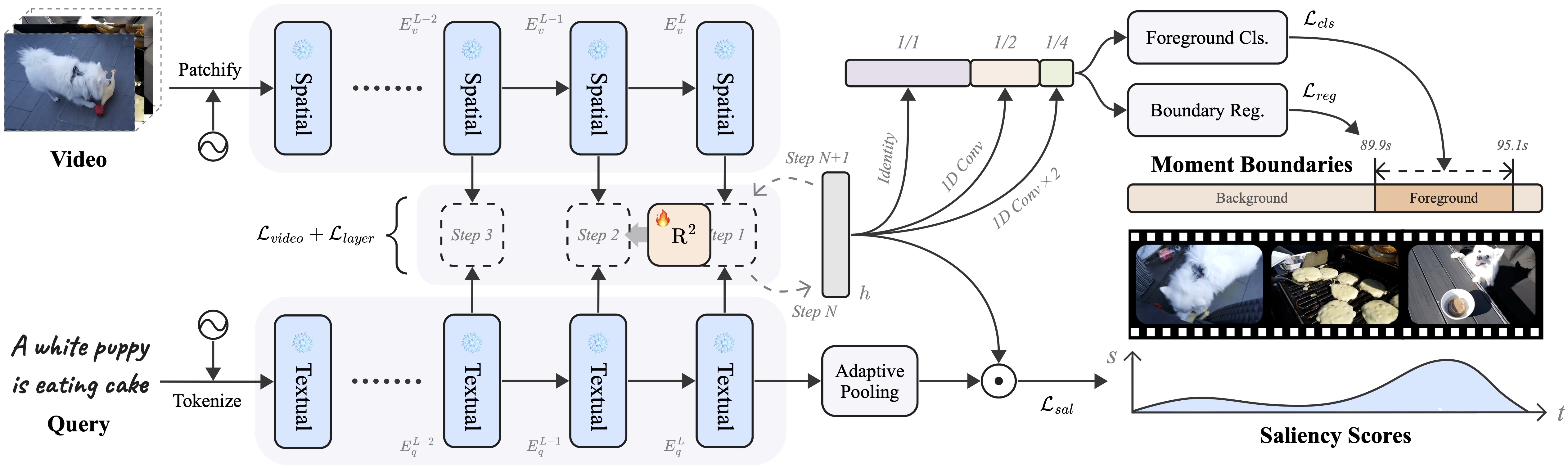
This repository maintains the official implementation of the paper $\boldsymbol{R^2}$-Tuning: Efficient Image-to-Video Transfer Learning for Video Temporal Grounding by Ye Liu, Jixuan He, Wanhua Li, Junsik Kim, Donglai Wei, Hanspeter Pfister, and Chang Wen Chen.
🔥 News
- [2024.7.2] Our paper has been accepted by ECCV 2024.
- [2024.6.16] Check out our online demo on 🤗 Hugging Face Spaces.
- [2024.6.15] Add support for single video inference.
- [2024.4.16] Code and dataset release.
- [2024.3.31] Our tech report is available on arXiv.
🔨 Installation
Please refer to the following environmental settings that we use. You may install these packages by yourself if you meet any problem during automatic installation.
- CUDA 12.1
- FFmpeg 6.0
- Python 3.12.2
- PyTorch 2.2.1
- NNCore 0.4.2
Install from source
- Clone the repository from GitHub.
git clone https://github.com/yeliudev/R2-Tuning.git
cd R2-Tuning
- Initialize conda environment.
conda create -n r2-tuning python=3.12 -y
conda activate r2-tuning
- Install dependencies.
pip install -r requirements.txt
🔖 Dataset
Option 1 [Recommended]: Download pre-extracted features from HuggingFace Hub directly.
# Prepare datasets in one command
bash tools/prepare_data.sh
Option 2: Reproduce our data pre-processing pipeline.
- Download videos from the following links and place them into
data/{dataset}/videos.
- Extract and compress video frames at a fixed frame rate.
# For QVHighlights, Ego4D-NLQ, TACoS, and TVSum
python tools/extract_frames.py <path-to-videos>

# For Charades-STA
python tools/extract_frames.py <path-to-videos> --fps 1.0

# For YouTube Highlights
python tools/extract_frames.py <path-to-videos> --anno_path data/youtube/youtube_anno.json
Arguments of tools/extract_frames.py
video_dirPath to the videos folder--anno_pathPath to the annotation file (only for YouTube Highlights to compute frame rates)--frame_dirPath to the output extracted frames--sizeSide length of the cropped video frames--fpsFrame rate to be used--max_lenThe maximum length of each video segment--workersNumber of processes--chunksizeThe chunk size for each process
- Extract features from video frames.
python tools/extract_feat.py <path-to-anno> <path-to-frames>
Arguments of tools/extract_feat.py
anno_pathPath to the annotation fileframe_dirPath to the extracted frames--video_feat_dirPath to the output video features--query_feat_dirPath to the output query features--archCLIP architecture to use (ViT-B/32,ViT-B/16,ViT-L/14,ViT-L/14-336px)--kSave the lastklayers features--batch_sizeThe batch size to use--workersNumber of workers for data loader
The prepared dataset should be in the following structure.
R2-Tuning
├── configs
├── datasets
├── models
├── tools
├── data
│   ├── qvhighlights
│   │   ├── frames_224_0.5fps (optional)
│   │   ├── clip_b32_{vid,txt}_k4
│   │   └── qvhighlights_{train,val,test}.jsonl
│   ├── ego4d
│   │   ├── frames_224_0.5fps (optional)
│   │   ├── clip_b32_{vid,txt}_k4
│   │   └── nlq_{train,val}.jsonl
│   ├── charades
│   │   ├── frames_224_1.0fps (optional)
│   │   ├── clip_b32_{vid,txt}_k4
│   │   └── charades_{train,test}.jsonl
│   ├── tacos
│   │   ├── frames_224_0.5fps (optional)
│   │   ├── clip_b32_{vid,txt}_k4
│   │   └── {train,val,test}.jsonl
│   ├── youtube
│   │   ├── frames_224_auto (optional)
│   │   ├── clip_b32_{vid,txt}_k4
│   │   └── youtube_anno.json
│   └── tvsum
│       ├── frames_224_0.5fps (optional)
│       ├── clip_b32_{vid,txt}_k4
│       └── tvsum_anno.json
├── README.md
├── setup.cfg
└── ···
🔮 Training
Use the following commands to train a model with a specified config.
# Single GPU
python tools/launch.py <path-to-config>

# Multiple GPUs on a single node (elastic)
torchrun --nproc_per_node=<num-gpus> tools/launch.py <path-to-config>

# Multiple GPUs on multiple nodes (slurm)
srun <slurm-args> python tools/launch.py <path-to-config>
Arguments of tools/launch.py
configThe config file to use--checkpointThe checkpoint file to load from--resumeThe checkpoint file to resume from--work_dirWorking directory--evalEvaluation only--dumpDump inference outputs--seedThe random seed to use--ampWhether to use automatic mixed precision training--debugDebug mode (detectnanduring training)--launcherThe job launcher to use
Please refer to the configs folder for detailed settings of each model.
🏆 Evaluation
Use the following command to test a model and evaluate results.
python tools/launch.py <path-to-config> --checkpoint <path-to-checkpoint> --eval
For QVHighlights, you may also dump inference outputs on val and test splits.
python tools/launch.py <path-to-config> --checkpoint <path-to-checkpoint> --dump
Then you can pack the hl_{val,test}_submission.jsonl files and submit them to CodaLab.
💻 Single Video Inference
[!WARNING] This feature is only compatible with
nncore==0.4.4.
Use the following command to perform moment retrieval using your own videos and queries.
# Make sure you are using the correct version
pip install nncore==0.4.4

python tools/inference.py <path-to-video> <query> [--config <path-to-config> --checkpoint <path-to-checkpoint>]
The checkpoint trained on QVHighlights using this config will be downloaded by default.
📦 Model Zoo
We provide multiple pre-trained models and training logs here. All the models were trained on a single NVIDIA A100 80GB GPU and were evaluated using the default metrics of different datasets.
| Dataset | Config | R1@0.3 | R1@0.5 | R1@0.7 | MR mAP | HD mAP | Download |
|---|---|---|---|---|---|---|---|
| QVHighlights | Default | 78.71 | 67.74 | 51.87 | 47.86 | 39.45 | model | log |
| Ego4D-NLQ | Default | 7.18 | 4.54 | 2.25 | — | — | model | log |
| Charades-STA | Default | 70.91 | 60.48 | 38.66 | — | — | model | log |
| TACoS | Default | 50.96 | 40.69 | 25.69 | — | — | model | log |
|
YouTube Highlights | Dog | — | — | — | — | 74.26 | model | log |
| Gymnastics | — | — | — | — | 72.07 | model | log | |
| Parkour | — | — | — | — | 81.02 | model | log | |
| Skating | — | — | — | — | 76.26 | model | log | |
| Skiing | — | — | — | — | 74.36 | model | log | |
| Surfing | — | — | — | — | 82.76 | model | log | |
| TVSum | BK | — | — | — | — | 91.23 | model | log |
| BT | — | — | — | — | 92.35 | model | log | |
| DS | — | — | — | — | 80.88 | model | log | |
| FM | — | — | — | — | 75.61 | model | log | |
| GA | — | — | — | — | 89.51 | model | log | |
| MS | — | — | — | — | 85.01 | model | log | |
| PK | — | — | — | — | 82.82 | model | log | |
| PR | — | — | — | — | 90.39 | model | log | |
| VT | — | — | — | — | 89.81 | model | log | |
| VU | — | — | — | — | 85.90 | model | log |
📖 Citation
Please kindly cite our paper if you find this project helpful.
@inproceedings{liu2024tuning,
  title={$R^2$-Tuning: Efficient Image-to-Video Transfer Learning for Video Temporal Grounding},
  author={Liu, Ye and He, Jixuan and Li, Wanhua and Kim, Junsik and Wei, Donglai and Pfister, Hanspeter and Chen, Chang Wen},
  booktitle={Proceedings of the European Conference on Computer Vision (ECCV)},
  year={2024}
}
Similar repos


Languages
Python
97.5%
Shell
2.5%
🌀 R2-Tuning: Efficient Image-to-Video Transfer Learning for Video Temporal Grounding (ECCV 2024)
See the codeREADME
$\boldsymbol{R^2}$-Tuning
Installation | Dataset | Training | Evaluation | Model Zoo
This repository maintains the official implementation of the paper $\boldsymbol{R^2}$-Tuning: Efficient Image-to-Video Transfer Learning for Video Temporal Grounding by Ye Liu, Jixuan He, Wanhua Li, Junsik Kim, Donglai Wei, Hanspeter Pfister, and Chang Wen Chen.
🔥 News
- [2024.7.2] Our paper has been accepted by ECCV 2024.
- [2024.6.16] Check out our online demo on 🤗 Hugging Face Spaces.
- [2024.6.15] Add support for single video inference.
- [2024.4.16] Code and dataset release.
- [2024.3.31] Our tech report is available on arXiv.
🔨 Installation
Please refer to the following environmental settings that we use. You may install these packages by yourself if you meet any problem during automatic installation.
- CUDA 12.1
- FFmpeg 6.0
- Python 3.12.2
- PyTorch 2.2.1
- NNCore 0.4.2
Install from source
- Clone the repository from GitHub.
git clone https://github.com/yeliudev/R2-Tuning.git
cd R2-Tuning
- Initialize conda environment.
conda create -n r2-tuning python=3.12 -y
conda activate r2-tuning
- Install dependencies.
pip install -r requirements.txt
🔖 Dataset
Option 1 [Recommended]: Download pre-extracted features from HuggingFace Hub directly.
# Prepare datasets in one command
bash tools/prepare_data.sh
Option 2: Reproduce our data pre-processing pipeline.
- Download videos from the following links and place them into
data/{dataset}/videos.
- Extract and compress video frames at a fixed frame rate.
# For QVHighlights, Ego4D-NLQ, TACoS, and TVSum
python tools/extract_frames.py <path-to-videos>

# For Charades-STA
python tools/extract_frames.py <path-to-videos> --fps 1.0

# For YouTube Highlights
python tools/extract_frames.py <path-to-videos> --anno_path data/youtube/youtube_anno.json
Arguments of tools/extract_frames.py
video_dirPath to the videos folder--anno_pathPath to the annotation file (only for YouTube Highlights to compute frame rates)--frame_dirPath to the output extracted frames--sizeSide length of the cropped video frames--fpsFrame rate to be used--max_lenThe maximum length of each video segment--workersNumber of processes--chunksizeThe chunk size for each process
- Extract features from video frames.
python tools/extract_feat.py <path-to-anno> <path-to-frames>
Arguments of tools/extract_feat.py
anno_pathPath to the annotation fileframe_dirPath to the extracted frames--video_feat_dirPath to the output video features--query_feat_dirPath to the output query features--archCLIP architecture to use (ViT-B/32,ViT-B/16,ViT-L/14,ViT-L/14-336px)--kSave the lastklayers features--batch_sizeThe batch size to use--workersNumber of workers for data loader
The prepared dataset should be in the following structure.
R2-Tuning
├── configs
├── datasets
├── models
├── tools
├── data
│   ├── qvhighlights
│   │   ├── frames_224_0.5fps (optional)
│   │   ├── clip_b32_{vid,txt}_k4
│   │   └── qvhighlights_{train,val,test}.jsonl
│   ├── ego4d
│   │   ├── frames_224_0.5fps (optional)
│   │   ├── clip_b32_{vid,txt}_k4
│   │   └── nlq_{train,val}.jsonl
│   ├── charades
│   │   ├── frames_224_1.0fps (optional)
│   │   ├── clip_b32_{vid,txt}_k4
│   │   └── charades_{train,test}.jsonl
│   ├── tacos
│   │   ├── frames_224_0.5fps (optional)
│   │   ├── clip_b32_{vid,txt}_k4
│   │   └── {train,val,test}.jsonl
│   ├── youtube
│   │   ├── frames_224_auto (optional)
│   │   ├── clip_b32_{vid,txt}_k4
│   │   └── youtube_anno.json
│   └── tvsum
│       ├── frames_224_0.5fps (optional)
│       ├── clip_b32_{vid,txt}_k4
│       └── tvsum_anno.json
├── README.md
├── setup.cfg
└── ···
🔮 Training
Use the following commands to train a model with a specified config.
# Single GPU
python tools/launch.py <path-to-config>

# Multiple GPUs on a single node (elastic)
torchrun --nproc_per_node=<num-gpus> tools/launch.py <path-to-config>

# Multiple GPUs on multiple nodes (slurm)
srun <slurm-args> python tools/launch.py <path-to-config>
Arguments of tools/launch.py
configThe config file to use--checkpointThe checkpoint file to load from--resumeThe checkpoint file to resume from--work_dirWorking directory--evalEvaluation only--dumpDump inference outputs--seedThe random seed to use--ampWhether to use automatic mixed precision training--debugDebug mode (detectnanduring training)--launcherThe job launcher to use
Please refer to the configs folder for detailed settings of each model.
🏆 Evaluation
Use the following command to test a model and evaluate results.
python tools/launch.py <path-to-config> --checkpoint <path-to-checkpoint> --eval
For QVHighlights, you may also dump inference outputs on val and test splits.
python tools/launch.py <path-to-config> --checkpoint <path-to-checkpoint> --dump
Then you can pack the hl_{val,test}_submission.jsonl files and submit them to CodaLab.
💻 Single Video Inference
[!WARNING] This feature is only compatible with
nncore==0.4.4.
Use the following command to perform moment retrieval using your own videos and queries.
# Make sure you are using the correct version
pip install nncore==0.4.4

python tools/inference.py <path-to-video> <query> [--config <path-to-config> --checkpoint <path-to-checkpoint>]
The checkpoint trained on QVHighlights using this config will be downloaded by default.
📦 Model Zoo
We provide multiple pre-trained models and training logs here. All the models were trained on a single NVIDIA A100 80GB GPU and were evaluated using the default metrics of different datasets.
| Dataset | Config | R1@0.3 | R1@0.5 | R1@0.7 | MR mAP | HD mAP | Download |
|---|---|---|---|---|---|---|---|
| QVHighlights | Default | 78.71 | 67.74 | 51.87 | 47.86 | 39.45 | model | log |
| Ego4D-NLQ | Default | 7.18 | 4.54 | 2.25 | — | — | model | log |
| Charades-STA | Default | 70.91 | 60.48 | 38.66 | — | — | model | log |
| TACoS | Default | 50.96 | 40.69 | 25.69 | — | — | model | log |
|
YouTube Highlights | Dog | — | — | — | — | 74.26 | model | log |
| Gymnastics | — | — | — | — | 72.07 | model | log | |
| Parkour | — | — | — | — | 81.02 | model | log | |
| Skating | — | — | — | — | 76.26 | model | log | |
| Skiing | — | — | — | — | 74.36 | model | log | |
| Surfing | — | — | — | — | 82.76 | model | log | |
| TVSum | BK | — | — | — | — | 91.23 | model | log |
| BT | — | — | — | — | 92.35 | model | log | |
| DS | — | — | — | — | 80.88 | model | log | |
| FM | — | — | — | — | 75.61 | model | log | |
| GA | — | — | — | — | 89.51 | model | log | |
| MS | — | — | — | — | 85.01 | model | log | |
| PK | — | — | — | — | 82.82 | model | log | |
| PR | — | — | — | — | 90.39 | model | log | |
| VT | — | — | — | — | 89.81 | model | log | |
| VU | — | — | — | — | 85.90 | model | log |
📖 Citation
Please kindly cite our paper if you find this project helpful.
@inproceedings{liu2024tuning,
  title={$R^2$-Tuning: Efficient Image-to-Video Transfer Learning for Video Temporal Grounding},
  author={Liu, Ye and He, Jixuan and Li, Wanhua and Kim, Junsik and Wei, Donglai and Pfister, Hanspeter and Chen, Chang Wen},
  booktitle={Proceedings of the European Conference on Computer Vision (ECCV)},
  year={2024}
}
Similar repos
Languages
Python
97.5%
Shell
2.5%