Interactive VQA web app for math charts using Flask and React. Upload a graph and ask questions—our system combines a MATCHA-based chart summarizer with a MiniChat-3B QA model to generate insightful answers. Fine-tuned with the AutoChart dataset. Full pipeline and evaluation included.
Jupyter Notebook
1
49 commits
updated Apr 29, 2024
Symbolab is a popular tool that helps people solve math problems step by step. It started as a search engine for math problems and later added features to show all the steps to solve a problem. However, it focuses more on finding answers to equations and functions from graph images.
Our project was inspired by Symbolab's limitations. We noticed that it doesn't explain graphs well, which can be tough for people who struggle with understanding graphs. So, we decided to create a new system called Math Plot VQA. This system lets users ask questions about graphs by inputting both a question and a photo of the graph. It's different from Symbolab because it helps users understand the meaning and context of graphs, not just compute functions and equations.
To enhance our system's capabilities, we integrated the MATCHA model Paper Summary , an enhanced version of the Pix2Struct model Paper Summary . MATCHA combines math reasoning and chart derendering tasks to improve visual language models' capabilities. This integration allows our system to better understand and respond to questions about graphs, making math more accessible and understandable for everyone, especially those who struggle with graph comprehension.
Additionally, we utilized the AutoChart dataset to fine-tune our QA model and use ChartQA Paper Summary to evaluate. ChartQA focuses on visual and logical reasoning over charts, providing a benchmark for complex reasoning questions related to charts. By leveraging these resources and technologies, we aim to create a system that not only computes solutions but also helps users understand the meaning and context of graphs, ultimately making math easier and more accessible.
In the world of math problem-solving, there's a big issue for people who struggle with understanding graphs. These individuals find it hard to make sense of math problems that include graphs, which makes learning and problem-solving tough. Most Question Answering (QA) systems today focus on answering questions from text, ignoring the needs of those who rely on graphs. Our goal is to change that. We're working on a VQA system that can understand and respond to questions about graphs. By doing this, we hope to make math more accessible and easier to understand for everyone, especially those who find graphs challenging.
Visual Question Answering (VQA) is a complex artificial intelligence challenge that has captured the interest of researchers across various fields, including computer vision, natural language processing, and machine learning. It involves generating natural language answers to questions asked about an image.
Currently, people who face challenges with graphs have limited options when it comes to getting help with math problems. Text-based explanations often fall short in conveying the information effectively, leaving these individuals frustrated and discouraged. By developing a VQA system that can handle graph-based inputs, we aim to provide a more intuitive and accessible way for them to interact with math problems. This approach can not only improve their understanding of mathematical concepts but also boost their confidence in tackling math-related challenges.
Users can easily upload mathematical graph images through the system interface, ensuring seamless interaction.
The system enables users to ask contextually relevant questions about the submitted graph, fostering active engagement.
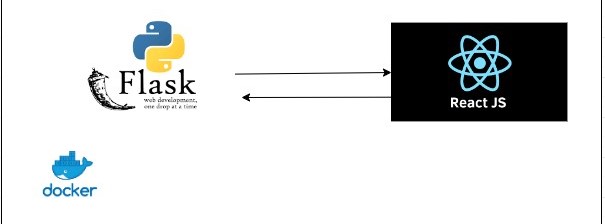
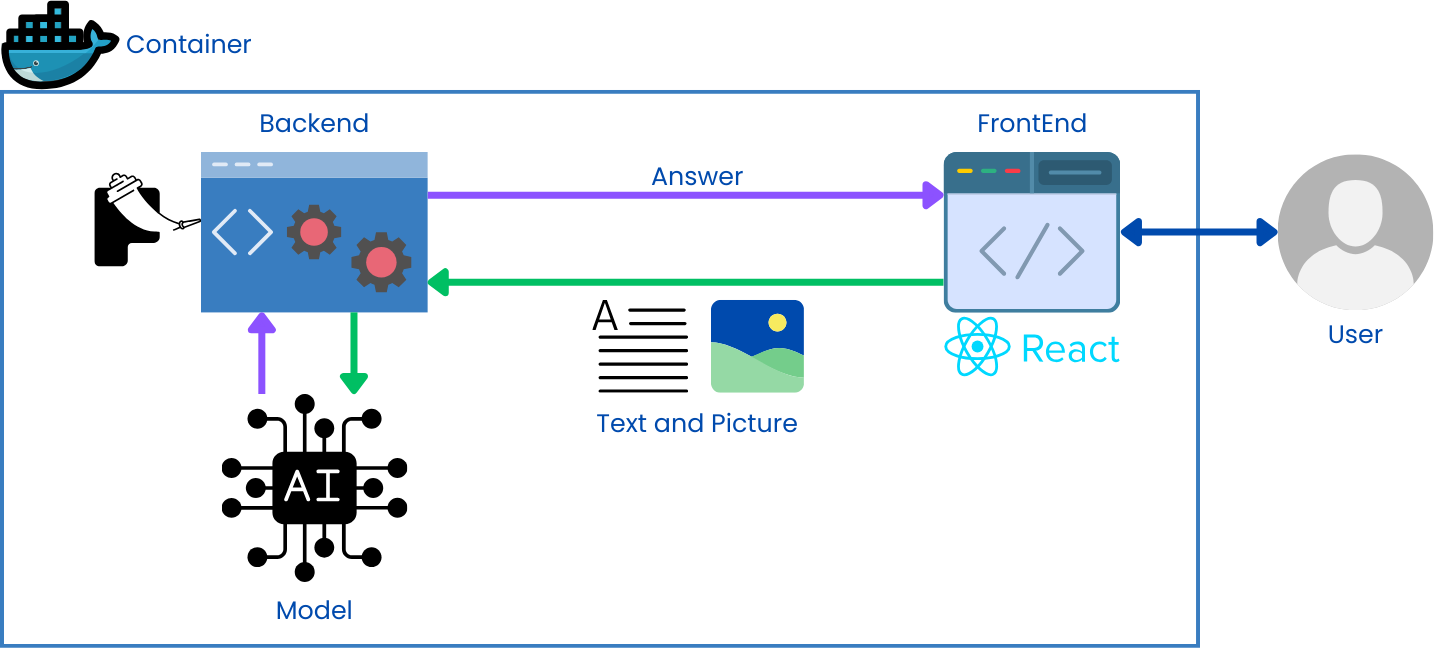
We'll be developing a robust application leveraging Flask as the backend to handle the logic and API endpoints for a model. Flask, with its simplicity and flexibility, will seamlessly integrate with the NLP model, allowing efficient processing of text data. On the frontend, React will provide a dynamic user interface, offering a responsive and intuitive experience for users interacting with the NLP functionalities. By utilizing Docker, I'll encapsulate the entire application, ensuring consistency across different environments and facilitating easy deployment. This combination of Flask, React, and Docker will enable me to build a scalable and efficient solution for NLP-based applications, catering to diverse user needs with ease.
1. Seamless Graph Upload: Users can effortlessly upload graph images through the system's interface. This should involve functionalities like image selection from device storage.
2. Contextual Question Input: The system allows users to ask questions directly related to the uploaded graph. This means the questions should be phrased in a way that considers the graph's structure and properties.
1. Math Question Solving: When a user asks a math question that can be solved using the graph data, the system should provide the solution along with a detailed explanation. This explanation should be clear and understandable, ideally breaking down the process into logical steps.
2. Graph Analysis and Interpretation: The system should analyze the uploaded graph and offer insightful interpretations. This could include identifying key characteristics like the height of bar chart, percentage of each slide in pie chart or highlighting any relevant patterns or trends within the graph structure.
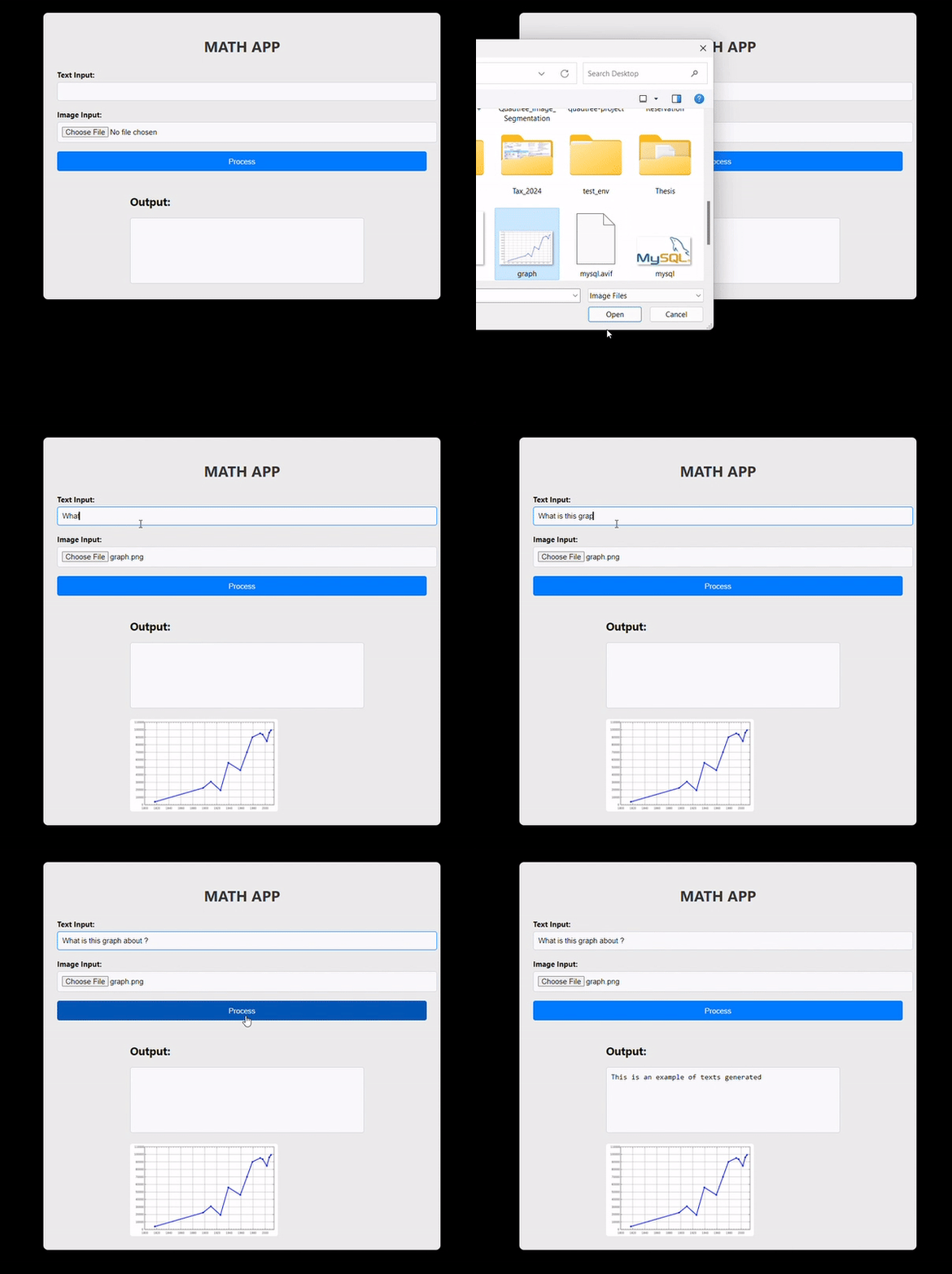
The web application features a text input box where users can type a question, such as "What is this graph about?" Users can also select a graph photo as an image input. After entering both the question and selecting an image, they can click on the "Process" button. The system will then analyze the question and the graph image to provide an answer, making math more accessible and understandable for users.
| Name | Main Role |
|---|---|
| Sitthiwat Damrongpreechar | Slide/Application |
| Pirunrat Kaewphanoaw | Application |
| Munthitra Thadthapong | Document/ Slide |
| Parun Ngamcharoen | Model |
| Nathas Sungworawongpana | Model |
Research question: Does fine-tuning a model improve its performance compared to using a pretrained model when answering questions based on line plots, bar plots, or scatter plots?
Hypothesis: We hypothesize that our model, fine-tuned with the AutoChart dataset for specific types of charts (line plot, bar plot, and scatter plot), will outperform the pretrained model in question answering related to charts.
Independent Variables: Model type (pretrained or fine-tuned).
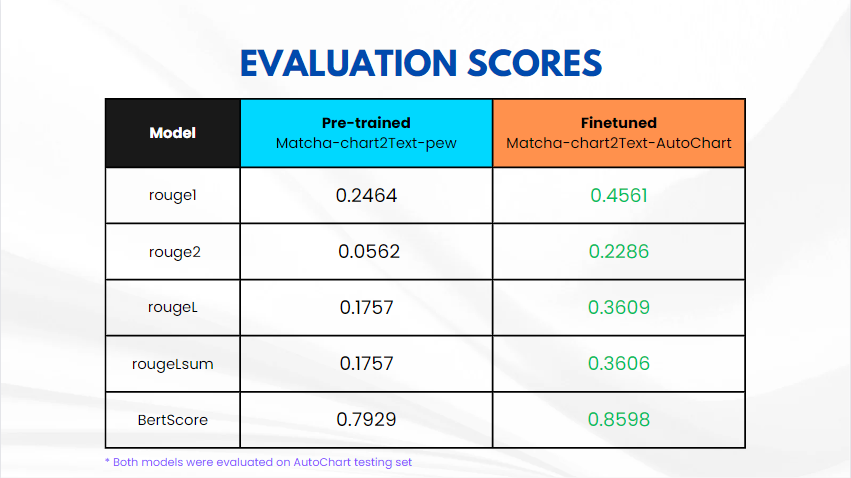
Dependent Variables: Performance metrics such as Rouge Scores and BertScore.
Control Variables: Python libraries and the Python environment.
Random Variables: The input charts and the questions asked (which can be confounding if manipulated).
This paper proposes a reinforcement learning framework for generating natural questions about images, known as Visual Question Generation (VQG). The approach focuses on two specific attributes of natural questions: content and linguistic quality. To address this, the authors introduce two discriminators, one for each attribute, inspired by adversarial learning. These discriminators guide the training process by providing scores used as rewards in the reinforcement learning framework. Experimental results on a standard VQG dataset demonstrate the effectiveness and robustness of the proposed model compared to state-of-the-art methods, both through automatic metrics and human evaluation. The paper suggests potential applications of the framework to other language generation tasks, such as dialogue generation with emotional content, and suggests avenues for future research, including improving efficiency in reward assignment and exploring collaborative methods for multiple discriminators.
This paper addresses the need for better validation methods for highly advanced Visual Question Answering (VQA) algorithms, particularly in the context of medical image analysis, focusing on diabetic macular edema (DME) grading. The authors propose an automatic adaptive questioning approach called Visual Turing Test (VTT) to evaluate the reasoning behavior of VQA algorithms. They introduce a reinforcement learning (RL) agent that observes previous questions and selects the next question to pose, simulating the behavior of a clinician. Through experiments, they demonstrate that this approach generates question streams similar to those of a clinician, effectively evaluating the VQA method's performance. The paper suggests the use of beta distributions to characterize the performance of the VQA system as perceived by the interrogator. The results show that the proposed method can distinguish between reasonable and unreasonable responders, even if their average performance is similar. The authors propose future directions, including applying the framework to other clinical applications, generating more VQA datasets in collaboration with clinicians, and enhancing the representation of images in the questioning process. They also suggest exploring open-ended questions, introducing noise in the state or question, exploiting logical inconsistencies in responses, and integrating the questioning strategy into the training of the VQA model for improved interpretability.
MATCHA, a novel pretraining technique for visual language models, integrates math reasoning and chart derendering tasks into the Pix2Struct base model. By incorporating a diverse mixture of pretraining tasks, including math reasoning, chart derendering, and screenshot parsing, MATCHA significantly enhances the model's ability to understand and generate text from visual data. Evaluation across various datasets demonstrates MATCHA's superiority over baselines, including Pix2Struct, with notable improvements in tasks such as ChartQA, PlotQA, and Chart-to-Text summarization. However, limitations include struggles with complex math problems and plot details, suggesting areas for further research and refinement. Despite these limitations, MATCHA's advancements represent a significant step forward in improving the capabilities of visual language models, albeit within a narrow scope of the visual language domain.
GeoQA presents a benchmark for automatic math problem-solving, focusing on geometric questions that demand understanding of textual descriptions, visual diagrams, and theorem knowledge. To address this challenge, the Neural Geometric Solver (NGS) is introduced, employing a multimodal architecture to parse and generate interpretable programs. NGS integrates a text encoder, diagram encoder, and LSTM decoder with Bahdanau attention, augmented with self-supervised auxiliary tasks to enhance cross-modal semantic representation. Despite significant advancements, results on the GeoQA dataset remain below human performance, underscoring the need for further research in multimodal numerical reasoning.
The ChartQA system addresses the need for complex reasoning in data analysis by introducing a large-scale benchmark dataset comprising human-written and generated questions from chart summaries. Unlike existing datasets, ChartQA emphasizes visual and logical reasoning over fixed-vocabulary questions, providing a more comprehensive evaluation framework. VisionTaPas, the proposed solution, employs two transformer-based models to integrate visual features and chart data tables for unified question answering. The models achieve state-of-the-art results on both previous datasets and the newly introduced ChartQA benchmark, underscoring their effectiveness. However, challenges persist in answering complex reasoning questions, particularly in data extraction, highlighting the need for further advancements in deep learning and rule-based methods to mitigate errors.
MMMU, a comprehensive benchmark for expert-level multimodal understanding and reasoning, encompasses 11.5K questions across 30 subjects and 6 disciplines, sourced meticulously from college exams, quizzes, and textbooks. It spans a wide array of image types and subfields, aiming to push the boundaries of what large multimodal models (LLMs) can achieve towards Expert AGI. Although not a direct measure of AGI capability, MMMU assesses models' performance akin to tasks faced by experts, highlighting the necessity for next-generation multimodal foundation models. Evaluation of various LLMs, including text-only models with OCR or captioning deployment, reveals GPT-4V achieving the highest accuracy of around 55.7% on the MMMU benchmark. Interestingly, models perform better in disciplines with 'natural' images and less reasoning, such as Art & Design and Humanities & Social Sciences, compared to fields like Science, Health & Medicine, and Technology & Engineering.
MathVista introduces a benchmark for evaluating the mathematical reasoning abilities of large language models (LLMs) and large multimodal models (LMMs) in visually complex scenarios. With a dataset combining challenges from diverse mathematical and visual tasks, including newly created datasets addressing logical, statistical, and scientific reasoning, MathVista evaluates 12 prominent foundation models. GPT-4V emerges as the best performer, achieving the highest accuracy of 49.9%, albeit still falling short of human performance by 10.4%. Augmented LLMs, particularly GPT-4 with program-of-thought prompting, exhibit superior performance over text-only LLMs, while Multimodal Bard shows promise but falls significantly below human performance. Fine-grained analysis highlights GPT-4V's strengths across various tasks and contexts but reveals shortcomings in logical reasoning and numeric common sense tasks. Additionally, qualitative analysis uncovers error sources such as hallucination in Multimodal Bard's predictions, shedding light on areas for improvement in multimodal reasoning models.
Pix2Struct presents a novel pretraining approach for visually-situated language understanding models, aiming to address tasks across documents, illustrations, user interfaces (UIs), and natural images. By parsing HTML screenshots into semantic structures, Pix2Struct achieves state-of-the-art results across various benchmarks without relying on domain-specific modifications. The method leverages transformer-based architectures and a large corpus of HTML screenshots for pretraining, demonstrating superior performance compared to prior visual methods. Additionally, the paper discusses challenges in training general-purpose visual language understanding models, such as resolution sensitivity and the need for better data curation, while outlining future research directions to advance the field further. Overall, Pix2Struct lays a strong foundation for enhancing visually-situated language understanding and paves the way for future innovations in this domain.
The paper introduces LLaVA, a Large Language and Vision Assistant, designed as an end-to-end trained large multimodal model that integrates vision encoding with language understanding for general-purpose visual and linguistic comprehension. Notably, the study explores leveraging machine-generated instruction-following data to enhance instruction-tuning capabilities in multimodal models. Results indicate that LLaVA exhibits comparable multimodal chat abilities to multimodal GPT-4 on unseen image-instruction pairs, achieving an 85.1% relative score compared to GPT-4 on a synthetic multimodal instruction-following dataset. Furthermore, when fine-tuned on a Science QA task, both LLaVA and GPT-4 achieve a high accuracy of 92.53%, underscoring the effectiveness of incorporating detailed description tasks and complex reasoning tasks in enhancing the conversational capabilities of multimodal models like LLaVA. The architecture of LLaVA integrates a vision encoder (CLIP) to encode images into text, which is then combined with input queries and fed into the language model (Vicuna) to generate textual responses, showcasing the model's versatility and performance across various tasks.
The paper presents InternVL, a large-scale vision-language foundation model designed to address the growing demand for efficient vision-language understanding. Unlike previous vision-language models (VLLMs), InternVL introduces a novel architecture that allows for flexible combinations of vision encoder and middleware for both contrastive and generative tasks. Notably, InternViT-6B, a variant of InternVL, demonstrates the ability to align with language middleware such as QLLaMA and efficiently leverage image-text data from diverse sources for training. Evaluation results indicate that InternVL-Chat outperforms LLaVA-1.5, highlighting its effectiveness in visual-language tasks. Unlike traditional approaches where the vision encoder feeds text directly into the language model, InternVL leverages contrastive learning between the vision encoder and language model for enhanced performance on various visual-language tasks, showcasing its innovative approach in scaling up vision foundation models.
The AutoChart dataset is a valuable resource for training models in the task of chart-to-text generation. It provides a rich collection of chart images paired with corresponding textual descriptions, facilitating models to learn the relationship between visual representations of data and their natural language explanations.
I. Focus: Chart-to-text generation, aiming to generate comprehensive textual descriptions that go beyond simple captions.
II.Content:
III. Strengths:
1. Large Scale: The extensive dataset size allows models to learn robust patterns and generalize effectively to unseen charts.
2. Analytical Descriptions: Rich textual summaries provide more than just captions, promoting model understanding of chart elements, their relationships, and the underlying data insights.
3. Diverse Charts: Covering various chart types enhances model capability in handling different data visualizations.
IV. Significance:
The current work aligns with the focus of the AutoChart dataset by training a model for chart-to-text generation. By leveraging this dataset, the model learns to analyze chart elements, understand the underlying data, and generate textual descriptions that effectively convey the information presented in the charts.
This class is responsible for loading and preprocessing data for the model. It takes the following parameters:
- I. image_paths: A list of file paths to the chart images.
- II.user_prompt: A string representing the prompt provided to the model (e.g., "What is this chart about?").
- III. chart_summaries: A list of textual summaries corresponding to each image in image_paths.
- IV. processor: A text processor object used for handling text data (e.g., tokenization, padding).
This function retrieves image data and corresponding summaries based on chart type. It takes two parameters:
- I. url_list: A list of dictionaries containing chart URLs and potentially additional information.
- II. chart_type: A string specifying the chart type (Bar, Line, or Scatter). Defaults to "Bar" if not provided.
- III. It retrieves image paths by constructing file paths based on the chart type and index within the url_list.
- IV. It extracts chart summaries from the url_list dictionaries.
- I. The code employs a pre-trained model Pix2StructForConditionalGeneration from the google/matcha-chart2text-pew model hub. This model architecture is specifically designed for image-to-text generation tasks.
- II. It's crucial to choose a pre-trained model that has been trained on a similar task or domain (image-to-text generation) for optimal performance.
- I. A text processor Pix2StructProcessor is loaded from the same model hub. This processor handles text data by performing actions like tokenization, padding, and adding special tokens.
- II. The processor ensures the text input aligns with the model's expectations.
- I.Batch Size (batch_size = 1):
- II.Number of Epochs (num_epochs = 5):
- III.Adafactor Optimizer (optimizer = Adafactor(lr=0.01))
- IV.Cosine Learning Rate Scheduler (scheduler = get_cosine_schedule_with_warmup)
The train function plays a pivotal role in the model's training process. It iterates through epochs, performing the following steps within each epoch:
- I.Setting Model to Training Mode (model.train()):
This ensures the model is prepared for training, enabling operations like dropout and batch normalization that might be deactivated during evaluation.
- II.Iterating Through Data Batches (DataLoader):
The DataLoader shuffles the training data (if shuffle=True) and splits it into batches of a specified size (batch_size). This allows the model to process the data in smaller chunks, improving memory efficiency and potentially accelerating training.
- III. Clearing Optimizer Gradients (optimizer.zero_grad()): Gradients track how the loss changes with respect to each model parameter (weight or bias). They are used by the optimizer to update the parameters in the direction that minimizes the loss. Clearing gradients before each training step ensures they accumulate only for the current batch, preventing outdated gradients from influencing parameter updates.
- IV. Moving Data to Device (to(device)):
The code checks if a GPU is available using torch.cuda.is_available(). If so, it moves the tensors containing labels, flattened patches (image representations), and attention masks to the GPU using .to(device). Training on a GPU can significantly speed up the process compared to using the CPU.
- V.Forward Pass (outputs = model(...)): The model takes the processed data (flattened patches and attention masks) along with labels (target text) as input and performs a forward pass through its layers. The forward pass computes the model's predictions and calculates the loss based on the difference between the predictions and the actual labels.
- VI.Calculating Loss (loss = outputs.loss):
The loss function quantifies the discrepancy between the model's predictions and the ground truth (labels). A lower loss indicates better model performance.
- VII.Backpropagation (loss.backward()):
Backpropagation propagates the calculated loss backward through the model's layers. This process computes the gradients for each parameter, indicating how much they contributed to the loss.
- VIII.Updating Optimizer Parameters (optimizer.step()):
The optimizer utilizes the gradients to update the model's weights and biases in a direction that minimizes the loss. The learning rate (set in the optimizer) determines the magnitude of these updates.
- IX.Updating Learning Rate Scheduler (scheduler.step()):
After each training step, the learning rate scheduler might adjust the learning rate based on the pre-defined schedule (cosine with warmup in this case). This helps the model converge more effectively and potentially achieve better performance.
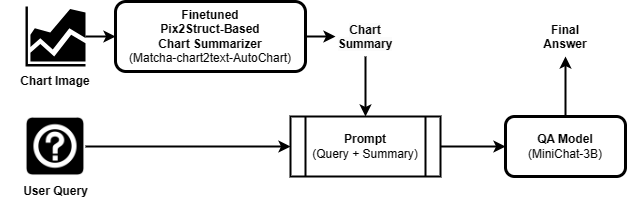
Our proposed solution is a multimodal pipeline in which:
In our previous progress report, We experimented with two chart summarizer models, MatCha-chart2text-pew Link and MatCha-chart2text-statista Link. The results showed that while the chart summarizer worked well for some graphs. We combined the chart summary with the user query as a prompt and used the Minichat-3B QA model Link to generate answers for question-answering task. The results shows that the errors from the generated answers are highly correlated with those from the summaries generated from the chart summarization step. This is further proven in the case that the generated summary is correct, since the QA model was also able to provide a correct answer with good additional insight to the user query. This indicates that the performance of the QA model is mostly, if not, fully dependent on the chart summarizer.This brings us to train a model and do a crucial evaluation step – comparing the effectiveness of fine-tuned models for chart summarization against pre-trained models.
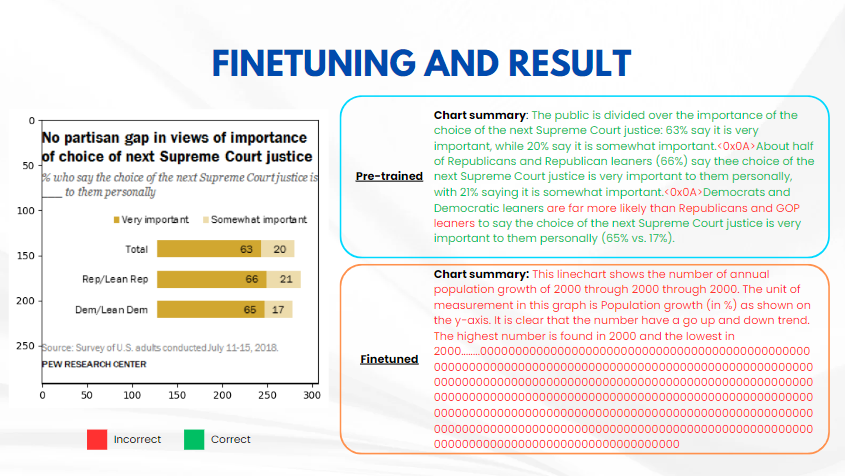
While the pre-trained chart summary model performed well with minimal errors. Conversely, the fine-tuned chart summarization model hallucinated and generated only errors that are irrelavant to the charts.
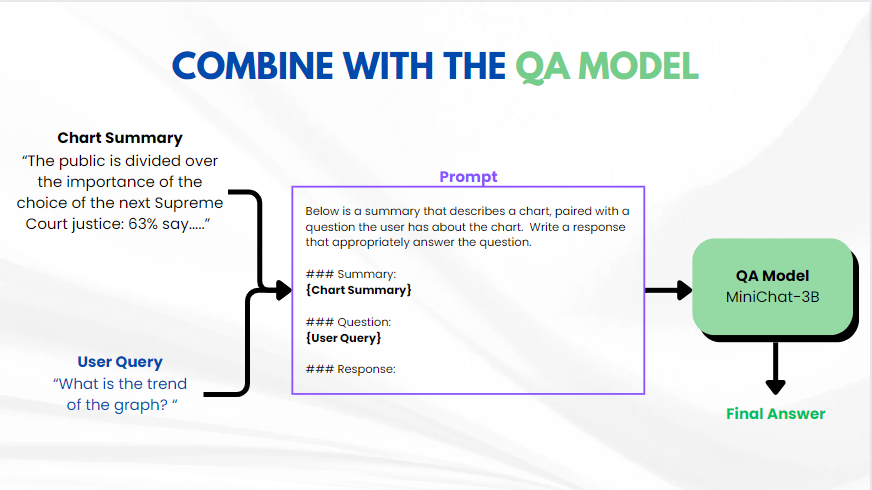 This system is designed for users to ask questions about data visualized in charts. The user can input both a text prompt and a chart image. An advanced AI model namely a Chart Summarizer, will then analyze the chart to extract the information and summarize it in text format. A QA model then received the user question along with the chart summary which are concatenated together using our prompt format, to generated the final answer to user's question.
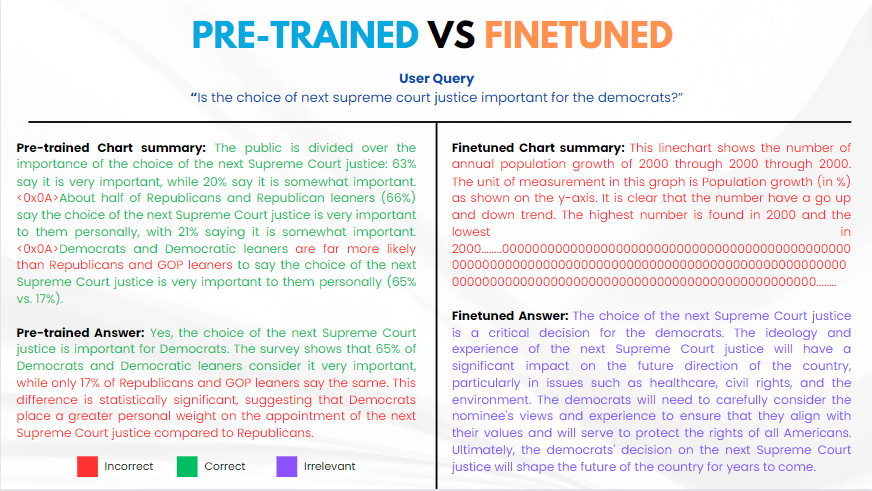
Our comparison between the pre-trained and fine-tuned models yielded interesting, yet unexpected results. While the pre-trained Chart Summarier model performed well with minimal errors, the downstream pre-trained answer model exhibited significant errors, with roughly half of its answers being incorrect due to hallucinations.
Conversely, the fine-tuned chart summarization model generated only errors that are entirely irrelavant to the chart. As such, this issue was propagated to the fine-tuned QA model, leading to entirely an irrelevant answer. These findings suggest that the fine-tuning process might have been underfitting, generalizing a chart to a generic summary which contains only keywords commonly used in the chart descriptions provided in the training set, and completely ignoring the actual content of the input chart.
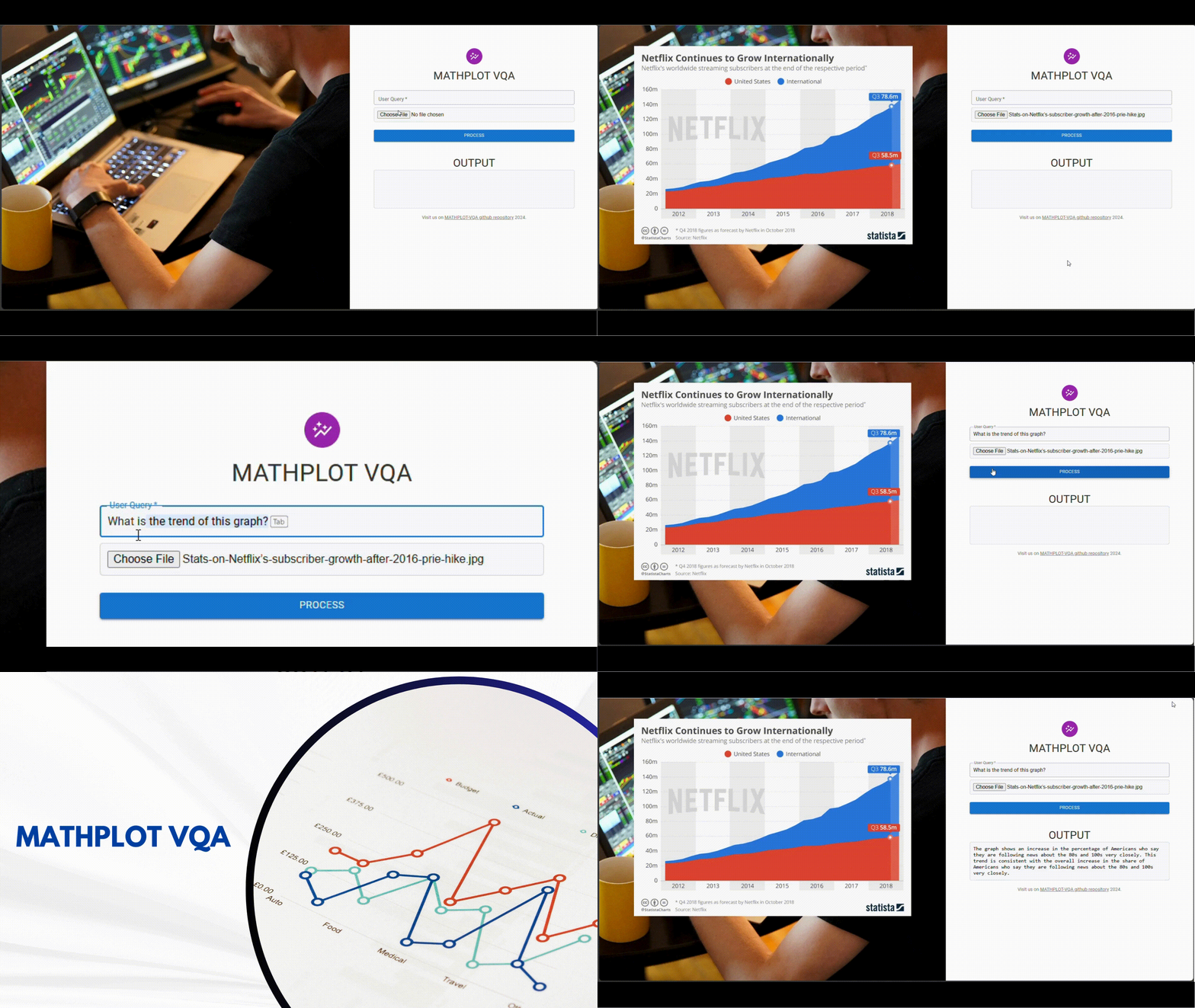 This is how the MathPlot VQA Application work. The MathPlot VQA Application allows users to input a question prompt, such as "What is the trend of this graph," and upload a graph picture. After clicking the Process button, the application generates results from a model and displays them in the output box.
In this study, we investigate whether fine-tuning a model with the AutoChart dataset leads to improved performance compared to using a pretrained model when answering questions based on line plots, bar plots, or scatter plots. Our hypothesis posits that the fine-tuned model would outperform the pretrained model in question answering related to charts. However, the results of our experiment suggest otherwise.
If the hypothesis is not true, it would imply that fine-tuning the model with the AutoChart dataset does not lead to better performance compared to using a pretrained model when answering questions based on line plots, bar plots, or scatter plots. In this case, the performance metrics, such as Rouge Scores and BertScore, may show significant differences between the pretrained and fine-tuned models. However, these metrics might not fully capture the model's performance in terms of chart interpretation. The control variables, including Python libraries and the Python environment, remain constant in both scenarios, ensuring that any differences in performance are attributed to the independent variable (model type). The random variables, such as the input charts and questions, could still introduce variability. Nonetheless, the lack of improvement in performance would suggest that the specific fine-tuning approach did not yield the expected benefits.
1. Finetune the model: Finetuned Model using better techniques such as LoRA or QLoRA and increase number of epochs to allow model convergence.
2. Deploying an AI model endpoint: Deploy the finetuned model to HuggingFace/AWS Sagemaker to allow other users to experiment or integrate with their web application without concern about the hardware specification and hardware infrastructure.
Interactive VQA web app for math charts using Flask and React. Upload a graph and ask questions—our system combines a MATCHA-based chart summarizer with a MiniChat-3B QA model to generate insightful answers. Fine-tuned with the AutoChart dataset. Full pipeline and evaluation included.
Jupyter Notebook
1
49 commits
updated Apr 29, 2024
Symbolab is a popular tool that helps people solve math problems step by step. It started as a search engine for math problems and later added features to show all the steps to solve a problem. However, it focuses more on finding answers to equations and functions from graph images.
Our project was inspired by Symbolab's limitations. We noticed that it doesn't explain graphs well, which can be tough for people who struggle with understanding graphs. So, we decided to create a new system called Math Plot VQA. This system lets users ask questions about graphs by inputting both a question and a photo of the graph. It's different from Symbolab because it helps users understand the meaning and context of graphs, not just compute functions and equations.
To enhance our system's capabilities, we integrated the MATCHA model Paper Summary , an enhanced version of the Pix2Struct model Paper Summary . MATCHA combines math reasoning and chart derendering tasks to improve visual language models' capabilities. This integration allows our system to better understand and respond to questions about graphs, making math more accessible and understandable for everyone, especially those who struggle with graph comprehension.
Additionally, we utilized the AutoChart dataset to fine-tune our QA model and use ChartQA Paper Summary to evaluate. ChartQA focuses on visual and logical reasoning over charts, providing a benchmark for complex reasoning questions related to charts. By leveraging these resources and technologies, we aim to create a system that not only computes solutions but also helps users understand the meaning and context of graphs, ultimately making math easier and more accessible.
In the world of math problem-solving, there's a big issue for people who struggle with understanding graphs. These individuals find it hard to make sense of math problems that include graphs, which makes learning and problem-solving tough. Most Question Answering (QA) systems today focus on answering questions from text, ignoring the needs of those who rely on graphs. Our goal is to change that. We're working on a VQA system that can understand and respond to questions about graphs. By doing this, we hope to make math more accessible and easier to understand for everyone, especially those who find graphs challenging.
Visual Question Answering (VQA) is a complex artificial intelligence challenge that has captured the interest of researchers across various fields, including computer vision, natural language processing, and machine learning. It involves generating natural language answers to questions asked about an image.
Currently, people who face challenges with graphs have limited options when it comes to getting help with math problems. Text-based explanations often fall short in conveying the information effectively, leaving these individuals frustrated and discouraged. By developing a VQA system that can handle graph-based inputs, we aim to provide a more intuitive and accessible way for them to interact with math problems. This approach can not only improve their understanding of mathematical concepts but also boost their confidence in tackling math-related challenges.
Users can easily upload mathematical graph images through the system interface, ensuring seamless interaction.
The system enables users to ask contextually relevant questions about the submitted graph, fostering active engagement.
We'll be developing a robust application leveraging Flask as the backend to handle the logic and API endpoints for a model. Flask, with its simplicity and flexibility, will seamlessly integrate with the NLP model, allowing efficient processing of text data. On the frontend, React will provide a dynamic user interface, offering a responsive and intuitive experience for users interacting with the NLP functionalities. By utilizing Docker, I'll encapsulate the entire application, ensuring consistency across different environments and facilitating easy deployment. This combination of Flask, React, and Docker will enable me to build a scalable and efficient solution for NLP-based applications, catering to diverse user needs with ease.
1. Seamless Graph Upload: Users can effortlessly upload graph images through the system's interface. This should involve functionalities like image selection from device storage.
2. Contextual Question Input: The system allows users to ask questions directly related to the uploaded graph. This means the questions should be phrased in a way that considers the graph's structure and properties.
1. Math Question Solving: When a user asks a math question that can be solved using the graph data, the system should provide the solution along with a detailed explanation. This explanation should be clear and understandable, ideally breaking down the process into logical steps.
2. Graph Analysis and Interpretation: The system should analyze the uploaded graph and offer insightful interpretations. This could include identifying key characteristics like the height of bar chart, percentage of each slide in pie chart or highlighting any relevant patterns or trends within the graph structure.
The web application features a text input box where users can type a question, such as "What is this graph about?" Users can also select a graph photo as an image input. After entering both the question and selecting an image, they can click on the "Process" button. The system will then analyze the question and the graph image to provide an answer, making math more accessible and understandable for users.
| Name | Main Role |
|---|---|
| Sitthiwat Damrongpreechar | Slide/Application |
| Pirunrat Kaewphanoaw | Application |
| Munthitra Thadthapong | Document/ Slide |
| Parun Ngamcharoen | Model |
| Nathas Sungworawongpana | Model |
Research question: Does fine-tuning a model improve its performance compared to using a pretrained model when answering questions based on line plots, bar plots, or scatter plots?
Hypothesis: We hypothesize that our model, fine-tuned with the AutoChart dataset for specific types of charts (line plot, bar plot, and scatter plot), will outperform the pretrained model in question answering related to charts.
Independent Variables: Model type (pretrained or fine-tuned).
Dependent Variables: Performance metrics such as Rouge Scores and BertScore.
Control Variables: Python libraries and the Python environment.
Random Variables: The input charts and the questions asked (which can be confounding if manipulated).
This paper proposes a reinforcement learning framework for generating natural questions about images, known as Visual Question Generation (VQG). The approach focuses on two specific attributes of natural questions: content and linguistic quality. To address this, the authors introduce two discriminators, one for each attribute, inspired by adversarial learning. These discriminators guide the training process by providing scores used as rewards in the reinforcement learning framework. Experimental results on a standard VQG dataset demonstrate the effectiveness and robustness of the proposed model compared to state-of-the-art methods, both through automatic metrics and human evaluation. The paper suggests potential applications of the framework to other language generation tasks, such as dialogue generation with emotional content, and suggests avenues for future research, including improving efficiency in reward assignment and exploring collaborative methods for multiple discriminators.
This paper addresses the need for better validation methods for highly advanced Visual Question Answering (VQA) algorithms, particularly in the context of medical image analysis, focusing on diabetic macular edema (DME) grading. The authors propose an automatic adaptive questioning approach called Visual Turing Test (VTT) to evaluate the reasoning behavior of VQA algorithms. They introduce a reinforcement learning (RL) agent that observes previous questions and selects the next question to pose, simulating the behavior of a clinician. Through experiments, they demonstrate that this approach generates question streams similar to those of a clinician, effectively evaluating the VQA method's performance. The paper suggests the use of beta distributions to characterize the performance of the VQA system as perceived by the interrogator. The results show that the proposed method can distinguish between reasonable and unreasonable responders, even if their average performance is similar. The authors propose future directions, including applying the framework to other clinical applications, generating more VQA datasets in collaboration with clinicians, and enhancing the representation of images in the questioning process. They also suggest exploring open-ended questions, introducing noise in the state or question, exploiting logical inconsistencies in responses, and integrating the questioning strategy into the training of the VQA model for improved interpretability.
MATCHA, a novel pretraining technique for visual language models, integrates math reasoning and chart derendering tasks into the Pix2Struct base model. By incorporating a diverse mixture of pretraining tasks, including math reasoning, chart derendering, and screenshot parsing, MATCHA significantly enhances the model's ability to understand and generate text from visual data. Evaluation across various datasets demonstrates MATCHA's superiority over baselines, including Pix2Struct, with notable improvements in tasks such as ChartQA, PlotQA, and Chart-to-Text summarization. However, limitations include struggles with complex math problems and plot details, suggesting areas for further research and refinement. Despite these limitations, MATCHA's advancements represent a significant step forward in improving the capabilities of visual language models, albeit within a narrow scope of the visual language domain.
GeoQA presents a benchmark for automatic math problem-solving, focusing on geometric questions that demand understanding of textual descriptions, visual diagrams, and theorem knowledge. To address this challenge, the Neural Geometric Solver (NGS) is introduced, employing a multimodal architecture to parse and generate interpretable programs. NGS integrates a text encoder, diagram encoder, and LSTM decoder with Bahdanau attention, augmented with self-supervised auxiliary tasks to enhance cross-modal semantic representation. Despite significant advancements, results on the GeoQA dataset remain below human performance, underscoring the need for further research in multimodal numerical reasoning.
The ChartQA system addresses the need for complex reasoning in data analysis by introducing a large-scale benchmark dataset comprising human-written and generated questions from chart summaries. Unlike existing datasets, ChartQA emphasizes visual and logical reasoning over fixed-vocabulary questions, providing a more comprehensive evaluation framework. VisionTaPas, the proposed solution, employs two transformer-based models to integrate visual features and chart data tables for unified question answering. The models achieve state-of-the-art results on both previous datasets and the newly introduced ChartQA benchmark, underscoring their effectiveness. However, challenges persist in answering complex reasoning questions, particularly in data extraction, highlighting the need for further advancements in deep learning and rule-based methods to mitigate errors.
MMMU, a comprehensive benchmark for expert-level multimodal understanding and reasoning, encompasses 11.5K questions across 30 subjects and 6 disciplines, sourced meticulously from college exams, quizzes, and textbooks. It spans a wide array of image types and subfields, aiming to push the boundaries of what large multimodal models (LLMs) can achieve towards Expert AGI. Although not a direct measure of AGI capability, MMMU assesses models' performance akin to tasks faced by experts, highlighting the necessity for next-generation multimodal foundation models. Evaluation of various LLMs, including text-only models with OCR or captioning deployment, reveals GPT-4V achieving the highest accuracy of around 55.7% on the MMMU benchmark. Interestingly, models perform better in disciplines with 'natural' images and less reasoning, such as Art & Design and Humanities & Social Sciences, compared to fields like Science, Health & Medicine, and Technology & Engineering.
MathVista introduces a benchmark for evaluating the mathematical reasoning abilities of large language models (LLMs) and large multimodal models (LMMs) in visually complex scenarios. With a dataset combining challenges from diverse mathematical and visual tasks, including newly created datasets addressing logical, statistical, and scientific reasoning, MathVista evaluates 12 prominent foundation models. GPT-4V emerges as the best performer, achieving the highest accuracy of 49.9%, albeit still falling short of human performance by 10.4%. Augmented LLMs, particularly GPT-4 with program-of-thought prompting, exhibit superior performance over text-only LLMs, while Multimodal Bard shows promise but falls significantly below human performance. Fine-grained analysis highlights GPT-4V's strengths across various tasks and contexts but reveals shortcomings in logical reasoning and numeric common sense tasks. Additionally, qualitative analysis uncovers error sources such as hallucination in Multimodal Bard's predictions, shedding light on areas for improvement in multimodal reasoning models.
Pix2Struct presents a novel pretraining approach for visually-situated language understanding models, aiming to address tasks across documents, illustrations, user interfaces (UIs), and natural images. By parsing HTML screenshots into semantic structures, Pix2Struct achieves state-of-the-art results across various benchmarks without relying on domain-specific modifications. The method leverages transformer-based architectures and a large corpus of HTML screenshots for pretraining, demonstrating superior performance compared to prior visual methods. Additionally, the paper discusses challenges in training general-purpose visual language understanding models, such as resolution sensitivity and the need for better data curation, while outlining future research directions to advance the field further. Overall, Pix2Struct lays a strong foundation for enhancing visually-situated language understanding and paves the way for future innovations in this domain.
The paper introduces LLaVA, a Large Language and Vision Assistant, designed as an end-to-end trained large multimodal model that integrates vision encoding with language understanding for general-purpose visual and linguistic comprehension. Notably, the study explores leveraging machine-generated instruction-following data to enhance instruction-tuning capabilities in multimodal models. Results indicate that LLaVA exhibits comparable multimodal chat abilities to multimodal GPT-4 on unseen image-instruction pairs, achieving an 85.1% relative score compared to GPT-4 on a synthetic multimodal instruction-following dataset. Furthermore, when fine-tuned on a Science QA task, both LLaVA and GPT-4 achieve a high accuracy of 92.53%, underscoring the effectiveness of incorporating detailed description tasks and complex reasoning tasks in enhancing the conversational capabilities of multimodal models like LLaVA. The architecture of LLaVA integrates a vision encoder (CLIP) to encode images into text, which is then combined with input queries and fed into the language model (Vicuna) to generate textual responses, showcasing the model's versatility and performance across various tasks.
The paper presents InternVL, a large-scale vision-language foundation model designed to address the growing demand for efficient vision-language understanding. Unlike previous vision-language models (VLLMs), InternVL introduces a novel architecture that allows for flexible combinations of vision encoder and middleware for both contrastive and generative tasks. Notably, InternViT-6B, a variant of InternVL, demonstrates the ability to align with language middleware such as QLLaMA and efficiently leverage image-text data from diverse sources for training. Evaluation results indicate that InternVL-Chat outperforms LLaVA-1.5, highlighting its effectiveness in visual-language tasks. Unlike traditional approaches where the vision encoder feeds text directly into the language model, InternVL leverages contrastive learning between the vision encoder and language model for enhanced performance on various visual-language tasks, showcasing its innovative approach in scaling up vision foundation models.
The AutoChart dataset is a valuable resource for training models in the task of chart-to-text generation. It provides a rich collection of chart images paired with corresponding textual descriptions, facilitating models to learn the relationship between visual representations of data and their natural language explanations.
I. Focus: Chart-to-text generation, aiming to generate comprehensive textual descriptions that go beyond simple captions.
II.Content:
III. Strengths:
1. Large Scale: The extensive dataset size allows models to learn robust patterns and generalize effectively to unseen charts.
2. Analytical Descriptions: Rich textual summaries provide more than just captions, promoting model understanding of chart elements, their relationships, and the underlying data insights.
3. Diverse Charts: Covering various chart types enhances model capability in handling different data visualizations.
IV. Significance:
The current work aligns with the focus of the AutoChart dataset by training a model for chart-to-text generation. By leveraging this dataset, the model learns to analyze chart elements, understand the underlying data, and generate textual descriptions that effectively convey the information presented in the charts.
This class is responsible for loading and preprocessing data for the model. It takes the following parameters:
- I. image_paths: A list of file paths to the chart images.
- II.user_prompt: A string representing the prompt provided to the model (e.g., "What is this chart about?").
- III. chart_summaries: A list of textual summaries corresponding to each image in image_paths.
- IV. processor: A text processor object used for handling text data (e.g., tokenization, padding).
This function retrieves image data and corresponding summaries based on chart type. It takes two parameters:
- I. url_list: A list of dictionaries containing chart URLs and potentially additional information.
- II. chart_type: A string specifying the chart type (Bar, Line, or Scatter). Defaults to "Bar" if not provided.
- III. It retrieves image paths by constructing file paths based on the chart type and index within the url_list.
- IV. It extracts chart summaries from the url_list dictionaries.
- I. The code employs a pre-trained model Pix2StructForConditionalGeneration from the google/matcha-chart2text-pew model hub. This model architecture is specifically designed for image-to-text generation tasks.
- II. It's crucial to choose a pre-trained model that has been trained on a similar task or domain (image-to-text generation) for optimal performance.
- I. A text processor Pix2StructProcessor is loaded from the same model hub. This processor handles text data by performing actions like tokenization, padding, and adding special tokens.
- II. The processor ensures the text input aligns with the model's expectations.
- I.Batch Size (batch_size = 1):
- II.Number of Epochs (num_epochs = 5):
- III.Adafactor Optimizer (optimizer = Adafactor(lr=0.01))
- IV.Cosine Learning Rate Scheduler (scheduler = get_cosine_schedule_with_warmup)
The train function plays a pivotal role in the model's training process. It iterates through epochs, performing the following steps within each epoch:
- I.Setting Model to Training Mode (model.train()):
This ensures the model is prepared for training, enabling operations like dropout and batch normalization that might be deactivated during evaluation.
- II.Iterating Through Data Batches (DataLoader):
The DataLoader shuffles the training data (if shuffle=True) and splits it into batches of a specified size (batch_size). This allows the model to process the data in smaller chunks, improving memory efficiency and potentially accelerating training.
- III. Clearing Optimizer Gradients (optimizer.zero_grad()): Gradients track how the loss changes with respect to each model parameter (weight or bias). They are used by the optimizer to update the parameters in the direction that minimizes the loss. Clearing gradients before each training step ensures they accumulate only for the current batch, preventing outdated gradients from influencing parameter updates.
- IV. Moving Data to Device (to(device)):
The code checks if a GPU is available using torch.cuda.is_available(). If so, it moves the tensors containing labels, flattened patches (image representations), and attention masks to the GPU using .to(device). Training on a GPU can significantly speed up the process compared to using the CPU.
- V.Forward Pass (outputs = model(...)): The model takes the processed data (flattened patches and attention masks) along with labels (target text) as input and performs a forward pass through its layers. The forward pass computes the model's predictions and calculates the loss based on the difference between the predictions and the actual labels.
- VI.Calculating Loss (loss = outputs.loss):
The loss function quantifies the discrepancy between the model's predictions and the ground truth (labels). A lower loss indicates better model performance.
- VII.Backpropagation (loss.backward()):
Backpropagation propagates the calculated loss backward through the model's layers. This process computes the gradients for each parameter, indicating how much they contributed to the loss.
- VIII.Updating Optimizer Parameters (optimizer.step()):
The optimizer utilizes the gradients to update the model's weights and biases in a direction that minimizes the loss. The learning rate (set in the optimizer) determines the magnitude of these updates.
- IX.Updating Learning Rate Scheduler (scheduler.step()):
After each training step, the learning rate scheduler might adjust the learning rate based on the pre-defined schedule (cosine with warmup in this case). This helps the model converge more effectively and potentially achieve better performance.
Our proposed solution is a multimodal pipeline in which:
In our previous progress report, We experimented with two chart summarizer models, MatCha-chart2text-pew Link and MatCha-chart2text-statista Link. The results showed that while the chart summarizer worked well for some graphs. We combined the chart summary with the user query as a prompt and used the Minichat-3B QA model Link to generate answers for question-answering task. The results shows that the errors from the generated answers are highly correlated with those from the summaries generated from the chart summarization step. This is further proven in the case that the generated summary is correct, since the QA model was also able to provide a correct answer with good additional insight to the user query. This indicates that the performance of the QA model is mostly, if not, fully dependent on the chart summarizer.This brings us to train a model and do a crucial evaluation step – comparing the effectiveness of fine-tuned models for chart summarization against pre-trained models.
While the pre-trained chart summary model performed well with minimal errors. Conversely, the fine-tuned chart summarization model hallucinated and generated only errors that are irrelavant to the charts.
This system is designed for users to ask questions about data visualized in charts. The user can input both a text prompt and a chart image. An advanced AI model namely a Chart Summarizer, will then analyze the chart to extract the information and summarize it in text format. A QA model then received the user question along with the chart summary which are concatenated together using our prompt format, to generated the final answer to user's question.
Our comparison between the pre-trained and fine-tuned models yielded interesting, yet unexpected results. While the pre-trained Chart Summarier model performed well with minimal errors, the downstream pre-trained answer model exhibited significant errors, with roughly half of its answers being incorrect due to hallucinations.
Conversely, the fine-tuned chart summarization model generated only errors that are entirely irrelavant to the chart. As such, this issue was propagated to the fine-tuned QA model, leading to entirely an irrelevant answer. These findings suggest that the fine-tuning process might have been underfitting, generalizing a chart to a generic summary which contains only keywords commonly used in the chart descriptions provided in the training set, and completely ignoring the actual content of the input chart.
This is how the MathPlot VQA Application work. The MathPlot VQA Application allows users to input a question prompt, such as "What is the trend of this graph," and upload a graph picture. After clicking the Process button, the application generates results from a model and displays them in the output box.
In this study, we investigate whether fine-tuning a model with the AutoChart dataset leads to improved performance compared to using a pretrained model when answering questions based on line plots, bar plots, or scatter plots. Our hypothesis posits that the fine-tuned model would outperform the pretrained model in question answering related to charts. However, the results of our experiment suggest otherwise.
If the hypothesis is not true, it would imply that fine-tuning the model with the AutoChart dataset does not lead to better performance compared to using a pretrained model when answering questions based on line plots, bar plots, or scatter plots. In this case, the performance metrics, such as Rouge Scores and BertScore, may show significant differences between the pretrained and fine-tuned models. However, these metrics might not fully capture the model's performance in terms of chart interpretation. The control variables, including Python libraries and the Python environment, remain constant in both scenarios, ensuring that any differences in performance are attributed to the independent variable (model type). The random variables, such as the input charts and questions, could still introduce variability. Nonetheless, the lack of improvement in performance would suggest that the specific fine-tuning approach did not yield the expected benefits.
1. Finetune the model: Finetuned Model using better techniques such as LoRA or QLoRA and increase number of epochs to allow model convergence.
2. Deploying an AI model endpoint: Deploy the finetuned model to HuggingFace/AWS Sagemaker to allow other users to experiment or integrate with their web application without concern about the hardware specification and hardware infrastructure.



