
This plugin populates a list of recently added/deleted/updated media, sends out the newsletter to configured clients(email, discord webhook, telegram & matrix).
C#
125
380 commits
updated Sep 28, 2026
README
Jellyfin Newsletter Plugin

This repository is a maintained fork of the Jellyfin Newsletter Plugin, originally created by Cloud9Developer. As the original repository is no longer actively maintained, this introduces several improvements, new features, and bug fixes, including:
- Discord Webhook Support
- Telegram Support
- Matrix Support
- Multiple Client Instances (Discord, Telegram, Matrix, Email)
- Multiple Email Templates (Modern/Classic)
- Removal of Imgur and Local Hosted Image Dependencies
- TMDB Integration
- Local Poster images support as attachments
- Event-Based item detection and notifications (Add/Update/Delete)
- Per-library selection for series and movies per client
- Radarr & Sonarr Integration for Upcoming Media
- Newsletter Preview to review and curate the queue before it is sent
- Featured section to pin hand-picked titles to the top of the newsletter
- Multiple Bug Fixes, Enhancements and much more!!!
Description
This plugin uses event-driven notifications with scheduled processing. When library changes occur (additions or deletions), they are detected in real-time and stored in the database. A hidden background task processes these events every 30 seconds, and the main Newsletter task generates and sends newsletters containing all accumulated events.
Additionally, the plugin integrates with Radarr and Sonarr to include upcoming media in your newsletters, giving users a preview of what's coming soon to your server.
Before a newsletter goes out you can review the queue on the Preview tab and drop anything you do not want to announce, and pin hand-picked titles to the top of the issue from the Featured tab.
Screenshots
Email Screenshots
Classic Template
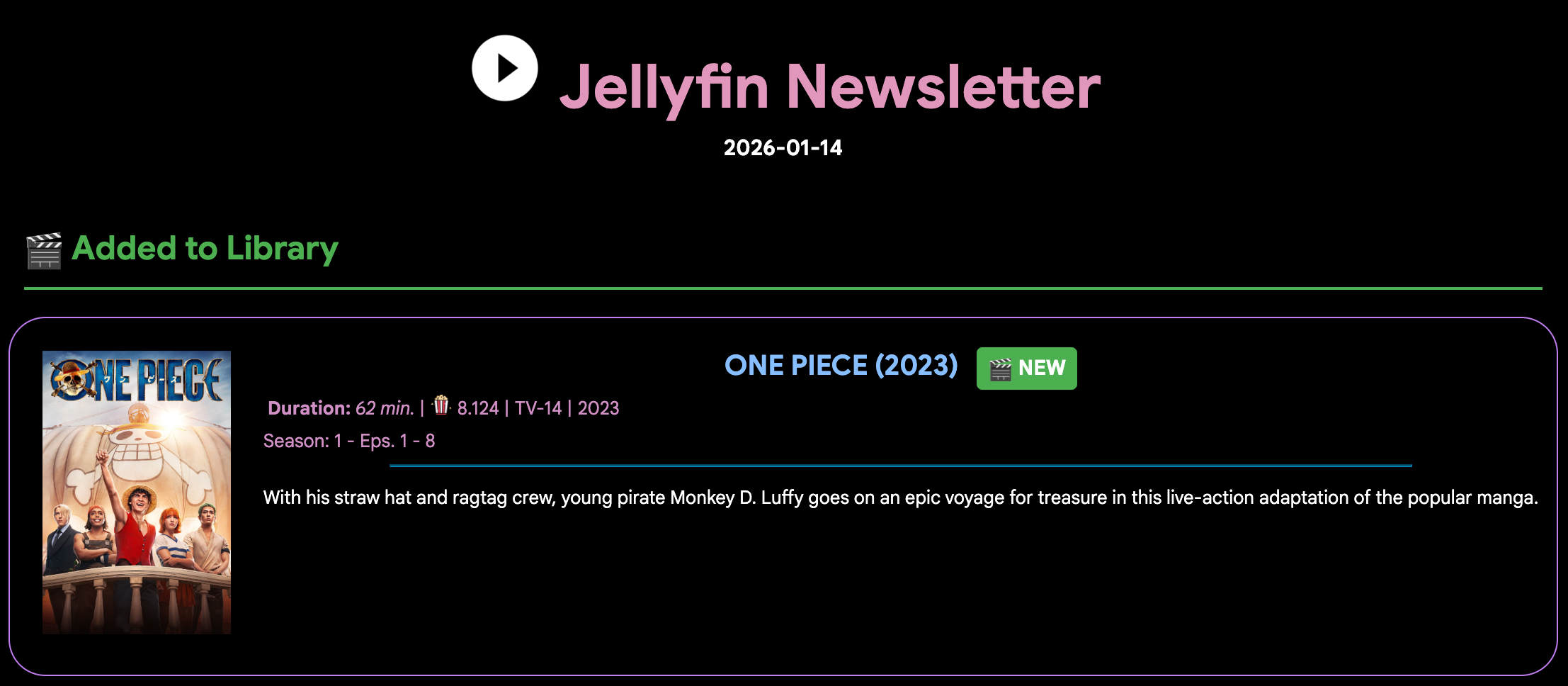
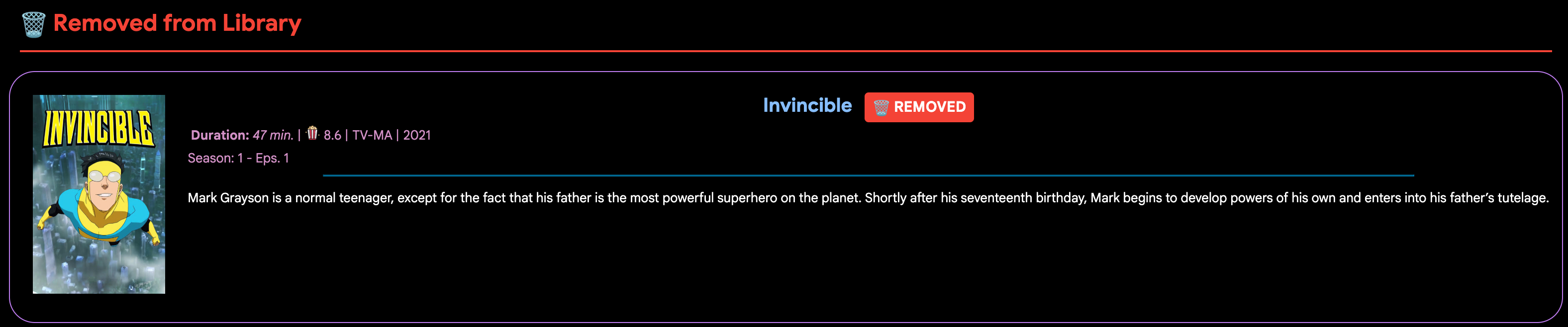
Modern Template
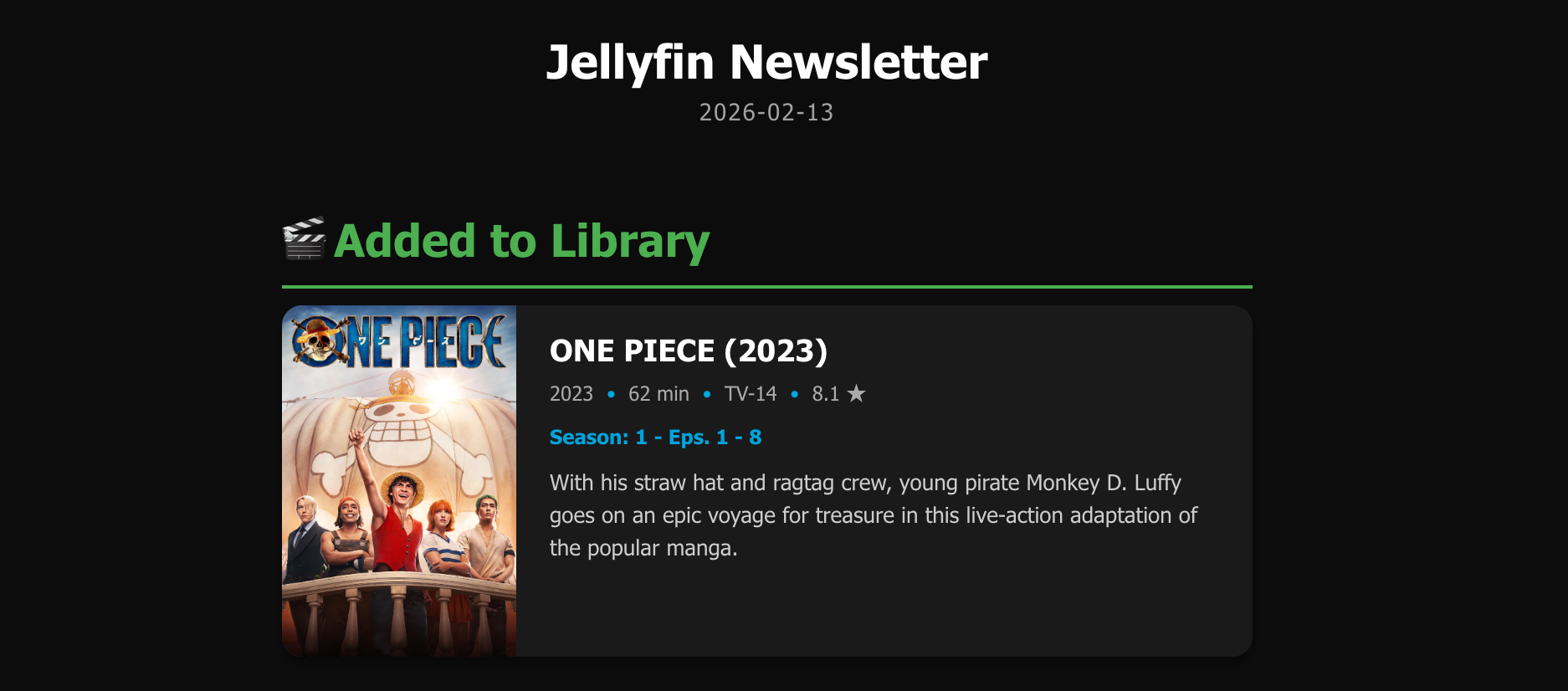
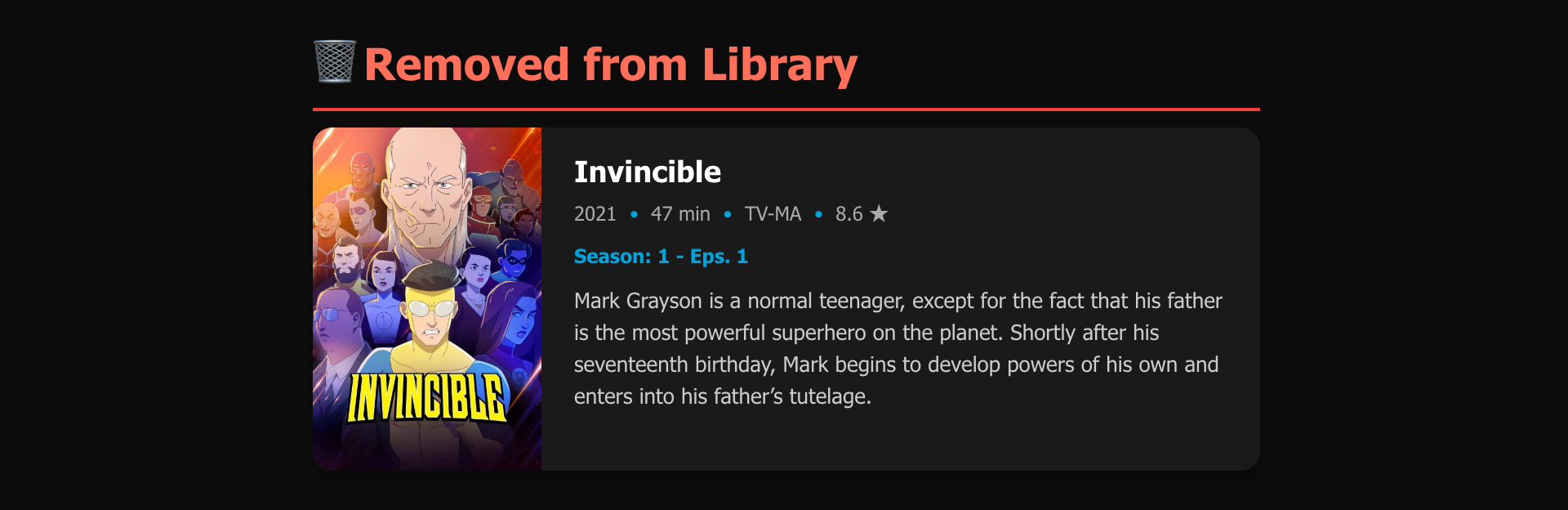
Discord Screenshots
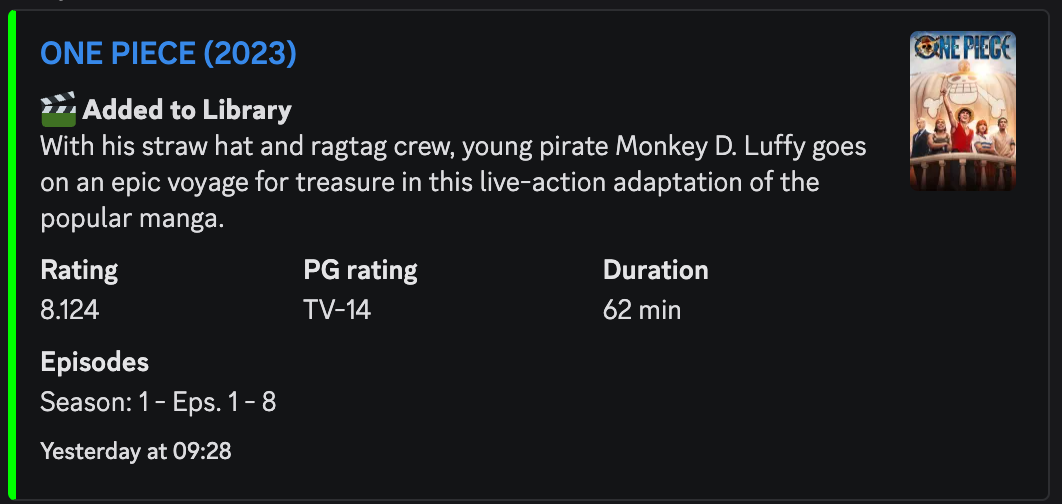
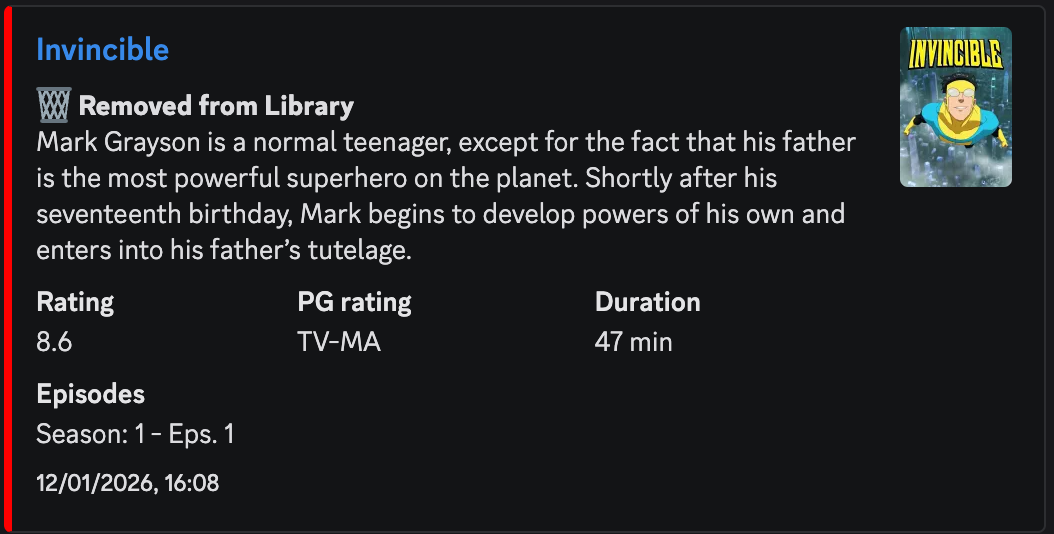
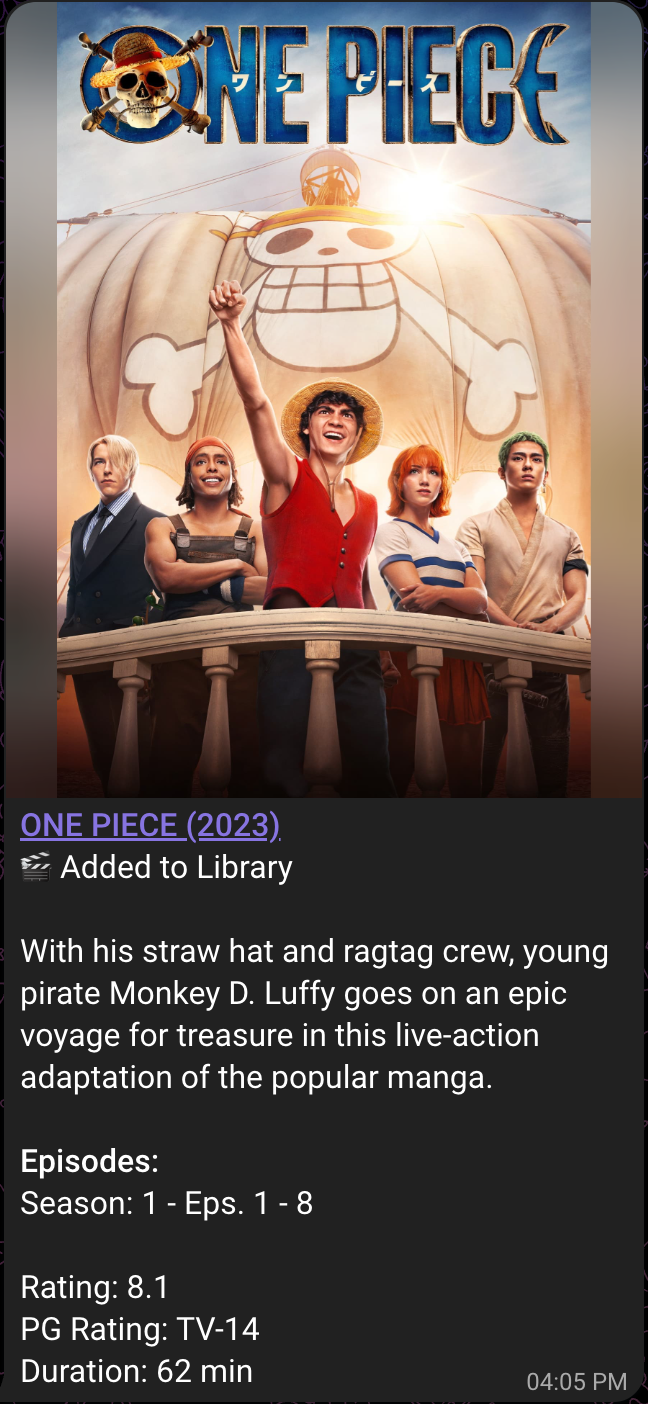
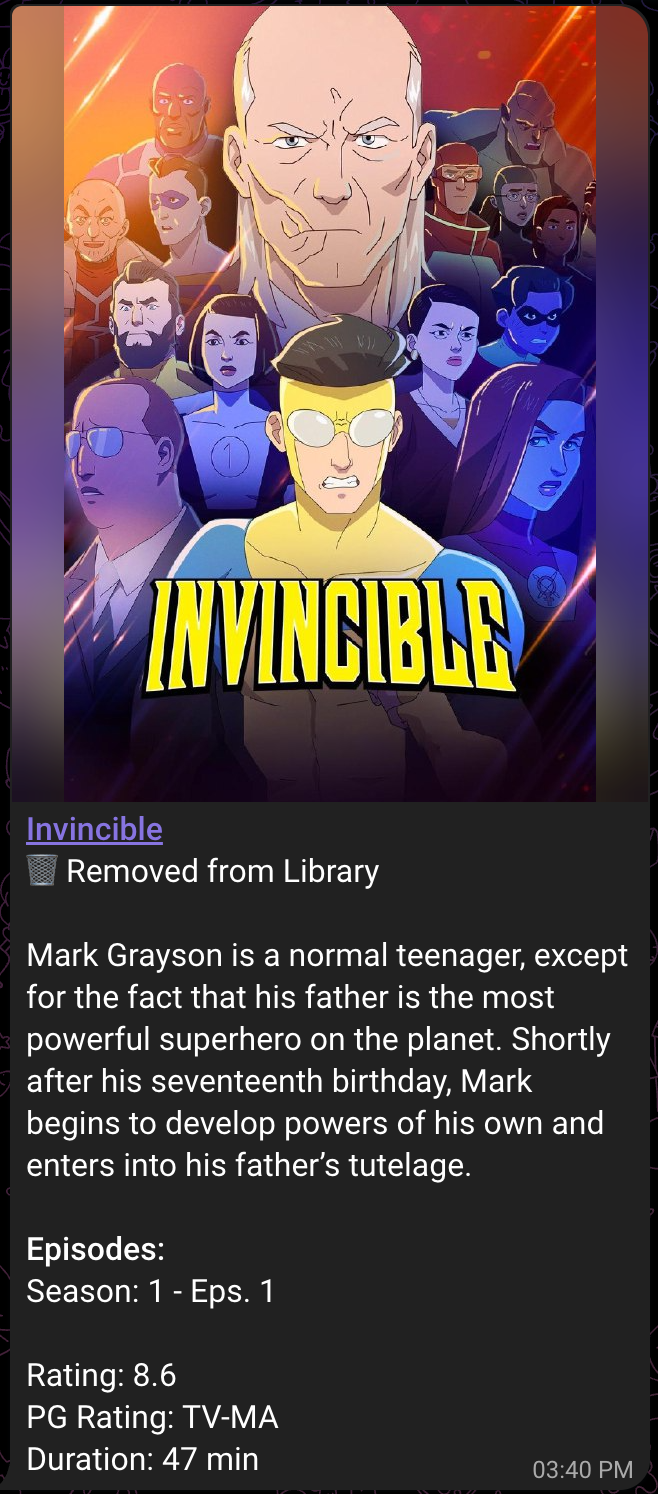
Telegram Screenshots
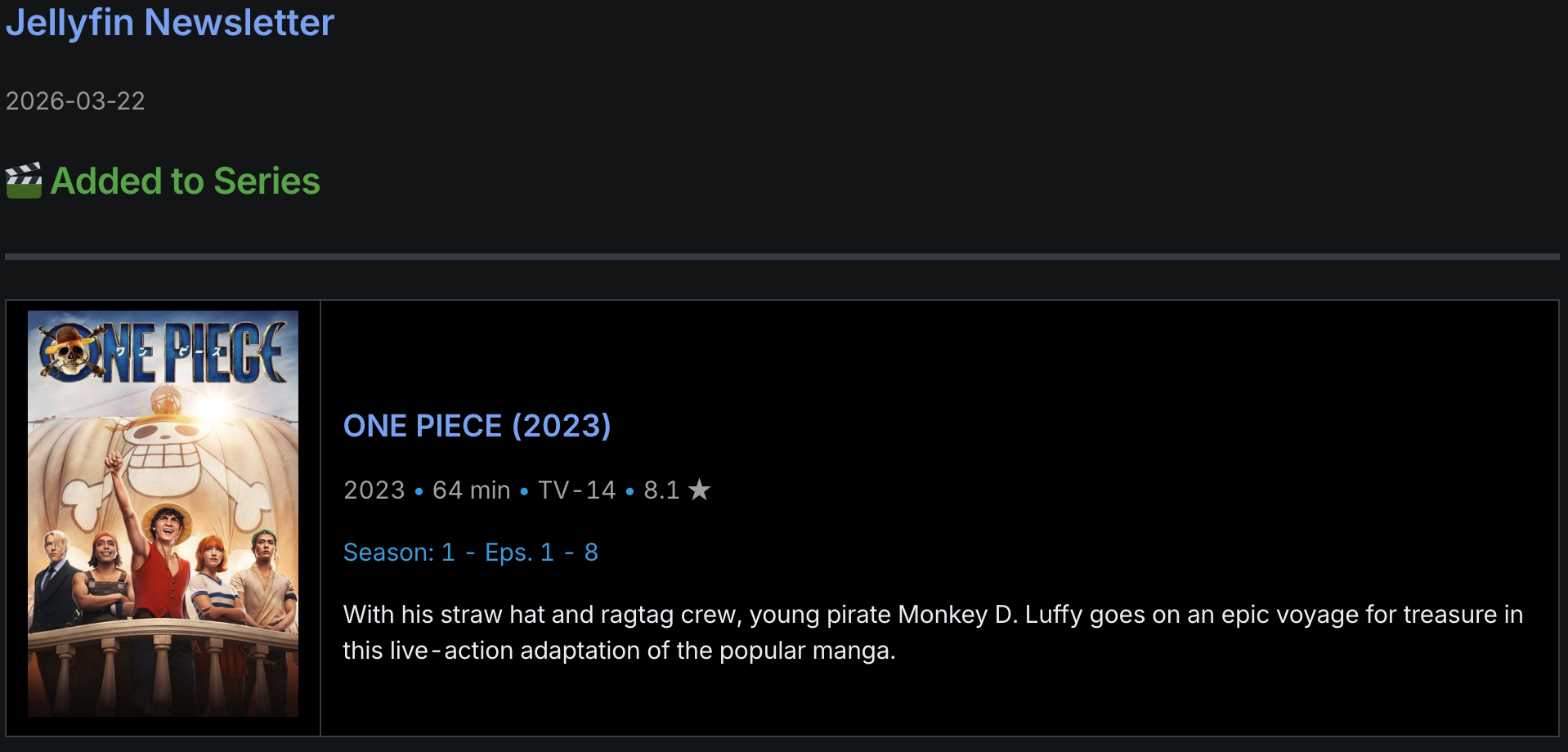
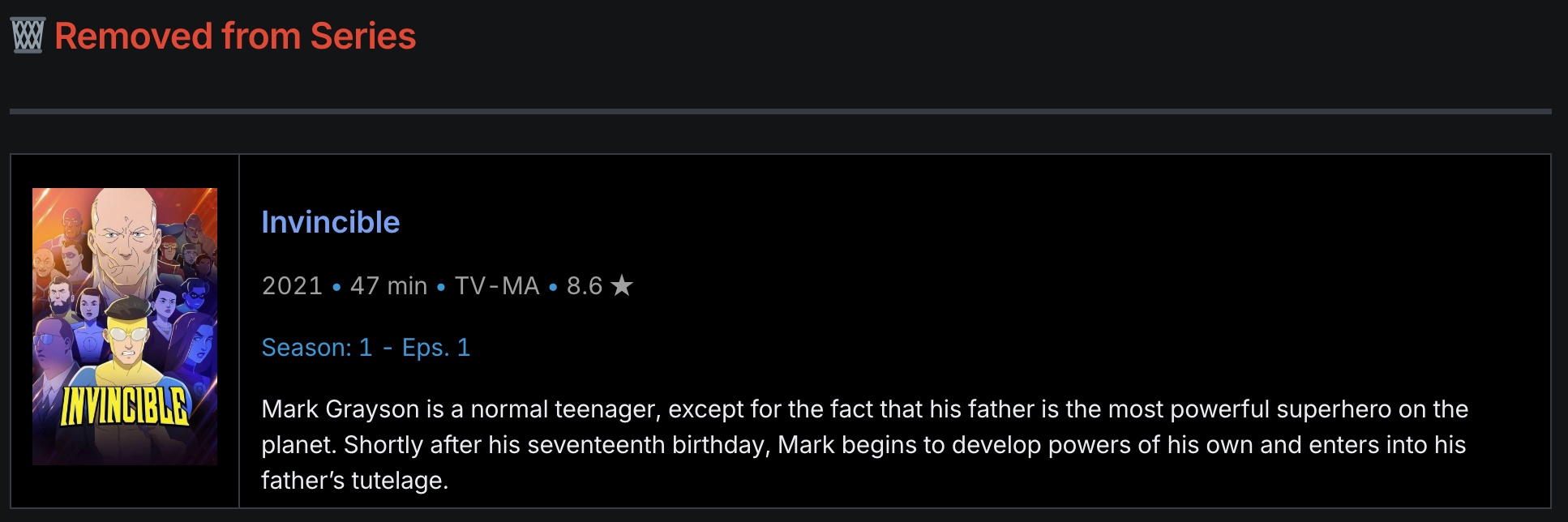
File Structure
To ensure proper images are being pulled from Jellyfin's database, ensure you follow the standard Organization Scheme for naming and organizing your files. https://jellyfin.org/docs/general/server/media/books
If this format isn't followed properly, Jellyfin may have issue correctly saving the item's data in the proper database (the database that this plugin uses).
Shows
├── Series (2010)
│   ├── Season 00
│   │   ├── Some Special.mkv
│   │   ├── Episode S00E01.mkv
│   │   └── Episode S00E02.mkv
│   ├── Season 01
│   │   ├── Episode S01E01-E02.mkv
│   │   ├── Episode S01E03.mkv
│   │   └── Episode S01E04.mkv
│   └── Season 02
│       ├── Episode S02E01.mkv
│       ├── Episode S02E02.mkv
│       ├── Episode S02E03 Part 1.mkv
│       └── Episode S02E03 Part 2.mkv
└── Series (2018)
    ├── Episode S01E01.mkv
    ├── Episode S01E02.mkv
    ├── Episode S02E01-E02.mkv
    └── Episode S02E03.mkv

Movies
├── Film (1990).mp4
├── Film (1994).mp4
├── Film (2008)
│   └── Film.mkv
└── Film (2010)
    ├── Film-cd1.avi
    └── Film-cd2.avi
How It Works
This plugin uses event-driven notifications with scheduled processing. When library changes occur:
- Library events (add/delete) are detected in real-time and stored in the database
- A hidden background task processes these events every 30 seconds
- The main Newsletter task generates and sends newsletters containing all accumulated events
Testing/Run Frequency
Testing and Frequency can be managed through your Dashboard > Scheduled Tasks
- There are 2 scheduled tasks:
- Newsletter: Generates and sends out newsletters containing all accumulated events since the last newsletter was sent
- Newsletter Item Scraper (hidden): Processes library events stored in the database (runs every 30 seconds)
Installation
Requires Jellyfin 12.0 or newer. From version 2.0.0.0 the plugin is built against .NET 10 to match Jellyfin 12. On Jellyfin 10.11 or older the catalog will keep offering 1.9.0.0, which is the last release for those servers.
Manifest is up and running! You can now import the manifest in Jellyfin and this plugin will appear in the Catalog!
- Go to "Plugins" on your "Dashboard"
- Go to the "Manage Repositories" tab
- Click the '+ New Respository' to add a new Repository
- Give it a name (for eg. Newsletters)
- In "Repository URL," put "https://raw.githubusercontent.com/Sanidhya30/Jellyfin-Newsletter/master/manifest.json"
- Click "Save"
- You should now see Jellyfin Newsletters in Catalog under the Category "Newsletters"
- Once installed, restart Jellyfin to activate the plugin and configure your settings for the plugin
Configuration
General Configuration
Server URL
- The server url of your jellyfin. This will be used for direct link in discord webhook.
Community Rating Decimal Places
- Configure the number of decimal places to display for community ratings in newsletters (0-4 places, default: 1)
Poster Type
- TMDB Poster - Uses image URLs from TheMovieDB (default, smallest emails).
- Local Poster Images - Embeds local poster images directly in the email/discord embed (larger messages).
Radarr / Sonarr Configuration
You can configure multiple Radarr and Sonarr instances. Each instance has its own URL, API key, and instance name. The plugin uses these to fetch upcoming media via the Radarr/Sonarr calendar APIs.
Instance Name
- A name for this Radarr/Sonarr instance. This name appears as the section header in the upcoming media portion of your newsletter.
URL
- The base URL of your Radarr/Sonarr instance (e.g.,
http://localhost:7878for Radarr,http://localhost:8989for Sonarr).
API Key
- The API key for your Radarr/Sonarr instance. Found under Settings → General → API Key in the respective application.
Test Connection
- Use the "Test" button to verify connectivity to your Radarr/Sonarr instance before saving.
Upcoming Days Ahead
- Configure how many days ahead to look for upcoming content (default: 7 days). This is a global setting shared across all Radarr/Sonarr instances.
Preview
The "Preview" tab shows everything currently queued for the next newsletter, so you can review and curate it before it is sent.
- Entries are grouped by event section (Added, Updated, Removed) and, within each section, by library. Series entries are summarised by season/episode.
- Removing an entry excludes it from every client. Excluded entries stay listed and can be restored at any time until the newsletter is sent.
- Changes take effect immediately — you do not need to press Save.
- Upcoming items from Radarr/Sonarr are fetched live when the newsletter is built, so they are not listed here.
- Use the "Refresh" button to reload the queue.
Featured
The "Featured" tab lets you pin hand-picked titles to the top of the next newsletter.
- Anything in your library can be featured, whether or not it was added recently. Featured items are read live from the library when the newsletter is built, so they do not depend on the queue.
- All featured titles appear under a single "Featured" section that spans every library, pinned above the other sections.
- The featured list is cleared once a newsletter is sent, so each issue is curated deliberately.
- Each client has its own Featured event toggle (default: enabled), so you can include the section for some clients and not others.
Featured Emoji
- The emoji shown beside the "Featured" heading (default: ⭐). Available in the header template as the
{FeaturedEmoji}placeholder.
Add a title
- Search your Jellyfin library and click a result to pin it. Pinned titles are listed below the search box and can be reordered by removing and re-adding, or removed with the "Remove" button.
- Press Save to store the featured list.
Email Configuration
You can configure Multiple Email Clients. Each client instance has its own SMTP settings, recipients, library selection, event triggers, template settings, and an enable/disable toggle.
To Addresses:
- Recipients of the newsletter. Add as many emails as you'd like, separated by commas.
- All emails will be sent out via BCC
From Address
- The address recipients will see on emails as the sender
- Defaults to JellyfinNewsletter@donotreply.com
Subject
- The subject of the email
Newsletter Title
- The heading shown at the top of the newsletter body
- Defaults to
Jellyfin Newsletter - Also available as the
{NewsletterTitle}tag in the Body HTML
- Defaults to
Smtp Server Address
- The email server address you want to use.
- Defaults to smtp.gmail.com
Smtp Port
- The port number used by the email server above
- Defaults to gmail's port (587)
Enable SSL
- Toggle SSL/TLS encryption for the SMTP connection (default: enabled). Disable this if your SMTP server does not support or require SSL.
Smtp Username
- Your username/email to authenticate to the SMTP server above
Smtp Password
- Your password to authenticate to the SMTP server above
- I'm not sure about other email servers, but Google requires a Dev password to be created.
- For gmail specific instructions, you can visit https://support.google.com/mail/answer/185833?hl=en for details
- I'm not sure about other email servers, but Google requires a Dev password to be created.
Library Selection
- Choose specific libraries within each item type (Movies/Series) to include in newsletters for this email client.
Newsletter Event Settings
- Configure which library events (Add/Update/Delete/Upcoming/Featured) should trigger the newsletters for this email client:
- Add: Enable newly added items section in the newsletter (default: enabled).
- Update: Enable updated items section in the newsletter. Updates are detected when media files are upgraded (e.g., by tools like Radarr/Sonarr), where the old file is deleted and a new one is added with the same title/season/episode information (default: disabled).
- Delete: Enable deleted items section in the newsletter (default: enabled).
- Upcoming: Enable upcoming media section in the newsletter, sourced from Radarr/Sonarr (default: disabled).
- Featured: Enable the Featured section, pinned to the top of the newsletter and populated from the Featured tab (default: enabled).
Max Items Per Section
- Limit how many items are shown in each section of the newsletter (for example, "Added to Movies"). Items beyond the limit are left out of the newsletter entirely (they are not sent, just skipped), and a small "…" note is shown at the end of the section. Set to 0 to show all items (default).
Newsletter Template Category
You can select between different email templates:
- Modern: A sleek, card-based design. Fully compatible for mobile view.
- Classic: A more traditional list-based layout.
Body HTML
- Define custom HTML structure for the main email body. If left empty, the default HTML from the selected Newsletter Template Category will be used.
EntryData HTML
- Define custom HTML formatting for each individual media item (Movies/Series) in the newsletter. If left empty, the default HTML from the selected Newsletter Template Category will be used.
Header HTML
- Define custom HTML for section headers (e.g., "Added to Movies", "Removed from Series"). The template uses
<template>tags with IDs to define all event-type headers in a single file:<template id="header-featured">- Header for the Featured section<template id="header-add">- Header for newly added items<template id="header-update">- Header for updated items<template id="header-delete">- Header for deleted items<template id="header-upcoming">- Header for upcoming items
- Placeholders:
{LibraryName}- replaced with the library name (e.g., "Movies", "TV Shows"){FeaturedEmoji}- replaced with the emoji configured on the Featured tab (only used inheader-featured)
- If a custom Header HTML was saved before the Featured section existed and has no
header-featuredtemplate, the Featured section is skipped for that client and a warning is logged. - If left empty, the default header template from the selected Newsletter Template Category will be used.
Discord Configuration
You can now configure Multiple Discord Clients. Each client instance can have its own Webhook URL(s), library selection, event triggers, and an enable/disable toggle.
Webhook URL
- Your discord webhook url. Supports multiple webhooks: You can enter multiple webhook URLs separated by commas
,to send the same notification to multiple channels.
Webhook Name
- Name for your discord webhook, defaults to "Jellyfin Newsletter"
Mentions
- Who to ping when the newsletter is posted. Separate multiple entries with commas
,, for example:@everyone, @here, <@&ROLE_ID>, <@USER_ID>. - Enable Developer Mode in Discord to copy role and user IDs.
- The mention is posted once per webhook, on the first message of the newsletter, so a multi-part newsletter does not ping members repeatedly.
- Leave empty to post without pinging.
Library Selection
- Choose specific libraries within each item type (Movies/Series) to include in newsletters for this Discord client.
Newsletter Event Settings
- Configure which library events (Add/Update/Delete/Upcoming/Featured) should trigger Discord notifications:
- Add: Enable newly added items section in the newsletter (default: enabled).
- Update: Enable updated items section in the newsletter. Updates are detected when media files are upgraded (e.g., by tools like Radarr/Sonarr), where the old file is deleted and a new one is added with the same title/season/episode information (default: disabled).
- Delete: Enable deleted items section in the newsletter (default: enabled).
- Upcoming: Enable upcoming media section in the newsletter, sourced from Radarr/Sonarr (default: disabled).
- Featured: Enable the Featured section, pinned to the top of the newsletter and populated from the Featured tab (default: enabled).
Max Items Per Section
- Limit how many items are shown in each section of the newsletter (for example, "Added to Movies"). Items beyond the limit are left out of the newsletter entirely (they are not sent, just skipped). Set to 0 to show all items (default).
Fields & Color selection
- Select the fields that you want as part of your embed.
- Select the embed color for each event type (Add, Update, Delete, Upcoming, Featured) and item type (Series, Movies).
Telegram Configuration
You can now configure Multiple Telegram Clients. Each client instance can have its own Bot Token/Chat IDs, library selection, event configurations, and an enable/disable toggle.
Bot Token:
- Your Telegram bot token obtained from BotFather
Chat ID:
- The chat ID(can be a user ID, group ID, or channel ID) where you want to send the newsletters. Supports multiple Chat IDs: You can enter multiple Chat IDs separated by commas
,.
Library Selection
- Choose specific libraries within each item type (Movies/Series) to include in newsletters for this Telegram client.
Newsletter Event Settings
- Configure which library events (Add/Update/Delete/Upcoming/Featured) should trigger Telegram notifications:
- Add: Enable newly added items section in the newsletter (default: enabled).
- Update: Enable updated items section in the newsletter. Updates are detected when media files are upgraded (e.g., by tools like Radarr/Sonarr), where the old file is deleted and a new one is added with the same title/season/episode information (default: disabled).
- Delete: Enable deleted items section in the newsletter (default: enabled).
- Upcoming: Enable upcoming media section in the newsletter, sourced from Radarr/Sonarr (default: disabled).
- Featured: Enable the Featured section, pinned to the top of the newsletter and populated from the Featured tab (default: enabled).
Max Items Per Section
- Limit how many items are shown in each section of the newsletter (for example, "Added to Movies"). Items beyond the limit are left out of the newsletter entirely (they are not sent, just skipped). Set to 0 to show all items (default).
Fields selection
- Select the fields that you want as part of your message.
Matrix Configuration
You can configure Multiple Matrix Clients. Each client instance can have its own Homeserver URL, Access Token, Room ID(s), library selection, event configurations, and an enable/disable toggle.
Homeserver URL
- The URL of your Matrix homeserver (e.g.,
https://matrix.orgor your self-hosted instance URL).
Access Token
- The access token for your Matrix bot/user account. This is used to authenticate API requests to the homeserver.
Room ID
- The Room ID where newsletters will be sent (e.g.,
!roomid:matrix.org). You can find this in your Matrix client's room settings. Supports multiple Room IDs: You can enter multiple Room IDs separated by commas,.
Newsletter Title
- The heading shown at the top of the newsletter body
- Defaults to
Jellyfin Newsletter - Also available as the
{NewsletterTitle}tag in the Body HTML
- Defaults to
Test Message
- Use the "Test" button to send a test message and verify your Matrix configuration before saving.
Library Selection
- Choose specific libraries within each item type (Movies/Series) to include in newsletters for this Matrix client.
Newsletter Event Settings
- Configure which library events (Add/Update/Delete/Upcoming/Featured) should trigger Matrix notifications:
- Add: Enable newly added items section in the newsletter (default: enabled).
- Update: Enable updated items section in the newsletter. Updates are detected when media files are upgraded (e.g., by tools like Radarr/Sonarr), where the old file is deleted and a new one is added with the same title/season/episode information (default: disabled).
- Delete: Enable deleted items section in the newsletter (default: enabled).
- Upcoming: Enable upcoming media section in the newsletter, sourced from Radarr/Sonarr (default: disabled).
- Featured: Enable the Featured section, pinned to the top of the newsletter and populated from the Featured tab (default: enabled).
Max Items Per Section
- Limit how many items are shown in each section of the newsletter (for example, "Added to Movies"). Items beyond the limit are skipped and a small "…" note is shown at the end of the section. Set to 0 to show all items (default).
Newsletter Template Category
- Currently, one template is available:
- Matrix: An HTML-based template designed for Matrix clients with HTML rendering support (e.g., Element).
Body HTML
- Define custom HTML structure for the main message body. If left empty, the default HTML from the selected Newsletter Template Category will be used.
EntryData HTML
- Define custom HTML formatting for each individual media item (Movies/Series) in the newsletter. If left empty, the default HTML from the selected Newsletter Template Category will be used.
Header HTML
- Define custom HTML for section headers (e.g., "Added to Movies", "Removed from Series"). The template uses
<template>tags with IDs to define all event-type headers in a single file:<template id="header-featured">- Header for the Featured section<template id="header-add">- Header for newly added items<template id="header-update">- Header for updated items<template id="header-delete">- Header for deleted items<template id="header-upcoming">- Header for upcoming items
- Placeholders:
{LibraryName}- replaced with the library name (e.g., "Movies", "TV Shows"){FeaturedEmoji}- replaced with the emoji configured on the Featured tab (only used inheader-featured)
- If a custom Header HTML was saved before the Featured section existed and has no
header-featuredtemplate, the Featured section is skipped for that client and a warning is logged. - If left empty, the default header template from the selected Newsletter Template Category will be used.
Issues
Please leave a ticket in the Issues on this GitHub page and I will get to it as soon as I can. Please be patient with me, since I did this on the side of my normal job. But I will try to fix any issues that come up to the best of my ability and as fast as I can!
Available HTML Data Tags
Some of these may not interest that average user (if anyone), but I figured I would have any element in the Newsletters.db be available for use! <br>
NOTE: Examples of most tags can be found in the default Templates under Templates/ (template_body.html, template_entry.html, template_header.html)
Required Tags
- {EntryData} - Needs to be inside of the 'Body' html
Recommended Tags
Date Formatting Tags (Click to expand)
- {Date} - Auto-generated date (yyyy-MM-dd format)
- {d} - Day of the month (e.g. 9, 23)
- {dd} - Zero-padded day of the month (e.g. 09, 23)
- {day} - Full day name (e.g. Wednesday)
- {dy} - Short day name (e.g. Wed)
- {m} - Month of the year (e.g. 4, 11)
- {mm} - Zero-padded month (e.g. 04, 11)
- {month} - Full month name (e.g. April)
- {mon} - Short month name (e.g. Apr)
- {yy} - Two-digit year (e.g. 26)
- {yyyy} - Four-digit year (e.g. 2026)

- {prevDate} - Date of previous newsletter (legacy yyyy-MM-dd format)
- {prevd} - Day of the month of previous newsletter (e.g. 9, 23)
- {prevdd} - Zero-padded day of the month of previous newsletter (e.g. 09, 23)
- {prevday} - Full day name of previous newsletter (e.g. Wednesday)
- {prevdy} - Short day name of previous newsletter (e.g. Wed)
- {prevm} - Month of the year of previous newsletter (e.g. 4, 11)
- {prevmm} - Zero-padded month of previous newsletter (e.g. 04, 11)
- {prevmonth} - Full month name of previous newsletter (e.g. April)
- {prevmon} - Short month name of previous newsletter (e.g. Apr)
- {prevyy} - Two-digit year of previous newsletter (e.g. 26)
- {prevyyyy} - Four-digit year of previous newsletter (e.g. 2026)
Library Count Tags (Click to expand)
Counts cover only the libraries selected on the configuration that is sending the newsletter, so two configurations pointed at different libraries will legitimately show different numbers.
Current library size:
- {MovieCount} - Number of movies (e.g. 14)
- {SeriesCount} - Number of series (e.g. 7)
- {EpisodeCount} - Number of episodes (e.g. 213)
- {ItemCount} - Movies plus episodes (series are containers, so they are not counted here)
Library size when the previous newsletter was sent:
- {prevMovieCount} - Number of movies at the previous newsletter
- {prevSeriesCount} - Number of series at the previous newsletter
- {prevEpisodeCount} - Number of episodes at the previous newsletter
- {prevItemCount} - Movies plus episodes at the previous newsletter
Change since the previous newsletter. These always render with a sign - +2 when items were
added, -3 when items were deleted, 0 when nothing changed:
- {newMovieCount} - Change in movie count (e.g. +2)
- {newSeriesCount} - Change in series count (e.g. +1)
- {newEpisodeCount} - Change in episode count (e.g. -3)
- {newItemCount} - Change in movies plus episodes
Do not put your own + in front of these tags. The sign is already included, so a hardcoded
plus would read as +-3 once media is deleted. Example usage:
Now with {MovieCount} movies and {SeriesCount} shows! ({newMovieCount} since last newsletter!)
On the very first newsletter there is nothing to compare against, so the {prev*} tags equal the
current counts and every {new*} tag reads 0. The comparison becomes meaningful from the second
newsletter onwards.
- {ServerURL} - The configured server URL for Jellyfin
- {NewsletterTitle} - The configured per-client newsletter title - used in the Body template header
- {SeasonEpsInfo} - This tag is the Plugin-generated Season/Episode data
- {Title} - Title of Movie/Series
- {SeriesOverview} - Movie/Series overview
- {ImageURL} - Poster image for the Movie/Series
- {ItemURL} - Direct link to the item in Jellyfin's web interface
- {Type} - Item type (Movie or Series)
- {PremiereYear} - Year Movie/Series was Premiered, in case of upcoming media this is use as the date of release
- {RunTime} - Movie/Episode Duration (for Series, gives first found duration. Will fix for only single episode or average in future update)
- {OfficialRating} - TV-PG, TV-13, TV-14, etc.
- {CommunityRating} - Numerical rating stored in Jellyfin's metadata
- {LibraryName} - The library name (e.g., "Movies", "TV Shows") - used in the Header template
- {FeaturedEmoji} - The configured Featured emoji - used in the 'header-featured' Header template
Non-Recommended Tags
These tags are available but not recommended to use. Untested behavior using these.
- {Filename} - File path of the Movie/Episode (NOT RECOMMENDED TO USE)
- {Season} - Season number of Episode (NOT RECOMMENDED TO USE)
- {Episode} - Episode number (NOT RECOMMENDED TO USE)
- {ItemID} - Jellyfin's assigned ItemID (NOT RECOMMENDED TO USE)
- {PosterPath} - Jellyfin's assigned Poster Path (NOT RECOMMENDED TO USE)
- {EventBadge} - Visual badge indicating the event type (NEW, UPDATED, REMOVED) (NOT RECOMMENDED TO USE)
Known Issues
See 'issues' tab in GitHub with the label 'bug'
Planned Features
The following features are planned for future releases:
-
Support for delete events for series/season
- Deletion tracking for series and individual seasons
- Cleanup of related data
-
Support for update events to update the databaseDatabase synchronization for item updatesBetter handling of metadata changes and file upgrades
-
Support for music/audio items
- Extend newsletter functionality to music libraries
- Include album art, artist information, and track details
-
Multiple webhook/telegram ID/email/matrix room ID support with configurable parametersSupport for multiple notification endpoints per event typeIndividual configuration options for each recipient/channelGranular control over which events trigger newsletter for each endpoint
-
Upcoming series/episodes section for newsletterIntegration with Radarr and Sonarr for upcoming media trackingConfigurable lead time for upcoming content newsletterPer-client toggle to enable/disable the upcoming section
Contribute
If you would like to collaborate/contribute, feel free! Please see our Contributing Guidelines for details on how to set up the project locally, build it, and submit your Pull Requests.
Significant stargazers

52 followers · starred Sep 2026
Similar repos


Languages
C#
70.1%
HTML
29.0%
This plugin populates a list of recently added/deleted/updated media, sends out the newsletter to configured clients(email, discord webhook, telegram & matrix).
C#
125
380 commits
updated Sep 28, 2026
README
Jellyfin Newsletter Plugin
This repository is a maintained fork of the Jellyfin Newsletter Plugin, originally created by Cloud9Developer. As the original repository is no longer actively maintained, this introduces several improvements, new features, and bug fixes, including:
- Discord Webhook Support
- Telegram Support
- Matrix Support
- Multiple Client Instances (Discord, Telegram, Matrix, Email)
- Multiple Email Templates (Modern/Classic)
- Removal of Imgur and Local Hosted Image Dependencies
- TMDB Integration
- Local Poster images support as attachments
- Event-Based item detection and notifications (Add/Update/Delete)
- Per-library selection for series and movies per client
- Radarr & Sonarr Integration for Upcoming Media
- Newsletter Preview to review and curate the queue before it is sent
- Featured section to pin hand-picked titles to the top of the newsletter
- Multiple Bug Fixes, Enhancements and much more!!!
Description
This plugin uses event-driven notifications with scheduled processing. When library changes occur (additions or deletions), they are detected in real-time and stored in the database. A hidden background task processes these events every 30 seconds, and the main Newsletter task generates and sends newsletters containing all accumulated events.
Additionally, the plugin integrates with Radarr and Sonarr to include upcoming media in your newsletters, giving users a preview of what's coming soon to your server.
Before a newsletter goes out you can review the queue on the Preview tab and drop anything you do not want to announce, and pin hand-picked titles to the top of the issue from the Featured tab.
Screenshots
Email Screenshots
Classic Template
Modern Template
Discord Screenshots
Telegram Screenshots
File Structure
To ensure proper images are being pulled from Jellyfin's database, ensure you follow the standard Organization Scheme for naming and organizing your files. https://jellyfin.org/docs/general/server/media/books
If this format isn't followed properly, Jellyfin may have issue correctly saving the item's data in the proper database (the database that this plugin uses).
Shows
├── Series (2010)
│   ├── Season 00
│   │   ├── Some Special.mkv
│   │   ├── Episode S00E01.mkv
│   │   └── Episode S00E02.mkv
│   ├── Season 01
│   │   ├── Episode S01E01-E02.mkv
│   │   ├── Episode S01E03.mkv
│   │   └── Episode S01E04.mkv
│   └── Season 02
│       ├── Episode S02E01.mkv
│       ├── Episode S02E02.mkv
│       ├── Episode S02E03 Part 1.mkv
│       └── Episode S02E03 Part 2.mkv
└── Series (2018)
    ├── Episode S01E01.mkv
    ├── Episode S01E02.mkv
    ├── Episode S02E01-E02.mkv
    └── Episode S02E03.mkv

Movies
├── Film (1990).mp4
├── Film (1994).mp4
├── Film (2008)
│   └── Film.mkv
└── Film (2010)
    ├── Film-cd1.avi
    └── Film-cd2.avi
How It Works
This plugin uses event-driven notifications with scheduled processing. When library changes occur:
- Library events (add/delete) are detected in real-time and stored in the database
- A hidden background task processes these events every 30 seconds
- The main Newsletter task generates and sends newsletters containing all accumulated events
Testing/Run Frequency
Testing and Frequency can be managed through your Dashboard > Scheduled Tasks
- There are 2 scheduled tasks:
- Newsletter: Generates and sends out newsletters containing all accumulated events since the last newsletter was sent
- Newsletter Item Scraper (hidden): Processes library events stored in the database (runs every 30 seconds)
Installation
Requires Jellyfin 12.0 or newer. From version 2.0.0.0 the plugin is built against .NET 10 to match Jellyfin 12. On Jellyfin 10.11 or older the catalog will keep offering 1.9.0.0, which is the last release for those servers.
Manifest is up and running! You can now import the manifest in Jellyfin and this plugin will appear in the Catalog!
- Go to "Plugins" on your "Dashboard"
- Go to the "Manage Repositories" tab
- Click the '+ New Respository' to add a new Repository
- Give it a name (for eg. Newsletters)
- In "Repository URL," put "https://raw.githubusercontent.com/Sanidhya30/Jellyfin-Newsletter/master/manifest.json"
- Click "Save"
- You should now see Jellyfin Newsletters in Catalog under the Category "Newsletters"
- Once installed, restart Jellyfin to activate the plugin and configure your settings for the plugin
Configuration
General Configuration
Server URL
- The server url of your jellyfin. This will be used for direct link in discord webhook.
Community Rating Decimal Places
- Configure the number of decimal places to display for community ratings in newsletters (0-4 places, default: 1)
Poster Type
- TMDB Poster - Uses image URLs from TheMovieDB (default, smallest emails).
- Local Poster Images - Embeds local poster images directly in the email/discord embed (larger messages).
Radarr / Sonarr Configuration
You can configure multiple Radarr and Sonarr instances. Each instance has its own URL, API key, and instance name. The plugin uses these to fetch upcoming media via the Radarr/Sonarr calendar APIs.
Instance Name
- A name for this Radarr/Sonarr instance. This name appears as the section header in the upcoming media portion of your newsletter.
URL
- The base URL of your Radarr/Sonarr instance (e.g.,
http://localhost:7878for Radarr,http://localhost:8989for Sonarr).
API Key
- The API key for your Radarr/Sonarr instance. Found under Settings → General → API Key in the respective application.
Test Connection
- Use the "Test" button to verify connectivity to your Radarr/Sonarr instance before saving.
Upcoming Days Ahead
- Configure how many days ahead to look for upcoming content (default: 7 days). This is a global setting shared across all Radarr/Sonarr instances.
Preview
The "Preview" tab shows everything currently queued for the next newsletter, so you can review and curate it before it is sent.
- Entries are grouped by event section (Added, Updated, Removed) and, within each section, by library. Series entries are summarised by season/episode.
- Removing an entry excludes it from every client. Excluded entries stay listed and can be restored at any time until the newsletter is sent.
- Changes take effect immediately — you do not need to press Save.
- Upcoming items from Radarr/Sonarr are fetched live when the newsletter is built, so they are not listed here.
- Use the "Refresh" button to reload the queue.
Featured
The "Featured" tab lets you pin hand-picked titles to the top of the next newsletter.
- Anything in your library can be featured, whether or not it was added recently. Featured items are read live from the library when the newsletter is built, so they do not depend on the queue.
- All featured titles appear under a single "Featured" section that spans every library, pinned above the other sections.
- The featured list is cleared once a newsletter is sent, so each issue is curated deliberately.
- Each client has its own Featured event toggle (default: enabled), so you can include the section for some clients and not others.
Featured Emoji
- The emoji shown beside the "Featured" heading (default: ⭐). Available in the header template as the
{FeaturedEmoji}placeholder.
Add a title
- Search your Jellyfin library and click a result to pin it. Pinned titles are listed below the search box and can be reordered by removing and re-adding, or removed with the "Remove" button.
- Press Save to store the featured list.
Email Configuration
You can configure Multiple Email Clients. Each client instance has its own SMTP settings, recipients, library selection, event triggers, template settings, and an enable/disable toggle.
To Addresses:
- Recipients of the newsletter. Add as many emails as you'd like, separated by commas.
- All emails will be sent out via BCC
From Address
- The address recipients will see on emails as the sender
- Defaults to JellyfinNewsletter@donotreply.com
Subject
- The subject of the email
Newsletter Title
- The heading shown at the top of the newsletter body
- Defaults to
Jellyfin Newsletter - Also available as the
{NewsletterTitle}tag in the Body HTML
- Defaults to
Smtp Server Address
- The email server address you want to use.
- Defaults to smtp.gmail.com
Smtp Port
- The port number used by the email server above
- Defaults to gmail's port (587)
Enable SSL
- Toggle SSL/TLS encryption for the SMTP connection (default: enabled). Disable this if your SMTP server does not support or require SSL.
Smtp Username
- Your username/email to authenticate to the SMTP server above
Smtp Password
- Your password to authenticate to the SMTP server above
- I'm not sure about other email servers, but Google requires a Dev password to be created.
- For gmail specific instructions, you can visit https://support.google.com/mail/answer/185833?hl=en for details
- I'm not sure about other email servers, but Google requires a Dev password to be created.
Library Selection
- Choose specific libraries within each item type (Movies/Series) to include in newsletters for this email client.
Newsletter Event Settings
- Configure which library events (Add/Update/Delete/Upcoming/Featured) should trigger the newsletters for this email client:
- Add: Enable newly added items section in the newsletter (default: enabled).
- Update: Enable updated items section in the newsletter. Updates are detected when media files are upgraded (e.g., by tools like Radarr/Sonarr), where the old file is deleted and a new one is added with the same title/season/episode information (default: disabled).
- Delete: Enable deleted items section in the newsletter (default: enabled).
- Upcoming: Enable upcoming media section in the newsletter, sourced from Radarr/Sonarr (default: disabled).
- Featured: Enable the Featured section, pinned to the top of the newsletter and populated from the Featured tab (default: enabled).
Max Items Per Section
- Limit how many items are shown in each section of the newsletter (for example, "Added to Movies"). Items beyond the limit are left out of the newsletter entirely (they are not sent, just skipped), and a small "…" note is shown at the end of the section. Set to 0 to show all items (default).
Newsletter Template Category
You can select between different email templates:
- Modern: A sleek, card-based design. Fully compatible for mobile view.
- Classic: A more traditional list-based layout.
Body HTML
- Define custom HTML structure for the main email body. If left empty, the default HTML from the selected Newsletter Template Category will be used.
EntryData HTML
- Define custom HTML formatting for each individual media item (Movies/Series) in the newsletter. If left empty, the default HTML from the selected Newsletter Template Category will be used.
Header HTML
- Define custom HTML for section headers (e.g., "Added to Movies", "Removed from Series"). The template uses
<template>tags with IDs to define all event-type headers in a single file:<template id="header-featured">- Header for the Featured section<template id="header-add">- Header for newly added items<template id="header-update">- Header for updated items<template id="header-delete">- Header for deleted items<template id="header-upcoming">- Header for upcoming items
- Placeholders:
{LibraryName}- replaced with the library name (e.g., "Movies", "TV Shows"){FeaturedEmoji}- replaced with the emoji configured on the Featured tab (only used inheader-featured)
- If a custom Header HTML was saved before the Featured section existed and has no
header-featuredtemplate, the Featured section is skipped for that client and a warning is logged. - If left empty, the default header template from the selected Newsletter Template Category will be used.
Discord Configuration
You can now configure Multiple Discord Clients. Each client instance can have its own Webhook URL(s), library selection, event triggers, and an enable/disable toggle.
Webhook URL
- Your discord webhook url. Supports multiple webhooks: You can enter multiple webhook URLs separated by commas
,to send the same notification to multiple channels.
Webhook Name
- Name for your discord webhook, defaults to "Jellyfin Newsletter"
Mentions
- Who to ping when the newsletter is posted. Separate multiple entries with commas
,, for example:@everyone, @here, <@&ROLE_ID>, <@USER_ID>. - Enable Developer Mode in Discord to copy role and user IDs.
- The mention is posted once per webhook, on the first message of the newsletter, so a multi-part newsletter does not ping members repeatedly.
- Leave empty to post without pinging.
Library Selection
- Choose specific libraries within each item type (Movies/Series) to include in newsletters for this Discord client.
Newsletter Event Settings
- Configure which library events (Add/Update/Delete/Upcoming/Featured) should trigger Discord notifications:
- Add: Enable newly added items section in the newsletter (default: enabled).
- Update: Enable updated items section in the newsletter. Updates are detected when media files are upgraded (e.g., by tools like Radarr/Sonarr), where the old file is deleted and a new one is added with the same title/season/episode information (default: disabled).
- Delete: Enable deleted items section in the newsletter (default: enabled).
- Upcoming: Enable upcoming media section in the newsletter, sourced from Radarr/Sonarr (default: disabled).
- Featured: Enable the Featured section, pinned to the top of the newsletter and populated from the Featured tab (default: enabled).
Max Items Per Section
- Limit how many items are shown in each section of the newsletter (for example, "Added to Movies"). Items beyond the limit are left out of the newsletter entirely (they are not sent, just skipped). Set to 0 to show all items (default).
Fields & Color selection
- Select the fields that you want as part of your embed.
- Select the embed color for each event type (Add, Update, Delete, Upcoming, Featured) and item type (Series, Movies).
Telegram Configuration
You can now configure Multiple Telegram Clients. Each client instance can have its own Bot Token/Chat IDs, library selection, event configurations, and an enable/disable toggle.
Bot Token:
- Your Telegram bot token obtained from BotFather
Chat ID:
- The chat ID(can be a user ID, group ID, or channel ID) where you want to send the newsletters. Supports multiple Chat IDs: You can enter multiple Chat IDs separated by commas
,.
Library Selection
- Choose specific libraries within each item type (Movies/Series) to include in newsletters for this Telegram client.
Newsletter Event Settings
- Configure which library events (Add/Update/Delete/Upcoming/Featured) should trigger Telegram notifications:
- Add: Enable newly added items section in the newsletter (default: enabled).
- Update: Enable updated items section in the newsletter. Updates are detected when media files are upgraded (e.g., by tools like Radarr/Sonarr), where the old file is deleted and a new one is added with the same title/season/episode information (default: disabled).
- Delete: Enable deleted items section in the newsletter (default: enabled).
- Upcoming: Enable upcoming media section in the newsletter, sourced from Radarr/Sonarr (default: disabled).
- Featured: Enable the Featured section, pinned to the top of the newsletter and populated from the Featured tab (default: enabled).
Max Items Per Section
- Limit how many items are shown in each section of the newsletter (for example, "Added to Movies"). Items beyond the limit are left out of the newsletter entirely (they are not sent, just skipped). Set to 0 to show all items (default).
Fields selection
- Select the fields that you want as part of your message.
Matrix Configuration
You can configure Multiple Matrix Clients. Each client instance can have its own Homeserver URL, Access Token, Room ID(s), library selection, event configurations, and an enable/disable toggle.
Homeserver URL
- The URL of your Matrix homeserver (e.g.,
https://matrix.orgor your self-hosted instance URL).
Access Token
- The access token for your Matrix bot/user account. This is used to authenticate API requests to the homeserver.
Room ID
- The Room ID where newsletters will be sent (e.g.,
!roomid:matrix.org). You can find this in your Matrix client's room settings. Supports multiple Room IDs: You can enter multiple Room IDs separated by commas,.
Newsletter Title
- The heading shown at the top of the newsletter body
- Defaults to
Jellyfin Newsletter - Also available as the
{NewsletterTitle}tag in the Body HTML
- Defaults to
Test Message
- Use the "Test" button to send a test message and verify your Matrix configuration before saving.
Library Selection
- Choose specific libraries within each item type (Movies/Series) to include in newsletters for this Matrix client.
Newsletter Event Settings
- Configure which library events (Add/Update/Delete/Upcoming/Featured) should trigger Matrix notifications:
- Add: Enable newly added items section in the newsletter (default: enabled).
- Update: Enable updated items section in the newsletter. Updates are detected when media files are upgraded (e.g., by tools like Radarr/Sonarr), where the old file is deleted and a new one is added with the same title/season/episode information (default: disabled).
- Delete: Enable deleted items section in the newsletter (default: enabled).
- Upcoming: Enable upcoming media section in the newsletter, sourced from Radarr/Sonarr (default: disabled).
- Featured: Enable the Featured section, pinned to the top of the newsletter and populated from the Featured tab (default: enabled).
Max Items Per Section
- Limit how many items are shown in each section of the newsletter (for example, "Added to Movies"). Items beyond the limit are skipped and a small "…" note is shown at the end of the section. Set to 0 to show all items (default).
Newsletter Template Category
- Currently, one template is available:
- Matrix: An HTML-based template designed for Matrix clients with HTML rendering support (e.g., Element).
Body HTML
- Define custom HTML structure for the main message body. If left empty, the default HTML from the selected Newsletter Template Category will be used.
EntryData HTML
- Define custom HTML formatting for each individual media item (Movies/Series) in the newsletter. If left empty, the default HTML from the selected Newsletter Template Category will be used.
Header HTML
- Define custom HTML for section headers (e.g., "Added to Movies", "Removed from Series"). The template uses
<template>tags with IDs to define all event-type headers in a single file:<template id="header-featured">- Header for the Featured section<template id="header-add">- Header for newly added items<template id="header-update">- Header for updated items<template id="header-delete">- Header for deleted items<template id="header-upcoming">- Header for upcoming items
- Placeholders:
{LibraryName}- replaced with the library name (e.g., "Movies", "TV Shows"){FeaturedEmoji}- replaced with the emoji configured on the Featured tab (only used inheader-featured)
- If a custom Header HTML was saved before the Featured section existed and has no
header-featuredtemplate, the Featured section is skipped for that client and a warning is logged. - If left empty, the default header template from the selected Newsletter Template Category will be used.
Issues
Please leave a ticket in the Issues on this GitHub page and I will get to it as soon as I can. Please be patient with me, since I did this on the side of my normal job. But I will try to fix any issues that come up to the best of my ability and as fast as I can!
Available HTML Data Tags
Some of these may not interest that average user (if anyone), but I figured I would have any element in the Newsletters.db be available for use! <br>
NOTE: Examples of most tags can be found in the default Templates under Templates/ (template_body.html, template_entry.html, template_header.html)
Required Tags
- {EntryData} - Needs to be inside of the 'Body' html
Recommended Tags
Date Formatting Tags (Click to expand)
- {Date} - Auto-generated date (yyyy-MM-dd format)
- {d} - Day of the month (e.g. 9, 23)
- {dd} - Zero-padded day of the month (e.g. 09, 23)
- {day} - Full day name (e.g. Wednesday)
- {dy} - Short day name (e.g. Wed)
- {m} - Month of the year (e.g. 4, 11)
- {mm} - Zero-padded month (e.g. 04, 11)
- {month} - Full month name (e.g. April)
- {mon} - Short month name (e.g. Apr)
- {yy} - Two-digit year (e.g. 26)
- {yyyy} - Four-digit year (e.g. 2026)

- {prevDate} - Date of previous newsletter (legacy yyyy-MM-dd format)
- {prevd} - Day of the month of previous newsletter (e.g. 9, 23)
- {prevdd} - Zero-padded day of the month of previous newsletter (e.g. 09, 23)
- {prevday} - Full day name of previous newsletter (e.g. Wednesday)
- {prevdy} - Short day name of previous newsletter (e.g. Wed)
- {prevm} - Month of the year of previous newsletter (e.g. 4, 11)
- {prevmm} - Zero-padded month of previous newsletter (e.g. 04, 11)
- {prevmonth} - Full month name of previous newsletter (e.g. April)
- {prevmon} - Short month name of previous newsletter (e.g. Apr)
- {prevyy} - Two-digit year of previous newsletter (e.g. 26)
- {prevyyyy} - Four-digit year of previous newsletter (e.g. 2026)
Library Count Tags (Click to expand)
Counts cover only the libraries selected on the configuration that is sending the newsletter, so two configurations pointed at different libraries will legitimately show different numbers.
Current library size:
- {MovieCount} - Number of movies (e.g. 14)
- {SeriesCount} - Number of series (e.g. 7)
- {EpisodeCount} - Number of episodes (e.g. 213)
- {ItemCount} - Movies plus episodes (series are containers, so they are not counted here)
Library size when the previous newsletter was sent:
- {prevMovieCount} - Number of movies at the previous newsletter
- {prevSeriesCount} - Number of series at the previous newsletter
- {prevEpisodeCount} - Number of episodes at the previous newsletter
- {prevItemCount} - Movies plus episodes at the previous newsletter
Change since the previous newsletter. These always render with a sign - +2 when items were
added, -3 when items were deleted, 0 when nothing changed:
- {newMovieCount} - Change in movie count (e.g. +2)
- {newSeriesCount} - Change in series count (e.g. +1)
- {newEpisodeCount} - Change in episode count (e.g. -3)
- {newItemCount} - Change in movies plus episodes
Do not put your own + in front of these tags. The sign is already included, so a hardcoded
plus would read as +-3 once media is deleted. Example usage:
Now with {MovieCount} movies and {SeriesCount} shows! ({newMovieCount} since last newsletter!)
On the very first newsletter there is nothing to compare against, so the {prev*} tags equal the
current counts and every {new*} tag reads 0. The comparison becomes meaningful from the second
newsletter onwards.
- {ServerURL} - The configured server URL for Jellyfin
- {NewsletterTitle} - The configured per-client newsletter title - used in the Body template header
- {SeasonEpsInfo} - This tag is the Plugin-generated Season/Episode data
- {Title} - Title of Movie/Series
- {SeriesOverview} - Movie/Series overview
- {ImageURL} - Poster image for the Movie/Series
- {ItemURL} - Direct link to the item in Jellyfin's web interface
- {Type} - Item type (Movie or Series)
- {PremiereYear} - Year Movie/Series was Premiered, in case of upcoming media this is use as the date of release
- {RunTime} - Movie/Episode Duration (for Series, gives first found duration. Will fix for only single episode or average in future update)
- {OfficialRating} - TV-PG, TV-13, TV-14, etc.
- {CommunityRating} - Numerical rating stored in Jellyfin's metadata
- {LibraryName} - The library name (e.g., "Movies", "TV Shows") - used in the Header template
- {FeaturedEmoji} - The configured Featured emoji - used in the 'header-featured' Header template
Non-Recommended Tags
These tags are available but not recommended to use. Untested behavior using these.
- {Filename} - File path of the Movie/Episode (NOT RECOMMENDED TO USE)
- {Season} - Season number of Episode (NOT RECOMMENDED TO USE)
- {Episode} - Episode number (NOT RECOMMENDED TO USE)
- {ItemID} - Jellyfin's assigned ItemID (NOT RECOMMENDED TO USE)
- {PosterPath} - Jellyfin's assigned Poster Path (NOT RECOMMENDED TO USE)
- {EventBadge} - Visual badge indicating the event type (NEW, UPDATED, REMOVED) (NOT RECOMMENDED TO USE)
Known Issues
See 'issues' tab in GitHub with the label 'bug'
Planned Features
The following features are planned for future releases:
-
Support for delete events for series/season
- Deletion tracking for series and individual seasons
- Cleanup of related data
-
Support for update events to update the databaseDatabase synchronization for item updatesBetter handling of metadata changes and file upgrades
-
Support for music/audio items
- Extend newsletter functionality to music libraries
- Include album art, artist information, and track details
-
Multiple webhook/telegram ID/email/matrix room ID support with configurable parametersSupport for multiple notification endpoints per event typeIndividual configuration options for each recipient/channelGranular control over which events trigger newsletter for each endpoint
-
Upcoming series/episodes section for newsletterIntegration with Radarr and Sonarr for upcoming media trackingConfigurable lead time for upcoming content newsletterPer-client toggle to enable/disable the upcoming section
Contribute
If you would like to collaborate/contribute, feel free! Please see our Contributing Guidelines for details on how to set up the project locally, build it, and submit your Pull Requests.
Similar repos
Significant stargazers
52 followers · starred Sep 2026
Languages
C#
70.1%
HTML
29.0%