
Jellyfin media server plugin to easily send notifications on Telegram!
See the codeREADME
Jellyfin Plugin Telegram Notifier



This Jellyfin plugin provides notification functionalities via Telegram for various events occurring within your Jellyfin server. Stay informed about playback activities, user management, plugin operations, and more right from your Telegram account. You can personalize the configuration for each user.

🧰 A troubleshooting guide is available here.
[!IMPORTANT] If you encounter a problem, a bug or have an idea for a new feature, submit an issue here. Please, submit only one feature or bug per issue.
[!TIP] If you're finding value in this project and it's been helpful to you, consider giving it a star ⭐️ on GitHub ! Your support means a lot and helps others discover the project too.
Table of contents
Install the plugin
To install the plugin on your Jellyfin server, you need to follow these steps:
- Go to the Jellyfin dashboard
- Go to the Plugins section
- Click on the Manage Repositories button
- Click on New Repository
- Add the depot URL:
Repository Name: Telegram Notifier
Repository URL:
https://raw.githubusercontent.com/RomainPierre7/jellyfin-plugin-TelegramNotifier/main/manifest.json
- Go back to the plugins page
- Search for the plugin:
Telegram Notifier
Make sure to enable the All or Available filter

- Click on the Install button
- Restart the Jellyfin server
Note: You can also install the plugin manually by downloading the latest release from the releases page.
Use the plugin
To use the plugin, you need to follow these steps:
- Go to the Jellyfin dashboard
- Go to the Plugins section
- Click on the Telegram Notifier plugin
- Click on settings
- Configure the plugin
Configuration
- Select the user you want to configure
- Enter the Telegram bot token
Note: You can create a Telegram bot by sending the command
/newbotto the BotFather and collect the token.
- Enter the chat ID
Note: You can get the collect the chat ID by sending a message to the bot and then go to the URL:
https://api.telegram.org/bot<YourBOTToken>/getUpdates
- Click on the Test button to test the configuration
- Enable the notifications for the user
- Select the events you want to be notified about
Available events:
- Item added
- Item deleted
- Playback start
- Playback progress
- Playback stop
- Subtitle download failure (soon...)
- Authentication failure (soon...)
- Authentication success (soon...)
- Session start
- Pending restart (soon...)
- Task completed (soon...)
- Plugin installation cancelled
- Plugin installation failed
- Plugin installed
- Plugin installing
- Plugin uninstalled
- Plugin updated
- User created
- User deleted
- User locked out
- User password changed
- User updated (soon...)
- User data saved (soon...)
- Click on the Save button
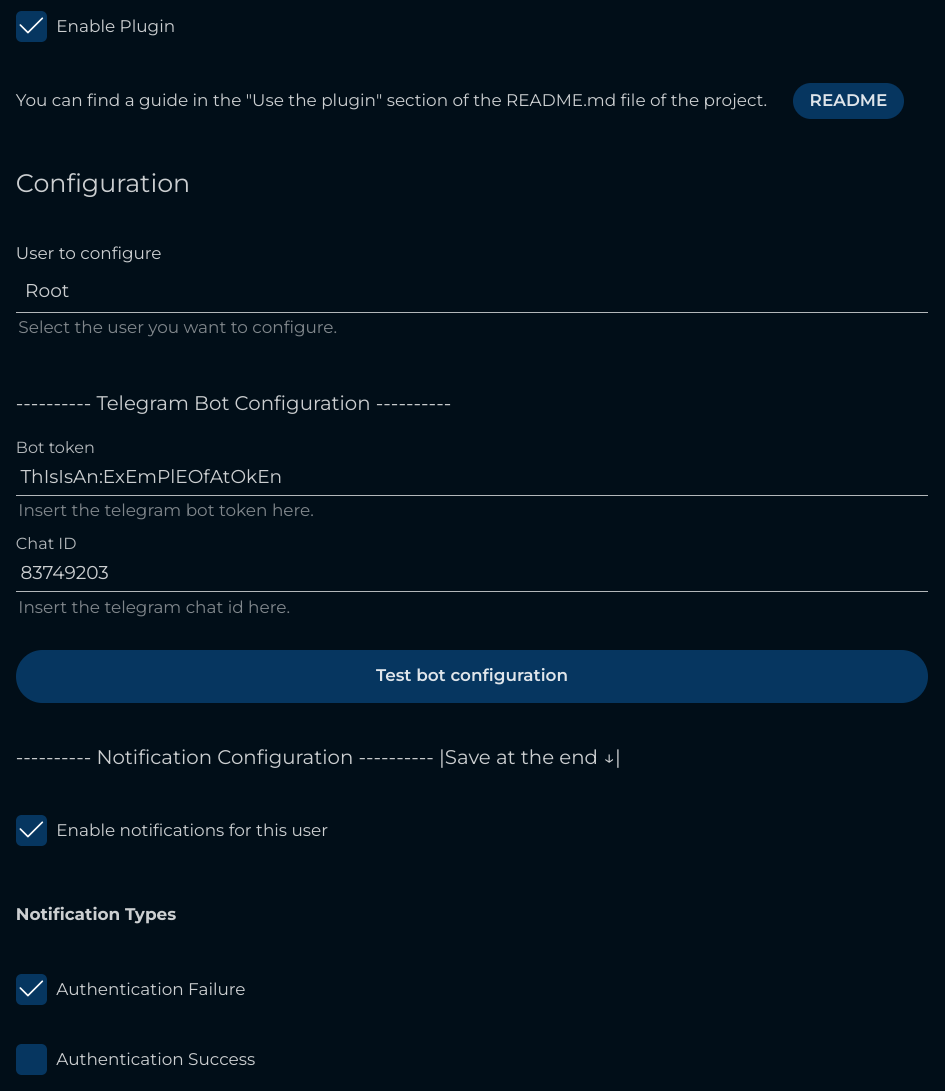
Example of the configuration page:
Install the project (for developers)
To install the project, you need to follow these steps:
Note: You need to have the .NET 9.0 SDK installed on your machine.
- Clone the repository
- Install the dependencies
- Compile the plugin
- Install the plugin
1. Clone the repository
git clone https://github.com/RomainPierre7/jellyfin_telegram_notifier.git
2. Install the dependencies
dotnet add package Jellyfin.Controller
3. Compile the plugin
dotnet build
or use the Makefile:
This command will only build the dll file in the plugin directory.
make dev
Other commands are available in the Makefile:
make build- Build the projectmake publish- Publish the projectmake clean- Clean the projectmake dev- Build the project and copy thedllfile in theplugindirectorymake plugin- Publish the project and copy thedllfile in theplugindirectory
4. Install the plugin
To install the plugin, you have to find the Jellyfin plugin directory. It depends on your installation but the most common paths are:
- Linux:
/var/lib/jellyfin/plugins - Windows:
C:\ProgramData\Jellyfin\Server\plugins - Docker:
/config/pluginsor/config/data/plugins
Then, you have to copy the Jellyfin.Plugin.TelegramNotifier.dll file in a folder in the plugin directory.
Example:
Plugin
│
└── TelegramNotifier
    │
    └── Jellyfin.Plugin.TelegramNotifier.dll
Finally, you have to restart the Jellyfin server.
5. Tips
If you want to easily test the plugin, you can use the following command to download a video file directly on your server:
curl https://cdn.pixabay.com/video/2025/03/28/268290_large.mp4 --output titanic.mp4
Similar repos


Languages
C#
74.9%
JavaScript
15.4%
HTML
9.1%
Jellyfin media server plugin to easily send notifications on Telegram!
See the codeREADME
Jellyfin Plugin Telegram Notifier
This Jellyfin plugin provides notification functionalities via Telegram for various events occurring within your Jellyfin server. Stay informed about playback activities, user management, plugin operations, and more right from your Telegram account. You can personalize the configuration for each user.
🧰 A troubleshooting guide is available here.
[!IMPORTANT] If you encounter a problem, a bug or have an idea for a new feature, submit an issue here. Please, submit only one feature or bug per issue.
[!TIP] If you're finding value in this project and it's been helpful to you, consider giving it a star ⭐️ on GitHub ! Your support means a lot and helps others discover the project too.
Table of contents
Install the plugin
To install the plugin on your Jellyfin server, you need to follow these steps:
- Go to the Jellyfin dashboard
- Go to the Plugins section
- Click on the Manage Repositories button
- Click on New Repository
- Add the depot URL:
Repository Name: Telegram Notifier
Repository URL:
https://raw.githubusercontent.com/RomainPierre7/jellyfin-plugin-TelegramNotifier/main/manifest.json
- Go back to the plugins page
- Search for the plugin:
Telegram Notifier
Make sure to enable the All or Available filter
- Click on the Install button
- Restart the Jellyfin server
Note: You can also install the plugin manually by downloading the latest release from the releases page.
Use the plugin
To use the plugin, you need to follow these steps:
- Go to the Jellyfin dashboard
- Go to the Plugins section
- Click on the Telegram Notifier plugin
- Click on settings
- Configure the plugin
Configuration
- Select the user you want to configure
- Enter the Telegram bot token
Note: You can create a Telegram bot by sending the command
/newbotto the BotFather and collect the token.
- Enter the chat ID
Note: You can get the collect the chat ID by sending a message to the bot and then go to the URL:
https://api.telegram.org/bot<YourBOTToken>/getUpdates
- Click on the Test button to test the configuration
- Enable the notifications for the user
- Select the events you want to be notified about
Available events:
- Item added
- Item deleted
- Playback start
- Playback progress
- Playback stop
- Subtitle download failure (soon...)
- Authentication failure (soon...)
- Authentication success (soon...)
- Session start
- Pending restart (soon...)
- Task completed (soon...)
- Plugin installation cancelled
- Plugin installation failed
- Plugin installed
- Plugin installing
- Plugin uninstalled
- Plugin updated
- User created
- User deleted
- User locked out
- User password changed
- User updated (soon...)
- User data saved (soon...)
- Click on the Save button
Example of the configuration page:
Install the project (for developers)
To install the project, you need to follow these steps:
Note: You need to have the .NET 9.0 SDK installed on your machine.
- Clone the repository
- Install the dependencies
- Compile the plugin
- Install the plugin
1. Clone the repository
git clone https://github.com/RomainPierre7/jellyfin_telegram_notifier.git
2. Install the dependencies
dotnet add package Jellyfin.Controller
3. Compile the plugin
dotnet build
or use the Makefile:
This command will only build the dll file in the plugin directory.
make dev
Other commands are available in the Makefile:
make build- Build the projectmake publish- Publish the projectmake clean- Clean the projectmake dev- Build the project and copy thedllfile in theplugindirectorymake plugin- Publish the project and copy thedllfile in theplugindirectory
4. Install the plugin
To install the plugin, you have to find the Jellyfin plugin directory. It depends on your installation but the most common paths are:
- Linux:
/var/lib/jellyfin/plugins - Windows:
C:\ProgramData\Jellyfin\Server\plugins - Docker:
/config/pluginsor/config/data/plugins
Then, you have to copy the Jellyfin.Plugin.TelegramNotifier.dll file in a folder in the plugin directory.
Example:
Plugin
│
└── TelegramNotifier
    │
    └── Jellyfin.Plugin.TelegramNotifier.dll
Finally, you have to restart the Jellyfin server.
5. Tips
If you want to easily test the plugin, you can use the following command to download a video file directly on your server:
curl https://cdn.pixabay.com/video/2025/03/28/268290_large.mp4 --output titanic.mp4
Similar repos
Languages
C#
74.9%
JavaScript
15.4%
HTML
9.1%