Welcome to STM32 model zoo services!
🎉 We are excited to announce that the STM32 AI model zoo now includes comprehensive PyTorch support, joining TensorFlow and ONNX. It now features a vast library of PyTorch models, all seamlessly integrated with our end-to-end workflows. Whether you want to train, evaluate, quantize, benchmark, or deploy, you’ll find everything you need – plus the flexibility to choose between PyTorch, TensorFlow, and ONNX. Dive into the expanded STM32 model zoo and take your AI projects further than ever on STM32 devices.
The STM32 AI model zoo is a set of services and scripts used to ease end to end AI models integration on ST devices. This can be used in conjunction with the STM32 model zoo, which contains a collection of reference machine learning models optimized to run on STM32 microcontrollers. Available on GitHub, it is a valuable resource for anyone looking to add AI capabilities to their STM32-based projects.
These models can be useful for quick deployment if you are interested in the categories they were trained on. We also provide training scripts to perform transfer learning or to train your own model from scratch on your custom dataset.
The performance on reference STM32 MCUs and MPUs is provided for both float and quantized models. This project is organized by application. For each application, you will have a step-by-step guide indicating how to train and deploy the models.
To clone the repository please use:
git clone https://github.com/STMicroelectronics/stm32ai-modelzoo-services.git --depth 1
STM32N6.ONNX model quantization and evaluation from h5 models.Pytorch support through the speech enhancement Use Case.ONNX model quantization and evaluation.single entry point to the code : a .yaml configuration file to configure all the needed services.Bring Your Own Model (BYOM) feature to allow the user (re-)training his own model. Example is provided here, chapter 5.1.Bring Your Own Data (BYOD) feature to allow the user finetuning some pretrained models with his own datasets. Example is provided here, chapter 2.3.



The ST model zoo provides a collection of independent services and pre-built chained services that can be used to perform various functions related to machine learning. The individual services include tasks such as training or quantization of a model, while the chained services combine multiple services to perform more complex functions, such as training the model, quantizing it, and evaluating the quantized model successively before benchmarking it on a HW of your choice.
All trained models in the STM32 model zoo are provided with their configuration .yaml file used to generate them. This is a very good baseline to start with!
[!TIP] All services are available for following use cases with quick and easy examples that are provided and can be executed for a fast ramp up (click on use cases links below).
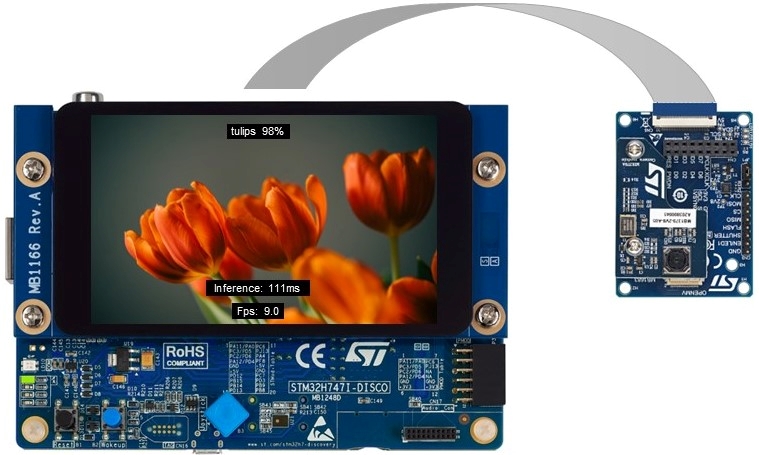
Image classification is used to classify the content of an image within a predefined set of classes. Only one class is predicted from an input image.
| Suitable Targets for Deployment | Models |
|---|---|
| STM32H747I-DISCO | MobileNet v1 0.25, MobileNet v1 0.5, MobileNet v2 0.35, ResNet8 v1, ST ResNet8, ResNet32 v1, SqueezeNet v1.1, FD MobileNet 0.25, ST FD MobileNet, ST EfficientNet, Mnist |
| NUCLEO-H743ZI2 | MobileNet v1 0.25, MobileNet v1 0.5, MobileNet v2 0.35, ResNet8 v1, ST ResNet8, ResNet32 v1, SqueezeNet v1.1, FD MobileNet 0.25, ST FD MobileNet, ST EfficientNet, Mnist |
| STM32MP257F-EV1 | MobileNet v1 1.0, MobileNet v2 1.0, MobileNet v2 1.4, ResNet50 v2, EfficientNet v2 |
| STM32N6570-DK | MobileNet v1 1.0, MobileNet v2 1.0, MobileNet v2 1.4, ResNet50 v2, EfficientNet v2, DarkNet_pt, Dla_pt, FdMobileNet_pt, HardNet_pt, MnasNet_pt, MobileNet_pt, MobileNetv2_pt, MobileNetv4_pt, PeleeNet_pt, PreresNet18_pt, ProxylessNas_pt, RegNet_pt, SemnasNet_pt, ShuffleNetv2_pt, Sqnxt_pt, SqueezeNet_pt, St_ResNet_pt |
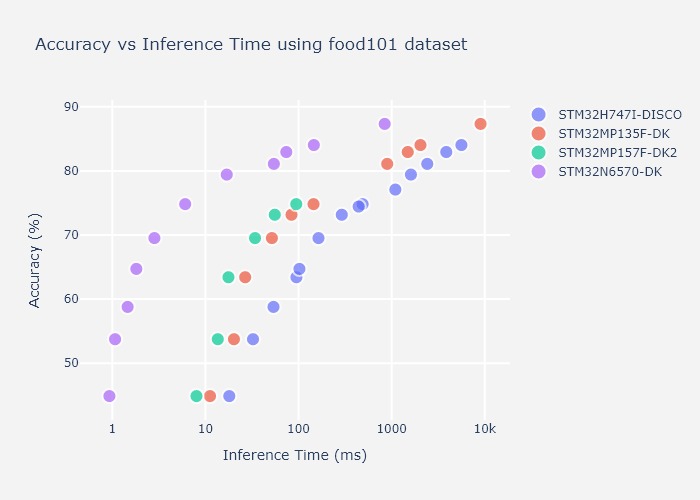
Selecting a model for a specific task or a specific device is not always an easy task, and relying on metrics like the inference time and the accuracy, as in the example figure on food-101 classification below, can help you make the right choice before fine-tuning your model.
Please find below some tutorials for a quick ramp up!
Image Classification top readme here
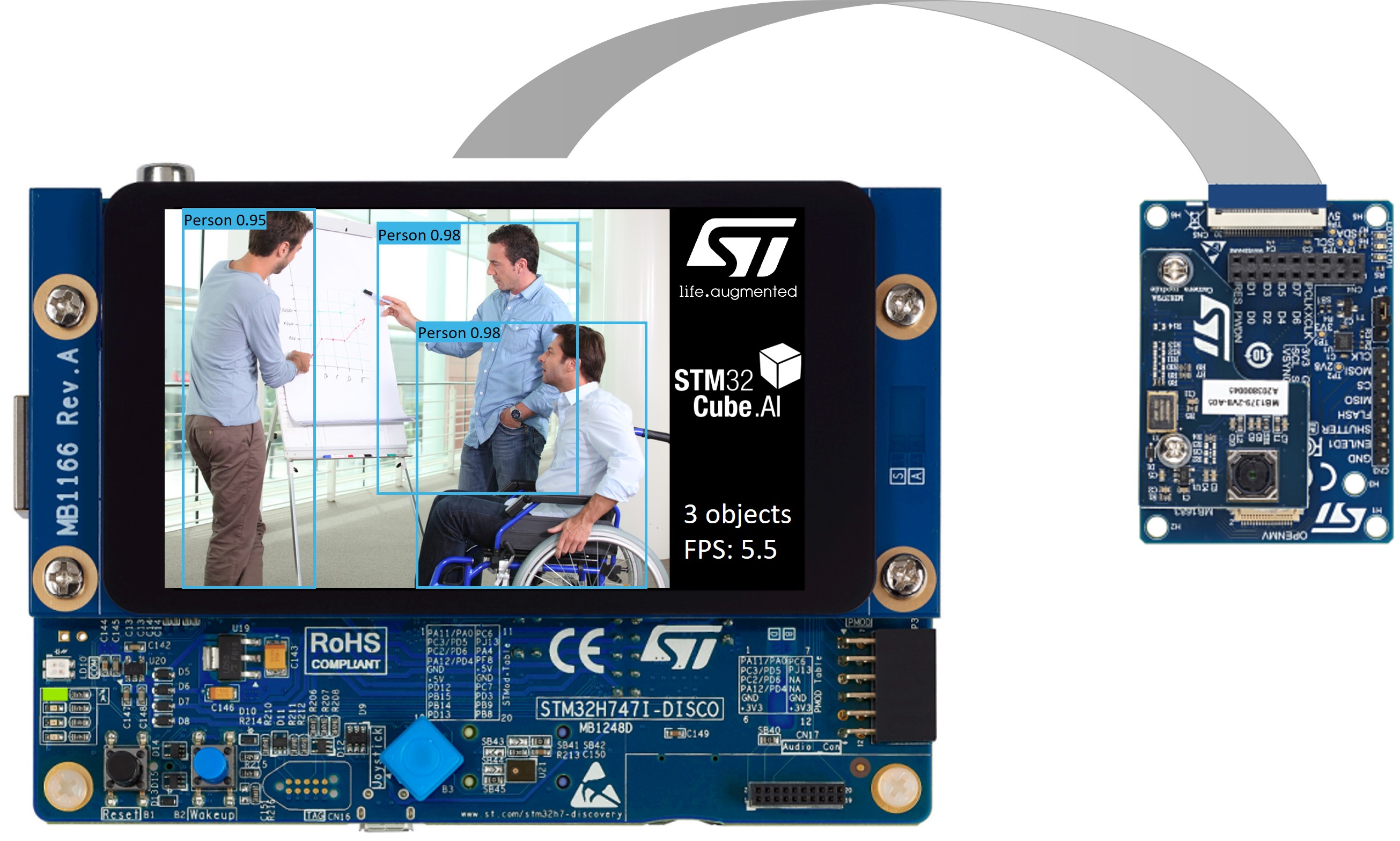
Object detection is used to detect, locate and estimate the occurrences probability of predefined objects from input images.
| Suitable Targets for Deployment | Models |
|---|---|
| STM32H747I-DISCO | ST Yolo LC v1 |
| STM32N6570-DK | Tiny Yolo v2, ST Yolo X, Yolo v8, Yolo v11, Yolo 26, Blazeface front, SSD_MobileNetV1_pt, SSD_MobileNetV2_pt, SSDLite_MobileNetV1_pt, SSDLite_MobileNetV2_pt, SSDLite_MobileNetV3Large_pt, SSDLite_MobileNetV3Small_pt, ST_YoloDv2Milli_pt, ST_YoloDv2Tiny_pt |
Please find below some tutorials for a quick ramp up!
Object Detection top readme here
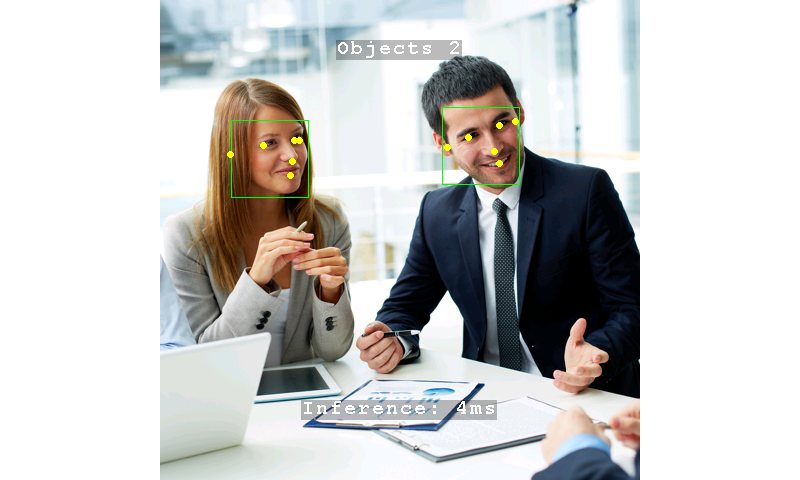
Face detection is used to detect, locate and estimate the occurrences probability of faces from input images.
| Models | Input Resolutions | Supported Services | Targets for deployment |
|---|---|---|---|
| Blazeface front | 128x128x3 | Benchmarking / Prediction / Deployment/ Evaluation | STM32N6570-DK |
| Yunet | 3x320x320 | Benchmarking / Prediction / Deployment/ Evaluation | STM32N6570-DK |
Full FD Services : evaluation, quantization, benchmarking, prediction, deployment
Please find below some tutorials for a quick ramp up!
Face Detection top readme here
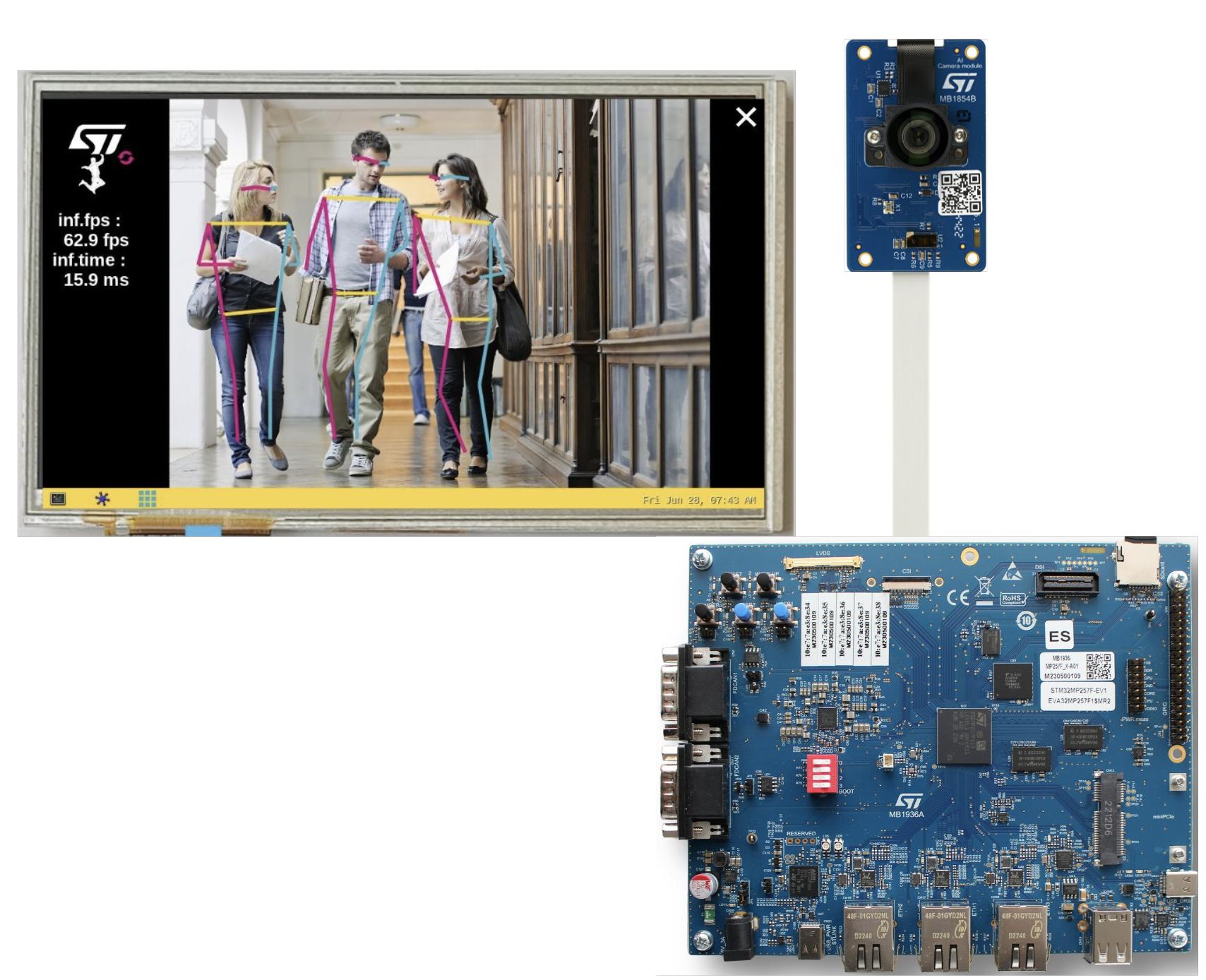
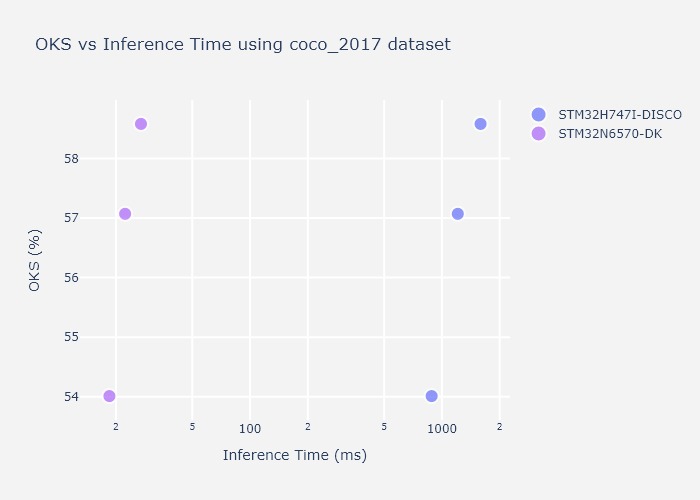
Pose estimation allows to detect key points on some specific objects (people, hand, face, ...). It can be single pose where key points can be extracted from a single object, or multi pose where location of key points are estimated on all detected objects from the input images.
| Models | Input Resolutions | Supported Services | Targets for deployment |
|---|---|---|---|
| Yolo v8n pose | 192x192x3 256x256x3 320x320x3 | Evaluation / Benchmarking / Prediction / Deployment | STM32N6570-DK |
| Yolo v11n pose | 256x256x3 320x320x3 | Benchmarking / Prediction / Deployment | STM32N6570-DK |
| ST MoveNet | 192x192x3 224x224x3 256x256x3 | All services | STM32N6570-DK STM32MP257F-EV1 |
| MoveNet | 192x192x3 256x256x3 | Evaluation / Quantization / Benchmarking / Prediction | STM32MP257F-EV1 |
| Face landmarks | 192x192x3 | Benchmarking / Prediction | STM32N6570-DK |
| Hand landmarks | 224x224x3 | Benchmarking / Prediction | STM32N6570-DK |
Full PE Services : training, evaluation, quantization, benchmarking, prediction, deployment
Please find below some tutorials for a quick ramp up!
Pose Estimation top readme here
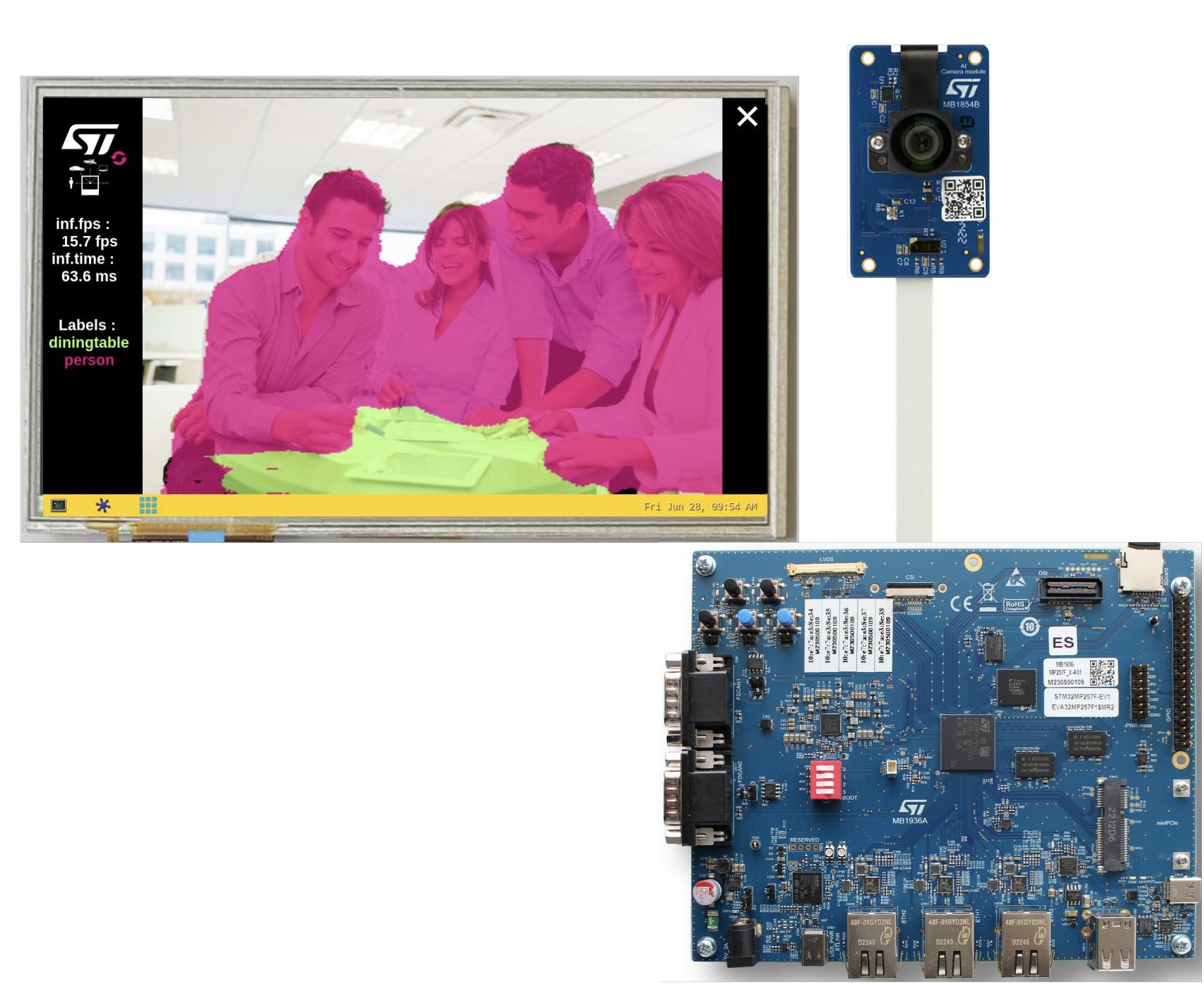
Semantic segmentation is an algorithm that associates a label to every pixel in an image. It is used to recognize a collection of pixels that form distinct categories. It doesn't differentiate instances of the same category, which is the main difference between instance and semantic segmentation.
| Models | Input Resolutions | Supported Services | Targets for deployment |
|---|---|---|---|
| DeepLab v3 | 256x256x3 320x320x3 416x416x3 512x512x3 | Full Seg Services | STM32MP257F-EV1 STM32N6570-DK |
Full Seg Services : training, evaluation, quantization, benchmarking, prediction, deployment
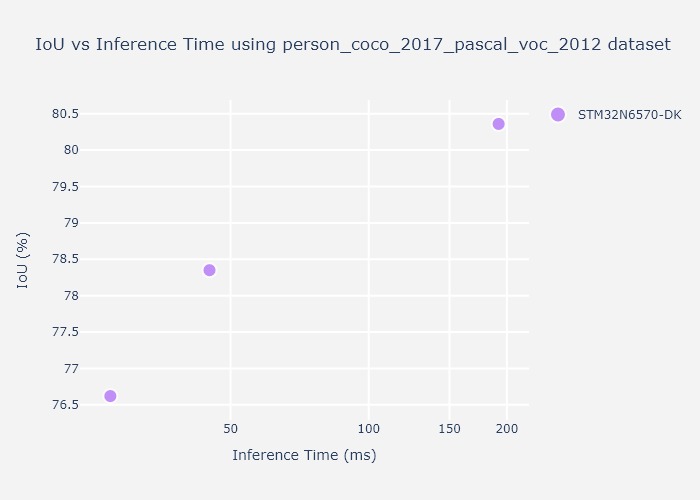
Various metrics can be used to estimate the quality of a segmentation use case. Metrics like the inference time and IoU, as in the example figure on person segmentation below, can help you make the right choice before fine-tuning your model, as well as checking HW capabilities for the segmentation task.
Please find below some tutorials for a quick ramp up!
Semantic Segmentation top readme here
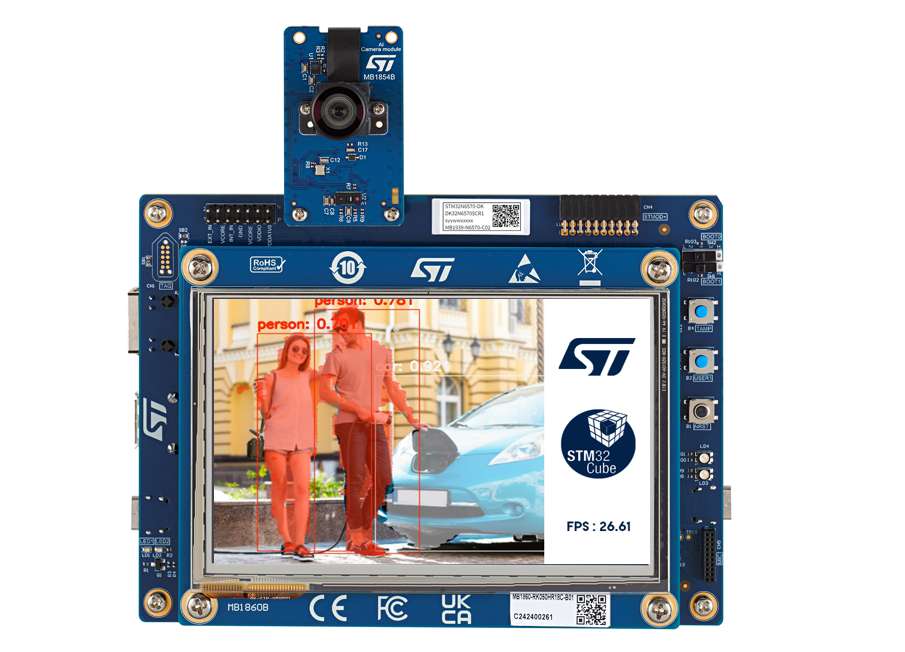
Instance segmentation is an algorithm that associates a label to every pixel in an image. It also outputs bounding boxes on detected class objects. It is used to recognize a collection of pixels that form distinct categories and instances of each category. It differentiates instances of the same category, which is the main difference between instance and semantic segmentation.
| Models | Input Resolutions | Supported Services | Targets for deployment |
|---|---|---|---|
| yolov8n_seg | 256x256x3 320x320x3 | Prediction, Benchmark, Deployment | STM32N6570-DK |
| yolov11n_seg | 256x256x3 320x320x3 | Prediction, Benchmark, Deployment | STM32N6570-DK |
Please find below some tutorials for a quick ramp up!
Instance Segmentation top readme here
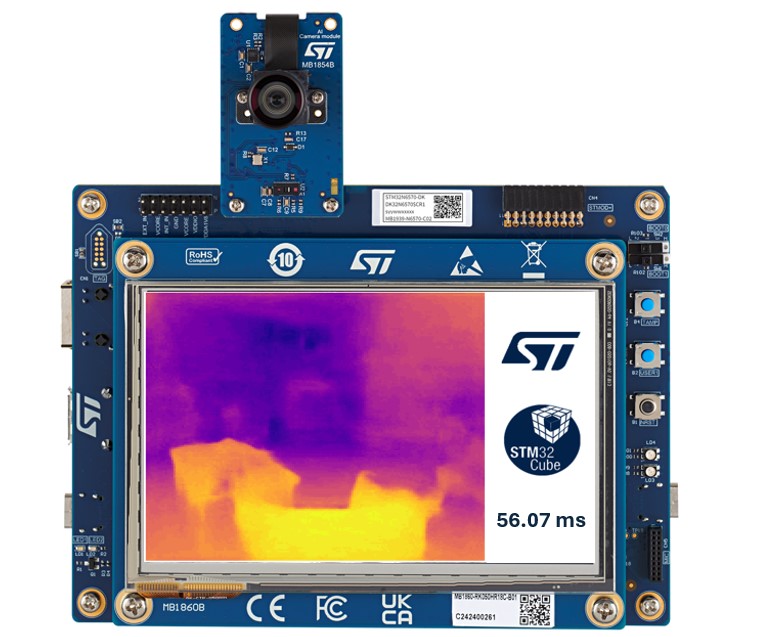
This allows to predict the distance to objects from an image as a pixel-wise depth map.
| Models | Input Resolutions | Supported Services |
|---|---|---|
| fast_depth | 224x224x3 256x256x3 320x320x3 | benchmarking / prediction |
Depth Estimation top readme here.
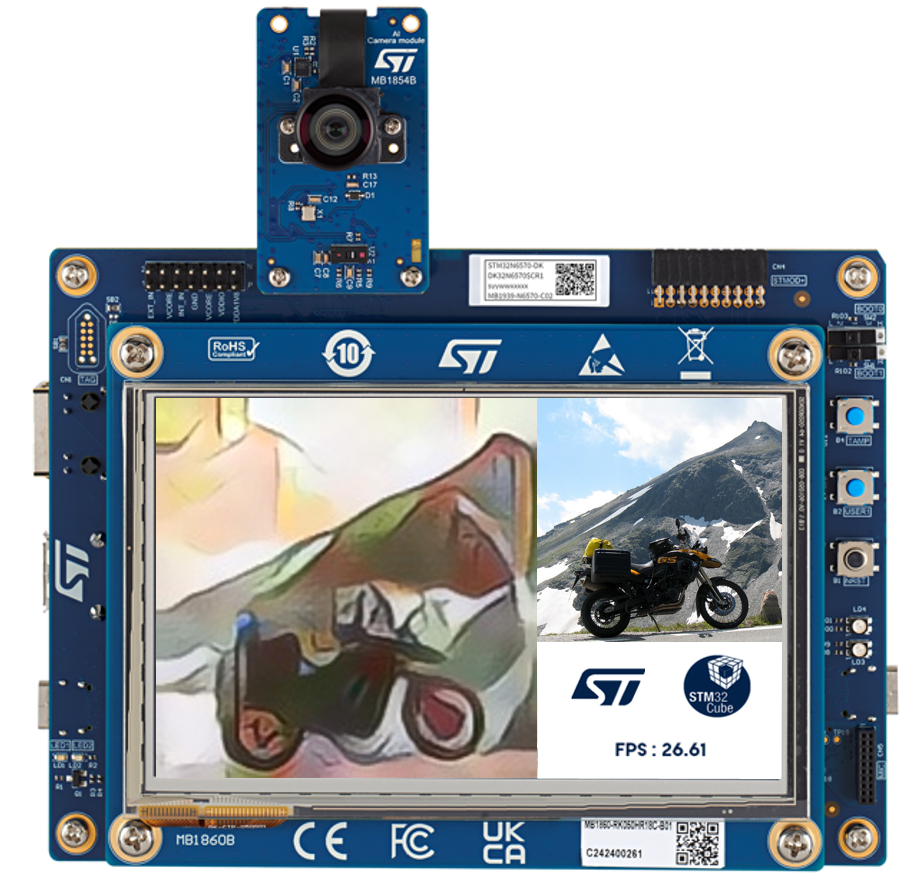
Neural Style Transfer is a deep learning technique that applies the artistic style of one image to the content of another image by optimizing a new image to simultaneously match the content features of the original and the style features of the reference image.
| Models | Input Resolutions | Supported Services |
|---|---|---|
| Xinet_picasso_muse | 160x160x3 | Prediction, Benchmark |
Neural style transfer top readme here
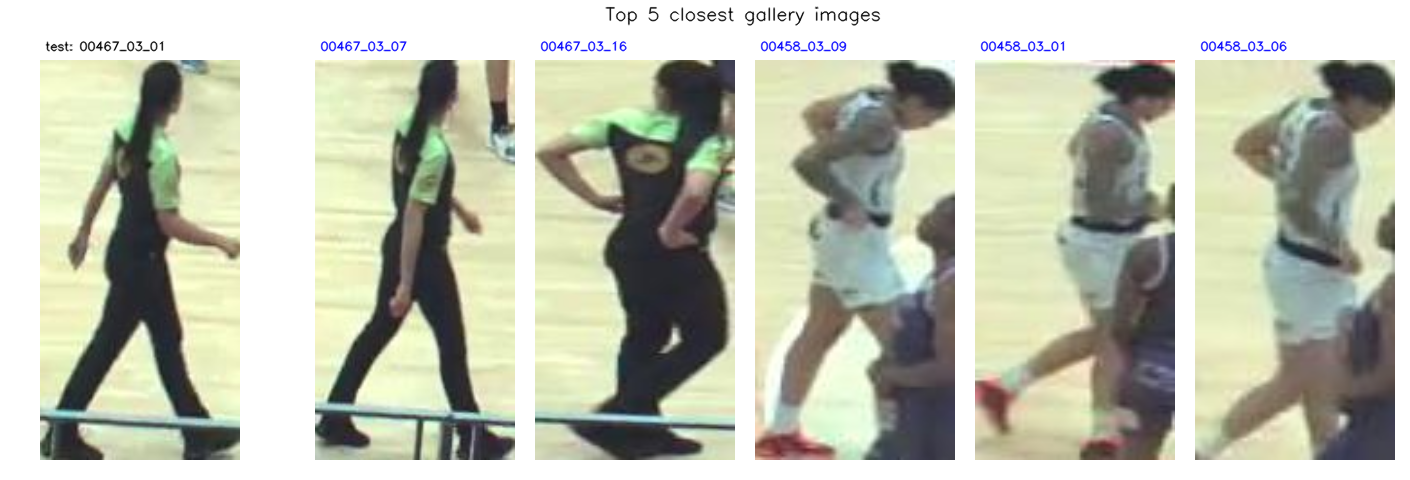
Re-Identification is used to recognize a specific object (person, vehicle, ...) from a set of images.
| Models | Input Resolutions | Supported Services | Suitable Targets for deployment |
|---|---|---|---|
| MobileNet v2 | 256x128x3 | Full IC Services | STM32N6570-DK |
| OSNet | 256x128x3 | Full IC Services | STM32N6570-DK |
Full IC Services : training, evaluation, quantization, benchmarking, prediction, deployment
Re-Identification top readme here
This is used to detect a set of pre-defined audio events.
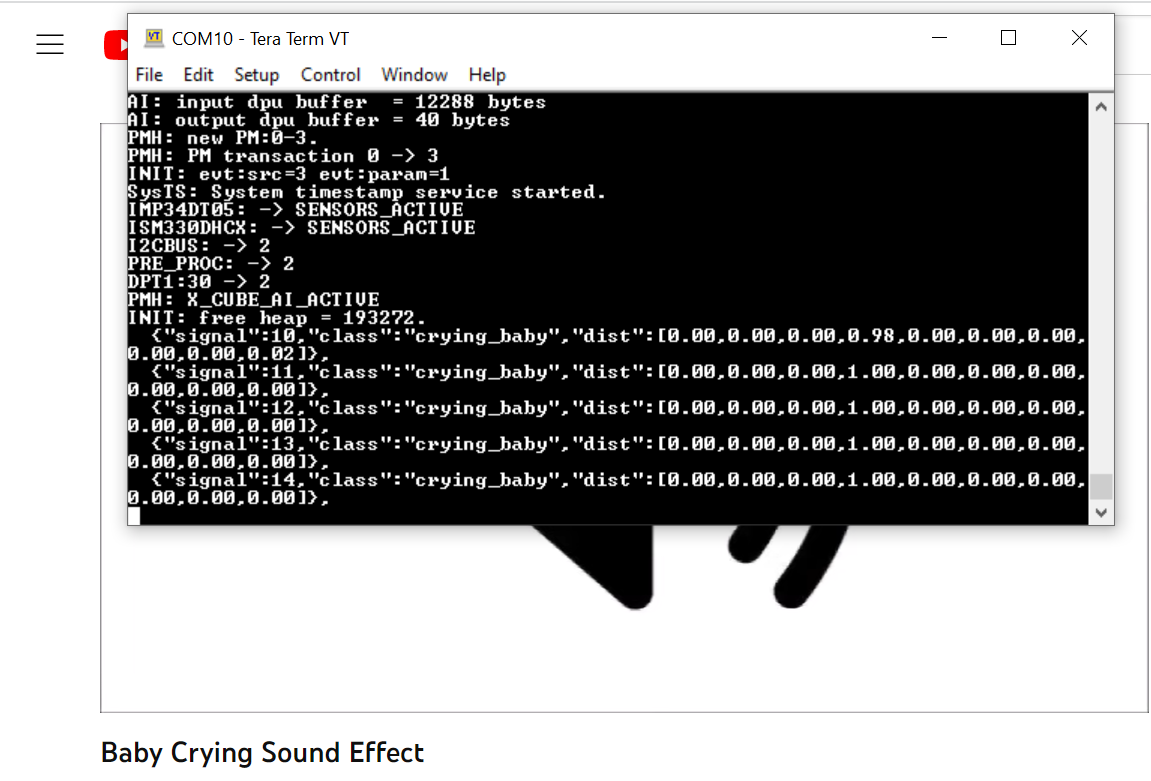
Audio Event Detection use case
| Models | Input Resolutions | Supported Services | Targets for deployment |
|---|---|---|---|
| miniresnet | 64x50x1 | Full AED Services | B-U585I-IOT02A |
| miniresnet v2 | 64x50x1 | Full AED Services | B-U585I-IOT02A |
| yamnet 256/1024 | 64x96x1 | Full AED Services | B-U585I-IOT02A STM32N6570-DK |
Full AED Services : training, evaluation, quantization, benchmarking, prediction, deployment
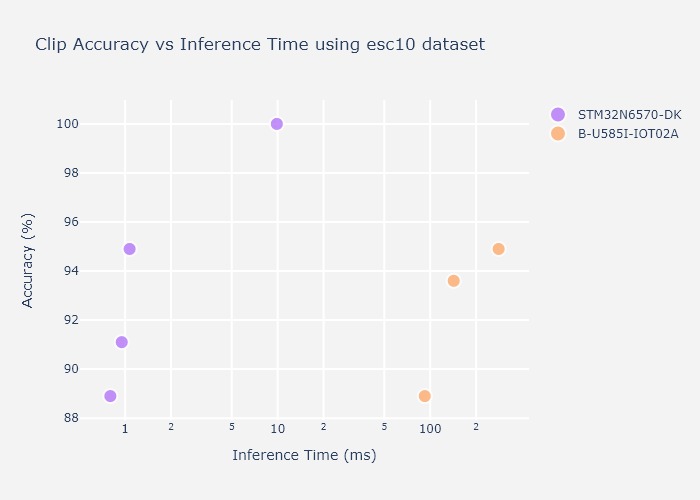
Various metrics can be used to estimate quality of an audio event detection UC. The main ones are the inference time and the accuracy (percentage of good detections) on esc-10 dataset as in example figure below. This may help making the right choice before fine tuning your model, as well as checking HW capabilities for such AED task.
Please find below some tutorials for a quick ramp up!
Audio Event Detection top readme here
Speech Enhancement is an algorithm that enhances audio perception in a noisy environment.
| Models | Input Resolutions | Supported Services | Targets for deployment |
|---|---|---|---|
| stft_tcnn | 257x40 | Full SE Services | STM32N6570-DK |
Full SE Services : training, evaluation, quantization, benchmarking, deployment
Speech Enhancement top readme here
This allows to recognize various activities like walking, running, ...

Human Activity Recognition use case
| Models | Input Resolutions | Supported Services | Targets for deployment |
|---|---|---|---|
| gmp | 24x3x1 48x3x1 | training / Evaluation / Benchmarking / Deployment | B-U585I-IOT02A |
| ign | 24x3x1 48x3x1 | training / Evaluation / Benchmarking / Deployment | B-U585I-IOT02A |
Please find below some tutorials for a quick ramp up!
Human Activity Recognition top readme here
This allows to recognize a set of hand postures using Time of Flight (ToF) sensor.
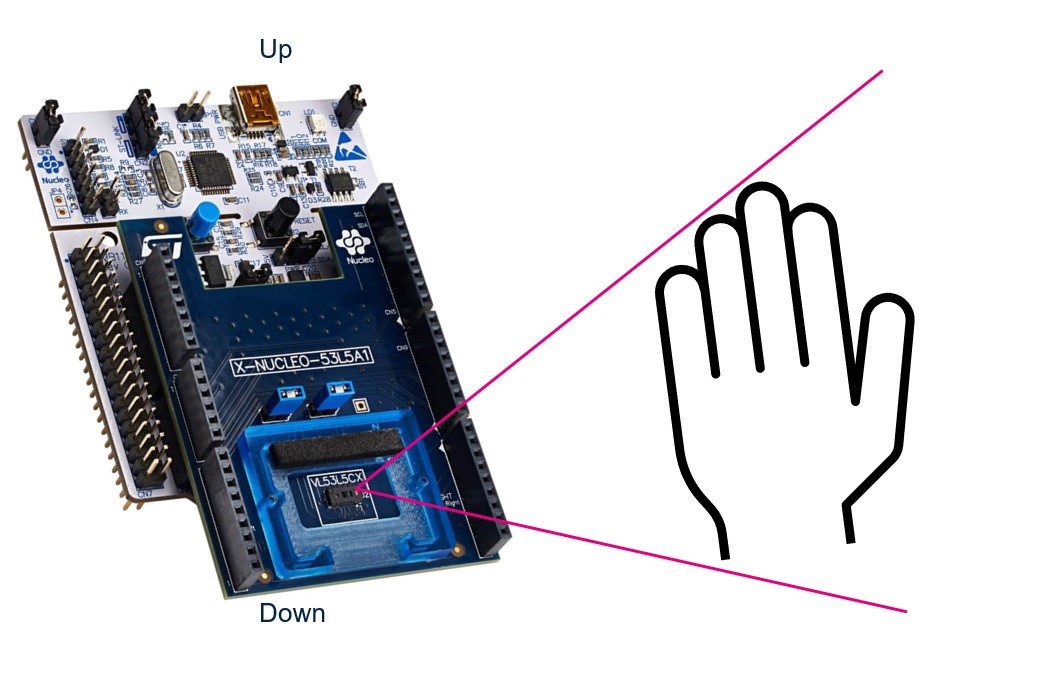
Hand Posture Recognition use case
| Models | Input Resolutions | Supported Services | Targets for deployment |
|---|---|---|---|
| ST CNN 2D Hand Posture | 64x50x1 | training / Evaluation / Benchmarking / Deployment | NUCLEO-F401RE with X-NUCLEO-53LxA1 Time-of-Flight Nucleo expansion board |
Hand Posture Recognition top readme here
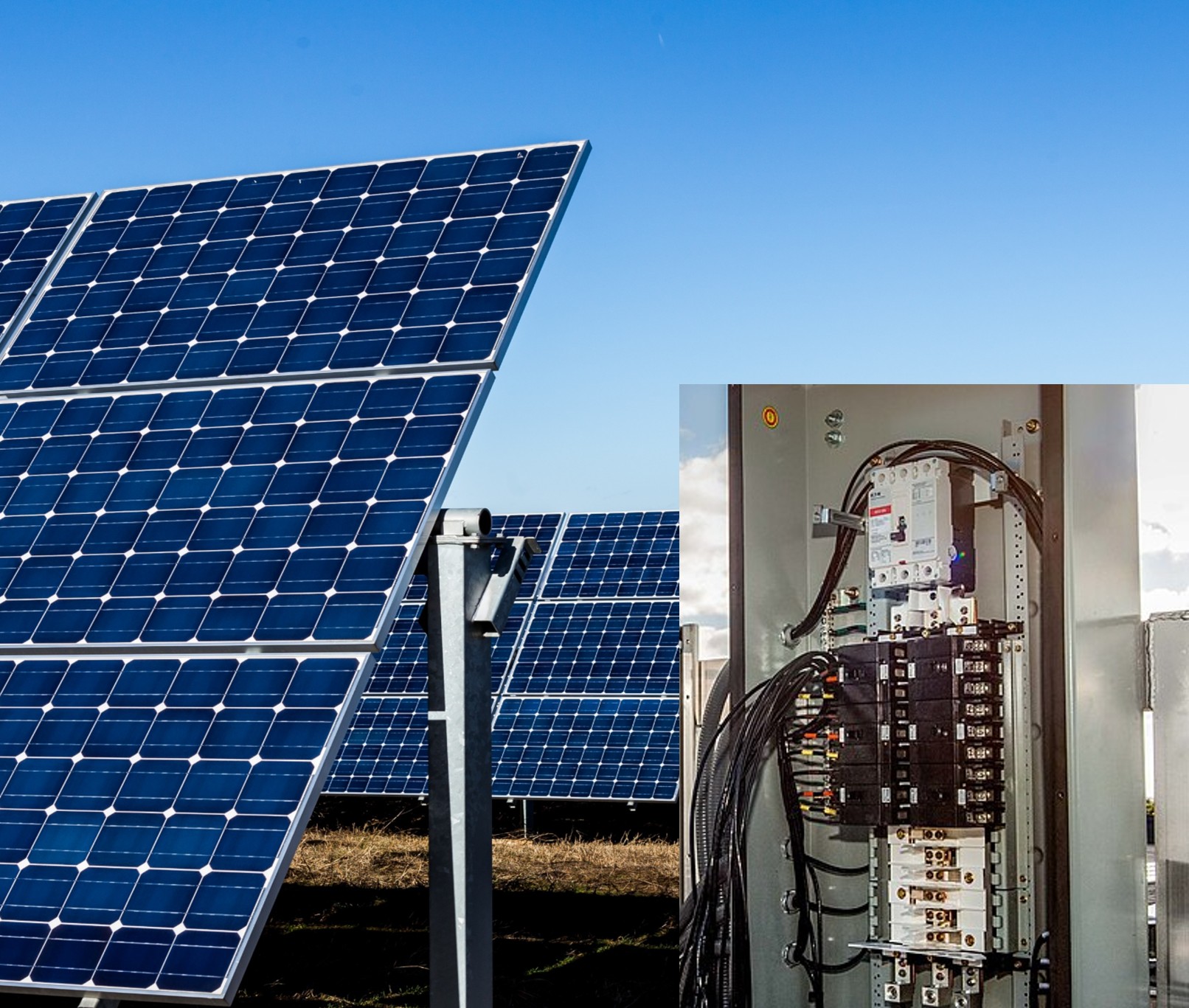
Arc fault detection is used to classify electrical signals as normal or arc fault conditions.
Please find below some tutorials for a quick ramp up!
Arc Fault Detection top readme here
A Docker-based setup is available for the STM32AI Model Zoo, including a ready-to-use image that captures the full software stack (tools, dependencies, and configuration) in a single, consistent environment. This Docker configuration reduces host-specific installation and compatibility issues, and offers a straightforward way to run the project on different platforms with identical behavior. It also makes it easier to share and reproduce workflows, whether training, evaluating, or running experiments, by keeping the runtime environment standardized across machines.
The Model Zoo Dashboard is hosted in a Docker environment under the STMicroelectronics Organization. This dashboard is developed using Dash Plotly and Flask, and it operates within a Docker container. It can also run locally if Docker is installed on your system. The dashboard provides the following features:
• Training: Train machine learning models. • Evaluation: Evaluate the performance of models. • Benchmarking: Benchmark your model using ST Edge AI Developer Cloud • Visualization: Visualize model performance and metrics. • User Configuration Update: Update and modify user configurations directly from the dashboard. • Output Download: Download model results and outputs.
You can also find our models on Hugging Face under the STMicroelectronics Organization. Each model from the STM32AI Model Zoo is represented by a model card on Hugging Face, providing all the necessary information about the model and linking to dedicated scripts.
For a detailed guide on installing and setting up the model zoo and its requirements, especially when operating behind a proxy in a corporate environment, refer to the wiki article How to install STM32 model zoo.
stm32ai executable.pesq library (for speech quality evaluation), you must have Visual Studio with C++ build tools installed. Download from Visual Studio Downloads.Clone this repository:
git clone https://github.com/STMicroelectronics/stm32ai-modelzoo-services.git --depth 1
cd stm32ai-modelzoo-services
Create a Python environment using either venv or conda:
python -m venv st_zoo
conda create -n st_zoo python=3.12.9
Activate your environment:
st_zoo\Scripts\activate.bat
source st_zoo/bin/activate
conda activate st_zoo
If using an NVIDIA GPU with conda, install CUDA libraries and set the path:
conda install -c conda-forge cudatoolkit=11.8 cudnn
mkdir -p $CONDA_PREFIX/etc/conda/activate.d
echo 'export LD_LIBRARY_PATH=$LD_LIBRARY_PATH:$CONDA_PREFIX/lib/' > $CONDA_PREFIX/etc/conda/activate.d/env_vars.sh
Then install all required Python packages:
pip install -r requirements.txt
Some application code in this repository is provided as git submodules. These submodules contain essential code for specific use cases and are not included in the main repository by default. To ensure all features and application examples work correctly, you need to initialize and update the submodules after cloning the repository:
git submodule update --init --recursive
This command will download all necessary submodules content, it is only needed if you plan to use deployment features.
[!CAUTION] If there are any white spaces in the paths (for Python, STM32CubeIDE, or STEdgeAI Core local installation), this can result in errors. Avoid having paths with white spaces.
[!TIP] In this project, we are using the ClearML library to log the results of different runs.
Sign Up: Sign up for free to the ClearML Hosted Service. Alternatively, you can set up your own server as described here.
Create Credentials: Go to your ClearML workspace and create new credentials.
Configure ClearML: Create a clearml.conf file and paste the credentials into it. If you are behind a proxy or using SSL portals, add verify_certificate = False to the configuration to make it work. Here is an example of what your clearml.conf file might look like:
api {
    web_server: https://app.clear.ml
    api_server: https://api.clear.ml
    files_server: https://files.clear.ml
    # Add this line if you are behind a proxy or using SSL portals
    verify_certificate = False
    credentials {
        "access_key" = "YOUR_ACCESS_KEY"
        "secret_key" = "YOUR_SECRET_KEY"
    }
}
Once configured, your experiments will be logged directly and shown in the project section under the name of your project.
In this project, we are also using the MLflow library to log the results of different runs.
Depending on which version of Windows OS you are using or where you place the project, the output log files might have a very long path, which might result in an error at the time of logging the results. By default, Windows uses a path length limitation (MAX_PATH) of 256 characters. To avoid this potential error, follow these steps:
Enable Long Paths: Create (or edit) a variable named LongPathsEnabled in the Registry Editor under Computer\HKEY_LOCAL_MACHINE\SYSTEM\CurrentControlSet\Control\FileSystem and assign it a value of 1. This will change the maximum length allowed for the file path on Windows machines and will avoid any errors resulting due to this. For more details, refer to Naming Files, Paths, and Namespaces.
GIT Configuration: If you are using Git, the line below may help solve the long path issue:
git config --system core.longpaths true
Welcome to STM32 model zoo services!
🎉 We are excited to announce that the STM32 AI model zoo now includes comprehensive PyTorch support, joining TensorFlow and ONNX. It now features a vast library of PyTorch models, all seamlessly integrated with our end-to-end workflows. Whether you want to train, evaluate, quantize, benchmark, or deploy, you’ll find everything you need – plus the flexibility to choose between PyTorch, TensorFlow, and ONNX. Dive into the expanded STM32 model zoo and take your AI projects further than ever on STM32 devices.
The STM32 AI model zoo is a set of services and scripts used to ease end to end AI models integration on ST devices. This can be used in conjunction with the STM32 model zoo, which contains a collection of reference machine learning models optimized to run on STM32 microcontrollers. Available on GitHub, it is a valuable resource for anyone looking to add AI capabilities to their STM32-based projects.
These models can be useful for quick deployment if you are interested in the categories they were trained on. We also provide training scripts to perform transfer learning or to train your own model from scratch on your custom dataset.
The performance on reference STM32 MCUs and MPUs is provided for both float and quantized models. This project is organized by application. For each application, you will have a step-by-step guide indicating how to train and deploy the models.
To clone the repository please use:
git clone https://github.com/STMicroelectronics/stm32ai-modelzoo-services.git --depth 1
STM32N6.ONNX model quantization and evaluation from h5 models.Pytorch support through the speech enhancement Use Case.ONNX model quantization and evaluation.single entry point to the code : a .yaml configuration file to configure all the needed services.Bring Your Own Model (BYOM) feature to allow the user (re-)training his own model. Example is provided here, chapter 5.1.Bring Your Own Data (BYOD) feature to allow the user finetuning some pretrained models with his own datasets. Example is provided here, chapter 2.3.
The ST model zoo provides a collection of independent services and pre-built chained services that can be used to perform various functions related to machine learning. The individual services include tasks such as training or quantization of a model, while the chained services combine multiple services to perform more complex functions, such as training the model, quantizing it, and evaluating the quantized model successively before benchmarking it on a HW of your choice.
All trained models in the STM32 model zoo are provided with their configuration .yaml file used to generate them. This is a very good baseline to start with!
[!TIP] All services are available for following use cases with quick and easy examples that are provided and can be executed for a fast ramp up (click on use cases links below).
Image classification is used to classify the content of an image within a predefined set of classes. Only one class is predicted from an input image.
| Suitable Targets for Deployment | Models |
|---|---|
| STM32H747I-DISCO | MobileNet v1 0.25, MobileNet v1 0.5, MobileNet v2 0.35, ResNet8 v1, ST ResNet8, ResNet32 v1, SqueezeNet v1.1, FD MobileNet 0.25, ST FD MobileNet, ST EfficientNet, Mnist |
| NUCLEO-H743ZI2 | MobileNet v1 0.25, MobileNet v1 0.5, MobileNet v2 0.35, ResNet8 v1, ST ResNet8, ResNet32 v1, SqueezeNet v1.1, FD MobileNet 0.25, ST FD MobileNet, ST EfficientNet, Mnist |
| STM32MP257F-EV1 | MobileNet v1 1.0, MobileNet v2 1.0, MobileNet v2 1.4, ResNet50 v2, EfficientNet v2 |
| STM32N6570-DK | MobileNet v1 1.0, MobileNet v2 1.0, MobileNet v2 1.4, ResNet50 v2, EfficientNet v2, DarkNet_pt, Dla_pt, FdMobileNet_pt, HardNet_pt, MnasNet_pt, MobileNet_pt, MobileNetv2_pt, MobileNetv4_pt, PeleeNet_pt, PreresNet18_pt, ProxylessNas_pt, RegNet_pt, SemnasNet_pt, ShuffleNetv2_pt, Sqnxt_pt, SqueezeNet_pt, St_ResNet_pt |
Selecting a model for a specific task or a specific device is not always an easy task, and relying on metrics like the inference time and the accuracy, as in the example figure on food-101 classification below, can help you make the right choice before fine-tuning your model.
Please find below some tutorials for a quick ramp up!
Image Classification top readme here
Object detection is used to detect, locate and estimate the occurrences probability of predefined objects from input images.
| Suitable Targets for Deployment | Models |
|---|---|
| STM32H747I-DISCO | ST Yolo LC v1 |
| STM32N6570-DK | Tiny Yolo v2, ST Yolo X, Yolo v8, Yolo v11, Yolo 26, Blazeface front, SSD_MobileNetV1_pt, SSD_MobileNetV2_pt, SSDLite_MobileNetV1_pt, SSDLite_MobileNetV2_pt, SSDLite_MobileNetV3Large_pt, SSDLite_MobileNetV3Small_pt, ST_YoloDv2Milli_pt, ST_YoloDv2Tiny_pt |
Please find below some tutorials for a quick ramp up!
Object Detection top readme here
Face detection is used to detect, locate and estimate the occurrences probability of faces from input images.
| Models | Input Resolutions | Supported Services | Targets for deployment |
|---|---|---|---|
| Blazeface front | 128x128x3 | Benchmarking / Prediction / Deployment/ Evaluation | STM32N6570-DK |
| Yunet | 3x320x320 | Benchmarking / Prediction / Deployment/ Evaluation | STM32N6570-DK |
Full FD Services : evaluation, quantization, benchmarking, prediction, deployment
Please find below some tutorials for a quick ramp up!
Face Detection top readme here
Pose estimation allows to detect key points on some specific objects (people, hand, face, ...). It can be single pose where key points can be extracted from a single object, or multi pose where location of key points are estimated on all detected objects from the input images.
| Models | Input Resolutions | Supported Services | Targets for deployment |
|---|---|---|---|
| Yolo v8n pose | 192x192x3 256x256x3 320x320x3 | Evaluation / Benchmarking / Prediction / Deployment | STM32N6570-DK |
| Yolo v11n pose | 256x256x3 320x320x3 | Benchmarking / Prediction / Deployment | STM32N6570-DK |
| ST MoveNet | 192x192x3 224x224x3 256x256x3 | All services | STM32N6570-DK STM32MP257F-EV1 |
| MoveNet | 192x192x3 256x256x3 | Evaluation / Quantization / Benchmarking / Prediction | STM32MP257F-EV1 |
| Face landmarks | 192x192x3 | Benchmarking / Prediction | STM32N6570-DK |
| Hand landmarks | 224x224x3 | Benchmarking / Prediction | STM32N6570-DK |
Full PE Services : training, evaluation, quantization, benchmarking, prediction, deployment
Please find below some tutorials for a quick ramp up!
Pose Estimation top readme here
Semantic segmentation is an algorithm that associates a label to every pixel in an image. It is used to recognize a collection of pixels that form distinct categories. It doesn't differentiate instances of the same category, which is the main difference between instance and semantic segmentation.
| Models | Input Resolutions | Supported Services | Targets for deployment |
|---|---|---|---|
| DeepLab v3 | 256x256x3 320x320x3 416x416x3 512x512x3 | Full Seg Services | STM32MP257F-EV1 STM32N6570-DK |
Full Seg Services : training, evaluation, quantization, benchmarking, prediction, deployment
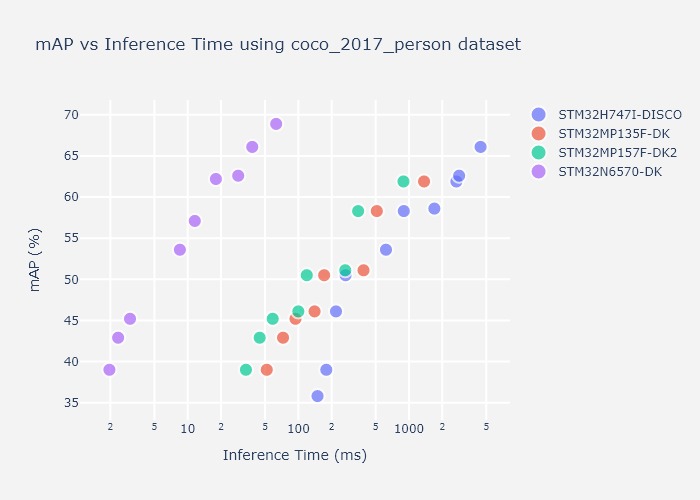
Various metrics can be used to estimate the quality of a segmentation use case. Metrics like the inference time and IoU, as in the example figure on person segmentation below, can help you make the right choice before fine-tuning your model, as well as checking HW capabilities for the segmentation task.
Please find below some tutorials for a quick ramp up!
Semantic Segmentation top readme here
Instance segmentation is an algorithm that associates a label to every pixel in an image. It also outputs bounding boxes on detected class objects. It is used to recognize a collection of pixels that form distinct categories and instances of each category. It differentiates instances of the same category, which is the main difference between instance and semantic segmentation.
| Models | Input Resolutions | Supported Services | Targets for deployment |
|---|---|---|---|
| yolov8n_seg | 256x256x3 320x320x3 | Prediction, Benchmark, Deployment | STM32N6570-DK |
| yolov11n_seg | 256x256x3 320x320x3 | Prediction, Benchmark, Deployment | STM32N6570-DK |
Please find below some tutorials for a quick ramp up!
Instance Segmentation top readme here
This allows to predict the distance to objects from an image as a pixel-wise depth map.
| Models | Input Resolutions | Supported Services |
|---|---|---|
| fast_depth | 224x224x3 256x256x3 320x320x3 | benchmarking / prediction |
Depth Estimation top readme here.
Neural Style Transfer is a deep learning technique that applies the artistic style of one image to the content of another image by optimizing a new image to simultaneously match the content features of the original and the style features of the reference image.
| Models | Input Resolutions | Supported Services |
|---|---|---|
| Xinet_picasso_muse | 160x160x3 | Prediction, Benchmark |
Neural style transfer top readme here
Re-Identification is used to recognize a specific object (person, vehicle, ...) from a set of images.
| Models | Input Resolutions | Supported Services | Suitable Targets for deployment |
|---|---|---|---|
| MobileNet v2 | 256x128x3 | Full IC Services | STM32N6570-DK |
| OSNet | 256x128x3 | Full IC Services | STM32N6570-DK |
Full IC Services : training, evaluation, quantization, benchmarking, prediction, deployment
Re-Identification top readme here
This is used to detect a set of pre-defined audio events.
Audio Event Detection use case
| Models | Input Resolutions | Supported Services | Targets for deployment |
|---|---|---|---|
| miniresnet | 64x50x1 | Full AED Services | B-U585I-IOT02A |
| miniresnet v2 | 64x50x1 | Full AED Services | B-U585I-IOT02A |
| yamnet 256/1024 | 64x96x1 | Full AED Services | B-U585I-IOT02A STM32N6570-DK |
Full AED Services : training, evaluation, quantization, benchmarking, prediction, deployment
Various metrics can be used to estimate quality of an audio event detection UC. The main ones are the inference time and the accuracy (percentage of good detections) on esc-10 dataset as in example figure below. This may help making the right choice before fine tuning your model, as well as checking HW capabilities for such AED task.
Please find below some tutorials for a quick ramp up!
Audio Event Detection top readme here
Speech Enhancement is an algorithm that enhances audio perception in a noisy environment.
| Models | Input Resolutions | Supported Services | Targets for deployment |
|---|---|---|---|
| stft_tcnn | 257x40 | Full SE Services | STM32N6570-DK |
Full SE Services : training, evaluation, quantization, benchmarking, deployment
Speech Enhancement top readme here
This allows to recognize various activities like walking, running, ...
Human Activity Recognition use case
| Models | Input Resolutions | Supported Services | Targets for deployment |
|---|---|---|---|
| gmp | 24x3x1 48x3x1 | training / Evaluation / Benchmarking / Deployment | B-U585I-IOT02A |
| ign | 24x3x1 48x3x1 | training / Evaluation / Benchmarking / Deployment | B-U585I-IOT02A |
Please find below some tutorials for a quick ramp up!
Human Activity Recognition top readme here
This allows to recognize a set of hand postures using Time of Flight (ToF) sensor.
Hand Posture Recognition use case
| Models | Input Resolutions | Supported Services | Targets for deployment |
|---|---|---|---|
| ST CNN 2D Hand Posture | 64x50x1 | training / Evaluation / Benchmarking / Deployment | NUCLEO-F401RE with X-NUCLEO-53LxA1 Time-of-Flight Nucleo expansion board |
Hand Posture Recognition top readme here
Arc fault detection is used to classify electrical signals as normal or arc fault conditions.
Please find below some tutorials for a quick ramp up!
Arc Fault Detection top readme here
A Docker-based setup is available for the STM32AI Model Zoo, including a ready-to-use image that captures the full software stack (tools, dependencies, and configuration) in a single, consistent environment. This Docker configuration reduces host-specific installation and compatibility issues, and offers a straightforward way to run the project on different platforms with identical behavior. It also makes it easier to share and reproduce workflows, whether training, evaluating, or running experiments, by keeping the runtime environment standardized across machines.
The Model Zoo Dashboard is hosted in a Docker environment under the STMicroelectronics Organization. This dashboard is developed using Dash Plotly and Flask, and it operates within a Docker container. It can also run locally if Docker is installed on your system. The dashboard provides the following features:
• Training: Train machine learning models. • Evaluation: Evaluate the performance of models. • Benchmarking: Benchmark your model using ST Edge AI Developer Cloud • Visualization: Visualize model performance and metrics. • User Configuration Update: Update and modify user configurations directly from the dashboard. • Output Download: Download model results and outputs.
You can also find our models on Hugging Face under the STMicroelectronics Organization. Each model from the STM32AI Model Zoo is represented by a model card on Hugging Face, providing all the necessary information about the model and linking to dedicated scripts.
For a detailed guide on installing and setting up the model zoo and its requirements, especially when operating behind a proxy in a corporate environment, refer to the wiki article How to install STM32 model zoo.
stm32ai executable.pesq library (for speech quality evaluation), you must have Visual Studio with C++ build tools installed. Download from Visual Studio Downloads.Clone this repository:
git clone https://github.com/STMicroelectronics/stm32ai-modelzoo-services.git --depth 1
cd stm32ai-modelzoo-services
Create a Python environment using either venv or conda:
python -m venv st_zoo
conda create -n st_zoo python=3.12.9
Activate your environment:
st_zoo\Scripts\activate.bat
source st_zoo/bin/activate
conda activate st_zoo
If using an NVIDIA GPU with conda, install CUDA libraries and set the path:
conda install -c conda-forge cudatoolkit=11.8 cudnn
mkdir -p $CONDA_PREFIX/etc/conda/activate.d
echo 'export LD_LIBRARY_PATH=$LD_LIBRARY_PATH:$CONDA_PREFIX/lib/' > $CONDA_PREFIX/etc/conda/activate.d/env_vars.sh
Then install all required Python packages:
pip install -r requirements.txt
Some application code in this repository is provided as git submodules. These submodules contain essential code for specific use cases and are not included in the main repository by default. To ensure all features and application examples work correctly, you need to initialize and update the submodules after cloning the repository:
git submodule update --init --recursive
This command will download all necessary submodules content, it is only needed if you plan to use deployment features.
[!CAUTION] If there are any white spaces in the paths (for Python, STM32CubeIDE, or STEdgeAI Core local installation), this can result in errors. Avoid having paths with white spaces.
[!TIP] In this project, we are using the ClearML library to log the results of different runs.
Sign Up: Sign up for free to the ClearML Hosted Service. Alternatively, you can set up your own server as described here.
Create Credentials: Go to your ClearML workspace and create new credentials.
Configure ClearML: Create a clearml.conf file and paste the credentials into it. If you are behind a proxy or using SSL portals, add verify_certificate = False to the configuration to make it work. Here is an example of what your clearml.conf file might look like:
api {
    web_server: https://app.clear.ml
    api_server: https://api.clear.ml
    files_server: https://files.clear.ml
    # Add this line if you are behind a proxy or using SSL portals
    verify_certificate = False
    credentials {
        "access_key" = "YOUR_ACCESS_KEY"
        "secret_key" = "YOUR_SECRET_KEY"
    }
}
Once configured, your experiments will be logged directly and shown in the project section under the name of your project.
In this project, we are also using the MLflow library to log the results of different runs.
Depending on which version of Windows OS you are using or where you place the project, the output log files might have a very long path, which might result in an error at the time of logging the results. By default, Windows uses a path length limitation (MAX_PATH) of 256 characters. To avoid this potential error, follow these steps:
Enable Long Paths: Create (or edit) a variable named LongPathsEnabled in the Registry Editor under Computer\HKEY_LOCAL_MACHINE\SYSTEM\CurrentControlSet\Control\FileSystem and assign it a value of 1. This will change the maximum length allowed for the file path on Windows machines and will avoid any errors resulting due to this. For more details, refer to Naming Files, Paths, and Namespaces.
GIT Configuration: If you are using Git, the line below may help solve the long path issue:
git config --system core.longpaths true



