A Game Boy emulator, disassembler and debugger, written in Rust
Rust
314
1,015 commits
updated Sep 4, 2025
An emulator and debugger for the Nintendo Game Boy, written in Rust.
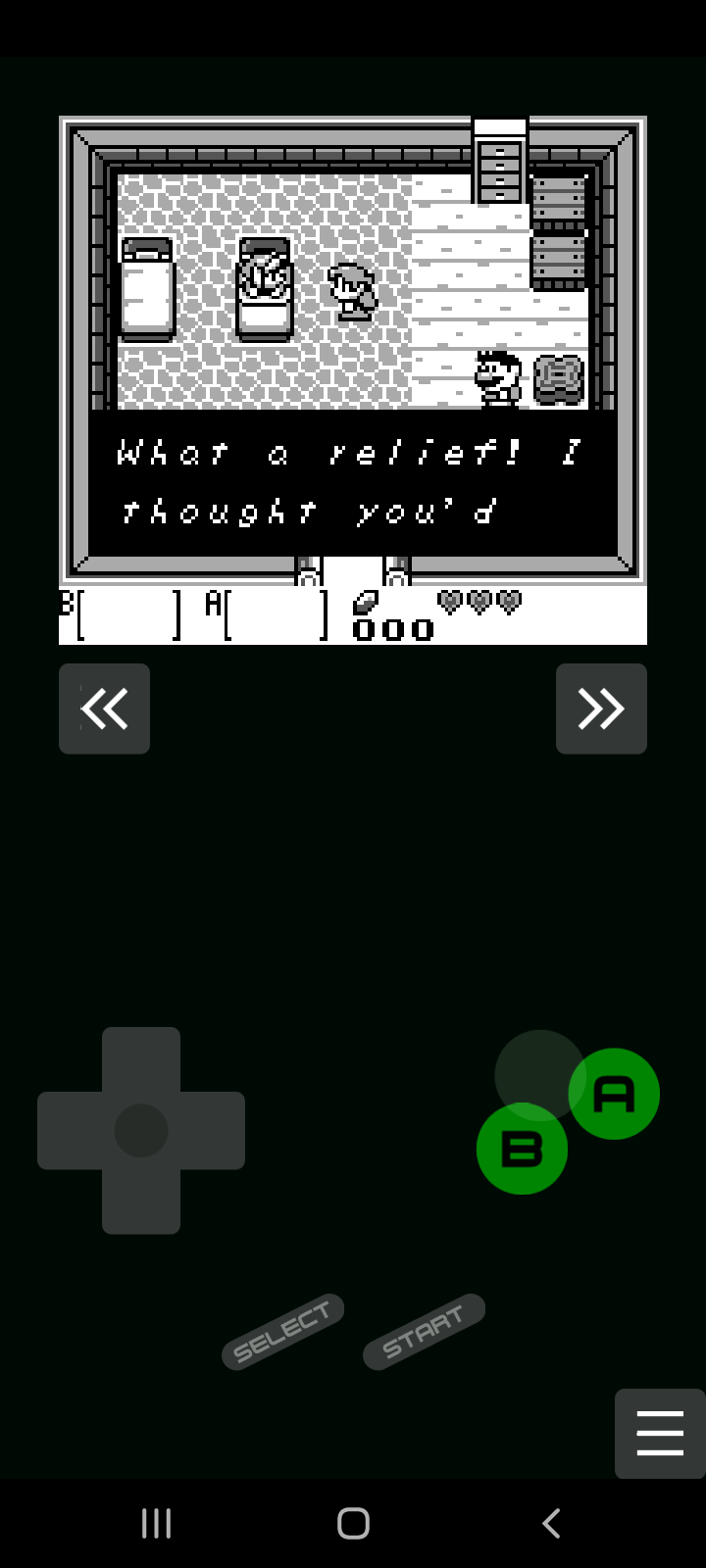
You can find pre compiled binaries in the Releases page.
For building this project, you need the Rust toolchain
installed (whihc includes cargo). Then follow the instructions for each
platform.
This project optionally depends on cargo-about (0.5.1) for generating a list of licenses. You can install it using cargo:
cargo install cargo-about
Compiling and running for native, i.e, Windows and Linux (other platforms are untested), only needs cargo:
cargo run --release -p gameroy-native
You can also build for WebAssembly, and run the emulator on the web. Using web-pack, run the following command:
cd wasm
wasm-pack build --target web
After that, open a web server that serves wasm/index.html.
For example, you can use python's http.server module:
cd wasm
python -m http.server
And access localhost:8000 in a web browser.
To build for android, you need to have Anroid NDK installed.
GameRoy uses Gradle to build the android port. To build and install the .apk in a device:
cd android
./gradlew installDebug # or `gradlew installDebug`, on Windows
To see the logs:
adb logcat *:S gameroy:V RustStdoutStderr:V
(The project uses rust-android-gradle for building the rust code for android.)
GameRoy uses a file named gameroy.toml, located in the same folder as the executable.
The default gameroy.toml file comes documented.
The default keymap is:
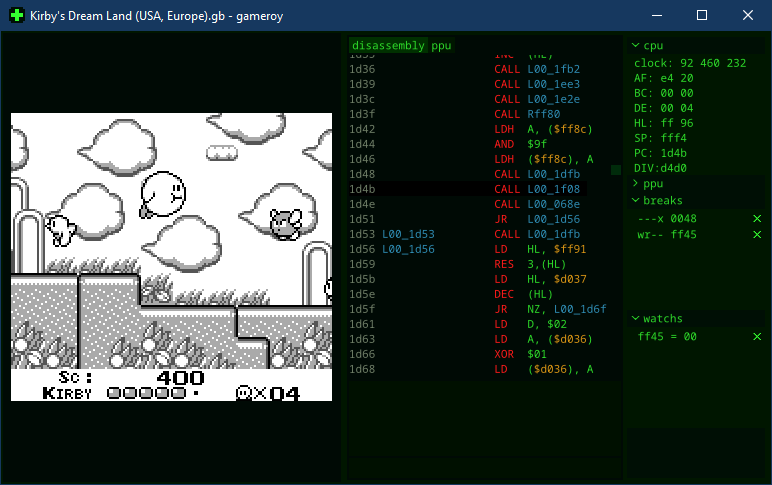
left: Left Arrowright: Right Arrowup: Up Arrowdown: Down ArrowA: AB: Sselect: Backspacestart: ReturnBy pressing F12 you can open/close the debug panel. There you can see a view
to the disassembled code, a view to the PPU memory and state, the CPU
registers, etc. At the bottom there is a text field for command input.
step (F8): execute 1 opcode.stepback (F7): reverse by 1 opcode.run (F9): continue to run.run for <clock_count>: run for the given number of cycles.run until <clock_count>: run until the total clock count reach the given value.runto <address>: run until reaching the address.watch <address>: add a memory address to the watch list, where its value will be displayed.break <flags> <address>: add a breakpoint to a memory address. Flags is a continuous
string containing at least one of the following letters:
x: break immediately before executing an opcode in the address.j: break immediately before jumping to the address.r: break immediately before reading the addressw: break immediately before writing to the addressreset: restarts the Game Boy.dump <path>: write the current disassembled code to a file. This disassembly is not
complete nor is in a known format.Pressing Enter with the text field empty will run a step.
break rw ff45: break immediately before reading or writing to the LYC register.break x 0048: break immediately before executing the STAT Interrupt handler.watch ff05: watch the value of the TIMA register.All test roms used were obtained from c-sp/gameboy-test-roms v.51, but the emulator was only run against the tests listed below.
To run all tests, download and extract the suite to gameroy\core\tests\gameboy-test-roms,
then go to the project root and run the command:
cargo test -p gameroy-core
| Test | GameRoy |
|---|---|
| cgb sound | N/A* |
| cpu instrs | 👍 |
| dmg sound | 👍 |
| instr timing | 👍 |
| interrupt time | N/A* |
| mem timing | 👍 |
| mem timing 2 | 👍 |
| oam bug | ❌ |
* need GBC support. GameRoy only supports DMG.
Only tests that were expected to pass on DMG were tested.
| Test | GameRoy |
|---|---|
| acceptance\bits | 👍 |
| acceptance\instr | 👍 |
| acceptance\interrupts | 👍 |
| acceptance\oam_dma | 👍 |
| acceptance\ppu | 👍 |
| acceptance\serial | 👍 |
| acceptance\timer | 👍 |
| acceptance\ | 👍 |
| emulator_only\mbc1 | 👍 |
| emulator_only\mbc2 | 👍 |
| emulator_only\mbc5 | 👍 |
| manual-only\ | 👍 |
| other | N/A* |
* Not tested.
| Test | GameRoy |
|---|---|
| ppu | 15/25 |
| mbc | 0/1 |
| dma | N/A* |
* CGB only
👍
1/7*
* Only tests that passed on SameBoy were tested.
0/3*
* Only tests that passed on SameBoy were tested. Was not sure which tests should pass on DMG.
Licensed under either of
at your option.
Unless you explicitly state otherwise, any contribution intentionally submitted for inclusion in the work by you, as defined in the Apache-2.0 license, shall be dual licensed as above, without any additional terms or conditions.
4,283 followers · starred Sep 2023
3,248 followers · starred Sep 2023
80 followers · starred Sep 2023
119 followers · starred Sep 2023
A Game Boy emulator, disassembler and debugger, written in Rust
Rust
314
1,015 commits
updated Sep 4, 2025
An emulator and debugger for the Nintendo Game Boy, written in Rust.
You can find pre compiled binaries in the Releases page.
For building this project, you need the Rust toolchain
installed (whihc includes cargo). Then follow the instructions for each
platform.
This project optionally depends on cargo-about (0.5.1) for generating a list of licenses. You can install it using cargo:
cargo install cargo-about
Compiling and running for native, i.e, Windows and Linux (other platforms are untested), only needs cargo:
cargo run --release -p gameroy-native
You can also build for WebAssembly, and run the emulator on the web. Using web-pack, run the following command:
cd wasm
wasm-pack build --target web
After that, open a web server that serves wasm/index.html.
For example, you can use python's http.server module:
cd wasm
python -m http.server
And access localhost:8000 in a web browser.
To build for android, you need to have Anroid NDK installed.
GameRoy uses Gradle to build the android port. To build and install the .apk in a device:
cd android
./gradlew installDebug # or `gradlew installDebug`, on Windows
To see the logs:
adb logcat *:S gameroy:V RustStdoutStderr:V
(The project uses rust-android-gradle for building the rust code for android.)
GameRoy uses a file named gameroy.toml, located in the same folder as the executable.
The default gameroy.toml file comes documented.
The default keymap is:
left: Left Arrowright: Right Arrowup: Up Arrowdown: Down ArrowA: AB: Sselect: Backspacestart: ReturnBy pressing F12 you can open/close the debug panel. There you can see a view
to the disassembled code, a view to the PPU memory and state, the CPU
registers, etc. At the bottom there is a text field for command input.
step (F8): execute 1 opcode.stepback (F7): reverse by 1 opcode.run (F9): continue to run.run for <clock_count>: run for the given number of cycles.run until <clock_count>: run until the total clock count reach the given value.runto <address>: run until reaching the address.watch <address>: add a memory address to the watch list, where its value will be displayed.break <flags> <address>: add a breakpoint to a memory address. Flags is a continuous
string containing at least one of the following letters:
x: break immediately before executing an opcode in the address.j: break immediately before jumping to the address.r: break immediately before reading the addressw: break immediately before writing to the addressreset: restarts the Game Boy.dump <path>: write the current disassembled code to a file. This disassembly is not
complete nor is in a known format.Pressing Enter with the text field empty will run a step.
break rw ff45: break immediately before reading or writing to the LYC register.break x 0048: break immediately before executing the STAT Interrupt handler.watch ff05: watch the value of the TIMA register.All test roms used were obtained from c-sp/gameboy-test-roms v.51, but the emulator was only run against the tests listed below.
To run all tests, download and extract the suite to gameroy\core\tests\gameboy-test-roms,
then go to the project root and run the command:
cargo test -p gameroy-core
| Test | GameRoy |
|---|---|
| cgb sound | N/A* |
| cpu instrs | 👍 |
| dmg sound | 👍 |
| instr timing | 👍 |
| interrupt time | N/A* |
| mem timing | 👍 |
| mem timing 2 | 👍 |
| oam bug | ❌ |
* need GBC support. GameRoy only supports DMG.
Only tests that were expected to pass on DMG were tested.
| Test | GameRoy |
|---|---|
| acceptance\bits | 👍 |
| acceptance\instr | 👍 |
| acceptance\interrupts | 👍 |
| acceptance\oam_dma | 👍 |
| acceptance\ppu | 👍 |
| acceptance\serial | 👍 |
| acceptance\timer | 👍 |
| acceptance\ | 👍 |
| emulator_only\mbc1 | 👍 |
| emulator_only\mbc2 | 👍 |
| emulator_only\mbc5 | 👍 |
| manual-only\ | 👍 |
| other | N/A* |
* Not tested.
| Test | GameRoy |
|---|---|
| ppu | 15/25 |
| mbc | 0/1 |
| dma | N/A* |
* CGB only
👍
1/7*
* Only tests that passed on SameBoy were tested.
0/3*
* Only tests that passed on SameBoy were tested. Was not sure which tests should pass on DMG.
Licensed under either of
at your option.
Unless you explicitly state otherwise, any contribution intentionally submitted for inclusion in the work by you, as defined in the Apache-2.0 license, shall be dual licensed as above, without any additional terms or conditions.
4,283 followers · starred Sep 2023
3,248 followers · starred Sep 2023
80 followers · starred Sep 2023
119 followers · starred Sep 2023



