
ROS 2 implementation for RoboCup @Home OPL | RoBorregos. API docs: https://roborregos.github.io/home2/
See the codeREADME
RoBorregos @Home


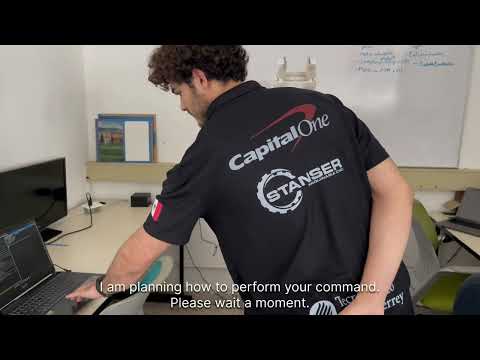
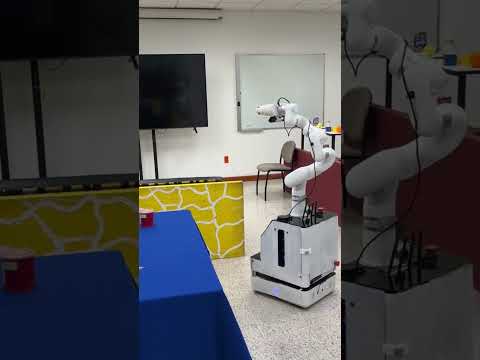
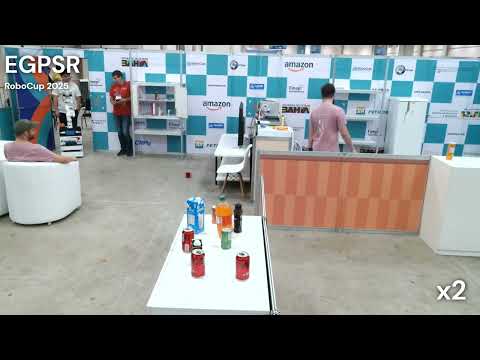
ROS 2 repository by RoBorregos, the Robotics Representative Team of Tecnologico de Monterrey. This project focuses on developing a modular software architecture for FRIDA (Friendly Robotics Interactive Domestic Assistant), an autonomous service robot competing in the RoboCup @Home league. The system enables robots to perform everyday domestic tasks through integrated vision, navigation, manipulation, and human-robot interaction modules.
Table of Contents
- Getting Started
- Usage
- Cyclone DDS Setup
- AI Agent Setup
- Documentation
- Video Demonstrations
- Team Members
- Past Contributors
Getting Started
Prerequisites
- Docker
- Docker Compose
- Git
- NVIDIA Container Toolkit (optional, for GPU support)
Installation
git clone https://github.com/RoBorregos/home2.git --recursive
cd home2

# If you already cloned without --recursive
git submodule update --init --recursive
Usage
The run.sh script automatically detects your environment (CPU, CUDA, or L4T) and manages the Docker containers.
# Show available commands and options
./run.sh --help

# Run a specific area
./run.sh vision
./run.sh hri
./run.sh navigation
./run.sh manipulation
./run.sh integration

# Run a competition task
./run.sh --gpsr
./run.sh --restaurant
Available Areas
| Area | Description |
|---|---|
vision | Spins up the containers for the vision area |
manipulation | Spins up the containers for manipulation |
navigation | Spins up the containers for navigation |
hri | Spins up the containers for human-robot interaction |
integration | Spins up the complete integration environment |
frida_interfaces | Builds and configures FRIDA's custom interfaces/messages |
Competition Tasks
| Flag | Description |
|---|---|
--hric | Runs the Human-Robot Interaction challenge |
--ppc | Runs the Pick and Place challenge |
--gpsr | Runs the General Purpose Service Robot challenge |
--dlc | Runs the Doing Laundry Challenge |
--restaurant | Runs the Restaurant challenge |
--finals | Runs the finals stage routine |
Control Commands
| Flag | Description |
|---|---|
--stop | Stops the running containers without removing them |
--down | Stops and removes all containers, networks, and volumes |
Additional Flags
| Flag | Description |
|---|---|
--build | Builds the ROS 2 packages inside the container |
--build-image | Builds the Docker image for the specified area or task |
--recreate | Forces the recreation of containers |
Cyclone DDS Setup
To enable communication between multiple computers (e.g., robot and development machine), set up Cyclone DDS on each host computer.
Bare Metal (Orin, direct install)
sudo bash scripts/setup_cyclonedds.sh <INTERFACE>
source ~/.bashrc
Docker Setup (PC)
Run the host-only setup once to apply kernel buffer settings:
sudo bash scripts/setup_cyclonedds.sh --host-only <INTERFACE>
Then run your area normally — run.sh reads the configuration automatically:
./run.sh navigation
Replace <INTERFACE> with your network interface (e.g., eno1, wlp2s0). Find it with:
ip -br link show
Revert to FastDDS
sudo bash scripts/setup_cyclonedds.sh --revert
source ~/.bashrc
For detailed configuration options, see the CycloneDDS setup docs.
AI Agent Setup
To set up personalized instructions for your AI development agent (Claude, Gemini, or Copilot), run the setup script:
./scripts/setup-agent.sh [agent_type]
Available agent_type options: claude, gemini, copilot, custom. If no argument is provided, the script will prompt you for a choice.
Documentation

Video Demonstrations
Team Members
| Name | GitHub | Role |
|---|---|---|
| Oscar Arreola | @Oscar-gg | HRI, Integration |
| Gerardo Fregoso | @GerardoFJ | Navigation, Integration |
| Alejandra Coeto | @Ale-Coeto | Vision, Integration |
| Danae Sanchez | @DanaeSG | Vision, Navigation, Integration |
| Alejandro Gonzalez | @AleGonzcamilla | Mechanics, Manipulation |
| Emil Winkler | @emilwinkp | Manipulation |
| Fernando Hernandez | @Fernando94654 | Vision, Manipulation |
| Camila Tite | @CamilaTite26 | HRI |
| Daniela Herrera | @DanHeGa | Vision |
| Gilberto Malagamba | @GilMM27 | HRI, Integration |
| Jose Dominguez | @JLDominguezM | Manipulation, Integration |
Past Contributors
| Name | GitHub | Role |
|---|---|---|
| Adan Flores-Ramirez | @afr2903 | Research |
| David Vazquez | @deivideich | Manipulation |
| Emiliano Flores | @EmilianoHFlores | Manipulation, Vision, Integration |
| Ivan Romero | @IvanRomero03 | Integration, HRI, Manipulation, Vision |
| Diego Hernandez | @Diego-HC | Integration, HRI, Navigation |


Similar repos


Languages
C++
49.7%
Python
45.3%
Shell
2.1%
ROS 2 implementation for RoboCup @Home OPL | RoBorregos. API docs: https://roborregos.github.io/home2/
See the codeREADME
RoBorregos @Home
ROS 2 repository by RoBorregos, the Robotics Representative Team of Tecnologico de Monterrey. This project focuses on developing a modular software architecture for FRIDA (Friendly Robotics Interactive Domestic Assistant), an autonomous service robot competing in the RoboCup @Home league. The system enables robots to perform everyday domestic tasks through integrated vision, navigation, manipulation, and human-robot interaction modules.
Table of Contents
- Getting Started
- Usage
- Cyclone DDS Setup
- AI Agent Setup
- Documentation
- Video Demonstrations
- Team Members
- Past Contributors
Getting Started
Prerequisites
- Docker
- Docker Compose
- Git
- NVIDIA Container Toolkit (optional, for GPU support)
Installation
git clone https://github.com/RoBorregos/home2.git --recursive
cd home2

# If you already cloned without --recursive
git submodule update --init --recursive
Usage
The run.sh script automatically detects your environment (CPU, CUDA, or L4T) and manages the Docker containers.
# Show available commands and options
./run.sh --help

# Run a specific area
./run.sh vision
./run.sh hri
./run.sh navigation
./run.sh manipulation
./run.sh integration

# Run a competition task
./run.sh --gpsr
./run.sh --restaurant
Available Areas
| Area | Description |
|---|---|
vision | Spins up the containers for the vision area |
manipulation | Spins up the containers for manipulation |
navigation | Spins up the containers for navigation |
hri | Spins up the containers for human-robot interaction |
integration | Spins up the complete integration environment |
frida_interfaces | Builds and configures FRIDA's custom interfaces/messages |
Competition Tasks
| Flag | Description |
|---|---|
--hric | Runs the Human-Robot Interaction challenge |
--ppc | Runs the Pick and Place challenge |
--gpsr | Runs the General Purpose Service Robot challenge |
--dlc | Runs the Doing Laundry Challenge |
--restaurant | Runs the Restaurant challenge |
--finals | Runs the finals stage routine |
Control Commands
| Flag | Description |
|---|---|
--stop | Stops the running containers without removing them |
--down | Stops and removes all containers, networks, and volumes |
Additional Flags
| Flag | Description |
|---|---|
--build | Builds the ROS 2 packages inside the container |
--build-image | Builds the Docker image for the specified area or task |
--recreate | Forces the recreation of containers |
Cyclone DDS Setup
To enable communication between multiple computers (e.g., robot and development machine), set up Cyclone DDS on each host computer.
Bare Metal (Orin, direct install)
sudo bash scripts/setup_cyclonedds.sh <INTERFACE>
source ~/.bashrc
Docker Setup (PC)
Run the host-only setup once to apply kernel buffer settings:
sudo bash scripts/setup_cyclonedds.sh --host-only <INTERFACE>
Then run your area normally — run.sh reads the configuration automatically:
./run.sh navigation
Replace <INTERFACE> with your network interface (e.g., eno1, wlp2s0). Find it with:
ip -br link show
Revert to FastDDS
sudo bash scripts/setup_cyclonedds.sh --revert
source ~/.bashrc
For detailed configuration options, see the CycloneDDS setup docs.
AI Agent Setup
To set up personalized instructions for your AI development agent (Claude, Gemini, or Copilot), run the setup script:
./scripts/setup-agent.sh [agent_type]
Available agent_type options: claude, gemini, copilot, custom. If no argument is provided, the script will prompt you for a choice.
Documentation
Video Demonstrations
Team Members
| Name | GitHub | Role |
|---|---|---|
| Oscar Arreola | @Oscar-gg | HRI, Integration |
| Gerardo Fregoso | @GerardoFJ | Navigation, Integration |
| Alejandra Coeto | @Ale-Coeto | Vision, Integration |
| Danae Sanchez | @DanaeSG | Vision, Navigation, Integration |
| Alejandro Gonzalez | @AleGonzcamilla | Mechanics, Manipulation |
| Emil Winkler | @emilwinkp | Manipulation |
| Fernando Hernandez | @Fernando94654 | Vision, Manipulation |
| Camila Tite | @CamilaTite26 | HRI |
| Daniela Herrera | @DanHeGa | Vision |
| Gilberto Malagamba | @GilMM27 | HRI, Integration |
| Jose Dominguez | @JLDominguezM | Manipulation, Integration |
Past Contributors
| Name | GitHub | Role |
|---|---|---|
| Adan Flores-Ramirez | @afr2903 | Research |
| David Vazquez | @deivideich | Manipulation |
| Emiliano Flores | @EmilianoHFlores | Manipulation, Vision, Integration |
| Ivan Romero | @IvanRomero03 | Integration, HRI, Manipulation, Vision |
| Diego Hernandez | @Diego-HC | Integration, HRI, Navigation |
Similar repos
Contributors
(top 30 of 36)
Languages
C++
49.7%
Python
45.3%
Shell
2.1%