Build script for BareMetal OS and its related utilities
Shell
841
212 commits
updated Apr 16, 2026
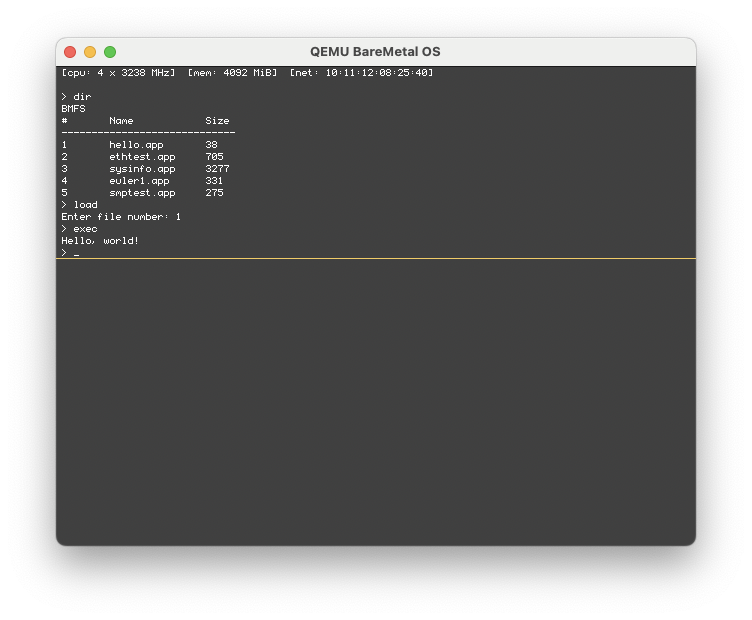
BareMetal OS is an exokernel-based operating system crafted entirely in x86-64 assembly and is designed to provide unparalleled levels of flexibility and efficiency. By exposing hardware resources directly to applications, it empowers developers to finely tune and optimize their software for specific tasks. With the exokernel's minimalist design, it minimizes the overhead imposed by traditional operating systems, enabling applications to achieve peak performance. Its x86-64 assembly implementation speaks to its commitment to squeezing every ounce of performance from the hardware, making it a compelling choice for those who demand the utmost control and efficiency from their computing environments.
[!NOTE]
BareMetal OS is under active development. Some physical hardware configurations may not work correctly.
The script in this repo depends on a Debian-based Linux system like Ubuntu or Elementary. macOS is also supported to build and test the OS, as well as the Assembly applications, if you are using Homebrew.
In Linux this can be completed with the following command:
sudo apt install nasm qemu-system-x86 gcc git mtools
In macOS via Homebrew this can be completed with the following command:
brew install nasm qemu gcc git mtools
BareMetal OS consists of several different projects:
git clone https://github.com/ReturnInfinity/BareMetal-OS.git
cd BareMetal-OS
./baremetal.sh setup
baremetal.sh setup automatically runs the build and install functions. Once the setup is complete you can execute baremetal.sh run to verify that everything installed correctly.
./baremetal.sh build
This command builds the boot sector, loader (Pure64), kernel, and simple command line interface (Monitor) to the disk image. If you want to attach your own binary to the end of the kernel you can use ./baremetal.sh build mybinary.bin
./baremetal.sh install
This command installs the software to the disk image.
./baremetal.sh demos
This command installs the demo programs to the disk image.
./baremetal.sh run
./baremetal.sh run-uefi
./baremetal.sh run-2
Running a cloned second instance is useful for testing network connectivity between QEMU systems.
./baremetal.sh vmdk
./baremetal.sh vdi
Notes:
Chipset Type for the VirtualBox VM must be ICH9bochs -f bochs.cfg
Notes:
bochs.cfg file may need to be adjusted for your usage. It was created for a Linux-based system.display_libary is set to use x for X Windows with the GUI Debugger by default. On macOS or Windows you will need to use sdl2 with no additional options.romimage and vgaromimage will need to be updated if the Bochs BIOS files are in a different location.Booting via BIOS and UEFI is supported. Secure boot in UEFI mode must be disabled since this software isn't signed. You may need to press DEL or F12 on the keyboard on power-up to select the boot drive.
[!IMPORTANT] Booting from a floppy or USB drive works. For BIOS-based floppy boot and UEFI-based USB drive booting there is a RAM drive image loaded that contains the demo programs.
Write the floppy.sys image to your diskette and boot your system with it.
The baremetal_os.img file is a hybrid disk image and supports both BIOS and UEFI systems. Write the baremetal_os.img image to your disk:
[!CAUTION] Doublecheck that you are writing the disk image to the correct disk
dd if=baremetal_os.img of=/dev/sdc
Once the disk image is written you can install the disk in the system and boot from it.
Copy the BOOTX64.EFI file to /EFI/BOOT on your USB drive and boot your system from it.
// EOF
423 followers · starred Oct 2015
130 followers · starred May 2024
234 followers · starred Dec 2024
165 followers · starred Apr 2026
Build script for BareMetal OS and its related utilities
Shell
841
212 commits
updated Apr 16, 2026
BareMetal OS is an exokernel-based operating system crafted entirely in x86-64 assembly and is designed to provide unparalleled levels of flexibility and efficiency. By exposing hardware resources directly to applications, it empowers developers to finely tune and optimize their software for specific tasks. With the exokernel's minimalist design, it minimizes the overhead imposed by traditional operating systems, enabling applications to achieve peak performance. Its x86-64 assembly implementation speaks to its commitment to squeezing every ounce of performance from the hardware, making it a compelling choice for those who demand the utmost control and efficiency from their computing environments.
[!NOTE]
BareMetal OS is under active development. Some physical hardware configurations may not work correctly.
The script in this repo depends on a Debian-based Linux system like Ubuntu or Elementary. macOS is also supported to build and test the OS, as well as the Assembly applications, if you are using Homebrew.
In Linux this can be completed with the following command:
sudo apt install nasm qemu-system-x86 gcc git mtools
In macOS via Homebrew this can be completed with the following command:
brew install nasm qemu gcc git mtools
BareMetal OS consists of several different projects:
git clone https://github.com/ReturnInfinity/BareMetal-OS.git
cd BareMetal-OS
./baremetal.sh setup
baremetal.sh setup automatically runs the build and install functions. Once the setup is complete you can execute baremetal.sh run to verify that everything installed correctly.
./baremetal.sh build
This command builds the boot sector, loader (Pure64), kernel, and simple command line interface (Monitor) to the disk image. If you want to attach your own binary to the end of the kernel you can use ./baremetal.sh build mybinary.bin
./baremetal.sh install
This command installs the software to the disk image.
./baremetal.sh demos
This command installs the demo programs to the disk image.
./baremetal.sh run
./baremetal.sh run-uefi
./baremetal.sh run-2
Running a cloned second instance is useful for testing network connectivity between QEMU systems.
./baremetal.sh vmdk
./baremetal.sh vdi
Notes:
Chipset Type for the VirtualBox VM must be ICH9bochs -f bochs.cfg
Notes:
bochs.cfg file may need to be adjusted for your usage. It was created for a Linux-based system.display_libary is set to use x for X Windows with the GUI Debugger by default. On macOS or Windows you will need to use sdl2 with no additional options.romimage and vgaromimage will need to be updated if the Bochs BIOS files are in a different location.Booting via BIOS and UEFI is supported. Secure boot in UEFI mode must be disabled since this software isn't signed. You may need to press DEL or F12 on the keyboard on power-up to select the boot drive.
[!IMPORTANT] Booting from a floppy or USB drive works. For BIOS-based floppy boot and UEFI-based USB drive booting there is a RAM drive image loaded that contains the demo programs.
Write the floppy.sys image to your diskette and boot your system with it.
The baremetal_os.img file is a hybrid disk image and supports both BIOS and UEFI systems. Write the baremetal_os.img image to your disk:
[!CAUTION] Doublecheck that you are writing the disk image to the correct disk
dd if=baremetal_os.img of=/dev/sdc
Once the disk image is written you can install the disk in the system and boot from it.
Copy the BOOTX64.EFI file to /EFI/BOOT on your USB drive and boot your system from it.
// EOF
423 followers · starred Oct 2015
130 followers · starred May 2024
234 followers · starred Dec 2024
165 followers · starred Apr 2026