A bootable x86 system built from handwritten binary machine code. No Assembly. No compiler. Just 0s and 1s.
See the code
No C. No Rust. No Assembly. No compiler. Just 0s and 1s.


Explore the live website → · Documentation · Download the 512-byte image
What if you could build a real bootable computer program without writing a single instruction in a programming language?
bitborn explores that question by encoding machine instructions directly as binary digits. Every opcode. Every operand. Every branch displacement. No assembler translates the target code: we author the bytes themselves.
A real 512-byte BIOS boot program, fourteen reviewed examples, four byte tools, an editable boot builder, a visual CPU lab, and 20 binary challenges. This is an educational experiment, not a production operating system.
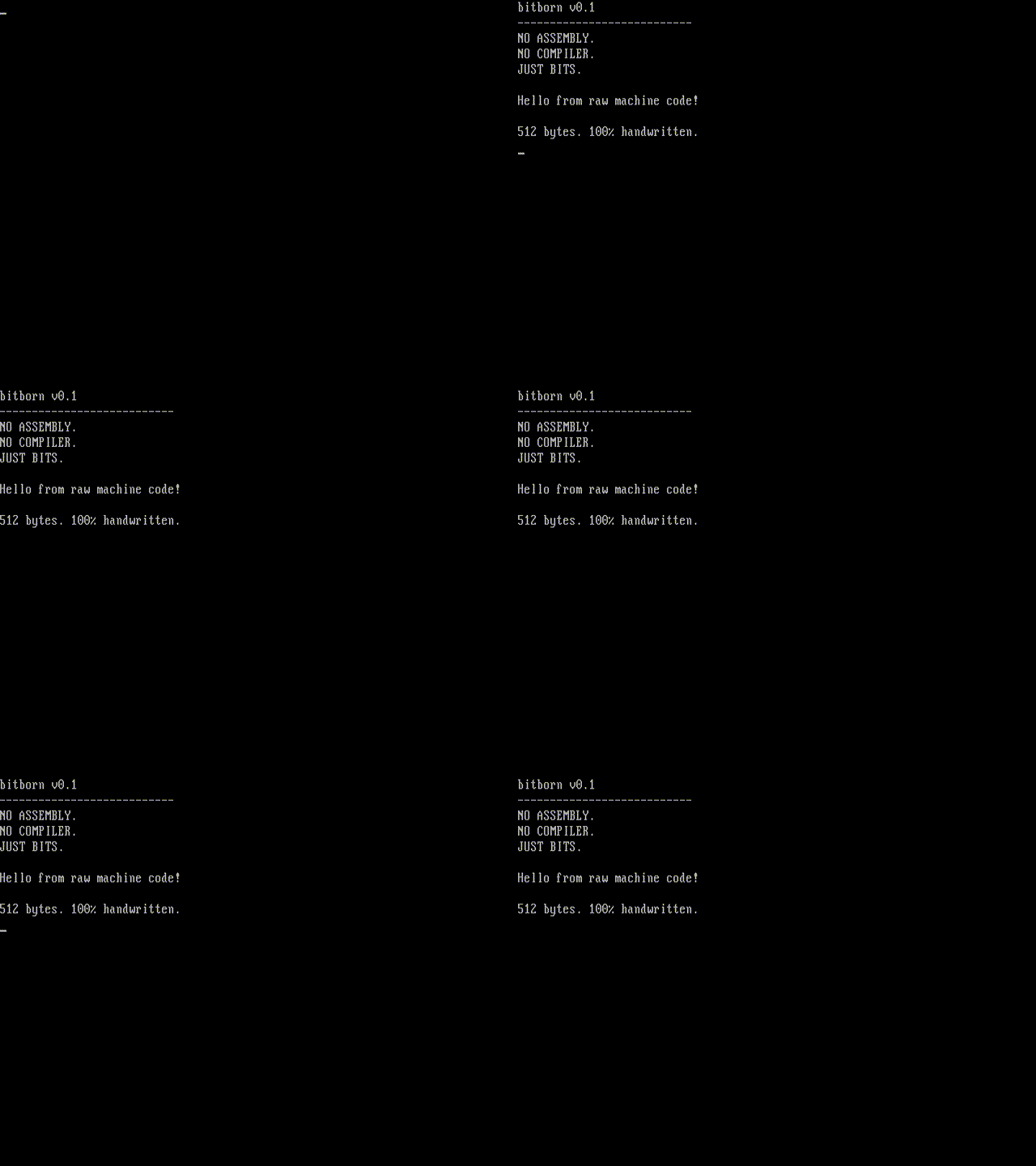
Actual QEMU/SeaBIOS boot, not a simulated terminal. Capture provenance.
You need Python 3.10+, Make and QEMU. On macOS: brew install qemu.
On Ubuntu: sudo apt-get install python3 make qemu-system-x86.
git clone https://github.com/OthmaneBlial/bitborn.git
cd bitborn
make test
make run
make run boots the image in a graphical QEMU window and mirrors its text to
the serial terminal. make test uses headless QEMU and checks real guest behavior.
The BIOS examples also work under TCG emulation on Apple Silicon. Linux ELF
examples require a Linux x86-64 kernel; macOS skips their native test and
Ubuntu CI executes all six.
Updated 2026-10-12 after each verified milestone. See ROADMAP.md for exact evidence and remaining gates.
| Milestone | Progress |
|---|---|
| 512-byte handwritten boot program and four byte tools | ✅ QEMU-tested, public |
| Linux exit, arithmetic, text, loops and comparisons | ✅ Native execution passed in Linux CI |
| BIOS keyboard and direct VGA memory writes | ✅ QEMU-tested |
| Multi-sector loader and interactive monitor | ✅ QEMU-tested: help, clear, about, reboot, peek |
| Ten example guides and complete byte tables | ✅ Documented, with actual execution checks |
| Real boot screenshot/GIF and architecture tutorial | ✅ Captured from QEMU and reproducible |
Interactive .io website and mobile browser checks | ✅ Live; HTTPS assets and Chrome interactions verified |
| Public v0.1.0 images, source and checksums | ✅ Published; downloaded artifacts and checksums verified |
| v0.1.1 host-tool patch | ✅ Published; comment/failed-write checks and downloaded artifacts verified |
| Shared CPU model: flags, calls, stack and segmented memory | ✅ Locally verified; modern PUSH SP semantics checked in real QEMU |
| Full editable 512-byte boot-sector builder | ✅ Chrome-tested; exact downloaded image/source boot the one-bit edit in QEMU |
| Visual CPU lab: registers, flags, stack, memory and breakpoints | ✅ Five literal teaching programs and Chrome controls verified |
| 20 challenges across four levels | ✅ All solutions pass model and QEMU goals; seeds fail; local progress and sharing tested |
Eight dedicated .io routes and a size-comparison lab | ✅ Public; expanded Linux CI and live builder checks passed |
| Original 12-byte exit versus 8-byte alternative | ✅ Both return 42 in Linux CI; 132→128-byte ELF sizes, no speed claim |
| New browser GIFs, showcase and contributor issue forms | ✅ Genuine captured states with provenance; contributor files checked |
| Native shell and separately authored disk app | ✅ Nine commands, real RAM/register snapshots, checked disk load and repeated return in QEMU |
| 32-bit protected mode and software interrupt | ✅ GDT, flat memory, IDT gate and IRETD verified in QEMU; native captures recorded |
| Packaging and boundary correctness | ✅ Source aliases/collisions/corrupt derived files rejected; 16-bit IP wrap tested |
| v0.2.0 release | ✅ Public; all 13 files re-downloaded anonymously, exact bytes and checksums verified |
| Paging, exception/hardware interrupt handling and physical hardware | Future research; no working claim |
10111000 00101010 00000000
   B8       2A       00
In 16-bit real mode, this means MOV AX,42: one opcode byte followed by the
little-endian immediate operand. The instruction name here is an explanation,
never an input to a code generator. In a 32-bit operand-size context, the same
opcode consumes four immediate bytes. Execution mode matters.
The .bits file is human-readable notation; bitpack removes comments and
whitespace and turns each eight-digit token into exactly one byte. BIOS loads
those bytes at physical 7C00. The x86 CPU decodes and executes them.
./tools/bitpack boot/boot.bits boot.img
./tools/bitinspect boot.img --annotations boot/annotations.json
./tools/bitverify boot.img --size 512 --bios
./tools/bitdiff build/boot.img boot.img
| Tool | What it does |
|---|---|
bitpack | Strictly packs binary byte tokens; useful source-line errors |
bitinspect | Offsets, binary, hex and known annotated instruction boundaries |
bitverify | Sizes, BIOS signature, reviewed hashes, annotations, source audit and reproduction |
bitdiff | Marks each changed bit, including added or removed bytes |
The host tools are Python. The browser explorer is JavaScript. The target
machine instructions are authored directly in .bits. Packaging gallery
payloads adds non-executable zero fill, BIOS signatures or ELF headers; it never
generates an instruction. The main boot source already contains all 512 bytes.
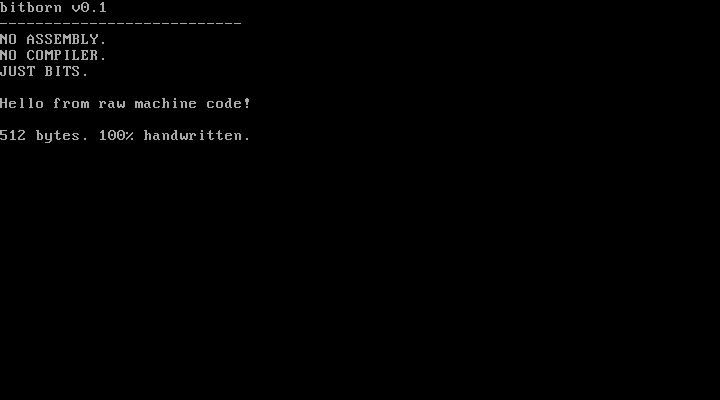
The program normalizes CS, sets data/stack segments, selects VGA text mode, initializes COM1 to 115200 baud/8N1, and prints the exact greeting to both outputs. It then disables interrupts and enters a controlled halt loop.
| Region | Bytes |
|---|---|
| Handwritten instructions | 91 |
| Literal greeting, line breaks and NUL | 148 |
| Explicit zero padding | 271 |
BIOS signature 55 AA | 2 |
| Total | 512 |
Read the canonical source · Every boot byte explained · Architecture · Encoding guide
| Example | Actual result | Environment |
|---|---|---|
| Return an exit code | Exit 42 | Linux x86-64 |
| Arithmetic | 6×7 → exit 42 | Linux x86-64 |
| Print text | Hello from raw bits! | Linux x86-64 |
| Loop and count | Five iterations → exit 5 | Linux x86-64 |
| Compare values | Equality branch → exit 42 | Linux x86-64 |
| Keyboard input | Real key echoed to VGA/COM1 | BIOS |
| VGA memory | Bright green B at B8000 | BIOS |
| 512-byte boot sector | Greeting and halt | BIOS |
| Interactive monitor | Five exact commands and edited input | BIOS |
| Disk reads | Load and execute additional sectors | BIOS |
| Eight-byte exit | Same exit 42; smaller payload, more stack traffic | Linux x86-64 |
| Binary shell | Nine commands, real memory, register snapshot and disk app | BIOS |
| Returning disk app | Computes 7×6, stores 2A in RAM, returns to shell | BIOS payload |
| Protected mode | 32-bit flat memory, IDT software interrupt and IRETD | BIOS → protected mode |
Each guide links its canonical source, per-byte table, generated binary path,
expected behavior and automated test. make build produces the artifacts.
The six ELF programs consist of the unchanged payload plus 120-byte host-packed
headers; they use Linux syscalls with no runtime library or linker.
qemu-system-i386 -drive file=build/monitor.img,format=raw,if=floppy -boot a -serial stdio
Type in the QEMU display and press Enter. The monitor supports exact lowercase
help, clear, about, reboot and peek; a 15-character input bound and
Backspace editing. peek loads the actual byte at physical 7C00. The monitor
and disk-read images use a separately handwritten loader and two padded sectors.
The new shell adds dump, regs, write, read and run alongside help,
about, clear and reboot. Its five-sector disk loads a separately authored app
at 9000; BIOS carry errors stop the launch. regs samples the actual CPU at
handler entry. The memory experiment and app calculation are checked against
guest RAM. The separate protected-mode target enters 32-bit ring zero, loads a
GDT and one software-interrupt gate, then verifies memory and interrupt return.
Neither experiment supplies paging, general exception handling or a full OS.
Start with the Boot Sector Builder:
all 512 bytes are editable, current decoding explains fields, and .bits/.img
exports preserve your exact bytes. Change offset 176 from 01001000 to
01101000, then boot the downloaded image: “Hello” becomes “hello”.
The CPU Lab shows all modeled 16-bit registers, flags, changed register bits, stack and memory. Step, run, pause, adjust speed, set breakpoints or inspect a bounded literal program. The 20 challenges provide four difficulty levels, hints, semantic goals, share links and progress stored only in your browser. Every reviewed solution also runs in QEMU; success is based on the behavior goals rather than equality with one answer.
Browser execution is a bounded educational model, with a 4,096-step ceiling,
1 MiB modeled memory and explicit unsupported-encoding errors. It does not run
native browser code. make site-test verifies source hashes, execution and links.
Learning paths,
architecture,
examples and the
live roadmap have dedicated pages.
The roadmap and homepage progress feed are rebuilt from the table above.
The website documentation links all fourteen current examples and the latest
release. The original 512-byte boot message still reports v0.1; its exact bytes
are preserved while v0.2 adds separate instruments and native targets.
npm ci                         # development-only browser test dependency
npx playwright install chromium
npm run test:browser            # real Chrome interactions and mobile layouts
npx playwright install firefox webkit
npm run test:cross-browser      # Firefox/WebKit interactions and exact downloads
python3 tools/verify_browser_export.py # actual QEMU boot of the browser download
python3 -m http.server 8000 --directory site
Beginner tutorial · Contributing · Reproducible showcase · Good first contributions · Changelog · Roadmap · Latest release · Dated public metrics
Independent encoding assertions and branch checks supplement reviewed SHA-256 hashes. QEMU tests verify exact serial output, halt state, actual VGA/loaded-disk memory, every monitor command, editing, buffer bounds, reboot, and a forced BIOS disk-read failure. Native Linux CI runs all six ELF payloads. Browser tests exercise bit edits, opcode changes, unsupported encodings, signature inspection, full simulated boot, copy controls, reduced-motion mode and mobile layouts. New checks cover every challenge's positive and negative case, exact bit-edit budgets, local storage failures, downloaded image/source identity, lab calls and flags, live memory fetch, breakpoints, and source-derived roadmap rendering.
Hashes prove byte identity, not correctness or authorship. QEMU proves emulated behavior, not physical-hardware support. CI status is linked above. The v0.2.0 exact-commit CI and tag CI both passed all 37 Python tests, browser checks and artifact reproduction. All 135 live runtime files match local bytes, including all 86 curated downloads; the published interactions were repeated in Chrome.
Isn't machine code just Assembly? Assembly is a symbolic language; an assembler encodes it. Here the bytes themselves are the source. Mnemonics only explain the bytes. Binary versus hex changes notation, not machine behavior.
Is everything in this repo written in binary? The target instructions and data are. Host packaging, tests, docs and website use ordinary tools and languages. This project does not remove languages from the host environment or from QEMU.
Was AI used? Yes. Source editing, explanations, host tools and site creation were AI-assisted. “Handwritten” describes direct authorship of literal target instruction bytes, rather than an assembler/compiler output; it does not claim unassisted human authorship. Inspect the sources, build pipeline and history.
Does it boot with UEFI? It targets legacy BIOS and x86 real mode. It is not an EFI executable, a protected-mode kernel, a filesystem or a production OS.
Can I use real hardware? No hardware validation is claimed. The UART poll can stall on absent hardware; the loader makes one CHS read without retries. Use a disposable emulator. No physical disk writes are needed to reproduce it.
Is the browser a complete x86 emulator? No. It supports documented instruction forms with simplified flags, BIOS and UART behavior. Unsupported bytes stop; execution is bounded. Native proof comes from QEMU and Linux CI.
Why do this? To make instruction encoding, byte order, control flow, the stack, firmware and executable formats concrete enough to inspect one bit at a time.
Created for OthmaneBlial. MIT licensed. Intel's instruction manuals, QEMU, SeaBIOS, Linux and the ELF ABI provide the underlying interfaces; technical references link to their primary documentation. No upstream executable blob is embedded or presented as our target source.
A bootable x86 system built from handwritten binary machine code. No Assembly. No compiler. Just 0s and 1s.
See the code
No C. No Rust. No Assembly. No compiler. Just 0s and 1s.
Explore the live website → · Documentation · Download the 512-byte image
What if you could build a real bootable computer program without writing a single instruction in a programming language?
bitborn explores that question by encoding machine instructions directly as binary digits. Every opcode. Every operand. Every branch displacement. No assembler translates the target code: we author the bytes themselves.
A real 512-byte BIOS boot program, fourteen reviewed examples, four byte tools, an editable boot builder, a visual CPU lab, and 20 binary challenges. This is an educational experiment, not a production operating system.
Actual QEMU/SeaBIOS boot, not a simulated terminal. Capture provenance.
You need Python 3.10+, Make and QEMU. On macOS: brew install qemu.
On Ubuntu: sudo apt-get install python3 make qemu-system-x86.
git clone https://github.com/OthmaneBlial/bitborn.git
cd bitborn
make test
make run
make run boots the image in a graphical QEMU window and mirrors its text to
the serial terminal. make test uses headless QEMU and checks real guest behavior.
The BIOS examples also work under TCG emulation on Apple Silicon. Linux ELF
examples require a Linux x86-64 kernel; macOS skips their native test and
Ubuntu CI executes all six.
Updated 2026-10-12 after each verified milestone. See ROADMAP.md for exact evidence and remaining gates.
| Milestone | Progress |
|---|---|
| 512-byte handwritten boot program and four byte tools | ✅ QEMU-tested, public |
| Linux exit, arithmetic, text, loops and comparisons | ✅ Native execution passed in Linux CI |
| BIOS keyboard and direct VGA memory writes | ✅ QEMU-tested |
| Multi-sector loader and interactive monitor | ✅ QEMU-tested: help, clear, about, reboot, peek |
| Ten example guides and complete byte tables | ✅ Documented, with actual execution checks |
| Real boot screenshot/GIF and architecture tutorial | ✅ Captured from QEMU and reproducible |
Interactive .io website and mobile browser checks | ✅ Live; HTTPS assets and Chrome interactions verified |
| Public v0.1.0 images, source and checksums | ✅ Published; downloaded artifacts and checksums verified |
| v0.1.1 host-tool patch | ✅ Published; comment/failed-write checks and downloaded artifacts verified |
| Shared CPU model: flags, calls, stack and segmented memory | ✅ Locally verified; modern PUSH SP semantics checked in real QEMU |
| Full editable 512-byte boot-sector builder | ✅ Chrome-tested; exact downloaded image/source boot the one-bit edit in QEMU |
| Visual CPU lab: registers, flags, stack, memory and breakpoints | ✅ Five literal teaching programs and Chrome controls verified |
| 20 challenges across four levels | ✅ All solutions pass model and QEMU goals; seeds fail; local progress and sharing tested |
Eight dedicated .io routes and a size-comparison lab | ✅ Public; expanded Linux CI and live builder checks passed |
| Original 12-byte exit versus 8-byte alternative | ✅ Both return 42 in Linux CI; 132→128-byte ELF sizes, no speed claim |
| New browser GIFs, showcase and contributor issue forms | ✅ Genuine captured states with provenance; contributor files checked |
| Native shell and separately authored disk app | ✅ Nine commands, real RAM/register snapshots, checked disk load and repeated return in QEMU |
| 32-bit protected mode and software interrupt | ✅ GDT, flat memory, IDT gate and IRETD verified in QEMU; native captures recorded |
| Packaging and boundary correctness | ✅ Source aliases/collisions/corrupt derived files rejected; 16-bit IP wrap tested |
| v0.2.0 release | ✅ Public; all 13 files re-downloaded anonymously, exact bytes and checksums verified |
| Paging, exception/hardware interrupt handling and physical hardware | Future research; no working claim |
10111000 00101010 00000000
   B8       2A       00
In 16-bit real mode, this means MOV AX,42: one opcode byte followed by the
little-endian immediate operand. The instruction name here is an explanation,
never an input to a code generator. In a 32-bit operand-size context, the same
opcode consumes four immediate bytes. Execution mode matters.
The .bits file is human-readable notation; bitpack removes comments and
whitespace and turns each eight-digit token into exactly one byte. BIOS loads
those bytes at physical 7C00. The x86 CPU decodes and executes them.
./tools/bitpack boot/boot.bits boot.img
./tools/bitinspect boot.img --annotations boot/annotations.json
./tools/bitverify boot.img --size 512 --bios
./tools/bitdiff build/boot.img boot.img
| Tool | What it does |
|---|---|
bitpack | Strictly packs binary byte tokens; useful source-line errors |
bitinspect | Offsets, binary, hex and known annotated instruction boundaries |
bitverify | Sizes, BIOS signature, reviewed hashes, annotations, source audit and reproduction |
bitdiff | Marks each changed bit, including added or removed bytes |
The host tools are Python. The browser explorer is JavaScript. The target
machine instructions are authored directly in .bits. Packaging gallery
payloads adds non-executable zero fill, BIOS signatures or ELF headers; it never
generates an instruction. The main boot source already contains all 512 bytes.
The program normalizes CS, sets data/stack segments, selects VGA text mode, initializes COM1 to 115200 baud/8N1, and prints the exact greeting to both outputs. It then disables interrupts and enters a controlled halt loop.
| Region | Bytes |
|---|---|
| Handwritten instructions | 91 |
| Literal greeting, line breaks and NUL | 148 |
| Explicit zero padding | 271 |
BIOS signature 55 AA | 2 |
| Total | 512 |
Read the canonical source · Every boot byte explained · Architecture · Encoding guide
| Example | Actual result | Environment |
|---|---|---|
| Return an exit code | Exit 42 | Linux x86-64 |
| Arithmetic | 6×7 → exit 42 | Linux x86-64 |
| Print text | Hello from raw bits! | Linux x86-64 |
| Loop and count | Five iterations → exit 5 | Linux x86-64 |
| Compare values | Equality branch → exit 42 | Linux x86-64 |
| Keyboard input | Real key echoed to VGA/COM1 | BIOS |
| VGA memory | Bright green B at B8000 | BIOS |
| 512-byte boot sector | Greeting and halt | BIOS |
| Interactive monitor | Five exact commands and edited input | BIOS |
| Disk reads | Load and execute additional sectors | BIOS |
| Eight-byte exit | Same exit 42; smaller payload, more stack traffic | Linux x86-64 |
| Binary shell | Nine commands, real memory, register snapshot and disk app | BIOS |
| Returning disk app | Computes 7×6, stores 2A in RAM, returns to shell | BIOS payload |
| Protected mode | 32-bit flat memory, IDT software interrupt and IRETD | BIOS → protected mode |
Each guide links its canonical source, per-byte table, generated binary path,
expected behavior and automated test. make build produces the artifacts.
The six ELF programs consist of the unchanged payload plus 120-byte host-packed
headers; they use Linux syscalls with no runtime library or linker.
qemu-system-i386 -drive file=build/monitor.img,format=raw,if=floppy -boot a -serial stdio
Type in the QEMU display and press Enter. The monitor supports exact lowercase
help, clear, about, reboot and peek; a 15-character input bound and
Backspace editing. peek loads the actual byte at physical 7C00. The monitor
and disk-read images use a separately handwritten loader and two padded sectors.
The new shell adds dump, regs, write, read and run alongside help,
about, clear and reboot. Its five-sector disk loads a separately authored app
at 9000; BIOS carry errors stop the launch. regs samples the actual CPU at
handler entry. The memory experiment and app calculation are checked against
guest RAM. The separate protected-mode target enters 32-bit ring zero, loads a
GDT and one software-interrupt gate, then verifies memory and interrupt return.
Neither experiment supplies paging, general exception handling or a full OS.
Start with the Boot Sector Builder:
all 512 bytes are editable, current decoding explains fields, and .bits/.img
exports preserve your exact bytes. Change offset 176 from 01001000 to
01101000, then boot the downloaded image: “Hello” becomes “hello”.
The CPU Lab shows all modeled 16-bit registers, flags, changed register bits, stack and memory. Step, run, pause, adjust speed, set breakpoints or inspect a bounded literal program. The 20 challenges provide four difficulty levels, hints, semantic goals, share links and progress stored only in your browser. Every reviewed solution also runs in QEMU; success is based on the behavior goals rather than equality with one answer.
Browser execution is a bounded educational model, with a 4,096-step ceiling,
1 MiB modeled memory and explicit unsupported-encoding errors. It does not run
native browser code. make site-test verifies source hashes, execution and links.
Learning paths,
architecture,
examples and the
live roadmap have dedicated pages.
The roadmap and homepage progress feed are rebuilt from the table above.
The website documentation links all fourteen current examples and the latest
release. The original 512-byte boot message still reports v0.1; its exact bytes
are preserved while v0.2 adds separate instruments and native targets.
npm ci                         # development-only browser test dependency
npx playwright install chromium
npm run test:browser            # real Chrome interactions and mobile layouts
npx playwright install firefox webkit
npm run test:cross-browser      # Firefox/WebKit interactions and exact downloads
python3 tools/verify_browser_export.py # actual QEMU boot of the browser download
python3 -m http.server 8000 --directory site
Beginner tutorial · Contributing · Reproducible showcase · Good first contributions · Changelog · Roadmap · Latest release · Dated public metrics
Independent encoding assertions and branch checks supplement reviewed SHA-256 hashes. QEMU tests verify exact serial output, halt state, actual VGA/loaded-disk memory, every monitor command, editing, buffer bounds, reboot, and a forced BIOS disk-read failure. Native Linux CI runs all six ELF payloads. Browser tests exercise bit edits, opcode changes, unsupported encodings, signature inspection, full simulated boot, copy controls, reduced-motion mode and mobile layouts. New checks cover every challenge's positive and negative case, exact bit-edit budgets, local storage failures, downloaded image/source identity, lab calls and flags, live memory fetch, breakpoints, and source-derived roadmap rendering.
Hashes prove byte identity, not correctness or authorship. QEMU proves emulated behavior, not physical-hardware support. CI status is linked above. The v0.2.0 exact-commit CI and tag CI both passed all 37 Python tests, browser checks and artifact reproduction. All 135 live runtime files match local bytes, including all 86 curated downloads; the published interactions were repeated in Chrome.
Isn't machine code just Assembly? Assembly is a symbolic language; an assembler encodes it. Here the bytes themselves are the source. Mnemonics only explain the bytes. Binary versus hex changes notation, not machine behavior.
Is everything in this repo written in binary? The target instructions and data are. Host packaging, tests, docs and website use ordinary tools and languages. This project does not remove languages from the host environment or from QEMU.
Was AI used? Yes. Source editing, explanations, host tools and site creation were AI-assisted. “Handwritten” describes direct authorship of literal target instruction bytes, rather than an assembler/compiler output; it does not claim unassisted human authorship. Inspect the sources, build pipeline and history.
Does it boot with UEFI? It targets legacy BIOS and x86 real mode. It is not an EFI executable, a protected-mode kernel, a filesystem or a production OS.
Can I use real hardware? No hardware validation is claimed. The UART poll can stall on absent hardware; the loader makes one CHS read without retries. Use a disposable emulator. No physical disk writes are needed to reproduce it.
Is the browser a complete x86 emulator? No. It supports documented instruction forms with simplified flags, BIOS and UART behavior. Unsupported bytes stop; execution is bounded. Native proof comes from QEMU and Linux CI.
Why do this? To make instruction encoding, byte order, control flow, the stack, firmware and executable formats concrete enough to inspect one bit at a time.
Created for OthmaneBlial. MIT licensed. Intel's instruction manuals, QEMU, SeaBIOS, Linux and the ELF ABI provide the underlying interfaces; technical references link to their primary documentation. No upstream executable blob is embedded or presented as our target source.



