




From Method Text to Editable SVG
AutoFigure-Edit is the next version of AutoFigure. It turns paper method sections into fully editable SVG figures and lets you refine them in an embedded SVG editor.
Quick Start • Web Interface • How It Works • Configuration • Citation
[Paper]
[AutoFigure]
[BibTeX]
https://github.com/user-attachments/assets/6f93deb4-9854-4f1e-8097-53b0c3378a0d
gpt-image-2 and gpt-5.5, Bianxie AI / custom OpenAI-compatible routing, and a bilingual configuration workflow. See the full release notes.AutoFigure-Edit v1.1 is published as tag v1.1. This release focuses on two practical workflows that were still awkward in earlier public builds: starting from a user-supplied stage-1 academic figure, and running the pipeline cleanly with official OpenAI models or OpenAI-compatible gateways.
gpt-image-2, while the OpenAI Responses path is documented and exposed for text plus multimodal SVG reconstruction with gpt-5.5 as the default SVG model.custom OpenAI-compatible routing: The CLI and web UI expose bianxie as a built-in compatible route with https://api.bianxie.ai/v1, while custom remains available for user-supplied OpenAI-compatible /v1 base URLs. The openai_response route can inherit the same compatible base_url and api_key by default.Full release notes: releases/v1.1.md
| Feature | Description |
|---|---|
| 📝 Text-to-Figure | Generate a draft figure directly from method text. |
| 🧠 SAM3 Icon Detection | Detect icon regions from multiple prompts and merge overlaps. |
| 🎯 Labeled Placeholders | Insert consistent AF-style placeholders for reliable SVG mapping. |
| 🧩 SVG Generation | Produce an editable SVG template aligned to the figure. |
| 🖥️ Embedded Editor | Edit the SVG in-browser using the bundled svg-edit. |
| 📦 Artifact Outputs | Save PNG/SVG outputs and icon crops per run. |
AutoFigure-edit introduces two breakthrough capabilities:
Below are 9 examples covering 3 different papers. Each paper is generated using 3 different reference styles. (Each image shows: Left = AutoFigure Generation | Right = Vectorized Editable SVG)
| Paper & Style Transfer Demonstration |
|---|
CycleResearcher / Style 1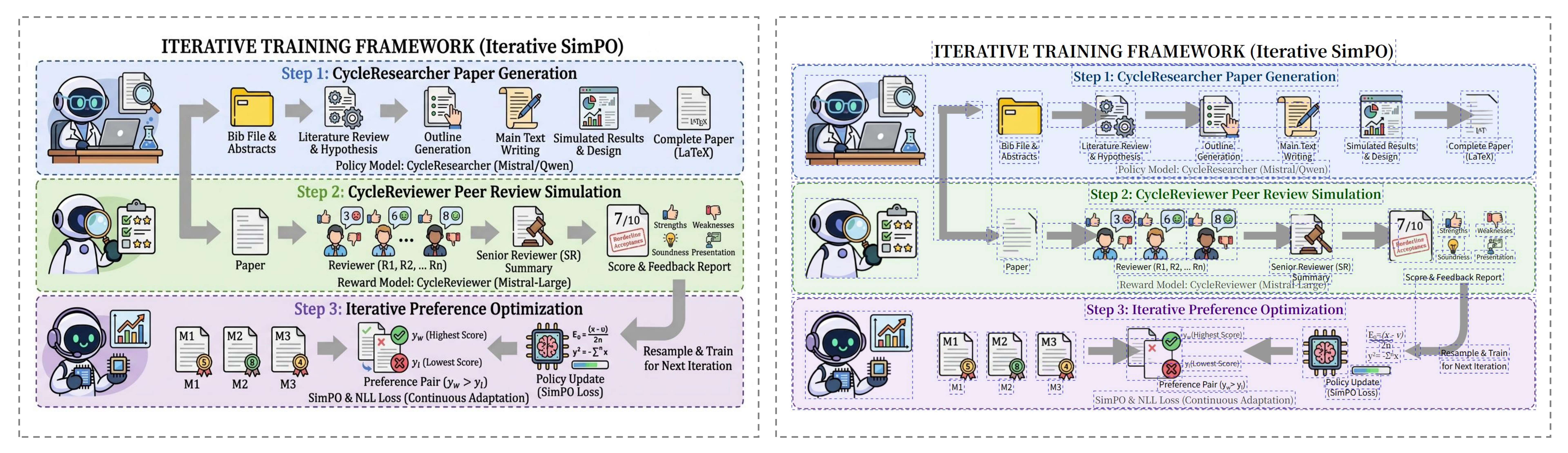 |
CycleResearcher / Style 2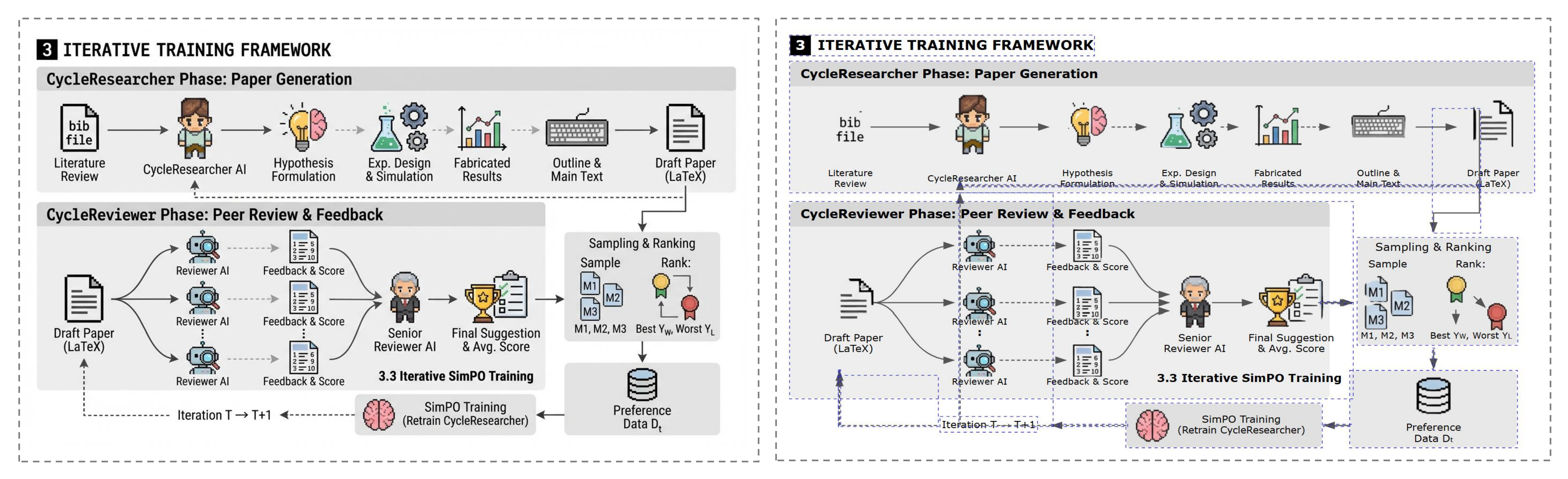 |
CycleResearcher / Style 3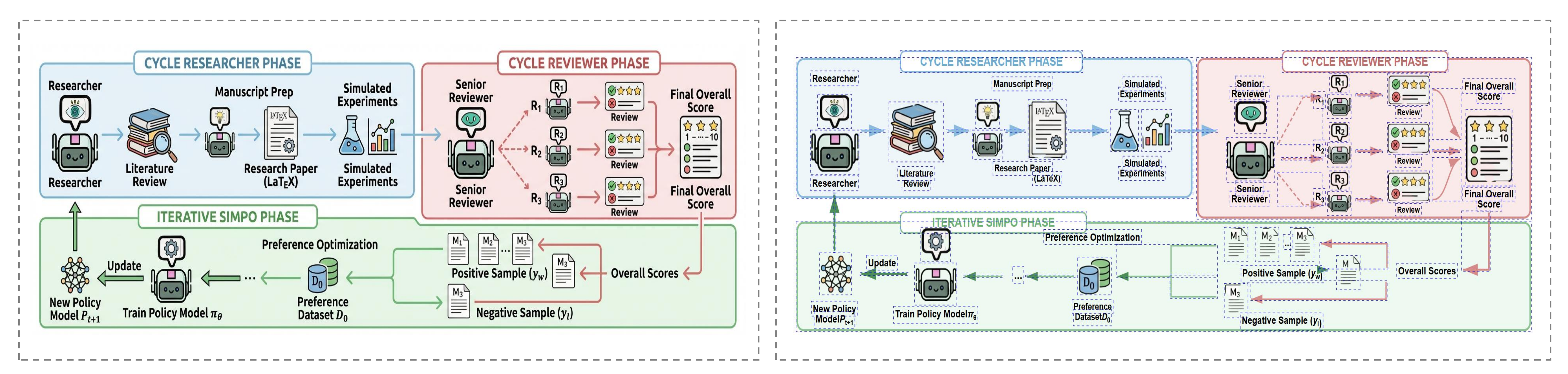 |
DeepReviewer / Style 1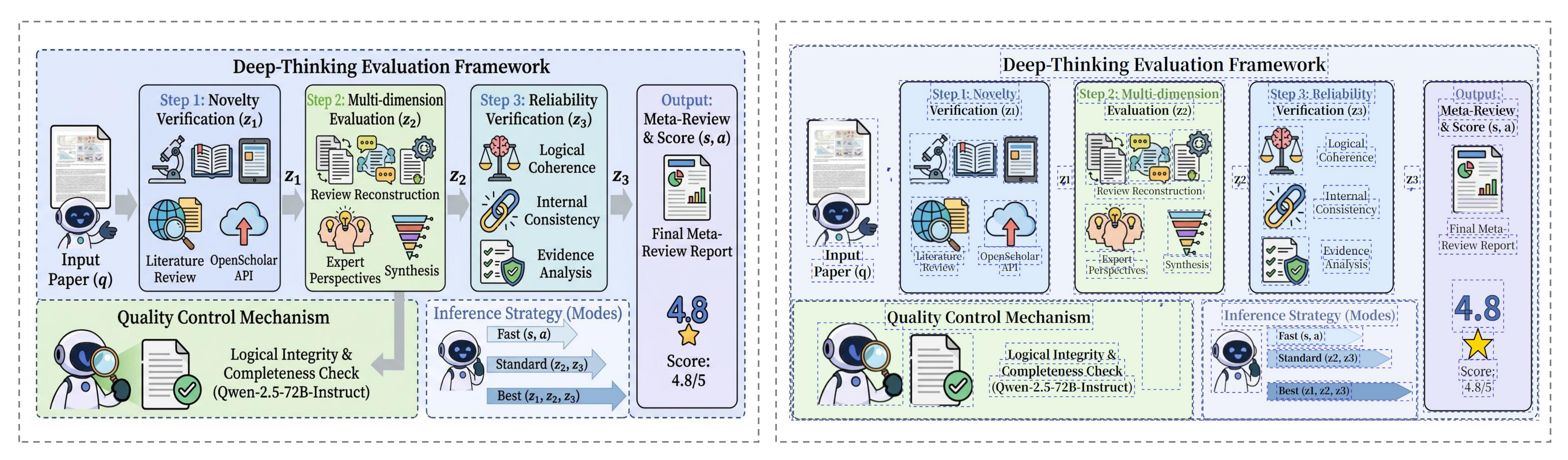 |
DeepReviewer / Style 2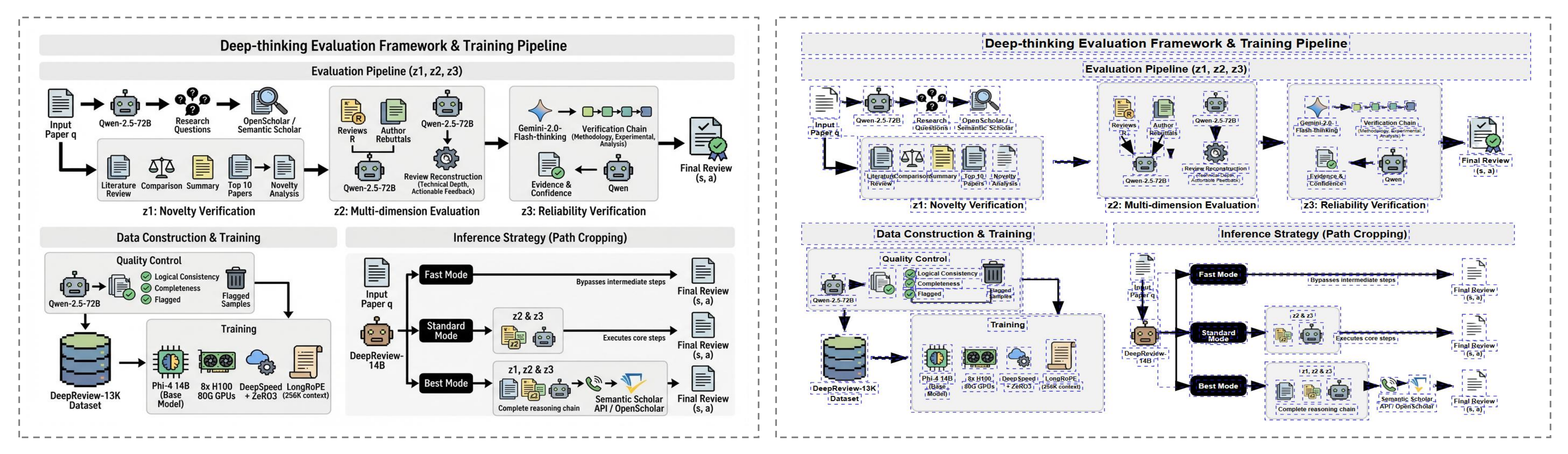 |
DeepReviewer / Style 3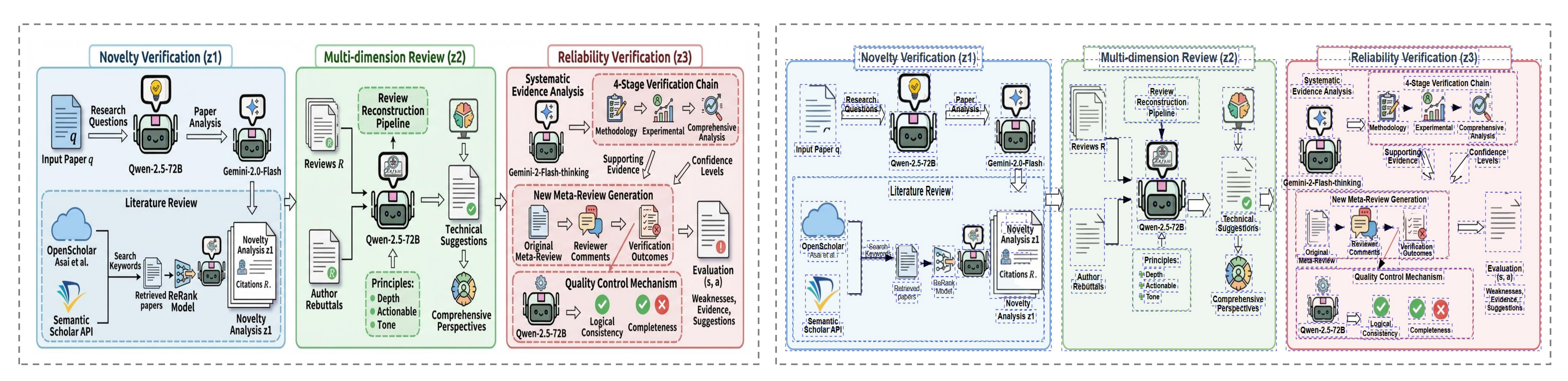 |
DeepScientist / Style 1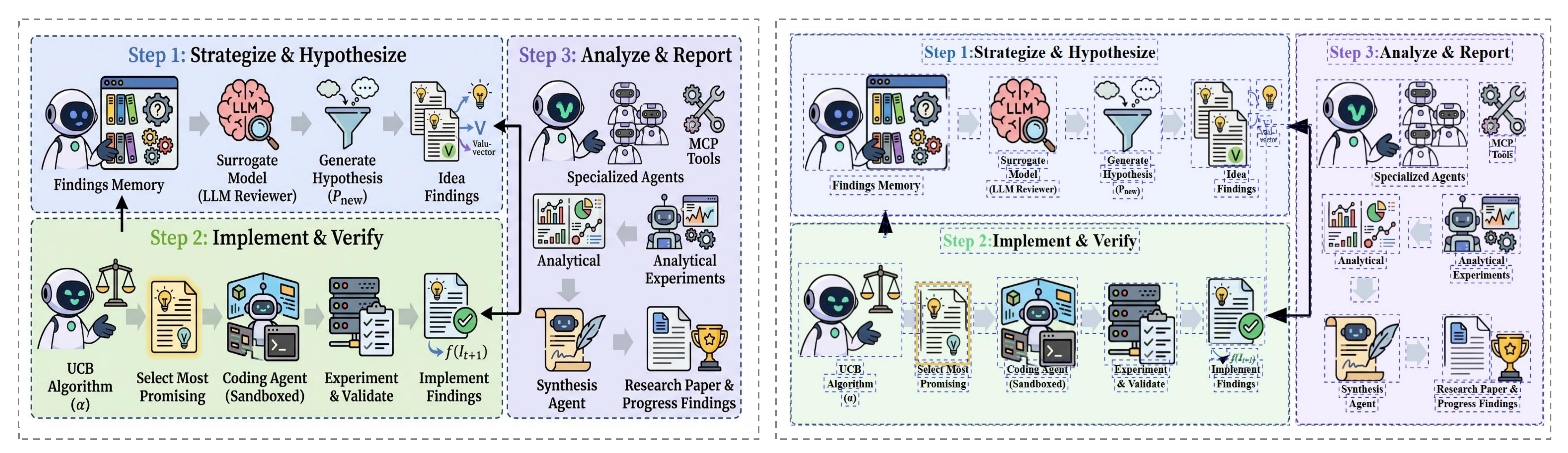 |
DeepScientist / Style 2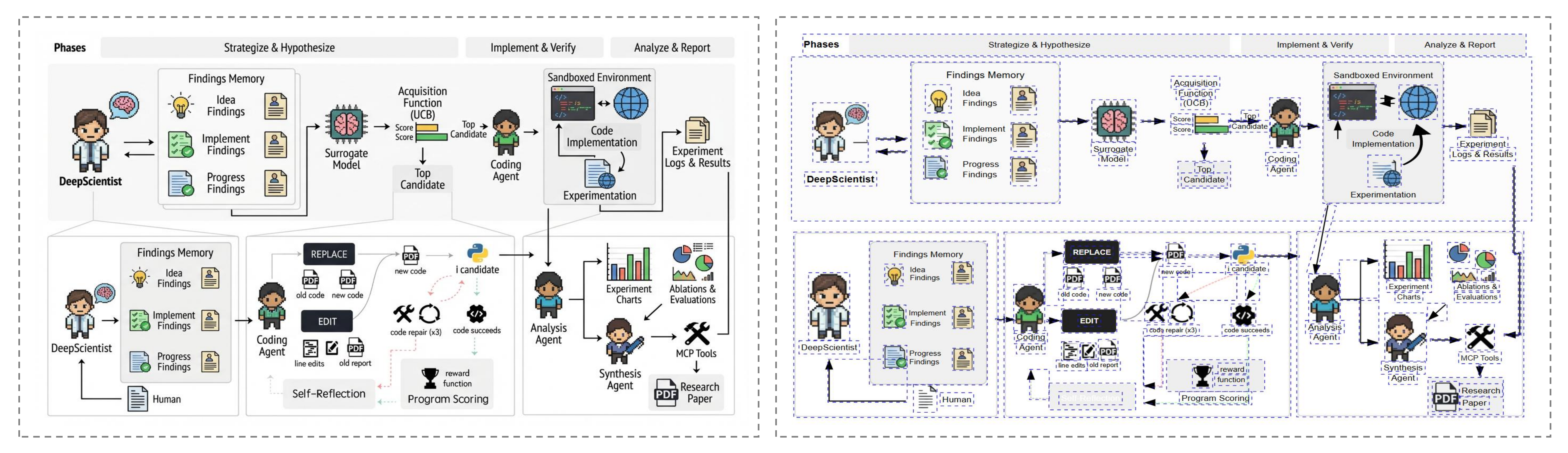 |
DeepScientist / Style 3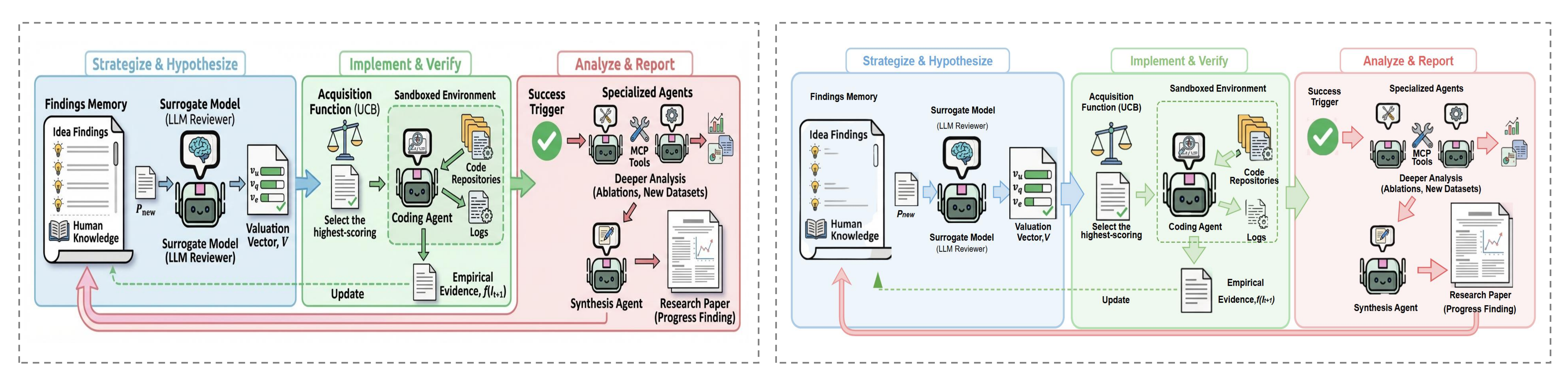 |
The AutoFigure-edit pipeline transforms a raw generation into an editable SVG in four distinct stages:
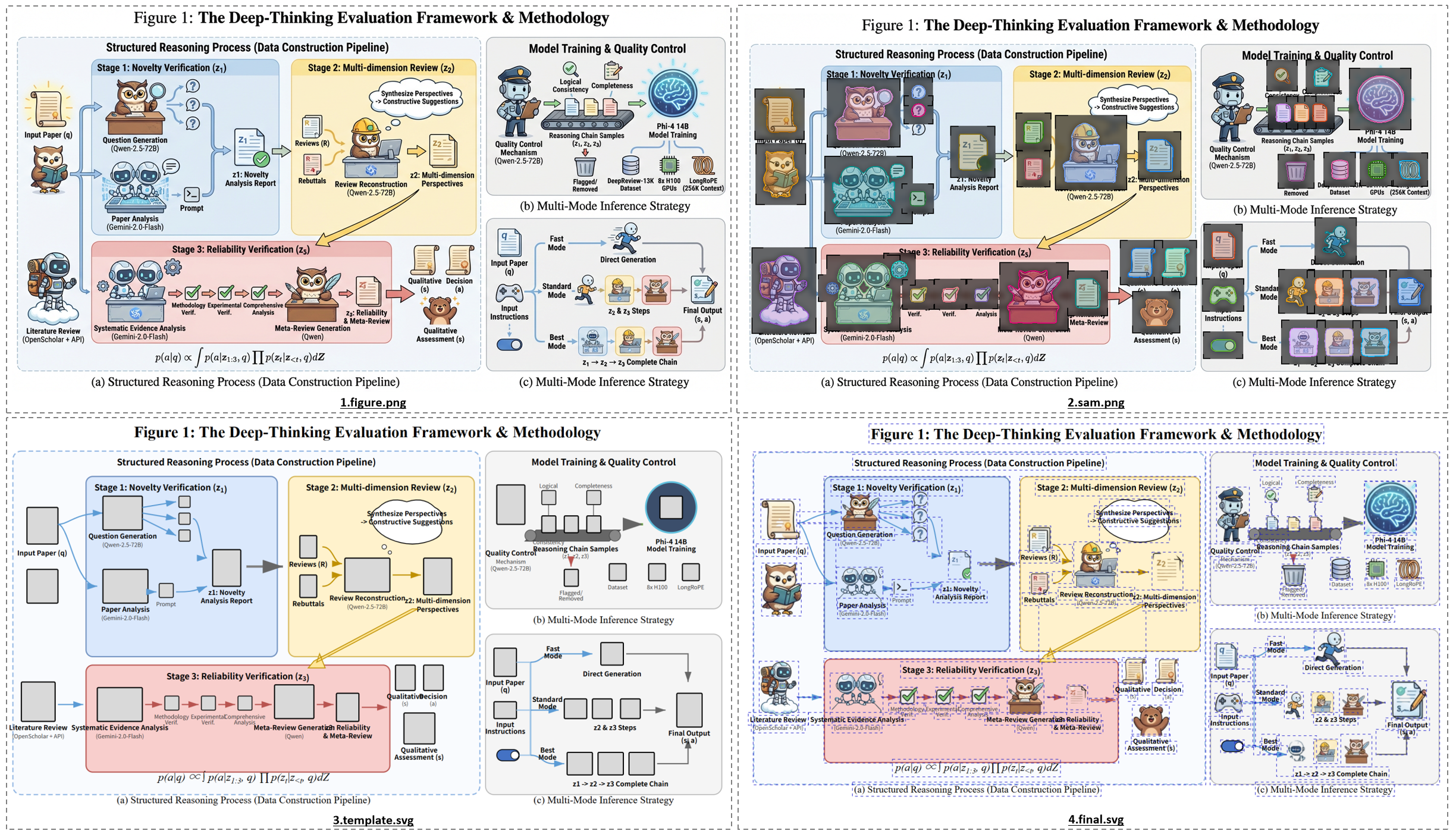
figure.png): The LLM generates a raster draft based on the method text.sam.png): SAM3 detects and segments distinct icons and text regions.template.svg): The system constructs a structural SVG wireframe using placeholders.final.svg): High-quality cropped icons and vectorized text are injected into the template.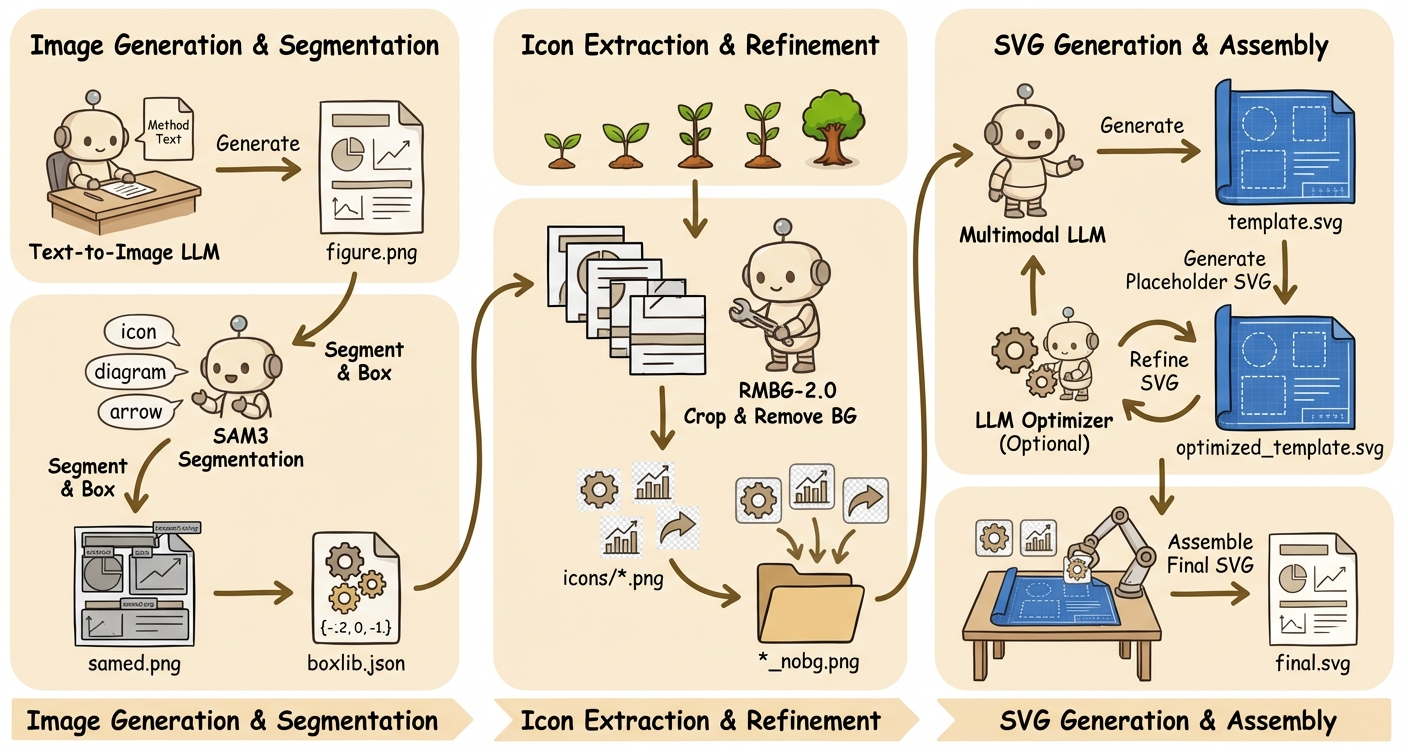
AutoFigure2’s pipeline starts from the paper’s method text and first calls a text‑to‑image LLM to render a journal‑style schematic, saved as figure.png. The system then runs SAM3 segmentation on that image using one or more text prompts (e.g., “icon, diagram, arrow”), merges overlapping detections by an IoU‑like threshold, and draws gray‑filled, black‑outlined labeled boxes on the original; this produces both samed.png (the labeled mask overlay) and a structured boxlib.json with coordinates, scores, and prompt sources.
Next, each box is cropped from the original figure and passed through RMBG‑2.0 for background removal, yielding transparent icon assets under icons/*.png and *_nobg.png. With figure.png, samed.png, and boxlib.json as multimodal inputs, the LLM generates a placeholder‑style SVG (template.svg) whose boxes match the labeled regions.
Optionally, the SVG is iteratively refined by an LLM optimizer to better align strokes, layouts, and styles, resulting in optimized_template.svg (or the original template if optimization is skipped). The system then compares the SVG dimensions with the original figure to compute scale factors and aligns coordinate systems. Finally, it replaces each placeholder in the SVG with the corresponding transparent icon (matched by label/ID), producing the assembled final.svg.
Key configuration details:
label, box, or none).optimize_iterations=0 allows skipping the refinement step to use the raw structure directly.Use Docker for a reproducible one-command setup without local Python/SAM3 installation.
8000 available on hostbriaai/RMBG-2.0: https://huggingface.co/briaai/RMBG-2.0.env# Linux/macOS
cp .env.example .env
# Windows PowerShell
Copy-Item .env.example .env
At minimum, set this in .env:
HF_TOKEN=hf_xxx
Optional but recommended:
# SAM3 API backend (Docker default in UI is Roboflow)
ROBOFLOW_API_KEY=your_roboflow_key

# Step-4 multimodal retry tuning (OpenRouter)
OPENROUTER_MULTIMODAL_RETRIES=3
OPENROUTER_MULTIMODAL_RETRY_DELAY=1.5

# DNS override for Roboflow name-resolution issues
DOCKER_DNS_1=223.5.5.5
DOCKER_DNS_2=119.29.29.29
For restricted networks, you can also set build mirrors:
BASE_IMAGE=docker.m.daocloud.io/library/python:3.11-slim
PIP_INDEX_URL=https://pypi.tuna.tsinghua.edu.cn/simple
PIP_EXTRA_INDEX_URL=
docker compose up -d --build
Open http://localhost:8000.
docker compose ps
curl http://localhost:8000/healthz
Expected health response: {"status":"ok"}.
# Stream logs
docker compose logs -f autofigure-edit

# Restart service
docker compose restart autofigure-edit

# Rebuild from scratch (no cache)
docker compose build --no-cache
docker compose up -d

# Stop and remove container
docker compose down
./outputs, ./uploadshf_cache (/app/.cache/huggingface)roboflowicon,person,robot,animalopenrouter: image google/gemini-3.1-flash-image-preview, svg google/gemini-3.1-pro-previewbianxie: image gpt-image-2, svg gemini-3.1-pro-preview (built-in base URL https://api.bianxie.ai/v1)custom: image gemini-3.1-flash-image-preview, svg gemini-3.1-pro-preview (requires your own OpenAI-compatible /v1 base URL)gemini: image gemini-3.1-flash-image-preview, svg gemini-3.1-pro-previewopenai_response: image gpt-image-2 (step 1 fallback), svg gpt-5.5 via Responses API--image_provider openai: image gpt-image-2 via the official OpenAI Images APITemporary failure in name resolution (Roboflow): set DOCKER_DNS_1/2 in .env, then docker compose up -d --build.auth.docker.io): set BASE_IMAGE and PIP_INDEX_URL mirrors in .env.ROBOFLOW_API_URL=<your_reachable_roboflow_endpoint>ROBOFLOW_API_FALLBACK_URLS=<comma_separated_backup_endpoints># 1) Install dependencies
pip install -r requirements.txt
# 2) Install SAM3 separately (not vendored in this repo)
git clone https://github.com/facebookresearch/sam3.git
cd sam3
pip install -e .
Run:
python autofigure2.py \
  --method_file paper.txt \
  --output_dir outputs/demo \
  --provider bianxie \
  --api_key YOUR_KEY
Use OpenAI only for step 1 image generation while keeping SVG reconstruction on the original provider:
python autofigure2.py \
  --method_file paper.txt \
  --output_dir outputs/demo \
  --provider gemini \
  --api_key GEMINI_KEY \
  --image_provider openai \
  --image_api_key OPENAI_KEY \
  --image_model gpt-image-2
Use the OpenAI Responses API for text + multimodal SVG reconstruction:
python autofigure2.py \
  --method_file paper.txt \
  --output_dir outputs/demo \
  --provider openai_response \
  --api_key OPENAI_KEY
Continue from an existing stage-1 figure and skip image generation:
python autofigure2.py \
  --input_figure_path ./my_stage1_figure.png \
  --output_dir outputs/import_demo \
  --provider openai_response \
  --api_key OPENAI_KEY \
  --svg_model gpt-5.5
python server.py
Then open http://localhost:8000.
AutoFigure-edit provides a visual web interface designed for seamless generation and editing.
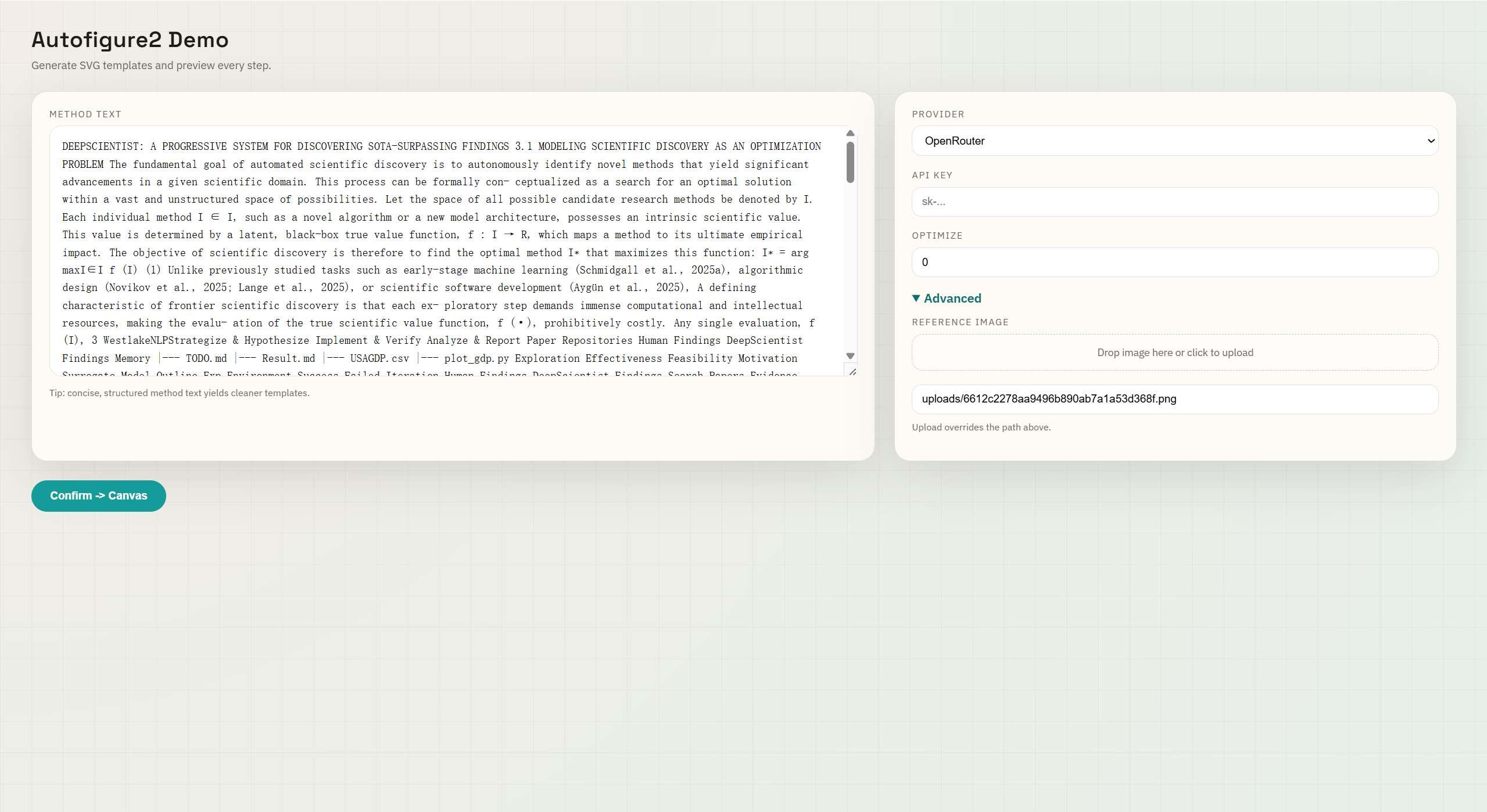
On the start page, paste your paper's method text on the left. On the right, configure your generation settings:
0 for standard use).1K, 2K, or 4K.figure.png to a 4K long edge (3840px) while preserving aspect ratio.If you already have the first-stage raster figure, use the black button in the top-right corner:
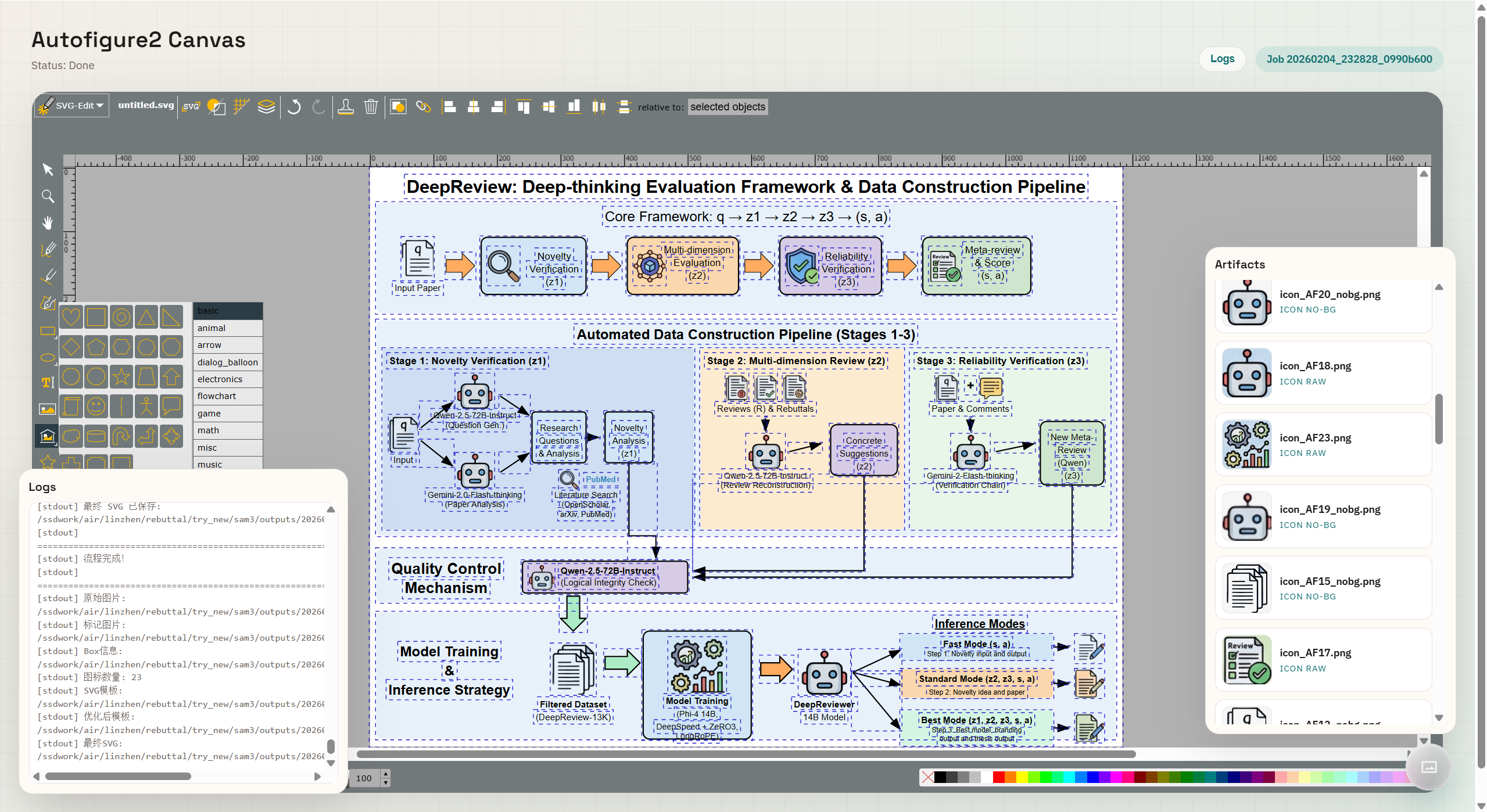
The generation result loads directly into an integrated SVG-Edit canvas, allowing for full vector editing.
outputs/ and reopen an older result in the canvas.AutoFigure-edit depends on SAM3 but does not vendor it. Please follow the official SAM3 installation guide and prerequisites. The upstream repo currently targets Python 3.12+, PyTorch 2.7+, and CUDA 12.6 for GPU builds.
SAM3 checkpoints are hosted on Hugging Face and may require you to request
access and authenticate (e.g., huggingface-cli login) before download.
If you prefer not to install SAM3 locally, you can use an API backend (also supported in the Web demo). We recommend using Roboflow as it is free to use.
Option A: fal.ai
export FAL_KEY="your-fal-key"
python autofigure2.py \
  --method_file paper.txt \
  --output_dir outputs/demo \
  --provider bianxie \
  --api_key YOUR_KEY \
  --sam_backend fal
Option B: Roboflow
export ROBOFLOW_API_KEY="your-roboflow-key"
python autofigure2.py \
  --method_file paper.txt \
  --output_dir outputs/demo \
  --provider bianxie \
  --api_key YOUR_KEY \
  --sam_backend roboflow
Optional CLI flags (API):
--sam_api_key (overrides FAL_KEY/ROBOFLOW_API_KEY)--sam_max_masks (default: 32, fal.ai only)| Provider | Base URL | Notes |
|---|---|---|
| OpenRouter | openrouter.ai/api/v1 | Supports Gemini/Claude/others |
| Bianxie AI | api.bianxie.ai/v1 | Built-in OpenAI-compatible aggregate API; supports GPT-image-2 and Gemini-3.1-Pro access for mainland China users without a foreign credit card |
| Custom | <your-compatible-endpoint>/v1 (required) | Vendor-neutral OpenAI-compatible API |
| Gemini (Google) | generativelanguage.googleapis.com/v1beta | Official Google Gemini API (google-genai) |
| OpenAI Responses | api.openai.com/v1 | Uses the official OpenAI Responses API for text + multimodal |
Common CLI flags:
--method_text, --method_file, or --input_figure_path--provider (openrouter | bianxie | custom | gemini | openai_response)--image_provider (openrouter | bianxie | custom | gemini | openai, optional step-1 override)--image_api_key, --image_base_url--image_model, --svg_model--image_size (1K | 2K | 4K, Gemini only)--disable_auto_upscale (disable the default 4K aspect-ratio-preserving upscale after step 1)--sam_prompt (comma-separated prompts)--sam_backend (local | fal | roboflow | api)--sam_api_key (API key override; falls back to FAL_KEY or ROBOFLOW_API_KEY)--sam_max_masks (fal.ai max masks, default 32)--merge_threshold (0 disables merging)--optimize_iterations (0 disables optimization)--reference_image_path (optional)If you want to use a self-hosted or third-party OpenAI-compatible endpoint, use:
--provider custom--base_url <your_openai_compatible_v1_root>--image_model <image_model_id>--svg_model <svg_model_id>You can also set AUTOFIGURE_CUSTOM_BASE_URL instead of passing --base_url every time.
base_url must be the OpenAI-compatible /v1 root:
https://your-provider.example/v1
Do not pass a concrete endpoint path such as:
https://your-provider.example/v1/chat/completions
For text reasoning and SVG reconstruction, the Custom route calls:
POST /chat/completions
Authorization: Bearer <api_key>
Text-only requests use the normal Chat Completions message shape:
{
  "model": "your-text-or-svg-model",
  "messages": [{ "role": "user", "content": "..." }],
  "max_tokens": 16000,
  "temperature": 0.7
}
Multimodal SVG reconstruction must support OpenAI-style image_url data URIs:
{
  "role": "user",
  "content": [
    { "type": "text", "text": "..." },
    {
      "type": "image_url",
      "image_url": { "url": "data:image/png;base64,..." }
    }
  ]
}
The response must return content in the standard shape:
{
  "choices": [
    { "message": { "content": "<svg ...>...</svg>" } }
  ]
}
The SVG may be returned as raw <svg>...</svg> or inside a markdown code block.
The built-in bianxie route uses the same OpenAI-compatible chat shape for text/SVG reconstruction, and uses an OpenAI Images-compatible path for gpt-image-2 step-1 image generation.
For step-1 image generation with --image_provider custom (or when --provider custom is linked to step 1), this repo currently calls /chat/completions and expects the returned message content to contain a base64 image data URI:

or:
data:image/png;base64,...
If your provider only exposes an OpenAI Images-compatible /images/generations route, use --image_provider openai for the official OpenAI Images API, or keep image generation on another supported route.
As of April 23, 2026, OpenAI's official Images API supports images.generate and images.edit for GPT-Image models. In this repo, --image_provider openai uses the OpenAI Images API for step 1 only:
images.generateimages.editgpt-image-2 (override with --image_model)--image_api_key -> OPENAI_API_KEY -> --api_keyAfter step 1, the generated figure.png is upscaled by default so its long edge reaches 3840px while preserving the original aspect ratio. If the generated image is already at or above a 4K long edge, the upscale step is skipped automatically.
Disable it with:
--disable_auto_upscale
As of April 23, 2026, OpenAI's official Responses API supports text output plus multimodal input with input_text and input_image. In this repo, --provider openai_response means:
client.responses.create(...)client.responses.create(...)--image_provider is explicitly setgpt-5.5 (override with --svg_model)If you already have the academic raster figure from step 1, use --input_figure_path to skip image generation entirely. The pipeline will normalize the imported image into figure.png, optionally apply the default 4K aspect-ratio-preserving upscale, and then continue from SAM segmentation and SVG reconstruction.
AutoFigure-edit/
├── autofigure2.py         # Main pipeline
├── server.py              # FastAPI backend
├── requirements.txt
├── web/                   # Static frontend
│   ├── index.html
│   ├── canvas.html
│   ├── history.html
│   ├── styles.css
│   ├── app.js
│   └── vendor/svg-edit/   # Embedded SVG editor
└── img/                   # README assets
WeChat Discussion Group
Scan the QR code to join our community. If the QR code has expired, please add WeChat ID nauhcutnil or contact [email protected].
When sending a friend request, please identify yourself in the format:
University/Company - Degree/Position - Name
(e.g., Westlake University - PhD Student - Zhang San).
 |  |
If you find AutoFigure, AutoFigure-Edit, or FigureBench helpful, please cite:
@inproceedings{
zhu2026autofigure,
title={AutoFigure: Generating and Refining Publication-Ready Scientific Illustrations},
author={Minjun Zhu and Zhen Lin and Yixuan Weng and Panzhong Lu and Qiujie Xie and Yifan Wei and Sifan Liu and Qiyao Sun and Yue Zhang},
booktitle={The Fourteenth International Conference on Learning Representations},
year={2026},
url={https://openreview.net/forum?id=5N3z9JQJKq}
}

@inproceedings{lin-etal-2026-autofigure,
    title = "{A}uto{F}igure-Edit: Generating Editable Scientific Illustrations via Reference-Guided Styling",
    author = "Lin, Zhen  and
      Xie, Qiujie  and
      Zhu, Minjun  and
      Li, Shichen  and
      Sun, QiYao  and
      Gu, Enhao  and
      Ding, Yiran  and
      Sun, Ke  and
      Guo, Fang  and
      Lu, Panzhong  and
      Ning, Zhiyuan  and
      Weng, Yixuan  and
      Zhang, Yue",
    editor = "Durrett, Greg  and
      Jian, Ping",
    booktitle = "Proceedings of the 64th Annual Meeting of the {A}ssociation for {C}omputational {L}inguistics (Volume 3: System Demonstrations)",
    month = jul,
    year = "2026",
    address = "San Diego, California, United States",
    publisher = "Association for Computational Linguistics",
    url = "https://aclanthology.org/2026.acl-demo.6/",
    doi = "10.18653/v1/2026.acl-demo.6",
    pages = "57--67",
    ISBN = "979-8-89176-392-0",
    abstract = "High-quality scientific illustrations are essential for communicating complex scientific and technical concepts, yet existing automated systems remain limited in editability, stylistic controllability, and efficiency. We present AutoFigure-Edit, an end-to-end system that generates fully editable scientific illustrations from long-form scientific text while enabling flexible style adaptation through user-provided reference images. By combining long-context understanding, reference-guided styling, and native SVG editing, it enables efficient creation and refinement of high-quality scientific illustrations. To facilitate further progress in this field, we release the video at https://youtu.be/10IH8SyJjAQ, the full codebase at https://github.com/ResearAI/AutoFigure-Edit and provide a live demo for easy access and interactive use at https://autofigure.cc/."
}

@dataset{figurebench2025,
  title = {FigureBench: A Benchmark for Automated Scientific Illustration Generation},
  author = {WestlakeNLP},
  year = {2025},
  url = {https://huggingface.co/datasets/WestlakeNLP/FigureBench}
}
Repository metadata and usage guidance:
We would like to thank the Linux.do community for their support.
We also thank the following sponsor for supporting this project:
| Sponsor | Link | Support | Note |
|---|---|---|---|
| Bianxie AI Aggregate API | https://api.bianxie.ai | Provides mainland China-friendly access to GPT-image-2 and Gemini-3.1-Pro for AutoFigure-Edit users | No foreign credit card required |
This project is licensed under the MIT License - see LICENSE for details.
Name and logo usage are covered separately in TRADEMARK.md.
Explore more open-source research tools from ResearAI:
| Project | What it does |
|---|---|
| DeepScientist | autonomous scientific discovery system |
| AutoFigure | generate paper-ready figures |
| DeepReviewer-v2 | review papers and drafts |
| Awesome-AI-Scientist | curated AI scientist landscape |
The optimal configuration for this project uses gemini-3.1-flash-image-preview from Google AI Studio [https://aistudio.google.com/] as the image generation model and gemini-3.1-pro-preview as the SVG conversion model. Each run costs approximately $0.50, consumes about 30,000 tokens, and takes around 20 minutes. It is strongly recommended to use the 4K option for optimal performance, as using 1K or 2K resolutions will result in the final generated SVG being unusually blurry.
[Mainland China Notice] Gemini's Terms of Service do not permit access or usage by users in mainland China. If OpenRouter throws an error, it is often because an account registered in mainland China lacks the necessary permissions to use Gemini. It is recommended to use an OpenRouter account registered in the United States or Europe and to ensure compliant usage.
15 followers · starred Feb 2026
3,596 followers · starred Jul 2026
86 followers · starred Feb 2026
164 followers · starred Feb 2026
From Method Text to Editable SVG
AutoFigure-Edit is the next version of AutoFigure. It turns paper method sections into fully editable SVG figures and lets you refine them in an embedded SVG editor.
Quick Start • Web Interface • How It Works • Configuration • Citation
[Paper]
[AutoFigure]
[BibTeX]
https://github.com/user-attachments/assets/6f93deb4-9854-4f1e-8097-53b0c3378a0d
gpt-image-2 and gpt-5.5, Bianxie AI / custom OpenAI-compatible routing, and a bilingual configuration workflow. See the full release notes.AutoFigure-Edit v1.1 is published as tag v1.1. This release focuses on two practical workflows that were still awkward in earlier public builds: starting from a user-supplied stage-1 academic figure, and running the pipeline cleanly with official OpenAI models or OpenAI-compatible gateways.
gpt-image-2, while the OpenAI Responses path is documented and exposed for text plus multimodal SVG reconstruction with gpt-5.5 as the default SVG model.custom OpenAI-compatible routing: The CLI and web UI expose bianxie as a built-in compatible route with https://api.bianxie.ai/v1, while custom remains available for user-supplied OpenAI-compatible /v1 base URLs. The openai_response route can inherit the same compatible base_url and api_key by default.Full release notes: releases/v1.1.md
| Feature | Description |
|---|---|
| 📝 Text-to-Figure | Generate a draft figure directly from method text. |
| 🧠 SAM3 Icon Detection | Detect icon regions from multiple prompts and merge overlaps. |
| 🎯 Labeled Placeholders | Insert consistent AF-style placeholders for reliable SVG mapping. |
| 🧩 SVG Generation | Produce an editable SVG template aligned to the figure. |
| 🖥️ Embedded Editor | Edit the SVG in-browser using the bundled svg-edit. |
| 📦 Artifact Outputs | Save PNG/SVG outputs and icon crops per run. |
AutoFigure-edit introduces two breakthrough capabilities:
Below are 9 examples covering 3 different papers. Each paper is generated using 3 different reference styles. (Each image shows: Left = AutoFigure Generation | Right = Vectorized Editable SVG)
| Paper & Style Transfer Demonstration |
|---|
| CycleResearcher / Style 1 |
| CycleResearcher / Style 2 |
| CycleResearcher / Style 3 |
| DeepReviewer / Style 1 |
| DeepReviewer / Style 2 |
| DeepReviewer / Style 3 |
| DeepScientist / Style 1 |
| DeepScientist / Style 2 |
| DeepScientist / Style 3 |
The AutoFigure-edit pipeline transforms a raw generation into an editable SVG in four distinct stages:
figure.png): The LLM generates a raster draft based on the method text.sam.png): SAM3 detects and segments distinct icons and text regions.template.svg): The system constructs a structural SVG wireframe using placeholders.final.svg): High-quality cropped icons and vectorized text are injected into the template.
AutoFigure2’s pipeline starts from the paper’s method text and first calls a text‑to‑image LLM to render a journal‑style schematic, saved as figure.png. The system then runs SAM3 segmentation on that image using one or more text prompts (e.g., “icon, diagram, arrow”), merges overlapping detections by an IoU‑like threshold, and draws gray‑filled, black‑outlined labeled boxes on the original; this produces both samed.png (the labeled mask overlay) and a structured boxlib.json with coordinates, scores, and prompt sources.
Next, each box is cropped from the original figure and passed through RMBG‑2.0 for background removal, yielding transparent icon assets under icons/*.png and *_nobg.png. With figure.png, samed.png, and boxlib.json as multimodal inputs, the LLM generates a placeholder‑style SVG (template.svg) whose boxes match the labeled regions.
Optionally, the SVG is iteratively refined by an LLM optimizer to better align strokes, layouts, and styles, resulting in optimized_template.svg (or the original template if optimization is skipped). The system then compares the SVG dimensions with the original figure to compute scale factors and aligns coordinate systems. Finally, it replaces each placeholder in the SVG with the corresponding transparent icon (matched by label/ID), producing the assembled final.svg.
Key configuration details:
label, box, or none).optimize_iterations=0 allows skipping the refinement step to use the raw structure directly.Use Docker for a reproducible one-command setup without local Python/SAM3 installation.
8000 available on hostbriaai/RMBG-2.0: https://huggingface.co/briaai/RMBG-2.0.env# Linux/macOS
cp .env.example .env
# Windows PowerShell
Copy-Item .env.example .env
At minimum, set this in .env:
HF_TOKEN=hf_xxx
Optional but recommended:
# SAM3 API backend (Docker default in UI is Roboflow)
ROBOFLOW_API_KEY=your_roboflow_key

# Step-4 multimodal retry tuning (OpenRouter)
OPENROUTER_MULTIMODAL_RETRIES=3
OPENROUTER_MULTIMODAL_RETRY_DELAY=1.5

# DNS override for Roboflow name-resolution issues
DOCKER_DNS_1=223.5.5.5
DOCKER_DNS_2=119.29.29.29
For restricted networks, you can also set build mirrors:
BASE_IMAGE=docker.m.daocloud.io/library/python:3.11-slim
PIP_INDEX_URL=https://pypi.tuna.tsinghua.edu.cn/simple
PIP_EXTRA_INDEX_URL=
docker compose up -d --build
Open http://localhost:8000.
docker compose ps
curl http://localhost:8000/healthz
Expected health response: {"status":"ok"}.
# Stream logs
docker compose logs -f autofigure-edit

# Restart service
docker compose restart autofigure-edit

# Rebuild from scratch (no cache)
docker compose build --no-cache
docker compose up -d

# Stop and remove container
docker compose down
./outputs, ./uploadshf_cache (/app/.cache/huggingface)roboflowicon,person,robot,animalopenrouter: image google/gemini-3.1-flash-image-preview, svg google/gemini-3.1-pro-previewbianxie: image gpt-image-2, svg gemini-3.1-pro-preview (built-in base URL https://api.bianxie.ai/v1)custom: image gemini-3.1-flash-image-preview, svg gemini-3.1-pro-preview (requires your own OpenAI-compatible /v1 base URL)gemini: image gemini-3.1-flash-image-preview, svg gemini-3.1-pro-previewopenai_response: image gpt-image-2 (step 1 fallback), svg gpt-5.5 via Responses API--image_provider openai: image gpt-image-2 via the official OpenAI Images APITemporary failure in name resolution (Roboflow): set DOCKER_DNS_1/2 in .env, then docker compose up -d --build.auth.docker.io): set BASE_IMAGE and PIP_INDEX_URL mirrors in .env.ROBOFLOW_API_URL=<your_reachable_roboflow_endpoint>ROBOFLOW_API_FALLBACK_URLS=<comma_separated_backup_endpoints># 1) Install dependencies
pip install -r requirements.txt
# 2) Install SAM3 separately (not vendored in this repo)
git clone https://github.com/facebookresearch/sam3.git
cd sam3
pip install -e .
Run:
python autofigure2.py \
  --method_file paper.txt \
  --output_dir outputs/demo \
  --provider bianxie \
  --api_key YOUR_KEY
Use OpenAI only for step 1 image generation while keeping SVG reconstruction on the original provider:
python autofigure2.py \
  --method_file paper.txt \
  --output_dir outputs/demo \
  --provider gemini \
  --api_key GEMINI_KEY \
  --image_provider openai \
  --image_api_key OPENAI_KEY \
  --image_model gpt-image-2
Use the OpenAI Responses API for text + multimodal SVG reconstruction:
python autofigure2.py \
  --method_file paper.txt \
  --output_dir outputs/demo \
  --provider openai_response \
  --api_key OPENAI_KEY
Continue from an existing stage-1 figure and skip image generation:
python autofigure2.py \
  --input_figure_path ./my_stage1_figure.png \
  --output_dir outputs/import_demo \
  --provider openai_response \
  --api_key OPENAI_KEY \
  --svg_model gpt-5.5
python server.py
Then open http://localhost:8000.
AutoFigure-edit provides a visual web interface designed for seamless generation and editing.
On the start page, paste your paper's method text on the left. On the right, configure your generation settings:
0 for standard use).1K, 2K, or 4K.figure.png to a 4K long edge (3840px) while preserving aspect ratio.If you already have the first-stage raster figure, use the black button in the top-right corner:
The generation result loads directly into an integrated SVG-Edit canvas, allowing for full vector editing.
outputs/ and reopen an older result in the canvas.AutoFigure-edit depends on SAM3 but does not vendor it. Please follow the official SAM3 installation guide and prerequisites. The upstream repo currently targets Python 3.12+, PyTorch 2.7+, and CUDA 12.6 for GPU builds.
SAM3 checkpoints are hosted on Hugging Face and may require you to request
access and authenticate (e.g., huggingface-cli login) before download.
If you prefer not to install SAM3 locally, you can use an API backend (also supported in the Web demo). We recommend using Roboflow as it is free to use.
Option A: fal.ai
export FAL_KEY="your-fal-key"
python autofigure2.py \
  --method_file paper.txt \
  --output_dir outputs/demo \
  --provider bianxie \
  --api_key YOUR_KEY \
  --sam_backend fal
Option B: Roboflow
export ROBOFLOW_API_KEY="your-roboflow-key"
python autofigure2.py \
  --method_file paper.txt \
  --output_dir outputs/demo \
  --provider bianxie \
  --api_key YOUR_KEY \
  --sam_backend roboflow
Optional CLI flags (API):
--sam_api_key (overrides FAL_KEY/ROBOFLOW_API_KEY)--sam_max_masks (default: 32, fal.ai only)| Provider | Base URL | Notes |
|---|---|---|
| OpenRouter | openrouter.ai/api/v1 | Supports Gemini/Claude/others |
| Bianxie AI | api.bianxie.ai/v1 | Built-in OpenAI-compatible aggregate API; supports GPT-image-2 and Gemini-3.1-Pro access for mainland China users without a foreign credit card |
| Custom | <your-compatible-endpoint>/v1 (required) | Vendor-neutral OpenAI-compatible API |
| Gemini (Google) | generativelanguage.googleapis.com/v1beta | Official Google Gemini API (google-genai) |
| OpenAI Responses | api.openai.com/v1 | Uses the official OpenAI Responses API for text + multimodal |
Common CLI flags:
--method_text, --method_file, or --input_figure_path--provider (openrouter | bianxie | custom | gemini | openai_response)--image_provider (openrouter | bianxie | custom | gemini | openai, optional step-1 override)--image_api_key, --image_base_url--image_model, --svg_model--image_size (1K | 2K | 4K, Gemini only)--disable_auto_upscale (disable the default 4K aspect-ratio-preserving upscale after step 1)--sam_prompt (comma-separated prompts)--sam_backend (local | fal | roboflow | api)--sam_api_key (API key override; falls back to FAL_KEY or ROBOFLOW_API_KEY)--sam_max_masks (fal.ai max masks, default 32)--merge_threshold (0 disables merging)--optimize_iterations (0 disables optimization)--reference_image_path (optional)If you want to use a self-hosted or third-party OpenAI-compatible endpoint, use:
--provider custom--base_url <your_openai_compatible_v1_root>--image_model <image_model_id>--svg_model <svg_model_id>You can also set AUTOFIGURE_CUSTOM_BASE_URL instead of passing --base_url every time.
base_url must be the OpenAI-compatible /v1 root:
https://your-provider.example/v1
Do not pass a concrete endpoint path such as:
https://your-provider.example/v1/chat/completions
For text reasoning and SVG reconstruction, the Custom route calls:
POST /chat/completions
Authorization: Bearer <api_key>
Text-only requests use the normal Chat Completions message shape:
{
  "model": "your-text-or-svg-model",
  "messages": [{ "role": "user", "content": "..." }],
  "max_tokens": 16000,
  "temperature": 0.7
}
Multimodal SVG reconstruction must support OpenAI-style image_url data URIs:
{
  "role": "user",
  "content": [
    { "type": "text", "text": "..." },
    {
      "type": "image_url",
      "image_url": { "url": "data:image/png;base64,..." }
    }
  ]
}
The response must return content in the standard shape:
{
  "choices": [
    { "message": { "content": "<svg ...>...</svg>" } }
  ]
}
The SVG may be returned as raw <svg>...</svg> or inside a markdown code block.
The built-in bianxie route uses the same OpenAI-compatible chat shape for text/SVG reconstruction, and uses an OpenAI Images-compatible path for gpt-image-2 step-1 image generation.
For step-1 image generation with --image_provider custom (or when --provider custom is linked to step 1), this repo currently calls /chat/completions and expects the returned message content to contain a base64 image data URI:

or:
data:image/png;base64,...
If your provider only exposes an OpenAI Images-compatible /images/generations route, use --image_provider openai for the official OpenAI Images API, or keep image generation on another supported route.
As of April 23, 2026, OpenAI's official Images API supports images.generate and images.edit for GPT-Image models. In this repo, --image_provider openai uses the OpenAI Images API for step 1 only:
images.generateimages.editgpt-image-2 (override with --image_model)--image_api_key -> OPENAI_API_KEY -> --api_keyAfter step 1, the generated figure.png is upscaled by default so its long edge reaches 3840px while preserving the original aspect ratio. If the generated image is already at or above a 4K long edge, the upscale step is skipped automatically.
Disable it with:
--disable_auto_upscale
As of April 23, 2026, OpenAI's official Responses API supports text output plus multimodal input with input_text and input_image. In this repo, --provider openai_response means:
client.responses.create(...)client.responses.create(...)--image_provider is explicitly setgpt-5.5 (override with --svg_model)If you already have the academic raster figure from step 1, use --input_figure_path to skip image generation entirely. The pipeline will normalize the imported image into figure.png, optionally apply the default 4K aspect-ratio-preserving upscale, and then continue from SAM segmentation and SVG reconstruction.
AutoFigure-edit/
├── autofigure2.py         # Main pipeline
├── server.py              # FastAPI backend
├── requirements.txt
├── web/                   # Static frontend
│   ├── index.html
│   ├── canvas.html
│   ├── history.html
│   ├── styles.css
│   ├── app.js
│   └── vendor/svg-edit/   # Embedded SVG editor
└── img/                   # README assets
WeChat Discussion Group
Scan the QR code to join our community. If the QR code has expired, please add WeChat ID nauhcutnil or contact [email protected].
When sending a friend request, please identify yourself in the format:
University/Company - Degree/Position - Name
(e.g., Westlake University - PhD Student - Zhang San).
| |
If you find AutoFigure, AutoFigure-Edit, or FigureBench helpful, please cite:
@inproceedings{
zhu2026autofigure,
title={AutoFigure: Generating and Refining Publication-Ready Scientific Illustrations},
author={Minjun Zhu and Zhen Lin and Yixuan Weng and Panzhong Lu and Qiujie Xie and Yifan Wei and Sifan Liu and Qiyao Sun and Yue Zhang},
booktitle={The Fourteenth International Conference on Learning Representations},
year={2026},
url={https://openreview.net/forum?id=5N3z9JQJKq}
}

@inproceedings{lin-etal-2026-autofigure,
    title = "{A}uto{F}igure-Edit: Generating Editable Scientific Illustrations via Reference-Guided Styling",
    author = "Lin, Zhen  and
      Xie, Qiujie  and
      Zhu, Minjun  and
      Li, Shichen  and
      Sun, QiYao  and
      Gu, Enhao  and
      Ding, Yiran  and
      Sun, Ke  and
      Guo, Fang  and
      Lu, Panzhong  and
      Ning, Zhiyuan  and
      Weng, Yixuan  and
      Zhang, Yue",
    editor = "Durrett, Greg  and
      Jian, Ping",
    booktitle = "Proceedings of the 64th Annual Meeting of the {A}ssociation for {C}omputational {L}inguistics (Volume 3: System Demonstrations)",
    month = jul,
    year = "2026",
    address = "San Diego, California, United States",
    publisher = "Association for Computational Linguistics",
    url = "https://aclanthology.org/2026.acl-demo.6/",
    doi = "10.18653/v1/2026.acl-demo.6",
    pages = "57--67",
    ISBN = "979-8-89176-392-0",
    abstract = "High-quality scientific illustrations are essential for communicating complex scientific and technical concepts, yet existing automated systems remain limited in editability, stylistic controllability, and efficiency. We present AutoFigure-Edit, an end-to-end system that generates fully editable scientific illustrations from long-form scientific text while enabling flexible style adaptation through user-provided reference images. By combining long-context understanding, reference-guided styling, and native SVG editing, it enables efficient creation and refinement of high-quality scientific illustrations. To facilitate further progress in this field, we release the video at https://youtu.be/10IH8SyJjAQ, the full codebase at https://github.com/ResearAI/AutoFigure-Edit and provide a live demo for easy access and interactive use at https://autofigure.cc/."
}

@dataset{figurebench2025,
  title = {FigureBench: A Benchmark for Automated Scientific Illustration Generation},
  author = {WestlakeNLP},
  year = {2025},
  url = {https://huggingface.co/datasets/WestlakeNLP/FigureBench}
}
Repository metadata and usage guidance:
We would like to thank the Linux.do community for their support.
We also thank the following sponsor for supporting this project:
| Sponsor | Link | Support | Note |
|---|---|---|---|
| Bianxie AI Aggregate API | https://api.bianxie.ai | Provides mainland China-friendly access to GPT-image-2 and Gemini-3.1-Pro for AutoFigure-Edit users | No foreign credit card required |
This project is licensed under the MIT License - see LICENSE for details.
Name and logo usage are covered separately in TRADEMARK.md.
Explore more open-source research tools from ResearAI:
| Project | What it does |
|---|---|
| DeepScientist | autonomous scientific discovery system |
| AutoFigure | generate paper-ready figures |
| DeepReviewer-v2 | review papers and drafts |
| Awesome-AI-Scientist | curated AI scientist landscape |
The optimal configuration for this project uses gemini-3.1-flash-image-preview from Google AI Studio [https://aistudio.google.com/] as the image generation model and gemini-3.1-pro-preview as the SVG conversion model. Each run costs approximately $0.50, consumes about 30,000 tokens, and takes around 20 minutes. It is strongly recommended to use the 4K option for optimal performance, as using 1K or 2K resolutions will result in the final generated SVG being unusually blurry.
[Mainland China Notice] Gemini's Terms of Service do not permit access or usage by users in mainland China. If OpenRouter throws an error, it is often because an account registered in mainland China lacks the necessary permissions to use Gemini. It is recommended to use an OpenRouter account registered in the United States or Europe and to ensure compliant usage.
15 followers · starred Feb 2026
3,596 followers · starred Jul 2026
86 followers · starred Feb 2026
164 followers · starred Feb 2026





